Deep-read books and articles in five modes (quick, deep, knowledge map, Feynman, full book) with claim-evidence-data reports, Mermaid/XMind mindmaps, batch comparison, budget preflight, transparent background-job progress, and MD/HTML exports from URLs, files, or pasted text.
Install
# from npm (prebuilt)
dsh plugin --profile web add dsh-deepread
# from GitHub (first run asks for allowBuilds approval — follow the hint, retry)
dsh plugin --profile web add github:xiehuan123/dsh-deepread
Any plugin you install runs third-party code with your own permissions — it can read your files, use your credentials, and reach the network, and tool approvals don’t sandbox it. GitHub-sourced plugins also run build scripts at install time — pnpm blocks those until you allow them, so an install can stop with ERR_PNPM_GIT_DEP_PREPARE_NOT_ALLOWED or ERR_PNPM_IGNORED_BUILDS; dsh prints the exact key to add under allowBuilds in your profile’s pnpm-workspace.yaml, and the install works on the next run. Allowing a build is a trust decision: only install sources you trust, and pin a commit (github:owner/repo#sha).
README
Website · Real outputs · English · 中文
Turn articles, books, PDFs, and document sets into claims you can trace back to evidence and source locations.
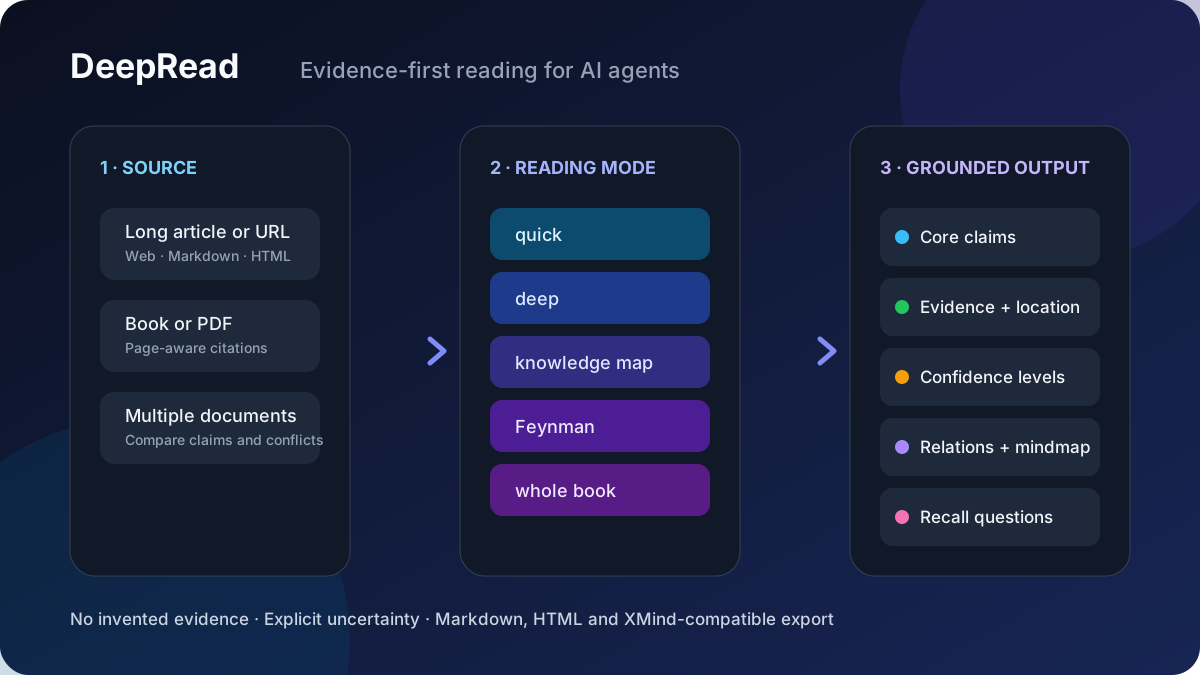
DeepRead is available in two compatible forms:
- Portable Agent Skill for Codex, Claude Code, and other Agent Skills-compatible tools. Zero runtime dependencies; the agent follows the evidence-first reading workflow with its own file and web tools.
- Host plugin package for DeepSeek Harness Web/headless and dsh-TUI, with a
deepreadtool, PDF extraction, optional persistence/jobs/Web route, batch comparison, cost preview, and HTML/XMind-compatible export. Its browser client is an optional Web-only entry.
Why it is different
| A typical summary | DeepRead |
|---|---|
| Compresses the topic | Extracts complete claims and the reasoning behind them |
| Blends source facts with model inference | Labels author intent, source facts, reasoned inference, and unverified content |
| Makes conclusions hard to check | Pairs important claims with evidence and page/paragraph locations |
| Stops at an answer | Adds knowledge maps, conflicts, limitations, and active-recall questions |
If the source does not support a claim, DeepRead says “source does not provide evidence” instead of filling the gap.
Quick start
Portable Agent Skill
npx skills@latest add xiehuan123/dsh-deepread
Then ask your agent:
Deep-read docs/architecture.pdf in knowledge-map mode.
For every important claim, show the supporting evidence and source location.
Full DeepSeek Harness plugin
dsh plugin --profile web add dsh-deepread
If pnpm reports ERR_PNPM_ADDING_TO_ROOT, retry with the profile workspace made explicit:
dsh plugin --profile web add -w dsh-deepread
Restart dsh web, then use the 📖 reading panel or call the deepread tool in chat.
See real outputs
These are complete reports generated from public articles, not hand-written mockups:
| Report | What DeepRead made visible |
|---|---|
deep · Claude Code token optimization |
Reconstructed the engineering chain from visibility to input, output, and retrieval-path compression; separated recommendations from project-authored benchmarks. |
map · Marketing-claim fact check |
Found that the article's “90%”, “¥1.28M salary”, and “¥2,000/day” claims had no source, sample, or baseline; marked each one unverified. |
deep · vivo Tauri architecture |
Connected architecture choices to reported size/performance evidence while preserving the article's untested assumptions and deployment limits. |
Browse all reproducible examples →
Features
| Capability | Details |
|---|---|
| 🎛️ Five modes | quick key takeaways · deep in-depth reading · map knowledge map · feynman Feynman technique (11-step loop + spaced repetition) · book whole-book reading (see the comparison below) |
| 🗺️ Knowledge-map mode | Core question / core conclusion / ten content categories (conclusion, sub-claim, mechanism, fact, data, case, hidden premise, objection, limitation, actionable advice) / every claim paired with evidence (unverifiable claims marked "no evidence provided in the original text") / key data table (value & unit, time range, sample, baseline, source, location) / eight relation labels (supports, refutes, causes, explains, depends on, exemplifies, contrasts, limits) / four confidence levels (author intent, original facts & data, reasonable inference, unverifiable) / Mermaid mindmap / XMind outline / 5 active-recall questions |
| 📥 Three inputs | WeChat article URLs (mp.weixin.qq.com stable links) · files (.txt/.md/.html/.pdf, PDF via a built-in pure-JS extractor with Chinese ToUnicode mapping, page markers, and object-stream/xref-stream support) · pasted text |
| 📤 Optional export | Displayed in-session by default; export accepts md / mm (FreeMind, importable by XMind) / html (editor-style web report with light/dark theme) / all, written to deepread-output/ in the workspace |
| 🎨 Browser UI | deepread tool result card (four-color confidence legend, collapsible sections) + a 📖 shortcut button next to the input area that opens a card-style reading panel (link/path/text + mode/export selection + reading focus + one-click start) |
| 🔀 Batch compare | Pass 2-10 documents via batch (url/path/text each) to get per-document summaries plus a cross-document report: comparison matrix, conflicts, complementarity, and synthesis |
| 📍 Citations | Reports carry page/paragraph provenance: arguments, quotes, and a dedicated citation table locate claims back to 【第N页】 markers in the source |
| 🧮 Cost preview | estimate: true previews token spend, model-call count, and expected time per mode without calling the model (CJK≈0.6 tok/char heuristic; rate/latency defaults are picked per model family and can be overridden explicitly) |
| 📚 Recently read | The Web panel keeps a local history of recent reads with one-click re-read (localStorage, no server round-trip) |
| ⏳ Progress transparency | Long reads / big PDFs / batches become official background jobs: the label states segment count and budget; the progress stream pushes 「精读第 3/20 段…」 line by line; job_output polls progress and the final report, job_kill cancels |
| 🔍 Parse progress | Full PDF extraction moves inside the background job and streams per page — 「解析 PDF 中… 42%(10/24 页)」 — after a fast sampling preflight decides length (no more silent wait before the background job appears); batches stream per document — 「解析第 2/5 篇… / 精读第 2/5 篇… / 完成第 2/5 篇」 plus 「跨篇对比汇总中…」 |
| 🧮 Panel budget | The Web panel shows per-mode token + time hints above the mode chips (e.g. 深度精读 (≈38k token · ≈8分钟)), instantly for pasted text; calibrated by real model speed; links/file paths are fetched and estimated by the Host through a same-origin API (POST /api/deepread/budget) and the panel's 🔍 budget-preflight button shows a one-line result (≈N chars · ≈X token · ≈Y min) right inside the panel — no chat round-trip, no table |
| ⚡ Fast preflight | estimate mode samples the first 2 PDF pages and extrapolates by page count, so big PDF budgets come back in milliseconds |
| 🎯 Self-calibration | Real token/s measured from every model call feeds a rolling average persisted in storage — estimates converge to your actual provider speed; cold-start defaults are per model family (DeepSeek/Kimi/Qwen ≈100-110 tok/s, Claude ≈70, GPT ≈90) |
Five modes compared
| Mode | Best for | Key output | Cost |
|---|---|---|---|
quick |
"What is this article about?" at a glance | One-line summary, core claim, argument structure, quotes, key concepts, critical questions | Single call, fastest |
deep (default) |
Reading one article carefully | Overview, core claim, argument structure (claim + evidence + verbatim quotes), argument flow, section highlights, quotes, key concepts, critical thinking | Long articles are auto-split, section-by-section + summary |
map |
Research, fact-checking before citing | Core question & conclusion, ten content categories, claim-evidence pairing, key data table (five elements), eight relations, four confidence levels, Mermaid mindmap, XMind outline, active-recall questions | Structured pipeline, multiple calls |
feynman |
Truly learning it and teaching it to others | 11-step loop: TOC → questions → per-chapter → claims/data/evidence → chapter mindmap → explain with the book closed → self-check gaps → correct against the source → merged mindmap → explain again → spaced review on days 1/3/7/14/30 | Longest output, most calls |
book |
Whole books / very long texts | Table of contents, chapter flow, a full-book summary assembled from per-part deep reads | Processed part by part |
One-line picker: in a hurry, quick; read one article thoroughly, deep; cite and fact-check, map; learn and remember, feynman; a whole book, book.
Installation
DeepRead 1.0.1 requires Node.js 22.19 or 24 and higher (^22.19 || >=24). The same npm package exposes the TypeScript Host entry at lib/types/index.js, the dsh-TUI Community Consensus v0.15 manifest at dsh-plugin.json, and an optional DeepSeek Harness Web client at lib/client.js.
Host compatibility
| Host | Node deepread tool |
Web client | Packaged skill | Degraded behavior |
|---|---|---|---|---|
DeepSeek Harness Web 0.1.2-rc.1 |
Supported | Web UI loaded | Available | None |
DeepSeek Harness headless 0.1.0-rc.7 |
Supported | Web client not loaded | Available | No budget HTTP route |
dsh-TUI 0.8.1 minimum / Community Consensus v0.15 |
Supported | Web client not loaded | Available | No Web route or browser UI |
Custom composition without storageDomain |
Supported | Depends on Web services | Available | URL cache and Host calibration use in-process state |
Before replacing 0.5.4, read the Upgrade and rollback guide, including the browser-origin and DSH_HOME retention conditions. The Release notes describe the compatibility and entry-point changes.
DeepSeek Harness (tool + Web UI, full functionality)
Requires pnpm on the machine (dsh plugin runs pnpm underneath to install plugins).
The unpinned command follows the npm latest tag. For the validated Harness Web 0.1.2-rc.1 baseline, pin DeepRead 1.0.1; keep DeepRead 1.0.0 on the older 0.1.0-rc.7 Web runtime. Check the current tags with npm view dsh-deepread dist-tags.
# npm latest tag
dsh plugin --profile web add dsh-deepread

# Exact npm version
dsh plugin --profile web add dsh-deepread@1.0.1

# Exact GitHub tag
dsh plugin --profile web add "github:xiehuan123/dsh-deepread#v1.0.1"
To remove DeepRead from the Web profile:
dsh plugin --profile web remove dsh-deepread
pnpm workspace-root compatibility
Some DSH releases create each profile as a pnpm workspace but forward add and remove without marking the workspace root explicitly. With affected pnpm versions, the command stops before any DeepRead code runs and reports ERR_PNPM_ADDING_TO_ROOT. Retry only that failed operation with -w (the pnpm shorthand for --workspace-root):
# Install after ERR_PNPM_ADDING_TO_ROOT
dsh plugin --profile web add -w dsh-deepread

# Remove after the same workspace-root error
dsh plugin --profile web remove -w dsh-deepread
This is a profile package-manager compatibility issue and can affect any DSH plugin installed into that profile. Do not delete pnpm caches or edit node_modules by hand; let dsh plugin update the profile manifest and bundle list.
Restart dsh web for it to take effect. A 📖 shortcut button appears next to the input area; click it to open the card-style reading panel. You can also just say: "Read this article in knowledge-map mode: ".
Tip: fetching WeChat article URLs needs an HTTP provider. If you see "web fetch service unavailable" after install, mount
@deepseek-ai/dsh-web-fetch-httpin the profile'scordis.patch.ymland give it a browser User-Agent (WeChat serves an anti-bot verification page).
dsh-TUI (Host tool + skill)
dsh-TUI 0.8.1 or newer can install dsh-deepread@1.0.1 through the host's plugin installer. The installer reads the packaged dsh-plugin.json v0.15 manifest and loads lib/types/index.js; it does not load lib/client.js.
Codex / Claude Code (skill form, zero dependencies)
Install (pick one):
claude plugin install xiehuan123/dsh-deepread      # terminal command (Codex compatible)
/plugin install xiehuan123/dsh-deepread            # or the in-session slash command
npx skills@latest add xiehuan123/dsh-deepread      # or skills.sh
Usage (Codex / Claude Code):
- Trigger: say something containing "deep-read / analyze / knowledge map / Feynman", e.g.
Deep-read docs/architecture.mdAnalyze this article in knowledge-map mode: <paste text>Read this book with the Feynman technique and give me a review planQuickly summarize this WeChat article: https://mp.weixin.qq.com/s/xxxx
- Mode: the agent picks a mode automatically (default
deep); it asks when unsure. - Input: file path / web link (WeChat articles are fetched directly; for anti-bot sites like Zhihu/Juejin, paste the text) / pasted text. PDFs work too (the agent extracts text per
SKILL.md; scan-only PDFs should be OCR'd first). - Output: a Markdown report in the conversation by default; say "export html / mindmap / md" and it writes to
deepread-output/in the workspace (.mdreport,.mmFreeMind mindmap [importable by XMind],.htmlweb report). - Knowledge-map mode: output carries four confidence levels (author intent / original facts & data / reasonable inference / unverifiable), and every claim is paired with evidence — the original text lacking evidence is explicitly marked "no evidence provided in the original text".
- Feynman mode: the full 11 steps (TOC → questions → per-chapter → claims/data/evidence → chapter mindmap → explain with the book closed → self-check gaps → correct against the source → merged mindmap → explain again → spaced review on days 1/3/7/14/30).
Note: the Codex/Claude skill is the "methodology" form — the agent performs the analysis with its own tools; the DSH
deepreadis the "tool" form — the plugin runs the pipeline by calling the model directly. Output formats are identical and interchangeable (an exported.md/.htmlkeeps working when handed to an agent on either host).
Examples
Please deep-read this link: https://mp.weixin.qq.com/s/xxxx
Read book.pdf in knowledge-map mode and export html
Quickly summarize this article: <paste text>
Parameters
| Parameter | Type | Description |
|---|---|---|
url |
string | Stable WeChat article link (mp.weixin.qq.com only; for anti-bot sites, paste the text) |
path |
string | Workspace file path (.txt/.md/.markdown/.html/.pdf) |
text |
string | Pasted text |
depth |
enum | quick / deep (default) / map / feynman / book |
export |
enum | none (default, in-session only) / md / mm / html / all |
refresh |
boolean | true forces a re-fetch and cache refresh (default false: a cached URL reuses the stored full text without network access) |
focus |
string | Reader's angle of interest, e.g. "argumentation logic", "research methodology" |
language |
enum | zh / en / auto (default) |
Repository layout
├── package.json            # dsh.bundle + dsh.client + dsh.skills
├── cordis.patch.yml        # inserts itself into the composition
├── dsh-plugin.json         # dsh-TUI Community Consensus v0.15 Host-only manifest
├── src/index.ts            # TypeScript Cordis Host entry
├── src/host/**/*.ts        # Typed Host pipeline, optional services, storage, and exports
├── src/client/**/*.ts      # Typed client models, storage, store, views, and slot entry
├── tsdown.config.ts        # official lazy-CJS module build semantics for lib/client.js
├── lib/types/index.js      # generated Host runtime package entry
├── lib/client.js           # Client half (generated): __ModuleLoader__.load({ id, factory })
├── docs/                   # integration, upgrade/rollback, and release documentation
├── test/                   # Host, browser, compatibility, manifest, and package contracts
├── assets/                 # README and showcase visuals
├── skills/dsh-deepread/    # Codex / Claude Code compatible skill (SKILL.md + references + agents/openai.yaml)
├── plugin.json             # Agent Plugins-compatible root manifest
├── .claude-plugin/         # Claude Code plugin manifests (plugin.json + marketplace.json)
└── .codex-plugin/          # Codex plugin manifest (plugin.json)
The @deepseek-ai/* host packages (cordis / dsh-tools / schemastery / dsh-storage-domain) plus zod and react
are provided by the host profile and declared in peerDependencies (* means "follow the host version");
dsh.client.inject declares the client-side dependency edges (dsh-api-session-controller provides sessions,
dsh-client-ui-conversation provides conversation).
Full-text cache
Fetched article full texts are persisted following the official storageDomain convention: the
deepread_url_cache domain (version 1, zod-schema validated, records hold url/text/fetchedAt),
stored under $DSH_HOME/storages/ and surviving process restarts. Re-reading the same article in a
different mode (deep→map/feynman/book) reuses the cache without network access; when a fetch fails the
cache is used as a fallback and the report says so. Default TTL is 7 days with a cap of 200 entries
(expired entries are lazily removed on write). A composition that omits storageDomain degrades to
an in-process cache. webServer is optional: Web-capable profiles register the budget route, while
the stock headless profile activates the Host tool without that route or the browser client.
Plugin configuration (Config)
timeoutMs (default 900000), chunkChars (default 6000), maxParts (default 20),
maxInputChars (default 400000), cacheEnabled (default true), cacheTtlHours (default 168,
0 disables caching) can all be overridden in the cordis row, for example:
- insert:
    - id: deepread
      name: dsh-deepread
      config:
        timeoutMs: 600000
        cacheTtlHours: 24
Development
Before maintaining the host integration, read the DeepSeek Harness plugin integration reference. It records profile loading, the Node/browser entry points, slot lifecycle, theme rules, and the diagnostic order.
npm run typecheck:host      # strict Host typecheck
npm run typecheck:browser   # strict browser typecheck
npm run build               # build lib/types and lib/client.js
npm test                    # full repository contract suite
npm pack --dry-run --json   # inspect the publishable file list and public entries
Community
- Ask usage questions or share a reading workflow in GitHub Discussions.
- Report a reproducible problem with the bug form.
- Propose a focused improvement with the feature form.
- Read CONTRIBUTING.md before opening a pull request.
For Chinese-language notes about AI tools, open-source projects, and practical workflows, follow Appoint 实验室 on WeChat:
If traceable AI reading is useful to you, star the repository to make it easier for the next reader to find and to follow future releases.
License
MIT
Links
More in this category
Tencent/WeKnora#dsh-weknora★ 31002
Four read-only tools over a WeKnora knowledge base: list knowledge bases, hybrid passage search, reassemble one document's chunks in order, and WeKnora's own cited RAG or ReAct-agent answer with a resumable session id.
superdesigndev/treg★ 3752
Tool catalog for agents: search ~2,600 external endpoints (SEO and SERP, backlinks, social, people and company enrichment, ad libraries, scraping) by the task you want done, read each one's parameters and per-call price, then call it with the credential injected server-side. Ships the skill plus an MCP row that stays disabled until TREG_TOKEN is set.
TencentCloudBase/CloudBase-AI-Toolkit#dsh-plugin★ 1127
Tencent CloudBase backend for DeepSeek Harness — scaffold and deploy full-stack apps from chat, render query results as table cards with paging, sorting and CSV export, preview a deployment on its domain, and call the CloudBase MCP toolset (`mcp__cloudbase__*`) with device-code login.
gitroomhq/postiz-agent#dsh-postiz★ 498
Connects DeepSeek Harness to Postiz over MCP: list connected social media channels, fetch per-platform posting rules, and schedule, draft, or publish posts to X, LinkedIn, Instagram, Facebook, Threads, TikTok, YouTube, Reddit, Bluesky, Mastodon, Discord, Slack, Telegram and more; adds a postiz workflow skill.
EthanYoQ/Invoice-Downloader#dsh-invoice-downloader★ 465
Local IMAP invoice download, OCR, archive, and Excel reimbursement summaries for DeepSeek Harness.
anysearch-team/anysearch-dsh★ 432
AnySearch-powered real-time web and vertical search provider for DeepSeek Harness.
Community comments
Comments are public GitHub Discussions. Loading them connects to GitHub and Giscus; a GitHub account is required to post.