IDE-style run configurations for DSH: save LLM prompts and shell commands as reusable run configs (global or per-workspace), run them from the session header or the new-session page, and manage them via the task_run_config tool with approval-gated writes.
Install
# from npm (prebuilt)
dsh plugin --profile web add @xiaoso/dsh-run-config
# from GitHub (first run asks for allowBuilds approval — follow the hint, retry)
dsh plugin --profile web add github:xiaoso456/dsh-run-config
Any plugin you install runs third-party code with your own permissions — it can read your files, use your credentials, and reach the network, and tool approvals don’t sandbox it. GitHub-sourced plugins also run build scripts at install time — pnpm blocks those until you allow them, so an install can stop with ERR_PNPM_GIT_DEP_PREPARE_NOT_ALLOWED or ERR_PNPM_IGNORED_BUILDS; dsh prints the exact key to add under allowBuilds in your profile’s pnpm-workspace.yaml, and the install works on the next run. Allowing a build is a trust decision: only install sources you trust, and pin a commit (github:owner/repo#sha).
README
English | 中文
Run configuration management for the DeepSeek Harness Web: like an IDE, save frequently used LLM prompts and shell commands as "task run configurations" and launch them with one click from the session header and the new-session page.
Features
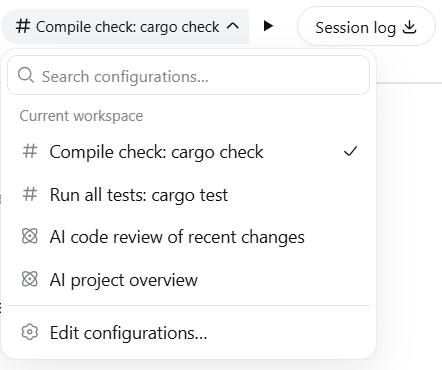
- Session-header run control: task picker + run button, with a hover tooltip showing which configuration will run
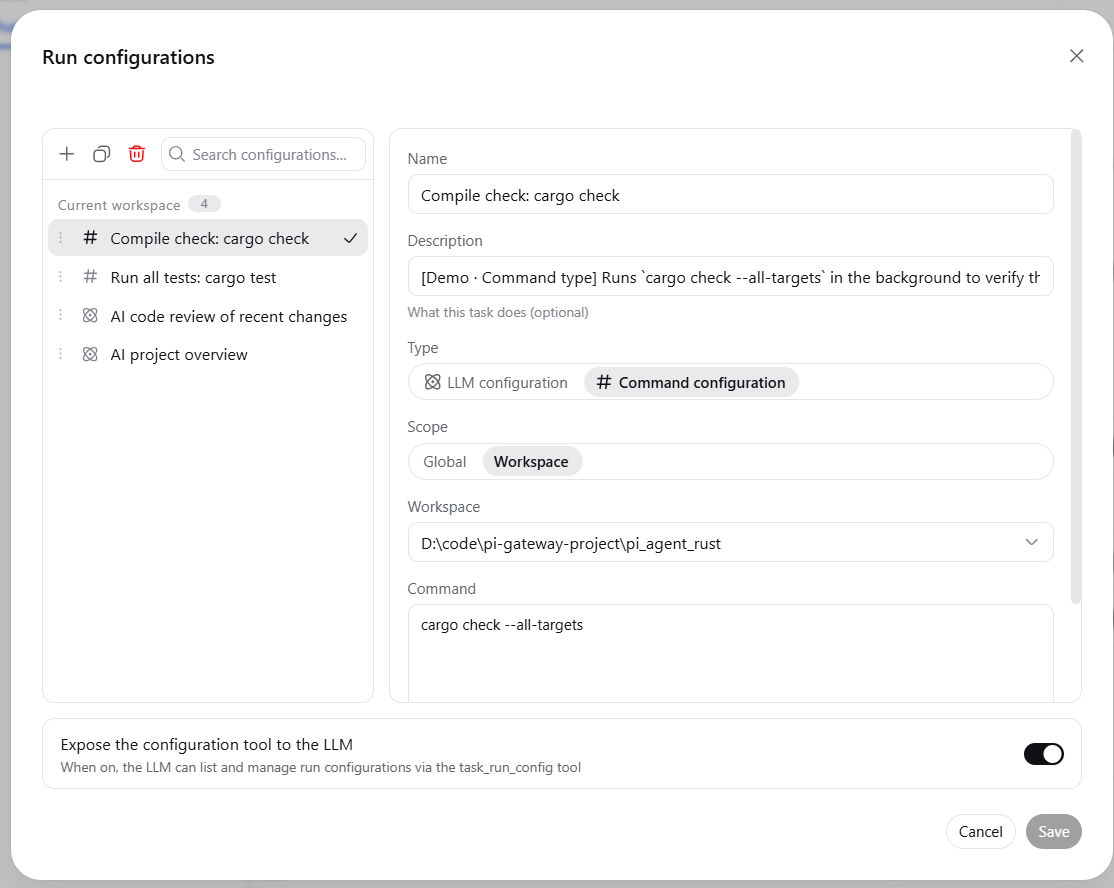
- Run-configuration management: IDEA-style dialog to create / edit /
duplicate / delete / reorder configurations
- Two types: LLM configuration (fills the composer with a prompt and sends it) and command configuration (runs a shell command in the background and notifies the LLM when it finishes)
- Two scopes: global (visible in every workspace) and workspace (visible only in the declared workspace)
- New-session run control: pick and run a configuration before entering a session (LLM configurations only — a command configuration needs an existing session working directory and runs from the session header)
- LLM integration: the model can list and manage configurations through
the
task_run_configtool (write actions go through the standard approval flow — in full-access mode the official semantics skip it); detailed usage is loaded on demand via therun-configurationskill
Usage example
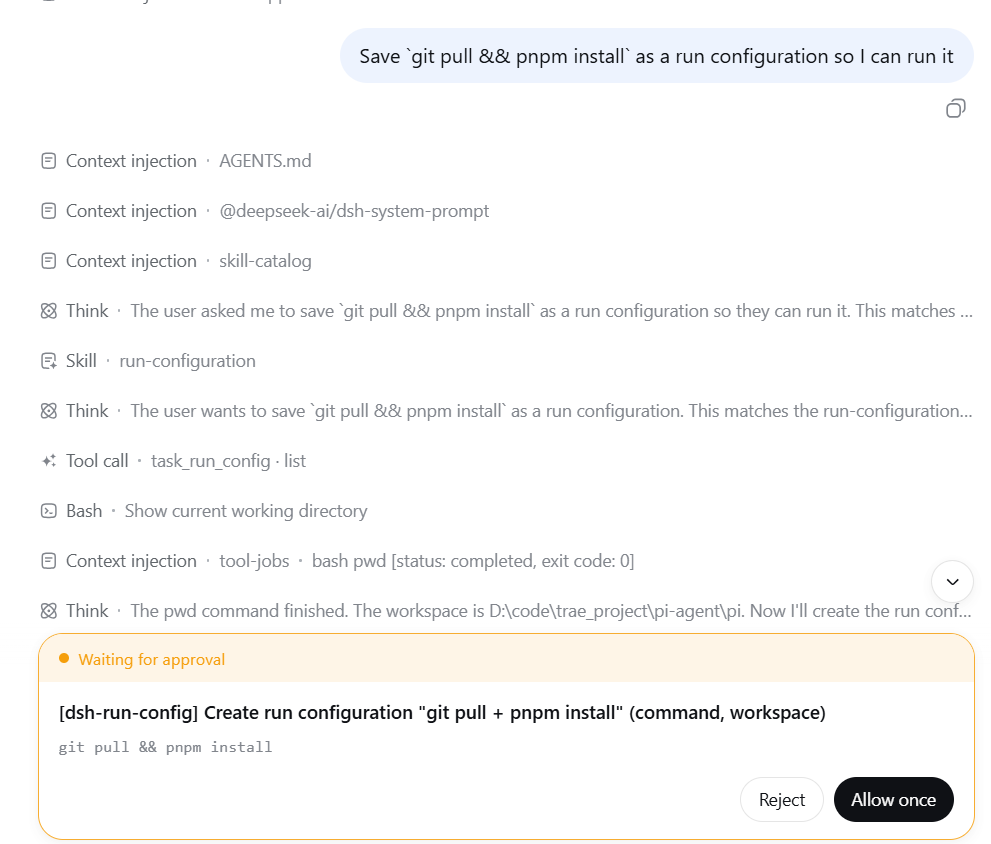
Just say it in a session:
Save
git pull && pnpm installas a run configuration so I can run it with one click later
The model calls the task_run_config tool to create a command
configuration (write actions show an approval prompt — unless the session
runs in full-access mode), and once created you can pick it from the session
header and run it with one click.
Recommended environment & setup
- Run under full access: use this plugin with the
danger-full-accesspreset to avoid sandbox errors that can occur when running command configurations in some scenarios. - Background-task manager plugin: DSH-better-sidebar provides a background-task page to inspect and manually terminate tasks.
Installation
From npm (recommended)
dsh plugin --profile web add @xiaoso/dsh-run-config

dsh web
Local development
dsh plugin --profile web add link:<path-to-this-repo>
From GitHub
dsh plugin --profile web add github:xiaoso456/dsh-run-config
Git installs run this package's prepare script to build the artifacts;
with pnpm ≥10 the first add may fail and ask you to allow the build in the
profile's pnpm-workspace.yaml.
Requirements
- Node.js ≥ 22 (per the
enginesfield inpackage.json) - Git Bash (recommended): recommended shell environment on Windows
- Built for the DeepSeek Harness
dsh0.2.1 line (>=0.2.1-0 <0.3.0-0, declared in the top-levelengines.dshofpackage.json; dsh's plugin version gate reads that field first and evaluates it withincludePrereleasesemantics, so this plugin's row is disabled when the range does not match; the same range underpeerDependenciesis for npm resolution only). On the dsh 0.2.0-rc.2 line install@xiaoso/dsh-run-config@0.2.3, on 0.2.0-rc.1 install0.2.1, on the 0.1.7 line install0.2.0, on the 0.1.5 line install0.1.5
Build
pnpm install
pnpm build
License
Links
More in this category
yjh051108/dsh-routing-suite★ 7028
One repository, three parts: a runtime injector for DSH plugin packages (inject, hot-reload, unload, promote a dev staging tool to the front, route self-heal, plus a settings-page plugin manager that lists, unloads and drags folders in to internalize), a task-aware reasoning-mode router agent preset (router-standard / router-spec / router-react), and a graded two-level task protocol whose six tools (commit_star, lock_stage, revise_do, edit_plan, mark_task, redteam_verdict) pin task state to disk. The injector implementation ships in-tree, so the install carries its own behaviour rather than a dependency list.
strukto-ai/mirage#dsh★ 3946
Swaps the filesystem and bash providers for a mirage virtual workspace: file tools and shell commands run over mounted resources (RAM, S3, Redis, Slack, Gmail, Notion, Postgres) instead of the host disk, with per-mount read/write/exec modes, per-command sandbox routing (monty, pyodide, quickjs in process; docker, e2b, daytona remote), and installed CLIs (git, gh, slack, linear, ntn, gws, or one you register) as head words in the virtual terminal.
first-fluke/oh-my-agent#dsh★ 1488
Runs project OMA checks before and after tool execution and when a turn tries to finish. Installs its OMA CLI dependency and initializes unconfigured projects on first use. Requires Node.js 22+; initial setup needs network access and project write access.
MichengAI/dsh-skills-manager★ 627
Manages local DeepSeek Harness skills in Settings and shows shared Agent skills as read-only.
hust-open-atom-club/oh-dsh★ 326
Community distribution: TUI, desktop, and Web UI as one bundle with layered installation.
Fishquito7/dsh-skill-mcp-panel★ 292
Manages DSH skills and MCP servers from the web settings: skill cards with hot enable/disable, workspace scopes, groups, batch migration and drag-and-drop import, plus stdio/HTTP MCP CRUD with connection tests, secret redaction and the unified dsh-panel CLI.
Community comments
Comments are public GitHub Discussions. Loading them connects to GitHub and Giscus; a GitHub account is required to post.