Manages local DeepSeek Harness skills in Settings and shows shared Agent skills as read-only.
Install
# from npm (prebuilt)
dsh plugin --profile web add @michengai/dsh-skills-manager
# from GitHub (first run asks for allowBuilds approval — follow the hint, retry)
dsh plugin --profile web add github:MichengAI/dsh-skills-manager
Any plugin you install runs third-party code with your own permissions — it can read your files, use your credentials, and reach the network, and tool approvals don’t sandbox it. GitHub-sourced plugins also run build scripts at install time — pnpm blocks those until you allow them, so an install can stop with ERR_PNPM_GIT_DEP_PREPARE_NOT_ALLOWED or ERR_PNPM_IGNORED_BUILDS; dsh prints the exact key to add under allowBuilds in your profile’s pnpm-workspace.yaml, and the install works on the next run. Allowing a build is a trust decision: only install sources you trust, and pin a commit (github:owner/repo#sha).
README
DSH Skills Manager
Manage local and project skills, install from GitHub, preview updates and restore backups
简体中文 · English · 日本語 · Español · Français · Deutsch · Русский · Português
DSH Skills Manager is a community-maintained DeepSeek Harness (DSH) plugin, not an official DeepSeek AI product.
Features
Bring skills from your computer and projects into DSH without switching between Agent folders.
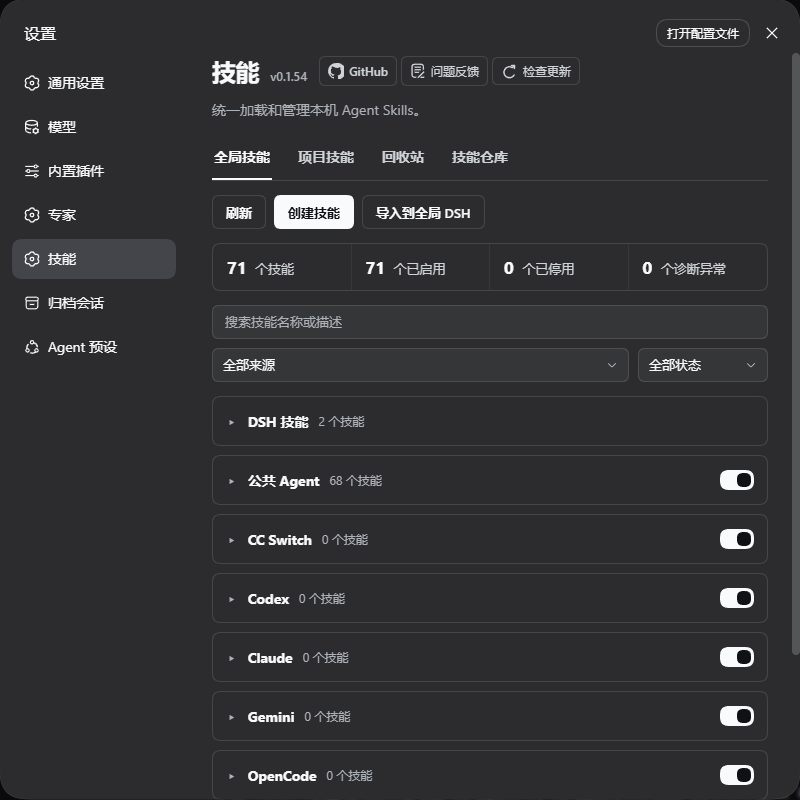
- Unified multi-view management: Browse Global Skills, Project Skills, Discover, and Trash in unified tabs with instant search, status filtering, and collapsible source groups.
- Browse by source repository: Switch between directory and repository views. Sources are identified from install records, lock files, and skill metadata; skills without a reliable source are marked as unknown.
- Broad ecosystem support: Full coverage for 20+ tools and CLI environments including DSH, Shared Agent, Codex, Claude Code, Copilot, Cursor, Google Antigravity, Windsurf, Qoder, and Trae without touching third-party files.
- Categorization and drag & drop: Create category folders inside sources, drag skill rows (
⋮⋮) to organize and order them, batch assign skills, and toggle entire categories with a single switch. Category metadata is saved without moving files. - Public markets & repositories: Integrated Discover hub to explore trending skills from ClawHub and skills.sh, or subscribe to public GitHub repositories with incremental diff inspection and backups.
- Create and flexible import: Create skills or import ZIP archives, folders, and
SKILL.mdfiles directly into your global user root or a registered workspace. - Wide reading experience: 760px responsive detail modal with monospace syntax styling, vertical resizing, and a one-click "Copy body" action.
- Trash & safe rollback: Soft delete protects skills from accidental loss, allowing complete restoration with provenance and update history preserved.
- Custom source folders: Point an external agent source at another folder from the panel without moving any file. DSH and Shared Agent stay configured by the host.
- Skill Token Cost Estimation & Live Totals: Displays inline estimated token badges for skill descriptions in the list and live totals in the status bar for persistent system prompt overhead; clearly distinguishes manual-only, disabled, and overridden skills with complete description/body breakdowns in detail modals.
Screenshots
Global skills:
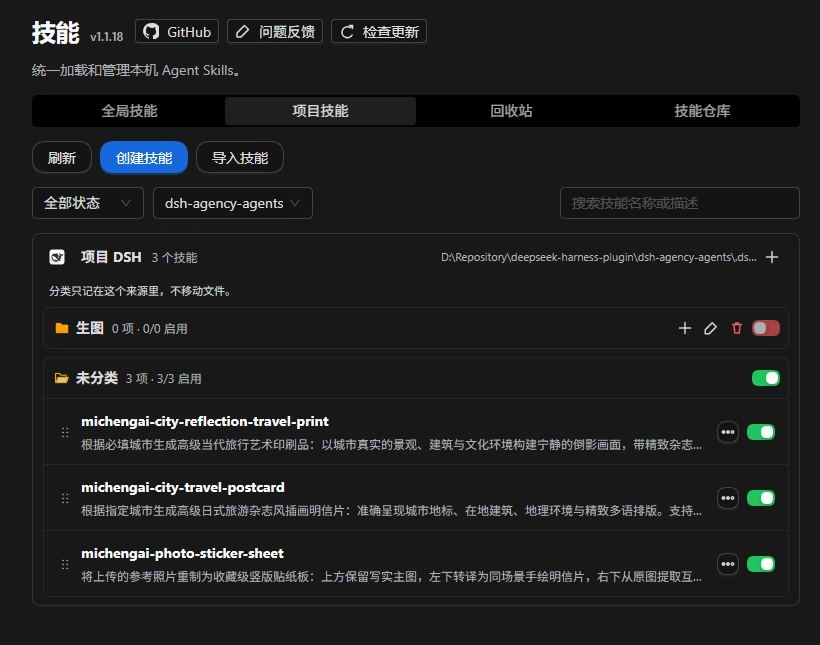
Project skills:
Skill repositories & discover:
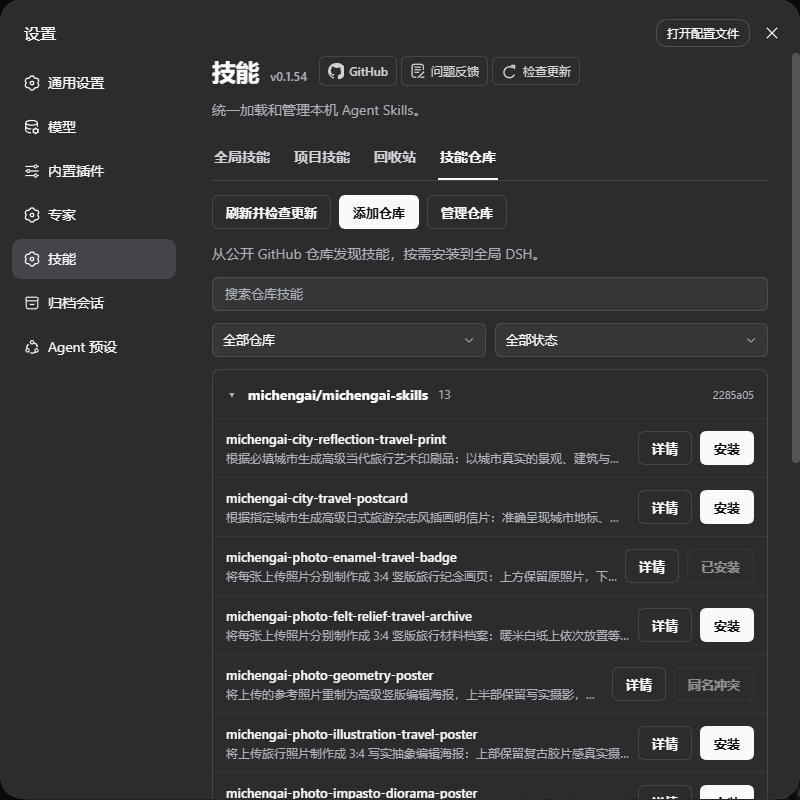
Screenshots show core feature views for global skills, project skills, and skill discovery. Lossless WebP.
Installation
Requires a working DeepSeek Harness installation. The commands below use the web profile; replace it with yours if needed.
Supported plugin installation sources are the npm registry, a locally built .tgz package, and GitHub. GitHub and npm both include a ready-to-run lib. After changing source, run the build before committing.
Ask an agent to install it
Send this to an agent that can use your local terminal:
Install the latest @michengai/dsh-skills-manager into my DSH web profile using the official npm registry. Confirm installation and explain how to reload DSH.
Install manually
[Console]::OutputEncoding = [System.Text.Encoding]::UTF8
$OutputEncoding = [System.Text.Encoding]::UTF8
dsh plugin --profile web add @michengai/dsh-skills-manager@latest --registry=https://registry.npmjs.org/
Restart DSH, refresh the page, and open Settings → Skills. To update, update in the host plugin manager or run the installation command again.
- Plugin
1.4.6is tested with DeepSeek Harness0.2.0-rc.1,0.2.0-rc.2,0.2.1-rc.1,0.2.1-rc.2,0.2.1-rc.3,0.2.1-rc.4,0.2.1-rc.5,0.2.2-rc.1,0.2.2-rc.2,0.2.2-rc.3. - Host compatibility: Full DeepSeek Harness
0.2.xline (>=0.2.0-rc.1 <0.3.0-0), forwards-compatible with subsequent0.2.xRC releases without requiring routine plugin version bumps. Legacy versions and breaking changes in the0.3.0generation are rejected by the version gate. If you still use a0.1.xhost, install plugin1.1.23instead of@latest. - Reverse proxy deployment: Supports hosting DSH behind prefix-stripping reverse proxies (e.g.
/app/dsh/). API and update endpoints resolve against the page base URI (document.baseURI).
Plugin Configuration & Toggles
The plugin follows standard DSH bundle configuration conventions. Options are located at:
Sidebar → Plugins → Click
Skills Manager(the host'splugins.bundle.configslot).
Native configuration options are available:
1. Sidebar Entry (sidebarEntry)
- Default: Disabled (
false) - Description: Displays a persistent Skills navigation icon directly under Plugins in the host's left primary sidebar.
- Effect:
- When enabled, clicking the sidebar icon opens the Skills Manager directly in the primary workspace with a 960px centered container (matching host plugin manager conventions). This eliminates vertical scrolling constraints in narrow settings dialogs;
- When disabled, unregisters the sidebar entry cleanly;
- The standard Settings → Skills view remains active either way, and state is synchronized live across both entry points.
Usage Guide
| Action | How to do it |
|---|---|
| Find skills | Switch between Global Skills and Project Skills tabs, expand/collapse source groups, or use the search bar and status filters. |
| Inspect content | Click View details on any skill row to read SKILL.md content and diagnostics in a 760px wide resizable dialog, with one-click Copy body. |
| Toggle invocation | Toggle the switch on the right side of a skill row to enable or disable it for DSH without editing third-party files. |
| Change an external source folder | Click Source folders… under the ➕ menu in the header or select Change skills folder on the source row, type or browse to a folder, and save. Restore default returns to the configured default. Only where this plugin reads changes; no files move and external sources stay read-only. |
| Organize categories | Click New category within a source, then drag the grab handle (⋮⋮) to reorder or move skills across categories. Toggling a category turns all its member skills on or off. |
| Create & import | Click Create skill… or Import skill… under the ➕ menu in the header. Select destination scope (User directory or a registered workspace project) and path. |
| Discover & install | Open the Discover tab to browse trending ClawHub skills or search the skills.sh catalog, or click Add repository to subscribe to a public GitHub repo. |
| Update repository skills | Click Refresh, inspect file diffs with Review update, and confirm to update with an automated backup. |
| Roll back updates | Click Restore previous version on skills with backup history, preview changes, and confirm rollback. |
| Recover deletions | Open Trash to restore accidentally deleted DSH skills with their original locations preserved. |
Browse by source repository
Switch between the default directory view and the repository view to browse skills by source directory, repository and in-repository directory. Skills without a known source are marked as unknown. Sources come from install records, directory lock files and skill metadata, not guessed directory names.
The repository view does not move skill files; individual skill controls remain available. Switch back to the directory view to create categories, assign skills or reorder them by dragging.
Four Main Tabs
- Global Skills
- Manage cross-project skills stored across all detected agent home directories on your machine.
- Categorize and toggle skills by source; same-name precedence automatically highlights shadowed copies.
- Project Skills
- Select any registered workspace from the dropdown to manage its project-level skills (
<project>/.dsh/skills, etc.). - Scans and searches only the selected workspace; project copies take precedence over global counterparts.
- Select any registered workspace from the dropdown to manage its project-level skills (
- Discover
- Public Catalogs: Direct integration with ClawHub and skills.sh to find and install popular community skills;
- GitHub Repositories: Subscribe to public repositories, scan skill lists, preview diffs, and install copies with local edit protections.
- Trash
- Soft-delete buffer for DSH and Shared Agent skills, preserving provenance and install destinations.
- Deleted skills can be restored anytime with a single click.
Skill Naming & Frontmatter Requirements
The DeepSeek Harness loader enforces strict identifier policies:
- Format constraint: Host loaders require skill names to strictly match lowercase ASCII alphanumeric characters and hyphens (kebab-case, e.g.
my-tool). - Non-ASCII & Chinese skill folders: Your skill directory name can remain in Chinese (e.g.
文案排版/), provided you specify a valid EnglishnameinSKILL.mdfrontmatter:--- name: copy-formatting-helper description: Helper for multi-platform article formatting --- # Skill instructions... - Diagnostics: Skills lacking an English name are flagged with clear in-app diagnostics explaining that the host loader cannot invoke them, with options to safely disable or clean up records.
Repository & Installation Boundaries
- Repository Refresh checks subscribed skill contents without replacing local files; to update the plugin itself, update in the host plugin manager or run the installation command again.
- Repository installation can target user DSH skills, Shared Agent (
~/.agents/skills, overridable viaDSH_AGENTS_HOME), or<project>/.dsh/skillsfor registered workspaces. Unsafe paths and external agent roots (Codex, Claude) are locked against writes. - All repository sources are fetched through Git on demand: only directories containing
SKILL.mdare downloaded, so README images and other unrelated assets are skipped (a subdirectory narrows the scope further). Without a usable local Git, repositories cannot be added and the plugin asks you to install Git. - Local edits are detected and require explicit confirmation before overwriting; backup history is preserved for rollback.
Supported Agent directories
~ means your home directory; <project> is the project root of a registered workspace. These are default paths; configured environment variables take precedence. An environment variable overrides the agent's main home root directory, and the plugin scans the skills folder under it (i.e., <ENV_PATH>/skills).
| Source | Global directory | Environment variable | Project directory |
|---|---|---|---|
| DSH | ~/.dsh/skills |
DSH_HOME |
<project>/.dsh/skills |
| Shared Agent | ~/.agents/skills |
DSH_AGENTS_HOME |
<project>/.agents/skills |
| CC Switch | ~/.cc-switch/skills |
— | — |
| Codex | ~/.codex/skills |
DSH_CODEX_HOME |
<project>/.codex/skills |
| Claude Code | ~/.claude/skills |
DSH_CLAUDE_HOME |
<project>/.claude/skills |
| Gemini | ~/.gemini/skills |
DSH_GEMINI_HOME |
<project>/.gemini/skills |
| OpenCode | ~/.config/opencode/skills |
DSH_OPENCODE_HOME |
<project>/.opencode/skills |
| Cursor | ~/.cursor/skills |
DSH_CURSOR_HOME |
<project>/.cursor/skills |
| Copilot | ~/.copilot/skills |
DSH_COPILOT_HOME |
<project>/.github/skills |
| Windsurf | ~/.codeium/windsurf/skills~/.windsurf/skills |
DSH_WINDSURF_HOMEDSH_WINDSURF_USER_HOME |
<project>/.windsurf/skills |
| Trae | ~/.trae/skills |
DSH_TRAE_HOME |
<project>/.trae/skills |
| Trae CN | ~/.trae-cn/skills |
DSH_TRAE_CN_HOME |
<project>/.trae-cn/skills |
| OpenClaw / Clawdbot | ~/.openclaw/skills~/.clawdbot/skills |
DSH_OPENCLAW_HOMEDSH_CLAWDBOT_HOME |
— |
| Roo | ~/.roo/skills |
DSH_ROO_HOME |
<project>/.roo/skills |
| CodeBuddy | ~/.codebuddy/skills |
DSH_CODEBUDDY_HOME |
<project>/.codebuddy/skills |
| WorkBuddy | ~/.workbuddy/skills |
DSH_WORKBUDDY_HOME |
<project>/.workbuddy/skills |
| Qoder | ~/.qoder/skills |
DSH_QODER_HOME |
<project>/.qoder/skills |
| Qoder CN CLI | ~/.qoder-cn/skills |
DSH_QODER_CN_HOME |
— |
| Qoder CN | ~/.lingma/skills |
DSH_LINGMA_HOME |
<project>/.lingma/skills |
| Google Antigravity | ~/.gemini/config/skills |
DSH_ANTIGRAVITY_HOME |
<project>/.agents/skills |
Ordinary project-root <project>/skills directories are not scanned, so repository release resources are not exposed as Agent skills. OpenClaw / Clawdbot support is limited to the user-level sources above. Qoder CN CLI project skills use <project>/.qoder/skills and appear as Qoder. Qoder CN IDE uses the Lingma directories. Missing external source directories are not shown.
External agent sources (CC Switch, Codex, Claude Code and others) can be pointed at another folder from the source row; the change takes effect immediately. Overrides are stored in ~/.dsh/skills-manager/roots.json and take precedence over DSH_<AGENT>_HOME; editing that file by hand requires restarting DSH. DSH and Shared Agent are the host's scan paths and are not offered here — use DSH_HOME / DSH_AGENTS_HOME to relocate them. The folder must already exist and must not overlap another source; when a custom folder disappears, the source stays listed so you can restore the default.
Custom sources (agents outside the list)
An agent that is not in the table above does not need to wait for a release: open Source folders… under the ➕ menu, choose Add source and point it at the agent's skills folder. Custom sources behave like built-in external sources — read-only, nothing moved or modified — and support grouping, drag-and-drop organisation, and source-level plus category-level toggles. The display name defaults to the folder name and can be overridden.
When an agent keeps a separate skills folder per sub-profile (multiple accounts or workspaces), point at the product folder and choose Scan subfolders: the plugin looks two levels down for every skills folder containing SKILL.md and lists them as candidates named product / subfolder, each with its skill count, so you can register them in one go. Scanning only produces candidates and never registers anything by itself; candidates overlapping an existing source are flagged and cannot be added.
Registrations live in the customSources section of roots.json, alongside the folder overrides. Removing a registration only deletes that record — the skill files on disk are left untouched. Up to 32 custom sources are supported.
Agent Presets
Skills Manager automatically discovers Agent Presets configured with dedicated skill folders in DSH and lists them at the end of the global skills view:
- Official Built-in Presets (such as Creator Mode): bundled skills remain strictly read-only for inspection without misleading toggles or modifications to host files;
- Custom Presets: your own Agent Presets configured with
customSkillDirsenjoy full parity with standard skills — toggle individual skills or the entire preset source on/off (actively intercepted in host runtime), organize categories and custom notes, select a custom preset target directly in Create, Import, or Repository/Registry Install modals, move skills to Trash, and restore them back to the original preset folder. Preset paths overlapping with global skill directories are safely blocked to prevent accidental deletion, and relative preset paths remain read-only for safety (use an absolute path to enable full management).
DSH product ecosystem
For a desktop workbench, download DSH Codex Desktop. Existing DeepSeek Harness installations can add plugins as needed by following each project's README. Below are 11 first-party plugins; consult the corresponding desktop release notes and bundled catalog for what that version includes.
| Plugin | What you can do |
|---|---|
| Codex UI | Organize projects and conversations, search tasks, and navigate chat turns |
| Agency Agents | Choose and summon specialists for your task |
| Skills Manager | Manage local and project skills; install, update and roll back repository skills |
| Archive Manager | Search, restore, or clean up archived conversations |
| IM Connect | Send tasks and receive replies through messaging platforms |
| Automation | Schedule tasks and review each run |
| BTW | Ask side questions without interrupting the main task |
| Simplify | Use /simplify to improve code within your Git changes |
| PUA | Guide the Agent to try new approaches after failures, investigate causes, and verify results before completion |
| Code Review | Use /review to request an independent Agent code review and receive the report in the current conversation |
| Codex Pet | View conversation notifications and respond to tool approvals and questions through a desktop pet |
Feedback and contributions
Open an issue for bugs or suggestions. Include your DSH and plugin versions, reproduction steps, and a full screenshot for UI issues.
Source code lives in src and uses strict TypeScript while retaining the existing plugin architecture. Run npm run typecheck for type checks, npm run build to generate runtime files, and npm run verify for the full regression and package checks. GitHub and npm both include a ready-to-run lib. After changing source, run the build before committing. Packing still checks types and builds the JavaScript files required by the npm package. CI runs full verification on Node.js 22.19.0 and 24, and code changes also trigger the supported-host compatibility matrix. Contributions are welcome.
To test a source checkout, install dependencies using the pinned pnpm version, run npm run verify, then run npm pack. Install the resulting .tgz with dsh plugin --profile web add <package.tgz>, restart DSH and refresh the page. Do not use --ignore-scripts when packing: it skips the build hook.
License
Links
More in this category
yjh051108/dsh-routing-suite★ 7021
One repository, three parts: a runtime injector for DSH plugin packages (inject, hot-reload, unload, promote a dev staging tool to the front, route self-heal, plus a settings-page plugin manager that lists, unloads and drags folders in to internalize), a task-aware reasoning-mode router agent preset (router-standard / router-spec / router-react), and a graded two-level task protocol whose six tools (commit_star, lock_stage, revise_do, edit_plan, mark_task, redteam_verdict) pin task state to disk. The injector implementation ships in-tree, so the install carries its own behaviour rather than a dependency list.
strukto-ai/mirage#dsh★ 3785
Swaps the filesystem and bash providers for a mirage virtual workspace: file tools and shell commands run over mounted resources (RAM, S3, Redis, Slack, Gmail, Notion, Postgres) instead of the host disk, with per-mount read/write/exec modes, per-command sandbox routing (monty, pyodide, quickjs in process; docker, e2b, daytona remote), and installed CLIs (git, gh, slack, linear, ntn, gws, or one you register) as head words in the virtual terminal.
first-fluke/oh-my-agent#dsh★ 1460
Runs project OMA checks before and after tool execution and when a turn tries to finish. Installs its OMA CLI dependency and initializes unconfigured projects on first use. Requires Node.js 22+; initial setup needs network access and project write access.
hust-open-atom-club/oh-dsh★ 324
Community distribution: TUI, desktop, and Web UI as one bundle with layered installation.
Fishquito7/dsh-skill-mcp-panel★ 277
Manages DSH skills and MCP servers from the web settings: skill cards with hot enable/disable, workspace scopes, groups, batch migration and drag-and-drop import, plus stdio/HTTP MCP CRUD with connection tests, secret redaction and the unified dsh-panel CLI.
weijiafu14/pi2dsh★ 220
Pi Host ABI compatibility engine: after one install, unmodified Pi extensions from npm mount as native DSH plugins with `dsh plugin add <pi-package>`. Verified end to end on stock DSH with pi-mcp-adapter (full MCP manager: OAuth, resources, prompts, MCP Apps, elicitation, sampling), @tintinweb/pi-subagents, pi-code, pi-hermes-memory and pi-background-tasks; `pi2dsh inspect` reports a package's compatibility before installing.
Community comments
Comments are public GitHub Discussions. Loading them connects to GitHub and Giscus; a GitHub account is required to post.