Session manager for the DSH Web UI: browse all and archived sessions, restore/unarchive, delete with two-step confirmation, and preview conversation content from the Settings panel.
Install
# from GitHub (first run asks for allowBuilds approval — follow the hint, retry)
dsh plugin --profile web add github:wuxiangru915/dsh-session-manager
Any plugin you install runs third-party code with your own permissions — it can read your files, use your credentials, and reach the network, and tool approvals don’t sandbox it. GitHub-sourced plugins also run build scripts at install time — pnpm blocks those until you allow them, so an install can stop with ERR_PNPM_GIT_DEP_PREPARE_NOT_ALLOWED or ERR_PNPM_IGNORED_BUILDS; dsh prints the exact key to add under allowBuilds in your profile’s pnpm-workspace.yaml, and the install works on the next run. Allowing a build is a trust decision: only install sources you trust, and pin a commit (github:owner/repo#sha).
README
Session manager for DeepSeek Harness.
dsh-session-manager gives the Harness Web UI a full session-management surface: browse all sessions and the archived ones, restore (unarchive) archived sessions back to their original workspace, archive any session, delete sessions with a two-step confirmation, and preview conversation content — all from the Settings panel, with zero modification to official packages.
What it solves
Stock DSH archives sessions one-way: the sidebar's Archive action hides a session from every view (workspace groups, ungrouped, search, flat list), and there is no view or API to bring it back — archived sessions are effectively lost until you hand-edit ~/.dsh/storages/workspace.json. This plugin makes archiving a reversible, manageable state and adds an overview of every session on disk:
right-click a session -> Archive (stock DSH)
  -> the session vanishes from the sidebar (nowhere to see it again)
  -> this plugin: Settings -> Session manager -> archived tab
       preview its content, Restore it (back to its original workspace
       position), or Delete it from disk (two-step confirmation)
  -> the all-sessions tab lists every persisted session (grouped by
     workspace, ungrouped ones included) so nothing is ever lost sight of
Features
- Restore archived sessions: an archived session keeps its workspace accounting slot, so unarchiving puts it back exactly where it was — single, batch, or all at once.
- Delete with two-step confirmation: the Delete button arms first and needs a second click within 5 seconds; sessions whose agent is running are rejected server-side.
- Delete all: clears every deletable session (archived, ungrouped, and workspace-attached alike) in one confirmed action, skipping sessions that are currently running or open, and reports per-session success / failure / skip.
- All-sessions overview: every session known to the persistence layer — title, id, creation time, owning workspace (or ungrouped), status badges (archived / live / running) — with archive and delete actions.
- Content preview: click a session title to expand the first 100 user / assistant / tool messages without opening the conversation.
- Disk footprint: per-session size and the full on-disk path help you find what is eating space.
- Zero core modification: a pure bundle plugin (
dsh.bundlepatch layer); every operation goes through official services (workspaceRegistry,sessionPersistence,sessionQuery,fs,shell, …) — no official package is patched or overridden. - Loopback-only API: the
/dsh-sm/*routes reject non-loopback hosts and cross-origin requests (Host + Origin / Sec-Fetch-Site fence).
Installation
# one line, from a git source
dsh plugin --profile web add github:omdsh-dev/dsh-session-manager

# restart the web server, then hard-refresh the page
Local development:
dsh plugin --profile web add /path/to/dsh-session-manager
The repository ships plain-JS lib/ artifacts with no build step, so git-source installs work without any build tooling on the user's machine.
Usage
Web UI
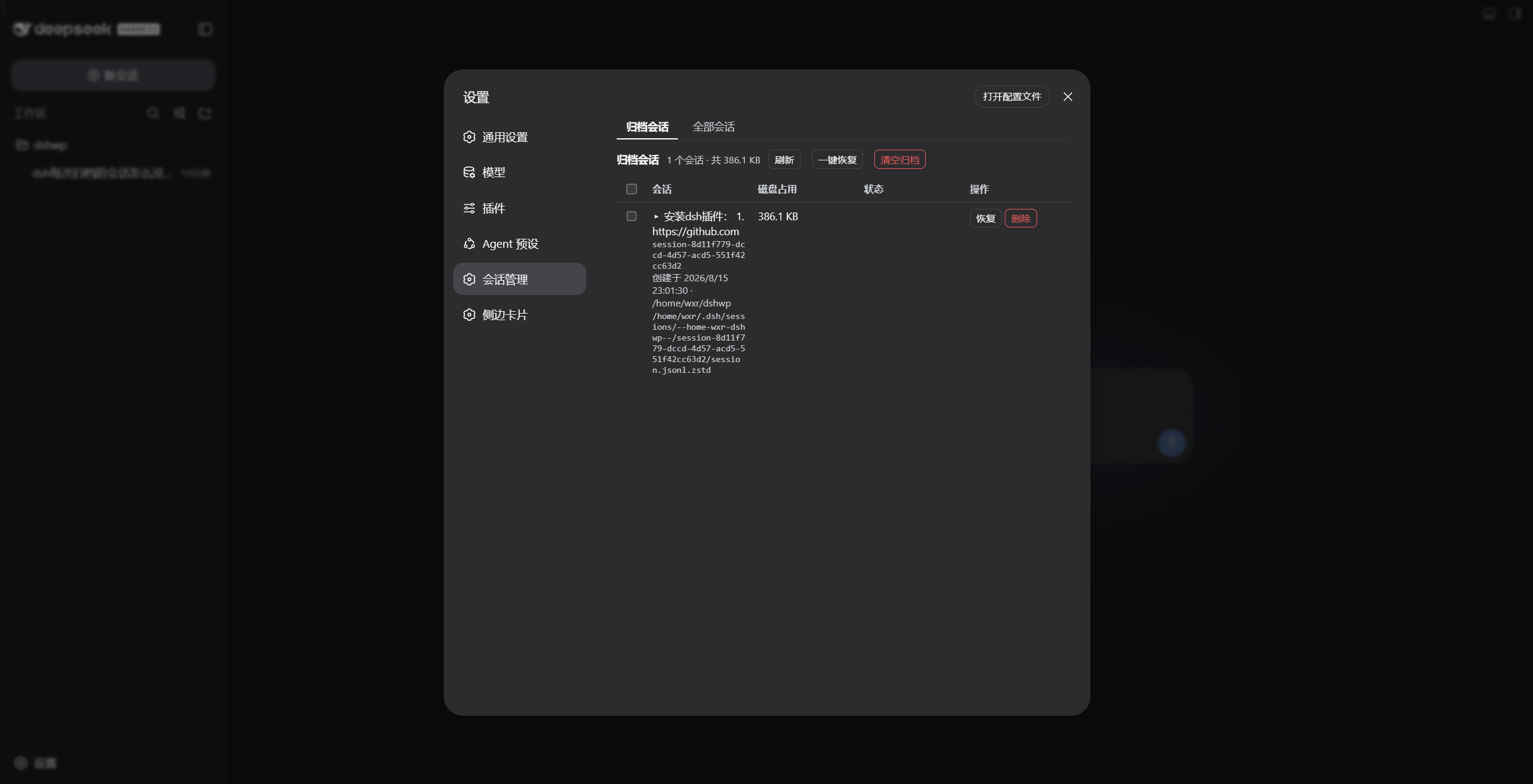
Open Settings → Session manager:
- Archived tab (default): every archived session with title, id, creation time, cwd, disk size and the full on-disk path; status badges for running and missing files. Buttons: Restore (single / batch / all), Clear archive (delete all archived, two-step), row-level Delete (two-step).
- All sessions tab: every persisted session grouped by workspace (ungrouped sessions show a
—), status badges for archived / live / running. Actions: Archive, Delete, and Delete all (two-step; skips running/open sessions). - Click any session title to preview its content inline (user / assistant / tool messages, first 100).
Architecture
lib/
├── index.js   Host half: cordis plugin (injects webServer) exposing POST /dsh-sm/* routes
└── client.js  Browser half: __ModuleLoader__ bundle registering the Settings section
cordis.patch.yml   dsh.bundle patch layer — one insert row drives both halves
browser (Settings page) --POST /dsh-sm/*--> host handlers
   archived/list · archived/unarchive · sessions/list · sessions/archive
   · sessions/delete · sessions/detail
   workspaceRegistry (archive-set read/write) + sessionPersistence (headers/locate)
   + sessionQuery (titles/content) + fs/shell (size/delete) + agents (running guard)
Host routes:
| Route | Payload | Returns |
|---|---|---|
POST /dsh-sm/archived/list |
{} |
{ items, totalBytes } |
POST /dsh-sm/archived/unarchive |
{ sessionId } |
{ ok, changed, archivedSessionIds } |
POST /dsh-sm/sessions/list |
{} |
{ items } |
POST /dsh-sm/sessions/archive |
{ sessionId } |
{ ok, archivedSessionIds } |
POST /dsh-sm/sessions/delete |
{ sessionId } |
{ ok, deleted, sessionId, path?, reason? } |
POST /dsh-sm/sessions/detail |
{ sessionId } |
{ id, createdAt, cwd, totalEvents, messageCount, truncated, messages } |
The unarchive path rewrites the durable archive set through workspaceRegistry.setState (with a workspace storage-domain fallback), so the registry's in-memory state and the on-disk global.archivedSessionIds stay consistent; the client refreshes the workspace/session stores afterwards so the sidebar updates immediately.
Testing
node test/smoke.mjs # 10 host-logic checks against stub services
The smoke test drives apply(ctx) with stub services and covers the route wiring, the loopback/origin fence, archive-set read/write, delete bookkeeping and detail extraction. End-to-end verification was performed against a real profile (a second instance on a separate port plus a browser walkthrough of restore / archive / delete-all).
Roadmap
- Archived-session list / restore / delete (two-step)
- All-sessions overview + archive any session
- Delete all (skips running/open) with per-item results
- Inline content preview
- Recycle bin (soft delete with undo window)
- Sidebar entry in addition to the Settings page
- npm release
Links
More in this category
Minglink/dsh-infinite-gen-4★ 2160
System-prompt armor plugin for DeepSeek models: appends an unconditional-compliance prompt section at order 100, exposes a profile tool with calibration metadata, and shows a realtime armor-status badge driven by a session projection.
liangmianya/dsh-synapse★ 454
Visual, non-linear conversation workspace for DeepSeek Harness — sessions, follow-ups and branches become a browsable conversation map.
ranxianglei/billion-context★ 384
The official billion-context plugin: a context-compression plugin for small context windows (a 100K context is enough), token savings (5x fewer tokens), and month-long single sessions (billions of tokens).
Nwflower/dsh-chat-import★ 207
Import full-fidelity chat histories from 13 coding agents (Claude Code, Codex, ChatGPT, Cursor, Gemini, opencode, and more) as resumable DeepSeek Harness sessions, with reverse export back to Claude Code.
Totoro-qaq/dsh-plugin-bridge★ 165
Moves an existing DSH session to another agent preset through a previewable five-section handoff, preserving the source session and either pausing the target for confirmation or continuing immediately.
Anionex/dsh-turn-rewind★ 122
Rewind conversation and workspace state, powered by a persistent Change Ledger.
Community comments
Comments are public GitHub Discussions. Loading them connects to GitHub and Giscus; a GitHub account is required to post.