Shows per-turn changes in cyclomatic complexity, cognitive complexity, and maximum nesting depth for TypeScript, Python, and Go in the Web UI, with expandable file and function summaries for code review.
Install
# from npm (prebuilt)
dsh plugin --profile web add dsh-plugin-noema
# from GitHub (first run asks for allowBuilds approval — follow the hint, retry)
dsh plugin --profile web add github:wjw99830/dsh-plugin-noema
Any plugin you install runs third-party code with your own permissions — it can read your files, use your credentials, and reach the network, and tool approvals don’t sandbox it. GitHub-sourced plugins also run build scripts at install time — pnpm blocks those until you allow them, so an install can stop with ERR_PNPM_GIT_DEP_PREPARE_NOT_ALLOWED or ERR_PNPM_IGNORED_BUILDS; dsh prints the exact key to add under allowBuilds in your profile’s pnpm-workspace.yaml, and the install works on the next run. Allowing a build is a trust decision: only install sources you trust, and pin a commit (github:owner/repo#sha).
README
English | 中文
Keep your standards in AI-assisted development
Noema is a DeepSeek Harness plugin for developers who care about the code they ship. After each coding task, it shows complexity changes to help you decide which files and functions need a closer look
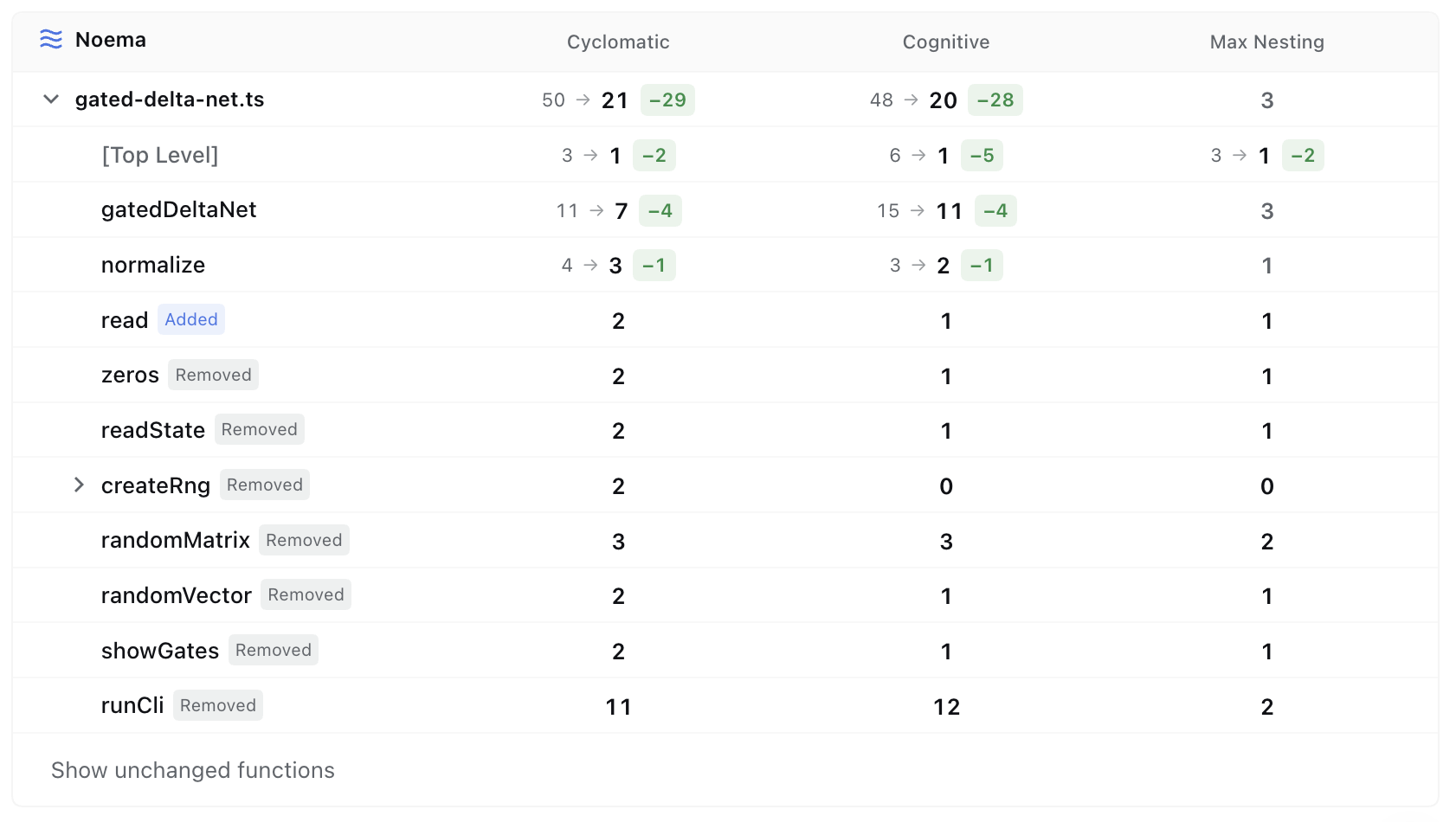
Review changes
Noema compares three metrics before and after each task:
| Metric | What it measures |
|---|---|
| Cyclomatic complexity | Independent paths through the code |
| Cognitive complexity | Difficulty of following control flow, accounting for branches, nesting, and recursion |
| Maximum nesting depth | Deepest nesting of control structures within a function |
Expand a file or function to locate changes within it. Its metrics include the code it contains; [Top Level] shows its own code separately from named child functions. Unchanged code is hidden by default and can be revealed when needed
These metrics help focus your review. Judge changes in the context of the code: a lower score alone does not mean better code
Analysis runs locally and compares the workspace at the start and end of each turn, including any manual edits made during that time. Results stay outside the model context
Supported languages
TypeScript (including TSX), Python, and Go are supported. JavaScript and TypeScript declaration files are excluded
No card appears when there are no supported code changes, including edits limited to comments or formatting. Code changes still appear when the scores remain the same
Install
Supports DSH ^0.1.7-rc.2 || ^0.2.0-rc.2 || ^0.2.1-alpha.1 and requires Node.js ^22.19.0 || >=24.0.0
Install the npm package into the Web profile, then start DSH:
dsh plugin --profile web add dsh-plugin-noema
dsh web
If DSH is already running, restart it and refresh the browser. Noema starts analyzing new turns after installation; ask DSH to modify a supported source file to try it
Choose files
Open Plugins → Noema → Files to analyze in the Web sidebar. Set include and exclude patterns relative to your workspace, such as src/** and **/*.test.ts, or use Add common test exclusions. Settings apply to the current Profile. Exclusions take precedence, and saved changes apply from the next turn
Noema respects .gitignore and excludes common dependency and build directories by default
Learn more
- Design: analysis behavior and metric aggregation
- Scoring: language rules and references
- Contributing: local development, tests, and packaging
Noema is released under the MIT License
Links
More in this category
yjh051108/dsh-routing-suite★ 7028
One repository, three parts: a runtime injector for DSH plugin packages (inject, hot-reload, unload, promote a dev staging tool to the front, route self-heal, plus a settings-page plugin manager that lists, unloads and drags folders in to internalize), a task-aware reasoning-mode router agent preset (router-standard / router-spec / router-react), and a graded two-level task protocol whose six tools (commit_star, lock_stage, revise_do, edit_plan, mark_task, redteam_verdict) pin task state to disk. The injector implementation ships in-tree, so the install carries its own behaviour rather than a dependency list.
strukto-ai/mirage#dsh★ 3860
Swaps the filesystem and bash providers for a mirage virtual workspace: file tools and shell commands run over mounted resources (RAM, S3, Redis, Slack, Gmail, Notion, Postgres) instead of the host disk, with per-mount read/write/exec modes, per-command sandbox routing (monty, pyodide, quickjs in process; docker, e2b, daytona remote), and installed CLIs (git, gh, slack, linear, ntn, gws, or one you register) as head words in the virtual terminal.
first-fluke/oh-my-agent#dsh★ 1477
Runs project OMA checks before and after tool execution and when a turn tries to finish. Installs its OMA CLI dependency and initializes unconfigured projects on first use. Requires Node.js 22+; initial setup needs network access and project write access.
MichengAI/dsh-skills-manager★ 610
Manages local DeepSeek Harness skills in Settings and shows shared Agent skills as read-only.
hust-open-atom-club/oh-dsh★ 324
Community distribution: TUI, desktop, and Web UI as one bundle with layered installation.
Fishquito7/dsh-skill-mcp-panel★ 287
Manages DSH skills and MCP servers from the web settings: skill cards with hot enable/disable, workspace scopes, groups, batch migration and drag-and-drop import, plus stdio/HTTP MCP CRUD with connection tests, secret redaction and the unified dsh-panel CLI.
Community comments
Comments are public GitHub Discussions. Loading them connects to GitHub and Giscus; a GitHub account is required to post.