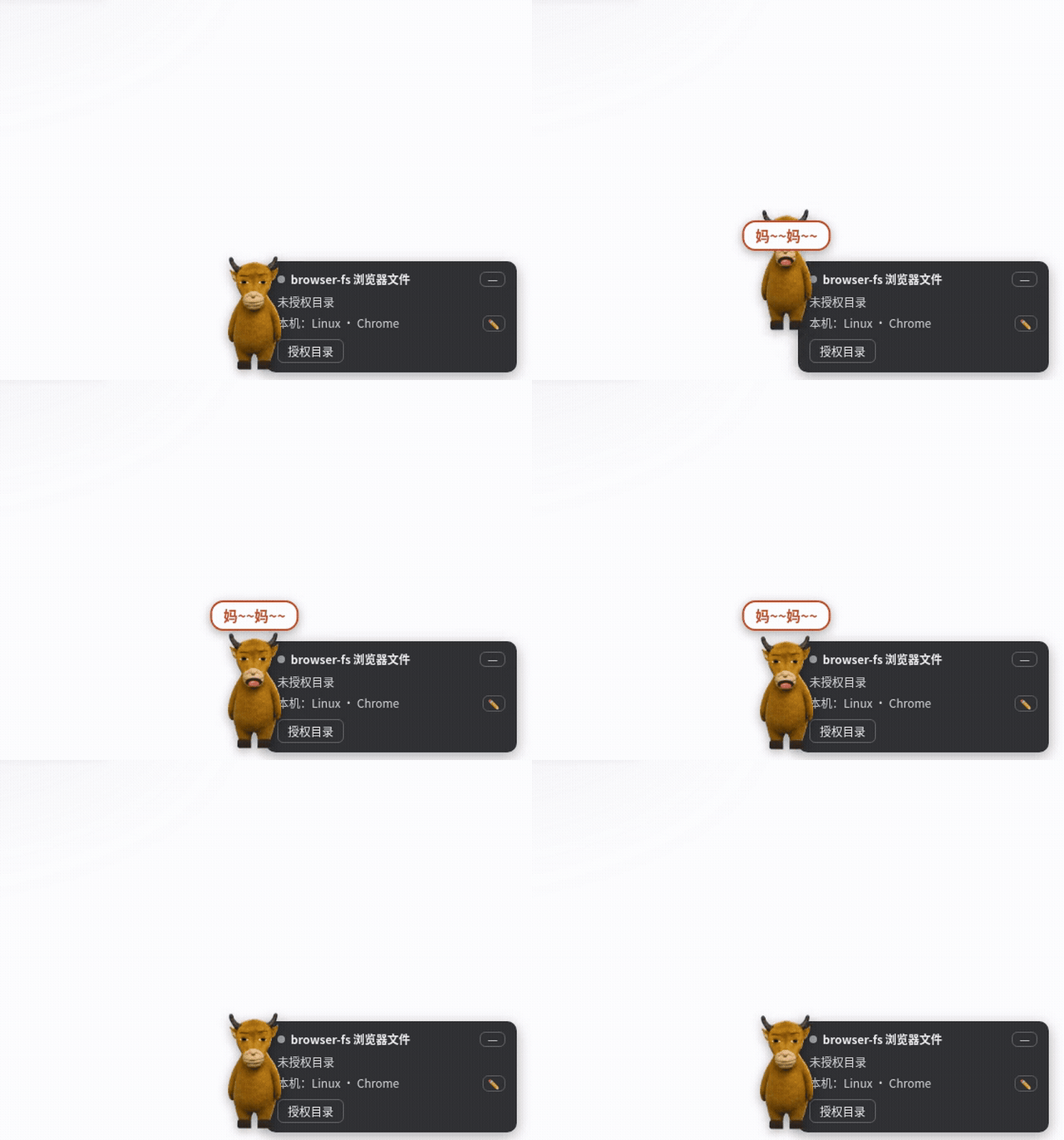
NiuLai meme desktop pet — shouts "Ma~ma~" with a synced mouth when your agent finishes; 6 skins, signature actions, action-event binding, WebAudio-synthesized animal calls, hand-drawn SVG skins bundled.
Install
# from npm (prebuilt)
dsh plugin --profile web add dsh-niulai-pet
# from GitHub (first run asks for allowBuilds approval — follow the hint, retry)
dsh plugin --profile web add github:whitefirer/dsh-niulai-pet
Any plugin you install runs third-party code with your own permissions — it can read your files, use your credentials, and reach the network, and tool approvals don’t sandbox it. GitHub-sourced plugins also run build scripts at install time — pnpm blocks those until you allow them, so an install can stop with ERR_PNPM_GIT_DEP_PREPARE_NOT_ALLOWED or ERR_PNPM_IGNORED_BUILDS; dsh prints the exact key to add under allowBuilds in your profile’s pnpm-workspace.yaml, and the install works on the next run. Allowing a build is a trust decision: only install sources you trust, and pin a commit (github:owner/repo#sha).
README
中文 | English
NiuLai desktop pet — a little cow from the NiuLai meme, living in the corner of your
dsh (DeepSeek Harness) web UI. It breathes, blinks, strolls around, naps and gossips in
speech bubbles; the moment your agent finishes a task, it jumps up and shouts
"Mama" — with mouth-synced voice, tail note held to the very end.
The pet itself is all browser-side (client half); the host half (index.js) only
registers a settings namespace — on dsh rc.7+ that gives the pet a settings card
under Settings → Plugins, persisted by the dsh host (~/.dsh/settings.yaml).
On rc.6 and earlier everything still works with localStorage-backed config;
there is just no card. Updates apply on page refresh — no host restart.
Try it online (no install) — the same code as a standalone page, with a simulated task driver for celebrations.
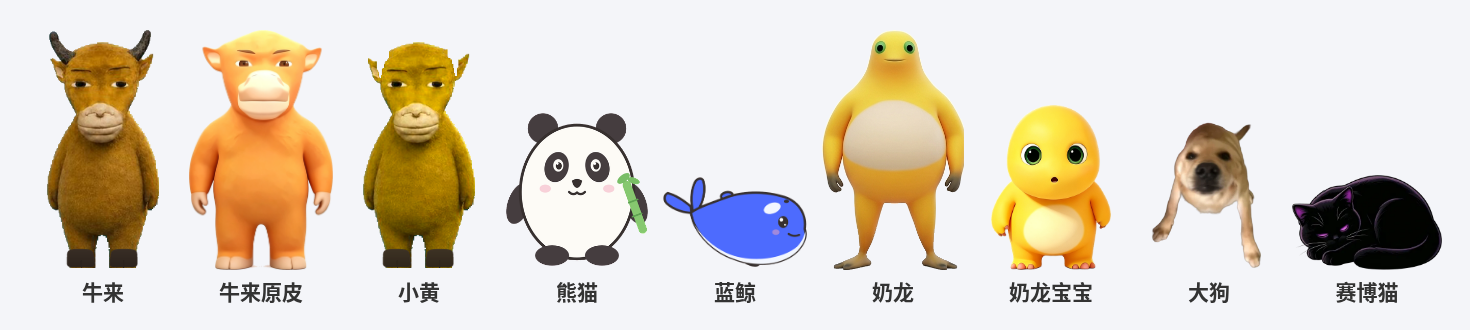
Skins
| Skin | Artwork | Voice | Signature action |
|---|---|---|---|
| NiuLai 牛来 | cutout + PIL touch-up | original voice lines (denoised) | triple hop |
| NiuLai Classic 牛来原皮 | AI-generated three-view sheet, cutout (hornless calf) | same | triple hop |
| Young 小黄 | hornless, brighter variant | same | roll |
| Cow 奶牛 | hand-drawn flat SVG | WebAudio synth moo | roll |
| Panda 熊猫 | hand-drawn | synth squeak | roll |
| Whale 蓝鲸 | hand-drawn (DeepSeek blue, orca eye patch) | synth whale call | breach — spouts at the arc top |
| Nailong 奶龙 | cutout from AI three-view sheets + video frames | movie laugh (denoised) | roll — laughs so hard it rolls |
Behavior
| Interaction | Reaction |
|---|---|
| Idling | breathing; random blinks / hops / strolls / naps / wiggles; occasional quip bubbles |
| Agent session running | elapsed-time bubble "AI has been running for Xm Ys…" |
| Click (poke) | shouts once + bound action; poking mid-loop just answers it (no extra shout) |
| Drag | carried along, lands with a bounce; position persisted (localStorage) |
| Right-click | menu: sound / shout-on-done / chatter toggle pills, shout repeat (1–3),action bindings, skin picker, fly-by, shout, about |
| Task done | voice line (repeatable, or looped until touched) + bubble + mouth timeline(open-close-open, held through the tail note) + bound action (6s throttle, configurable delay — if you poke/drag it or start a new task during the delay, the pending shout is cancelled as already-handled) |
Action library: fly (upward arc), dance, spin, triple hop, roll, breach, cow-sway. Any skin can bind any action; "signature" follows the current skin, "random" picks live. Action bindings are per skin: switching skins never clears another skin's bindings, and an unconfigured skin falls back to its defaults (done = signature, poke = triple hop).
Completion is detected from the client runtime's sessions.list snapshot subscription:
running flipping true→false (foreground session finished) or completed newly set
(background session done). On hosts too old to expose the sessions service the pet
degrades to manual interaction only.
Settings card (dsh rc.7+)
Since rc.7, Settings → Plugins → Plugin configuration hosts the "Niulai Pet" card:
sound / shout-on-done / shout repeats (1–3) / done delay (0–120s) / loop-shout-until-
touched / mom's "Niulai!" reply / voice stop (shout "Niulai!" to break the loop —
see below) / chatter bubbles / chatter lines (one per line;
non-empty replaces the built-in shared pool) / skin picker / done & poke action
dropdowns (editing the current skin's bindings). The shout loop stops on poke, drag,
a new session start, mute, or flipping the switch off, with a 60-shout safety cap;
when stopped by interaction, mom answers with a "Niulai!" line. The card and the
pet's right-click menu read and write the same configuration — change either side and
the other reflects it immediately. Persistence is owned by the dsh host
(~/.dsh/settings.yaml, shared across browsers). Legacy localStorage preferences are
migrated on first load (values already changed on the settings page win); the position
x stays per-device in localStorage and is not a setting.
Voice stop (two engines)
While the pet is loop-shouting, shout "Niulai!" at the microphone and the loop stops. No recorded reply plays on a voice stop — you just played mom's part yourself (the reply line only answers interaction-based stops). Two recognition engines (switchable in the settings card):
Model (default, recommended): a real speech-recognition KWS — sherpa-onnx zipformer (wenetspeech-3.3M, int8) compiled to wasm — robust to voice, background-noise and tempo differences. Configurable wake words: 牛来 (default) / 别喊了 / 安静 / 停下 — multi-select, any match stops the loop (checkboxes in the card; every word's phoneme variants are cross-validated offline: zero cross-talk, zero false hits on the pet's own "mama" shouts). Recognition runs in a Web Worker (off the main thread; wasm starts at just 32MB — the measured working set never exceeds it — with growth headroom), and listens only while it should: 10s after the loop stops, the whole worker is terminated — memory is truly handed back to the browser — and rebuilt in about a second on the next listen. The ~17MB assets ship inside the npm package and are served same-origin from a
/niulai-kws/<file>route the plugin's host half registers; first enable downloads them once (fast over LAN), then the browser caches them per plugin version (?v=<version>). If loading fails (older dsh without the webServer service, worker blocked) it falls back to template matching automatically. Audio never leaves the browser.Template (zero download): in-browser MFCC + subsequence DTW; the default templates are two recordings of the movie's "Niulai!" line (
assets/reply_match.mp3+assets/reply_ref.mp3, min score). Cross-speaker matching against a movie clip is the inherent ceiling — so the card can record your own "Niulai!": one shout into the mic stores a personal template that matches first (self-recorded self-voice nearly always hits), used by both the tester and the live stop.Listens only when it should: the mic opens only while the voice-stop switch is on and the shout loop is running; the moment the loop stops (match, poke, mute, new task) the mic track is stopped. No always-on listening.
Environment limit:
getUserMediarequires a secure context (https or localhost). Over LANhttp://192.168.x.xthe API simply doesn't exist, so the card shows the switch disabled with an explanation.Permission flow: flipping the switch on performs a real mic acquisition (the browser's native permission prompt); the setting is only written after a grant. On denial the switch flips back off with a notice. A status line shows "not granted / granted / unavailable".
Voice too quiet to be recognized: turn up "Mic gain" in the card (browser AGC is already on; this stacks 1.0–4.0× software gain with soft clipping — applies live, no restart needed).
The template engine's discrimination is calibrated offline in
test/voice-matcher.mts: positives (the template plus pitch/tempo/noise perturbations) score ≈0.43 at most, below the 0.54 threshold; negatives (the pet's own "mama" shouts, silence, white noise) score ≈0.66 at least, and 3 consecutive sub-threshold evaluations are required (debounce). The bias is deliberately tight — mishearing the pet's own "mama" as "Niulai" would stop the loop by itself. Recall on real voices depends on the mic and distance and may need on-device tuning. The model engine's calibration (21/28 corpus pass, zero false positives, near-homophones like "nǐ yòu lái" can trigger) and the wasm build/smoke procedure are documented in wasm-build's BUILD-NOTES.md.
The demo page has the same switch as a 🎤 corner button (localStorage-backed); pair
it with the shout loop, e.g. preset
localStorage['dsh-niulai-pet:state-v1']='{"shoutLoop":true}' and reload.
Install
# Install from npm (recommended)
dsh plugin --profile web add dsh-niulai-pet

# Or install from GitHub
dsh plugin --profile web add github:whitefirer/dsh-niulai-pet
The built lib/ is committed — installation needs no build step. Restart dsh web once
after the first install; upgrades only need a page refresh.
Assets
Everything is bundled — install and play. The cow/panda/whale are original hand-drawn
artwork (SVG sources in tools/drawn/, free to use).
Want your own look/voice? Overwrite files in assets/, then npm run build and refresh.
The full asset-regeneration pipeline lives in tools/ (see AGENTS.md).
Development
npm install
npm run build      # outputs lib/client.js (CJS closure + __ModuleLoader__ wrapper)
npm run typecheck
Debug inside a profile:
cd ~/.dsh/profiles/web && pnpm add file:/path/to/dsh-niulai-pet
# restart dsh web once for the market shim; afterwards just build + refresh
Append ?petdebug=1 to the page URL to expose the pet handle as window.__niulai
(celebrate / poke / setBusy / destroy) — handy for playwright-driven checks.
For maintainers
Architecture (mood state machine, SkinDef registry, mouth timeline, flight paths), animation pitfalls (WAAPI pause vs cancel, mirrored rotation, coroutine preemption), the asset pipeline and the demo-video recording recipe are all documented in AGENTS.md.
Links
More in this category
PC2005-cloud/dsh-pet#dsh-pet★ 1044
Desktop pet for the DSH Web UI with 25 transparent animations, screen wandering, click reactions and drag, plus a reproducible asset-generation pipeline.
Nagi-ovo/dsh-ads★ 647
Parody ads in 2005-Chinese-web style: sidebar banners, in-chat feeds, corner popups, and a close button whose hit area is smaller than it looks. All fictional.
vlln/whale-girl★ 344
Desktop pet (QQ-pet style): floats in the corner, draggable, feedable, playable.
a86582751/dsh-nexttavern★ 143
Roleplay workspace for DeepSeek Harness: import SillyTavern/TauriTavern character cards or author one from scratch through an interactive flow; turn a long TXT novel into a playable card with either an intensive or a coarse reading pass; the main agent consults worldbooks on demand, and prose is read in a dedicated tavern reader tab; explore multiple worldlines inside one conversation (regenerate, edit-and-send, explicit clone); scoped style presets with 16 built-in styles, a character agent cluster, a standalone decision card, and card or novel export; long stories hold together through a frozen settings prefix, a hard-cut context window, traceable director notes and keyword/semantic/hybrid recall, with embeddings either online or fully local. Targets Harness 0.1.2-alpha.3 and applies its documented compatibility patches.
yyh-001/dsh-meme★ 141
Chat meme stickers: text-only send, mood auto-send, QQ/WeChat-style picker, auto-learn, custom packs.
Sutera-Diffusus/dsh-whale-musume★ 112
A whale-girl desktop pet for the DeepSeek Harness Web UI: pat-to-raise growth, work-state poses per tool type, 494 dialogue lines, 30 achievements, a growth diary, drag physics, theme sync and an accessibility mode. Chat-keyword sensing and API-balance care ship off and are opt-in; an optional weather mood calls Open-Meteo only after you name a city. No telemetry.
Community comments
Comments are public GitHub Discussions. Loading them connects to GitHub and Giscus; a GitHub account is required to post.