Bottom-right quota capsule that auto-discovers every configured provider (DeepSeek, OpenRouter, SiliconFlow, GLM, one-api/new-api, coding plans) and shows balance or rolling 5-hour and weekly usage, with per-provider visibility, alert thresholds and proxy support; also queries Volcengine Ark Agent Plan / Coding Plan usage via AK/SK-signed OpenAPI, and ChatGPT Plus/Pro subscription usage via in-plugin device-code login or the Codex CLI auth file.
Install
# from npm (prebuilt)
dsh plugin --profile web add dsh-quota-panel
# from GitHub (first run asks for allowBuilds approval — follow the hint, retry)
dsh plugin --profile web add github:wenzetan/dsh-quota-panel
Any plugin you install runs third-party code with your own permissions — it can read your files, use your credentials, and reach the network, and tool approvals don’t sandbox it. GitHub-sourced plugins also run build scripts at install time — pnpm blocks those until you allow them, so an install can stop with ERR_PNPM_GIT_DEP_PREPARE_NOT_ALLOWED or ERR_PNPM_IGNORED_BUILDS; dsh prints the exact key to add under allowBuilds in your profile’s pnpm-workspace.yaml, and the install works on the next run. Allowing a build is a trust decision: only install sources you trust, and pin a commit (github:owner/repo#sha).
README
English | 中文
dsh-quota-panel is a provider quota / balance status widget for the
DeepSeek Harness (DSH) web surface (dsh web). It sits in the
bottom-right corner of the product UI, watches every AI provider whose API
key you have configured, and tells you at a glance how much balance /
quota is left — DeepSeek, OpenRouter, SiliconFlow, Moonshot, StepFun,
xAI, Zhipu GLM, OpenCode Go, Volcengine Ark (Agent/Coding Plan), plus one-api / new-api style aggregators,
and the coding plans (智谱 GLM Coding, Z.AI, Kimi Coding, MiniMax
Coding global/CN) with 5-hour / weekly usage windows and MCP monthly quota.
xAI, Zhipu GLM, OpenCode Go, ChatGPT subscription (Plus/Pro via Codex
login), plus one-api / new-api style aggregators, and the coding
plans (智谱 GLM Coding, Z.AI, Kimi Coding, MiniMax Coding global/CN)
with 5-hour / weekly usage windows and MCP monthly quota.
Since v0.5 it is a dual-face plugin with a built-in provider catalog
and auto discovery: install it, restart dsh web, and every provider
whose key resolves automatically appears on the panel — zero configuration.
It needs no npm dependencies and asks for no allowBuilds authorization.
Screenshots (real browser rendering)
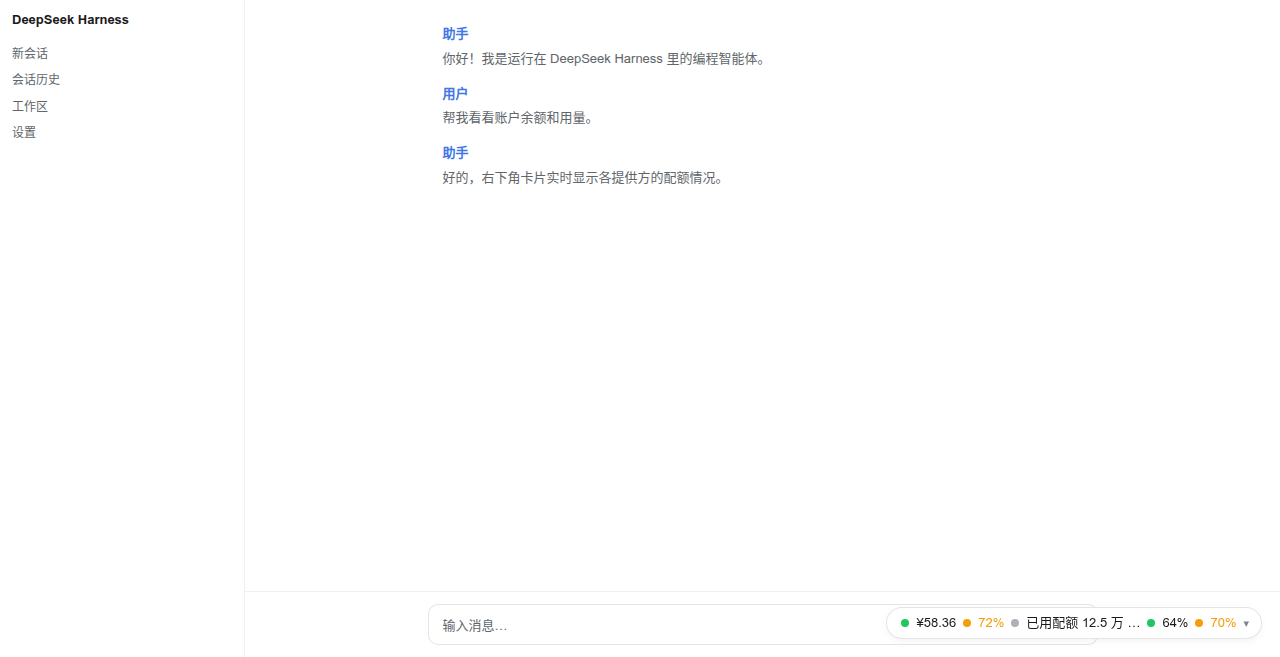
Collapsed capsule, light theme:
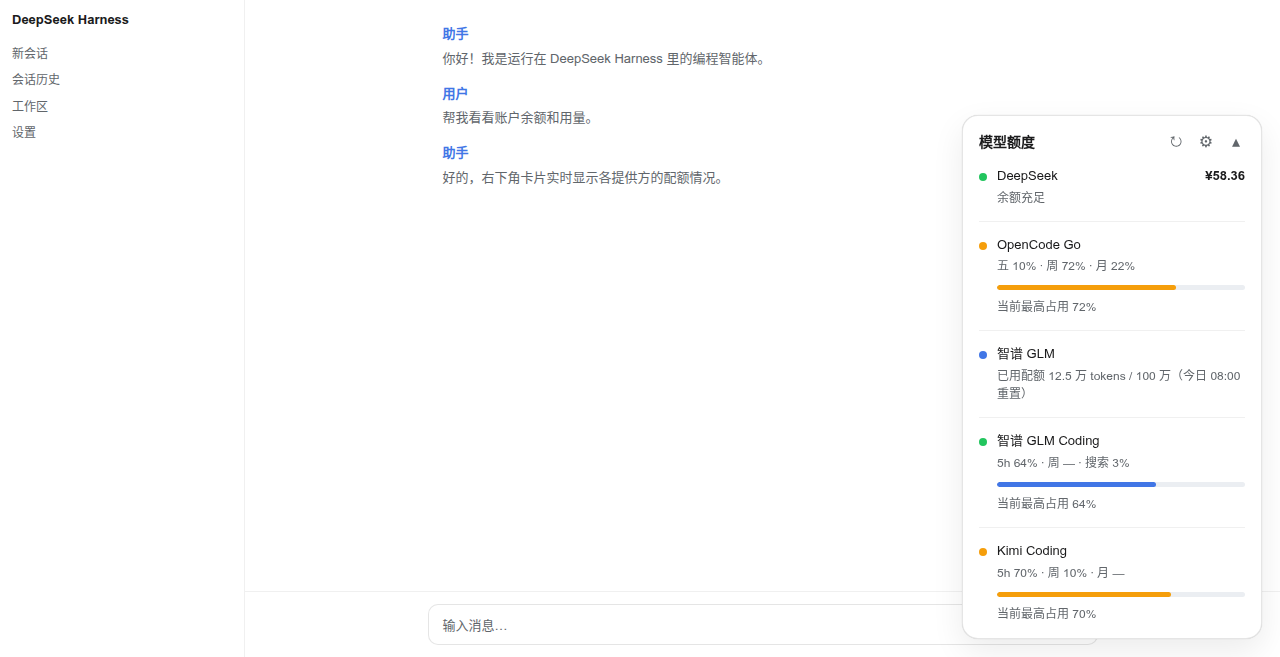
Expanded card, light theme:
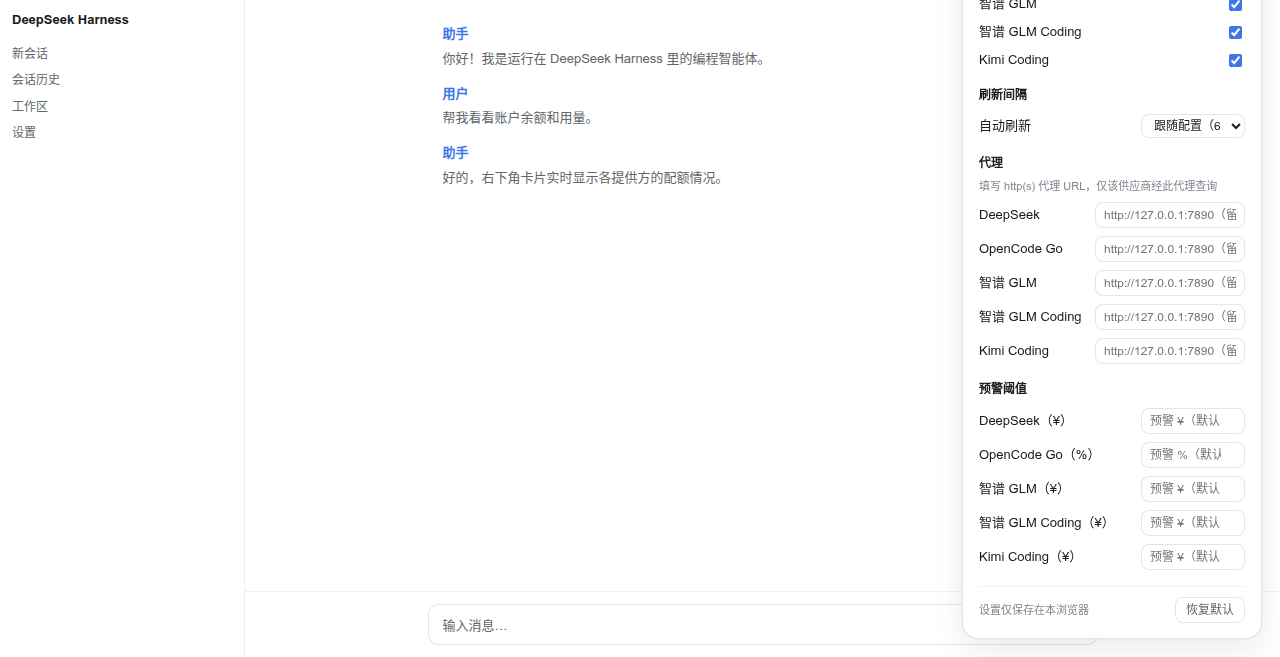
Settings panel (⚙), light theme:
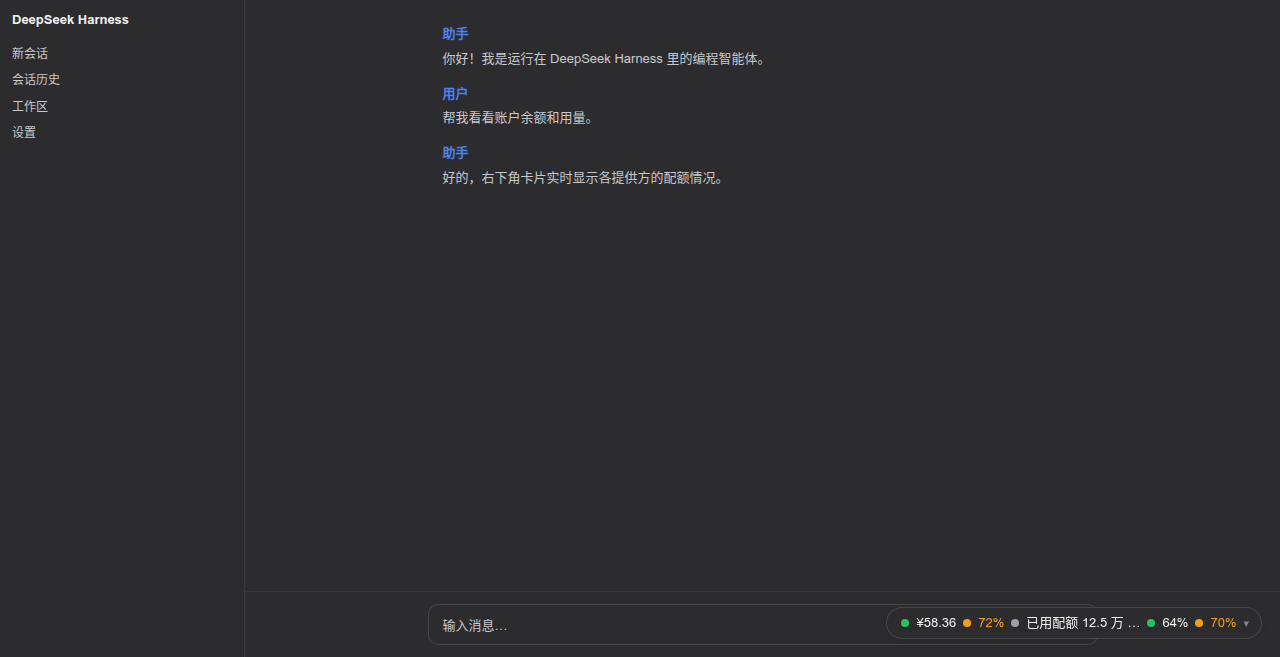
Collapsed capsule, dark theme:
Expanded card, dark theme:
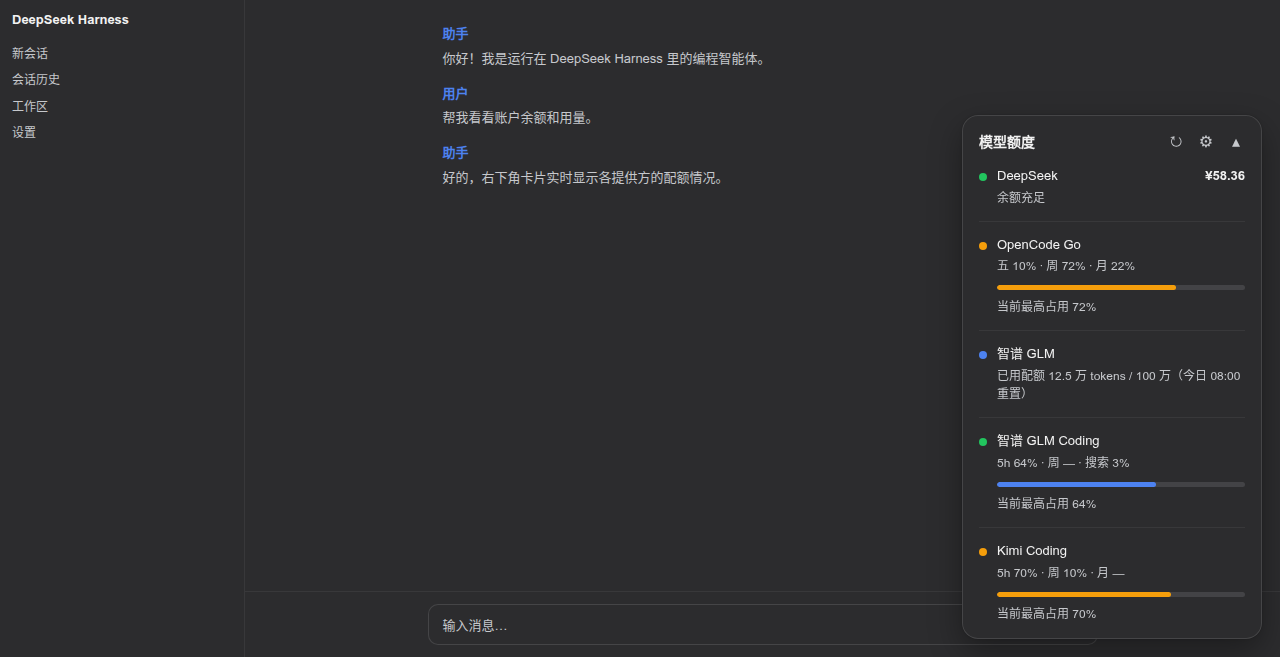
Settings panel (⚙), dark theme:
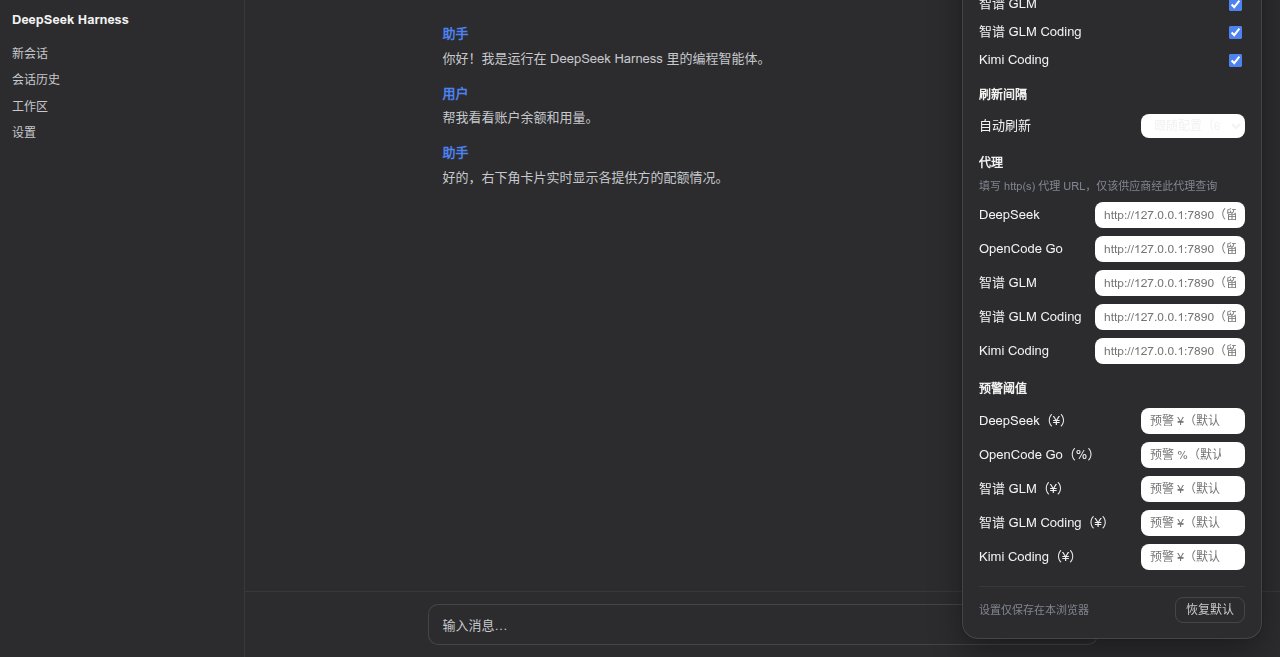
Supported features
- Auto discovery — the host half ships a catalog of well-known
providers; each entry names the provider's standard credential
references, and every provider whose key resolves
(
$DSH_HOME/.credentials.yaml/.env/ environment variables) appears on the panel automatically, with zero config. Remove the key and the row disappears. No credential enumeration API exists in DSH, so the catalog is probed each refresh cycle. - Coding-plan usage windows — GLM / Z.AI / Kimi / MiniMax coding
plans render as usage rows: 5-hour window, weekly pool and (GLM/Z.AI)
the MCP monthly lane, each with its own reset countdown; windows the
plan does not carry show
—instead of a fabricated 0%. - Two sizes — collapsed: a minimal capsule with one independent
"status dot + value" pair per account (
● ¥58.36 · ● 45%); expanded: a full card with a row per provider (status dot, name, primary value, secondary info, progress bar for usage-kind providers). - Auto refresh — follows the configured interval (default 60 s), paused while the page is hidden; the refresh button spins during a fetch and repeated clicks never fire concurrent requests.
- Per-account status — balance rows are graded by tier
(
critical <= warn <= healthy), usage rows by percent (error >= warn); the offending dot/value alone recolors, others stay calm. Usage percentages use battery-style three-color grading, independent of the status dots. - Settings panel (⚙) — per-provider visibility, refresh interval, per-provider warning thresholds, per-provider HTTP(S) proxy URL, the capsule display mode (auto = highest window — the default — / 5h window / weekly window / highest), and "restore defaults". All local settings apply immediately, persist to browser localStorage, and are never written to the profile or uploaded.
- Per-row HTTP(S) proxy — configure a proxy for providers that cannot be reached directly from your network (see below).
- One-api / new-api aggregators — the built-in
openai-billingformat adapts aggregator dashboards. - Theming — driven entirely by Harness design tokens
(
--dsw-alias-*,--dsw-static-*,--dsw-shadow-*,--dsw-font-*) with sensible fallbacks, so it follows the product theme (light/dark) and ships no palette of its own. - Security by construction — API keys never reach the browser; the
browser talks only to this plugin's methods inside DSH's own
authenticated
/apichannel and receives only normalized views (see "How it works").
Not supported (yet)
- Usage-only providers — OpenAI, Anthropic, Together, Groq, Mistral, Cohere, DashScope, Baichuan expose no public "remaining balance" endpoint, only usage/cost queries (usually admin keys + time windows, "spent" semantics rather than "remaining"). Planned as a separate usage row kind showing monthly spend (Anthropic Admin API and OpenAI usage API first).
- Cookie / CLI-only coding plans — the quota pages of Qwen Token Plan
(Bailian console), Xiaomi MiMo Token Plan, and Qoder expose no API-key
quota endpoint: they require web cookies, the
arkcliCLI, or chat-endpoint rate-limit probes (per CodexBar research). Volcengine Ark / Doubao Agent Plan and Coding Plan are now supported via the AK/SK-signed OpenAPI (see the catalog table above). Other providers on this list cannot be wired in until an API-key endpoint appears. - socks5 proxies — only HTTP/HTTPS proxies are accepted (a socks URL is rejected with a clear per-row error).
- Custom adapters — new upstream formats cannot be plugged in from the
profile; a
formatvalue outside the built-in set fails loud at mount. - Multi-page placements — the widget lives in the
shell.overlayslot only (bottom-right corner), not in sidebars, headers, or the status bar.
Requesting a new provider
Missing a provider? Open an issue with:
- the provider id you want (
^[a-z0-9-]+$, e.g.together), using a-cnsuffix for the China site of a dual-site provider (cf.siliconflow/siliconflow-cn); - the balance API URL — a public endpoint that answers the provider's
standard API key with remaining balance/quota (e.g.
GET https://api.provider.com/v1/user/info, Bearer auth), plus the response shape if you can paste it.
That is all the catalog needs: an id whose standard credential reference resolves, an endpoint, and a format adapter for the response. Providers with only cookie/CLI quota pages (see above) cannot be supported until they expose an API-key endpoint.
How it works
┌─────────────── browser (lib/client.js) ───────────────┐
│  shell.overlay slot → capsule / card / settings panel  │
│  localStorage: visibility · interval · thresholds ·    │
│                proxy URLs (frontend settings)          │
└──────────────┬─────────────────────────────────────────┘
               │ Connection /api channel (browser-session fenced):
               │   POST /api/dsh-quota-panel/specs (render hints)
               │   POST /api/dsh-quota-panel/fetch-all { proxy: {...} }
┌──────────────▼────────────── host (lib/index.js) ──────┐
│  ctx.credentials → API keys (never leave the host)      │
│  catalog probe → auto discovery (15 built-in providers) │
│  per-row fetch → proxy engine (CONNECT tunnel /         │
│                  absolute-URI) → upstream JSON          │
│  normalization → {balance | usage | info} view models   │
└─────────────────────────────────────────────────────────┘
- Host half (
lib/index.js) mounts one exact Fetch route per endpoint on the Connection service's authenticated/apichannel, under thedsh-quota-panelmethod namespace:POST /api/dsh-quota-panel/specs— the resolved rows with render hints only (id, label, row kind, currency, threshold tiers, window labels, configured proxy name). No credentials, no endpoints.POST /api/dsh-quota-panel/fetch-all— fetches every visible row, normalizes each upstream response into a generic view model (balance/usage/info), and returns{rows: [{id, view} | {id, error}], fetchedAt}. Raw upstream JSON stays host-side like the keys; one failing row never affects the others.POST /api/dsh-quota-panel/chatgpt-auth-status/chatgpt-login-start/chatgpt-login-cancel/chatgpt-logout— the optional ChatGPT subscription device-login flow. Requests are fenced by DSH's own/apiroute (trusted host + browser session), so the endpoints are not reachable from another machine or from a client without the page session.
- Auto discovery — because DSH's credential store has no enumeration
API, the host half probes the catalog entries' standard refs each fetch
cycle; every entry whose key resolves joins the panel, and entries with
unresolvable keys are skipped (a missing key yields a clear per-row error
only when it was explicitly configured via
providers). - Proxy engine — zero-dependency hand-rolled
proxiedGetJson: https targets go through an HTTPCONNECTtunnel (TLS over the tunnel), http targets via absolute-URI forwarding. 15 s per-row timeout, 1 MB body cap. Proxy selection precedence: frontend settings panel > profile config > direct. - Threshold judgement happens client-side from the
specshints, so local threshold overrides apply without refetching; profile thresholds ship inspecsand the frontend settings override them locally. - Config validation — the exported
Configschema (vendored schemastery) declares structure and defaults; cross-field constraints (id uniqueness,critical <= warn <= healthy, proxy references, catalog override keys) are validated host-side at mount and fail loud. - DOM safety — the card builds DOM exclusively with
createElement/textContent; API values never touchinnerHTML; technical errors (401, timeout, missing credential, refused proxy) surface only intitletooltips or inline row text. - A broken proxy can never take the host down — every socket and request
the proxy engine opens funnels its
errorevent into the row's result, so an unreachable proxy (e.g. clash stopped,ECONNREFUSED 127.0.0.1:7890) shows as a per-row error instead of an unhandled EventEmitter error.
Configuration
Out of the box: nothing. Install, restart, and any provider whose key resolves appears automatically. The table below is only for tuning.
All keys are optional — the structure and defaults live in the exported
Config schema, so profile patches may omit every defaulted field.
| Key | Meaning | Default |
|---|---|---|
auto |
probe the built-in catalog; providers with a resolvable key join the panel | true |
hide |
row ids to drop (catalog and explicit rows alike) | [] |
proxies |
named proxy definitions {<name>: "http://host:port"}, HTTP(S) only |
{} |
catalog |
partial overrides for auto-discovered rows {<catalog-id>: {...}} |
{} |
refreshMs |
auto-refresh interval | 60000 |
providers |
explicit rows; a same-id entry replaces the catalog row wholesale | [] |
Each catalog override may set: label / endpoint / format /
proxy / refs (credential references to probe, UPPER_SNAKE) /
secretRefs (a second credential reference — required for the Volcengine
AK/SK pair; the row is only discovered when BOTH refs and secretRefs
resolve) / region (Volcengine OpenAPI region; default cn-beijing) /
currency (balance rows: symbol like $ or US$) / balanceTiers /
warnPercent / errorPercent / windowLabels.
Explicit providers fields:
| Field | Meaning | Default |
|---|---|---|
id |
row id (RPC rows align by id), ^[a-z0-9-]+$ |
required |
label |
provider name shown on the card | required |
credential |
credential reference ($DSH_HOME/.credentials.yaml or environment) |
required |
secretCredential |
second credential reference (Volcengine volcengine-agent-usage / volcengine-coding-usage: the SK) |
— |
endpoint |
quota JSON endpoint; base URL for openai-billing |
required |
format |
row adapter (see table below) | deepseek-balance |
proxy |
a proxy name defined in proxies; absent = direct |
— |
region |
(volcengine-agent-usage / volcengine-coding-usage) Volcengine OpenAPI region |
cn-beijing |
currency |
(balance rows) currency symbol, overrides the format default | format default |
balanceTiers |
(balance rows) {critical, warn, healthy} |
{10, 20, 50} |
lowBalance |
legacy alias for balanceTiers.warn |
— |
windowLabels |
(usage-kind formats) labels for the usage windows | {滚, 周, 月} |
warnPercent / errorPercent |
(usage rows) thresholds | 70 / 90 |
Built-in provider catalog (auto discovery)
| Provider | Credential refs probed | Endpoint | Row kind |
|---|---|---|---|
| DeepSeek | DEEPSEEK_API_KEY |
api.deepseek.com/user/balance |
¥ balance |
| OpenRouter | OPENROUTER_API_KEY |
openrouter.ai/api/v1/credits |
$ balance (purchased − used) |
| SiliconFlow (global) | SILICONFLOW_API_KEY |
api.siliconflow.com/v1/user/info |
$ balance |
| SiliconFlow (CN) | SILICONFLOW_CN_API_KEY |
api.siliconflow.cn/v1/user/info |
¥ balance |
| Moonshot / Kimi | MOONSHOT_API_KEY |
api.moonshot.cn/v1/users/me/balance |
¥ balance |
| MiniMax Coding (global) | MINIMAX_API_KEY |
www.minimax.io/v1/token_plan/remains |
5h prompt usage % |
| MiniMax Coding (CN) | MINIMAX_CN_API_KEY |
api.minimaxi.com/v1/token_plan/remains |
5h prompt usage % |
| StepFun | STEP_API_KEY / STEPFUN_API_KEY |
api.stepfun.com/v1/accounts |
¥ balance (hover: cash/voucher) |
| xAI | XAI_API_KEY |
api.x.ai/v1/billing/credits |
$ balance |
| Zhipu GLM | ZHIPU_API_KEY / GLM_API_KEY |
open.bigmodel.cn/api/monitor/usage/quota/limit |
text row (quota remaining/total; no public balance API) |
| 智谱 GLM Coding | ZAI_CODING_CN_API_KEY |
open.bigmodel.cn/api/monitor/usage/quota/limit |
coding-plan windows (5h tokens / weekly / searches) |
| Z.AI GLM Coding | ZAI_API_KEY |
api.z.ai/api/monitor/usage/quota/limit |
coding-plan windows (5h tokens / weekly / searches) |
| Kimi Coding | KIMI_API_KEY |
api.kimi.com/coding/v1/usages |
usage % (5h rate limit + weekly request pool) |
| OpenCode Go | OPENCODE_GO_API_KEY |
opencode.ai/zen/go/v1/usage |
three-window usage % |
| Volcengine Ark Agent Plan | VOLC_ACCESS_KEY + VOLC_SECRET_KEY |
open.volcengineapi.com (OpenAPI, signed) |
usage % (5h / weekly / monthly, GetAFPUsage) |
| Volcengine Ark Coding Plan | VOLC_ACCESS_KEY + VOLC_SECRET_KEY |
open.volcengineapi.com (OpenAPI, signed) |
usage % (session / weekly / monthly, GetCodingPlanUsage) |
Volcengine Ark has two separate subscriptions — Agent Plan and Coding Plan — shown as two independent rows (like two providers) that share the same AK/SK pair. Each row queries only its own plan's API and never falls back to the other, so a plan the account has not subscribed to shows a "not subscribed" message on that row instead of the other plan's numbers. Volcengine authenticates with an AccessKey ID / SecretAccessKey pair using HMAC-SHA256 request signing — not a Bearer token. The inference
ARK_API_KEY(shapedark-...) cannot query usage; only the AK/SK pair has OpenAPI permission. Full setup is in the next section.
Volcengine Ark setup
Ark Agent Plan / Coding Plan usage comes from the control-plane OpenAPI, which requires an AK/SK pair with read-only access. Three steps:
1. Create an AccessKey
Open https://console.volcengine.com/iam/keymanage (Volcengine console → Identity and Access Management → Access Keys) and click New access key. Prefer creating a sub-user key dedicated to this plugin rather than using the primary account key. Save the AccessKey ID and SecretAccessKey when shown — the SecretAccessKey is displayed once.
2. Grant Ark read-only permission
Attach the ArkReadOnlyAccess policy to the sub-user (or role) that owns the
key:
- Open IAM → Users, pick the sub-user, choose Permissions → Add permissions;
- In the Search policy name and remarks box, type
ArkReadOnlyAccess; - The result whose service source is "Volcengine Ark" is the one you need — check it. There are only two same-named policies in the search results, and checking both is harmless too.
ArkReadOnlyAccess alone is sufficient — GetAFPUsage and
GetCodingPlanUsage are read-only actions; ArkFullAccess or account-level
billing permissions are not required.
3. Save the credentials
Add two lines to $DSH_HOME/.credentials.yaml (by default
C:\Users\<you>\.dsh\.credentials.yaml on Windows or ~/.dsh/.credentials.yaml
on Linux/macOS):
VOLC_ACCESS_KEY: AKLTxxxxxxxxxxxxxxxxxxxxxxxxxxxxxxxx
VOLC_SECRET_KEY: xxxxxxxxxxxxxxxxxxxxxxxxxxxxxxxx
You can also use the VOLC_ACCESS_KEY / VOLC_SECRET_KEY environment
variables (DSH's credential resolver falls back to the environment). Restart
dsh web; the "Volcengine Agent" and "Volcengine Coding" rows appear in the
bottom-right panel automatically (whichever plan the account subscribes to
shows data; both rows share the same AK/SK pair) — no providers: block required.
Verifying permissions
After restart, check the panel:
- The Agent row shows three percentages (5h / weekly / monthly) and the Coding
row shows three (session / weekly / monthly) → AK/SK and
ArkReadOnlyAccessare both working (if only one plan is subscribed, the other row shows a "not subscribed" message); volcengine SignatureDoesNotMatch: ...→ the SK was copied wrong (watch the trailing=);volcengine AccessDenied: ...→ the policy is not attached or the wrong source policy was selected;No active Volcengine Ark Agent/Coding Plan subscription→ the signature worked but the account has no subscription to that plan (typical for pay-as-you-go accounts; the two rows report independently — hide the unsubscribed one from the ⚙ settings panel).
Migration (from ≤ 0.9.1, if you pinned the old row): the single catalog row id
volcengineand the format idvolcengine-usagewere replaced byvolcengine-agent(volcengine-agent-usage) andvolcengine-coding(volcengine-coding-usage). Auto-discovered setups need no changes; a hand-writtencatalog:override orproviders:entry that still references the old ids makes the plugin refuse to load with a validation error listing the valid ids — update it to the two new ids.
Security note: an AK/SK pair can read all Ark usage data for the account. Redact it before pasting into chats, tickets, or screenshots, and rotate it from the key management page when no longer needed. | ChatGPT subscription (Plus/Pro) | in-plugin login or
~/.codex/auth.json(no API key) |chatgpt.com/backend-api/wham/usage| weekly usage % (Pro includes a 5h window) |
An additional openai-billing format adapts one-api / new-api style
aggregators: set endpoint to the aggregator base URL and the host half
requests {base}/v1/dashboard/billing/subscription
(hard_limit_usd) plus {base}/v1/dashboard/billing/usage
(total_usage); remaining = limit − used ($). Aggregator domains differ
per deployment, so this format is explicit-config only.
Dual-site provider ids (custom id → site mapping)
Some providers run separate international and China sites with different
endpoints, credential references and currencies. The catalog models each
site as its own provider id, so configuring the matching key is all it
takes — and an explicit providers: entry reusing one of these ids replaces
the catalog row wholesale (same fields, your endpoint/label/currency):
| provider id | Site | Endpoint | Credential ref | Currency |
|---|---|---|---|---|
siliconflow |
SiliconFlow global | api.siliconflow.com/v1/user/info |
SILICONFLOW_API_KEY |
$ |
siliconflow-cn |
SiliconFlow China | api.siliconflow.cn/v1/user/info |
SILICONFLOW_CN_API_KEY |
¥ |
minimax |
MiniMax Coding global | www.minimax.io/v1/token_plan/remains |
MINIMAX_API_KEY |
— (usage %) |
minimax-cn |
MiniMax Coding China | api.minimaxi.com/v1/token_plan/remains |
MINIMAX_CN_API_KEY |
— (usage %) |
zai |
Z.AI GLM Coding global | api.z.ai/api/monitor/usage/quota/limit |
ZAI_API_KEY |
— (usage %) |
zai-coding-cn |
智谱 GLM Coding China | open.bigmodel.cn/api/monitor/usage/quota/limit |
ZAI_CODING_CN_API_KEY |
— (usage %) |
Both sites of one provider can be on the panel at the same time (configure
both keys); hide: ["siliconflow"] drops either row individually.
The currency symbol for balance-kind rows comes from the format by default
(siliconflow-balance renders ¥) and can be overridden per row: catalog
rows carry currency (the global SiliconFlow row sets $), a catalog:
override may set it, and explicit providers: entries accept a currency
field (e.g. "US$").
ChatGPT subscription (Plus/Pro)
ChatGPT subscription usage is not API billing — there is no public balance/usage API. This plugin calls the same internal usage endpoint Codex uses, with a ChatGPT OAuth token, and shows the weekly window (and the 5-hour window on Pro) as a used-percentage row. Two login methods are supported, pick whichever you prefer:
⚠️ Experimental. The endpoint (
chatgpt.com/backend-api/wham/usage) is an undocumented internal API used by the Codex CLI; its response shape may change. The plugin only performs read-only queries.
Option A: in-plugin login (recommended — no Codex CLI install required)
- Restart
dsh weband open the panel settings (gear icon) in the bottom-right corner; - In the "ChatGPT account" section at the top, click "Log in to ChatGPT";
- The plugin starts an OAuth device-code flow and displays a one-time code
plus the sign-in URL
https://auth.openai.com/codex/device; - Open the URL in your browser, sign in with your ChatGPT Plus/Pro account, and enter the code;
- Once authorized, a "ChatGPT" row appears automatically (no restart). Hover
to see
plan: plus/proandweekly: N%(Pro also shows a 5h window).
Tokens are stored in $DSH_HOME/dsh-quota-panel/chatgpt-auth.json
(C:\Users\<you>\.dsh\dsh-quota-panel\ on Windows, file mode 0600). When the
access token expires the plugin refreshes it with the refresh token and writes
it back. Click "Log out" in the same section to delete the local token.
Option B: reuse a Codex CLI login
If you have already logged in via the Codex CLI
(ran codex and completed the browser sign-in), the plugin automatically reads
~/.codex/auth.json (or $CODEX_HOME/auth.json) — no extra configuration
needed. With this method, refreshed tokens stay in the plugin process memory
only and are never written back to auth.json (that file is owned by the
Codex CLI).
When both are present, the in-plugin login takes precedence. When neither
exists the ChatGPT row is hidden. If the token is invalidated by a login
elsewhere, the row shows an error — run Option A again, or codex login, to
recover.
Built-in formats
| format | Row kind | Upstream response shape |
|---|---|---|
deepseek-balance |
¥ balance | { balance_infos: [{ currency, total_balance, granted_balance, topped_up_balance }] } |
openrouter-credits |
$ balance | { data: { total_credits, total_usage } } |
siliconflow-balance |
balance (¥ by default, per-row currency override) | { data: { balance, chargeBalance, totalUsage } } |
moonshot-balance |
¥ balance | { data: { total_balance } } |
minimax-remains |
usage % | { base_resp, model_remains: [{ model_name, current_interval_total_count, current_interval_usage_count, current_interval_remaining_percent, end_time, current_weekly_total_count, current_weekly_usage_count, weekly_end_time }] } — coding model row (MiniMax-M*) preferred; counts are remaining-side (used = total − count); weekly window only when current_weekly_total_count > 0 |
stepfun-accounts |
¥ balance | { balance, total_cash_balance, total_voucher_balance } |
xai-credits |
$ balance | { total: { val } } (cents → dollars) |
openai-billing |
$ balance | aggregator dashboard/billing endpoints |
zhipu-quota |
text | { code: 200, data: { limits: [{ remaining, number }] } } (limits without remaining fall back to percentage) |
opencode-usage |
usage % | `{ usage: { rolling |
zai-coding-quota |
usage % | { code: 200, data: { limits: [{ type: TOKENS_LIMIT | TIME_LIMIT | CREDIT_LIMIT, unit, number, percentage, currentValue, usage, remaining, nextResetTime }] } } — semantic mapping (glm-plan-usage2, issue #2): TOKENS_LIMIT unit=3 → 5h window, unit=6 → weekly, TIME_LIMIT → MCP monthly lane; unknown units fall back to nextResetTime ordering; every window prefers the percentage field. Credit-package plans (issue #7) answer with CREDIT_LIMIT rows that carry the same unit/number declaration, so both row kinds share one unit match (unit=3 → the 5h credit window, e.g. 2000 credits; unit=6 → the weekly pool, e.g. 10000 credits) and either kind may fill a lane the other left empty; only rows that declare no unit fall back to nextResetTime ordering. Credit lanes are tagged in the hover title as [CREDIT_LIMIT u3n5 left remaining/usage], or no unit when the declaration is absent |
kimi-coding-usage |
usage % | { usage: { limit, used, remaining, resetTime }, limits: [{ window: { duration, timeUnit }, detail: { limit, used, remaining, resetTime } }] } — 5h = the duration=300 window, weekly = duration=10080 (fallback: top-level usage); used = limit − remaining |
volcengine-agent-usage |
usage % | Dispatched inline in fetchRow (not through adaptRow): signs and calls the Volcengine Ark OpenAPI GetAFPUsage, parsing Result.AFPFiveHour / AFPWeekly / AFPMonthly (Agent Plan 5h/weekly/monthly; AFPDaily skipped per the console). |
volcengine-coding-usage |
usage % | Dispatched inline in fetchRow (not through adaptRow): signs and calls the Volcengine Ark OpenAPI GetCodingPlanUsage, parsing Result.QuotaUsage[].Level ∈ {session,weekly,monthly} (Coding Plan session/weekly/monthly, percentages only). Independent from the Agent row — no fallback between them. |
chatgpt-subscription |
usage % | { plan_type, rate_limit: { primary_window: { used_percent, reset_at, limit_window_seconds }, secondary_window? } } — read via the OAuth token in ~/.codex/auth.json against Codex's internal usage endpoint; windows are classified by limit_window_seconds (18000s ≈ 5h → rolling, 604800s ≈ 7d → weekly), falling back to the typical positional layout (primary = 5h session, secondary = weekly pool). Experimental |
Proxy (providers that cannot be reached directly)
Configure per-provider proxies in the frontend settings panel (⚙ →
代理): fill an HTTP(S) proxy URL (e.g. http://127.0.0.1:7890,
user:pass allowed), saved to browser localStorage, effective immediately —
leave it empty to fall back to the profile config or a direct connection.
Requests still run host-side: the browser sends each row's proxy URL in the
fetch-all payload, the host validates it (http/https only, socks
rejected) and fetches through it — keys never reach the browser, but the
proxy itself can observe them (see Known issues & risks
under Security).
The profile proxies map + row-level proxy /
catalog.<id>.proxy remain available as default proxies (used when
the frontend field is empty). Precedence:
frontend settings > profile config > direct.
# example profile-level default proxy (the ⚙ panel can override per row)
- id: quota-panel
  name: 'dsh-quota-panel'
  config:
    proxies:
      home: http://127.0.0.1:7890     # local proxy http port (clash / v2rayN …)
    catalog:
      openrouter:
        proxy: home                    # OpenRouter via proxy by default
    providers:
      - id: my-agg
        label: My aggregator
        credential: AGG_API_KEY
        endpoint: https://agg.example  # base URL for openai-billing
        format: openai-billing
        proxy: home
Threshold defaults
DeepSeek balance (balanceTiers {critical: 10, warn: 20, healthy: 50}):
| Balance | Status | Secondary info |
|---|---|---|
<= 10 |
error (red dot + red value) | 建议充值 |
10 < x <= 20 |
warn (amber) | 余额紧张 |
20 < x <= 50 |
ok | 余额正常 |
> 50 |
ok | 余额充足 |
OpenCode usage (high = max(rolling, weekly, monthly)):
| Usage | Status |
|---|---|
< warnPercent |
ok (green dot, DeepSeek-blue bar) |
>= warnPercent |
warn (amber dot + bar) |
>= errorPercent |
error (red dot + bar) |
Compatibility
One DSH host line at a time. This package supports exactly the host line
its peerDependencies pin — currently @deepseek-ai/dsh@0.1.7-rc.1
(npm next). The five seam packages it actually talks to are declared as
exact peers:
| Seam package (peer, exact) | Used for |
|---|---|
@deepseek-ai/dsh-client-connection |
host connection.fetch RPC routes + browser connection.rpc |
@deepseek-ai/dsh-credentials |
host-side credentials.resolve |
@deepseek-ai/dsh-client-ui-renderer |
browser slots service (shell.overlay registration) |
@deepseek-ai/dsh-cordis-client-runner |
browser timer service (ctx.interval) |
@deepseek-ai/dsh-client-locale |
browser locale service (dictionaries) |
Because those peers are exact versions, a DSH 0.1.7-or-newer host's plugin/host
compatibility gate (evaluatePluginCompatibility) refuses to install or boot
this package on any other host line. That is intentional: old host lines are
served by old plugin versions. Keep running the release that pinned your DSH
version — its tag records which one — and upgrade the plugin together with DSH.
(Host lines older than 0.1.7 have no such gate and simply ignore the
declaration; they are not tested or supported.)
Verification for the current line lives in the testbed and the CI boot gate;
docs/2026-09-24-dsh-0.1.7-rc.1-assessment.md
records the seam-by-seam diff against the previous line.
Versioning and tags
The version string carries the DSH host line plus a local revision,
0.1.7-rc.1-v0.1
└────┬────┘ └┬┘
DSH line      └─ local revision (this repo's counter)
(peer pin)
package.json#versionis<dsh-line>-v<local>(for example0.1.7-rc.1-v0.1).- The git tag is
v+ that version:v0.1.7-rc.1-v0.1. - The npm channel mirrors DSH's own dist-tags. The release job reads
npm view @deepseek-ai/dsh dist-tagsand publishes the plugin under the tag that currently names the declared host line: a release for dshlatest(today0.1.5-rc.3) goes to npmlatest; a release for dshnext(today0.1.7-rc.1) goes to npmnext. A line no dist-tag points at falls back tonext. GitHub releases follow the same split:latest→ normal release gated by theproductionenvironment's reviewer, everything else → pre-release. - Releases for a maintenance line are cut from that line's branch
(
release/0.1.5-rc.3) by pushing the tag by hand or dispatching the CI workflow withrelease: true;mainonly ever auto-tags its own line. - A human can override the mapping for a release they have confirmed:
dispatch the CI workflow with
promote_tag(e.g.v0.1.7-rc.1-v0.1) to move npmlatestand the GitHub Latest flag to that release, even when its host line is still dshnext.
Because the host line is pinned in peerDependencies, one DSH line gets one
plugin line: old host lines keep their old plugin release, and the plugin is
upgraded together with DSH.
Install
Install a released version — not the main branch. main receives
unverified work-in-progress; only tagged releases have passed the CI gates
(check + boot) and — for the shipped line — the human approval gate.
Recommended — the release that matches your DSH line:
# dsh npm `latest` (0.1.5-rc.3 today) → plugin release tagged
# v0.1.5-rc.3-v0.1, published as npm `latest`:
dsh plugin --profile web add dsh-quota-panel

# dsh npm `next` (0.1.7-rc.1 today) → plugin release tagged
# v0.1.7-rc.1-v0.1, published as npm `next`:
dsh plugin --profile web add dsh-quota-panel@next

# Pin the tag instead (checked on the Releases page):
dsh plugin --profile web add "github:wenzetan/dsh-quota-panel#v0.1.5-rc.3-v0.1"

# Restart `dsh web` (bundle layer and client module graph apply at boot)
Check npm view @deepseek-ai/dsh dist-tags to see which tag your DSH line
rides, then install the matching plugin channel — the version rule is in
Versioning and tags.
Avoid bare
github:wenzetan/dsh-quota-panel(no#tag) — it tracksmainHEAD, which is the testing branch: it may carry unreleased work, fail CI, or break. Only developers iterating on the plugin itself should install frommain.
Refresh the browser page once after installing. Zero npm dependencies (the
schema library — schemastery + cosmokit, both MIT — is vendored under
src/vendor/ with relative-path imports), no allowBuilds authorization
needed.
Release channels & npm publishing (maintainer)
The release identity and channel rules live in
Versioning and tags. In short: package.json#version
is <dsh-line>-v<local>, the tag is v<that version>, and the publish
channel mirrors @deepseek-ai/dsh's own dist-tags — latest for the shipped
line (GitHub release, production environment reviewer), that line's dist-tag
for everything else (GitHub pre-release).
| package.json version | Host line it pins | Channel | Gate | GitHub Release | npm dist-tag |
|---|---|---|---|---|---|
0.1.7-rc.1-v0.1 |
dsh next |
that line's tag | CI only (check + boot) | flagged pre-release | next |
0.1.5-rc.3-v0.1 |
dsh latest |
that line's tag | CI + human approval | normal release | latest |
Workflow:
- Release the current line (automatic) — bump
package.json#version(e.g.0.1.7-rc.1-v0.1) and pushmain. CI runs the full gates, auto-tagsv0.1.7-rc.1-v0.1and publishes it under the dist-tag that@deepseek-ai/dshitself currently carries for0.1.7-rc.1(nexttoday). Theclassifyjob re-derives that mapping at publish time, so nothing is hardcoded. - Release another host line — check out that line's branch
(
release/0.1.5-rc.3), bump the version there (0.1.5-rc.3-v0.1), and either push the tag by hand or run the CI workflow with thereleaseinput on that branch. The release job publishes under the tag that dsh itself carries for that line —latestfor0.1.5-rc.3— and therelease-latestjob waits in theproductionenvironment for a human approval before creating the GitHub Release and publishing. - Promote (optional, human) — once you have confirmed the newer line
works for real, dispatch the CI workflow with
promote_tagset to its tag (e.g.v0.1.7-rc.1-v0.1). Thepromotejob moves npmlatestand the GitHub Latest flag there, and demotes every other normal release to a pre-release — so exactly one release (the currentlatest) is a normal release. It runs behind theproductionenvironment. - Verify (human) — install the pinned tag
(
dsh plugin --profile web add "github:wenzetan/dsh-quota-panel#v0.1.5-rc.3-v0.1", ordsh-quota-panel@latest/@nextfrom npm) and test it for real.
One-time setup:
- npm token — create an Automation (or granular) token with publish
rights to
dsh-quota-panel(name free as of this writing) and add it as the repository secretNPM_TOKEN(Settings → Secrets and variables → Actions). Without it, GitHub Releases still ship; npm steps are skipped. - stable gate — Settings → Environments → New environment →
production→ Required reviewers → add yourself. This is what makes "no stable release without human confirmation" enforced rather than conventional. (Without the reviewer configured, the stable channel publishes without pausing — same as before.)
The package declares dsh.bundle.patch (host half auto-activates as a
profile layer) and the dsh.client manifest (browser half auto-joins the
__DSH_BOOT__ module graph, immediately: true prefetched with the shell).
Acknowledgments
This plugin builds on community work — thanks to:
- yingjunnan/dsh-deepseek-quota — the original bottom-right DeepSeek balance card for the DSH Web page (auto-refresh + manual refresh); the capsule/card interaction model is directly inspired by it.
- Ghost011118/dsh-balance-meter — DeepSeek account balance and session cost readout for the DSH Web GUI; its panel design informed the expanded card layout.
- 0xsline/awesome-deepseek-harness — the community plugin catalog that surfaced the projects above and the broader DSH plugin ecosystem.
- hanmumuHL/check_balance — endpoint research (DeepSeek balance API) that informed the catalog.
- steipete/CodexBar — its provider docs (z.ai/GLM coding-plan windows, Kimi Code usage API, MiMo / Qwen / Qoder / Doubao auth research) shaped the coding-plan adapters and the not-supported list.
- zwen64657/glm-plan-usage2
— Rust GLM usage tracker whose monitor-API research (
docs/api-research.mdreal-world samples) pinned the semantic window mapping: TOKENS_LIMITunit=3→ 5h,unit=6→ weekly, TIME_LIMIT → MCP monthly,percentageas the authoritative field; its Kimi (window.duration300/10080,limit − remaining) and MiniMax (coding-model row, weekly lane) clients informed the matching adapters here (issue #2). - PowerUserZ/OpenTokenUsage
— documented the MiniMax
token_plan/remainsresponse quirks and the Kimi Code usage endpoint. - schemastery and
cosmokit (both MIT) — the schema
library vendored under
src/vendor/.
Changelog
- 0.1.7-rc.1-v0.1 (and its maintenance twin 0.1.5-rc.3-v0.1) — Adopts the
DSH-line version scheme:
package.json#versionis<dsh-line>-v<local>, the git tag isv<that version>, and the npm channel mirrors@deepseek-ai/dsh's own dist-tags (0.1.7-rc.1→next,0.1.5-rc.3→latest). The five seam packages are declared as exact-version peers, so a DSH 0.1.7+ host's plugin compatibility gate only loads the release built for its own host line (old lines keep their old plugin release). Client bundle URLs in the boot graph are document-relative since 0.1.7 — the testbed probes accept both forms. Every release before this entry was unpublished from GitHub and deprecated on npm. - v0.9.2-rc.4 — Fixes the swapped GLM Coding Plan 5h/weekly lanes on credit
packages (issue #7):
CREDIT_LIMITrows now share theTOKENS_LIMITwindow declaration (unit=3→ the 5h credit window,unit=6→ the weekly pool) instead of being placed bynextResetTimeorder alone — the weekly pool resetting before the 5h window inverted the two lanes every time. Either row kind can now also fill a lane its sibling left empty (a loneTOKENS_LIMITrow used to discard theCREDIT_LIMITrow and lose the 5h lane entirely). Rows that declare no unit keep the reset-order fallback, and the hover title spells out the declaration and quota ([CREDIT_LIMIT u3n5 left 1900/2000],no unitwhen absent). Existing V1 (5h-only) and V2 (5h/weekly/MCP) shapes are unchanged. - v0.9.2-rc.3 — Fixes a host crash in the proxy engine: the CONNECT tunnel
request had no
errorlistener, so an unreachable proxy (ECONNREFUSED 127.0.0.1:7890— proxy not running) surfaced as Node'sEmitted 'error' event on ClientRequest instanceand killeddsh web. Every socket and request now funnelserrorinto the row result, so a dead proxy degrades to a per-row message. - v0.9.2-rc.2 — Restores the host half on
@deepseek-ai/dsh@0.1.5-rc.1and newer.connection.rpc.handle()no longer works for third-party plugins there: its route disposer readsowner.webServer, and that owner resolves to the Connection plugin's own fiber, which never holdswebServer— the registration throws inside a child fiber, so boot stays silent while the channel disappears. The host half now mounts one exact Fetch route per endpoint throughconnection.fetch.register()(which needs onlyowner.effect), under DSH's own authenticated/apichannel:POST /api/dsh-quota-panel/<endpoint>. This supersedes rc.1, which remains merged but must not be promoted because its RPC endpoints are missing on current DSH. - v0.9.2-rc.1 — Volcengine Ark Agent Plan and Coding Plan are now shown as
two rows at once (previously a single row queried Agent Plan first and fell
back to Coding Plan). The two subscriptions render as two independent
providers sharing the same AK/SK pair: the Agent row (
volcengine-agent,GetAFPUsage, 5h/weekly/monthly) and the Coding row (volcengine-coding,GetCodingPlanUsage, session/weekly/monthly) each query only their own API with no cross-fallback; a plan the account has not subscribed to reports its own "not subscribed" message on that row. The Coding row's hover title labels its rolling windowsession:(it is a session limit, not a 5h window), and a migration note for the replaced row/format ids (volcengine/volcengine-usage) was added to the Volcengine troubleshooting section. - v0.8.1-rc.6 — layout fixes from issue #1, reworked: the panel is now
draggable — grab the collapsed capsule or the expanded card header and
move it anywhere (pointer capture, 5px move threshold so click-to-expand
still works, viewport-clamped so it stays grabbable, position persisted to
localStorage with the other settings, restored positions re-clamped on
resize, "restore defaults" clears it). The default anchor stays
right/bottom 18px until the first drag. Also injects
[class*="overlayLayer"]{z-index:1150 !important}so the shell overlay layer (z-index 20) is no longer covered whole-layer by body-mounted third-party fixed panels (z-index 1000+) — the widget stays inside the React tree, keeping event delegation intact. Both style tags are removed on plugin unload. (rc.5 was briefly auto-released with a fixed 60px bottom offset instead of dragging; its tag/release were rolled back — the npm version is an orphan pre-release.) - v0.8.1-rc.4 — capsule display mode (issue #2 follow-up): the settings panel gains 胶囊显示 / "capsule display" (auto = highest window — the default, unchanged behavior / 5h window / weekly window / highest). In rolling/weekly modes the collapsed capsule's value, status dot, progress bar and 100% caption all follow the chosen window instead of the highest one, so a 5h capsule no longer glows warn because the weekly pool sits at 40%; a plan without the chosen window falls back to the highest. The expanded card always shows every window.
- v0.8.1-rc.3 — coding-plan adapter fixes (issue #2, cross-checked with
glm-plan-usage2):
zai-coding-quotamaps windows semantically (TOKENS_LIMITunit=3→ 5h,unit=6→ weekly, TIME_LIMIT → the MCP monthly lane; unknown units fall back tonextResetTimeordering) instead of the size heuristic that swapped 5h/weekly on plans returning both rows, prefers thepercentagefield for every window, and relabels the third slot 搜索 → 月;kimi-coding-usagematches windows bywindow.duration(300 = 5h, 10080 = weekly) instead of blindlimits[0]and computes used aslimit − remaining(the old code read a nonexistentdetail.used, so the 5h window silently dropped);minimax-remainsprefers theMiniMax-M*coding model row over whatever comes first and adds the weekly window (current_weekly_total_count > 0, remaining-side counts). - v0.8.1-rc.1 — first pre-release on the automatic rc pipeline: 100% usage
caption appends the reset time (当前已使用 100% 等待重置 …); CI reworked
(reference dsh-llm-newapi): pre-releases auto-tag + publish to npm
nextwith alatestreclaim guard; stable versions require the manualrc_tagpromote workflow. - v0.8.0 — first stable release on the dual-channel pipeline: same code as v0.7.3 (which already passed check + boot) plus the install guidance rework (released tags / npm latest + next instead of bare main).
- v0.7.3 — no unconfigured provider rows:
cordis.patch.ymlno longer ships explicit example rows (deepseek / opencode-go), so the settings panel lists exactly the providers whose credential resolves (auto discovery). The CI boot gate now asserts both directions: the seeded key appears, and unconfigured providers do not. - v0.7.2 — web i18n: the panel follows the shell's language setting
(通用设置 → 语言,
locale.preference; zh / en) through thectx.localeservice — all copy (capsule, card, settings panel, errors, aria labels, usage windows) ships as zh/en dictionaries registered under thequota-panelnamespace; provider labels are proper nouns kept as-is (GLM, MiniMax, Kimi Coding…) with Chinese brand names romanized (智谱 → ZhiPu); host catalog labels normalized accordingly (SiliconFlow CN, MiniMax Coding CN, ZhiPu GLM). Also: usage reset times now show absolute 24h timestamps (下次重置 2026-08-15 14:00, dictionary keynextReset); usage rows drop the weekly segment when the plan has no weekly window and render the search/MCP lane as-%when it is unknown (no fabricated 0%); the usage caption reads 当前已使用 X%. - v0.7.1 — dual-site SiliconFlow: catalog id
siliconflownow maps to the global site (api.siliconflow.com,$), new idsiliconflow-cnmaps to the China site (api.siliconflow.cn,¥, refSILICONFLOW_CN_API_KEY); balance rows gained a per-rowcurrencyoverride (catalog rows,catalog:overrides, and explicitproviders:entries); README documents the dual-site provider id → endpoint/currency mapping. - v0.7.0 — adopted the org TypeScript tool-bundle template (dsh-plugin-check
compliant, zero waivers): sources moved to
src/*.tscompiled intolib/bynpm run build(tsc + vendored runtime copy), committed artifacts verified current by CI; newdsh-plugin-checkCI gate (any error or warning fails — currently verdict=pass, 0 error / 0 warning); CI check job now installs dev dependencies and builds before testing. - v0.6.0 — coding-plan support: new catalog rows 智谱 GLM Coding
(
ZAI_CODING_CN_API_KEY), Z.AI GLM Coding (ZAI_API_KEY), Kimi Coding (KIMI_API_KEY), MiniMax Coding global/CN (MINIMAX_API_KEY/MINIMAX_CN_API_KEY); newzai-coding-quota(5h/weekly token windows + search lane) andkimi-coding-usage(5h + weekly request pool) adapters;minimax-remainsrewritten for the realmodel_remainsresponse (now a usage row);zhipu-quotashowspercentagewhen a limit carries noremaining; usage rows render missing windows as—(labels fromwindowLabels, no longer hardcoded rolling/weekly/ monthly). - v0.5.0 — built-in provider catalog + auto discovery (probes
credential refs; 9 providers on board with zero config); 8 new format
adapters (incl. one-api/new-api
openai-billing);fetch-allcontract switched to host-side normalized views (balance / usage / info), upstream JSON no longer shipped; per-row HTTP(S) proxy (CONNECT tunnel / absolute URI, zero-dependency), configured in the ⚙ settings panel (localStorage, takes precedence over profileproxies/proxy); newauto/hide/proxies/catalogconfig keys. - v0.4.0 — dual-face refactor: host half moved to a loopback Connection
RPC channel (
specs/fetch-all) +Configschema; browser half moved into thedsh.clientmanifest +shell.overlayslot (React); added the ⚙ settings panel (visibility / refresh interval / thresholds, localStorage-persisted). - v0.3.0 — two sizes: collapsed minimal capsule (independent status dot + battery-style value per account), click to expand the full card.
- v0.2.0 — Harness-native card: design tokens, balance tier thresholds, usage progress bar.
- v0.1.0 — initial floating panel: server-side quota proxy + page badge.
Security
- API keys are resolved host-side via
ctx.credentialsand used only fo
…
Links
More in this category
bowenliang123/dsh-context★ 1556
DSH context insight panel: Context dashboard + /context command + Context browser — one-stop context lifecycle management with categorized composition, content details, evolution trends, compaction/injection events, and stats.
Han-1413141/dsh-cost-meter★ 344
Per-session and daily API cost, budget with usage %, official balance, history dashboard, and one-click official price sync with peak/off-peak pricing.
wssfk12138/dsh-damage-pulse★ 214
Tracks DeepSeek token usage, per-call and session costs, and account balance with cache-aware charge animations in the DSH Web UI.
zh667/TokenLedger★ 202
Sidebar usage panel that attributes tokens to the relay site that served each request, read from your existing provider config: today/month/all-time totals, per-site and per-model breakdowns, a year activity heatmap, and New API / Sub2API / DeepSeek balances.
Ychris12138/dsh-usage-stats★ 168
Multi-provider usage dashboard with provider/model token breakdowns, calendar drill-downs, account balances, and OpenCode Go / Z.ai subscription quota tracking.
PolinniZhong/dsh-personal-center★ 120
Personal center for DeepSeek Harness: cross-session usage statistics, per-model cost estimation, global custom instructions, a global font-size adjuster, a data-driven desktop pet with bitmap & vector skins, and a conversation status overview, all local and offline.
Community comments
Comments are public GitHub Discussions. Loading them connects to GitHub and Giscus; a GitHub account is required to post.