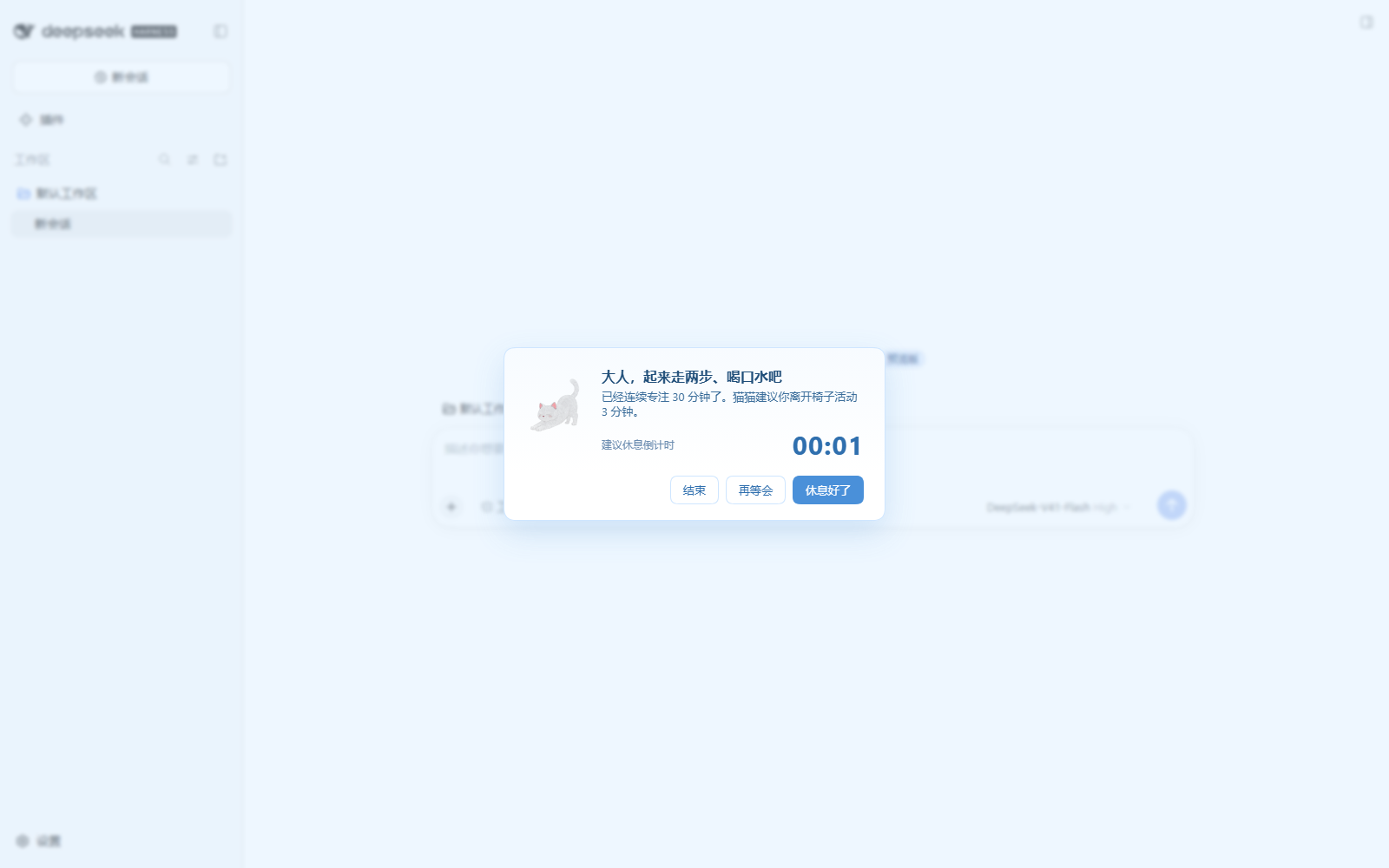
Sit-and-water reminder for DeepSeek Harness, with a cat that sits in the corner of the Web GUI. A focus cycle of 30-90 minutes ends in a centered overlay plus a triple chime that gets you up to walk and drink; the later button answers with one real sourced case about prolonged sitting and one about dehydration (built-in library of 17 entries, each with publisher, date and a link to the original); stopping produces a session report with worked time, completed rounds, successful interruptions, snoozes, suggested drinks and a good/mid/bad grade. The cat can be dragged anywhere with its position remembered and loops one animation per state. The timer and the ledger live in the host half, so a page refresh never loses a cycle; it only reminds while a DSH page is open. Cycle lengths, chime volume, cat opacity and grade thresholds are configurable on the plugin settings page.
Install
# from npm (prebuilt)
dsh plugin --profile web add dsh-no-long-sit
# from GitHub (first run asks for allowBuilds approval — follow the hint, retry)
dsh plugin --profile web add github:wangzhanchao883/dsh-no-long-sit
Any plugin you install runs third-party code with your own permissions — it can read your files, use your credentials, and reach the network, and tool approvals don’t sandbox it. GitHub-sourced plugins also run build scripts at install time — pnpm blocks those until you allow them, so an install can stop with ERR_PNPM_GIT_DEP_PREPARE_NOT_ALLOWED or ERR_PNPM_IGNORED_BUILDS; dsh prints the exact key to add under allowBuilds in your profile’s pnpm-workspace.yaml, and the install works on the next run. Allowing a build is a trust decision: only install sources you trust, and pin a commit (github:owner/repo#sha).
README
A sit-and-water reminder for DeepSeek Harness, delivered by a cat that sits in the corner of the Web GUI. A 30–90 minute focus cycle ends in a centered popup plus a triple chime that gets you up to walk and drink; "later" answers with real sourced cases; "finish" gives you a session report. The cat can be dragged anywhere and loops an animation per state — more capabilities are planned, the reminder is where it starts.
What it does today
The pet
- Bottom-right cat with a looping animation per state:
idle(lying),rise(stretching up),drink(holding a cup),sleep(asleep). Animated WebP, played natively by the browser — no frame timer in the plugin. - Draggable: grab it and drop it anywhere; the position is kept in
localStorage, so it survives a page refresh and a DSH restart. Dragging never opens the menu by accident (a 4 px movement threshold separates a drag from a click). - Pet opacity is configurable (
petOpacity, default0.75). - Missing or half-delivered art degrades to a built-in cat SVG instead of a blank spot.
The reminder (first feature)
- When a focus cycle ends: a centered overlay popup plus a triple chime (synthesized with Web Audio, no audio asset needed; there is a "preview" button in settings).
- Three buttons: 【休息好了】starts the next round · 【再等会】shows cases · 【结束】ends the session.
- When the break countdown finishes it chimes again and asks you to come back; if nobody answers
within
awaitReturnTimeoutMinutes(default 10) the next round starts on its own. - The case window shows exactly one sedentary case and one dehydration case per visit, drawn from a
shuffle bag over a built-in library of 17 entries (each with a real source URL and date): nothing
repeats within a cycle, two consecutive visits never match, and the bag is kept in
localStorage, so a page refresh or a DSH restart continues where it left off instead of starting over at case #1. - The session report gives worked time, completed rounds, successful interruptions, snoozes, suggested drinks and a good/mid/bad grade.
Install
dsh plugin --profile <profile> add dsh-no-long-sit
# restart DSH afterwards: bundle layers are composed at boot
Or from the repository:
dsh plugin --profile <profile> add https://github.com/wangzhanchao883/dsh-no-long-sit
Settings
Settings → Plugins → 猫猫桌宠 · 久坐提醒: address/nickname, focus cycle (30–90 min), break cycle (3–15 min), snooze interval and cap, chime on/off and volume, pet opacity, "come back" timeout, grade thresholds, case refresh, floating pet on/off, and a debug-only time scale. Changes take effect within ~2 seconds.
Two safety valves sit in that card: Restore defaults (two-step confirm — clears every user override in one atomic write and falls back to the schema defaults) and, whenever the debug time scale is below 1, a warning banner with a one-click "back to normal speed" button.
How it works
- Host half (
index.mjs+lib/) owns the authoritative timer and the ledger (<DSH_HOME>/data/dsh-no-long-sit/state.json, atomic writes), the case library, and five read-only routes under/dsh-no-long-sit/. Every route checks for cross-origin calls itself and asset paths go through a whitelist + sanitizer. - Browser half (
client.js) is a classic script (no build step): it registers intoshell.overlay, renders the pet and the three windows, polls the host, and renders the settings card throughctx.configForms. - Timer state is authoritative in the host, so a refresh never loses a cycle; settings are re-read
through
settings.describe()on every entry point, because a settings write does not re-apply a plugin.
Requirements
- DSH
0.1.7–0.2.xwith the Web GUI (webprofile, or the desktop app) - Node.js
^22or>=24
Notes
- The pet only appears while a DSH page is open; when every page is closed there is nothing to pop up on.
- A chime requires one user interaction with the page first (browser autoplay policy) — the plugin unlocks audio on your first click or keypress.
- Case refresh uses the host's web search + host LLM and keeps only entries whose URL came back from the search; if it fails, the old library is kept and the reason is shown in settings.
License
MIT
Links
More in this category
xmanrui/dsh-im★ 3832
Connect IM bots to DeepSeek Harness via QR codes or bot credentials (9 channels: Feishu, WeChat, DingTalk, WeCom, QQ, Slack, Telegram, Discord, and WhatsApp).
shaobeichen/dsh-pocket★ 3187
Remote phone access to the DSH Web UI: scan a QR code for LAN or public (cloudflared tunnel) access with real-time sync, a mobile-adaptive layout, and a settings tab.
c1overzz/dsh-bili-scroll★ 1478
Let your DSH agent browse Bilibili on its own, read subtitles, write a daily digest, and @ you when it finds something worth your attention.
OpenPetsHQ/openpets#dsh★ 1416
Bridges DeepSeek Harness lifecycle status, errors, and approval requests to a locally running OpenPets desktop companion.
inclusionAI/Avernet#deepseek-harness-channel-bcn★ 611
Connects DeepSeek Harness to Avernet's Bot Collaboration Network over WebSocket V2, with automatic onboarding, isolated agent sessions, tool-call events, and multi-bot routing tools.
zaofan-make/dsh-qqbot★ 286
QQ official bot channel (enhanced fork of tencent-connect/dsh-qqbot): full agent chat in groups and DMs, rich media, an auto-tagged sticker library with AI image replies, join approval, mute and broadcast, scheduled wakeups, remote approvals over QQ, interactive cards, multi-account instances, extensions, member profiles, and token-saving value-scored wakeups.
Community comments
Comments are public GitHub Discussions. Loading them connects to GitHub and Giscus; a GitHub account is required to post.