Telemetry backend exporting turns, model steps, and tool calls to yiTrace.
Install
# from GitHub (first run asks for allowBuilds approval — follow the hint, retry)
dsh plugin --profile web add github:vibeinging/dsh-trace
Any plugin you install runs third-party code with your own permissions — it can read your files, use your credentials, and reach the network, and tool approvals don’t sandbox it. GitHub-sourced plugins also run build scripts at install time — pnpm blocks those until you allow them, so an install can stop with ERR_PNPM_GIT_DEP_PREPARE_NOT_ALLOWED or ERR_PNPM_IGNORED_BUILDS; dsh prints the exact key to add under allowBuilds in your profile’s pnpm-workspace.yaml, and the install works on the next run. Allowing a build is a trust decision: only install sources you trust, and pin a commit (github:owner/repo#sha).
README
See what happened inside a DSH conversation.
中文 · npm · Usage guide · Report a bug
A community plugin for DeepSeek Harness. Follow model and tool calls on one timeline, inspect their input and output, and manage optional local Trace recording from Settings.
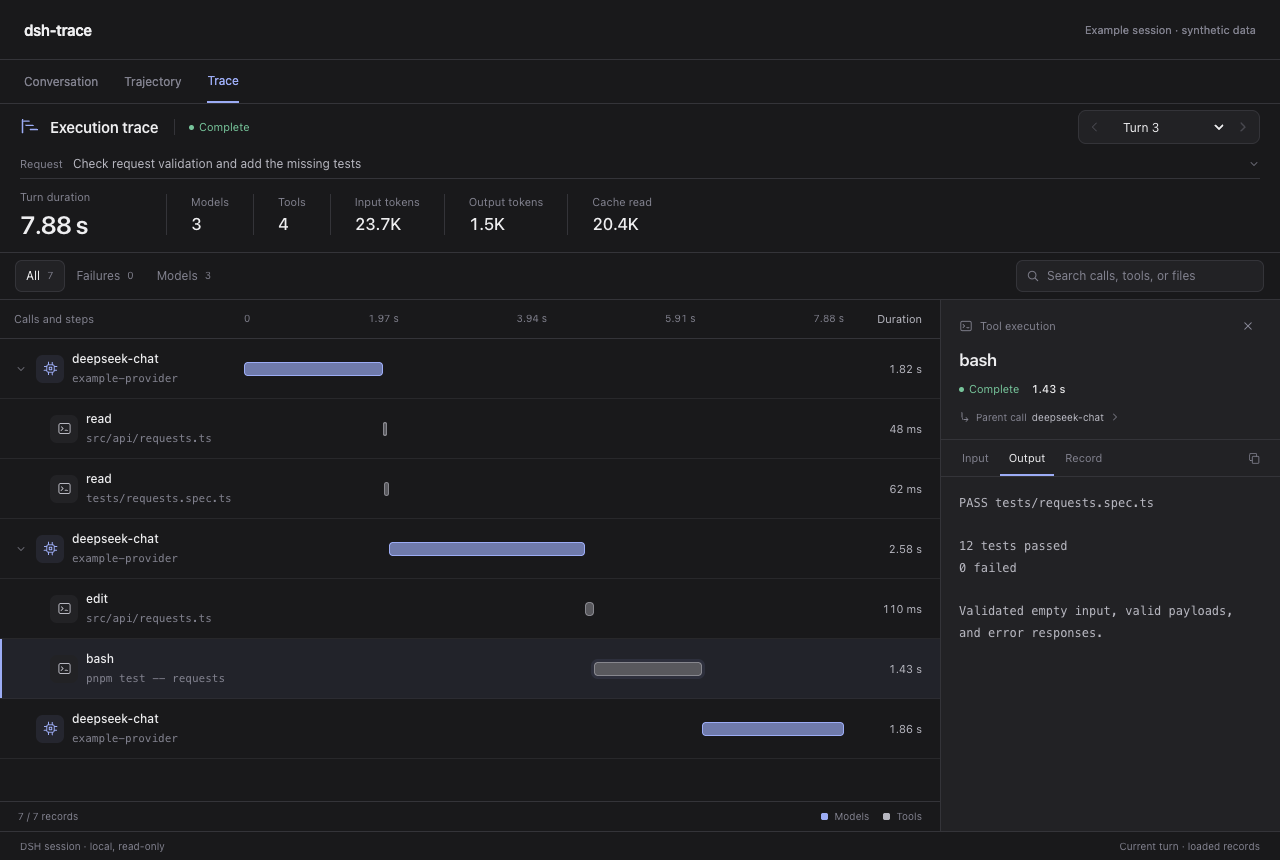
The real Trace components, shown with synthetic example data. Timings and counts are illustrative.
Install
In DSH Desktop → Plugins → Add plugin, enter:
@vibeinging/dsh-trace-viewer
Install and enable it. Open any conversation and select the Trace tab. No source checkout or build is needed.
For a DSH Web profile:
dsh plugin --profile web add -w @vibeinging/dsh-trace-viewer
dsh --profile web
Compatibility: tested with DSH SDK 0.2.1-rc.2, Cordis 4.0.5 and the host's React 18.3.1. Keep the official Trajectory provider enabled. Other DSH versions need verification. If a new Host component stays unavailable, quit DSH normally and reopen it. Close Desktop before managing its profile with the CLI.
Find the part that matters
| You want to… | Use… |
|---|---|
| Find where a turn spent its time | A shared model/tool waterfall with recorded durations |
| Understand a tool call | Its input, output, error and declared parent call |
| Compare a turn's recorded usage | Input/output tokens and cache reads; missing values stay unavailable |
| Find a failed step | Search and failure filters that preserve parent context |
| Follow an active or long conversation | Live updates, turn selection and earlier-history loading |
| Read without the composer taking space | Focus view; drafts are preserved and pending approvals remain accessible |
The viewer reads DSH's existing session data. You can use it immediately, with extra recording left off. It follows the host's theme and Chinese/English language setting.
Control your Trace data
Open Settings → Trace data. The sidebar shortcut is hidden by default; you can enable it there.
- Recording defaults to off. Enabling it records future committed events across the current Host's sessions; it does not backfill history.
- Choose model calls, tools, failures/interruption and compaction separately. Model response text and tool arguments/results are separate, opt-in switches.
- Copies stay under the profile's
data/dsh-trace-viewer/. Default retention is 30 days, checked every 24 hours while the Host runs. - Preview manual cleanup before confirming it. Cleanup skips active or changed segments and only removes this plugin's copies, preserving original DSH sessions.
Content may contain user input or file contents. Content switches affect future writes and are not general redaction rules. Previously recorded content remains until cleaned up. Full settings and data semantics →
Update or remove
Use the same DSH plugin page or profile used for installation:
dsh plugin --profile web add -w @vibeinging/dsh-trace-viewer@latest
dsh plugin --profile web remove -w @vibeinging/dsh-trace-viewer
Removing the plugin does not erase its saved copies. To switch from an earlier local development install, replace its link: dependency with the npm package in the same profile; keep only one copy of this package enabled.
Scope
The workbench covers the current conversation. Cross-session search, run comparison, and browsing/exporting recorded copies are not available yet. Child-agent detail depends on what DSH exposes. It does not change model requests or replace the host's telemetry backend.
Develop and contribute
git clone https://github.com/vibeinging/dsh-trace.git
cd dsh-trace
pnpm install --frozen-lockfile --ignore-scripts
pnpm run check
Node.js ^22.19.0 or >=24.0.0; pnpm 11.7.0. Development · Contributing · Changelog · Security
Independent community project, maintained separately from DSH. BSD-3-Clause; bundled TanStack Virtual retains its MIT notice. The old yiTrace exporter is archived and is not required.
Links
More in this category
yjh051108/dsh-routing-suite★ 6994
One repository, three parts: a runtime injector for DSH plugin packages (inject, hot-reload, unload, promote a dev staging tool to the front, route self-heal, plus a settings-page plugin manager that lists, unloads and drags folders in to internalize), a task-aware reasoning-mode router agent preset (router-standard / router-spec / router-react), and a graded two-level task protocol whose six tools (commit_star, lock_stage, revise_do, edit_plan, mark_task, redteam_verdict) pin task state to disk. The injector implementation ships in-tree, so the install carries its own behaviour rather than a dependency list.
strukto-ai/mirage#dsh★ 3762
Swaps the filesystem and bash providers for a mirage virtual workspace: file tools and shell commands run over mounted resources (RAM, S3, Redis, Slack, Gmail, Notion, Postgres) instead of the host disk, with per-mount read/write/exec modes, per-command sandbox routing (monty, pyodide, quickjs in process; docker, e2b, daytona remote), and installed CLIs (git, gh, slack, linear, ntn, gws, or one you register) as head words in the virtual terminal.
first-fluke/oh-my-agent#dsh★ 1357
Runs project OMA checks before and after tool execution and when a turn tries to finish. Installs its OMA CLI dependency and initializes unconfigured projects on first use. Requires Node.js 22+; initial setup needs network access and project write access.
MichengAI/dsh-skills-manager★ 444
Manages local DeepSeek Harness skills in Settings and shows shared Agent skills as read-only.
hust-open-atom-club/oh-dsh★ 324
Community distribution: TUI, desktop, and Web UI as one bundle with layered installation.
Fishquito7/dsh-skill-mcp-panel★ 248
Manages DSH skills and MCP servers from the web settings: skill cards with hot enable/disable, workspace scopes, groups, batch migration and drag-and-drop import, plus stdio/HTTP MCP CRUD with connection tests, secret redaction and the unified dsh-panel CLI.
Community comments
Comments are public GitHub Discussions. Loading them connects to GitHub and Giscus; a GitHub account is required to post.