Manage environment variables, .env files, and credentials in DeepSeek Harness, including Windows user and system environment variables.
Install
# from npm (prebuilt)
dsh plugin --profile web add dsh-environment-tray
# from GitHub (first run asks for allowBuilds approval — follow the hint, retry)
dsh plugin --profile web add github:songshuhuoban/dsh-environment-tray
Any plugin you install runs third-party code with your own permissions — it can read your files, use your credentials, and reach the network, and tool approvals don’t sandbox it. GitHub-sourced plugins also run build scripts at install time — pnpm blocks those until you allow them, so an install can stop with ERR_PNPM_GIT_DEP_PREPARE_NOT_ALLOWED or ERR_PNPM_IGNORED_BUILDS; dsh prints the exact key to add under allowBuilds in your profile’s pnpm-workspace.yaml, and the install works on the next run. Allowing a build is a trust decision: only install sources you trust, and pin a commit (github:owner/repo#sha).
README
This plugin publishes its README in Chinese only.
在 DeepSeek Harness 桌面版中查看和编辑环境变量、.env 文件和密钥,支持 Windows 用户级与系统级环境变量。
支持版本: DeepSeek Harness 0.2.1-rc.2(插件 0.1.3),同时兼容 0.2.0-rc.2。
安装
- 打开桌面版,进入左侧的 插件 → 添加插件。
- 在 包名或地址 中填写
dsh-environment-tray,点击 安装。 - 安装完成后点击 立即启用。如果提示重启,按提示重启桌面版。
入口
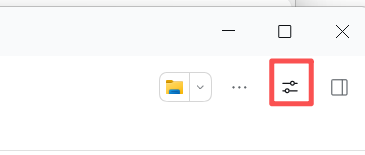
回到会话页面,点击右上角的 环境变量 双滑杆按钮(下图红框)。新会话和已有会话都可以打开。
使用
- 查找变量:在顶部搜索框输入变量名。
- 查看和复制:点击值旁的眼睛或复制按钮。
- 修改值:点击行尾的编辑按钮,按 Enter 或离开该行保存;按 Esc 取消。
- 新建变量:点击顶部加号,填写名称和值、选择保存位置,再点击「新建」。
- 删除变量:点击行尾的删除按钮,确认后删除所选位置中的值。
界面会显示变量的来源和生效状态;修改后如提示需要重启,按提示重启。
Links
More in this category
yjh051108/dsh-routing-suite★ 7028
One repository, three parts: a runtime injector for DSH plugin packages (inject, hot-reload, unload, promote a dev staging tool to the front, route self-heal, plus a settings-page plugin manager that lists, unloads and drags folders in to internalize), a task-aware reasoning-mode router agent preset (router-standard / router-spec / router-react), and a graded two-level task protocol whose six tools (commit_star, lock_stage, revise_do, edit_plan, mark_task, redteam_verdict) pin task state to disk. The injector implementation ships in-tree, so the install carries its own behaviour rather than a dependency list.
strukto-ai/mirage#dsh★ 3942
Swaps the filesystem and bash providers for a mirage virtual workspace: file tools and shell commands run over mounted resources (RAM, S3, Redis, Slack, Gmail, Notion, Postgres) instead of the host disk, with per-mount read/write/exec modes, per-command sandbox routing (monty, pyodide, quickjs in process; docker, e2b, daytona remote), and installed CLIs (git, gh, slack, linear, ntn, gws, or one you register) as head words in the virtual terminal.
first-fluke/oh-my-agent#dsh★ 1481
Runs project OMA checks before and after tool execution and when a turn tries to finish. Installs its OMA CLI dependency and initializes unconfigured projects on first use. Requires Node.js 22+; initial setup needs network access and project write access.
MichengAI/dsh-skills-manager★ 623
Manages local DeepSeek Harness skills in Settings and shows shared Agent skills as read-only.
hust-open-atom-club/oh-dsh★ 324
Community distribution: TUI, desktop, and Web UI as one bundle with layered installation.
Fishquito7/dsh-skill-mcp-panel★ 290
Manages DSH skills and MCP servers from the web settings: skill cards with hot enable/disable, workspace scopes, groups, batch migration and drag-and-drop import, plus stdio/HTTP MCP CRUD with connection tests, secret redaction and the unified dsh-panel CLI.
Community comments
Comments are public GitHub Discussions. Loading them connects to GitHub and Giscus; a GitHub account is required to post.