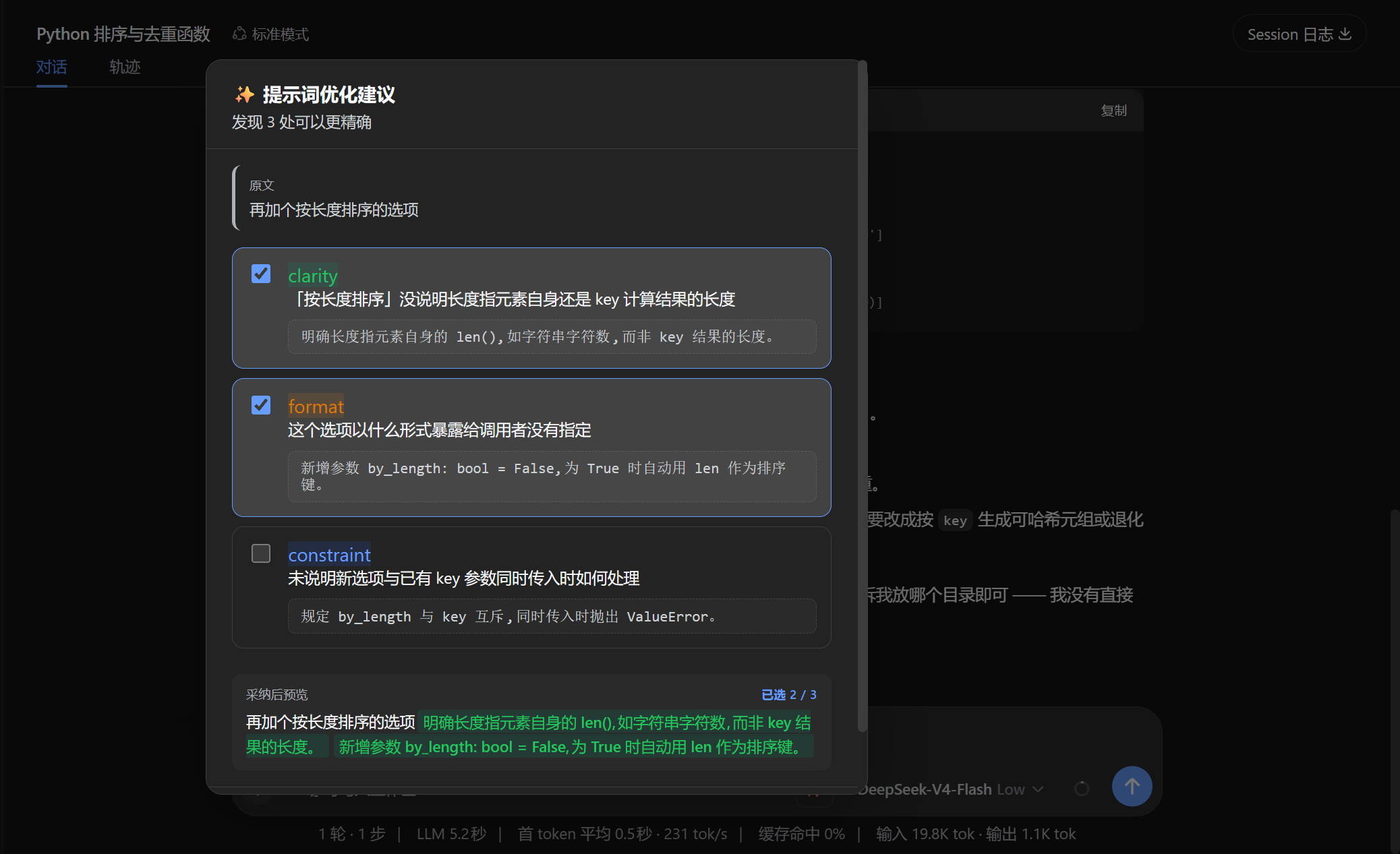
A ✨ button left of the send button: reads the draft and recent turns, asks the configured model for three suggestions each pairing an issue with a patch, lets you tick them individually with a live preview of the merged prompt, and writes the result back to the composer without sending.
Install
# from npm (prebuilt)
dsh plugin --profile web add dsh-prompt-refine
# from GitHub (first run asks for allowBuilds approval — follow the hint, retry)
dsh plugin --profile web add github:sojo-negai/dsh-prompt-refine
Any plugin you install runs third-party code with your own permissions — it can read your files, use your credentials, and reach the network, and tool approvals don’t sandbox it. GitHub-sourced plugins also run build scripts at install time — pnpm blocks those until you allow them, so an install can stop with ERR_PNPM_GIT_DEP_PREPARE_NOT_ALLOWED or ERR_PNPM_IGNORED_BUILDS; dsh prints the exact key to add under allowBuilds in your profile’s pnpm-workspace.yaml, and the install works on the next run. Allowing a build is a trust decision: only install sources you trust, and pin a commit (github:owner/repo#sha).
README
This plugin publishes its README in Chinese only.
DSH 提示词优化插件 —— 在发送前点一下,让模型结合上下文告诉你这条 prompt 缺什么。
它做什么
在输入框发送按钮左侧加一个 ✨ 按钮。点击后:
- 读当前草稿 + 最近几条对话历史
- 调你已配置好的模型(自动读
~/.dsh/settings.yaml的agent-default-model) - 弹窗列出 3 条「问题 + 补丁」 形式的建议
- 勾选想要的 → 实时预览合并后的 prompt
- 点「采纳 N 条并填入」→ 新 prompt 写回输入框
不抢你的发送权:填好后你自己按发送。Esc / 点遮罩 / 「跳过」都能随时退出。
为什么是「补丁」而不是「重写」
建议保留你原话,只补缺口:
原文    写个排序

scope     未说明排序对象 → 对一组整数数组进行升序排序。
format    未指定语言签名 → 请用 Python 实现,函数签名 sort_list(nums)。
constraint 缺边界约束     → 要求 O(n log n),处理空数组与重复元素。
三条可以同时采纳,不用三选一。
安装
方式一:npm 安装(推荐)
cd ~/.dsh/profiles/web    # 换成你要装进去的 profile
pnpm add dsh-prompt-refine
包内自带 dsh.bundle.patch 声明,安装后把 dsh-prompt-refine 加进该 profile package.json 的 dsh.profile.bundles 数组即可激活,然后重启 DSH。
方式二:源码安装(开发用)
pnpm install
pnpm build

# 装进 web profile
node scripts/install.mjs --profile web
rm -rf ~/.dsh/profiles/web/node_modules/dsh-prompt-refine
(cd ~/.dsh/profiles/web && pnpm install --force)
运行(开发模式)
# 在 deepseek-harness 仓库根目录
pnpm dsh web --patch ./dsh-prompt-refine/cordis.yml --no-open --port 0
或者用附带的脚本(自动杀旧实例 + 重启 + 打印新 URL):
bash scripts/dev-restart.sh
模型配置
v0.1 无需配置 —— 自动读用户 settings.yaml 里的 agent-default-model,
跟随你平时用的模型。改模型只改那里。
v0.2 计划:插件自己的设置页,可单独指定"优化用的模型"(比如用便宜的快模型)。
文件结构
src/
  dsh-prompt-refine.ts   host 入口
  host.ts                HTTP 端点 + ctx.llm 调用 + 降级
  shared/types.ts        请求/响应形状
  shared/prompt.ts       system prompt + JSON 解析
  client.ts              ✨ 按钮 + Portal 弹窗
scripts/
  install.mjs            装进 profile
License
MIT
Links
More in this category
Tencent/WeKnora#dsh-weknora★ 35688
Four read-only tools over a WeKnora knowledge base: list knowledge bases, hybrid passage search, reassemble one document's chunks in order, and WeKnora's own cited RAG or ReAct-agent answer with a resumable session id.
superdesigndev/treg★ 6403
Tool catalog for agents: search ~2,600 external endpoints (SEO and SERP, backlinks, social, people and company enrichment, ad libraries, scraping) by the task you want done, read each one's parameters and per-call price, then call it with the credential injected server-side. Ships the skill plus an MCP row that stays disabled until TREG_TOKEN is set.
T-Auto/dsh-ops★ 4593
Provides bash, PowerShell 7, and high-performance Rust tools for DSH on Windows to reduce token usage.
sixtysevenlf/dsh-blender-plugin★ 1388
Lets a DSH agent drive a local Blender over a direct TCP channel with 15 tools: viewport frames, custom-angle renders, Python execution, headless and job offload, transaction rollback, and a planning layer of 228 ops across 34 families.
TencentCloudBase/CloudBase-AI-Toolkit#dsh-plugin★ 1152
Tencent CloudBase backend for DeepSeek Harness — scaffold and deploy full-stack apps from chat, render query results as table cards with paging, sorting and CSV export, preview a deployment on its domain, and call the CloudBase MCP toolset (`mcp__cloudbase__*`) with device-code login.
anysearch-team/anysearch-dsh★ 665
AnySearch-powered real-time web and vertical search provider for DeepSeek Harness.
Community comments
Comments are public GitHub Discussions. Loading them connects to GitHub and Giscus; a GitHub account is required to post.