Collapse sidebar plugin entries into named groups, each group taking one row that expands and collapses its members in place like a two-level menu.
Install
# from GitHub (first run asks for allowBuilds approval — follow the hint, retry)
dsh plugin --profile web add github:skj1023/dsh-sidebar-groups
Any plugin you install runs third-party code with your own permissions — it can read your files, use your credentials, and reach the network, and tool approvals don’t sandbox it. GitHub-sourced plugins also run build scripts at install time — pnpm blocks those until you allow them, so an install can stop with ERR_PNPM_GIT_DEP_PREPARE_NOT_ALLOWED or ERR_PNPM_IGNORED_BUILDS; dsh prints the exact key to add under allowBuilds in your profile’s pnpm-workspace.yaml, and the install works on the next run. Allowing a build is a trust decision: only install sources you trust, and pin a commit (github:owner/repo#sha).
README
This plugin publishes its README in Chinese only.
把 DeepSeek Harness 左侧侧边栏里的插件入口,折叠成你自己定义的分组。
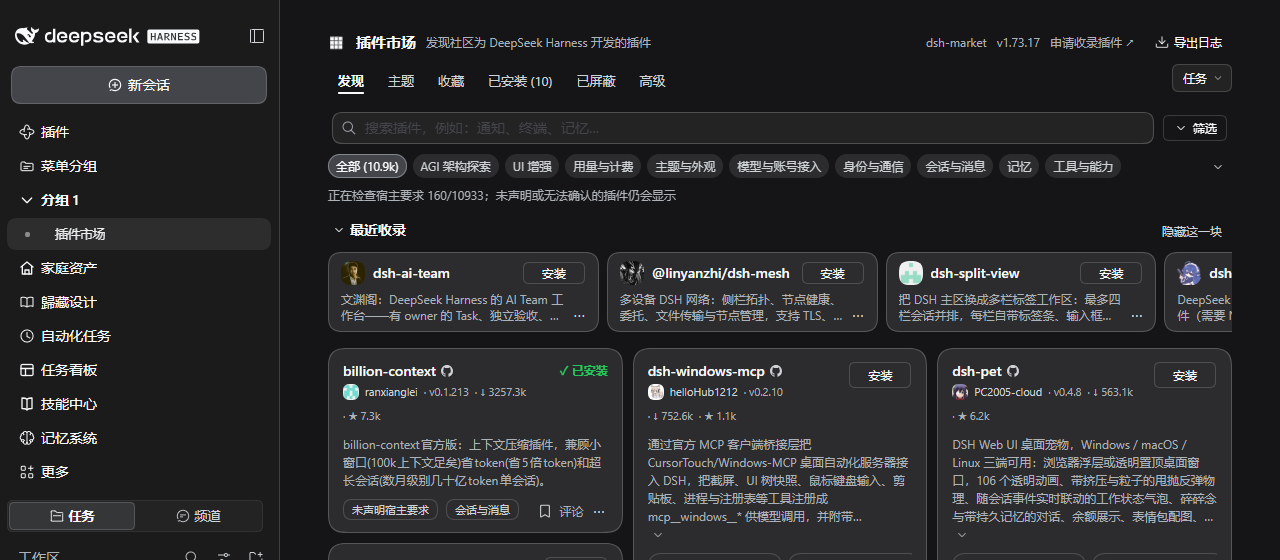
插件本身在侧边栏加两样东西:
- 「菜单分组」入口:打开管理页,可以配置这一行显示还是隐藏。
- 每个开启了「在侧边栏显示这一组」的分组,各占一行。分组行下面缩进显示成员,点分组行就地展开 / 收起,像一级、二级菜单。
安装
dsh plugin add github:skj1023/dsh-sidebar-groups
安装后刷新页面,侧边栏会出现「菜单分组」入口。需要 DeepSeek Harness 0.2.x(Web 侧栏)。
用法
- 侧边栏点「菜单分组」。
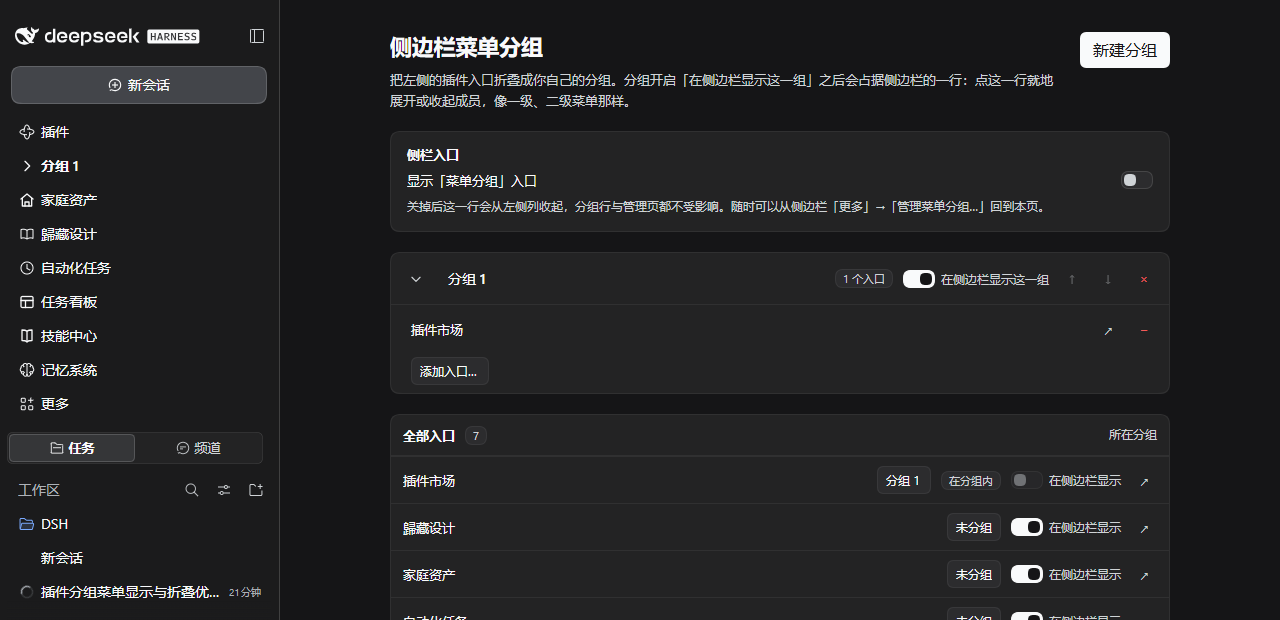
- 点右上角「新建分组」,给分组起个名字(直接点分组名就能改)。
- 在分组卡片的「添加入口...」里选一个插件;或者在「全部入口」表格里,用每一行的「所在分组」下拉把它归到某个分组。
- 打开分组卡片上的「在侧边栏显示这一组」,侧边栏立刻多出一行:点它、或点行首的箭头,就在原地展开 / 收起这一组的成员,不会切走当前页面。
- 「全部入口」表格里的「在侧边栏显示」开关,用来把不常用的、没进分组的入口从侧边栏收起来。
- 点分组里的成员行,和点普通入口一样打开对应插件页面;当前打开的那一项,圆点会变成主色,方便对照。
两点需要知道
- 「菜单分组」入口自己也能藏:管理页顶部「侧栏入口」里关掉「显示『菜单分组』入口」,那一行就从左侧列收起。要回来时,点侧边栏「更多」→「管理菜单分组…」。
- 配置存在浏览器本地存储:换端口或清理站点数据会丢。管理页底部的「备份」可以把配置导成 JSON,换环境时再贴回去导入。
实现说明
宿主的侧栏行由 ui-sidebar 渲染,插件拿不到行内容,也没有可插入自定义行的槽。所以分组成员是这样「收进」分组行的:
- 用一条注入到
<head>的样式,按行文字把成员的原生行display:none([data-sg-*]标记识别本插件自己的行)。 - 兼容两代宿主:0.1.x 的行按钮是
nav > button;0.2.x 起每行是div.panelEntry > button.panelRow(宽栏还多一个「取消固定」按钮)。样式统一用nav div:has(> button[aria-label=…])定位行容器,不依赖压缩后的类名。 - 展开时由插件注册
sidebar-groups:m:*子行,插在分组行下面,图标列换成小圆点、文字缩进一级。 - 分组行整行的点击在
document的 capture 阶段被截下,拦在宿主selectPanel之前,用来切换展开状态。 - 插件自己注册的行(分组行、成员行、管理入口)不显示宿主的「取消固定」按钮,显隐统一由插件配置决定。
这套做法不依赖「更多」菜单的 pin 接口,刷新后立即生效。
文件
index.js:宿主侧入口,空实现(这个插件只在客户端工作)。client.js:全部界面与逻辑。cordis.patch.yml:把插件插进 profile 的 bundle 补丁。locale/zh.json、locale/en.json:插件市场里显示的名字与说明。icon.svg:插件图标。
Links
More in this category
zhu1090093659/dsh-web#packages/dsh-task-board★ 10458
Task board for the dsh web GUI: a sidebar multi-column kanban whose cards run in real DSH agent sessions and can also be scheduled with cron expressions, executed host-side even with the browser closed.
zhu1090093659/dsh-web#packages/dsh-web-all★ 10458
Plugin and skin collection for the DSH Web UI: task board, Git graph, right-side panel, remote mobile UI, pet, live token stats, and a skin center.
ccch1mneyyy/dsh-TUI★ 7797
Claude Code-style full-screen terminal UI: pixel-whale header, live status line, and streaming thought expansion.
MeteorNOX/DeepSeek-Balance-Whale-Widget★ 7271
A fixed-corner whale widget for the DSH web GUI — balance, today's usage and per-turn cost with peak/off-peak pricing, editable balance-alert and daily-budget bubbles, a module-based custom bubble queue with A/B weighted choices and random lines or images, 30+ vendor templates (OpenAI, OpenRouter, Kimi, SiliconFlow, Ark, Zhipu, MiniMax and more) with per-model balance and subscription quota, plus task-end sound, imported audio, custom roles and a resource manager. Local-only, no telemetry.
omdsh-dev/DSH-better-sidebar★ 5191
Full sidebar workbench with file rendering and editing, terminal, Git, and subagents; third-party plugins can register new tabs.
omdsh-dev/dsh-genui★ 1007
Interactive UI components rendered inline in replies: layout, charts, forms, quizzes, mermaid, 3D scenes, and an action event loop back to the model.
Community comments
Comments are public GitHub Discussions. Loading them connects to GitHub and Giscus; a GitHub account is required to post.