A Chrome-dino-style runner for the DeepSeek Harness Web UI: play while the agent replies, score from 梁子 to 梁圣 on a persistent progress strip.
Install
# from npm (prebuilt)
dsh plugin --profile web add dsh-running-liang
# from GitHub (first run asks for allowBuilds approval — follow the hint, retry)
dsh plugin --profile web add github:skiuniverse/dsh-running-liang
Any plugin you install runs third-party code with your own permissions — it can read your files, use your credentials, and reach the network, and tool approvals don’t sandbox it. GitHub-sourced plugins also run build scripts at install time — pnpm blocks those until you allow them, so an install can stop with ERR_PNPM_GIT_DEP_PREPARE_NOT_ALLOWED or ERR_PNPM_IGNORED_BUILDS; dsh prints the exact key to add under allowBuilds in your profile’s pnpm-workspace.yaml, and the install works on the next run. Allowing a build is a trust decision: only install sources you trust, and pin a commit (github:owner/repo#sha).
README
English | 中文
Poor folks play cars, rich folks play watches, the richest play Liangda Runner. 穷玩车,富玩表,顶富就玩梁大快跑。
Developed 100% via vibe coding by DeepSeek Harness + DeepSeek-V4-Flash. For fun only.
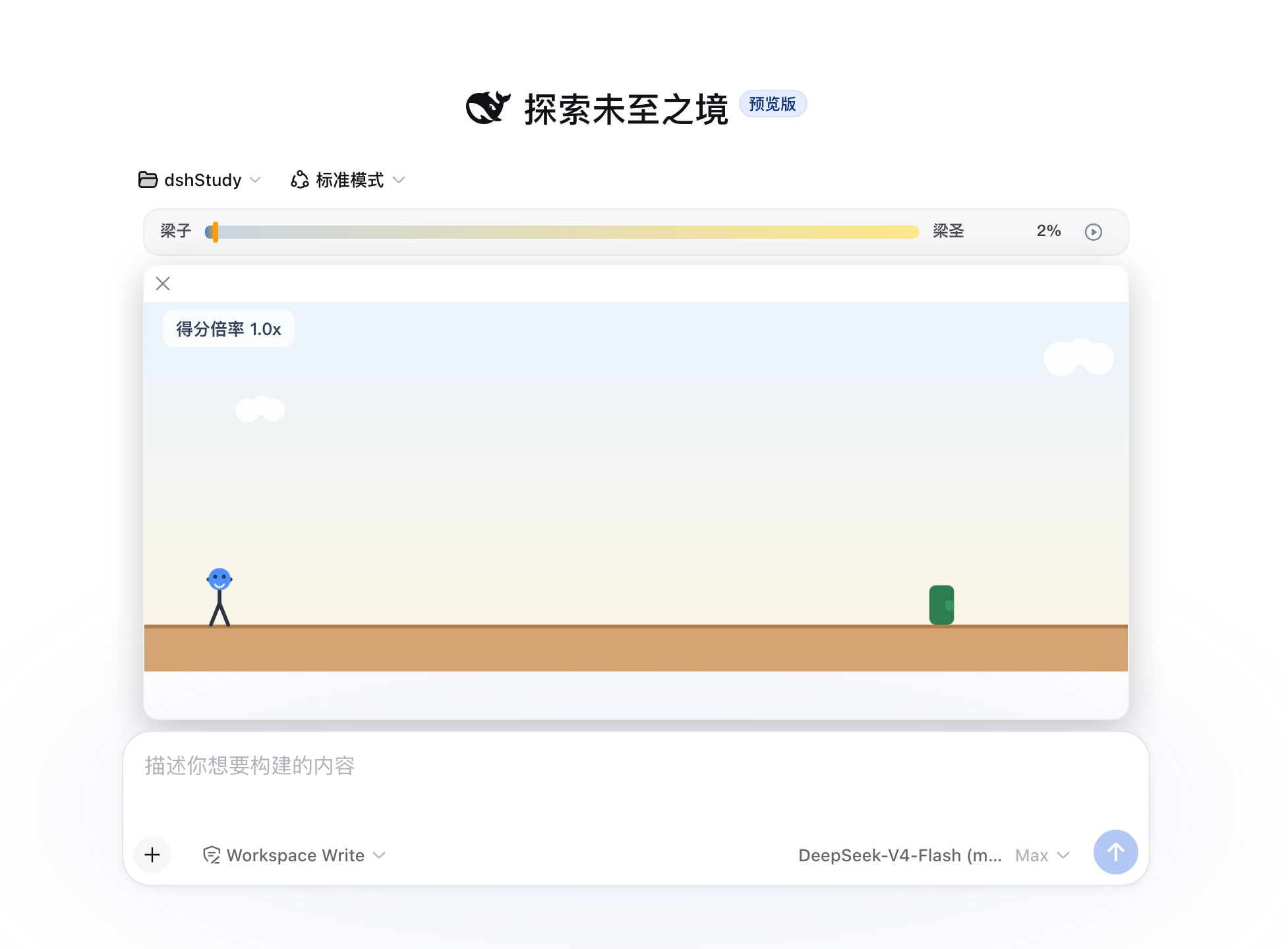
A Chrome-dino-style mini-game for DeepSeek Harness Web: while the agent is replying, a progress strip sits above the input bar (same row as the goal bar) with a play key — click it, run, jump (Space/↑), duck (↓), score from 梁子 toward 梁圣, and watch the progress bar survive the game and every reply.
Inspired by Chrome's Dino Run — the offline T-Rex Runner game shipped in the Chrome browser (Chromium project).
Install
dsh plugin --profile web add dsh-running-liang
or GitHub-only:
dsh plugin --profile web add skiuniverse/dsh-running-liang
Restart dsh web, send a message, and press the strip's play key.
How it plays
- Waiting window: the strip (and the game once expanded) lives while the session is running; on turn end the game pauses with a brief overlay, then collapses back to the strip.
- Fold = pause: clicking the play key (or ×) folds the panel and pauses — expanding again reopens PAUSED; any key or a click on the surface resumes. Collapsing never resets speed or score.
- Blur-pause: focusing the input OR clicking anywhere outside the game panel pauses; keys only control the game while focus is outside input fields.
- Speed tiers: every round (turn) restarts at tier 0, climbing one tier every 15 s of game time up to tier 4 (1.0/1.2/1.5/2.0/2.5× speed; 1.0/1.2/1.5/2.5/5.0 pts per second — the HUD shows the score rate). Hold the jump key for longer airtime; duck in the air to fall faster.
- Obstacles: cacti/rocks on the ground; low and high flying birds from tier 3 — jump the low ones, duck the high ones.
- Death: collision shows a settlement screen — the remaining progress to 梁圣 (x%) or the 梁圣 seconds you had survived (x.xxs); any key (or a click) restarts. Score, tier and saint status reset on restart.
- 梁圣: reach the threshold (default 150) and the strip shows
100% · <seconds>— surviving seconds since reaching 梁圣 in this round (not a lifetime total).
Avatar
- Built-in default: a stick figure with a DeepSeek-whale face, shipped in
assets/avatars/. - Custom: drop images into
~/.dsh/plugins/dsh-running-liang/avatars/(created on demand) or upload them from Settings → Plugins → plugin configuration → Liangda Runner. Pick any avatar there; a missing file falls back to the default.
Configuration
In Settings → Plugins → plugin configuration → Liangda Runner: threshold (梁圣 threshold, default 150), tierInterval (seconds per tier, default 15), allowIdlePlay (test switch: allow starting the game while the agent is idle), and customizable jump/duck keys (jump defaults Space, ↑ always jumps too; duck defaults ArrowDown). The tier table and physics are fixed constants.
Development
npm install
npm run typecheck   # tsc --noEmit
npm test            # vitest (engine / tiers / layout / store / render / avatar-files)
npm run build       # lib/index.js (host) + lib/client.js (browser bundle)
npm run check       # pre-publish self-check
Architecture notes: the client registers into the official DSH slots — conversation.input.dock (the strip + growing game panel, same flow as the goal bar) and settings.plugin.item (the settings card under Plugins → plugin configuration). The settings-card registration carries the legacy list id and the current keyed-slot key; the host serves the matching settings namespace so current DSH versions can discover the card. The host also registers a webServer route /dsh-running-liang/avatars (list / serve / upload). Long-lived state remains in localStorage; avatar files live on disk so they survive browser storage wipes.
License
MIT — see LICENSE.
Links
More in this category
PC2005-cloud/dsh-pet#dsh-pet★ 832
Desktop pet for the DSH Web UI with 25 transparent animations, screen wandering, click reactions and drag, plus a reproducible asset-generation pipeline.
Nagi-ovo/dsh-ads★ 636
Parody ads in 2005-Chinese-web style: sidebar banners, in-chat feeds, corner popups, and a close button whose hit area is smaller than it looks. All fictional.
vlln/whale-girl★ 338
Desktop pet (QQ-pet style): floats in the corner, draggable, feedable, playable.
a86582751/dsh-nexttavern★ 119
Roleplay workspace for DeepSeek Harness: import SillyTavern/TauriTavern character cards or author one from scratch through an interactive flow; turn a long TXT novel into a playable card with either an intensive or a coarse reading pass; the main agent consults worldbooks on demand, and prose is read in a dedicated tavern reader tab; explore multiple worldlines inside one conversation (regenerate, edit-and-send, explicit clone); scoped style presets with 16 built-in styles, a character agent cluster, a standalone decision card, and card or novel export; long stories hold together through a frozen settings prefix, a hard-cut context window, traceable director notes and keyword/semantic/hybrid recall, with embeddings either online or fully local. Targets Harness 0.1.2-alpha.3 and applies its documented compatibility patches.
yyh-001/dsh-meme★ 112
Chat meme stickers: text-only send, mood auto-send, QQ/WeChat-style picker, auto-learn, custom packs.
Sutera-Diffusus/dsh-whale-musume★ 89
A whale-girl desktop pet for the DeepSeek Harness Web UI: pat-to-raise growth, work-state poses per tool type, 494 dialogue lines, 30 achievements, a growth diary, drag physics, theme sync and an accessibility mode. Chat-keyword sensing and API-balance care ship off and are opt-in; an optional weather mood calls Open-Meteo only after you name a city. No telemetry.
Community comments
Comments are public GitHub Discussions. Loading them connects to GitHub and Giscus; a GitHub account is required to post.