Reviews every file the agent wrote in a session from the session header, with per-file hunks and refused writes counted apart from changes.
Install
# from npm (prebuilt)
dsh plugin --profile web add dsh-what-changed
# from GitHub (first run asks for allowBuilds approval — follow the hint, retry)
dsh plugin --profile web add github:sjh9714/dsh-what-changed
Any plugin you install runs third-party code with your own permissions — it can read your files, use your credentials, and reach the network, and tool approvals don’t sandbox it. GitHub-sourced plugins also run build scripts at install time. Only install sources you trust, and pin a commit (github:owner/repo#sha).
README
See what the agent actually changed. Every file it wrote in this session, in one panel, before you decide to commit.
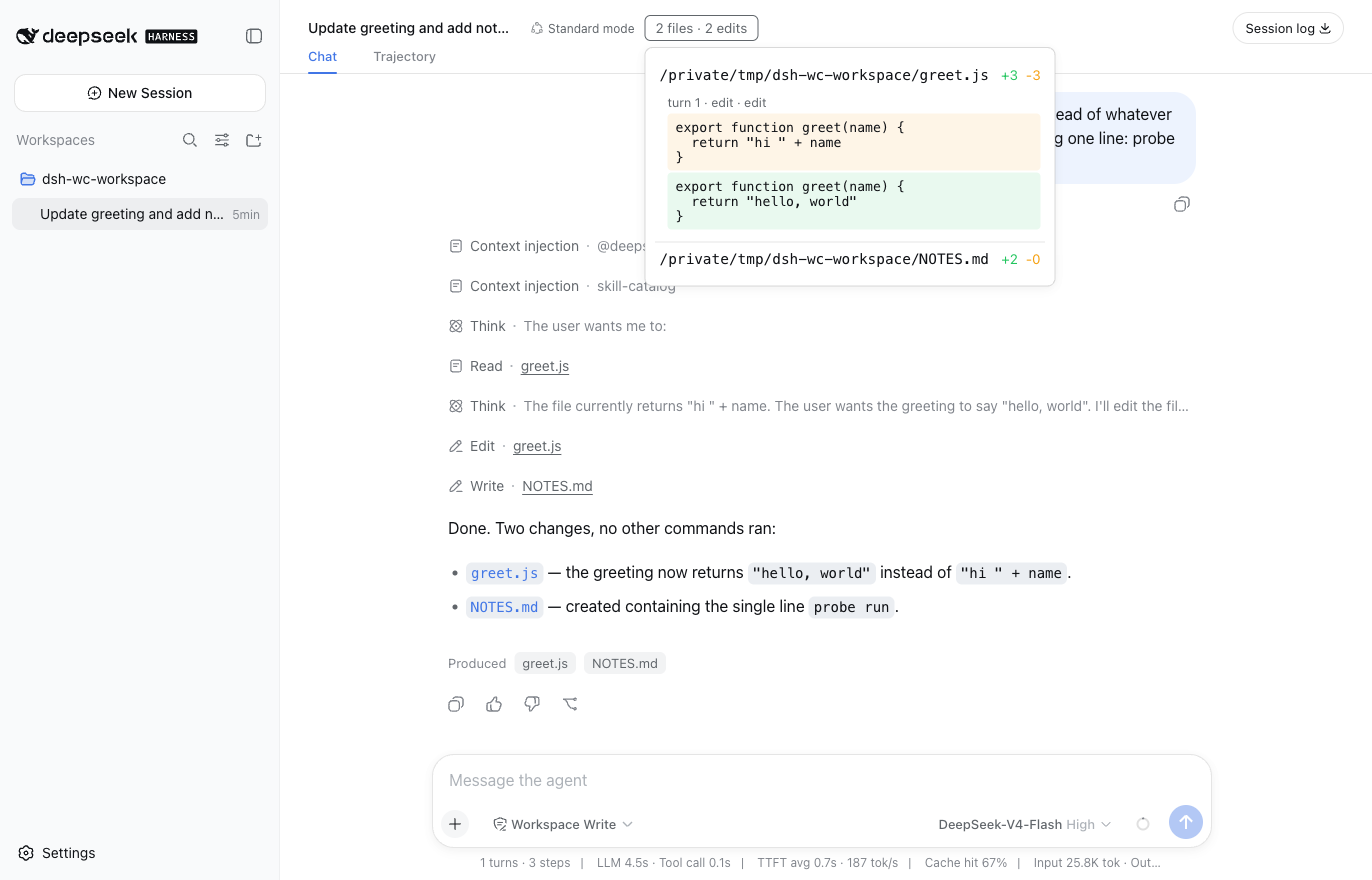
A real dsh web session, not a mockup. The 2 files · 2 edits in the header is this plugin, and that is what it opens to.
The sentence this answers
The most upvoted request in the DSH discussions is #172 with 163 upvotes, against 46 for the runner-up. It asks for a standalone client, a CLI and a VS Code extension. The two most upvoted replies under it are not about interfaces.
这个WEB版本总是看不见它编辑了啥代码,总感觉怪怪的 (In the web version I can never see what code it edited. It feels wrong.)
还是喜欢用cli模式,web太黑盒了 (I still prefer CLI mode, the web is too much of a black box.)
The reason people want a CLI is that they cannot see what the agent did to their code. The DeepSeek team already replied in that thread that a client and CLI are coming, so those are not the community's to race. "What did it change" is a separate question, and nothing answers it.
Per-call diff cards already render. What is missing is the thing you actually want before committing: across this whole session, which files ended up changed.
Install
dsh plugin --profile web add dsh-what-changed
A button appears in the session header with the file and edit counts. Clicking it opens the panel.
Installing mid-session works. That property is the seam's rather than ours: a projection registered after events have flowed folds over the whole log on first read. So installing after the agent has already done the work still answers for the work.
What it insists on
A refused write is not a change. An edit the permission fence rejected never reached the workspace, and showing it as a change would recreate the problem this plugin exists to remove. Refusals are counted against their file and stay out of the edit total.
A request is not a result. A tool/result may carry the diff the tool actually wrote, and that is used when present. str_replace_editor, the editor the Minimal preset mounts, ships none, so the call arguments are the fallback. Every edit records which of the two it came from and the panel says so, in as many words, as asked, tool reported no applied hunk.
It speaks your language. Every string on the button and in the panel goes through the shell's own locale seat, with Chinese and English dictionaries that follow the language you picked in settings. The two key sets constrain each other, so a key added to one and forgotten in the other is a compile error.
Zero is shown. "It changed nothing" is an answer. A button that disappears reads as a broken plugin.
An incomplete answer says it is incomplete. The agent writes through the shell too, and a shell's tool/result carries no file information at all, so which files it touched is not knowable from the event stream. Commands that look like writes are counted and the panel says how many are missing, with the button marked incomplete. Paths are never guessed. Reading them out of a command line takes one quote, pipe or variable expansion to be wrong, and a wrong path is worse than an admitted gap. Raised by #1, where the reporter's point was that this is the common path and not an edge case. Measured over eleven real sessions on one machine, the split was bash 12, write 3, read 1, with str_replace_editor and edit never called at all.
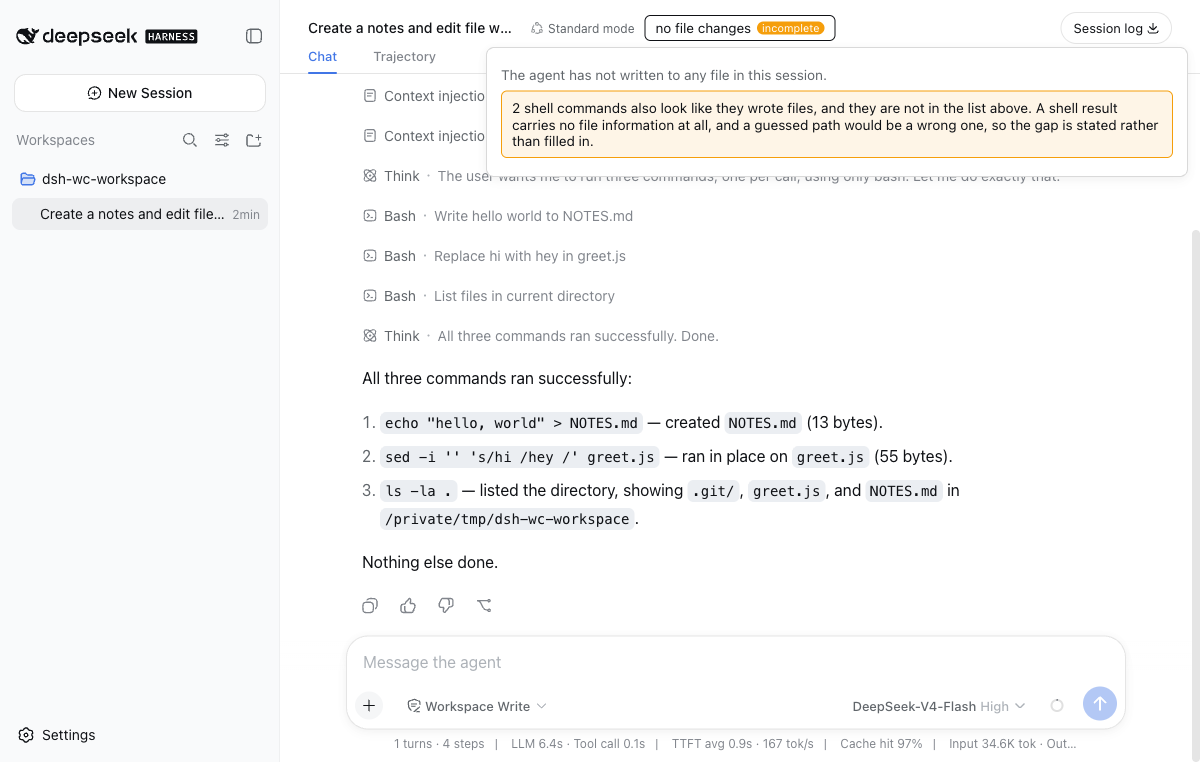
That session ran three bash calls, echo > NOTES.md, sed -i and ls -la. Two counted, the listing did not. Before this change the same screen read no file changes and stopped there, with two files changed on disk.
And then it answers the question properly. Counting the gap was the honest floor; naming the files is what you actually wanted. The panel also reads the workspace against HEAD, which does not care which tool wrote, and it is a separate section on purpose. The two readings disagree in both directions and each disagreement is information. git sees what a shell wrote and the fold cannot, while the fold sees a write that was later reverted and git cannot. Merging them into one number would hide both.
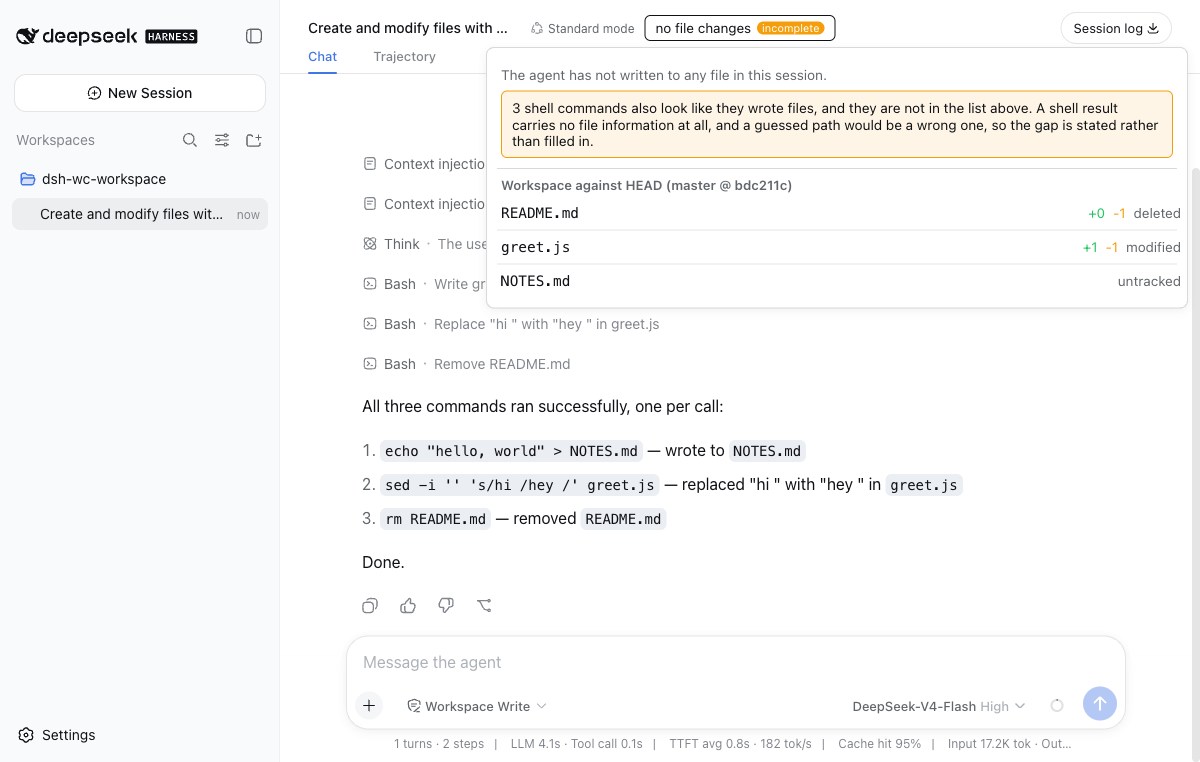
Same idea, one more command. The agent ran echo > NOTES.md, sed -i and rm README.md, all through bash. The fold admits three shell writes it cannot name, and git names all three with their line counts.
The route is POST /what-changed/worktree, loopback only, POST only, application/json only, and the path the browser names is canonicalized and matched against the workspace registry before git runs anywhere. It only ever reads.
How it gets the data
No core file is modified, no on-disk log is parsed, no events are subscribed to here.
It registers a unit with ctx.sessionProjections, the session-projection seam, whose own documentation says plugins register under ctx.inject(['sessionProjections'], …). In a composition without that capability the body never runs and the client reads capability absence rather than an error.
The browser half does one thing: mount a button into conversation.session.header.actions and read the value through the framework's useProjection seat. It folds nothing and subscribes to nothing.
Honest status
Run in a real dsh web, in a real session, against a real model. The screenshot above came out of that run.
What that run confirmed:
- the button mounts in the session header and the count tracks the agent live, going from
no file changesto2 files · 2 edits - the numbers are right. The agent did edit
greet.jsand did createNOTES.md - restarting
dsh weband reopening the same session gives the same counts. The fold is recomputed from the persisted log rather than from anything held in memory - the panel uses the shell's own color tokens and holds together in both the light and the dark theme
- the expanded view shows the hunk the tool actually wrote, not the call arguments. The
edittool does ship an applied hunk in thetool/resultmeta, which is why that row carries noas askedmarker. Unit tests can only fake that branch - switching the language in settings from English to Chinese reskins the button and the panel on the spot, with no reload
Two things only the live run found. Both are fixed.
The first took down every plugin's UI. The first client artifact was ordinary ESM from tsc:
Failed to load plugins
bundle .../client.js loaded without registering "dsh-what-changed" via __ModuleLoader__.load
Not this plugin failing to show, all of them. Nineteen green tests, a clean typecheck and a composed config tree all said otherwise. The fix is esbuild to CJS wrapped in window.__ModuleLoader__.load({ id, factory }), with react and the framework packages left external for the loader module table to answer.
The second was where the panel landed. It is position:absolute and had no positioned ancestor of its own, so it took the flex header's static-position corner, floated to the top of the window and lost its first rows off-screen. Fixing that exposed the other half: right-anchored at 680px it ran back underneath the workspace sidebar and the paths were cut to space/greet.js. It now anchors to the button's left edge and sizes to its content. jsdom lays nothing out, so neither of these is visible to a test.
Verified at the unit and integration level:
- the real registry drives the unit and the zod schema validates the view on the way out
- registering mid-session yields the whole log (asserted, not quoted from the docs)
- an unregistered unit reads
undefinedand the client rendersnullrather than throwing - refused writes stay out of the edit total
Eight contract details were guessed wrong first and corrected against the source. Two of them fail silently, in that they compile, they run, and the panel is empty forever.
callIdlives atmessage.source.callId, notmessage.callIdtool/callmust not carry asurfaceOp;tool/resultmust. Both directions throw
The second only surfaced once the tests ran against a real SessionStore. Unit tests cannot see it, because they feed apply() directly.
Limitations
- Three writing tools are listed by file,
str_replace_editor,writeandedit. A plugin that ships its own writer is not among them. Shell writes are counted but never attributed to a path, for the reason above - Line counts come from the text a call carried, not from a line-level diff
- The session list shows what the agent wrote through tools. The workspace section shows how the workspace differs from
HEAD, which includes your own edits and anything else on disk, so the two answer different questions on purpose
License
MIT
Links
More in this category
Anionex/dsh-turn-rewind★ 77
Rewind conversation and workspace state, powered by a persistent Change Ledger.
Nwflower/dsh-chat-import★ 57
Import full-fidelity chat histories from 13 coding agents (Claude Code, Codex, ChatGPT, Cursor, Gemini, opencode, and more) as resumable DeepSeek Harness sessions, with reverse export back to Claude Code.
whyihaveyou/dsh-suite#plugin-session-export★ 39
Export the append-only session log as human-readable Markdown or HTML, grouped by trajectory source.
Chinesezjc/dsh-interconnect★ 30
Cross-instance message and event handoff between DSH instances via an interconnect server.
Moeblack/dsh-message-edit★ 30
Branch-based message editing, reroll, retry, and a version timeline.
hellodigua/dsh-share★ 23
Share your conversations with one click.