Daily news digest from 46 curated RSS sources, edited by the model already configured in dsh, delivered to your IM via webhook, and broadcast in the chat like a regular model reply with zero context cost.
Install
# from npm (prebuilt)
dsh plugin --profile web add dsh-rss-daily
# from GitHub (first run asks for allowBuilds approval — follow the hint, retry)
dsh plugin --profile web add github:shangjian2023/dsh-rss-daily
Any plugin you install runs third-party code with your own permissions — it can read your files, use your credentials, and reach the network, and tool approvals don’t sandbox it. GitHub-sourced plugins also run build scripts at install time — pnpm blocks those until you allow them, so an install can stop with ERR_PNPM_GIT_DEP_PREPARE_NOT_ALLOWED or ERR_PNPM_IGNORED_BUILDS; dsh prints the exact key to add under allowBuilds in your profile’s pnpm-workspace.yaml, and the install works on the next run. Allowing a build is a trust decision: only install sources you trust, and pin a commit (github:owner/repo#sha).
README
One line: every morning, dsh quietly prepares an editor-grade news digest for you — curated from 46 RSS sources by the model you already configured, delivered to your IM, and broadcast in the chat like a regular reply (zero context cost).

What it looks like
The digest shows up inside your conversation, styled exactly like a model reply — plain markdown, same typography, same width:
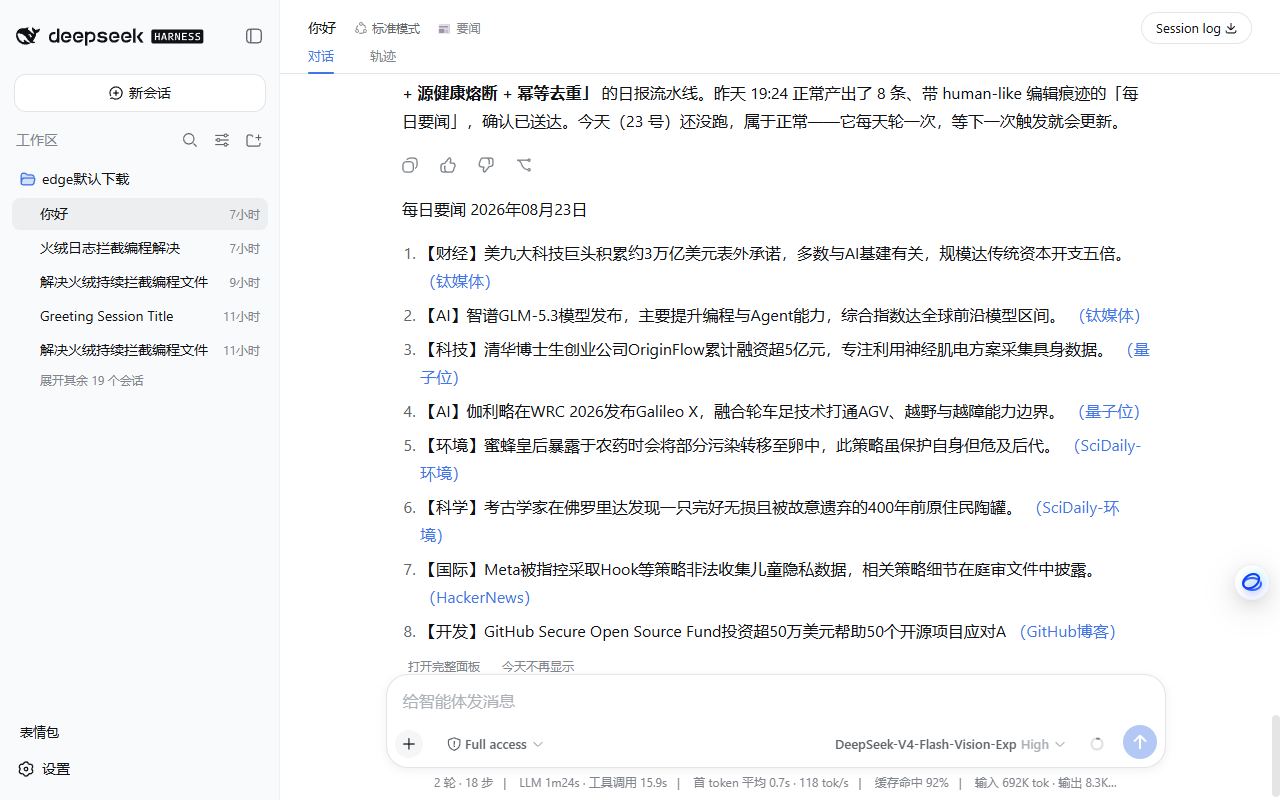
It's frontend-only: displayed in the chat, but never written to the session log and never sent to the model. Your context stays clean.
Why you'll like it
- It reads like an editor picked it, not an aggregator. ~20 candidates are scored (source tier × recency × signal words), deduplicated (Jaccard + 14-day MD5 history), cross-checked against a multi-source event graph, then handed to your own dsh model for the final edit: merge same-event reports, drop PR filler, balance topics (max 2 per tag), and compress each item into one concrete fact line (≤45 chars).
- Zero extra API keys. The editorial pass goes through
ctx.llm— whatever model your dsh already runs. No new credentials, no extra bill. - It never misses a day. If the model call fails, the digest degrades to a deterministic rule-based selection automatically. If dsh was down at the scheduled time, it catches up on next boot (within 12 h).
- It comes to you. Webhook delivery to ServerChan / PushDeer / WeCom / Telegram / Bark / gotify / any custom endpoint. At least one success counts as delivered.
- Production-grade pipeline. Ported from a personal script that has run daily since June 2026 through 9 revisions: per-source health tracking with adaptive timeouts, feed mojibake repair, full-text enrichment for thin summaries, a 420 s hard budget (SIGALRM on POSIX; on Windows via per-request timeouts plus soft budget checks), and idempotent two-phase send (fetch → outbox → deliver → confirm).
Quick start
# from npm (recommended)
dsh plugin --profile web add dsh-rss-daily

# or from GitHub
dsh plugin --profile web add github:shangjian2023/dsh-rss-daily
Restart dsh web. Every conversation header gets a 📰 button, and the daily schedule is live.
30-second setup:
- Click the 📰 button in any conversation → Settings tab
- Pick a time and add a delivery target (ServerChan / PushDeer / WeCom / Telegram / Bark / gotify / custom webhook)
- Hit Get today's digest — the digest is generated right now, delivered to your webhook, and appears in the chat
No YAML editing required — everything (schedule, targets, sources, digest size, LLM provider) is editable in the panel and takes effect immediately.
Highlights
🖥 Three UIs, zero context cost: the in-chat broadcast, the 📰 panel (digest / sources / settings), and the plugin settings card — all rendered client-side, never entering the session log
📝 The broadcast is a real-looking reply: the digest body renders through the host's own
MarkdownTextcomponent (the exact component behind genuine assistant messages), streams in with a typing cadence, and hides its action row until done — it looks like the model answering, yet costs zero context tokens🧰 46 curated sources across AI / tech / science / world / finance / dev / humanities and 15 categories in total, reachability-tested from mainland China; add or disable your own in the sources tab (sources failing 3 times in a row auto-degrade for 24 h; recovery needs 2 consecutive successes)
🤖
rss_dailyagent tool —run/status/redo/deliver, so you can also just ask the agent "generate today's news digest"🔌 Headless mode —
py/daily.pyruns standalone with any OpenAI-compatible endpoint, no dsh required:RSS_LLM_ENDPOINT=https://api.deepseek.com/v1 RSS_LLM_KEY=sk-... \ python py/daily.py --state-dir ~/.rss-daily
Configuration
Defaults are sensible; the panel covers everything. The main knobs:
| Key | Default | Meaning |
|---|---|---|
time |
08:00 |
Local HH:MM to run daily (boot catch-up if missed <12 h). The digest title date is computed in Beijing time (UTC+8) |
targets[] |
[] |
Delivery targets; delivered = at least one succeeded |
digestItems |
8 |
Max items per digest |
llmMode |
harness |
harness (use dsh's model) or none (rule-based only) |
broadcast |
true |
Show the in-chat digest card |
stateDir |
~/.dsh/rss-daily |
Sources / dedup history / outbox live here |
Power users can also overlay the config row in the profile's cordis.patch.yml; see the HTTP API and pipeline stages docs for the full surface.
How it works
46 sources ──▶ fetch (health, timeouts, dedup) ──▶ ~20 candidates
                                                       │
                              ctx.llm editorial pass (rule fallback)
                                                       │
                                    digest ──▶ webhook targets ──▶ confirm
                                                       │
                              in-chat broadcast (frontend-only)
py/daily.py is independently scriptable (--stage fetch|finalize|confirm|status, single-line JSON on stdout); the plugin drives exactly these stages. Never confirms before at least one delivery succeeds — confirmed items enter the 14-day dedup window permanently.
The editorial prompt suite is distilled from AIHOT (an open-source self-curating hot-news framework): five-axis private scoring with a noise-suppression table, answer-first one-liners, self-contained titles, anti-hallucination rules, an optional day lead, and per-event corroboration badges (✚N outlets). Selection may fall back to rules, but the digest language never does: a translate-only salvage pass runs before raw titles are shown (and those carry an explicit "raw titles" note).
DSH Desktop compatible: the default model follows the host's agentDefaultModel selection; empty replies (thinking models burning the token budget on reasoning) retry once at doubled budget; every paid call is receipted with a daily budget breaker; the panel ships its own opaque light/dark design system (host CSS variables renamed in 0.2.0-rc once left it transparent); without a host settings service, panel config persists to stateDir/panel-config.json.
MCP (for other agents)
mcp/server.py exposes the same pipeline as MCP tools, so Claude Code, Codex, opencode, Cursor — any MCP client — can drive it: rss_status, rss_fetch, rss_finalize, rss_confirm. The host agent acts as both the editor (pick & rewrite per the returned prompt) and the delivery channel (show the digest to the user).
The state directory is shared with the dsh plugin by default (idempotency and fetch locking honored across both); scheduled delivery stays with the dsh plugin or cron — MCP is for interactive use.
One-liner for Claude Code (user scope, all projects):
claude mcp add --scope user rss-daily -- python /path/to/dsh-rss-daily/mcp/server.py
See mcp/README.md for Codex / opencode configs and the long-task polling convention.
Requirements
- dsh with the
web(or any long-running) profile - Python 3.9+ with
feedparser(pip install feedparser); addpip install mcpfor the MCP server (both mcp 1.x and 2.x work) - Node.js ≥ 22.19 (matches the dsh host's own Node requirement; the plain-JS layers stay 18-compatible, but the plugin only runs inside dsh)
License
MIT
Links
More in this category
xmanrui/dsh-im★ 1710
Connect IM bots to DeepSeek Harness via QR codes or bot credentials (9 channels: Feishu, WeChat, DingTalk, WeCom, QQ, Slack, Telegram, Discord, and WhatsApp).
shaobeichen/dsh-pocket★ 1576
Remote phone access to the DSH Web UI: scan a QR code for LAN or public (cloudflared tunnel) access with real-time sync, a mobile-adaptive layout, and a settings tab.
inclusionAI/Avernet#deepseek-harness-channel-bcn★ 677
Connects DeepSeek Harness to Avernet's Bot Collaboration Network over WebSocket V2, with automatic onboarding, isolated agent sessions, tool-call events, and multi-bot routing tools.
omdsh-dev/dsh-notification★ 87
Desktop notifications for turn completions, with per-outcome controls and keyword rules.
THEWOLFWALKER/dsh-notifier★ 56
DSH notification & remote-control plane: one `notify()` API across 28 outbound channels, six inbound control channels, phone approvals/questions/task control, a Native DSH Notify & Control UI, live outbound hot-apply, multi-agent routing, and zero runtime dependencies.
whyihaveyou/dsh-suite#plugin-notify★ 56
IM webhook and local notifications on turn completion, errors, or approval (Feishu/WeCom/DingTalk/Slack/Discord/custom).
Community comments
Comments are public GitHub Discussions. Loading them connects to GitHub and Giscus; a GitHub account is required to post.