Image workbench for DSH: keep several OpenAI-compatible image services side by side, click a tile to make one active, fetch the model list from that service, and generate or edit images from chat. Its HTTP routes have no DSH access check, so a web page open in your browser could call them.
Install
# from a prebuilt release tarball
dsh plugin --profile web add "https://github.com/shamanjin/dsh-image-studio/releases/download/v1.0.0/dsh-image-studio-1.0.0.tgz"
# from GitHub (first run asks for allowBuilds approval — follow the hint, retry)
dsh plugin --profile web add github:shamanjin/dsh-image-studio
Any plugin you install runs third-party code with your own permissions — it can read your files, use your credentials, and reach the network, and tool approvals don’t sandbox it. GitHub-sourced plugins also run build scripts at install time — pnpm blocks those until you allow them, so an install can stop with ERR_PNPM_GIT_DEP_PREPARE_NOT_ALLOWED or ERR_PNPM_IGNORED_BUILDS; dsh prints the exact key to add under allowBuilds in your profile’s pnpm-workspace.yaml, and the install works on the next run. Allowing a build is a trust decision: only install sources you trust, and pin a commit (github:owner/repo#sha).
README
This plugin publishes its README in Chinese only.
DSH(DeepSeek Harness)插件:在 DSH 里管理多套图片生成服务,并在对话中直接出图。
界面中显示为图片工作台。不绑定厂商——只要接口兼容 OpenAI 的 /images/generations,都能接进来。
功能
- 多套配置:地址、API Key、模型、输出目录分别保存,点方块切换当前使用
- 模型列表:按「地址 + Key」拉取
/models,下拉选择或直接输入模型 ID - 文生图与图生图:只给描述就出图;给参考图则按图编辑
- 密钥安全:API Key 存在凭据存储里,配置文件只留引用名
界面
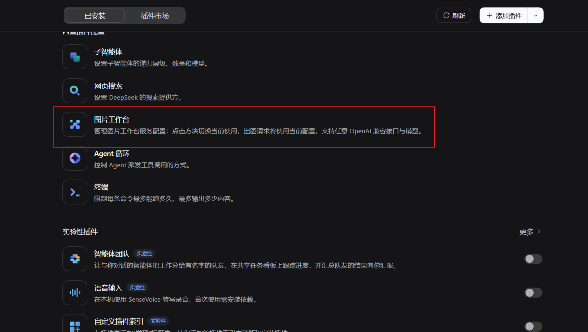
插件出现在「插件 → 已安装」列表里:
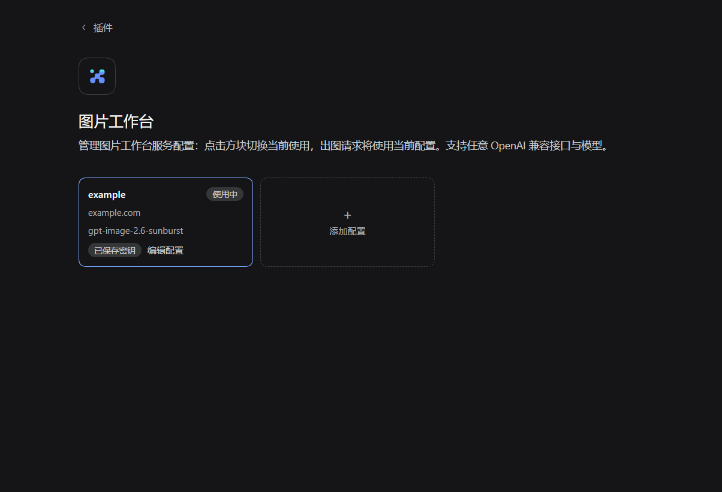
进入后每套配置是一个方块,点一下就切换为当前使用:
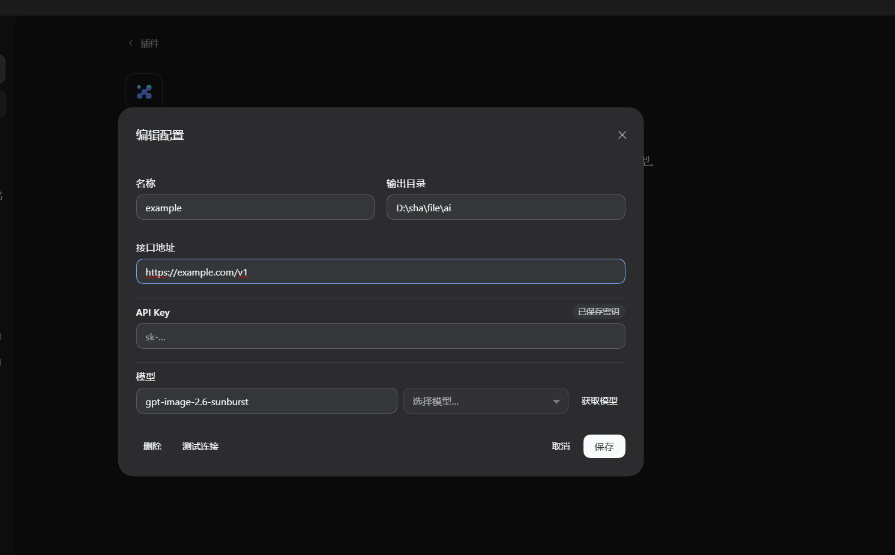
点方块里的「编辑配置」或 + 添加配置 打开配置弹窗:
安装
有 dsh CLI 时(把 desktop 换成你的 profile 名,通常是 desktop 或 web):
# 从 npm 装(推荐,预构建、无需构建授权)
dsh plugin --profile desktop add @shamanjin/dsh-image-studio

# 或直接从 GitHub 仓库装
dsh plugin --profile desktop add github:shamanjin/dsh-image-studio
也可以装 Release 里的包:
dsh plugin --profile desktop add "https://github.com/shamanjin/dsh-image-studio/releases/download/v1.0.0/dsh-image-studio-1.0.0.tgz"
只有桌面版、没有 dsh CLI 时(桌面应用不带 CLI,dsh 会提示命令不存在):
下载 Release 里的
dsh-image-studio-1.0.0.zip,解压到任意目录,例如C:\dsh-plugins\dsh-image-studio把它链接进 profile 的
node_modules(注意包名带作用域,目录嵌在@shamanjin下):New-Item -ItemType Directory "$env:USERPROFILE\.dsh\profiles\desktop\node_modules\@shamanjin" -Force New-Item -ItemType Junction ` -Path "$env:USERPROFILE\.dsh\profiles\desktop\node_modules\@shamanjin\dsh-image-studio" ` -Target "C:\dsh-plugins\dsh-image-studio"打开
%USERPROFILE%\.dsh\profiles\desktop\package.json,在dsh.profile.bundles数组里加一项"@shamanjin/dsh-image-studio"重启 DSH
两种方式装完都重启 DSH,然后侧栏 → 插件 → 图片工作台。
命令里的
<profile>是占位符,要替换成实际 profile 名再执行;PowerShell 里<是保留字符,原样粘贴会报「<运算符是为将来使用而保留的」。
使用
1. 配置一套服务
侧栏 → 插件 → 图片工作台 → + 添加配置:
- 接口地址:填到
/v1层,例如https://api.example.com/v1 - API Key:填完随「保存」一起写入
- 模型:点「获取模型」拉列表,在下拉里选;也可以直接输入模型 ID
- 输出目录:可留空
2. 对话里出图
配好后回到对话,直接说要什么:
- 「画一张雨夜的乡村车站,动画电影风格」
- 「参考
D:\images\a.png,把背景换成雪夜」
出图后返回本地图片路径,并以图片形式展示。
说明
| 项 | 说明 |
|---|---|
| 输出目录 | 留空时保存到当前工作目录下的 dsh_outputs/images |
| 密钥存放 | ~/.dsh/.credentials.yaml,配置文件里只有引用名 |
| 生效范围 | 只使用当前选中的那套配置,模型侧无法改地址、Key 或模型 |
License
MIT
Links
More in this category
liustack/modlens★ 4996
Vision bridge for text-only models: paste an image, get structured JSON evidence (OCR, layout, semantics).
ysr666/dsh-vision-router★ 1281
Free vision for text-only agents: built-in keyless vision chain plus pixel tools (Q&A, grounding, crop, pixel diff, colors, OCR, SVG trace, cutout, screenshots); paste an image to use it.
Anionex/dsh-vision-toolkit★ 945
Vision for text-only models: paste an image and the model switches to a Vision Toolkit variant for image Q&A, multi-image comparison, long-screenshot OCR, screenshot-to-UI reproduction, element grounding, and pixel diff. No API key by default — images are processed by the author-hosted free service, 100 per machine per day; configurable to your own provider.
SAOS-3624/dsh-see-now★ 672
Lets a text-only agent watch a live screen or camera feed: every frame is scored by how much the picture changed, only the ones that matter are packed into one numbered sheet with an audio envelope, so the model looks at what actually changed instead of a screenshot every few seconds.
SAOS-3624/dsh-video-storyboard★ 560
Turns a video (a local file, or a Bilibili/yt-dlp link) into one addressable storyboard grid — numbered cells with exact timestamps, per-cell transcript and an audio envelope on the same timeline — and video_zoom re-reads any window at higher resolution, so a text-only model can look at the video instead of reading a summary.
kingcharleslzy-ai/dsh-qwen-studio★ 229
Qwen Image 2.1 workspace for DSH: Apple Silicon MLX or your own NVIDIA server, native reference editing, LoRA, ControlNet, inpainting, shared presets, gallery and live agent progress. Includes verified updates and an agent setup guide.
Community comments
Comments are public GitHub Discussions. Loading them connects to GitHub and Giscus; a GitHub account is required to post.