Unit conversion as a `convert` tool: 10 categories (length, area, volume, time, angle, speed, temperature, pressure, energy/heat, power) and 82 units with English and Chinese aliases, plus a locale-aware Unit Converter tab in the DSH web view with one module per category and a temperature-difference (Δ) switch.
Install
# from npm (prebuilt)
dsh plugin --profile web add dsh-unitverse
# from GitHub (first run asks for allowBuilds approval — follow the hint, retry)
dsh plugin --profile web add github:runcat-tommy/dsh-unitverse
Any plugin you install runs third-party code with your own permissions — it can read your files, use your credentials, and reach the network, and tool approvals don’t sandbox it. GitHub-sourced plugins also run build scripts at install time — pnpm blocks those until you allow them, so an install can stop with ERR_PNPM_GIT_DEP_PREPARE_NOT_ALLOWED or ERR_PNPM_IGNORED_BUILDS; dsh prints the exact key to add under allowBuilds in your profile’s pnpm-workspace.yaml, and the install works on the next run. Allowing a build is a trust decision: only install sources you trust, and pin a commit (github:owner/repo#sha).
README
The name reads unit + universe: ten categories of units in one universe. The GUI view tab is still called 单位换算 / Unit Converter, and the model-facing tool is still
convert.
A DeepSeek Harness (DSH) unit conversion plugin exposing one convert tool
across length, area, volume, time, angle, speed, temperature, pressure,
energy/heat and power, with case-insensitive English and Chinese unit names,
plus both absolute-temperature and temperature-difference (Δ) modes.
Preview
English UI — one independent module per category, listing only that category's units:
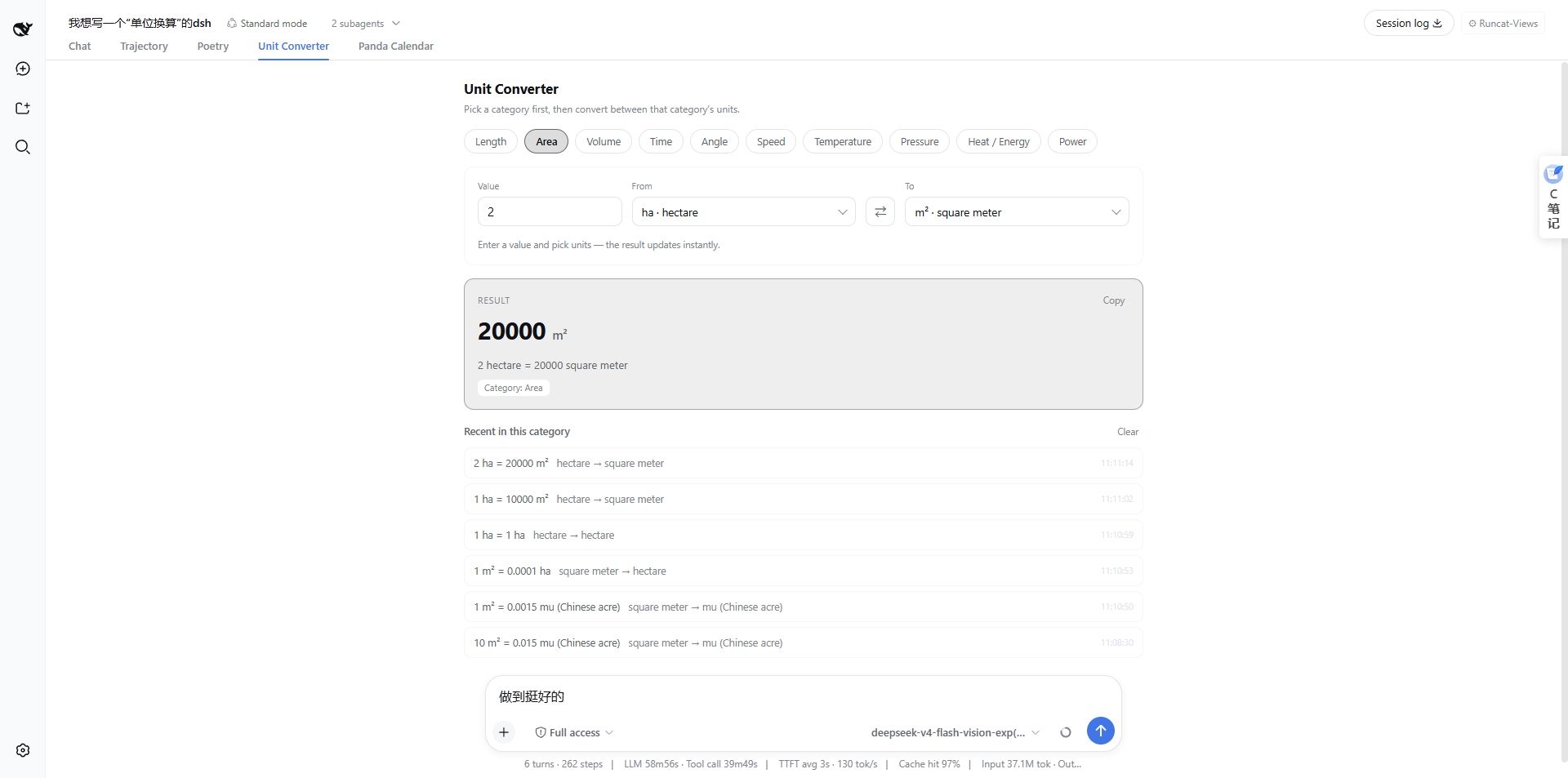
The Chinese UI screenshot lives in README.md — each README carries only its own language, so you never see a screenshot for the other locale.
Features
- ✅ 10 categories, 80+ common units (metric, imperial/US customary, common Chinese units)
- ✅ Lenient unit spelling:
km/KM/kilometer/千米/公里all resolve - ✅ Absolute temperature (°C / °F / K / °R) and temperature difference (
Δ°C↔Δ°F) - ✅ Pure TypeScript, zero runtime dependencies, side-effect free and unit-testable
- ✅ Results rounded to ~10 significant digits by default
- ✅ Clear errors for unknown units or cross-category requests
- ✅ Web UI view: a "Unit Converter" tab next to Conversation / Trajectory in the session view bar; the panel is split into ten independent category modules (units are never mixed), and all copy — unit names included — follows the DSH zh/en UI language (since v0.1.0, requires the DSH Web GUI, 0.1.0-rc.6 and up, verified through 0.2.1-rc.2 — the whole 0.1.1-rc.x and 0.2.x lines are covered)
Supported categories and units
| Category | Base | Units (symbols) |
|---|---|---|
| length | m | nm, μm, mm, cm, m, km, in, ft, yd, mi, nmi, 里 (li), 尺 (chi) |
| area | m² | mm², cm², m², km², ha, 亩 (mu), in², ft², yd², acre, mi² |
| volume | m³ | mL, L, m³, cm³, in³, ft³, yd³, gal (US), gal (UK), qt (US), bbl |
| time | s | ms, s, min, h, d, wk, mo, yr |
| angle | rad | rad, ° (deg), grad, ′ (arcmin), ″ (arcsec), turn |
| speed | m/s | m/s, km/h, mph, kn (knot), ft/s |
| temperature | K | °C, °F, K, °R (Δ prefix available for differences) |
| pressure | Pa | Pa, kPa, MPa, hPa, bar, atm, psi, Torr, mmHg, inHg |
| energy | J | J, kJ, MJ, cal, kcal, Wh, kWh, BTU |
| power | W | W, kW, MW, GW, hp, PS |
Every unit also accepts its English full name (including plurals) and its
Chinese name as aliases — e.g. ft, foot, feet and 英尺 are the same unit.
Installation
dsh-unitverse is published on npm, and can also be installed straight from
GitHub or by downloading it to a local directory first. Pick any one of the
three routes below — replace <profile-name> with your profile (e.g. web).
What
dsh pluginis: a thin forwarder for pnpm —dsh plugin --profile <profile-name> <args…>is equivalent to runningpnpm <args…>inside that profile's directory, after which DSH re-alignsdsh.profile.bundleswith what was actually loaded. So theadd/up(update) /remove/listused below are all pnpm commands.
Route 1: install straight from GitHub
dsh plugin --profile <profile-name> add github:runcat-tommy/dsh-unitverse
- Who it suits: following the repository source without cloning it first.
- Watch out: needs
gitlocally; the build artifacts inlib/are committed, so this route needs no--allow-buildapproval. - Updating: rerun the same command.
Route 2: download from GitHub, then install locally
git clone https://github.com/runcat-tommy/dsh-unitverse
dsh plugin --profile <profile-name> add ./dsh-unitverse
- Who it suits: testing local edits immediately, or offline / air-gapped machines.
- Watch out: offline you can also unzip the Download ZIP, or run
npm packandadd ./dsh-unitverse-<version>.tgz. Installed as alink, the profile follows your checkout. - Updating:
git pull→npm run build→ restart DSH.
Route 3: install from npm (recommended)
dsh plugin --profile <profile-name> add dsh-unitverse
- Who it suits: almost everyone — the least fuss, clear version semantics, any profile.
- Watch out: the npm package already contains the built artifacts and declares
no
prepare/postinstalllifecycle scripts, so it triggers no build approval. - Updating:
dsh plugin --profile <profile-name> up dsh-unitverse.
The three routes side by side
| Route | Command | Needs | Updating | Build approval |
|---|---|---|---|---|
| 1 GitHub direct | … add github:runcat-tommy/dsh-unitverse |
git locally |
rerun the same command | none (artifacts committed) |
| 2 Download locally | … add ./dsh-unitverse (or .tgz) |
nothing | git pull + npm run build + restart |
none |
| 3 npm (recommended) | … add dsh-unitverse |
nothing | … up dsh-unitverse |
none |
In one line: use route 3 (npm) for the least fuss, route 1 to follow the source,
route 2 to hack on the code or work offline — all three need a dsh web restart
before they take effect.
After installing
- No manual config edits:
package.jsondeclaresdsh.bundle, sodsh plugin addregisters the plugin in the profile's bundle list and activates the plugin row defined incordis.patch.yml. - Restart DSH for it to take effect: once the GUI process (
dsh webetc.) restarts, the model can call theconverttool. - Web UI: the package also ships a browser half — the
dsh.clientdeclaration pluslib/client.jsbehind theexports["./client"]entry. In a profile that runs the Web GUI, a "Unit Converter" tab appears in the session view tab bar (see Web converter view below); in CLI-only profiles the client part is simply never loaded and the tool keeps working. - Inspect / uninstall:
dsh plugin --profile <profile-name> listlists what is installed;dsh plugin --profile <profile-name> remove dsh-unitverseuninstalls it.
Web converter view (v0.1.0+)
After installing and restarting the DSH GUI process (dsh web etc.), open any
session: the view tab bar now shows "Unit Converter" next to Conversation /
Trajectory (the Chinese UI shows 单位换算):
- One module per category: the panel opens with ten category tabs — Length, Area, Volume, Time, Angle, Speed, Temperature, Pressure, Heat / Energy and Power. Switching a tab switches the module, and a module only ever lists its own units, so units from different categories are never mixed and a cross-category conversion cannot be produced. Each module starts from a common unit pair (e.g. Length → km ↔ mi).
- Unit dropdowns: source and target units are picked from a list showing
symbol · name— no unit name has to be typed, so nothing can be misspelled. - Instant result: typing a value updates the result immediately, shown as a large number + unit, the full equation and a category badge, with one-click copy.
- One-click ⇄ swap of source and target.
- The Temperature module adds a Difference Δ switch: off converts
absolute scales (
°C → °F), on converts intervals (Δ°C → Δ°F), with an explanatory hint. - Recent conversions are kept per category (browser localStorage); click any row to restore it, or clear the current category’s rows in one click.
- Fully follows the DSH UI language: in a Chinese environment every string — including unit names such as 千米 / 摄氏度 — is Chinese; in an English environment everything is English ("kilometer", "degree Celsius"), category names and tabs included. Switching the language refreshes the panel and the history immediately.
- The view is pure front-end: the conversion core is bundled into
lib/client.js, so conversions run locally in the browser — no model or server round-trip involved.
Usage
Once installed, the model can call the convert tool:
convert(value=100, from="km", to="mi") -> 62.13711922 mi
Tool parameters:
| Parameter | Type | Required | Description |
|---|---|---|---|
value |
number | yes | The numeric amount (finite number) |
from |
string | yes | Source unit: symbol / English / Chinese, case-insensitive |
to |
string | yes | Target unit: symbol / English / Chinese, case-insensitive |
Returns a structured result: { value, from, to, result, category, categoryZh, categoryEn, fromInput, toInput, summary } (fromInput / toInput are the caller's original tokens; from / to are the resolved canonical names).
Examples
"Convert 100 km to miles"
→ convert(100, "km", "mi") → summary: "100 km = 62.13711922 mi (length)"

"How many cm is 5 feet?"
→ convert(5, "feet", "cm") → summary: "5 feet = 152.4 cm (length)"

"36 km/h to m/s"     → convert(36, "km/h", "m/s")     → 10
"1 atm to kPa"       → convert(1, "atm", "kPa")       → 101.325
"212 °F to °C"       → convert(212, "°F", "°C")       → 100
Temperature differences (Δ)
Temperature converts as an absolute scale by default. For a temperature
difference, prefix BOTH units with Δ or delta:
"What is a 1 °C temperature interval in °F?"
→ convert(1, "Δ°C", "Δ°F") → 1.8
Mixing an absolute and a Δ unit (e.g. Δ°C → K) is rejected to avoid
ambiguous "degrees Kelvin"-style semantics; the error names both repairs (add Δ
to both, or drop it from both). Delta results keep the Δ marker in the echoed
units, so an interval is never mistaken for an absolute reading:
convert(10, "Δ°C", "Δ°F") → summary: "10 Δ°C = 18 Δ°F (温度)"
convert(10, "°C", "°F")   → summary: "10 °C = 50 °F (温度)"   ← absolute, a different result
Precision and conventions
- Results round to ~10 significant digits by default; the core
convert()accepts asignificantDigitsoption (1–15). calis the thermochemical calorie (1 cal = 4.184 J); usekcal/大卡for the food "Calorie".BTUis the International Table BTU (1 BTU = 1055.05585262 J).yr(year) is the Julian year of 365.25 days;mo(month) = year / 12.- The Chinese character 度 means degrees (angle); write 千瓦时 for kWh (avoid ambiguity with 度).
- Chinese 分/秒 in a time context map to
min/s; usearcmin/arcsec(角分/角秒) for angular minutes/seconds.
Using the core library directly
The conversion core is a zero-dependency pure module:
import { convert, convertDetailed } from 'dsh-unitverse'

convert(100, 'km', 'mi')                 // 62.13711922
convert(25, '°C', '°F')                  // 77
convert(1, 'Δ°C', 'Δ°F')                 // 1.8 (temperature difference)
convertDetailed(3, 'km/h', 'm/s')        // { result: 0.833..., summary: '...' }
src/index.tsis the DSH plugin entry (depends on@deepseek-ai/cordisand@deepseek-ai/dsh-tools);src/convert.ts+src/units.tsform the host-independent core library.
Development
npm install
npm test          # full vitest suite (conversions, aliases, temperature, edges,
                  # plugin registration, lib/client.js smoke tests)
npm run typecheck # tsc --noEmit
npm run build     # tsup -> lib/ (ESM + CJS + d.ts), then scripts/build-client.mjs
                  # emits lib/client.js (the ModuleLoader lazy-CJS bundle)
Repository layout
src/units.ts             unit tables and alias index (single source of truth)
src/convert.ts           conversion engine: parsing, converting, temperature/Δ, precision, errors
src/index.ts             DSH plugin entry (server/CLI side): registers the convert tool
src/client/              Web client plugin (browser side):
                           index.tsx          registers the conversation.view entry
                           UnitConvertView.tsx  converter panel (pure front-end core)
                           locales.ts         zh/en UI copy
scripts/build-client.mjs esbuild wrapper that emits lib/client.js (ModuleLoader lazy-CJS format)
test/                    Vitest tests (incl. lib/client.js smoke tests)
cordis.patch.yml         DSH bundle patch layer
lib/                     build output (committed so GitHub installs need no build)
src/convert.ts + src/units.ts form the host-independent core library: the
server tool imports it, and the same code is bundled into the browser-side
lib/client.js, so conversions in the Web view happen entirely locally.
License
Links
More in this category
Tencent/WeKnora#dsh-weknora★ 35940
Four read-only tools over a WeKnora knowledge base: list knowledge bases, hybrid passage search, reassemble one document's chunks in order, and WeKnora's own cited RAG or ReAct-agent answer with a resumable session id.
superdesigndev/treg★ 6483
Tool catalog for agents: search ~2,600 external endpoints (SEO and SERP, backlinks, social, people and company enrichment, ad libraries, scraping) by the task you want done, read each one's parameters and per-call price, then call it with the credential injected server-side. Ships the skill plus an MCP row that stays disabled until TREG_TOKEN is set.
T-Auto/dsh-ops★ 4787
Provides bash, PowerShell 7, and high-performance Rust tools for DSH on Windows to reduce token usage.
sixtysevenlf/dsh-blender-plugin★ 1461
Lets a DSH agent drive a local Blender over a direct TCP channel with 15 tools: viewport frames, custom-angle renders, Python execution, headless and job offload, transaction rollback, and a planning layer of 228 ops across 34 families.
TencentCloudBase/CloudBase-AI-Toolkit#dsh-plugin★ 1152
Tencent CloudBase backend for DeepSeek Harness — scaffold and deploy full-stack apps from chat, render query results as table cards with paging, sorting and CSV export, preview a deployment on its domain, and call the CloudBase MCP toolset (`mcp__cloudbase__*`) with device-code login.
anysearch-team/anysearch-dsh★ 669
AnySearch-powered real-time web and vertical search provider for DeepSeek Harness.
Community comments
Comments are public GitHub Discussions. Loading them connects to GitHub and Giscus; a GitHub account is required to post.