A right-sidebar tour of what each agent turn changed, built on dsh's own workspace-changes records: changed files with line counts and diffs, local rule-based flags (secrets in added lines, .env files, install scripts, deleted files, large deletions, removed or skipped tests, dependency, CI and migration changes, files outside the workspace), and, on request, a plain-language explanation from the session's model with a summary, one line per file and things worth checking.
Install
# from GitHub (first run asks for allowBuilds approval — follow the hint, retry)
dsh plugin --profile web add github:qinghuidaqzp/dsh-change-tour
Any plugin you install runs third-party code with your own permissions — it can read your files, use your credentials, and reach the network, and tool approvals don’t sandbox it. GitHub-sourced plugins also run build scripts at install time — pnpm blocks those until you allow them, so an install can stop with ERR_PNPM_GIT_DEP_PREPARE_NOT_ALLOWED or ERR_PNPM_IGNORED_BUILDS; dsh prints the exact key to add under allowBuilds in your profile’s pnpm-workspace.yaml, and the install works on the next run. Allowing a build is a trust decision: only install sources you trust, and pin a commit (github:owner/repo#sha).
README
English | 中文
A right-sidebar plugin for DeepSeek Harness (dsh): understand what each agent turn changed, in plain words.
An agent may change a dozen files in one turn. Programmers read every diff; everyone else clicks "accept" on faith. Change Tour turns each turn into a guided tour:
- Which files changed: new, modified or deleted, with lines added and removed. "diff" opens the line-by-line comparison.
- What deserves a second look: worked out on your machine by fixed rules, with no network and no cost. The table below lists what it flags.
- A plain-language explanation (optional): "Explain this turn" sends the turn's diff to the model you use in dsh. You get a summary, one sentence per file, and a list of things worth checking yourself.
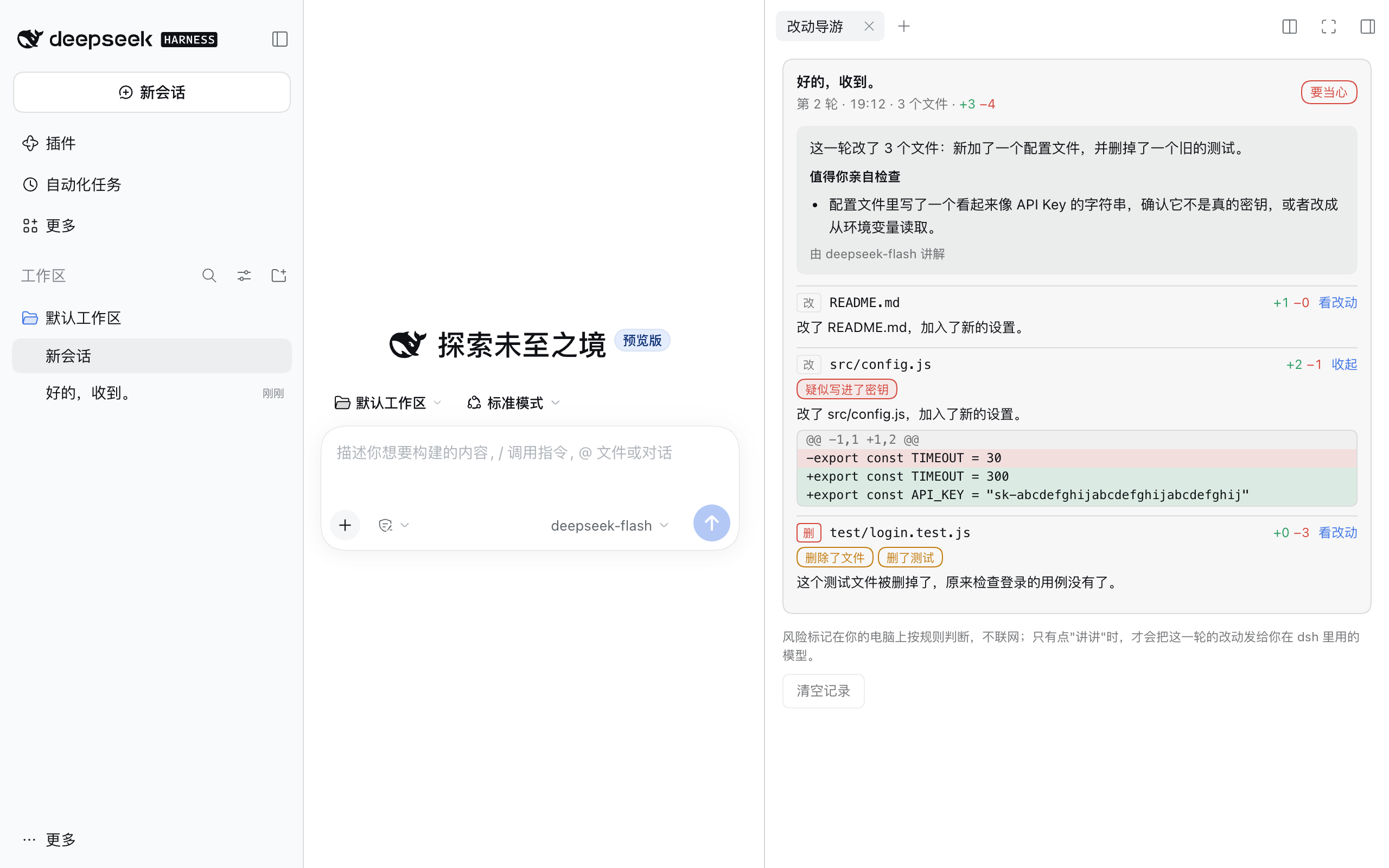
The screenshot comes from a test setup: the agent wrote a fake API key into a config file and deleted a test. The explanation text comes from the repository's local model stand-in (test/mockseek.mjs); a real model writes more specific text. The UI is shown in Chinese; it also ships English text.
What gets flagged
| Flag | Level | When |
|---|---|---|
| looks like a secret | careful | an added line contains something like an API key, GitHub token, AWS key, private key or password = "…" |
| .env file changed | careful | .env, .env.local and similar |
| install-time script added | careful | an install / postinstall / prepare script added to package.json |
| file deleted | worth a look | a whole file was deleted |
| N lines deleted | worth a look | 80+ lines deleted in a file, or far more deleted than added |
| tests removed / N test(s) fewer | worth a look | a test file deleted, or fewer test cases |
| tests skipped | worth a look | .skip, xit, @pytest.mark.skip, .only and similar added |
| dependencies changed | worth a look | package.json, requirements.txt, go.mod, Cargo.toml and similar |
| CI / deploy changed | worth a look | .github/workflows, .gitlab-ci.yml and similar |
| database schema | worth a look | files under migrations/, or .sql |
| outside the workspace | worth a look | the change is outside the current workspace |
| new file, config file, lockfile, binary file | note | informational only |
Each turn shows the most serious level: careful, worth a look, or nothing flagged.
Does the explanation cost money?
Flags cost nothing; they are computed locally.
An explanation is one model call, by default to the model the session last used (configurable). At most 24,000 characters of diff go in and at most 1,200 tokens come out; with deepseek-flash that is usually well under a cent.
Explanations run only when you click, unless you turn on autoExplain.
How it works
dsh ships a workspace-changes module (on by default in the Web and Desktop apps) that records, after every turn, which files changed and by how many lines, and serves line-by-line diffs. Change Tour reads those records, so:
- it runs no git commands of its own and never modifies your files;
- changes made with file tools and with shell commands are both seen (the latter needs git installed and the workspace to be a git repository; otherwise only file-tool edits are seen);
- line diffs are available while the session is open; after a dsh restart, older tours keep their file list, flags and explanation.
Install
Requires dsh 0.2.0 or later; tested on 0.2.2-rc.1.
dsh plugin --profile web add github:qinghuidaqzp/dsh-change-tour
Restart dsh, then open Change Tour from the right sidebar's guide page.
Configuration
| Key | Default | Meaning |
|---|---|---|
stateFile |
change-tour/tours.json in the dsh home |
where tours are saved; empty keeps them in memory |
autoExplain |
false |
explain every turn automatically (costs a little each time) |
language |
zh |
language for automatic explanations; manual ones follow the UI language |
provider / model |
empty | model for explanations; empty uses the model the session last used |
maxOutputTokens |
1200 |
longest explanation, in tokens |
budget |
24000 |
most characters of diff sent per explanation |
maxAnalyzedFiles |
60 |
most files per turn whose diffs are read for flags |
Privacy
- Flags are computed locally; the plugin makes no network requests of its own.
- Only "Explain" (or
autoExplain) sends a turn's diff to a model, through the same model and account you configured in dsh. If the diff really contains a secret, the explanation request contains it too. - The saved file holds file names, line counts, flags and explanation text, not the diff content.
Limits
- Flags are rule-based: expect false positives (fake keys in test data) and misses (secrets written differently). They tell you where to look first; they do not replace a code review.
- Explanations are written by a model and can be wrong; check the diff for anything important.
- The tab appears in the Web UI (including Desktop).
Development
npm install
npm test
test/mockseek.mjs is a local DeepSeek stand-in that needs no API key: a user message containing SCRIPT: <command> makes the agent run that command with bash (to really change files), and a Change Tour explanation request gets a well-formed JSON reply.
License
MIT
Links
More in this category
yjh051108/dsh-routing-suite★ 7028
One repository, three parts: a runtime injector for DSH plugin packages (inject, hot-reload, unload, promote a dev staging tool to the front, route self-heal, plus a settings-page plugin manager that lists, unloads and drags folders in to internalize), a task-aware reasoning-mode router agent preset (router-standard / router-spec / router-react), and a graded two-level task protocol whose six tools (commit_star, lock_stage, revise_do, edit_plan, mark_task, redteam_verdict) pin task state to disk. The injector implementation ships in-tree, so the install carries its own behaviour rather than a dependency list.
strukto-ai/mirage#dsh★ 3798
Swaps the filesystem and bash providers for a mirage virtual workspace: file tools and shell commands run over mounted resources (RAM, S3, Redis, Slack, Gmail, Notion, Postgres) instead of the host disk, with per-mount read/write/exec modes, per-command sandbox routing (monty, pyodide, quickjs in process; docker, e2b, daytona remote), and installed CLIs (git, gh, slack, linear, ntn, gws, or one you register) as head words in the virtual terminal.
first-fluke/oh-my-agent#dsh★ 1473
Runs project OMA checks before and after tool execution and when a turn tries to finish. Installs its OMA CLI dependency and initializes unconfigured projects on first use. Requires Node.js 22+; initial setup needs network access and project write access.
MichengAI/dsh-skills-manager★ 598
Manages local DeepSeek Harness skills in Settings and shows shared Agent skills as read-only.
hust-open-atom-club/oh-dsh★ 324
Community distribution: TUI, desktop, and Web UI as one bundle with layered installation.
Fishquito7/dsh-skill-mcp-panel★ 287
Manages DSH skills and MCP servers from the web settings: skill cards with hot enable/disable, workspace scopes, groups, batch migration and drag-and-drop import, plus stdio/HTTP MCP CRUD with connection tests, secret redaction and the unified dsh-panel CLI.
Community comments
Comments are public GitHub Discussions. Loading them connects to GitHub and Giscus; a GitHub account is required to post.