Reproducible science workbench: agent-driven cells, inline figures with feedback/rerun, manifest provenance, environment snapshots, and publication-grade figure skills (9 bio_* tools + workbench UI).
Install
# from npm (prebuilt)
dsh plugin --profile web add dsh-science-workbench
# from GitHub (first run asks for allowBuilds approval — follow the hint, retry)
dsh plugin --profile web add github:poplarity/dsh-science-workbench
Any plugin you install runs third-party code with your own permissions — it can read your files, use your credentials, and reach the network, and tool approvals don’t sandbox it. GitHub-sourced plugins also run build scripts at install time — pnpm blocks those until you allow them, so an install can stop with ERR_PNPM_GIT_DEP_PREPARE_NOT_ALLOWED or ERR_PNPM_IGNORED_BUILDS; dsh prints the exact key to add under allowBuilds in your profile’s pnpm-workspace.yaml, and the install works on the next run. Allowing a build is a trust decision: only install sources you trust, and pin a commit (github:owner/repo#sha).
README
English | 中文
A reproducible science workbench plugin for the DeepSeek Harness. It blends the best of three worlds:
- Jupyter — cells and inline figures you can see and re-run;
- Claude Science — an agent as the execution engine;
- Nextflow / nf-core — every artifact carries full provenance.
Core promise: every figure and artifact is traceable and replayable. You can always answer “it = which code + which inputs + which environment + which params/seed”, and re-run it in one click.
✨ Features
- Code → figure → feedback → redraw — the agent runs a self-contained cell to produce figures shown inline; you attach structured feedback to a figure, and
bio_rerun_cellregenerates a derived version (v1 → v2 → v3). - One ledger per project — a plain-text
manifest.jsonis the single source of truth: cells, artifacts, provenance and feedback history. - Reproducible by construction — self-contained scripts, a fresh subprocess per cell,
environment.lock, SHA-256 input/output hashes and a fixed seed. - Git-versioned automatically — each project is
git init-ed on creation and auto-committed at every step (never pushed). - Cross-platform — the Host shell layer speaks bash on macOS/Linux and PowerShell on Windows; Python resolves to
pythonon Windows andpython3on POSIX.
🛠 Tools
Nine agent-facing tools, plus a browser workbench:
| Tool | What it does |
|---|---|
bio_init_project |
Create/open a project: code/ data/ figures/ + manifest.json + environment.lock + git init. |
bio_run_cell |
Run one self-contained cell, discover figures, register artifacts with hashes, commit. |
bio_rerun_cell |
Re-run a cell with edited code as a derived version (lineage recorded). |
bio_add_feedback |
Attach structured feedback to an artifact (this is how a “redraw it” note becomes history). |
bio_get_project |
Return a project summary: cells, artifacts, provenance and feedback. |
bio_list_projects |
List all projects under the projects root. |
bio_set_projects_dir |
Set the root directory where projects live (persisted across restarts). |
bio_delete_cell |
Delete a cell and its produced artifacts (script + figures). |
bio_mark_cell |
Mark a cell as a final (成品) artifact, or unmark it — flagged in the workbench and index. |
The “Analysis workbench” tab shows the notebook, artifacts, provenance and feedback in a three-panel UI with inline figure preview (PNG/JPEG/SVG/PDF/TIFF/BMP), a searchable project picker (filter by name, sorted by most-recent activity), a cell search box, a native directory picker for the projects root, and a mark-as-final badge on completed cells. Very large figures (multi-MB) load on demand and display in full.
The plugin also bundles two publication-grade figure skills (adapted from Claude Science, Apache-2.0): figure-style (figure correctness & legibility rules + apply_figure_style()) and figure-composer (multi-panel figure composition with an adversarial self-review loop). See skills/ and ATTRIBUTIONS.md.
📸 Feature showcase
The feedback → redraw loop — every figure keeps its structured feedback history, and a one-click “让 agent 重画” (let the agent redraw) produces a derived version.
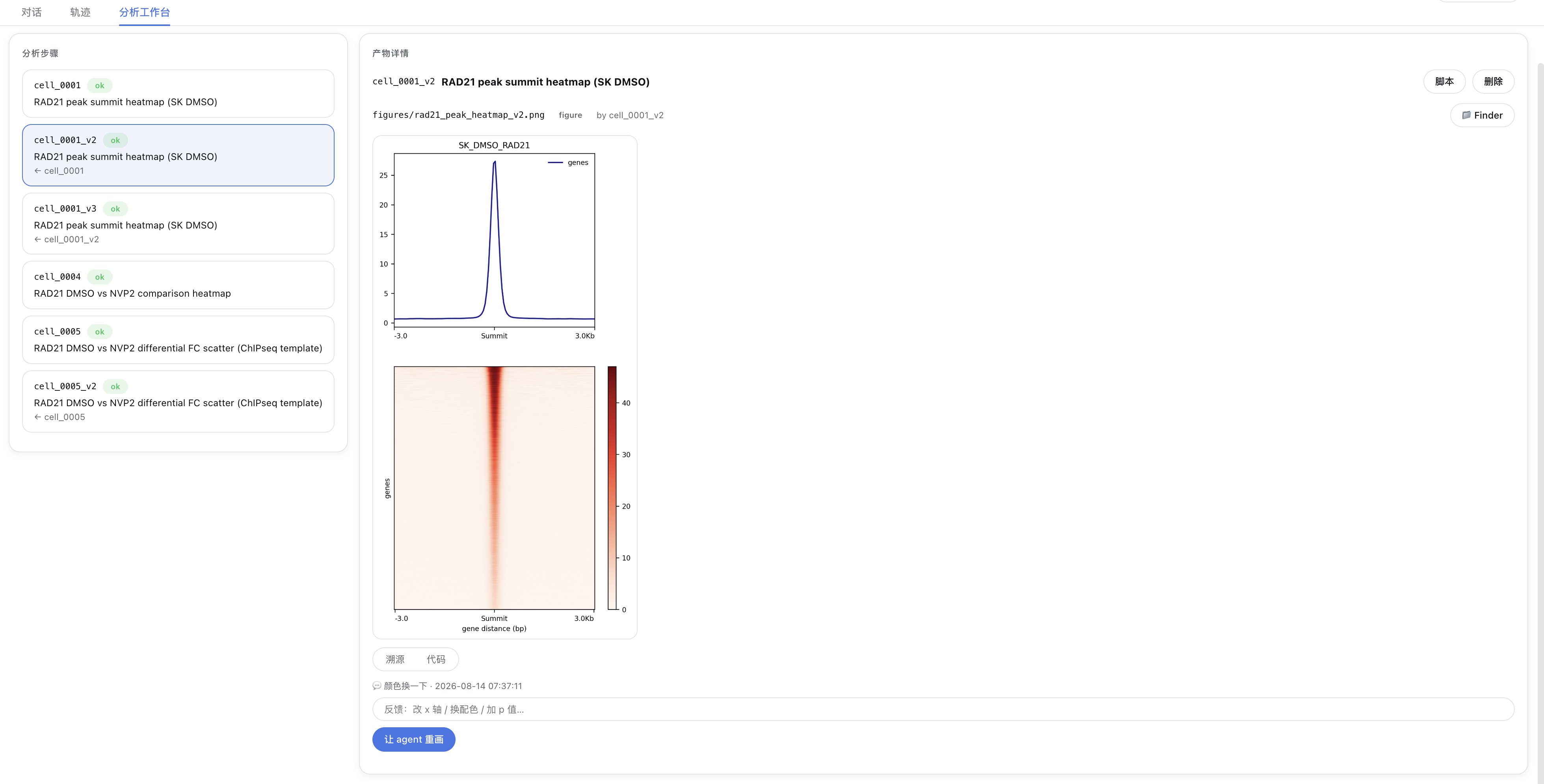
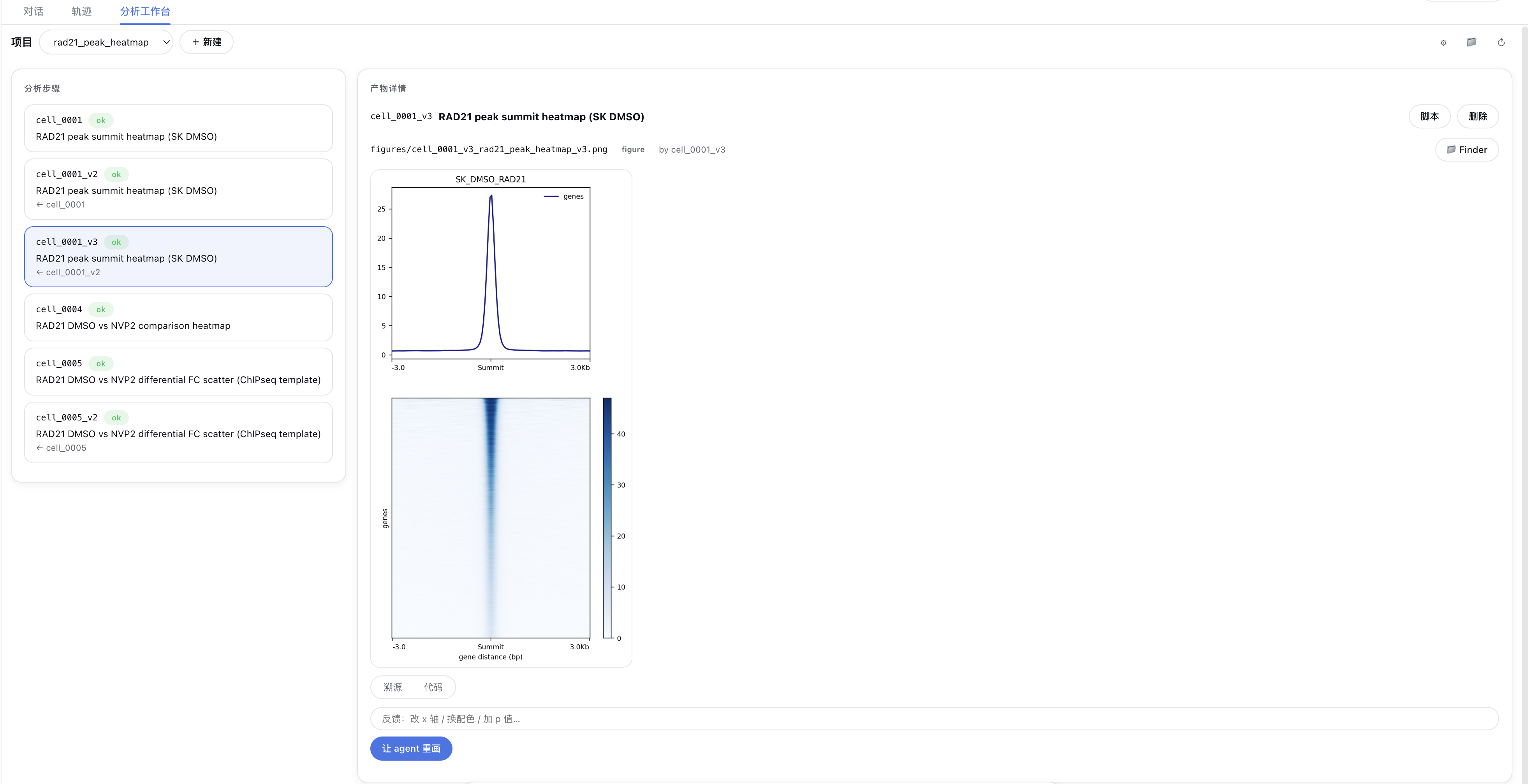
The workbench tab — a three-panel layout: the analysis steps list (with status and lineage cell_0001 → cell_0001_v2 → cell_0001_v3) on the left, and the artifact detail (inline figure + provenance / code tabs + script / delete / Finder actions) on the right.
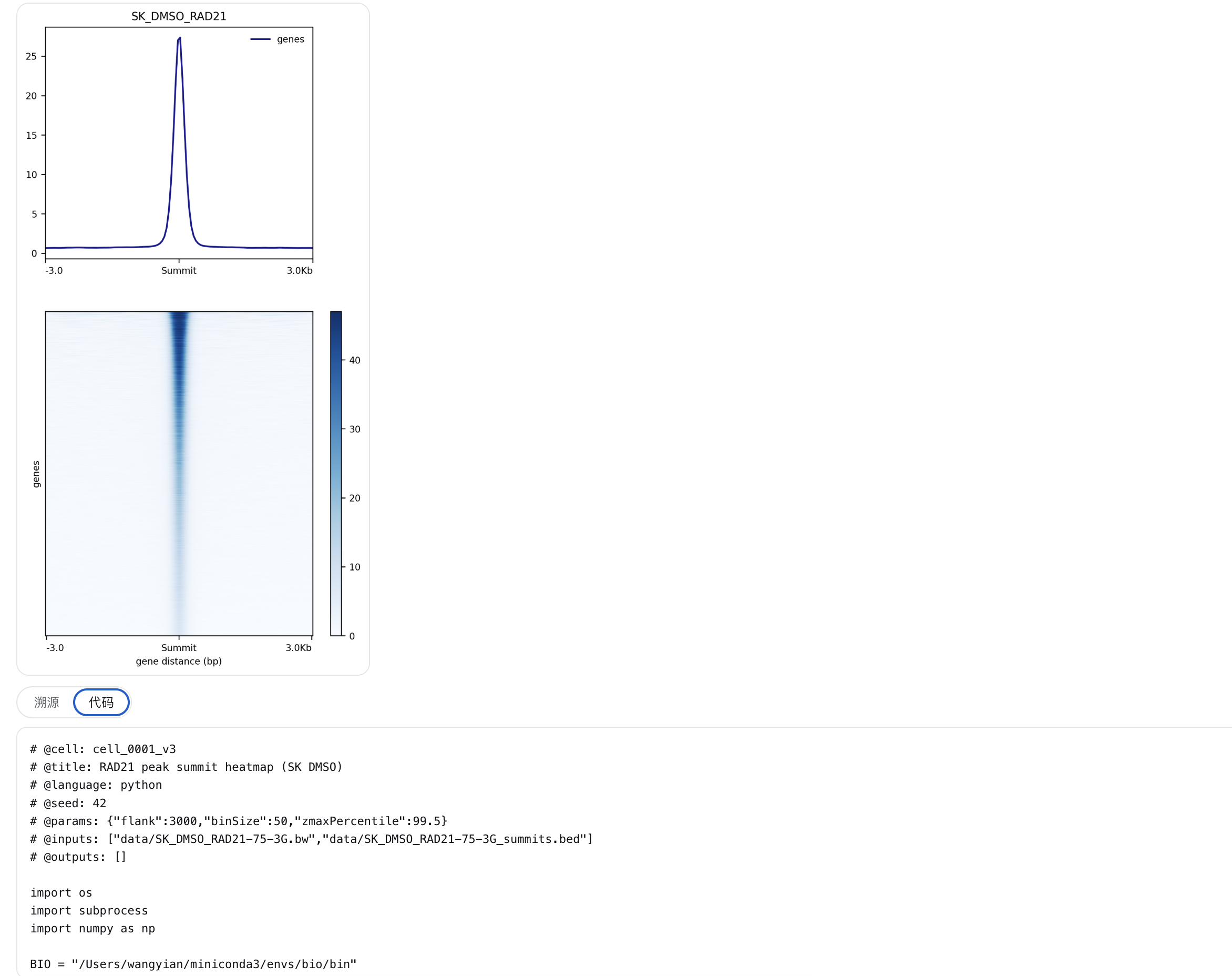
The code tab — every artifact’s generating script carries its declaration header (cell / title / language / seed / params / inputs), so it can be reviewed and reused at any time.
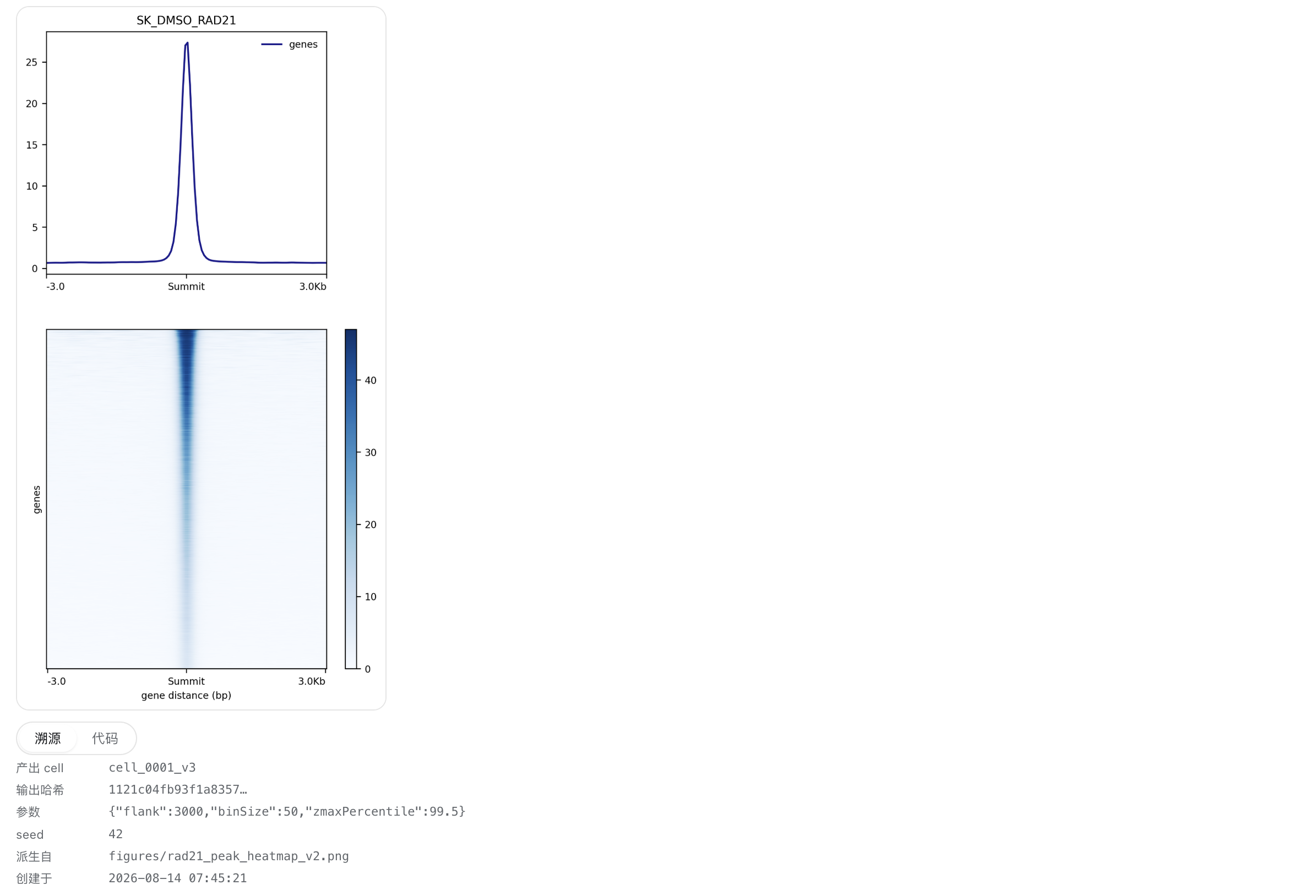
The provenance tab — full provenance: producing cell, output SHA-256 hash, params, seed, derived-from and created time.
📦 Install
dsh-science-workbench is a dual-face DSH plugin (Host + Client). Install it with the standard dsh plugin command — a thin pnpm forwarder that installs the package into a profile and automatically adds it to dsh.profile.bundles (because the package declares dsh.bundle.patch).
# From npm (published):
dsh plugin --profile web add dsh-science-workbench

# Local development (from a checkout):
dsh plugin --profile web add file:/path/to/dsh-science-workbench
Then restart dsh web. The bio_* tools become globally available, the workbench tab appears, and the plugin shows up under Settings → Plugins.
DSH desktop app
The desktop app owns its own desktop profile, which the dsh CLI refuses to write (profile "desktop" is managed exclusively by the Electron application). Install from inside the app instead:
- Open Plugins in the sidebar.
- Add plugin → paste the package name (
dsh-science-workbench) or the absolute path of a checkout (/path/to/dsh-science-workbench) → Install → Enable now. - Restart the app so the Host half loads (module hot-reload deliberately ignores
node_modules, so a linked checkout is not picked up while running).
Projects may live outside the app's session workspace — point the plugin at your own root with bio_set_projects_dir (e.g. ~/bio-projects); file writes are not fenced to the session workspace.
🚀 Quick start
After installing and restarting, just ask the agent in plain language:
“帮我用
demo_tss项目画一个 TSS 附近的信号热图。”
The agent will drive the tools for you. The equivalent manual flow is:
1. bio_init_project { name: "demo_tss" }
2. bio_run_cell { title: "TSS profile", code: "..." }   # writes figures/*.png
3. look at the inline figure → bio_add_feedback { artifactPath, text: "把配色改成 Blues" }
4. bio_rerun_cell { cellId: "cell_0001", editedCode: "..." }  # → cell_0001_v2 + new figure
Every step is committed to the project’s git history and recorded in manifest.json, so the whole lineage (cell_0001 → cell_0001_v2 → …) stays inspectable.
🧪 Reproducibility model
Each cell is a self-contained script with a declaration header:
# @cell: cell_0001
# @title: TSS profile
# @language: python
# @seed: 42
# @params: {"colorMap": "Blues"}
# @inputs: ["data/peaks.bed"]
# @outputs: []
It runs in a fresh subprocess with cwd = project root. On completion the Host:
- discovers figures written to
figures/and prefixes them with the cell id; - hashes every input and output (SHA-256) into the artifact record;
- appends the cell + artifacts to
manifest.jsonand updatesindex.md; - commits everything to the project’s local git repo.
📁 Project layout
<workspace>/bio-projects/<name>/
├─ manifest.json        # single source of truth: cells + artifacts + provenance + feedback
├─ environment.lock     # interpreter version + pip freeze snapshot
├─ index.md             # human-readable project index
├─ code/                # one self-contained script per cell (cell_0001.py, cell_0001_v2.py, …)
├─ data/                # input data
├─ figures/             # figures (cell-prefixed, e.g. cell_0001_tss_profile.png)
└─ .git/                # auto-created, auto-committed
🧩 Architecture
- Host (
lib/index.js) is the single source of truth. It registers thebio_*tools into the hosttoolsregistry, does all execution/provenance, and serves the/biowb/*data routes through thewebServerservice. - Client (
lib/client.js) is a pure projection — a hand-written browser bundle that reads/writes over same-originfetch('/biowb/<method>'). No typert Remote bridge and no harness monorepo build are required. - The convention skill (
skills/bio-workbench) teaches the agent the project layout, the cell contract and the feedback loop.
🌍 Cross-platform
| Operation | macOS / Linux | Windows |
|---|---|---|
| Shell | bash | PowerShell |
| Hash | shasum -a 256 |
Get-FileHash |
| mkdir / move / delete | mkdir -p / mv / rm -f |
New-Item / Move-Item / Remove-Item |
| Open in file manager | open / open -R |
explorer.exe / explorer.exe /select, |
| Python | python3 |
python |
🔧 Development
git clone https://github.com/poplarity/dsh-science-workbench
cd dsh-science-workbench

# lint (syntax check)
npm run lint

# install into your profile and restart
dsh plugin --profile web add file:$(pwd)
Structure: lib/index.js (Host) · lib/client.js (Client bundle) · index.js (entry re-export) · cordis.patch.yml (bundle patch) · skills/ (convention skill) · docs/ (design doc) · examples/ (example project).
📦 Releasing
Publishing runs on npm Trusted Publishing (OIDC) — .github/workflows/publish.yml
fires on a v* tag and exchanges the GitHub Actions OIDC token for publish
rights. No npm token is stored in this repo or in CI secrets.
One-time setup, on npmjs.org (not in the repo): Package → Settings → Trusted
Publisher → GitHub Actions, with poplarity / dsh-science-workbench /
publish.yml (the basename, not .github/workflows/publish.yml) and an empty
environment. npm matches those claims exactly; a mismatch comes back as a 404
on PUT, which reads like a permissions error but is a config mismatch.
To cut a release:
# 1. move CHANGELOG entries out of "Unreleased" into the new version section
# 2. bump version in package.json
git commit -am "v0.3.2: ..."
git tag -a v0.3.2 -m v0.3.2          # tag must equal v<package.json version>
git push origin main && git push origin v0.3.2
The workflow fails fast if the tag does not match package.json, checks the
runner's npm is ≥ 11.5.1, publishes with --provenance, then re-reads the
registry to confirm the version is live and carries a provenance
attestation. Verify a release with:
npm view dsh-science-workbench@<version> --json | jq .dist.attestations
npm 10.x is not sufficient: the OIDC handshake still succeeds and a provenance attestation is produced, but the publish request goes out without OIDC auth headers and is rejected with
404. Node 24 (npm 11.x) clears this.
License
Links
More in this category
Tencent/WeKnora#dsh-weknora★ 37685
Four read-only tools over a WeKnora knowledge base: list knowledge bases, hybrid passage search, reassemble one document's chunks in order, and WeKnora's own cited RAG or ReAct-agent answer with a resumable session id.
DayuanJiang/next-ai-draw-io#dsh-plugin★ 37029
Draws draw.io diagrams in DeepSeek Harness through the next-ai-drawio MCP server: the link in the reply opens a live preview in the right sidebar, you can edit the diagram by hand, and each AI change is a version you can restore. Node.js 18+; npx downloads the MCP server on first use.
superdesigndev/treg★ 8322
Tool catalog for agents: search ~2,600 external endpoints (SEO and SERP, backlinks, social, people and company enrichment, ad libraries, scraping) by the task you want done, read each one's parameters and per-call price, then call it with the credential injected server-side. Ships the skill plus an MCP row that stays disabled until TREG_TOKEN is set.
T-Auto/dsh-ops★ 5899
Provides bash, PowerShell 7, and high-performance Rust tools for DSH on Windows to reduce token usage.
sixtysevenlf/dsh-blender-plugin★ 2178
Lets a DSH agent drive a local Blender over a direct TCP channel with 15 tools: viewport frames, custom-angle renders, Python execution, headless and job offload, transaction rollback, and a planning layer of 228 ops across 34 families.
helloHub1212/dsh-windows-mcp★ 1612
Bridges the CursorTouch/Windows-MCP desktop automation server into DSH through the official MCP client bridge, registering its screenshot, UI tree snapshot, mouse and keyboard input, clipboard, process and registry tools as mcp__windows__* tools for the model, and adds a windows_mcp_doctor diagnostic tool. Computer Use is off by default and is switched on from the plugin panel.
Community comments
Comments are public GitHub Discussions. Loading them connects to GitHub and Giscus; a GitHub account is required to post.