Create editable Blender product scenes in DSH. Start from speaker, cup and lamp recipes or imported models; view saved results on the Lighttable, compare revisions, and adjust dimensions, materials, cameras and lights. Place static models on actual mesh surfaces in one saved operation, then save a complete static view while preserving existing cameras and animation. Repair repeating texture coordinates on planar custom mesh faces while preserving geometry. Render images or saved-shot videos and export an editable revision with its assets. Native geometry inspections, immutable revisions and an approval gate help preserve existing work. Supports DSH 0.2.1-rc.1 and the legacy host, with 20 tools for modeling, review and delivery.
Install
# from npm (prebuilt)
dsh plugin --profile web add @deepblend/dsh-blender-bundle
# from a prebuilt release tarball
dsh plugin --profile web add "https://github.com/pearjelly/deep-blend/releases/latest/download/deepblend-bundle.tgz"
# from GitHub (first run asks for allowBuilds approval — follow the hint, retry)
dsh plugin --profile web add github:pearjelly/deep-blend#path:/packages/deepblend/bundle
Any plugin you install runs third-party code with your own permissions — it can read your files, use your credentials, and reach the network, and tool approvals don’t sandbox it. GitHub-sourced plugins also run build scripts at install time — pnpm blocks those until you allow them, so an install can stop with ERR_PNPM_GIT_DEP_PREPARE_NOT_ALLOWED or ERR_PNPM_IGNORED_BUILDS; dsh prints the exact key to add under allowBuilds in your profile’s pnpm-workspace.yaml, and the install works on the next run. Allowing a build is a trust decision: only install sources you trust, and pin a commit (github:owner/repo#sha).
README
Create a product scene. Refine its shape, materials and lighting. Render the result — inside DSH.
DeepBlend Studio brings a Blender workbench and an agent preset to DeepSeek Harness. Start with a ready-to-create recipe or import your own model, then compare real renders as you work.
中文介绍 · Try the cup walkthrough · Quick start
See the workbench
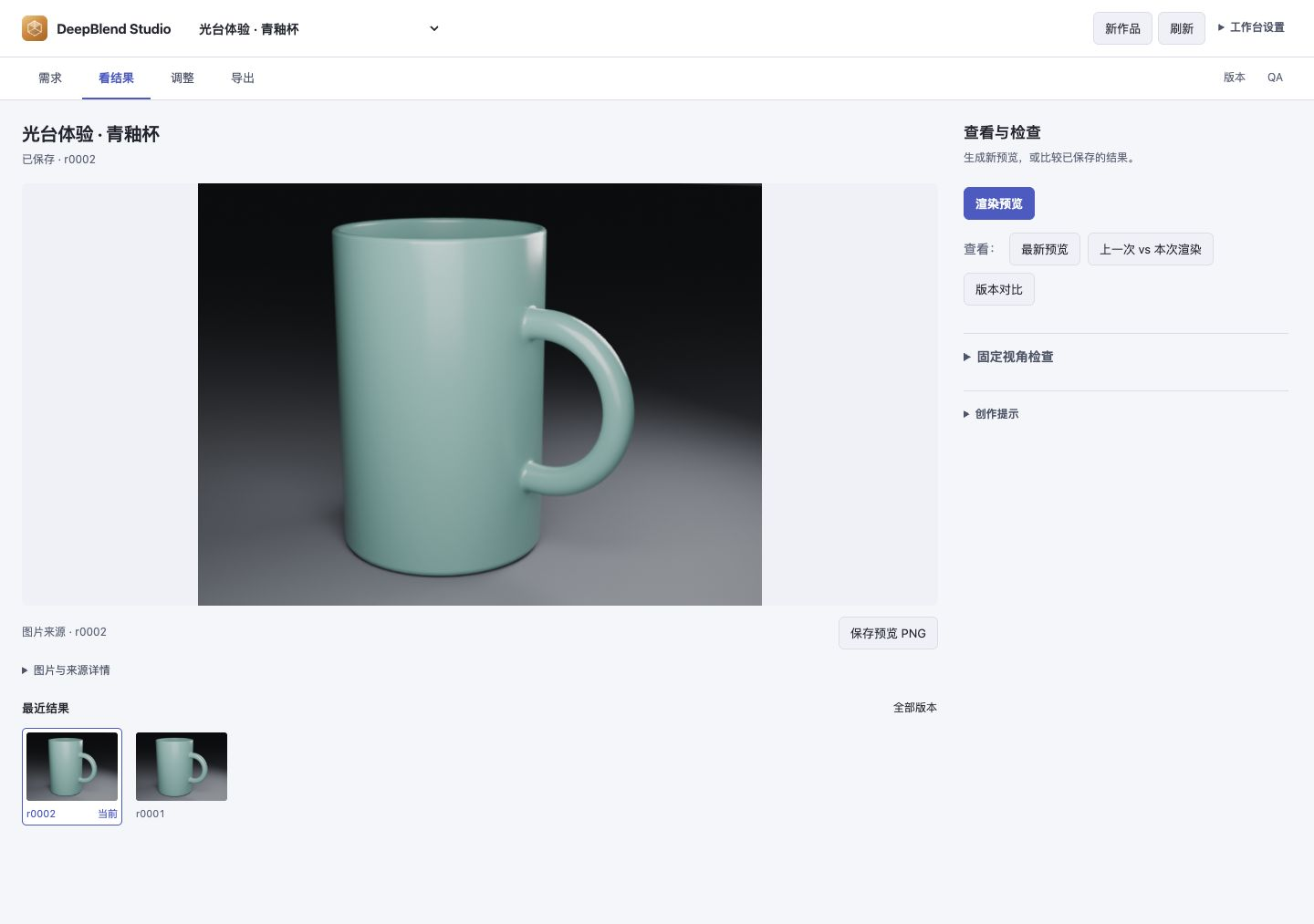
Captured from a running DSH workbench in a real browser. Desktop and narrow capture details record the loaded UI and exact image hashes. The earlier comparison and contact sheet retain their separate capture-docs-images.mjs provenance in the documentation image manifest.
Real work: light and material
Starting with 0.3.3, deepblend-doctor checks supported executable versions and reports
installation blockers, with separate PNG and MP4 tool readiness. See the
environment check guide
for commands and scope. It does not change profiles or project files.
Three product studies made with the locally installed DeepBlend plugin: amber glass, a champagne-metal lamp and a speaker with a physical woven grille. Each includes a high-resolution hero, a material close-up and a 6-second / 1080p / 24 fps camera animation.
| 琥珀时间 · Amber Atlas | 金色暮光 · Solstice | 织声 · Nocturne |
|---|---|---|
 |
 |
 |
| Play MP4 | Play MP4 | Play MP4 |
The inline previews sample the actual films at 12 fps; the MP4s retain all 144 rendered frames at 24 fps. Click a preview for its 2560×1440 still.
Open the gallery · Scene sources and rebuild · Render provenance · Official Blender visual references
The scenes and output come from editable SceneSpec and actual rendering. Official Blender examples informed the lighting and material direction; no official demo model, texture or movie frame is used in these three product studies.
New case: Night Shift

Created through DeepSeek Harness with the installed deep-blend 0.5.0 plugin: Blender’s official CHARGE Packbot, a new industrial set, lighting and six seconds of camera motion. 79 mesh parts, 511,595 polygons, 19 packed images; 1080p / 24 fps / 144 actually rendered frames. An independent DSH replay matched the scene digest; the frame-72 preview differed by at most 1/255 per channel.
播放视频 / Watch · 复现指南 / Replay guide · 完整复现素材 / Replay inputs
The robot uses the source asset’s static frame-1 pose; the film demonstrates the new set and camera motion. CHARGE Packbot © Blender Studio / Blender Foundation — CC-BY; new scene code is MIT. The promotional edit only adds titles and attribution. Release 0.8.1 includes replay inputs under examples/charge-study/; the guide pins the verified 0.5.0 environment.
From a starting point to a saved result
- Continue a creation draft. Reload or reopen the workbench, explicitly restore inputs saved in this browser, then create or retry the captured request. Restoring never submits automatically. Draft guide.
- Compare starting points. Switch recipes and keep each set of edits; resetting affects only the selected recipe. Comparison settings also stay with your browser draft. Comparison guide.
- Review saved versions. Open a saved/current comparison from history, keep unsaved edits, and read differences for the displayed pair. Viewing does not restore or render. Version guide.
- Start with something concrete. Choose a lamp, glass-and-ceramic scene, speaker or handled cup from the recipe gallery; adjust its exposed parameters and create a project with a real preview.
- Bring your own assets. Preview and insert GLB, glTF or OBJ models. Select multiple files or a directory to keep external textures and buffers together; add image textures and HDR/EXR lighting.
- Shape the scene. Edit dimensions, profiles, bevels, arrays and local materials. Adjust existing cameras and lights, or add an area fill light, directly in the workbench. Reuse camera settings and the light rig from a saved work and version, check the draft, then explicitly save.
- Judge the actual change. Compare saved revisions, inspect a fixed camera and frame in beauty or clay mode, and save reference images with your design goal.
- Finish or pick up later. Render PNG frames and an MP4, inspect job progress, cancel work or resume missing frames. Completed frames can continue straight to encoding; delivery records retain frame sources and actual render settings.
The agent preset exposes 20 tools for scene editing, complete fitted views, previews, visual review and delivery. Immutable revisions keep earlier scene states available, and expensive operations use an approval gate.
Install
Recommended — the published npm package:
dsh plugin --profile web add @deepblend/dsh-blender-bundle
Or install the prebuilt release bundle:
dsh plugin --profile web add https://github.com/pearjelly/deep-blend/releases/latest/download/deepblend-bundle.tgz
For the current source tree:
dsh plugin --profile web add 'github:pearjelly/deep-blend#path:/packages/deepblend/bundle'
Restart dsh web, select the DeepBlend Studio preset in a new session, and open the
Blender workbench in the sidebar. Installation adds both the workbench and agent presets.
Requirements: DSH 0.1.5-rc.2 on Node.js 22.23.3 or newer, Blender 5.2.1, and FFmpeg/ffprobe for MP4 delivery.
The managed Blender installer supports macOS arm64; on other platforms install Blender yourself
and configure blenderPath. See the installation guide for setup and platform details.
Source installs may require the build approval that DSH reports.
Version 0.3.4 adds Save preview PNG above previews, comparisons and inspection images. It checks the displayed source and saves the original bytes without a video encoder or another render.
Version 0.3.5 keeps creation inputs after failures, adds repair guidance and explicit retry, and recovers a saved project when its reply was lost. Newer drafts and later revisions are preserved. Drafts and retry keys remain in the current page; see the creation recovery guide.
Your first creation: a glazed cup
Follow the illustrated walkthrough:
- Create the glazed handled cup from the recipe gallery.
- Change its height from 105 mm to 110 mm and compare fixed-view clay renders.
- Adjust the glaze roughness, then the key light, one change at a time.
- Save the revisions and deliver one PNG frame plus a single-frame MP4.
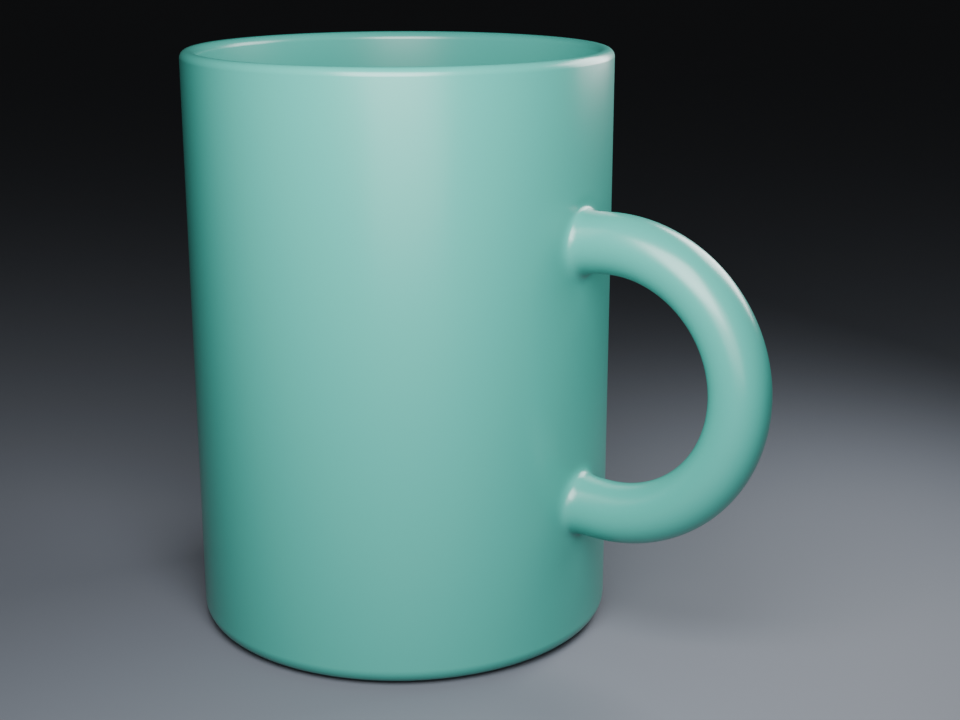
This is the original tutorial output. The handle roots still show visible bulges; the walkthrough explains that limitation. This recipe has no animation tracks, so additional frames do not create turntable motion automatically.
Find your next step
Import your own models · Shape and material editing · Camera and lighting · Documentation index
What is new in 0.3.2
A clearer Blender workbench: choose light or dark appearance, browse scene contents beside the object editor, and keep creation and apply actions within reach. Unsaved-change and invalid-number feedback help you see what still needs attention. Both the DSH panel and standalone page adapt to narrower spaces.
Branding and onboarding from 0.3.1
A clearer first-use journey, consistent branding, task-oriented guides and refreshed package introductions. The scene tools and runtime behavior remain those of 0.3.0. Changelog.
Product capabilities from 0.3.0
Product recipes and object editing, an asset library with browser model bundles, camera and light editing, fixed-view inspection history, more reliable render selection and recovery, and a typed public authoring SDK are now included in the published release.
Release notes · Author your own recipes · Public SDK · Recovery guide
For maintainers
This package supplies the Host composition: it mounts the Blender runtime, project/revision
host, browser UI and preset deployer with configuration. It is not a meta-package that lists
other market plugins; its dependencies are DeepBlend's own modules. SceneSpec is the source
of truth, and .blend is a compiled artifact.
| Source package | Responsibility |
|---|---|
| contracts | SceneSpec, schemas and public authoring SDK |
| provider-local | Blender execution and scene compilation |
| host | Projects, revisions, assets and render jobs |
| ui | Workbench and browser client |
| tool | Model-visible tools |
| preset | Agent presets and their deployment |
Full README · Manuals · Listing source
Report a bug · Request a feature
Preview reads belong to the selected work. Failed reads offer an explicit refresh while preserving edits; see preview recovery.
DSH 0.2.1-rc.1 与旧锚点 0.1.5-rc.2 均受支持。新版模式注册、模型图像输入与实测边界见1017 适配记录。
Links
More in this category
DayuanJiang/next-ai-draw-io#dsh-plugin★ 36685
Draws draw.io diagrams in DeepSeek Harness through the next-ai-drawio MCP server: the link in the reply opens a live preview in the right sidebar, you can edit the diagram by hand, and each AI change is a version you can restore. Node.js 18+; npx downloads the MCP server on first use.
Tencent/WeKnora#dsh-weknora★ 36302
Four read-only tools over a WeKnora knowledge base: list knowledge bases, hybrid passage search, reassemble one document's chunks in order, and WeKnora's own cited RAG or ReAct-agent answer with a resumable session id.
superdesigndev/treg★ 7042
Tool catalog for agents: search ~2,600 external endpoints (SEO and SERP, backlinks, social, people and company enrichment, ad libraries, scraping) by the task you want done, read each one's parameters and per-call price, then call it with the credential injected server-side. Ships the skill plus an MCP row that stays disabled until TREG_TOKEN is set.
T-Auto/dsh-ops★ 5074
Provides bash, PowerShell 7, and high-performance Rust tools for DSH on Windows to reduce token usage.
sixtysevenlf/dsh-blender-plugin★ 1575
Lets a DSH agent drive a local Blender over a direct TCP channel with 15 tools: viewport frames, custom-angle renders, Python execution, headless and job offload, transaction rollback, and a planning layer of 228 ops across 34 families.
TencentCloudBase/CloudBase-AI-Toolkit#dsh-plugin★ 1155
Tencent CloudBase backend for DeepSeek Harness — scaffold and deploy full-stack apps from chat, render query results as table cards with paging, sorting and CSV export, preview a deployment on its domain, and call the CloudBase MCP toolset (`mcp__cloudbase__*`) with device-code login.
Community comments
Comments are public GitHub Discussions. Loading them connects to GitHub and Giscus; a GitHub account is required to post.