WeChat (personal WeChat, iLink Bot API) channel: chat with your DSH agent from WeChat, with images, files and voice-note transcription. One WeChat conversation can hold several DSH Sessions (/new, /list, /use) and every option is editable from the settings page. Also published to npm as dsh-plugin-weixin.
Install
# from npm (prebuilt)
dsh plugin --profile web add dsh-plugin-weixin
# from GitHub (first run asks for allowBuilds approval — follow the hint, retry)
dsh plugin --profile web add github:panqing0313/dsh-plugin-weixin
Any plugin you install runs third-party code with your own permissions — it can read your files, use your credentials, and reach the network, and tool approvals don’t sandbox it. GitHub-sourced plugins also run build scripts at install time — pnpm blocks those until you allow them, so an install can stop with ERR_PNPM_GIT_DEP_PREPARE_NOT_ALLOWED or ERR_PNPM_IGNORED_BUILDS; dsh prints the exact key to add under allowBuilds in your profile’s pnpm-workspace.yaml, and the install works on the next run. Allowing a build is a trust decision: only install sources you trust, and pin a commit (github:owner/repo#sha).
README
WeChat BOT · dsh-plugin-weixin
Turn your personal WeChat into a remote control surface for DeepSeek Harness.
Say one line in WeChat; the DSH Agent opens a session on your own machine, runs it, and hands the result back to you — text, images, files and voice, in both directions.


Why this one
| No public endpoint, no server | The Agent runs on your own machine; WeChat is only the entry point. Credentials live locally in ~/.dsh/weixin/ with 0600 permissions, and nothing is uploaded to any third party. |
| Denies everyone by default | allowedSenders defaults to empty, which means nobody can drive your Agent; the first message after a QR scan registers you automatically, and anyone else is let in one by one afterwards. |
| Both directions work | Text, images, files, voice (SILK → WAV → local ASR), video frame extraction and stickers; long replies are split into bubbles automatically, and over-long code blocks go out as files. |
| Several accounts, no interference | Several WeChat accounts can be connected at the same time, each with its own long poll, allowlist and session line; logging in, pausing or logging out one account does not affect the others. |
| Usable without spending model calls | Commands, reminders, the daily digest, /diag, /usage and /outbox are answered by the plugin itself and consume no model conversation. |
| Visible and checkable | npm run doctor (13 checks), npm run onboard (onboarding checklist), in-chat /diag, the message journal, the Stats tab, the tool audit, and backup and restore. |
Up and running in 30 seconds
Step 1 · Install (pick any one of the three)
npx dsh-plugin-weixin --profile desktop          # no clone needed
node bin/install.mjs --profile desktop --pin     # install from source and pin the version
You can also enter dsh-plugin-weixin on DSH's plugin page (sidebar Plugins). Restart DSH after installing for it to take effect.
Step 2 · Log in
Open "Settings → Plugins → WeChat BOT" and click Scan to log in to WeChat, then scan the QR code shown on the card with WeChat on your phone (terminal users can run npm run login instead). After a successful scan, no DSH reload is needed.
Step 3 · Authorize
allowedSenders is empty by default, which equals denying everyone. The sender of a new account's first message is registered and let through automatically — at scan time only the bot id is known, and a person's WeChat id only appears with the first message. So send one line from your own WeChat and it starts working; to add other people, fill them in under "WeChat accounts → Allowlist" on the card.
To check it over after installing:
npm run onboard     # onboarding checklist: what is still missing, what to do next (exit code 0 = usable)
npm run doctor      # 13 checks: accounts / allowlist / instance lock / backlog / logs / host version
npm run doctor -- --fix     # checks, then repairs what it can: dirs, permissions, stale temp files, broken JSON moved aside
What it is, and what it is not
| It is | a two-way bridge between personal WeChat and DSH. The WeChat side speaks the official iLink Bot API (ilinkai.weixin.qq.com), over a vendored copy of Tencent's official open-source transport plugin @tencent-weixin/openclaw-weixin (MIT); the DSH side binds directly to the agents service. |
| It is not | an official WeChat product, and not an Enterprise WeChat / Official Account solution. It uses the bot binding channel of personal WeChat, so account risk control and availability are decided by WeChat. |
| It does not bypass permissions | Real file modifications and command execution are still decided by DSH's own permission layer and confirmation flow; the plugin neither bypasses them nor approves on your behalf. |
| Not yet possible | Outbound voice bubbles (in practice the server accepts but does not deliver them; voiceOutbound is off by default); native stickers / emoji packs (WeChat does not give bots this message type); native image understanding (inbound images are handed to the Agent as local paths, and whether it can read them depends on your model and toolchain); sending video (needs video encoding). |
Feature map
Grouped by what you want to do; each group jumps straight to its section.
Access and accounts — Install | Login | Authorization (important) | Managing multiple accounts | Configuration
Session control — Sessions | Managing from the settings page | Spotting WeChat sessions in the session list
Messages and media — Outbound attachments | Inbound media | Outbound voice | Speech recognition | Stickers | Voice and video | Markdown handling
Proactive and time — Scheduled reminders | Scheduled proactive messages | Speaking first | Daily digest and memory review | Quiet hours
Memory and persona — Persona and memory | Knowledge base | Companion pacing and life state | Memory corrections | Local recall search | Relationship curves and contacts
Group chat — Group chat
Operations and observability — Command reference | The Stats tab | Message journal | Metrics and soak | Backups and restore | Tool audit | Dangerous-tool notices | Compatibility
Integration and advanced — Model routing | The memory model | Language | ASR bridge | Custom model directory | Template packs | Dry run
Full contents — Highlights · Current status · Repository layout · Install · Login · Authorization (important) · Configuration · Sessions · Outbound attachments · Inbound media · Scheduled reminders · Scheduled proactive messages · Message journal · Local recall search · Immediate summary and export · Quiet hours · The Stats tab · Persona and memory · Companion pacing and life state · Memory corrections · Language · Model routing · The memory model · Stickers · Speaking first · Voice and video · Rich content · Dangerous-tool notices · Group chat · Tool audit · Speech recognition · Markdown handling · Compatibility · Development · Release · Documentation
Security and privacy
- Denies everyone by default.
allowedSenders/allowedChatsdefault to empty; a sender who is not on the list only gets one warn line — no session is opened and no reply is sent. Each account can override the global lists, and the rule is "account first, empty falls back to the global list". - The first contact is registered only once. Auto-registration happens only when the account's own allowlist is empty and has never registered anyone; after that every stranger is refused as before (refusals stay in the card's "Strangers the allowlist refused" list and can be allowed with one click).
- Credentials stay on this machine. They are written to
~/.dsh/weixin/openclaw-weixin/accounts/<id>.jsonwith permissions0600; the login flow takes no password, the vendor redacts, and the token never reaches the log. Logging out deletes this machine's credentials only (WeChat still needs the unbind on your phone, for the reason in Logging out and re-binding). - It does not bypass DSH's permission layer. The plugin only hands messages to the Agent; actually changing files or running commands is still up to DSH's permission and confirmation flow. A dangerous tool starting produces one notice in WeChat (
toolNotices). - Network egress is countable. The iLink Bot API and the image/file CDN;
readLinksfetches the page text of links in messages for the Agent to reference (it can be turned off); outbound webhooks only POST to your own address (with an HMAC signature); the local notification bridge binds only to127.0.0.1and requires a token. - Traces and health checks. The tool audit (
toolAudit) writes<state dir>/audit/*.jsonlper day (tool name, arguments truncated to 500 characters, who triggered it, whether it carried an error);/diag exportproduces a redacted health-check bundle, so you do not have to strip sensitive information by hand before pasting it to a maintainer.
Details and the threat model are in docs/security.md.
When something is wrong
npm run doctor— 13 checks, andnpm run doctor -- --fixalso repairs what it can (creates the dirs it owns, tightens permissions back to 0600, sweeps*.tmpolder than a day, renames broken JSON to.broken-<stamp>rather than deleting it).-- --dry-runlists the repairs without touching anything, and without--fixthe behaviour is exactly what it was. Start with the rows that are red. Thehost approw tells you whether the host version is in the verified-on-real-devices table.- Send
/diagin WeChat — a self-check that costs no model calls: connection, mode, switches, pending reminders, proactive budget, today's journal, quiet-hours state. To show it to someone else, send/diag export. - Common symptoms, matched against the logs:
- The phone says "cannot connect to openclaw for now" → is there
listening as account <id>in the logs? If not, the inbound loop did not start (~/.dsh/weixin/logs/). - The log has
settings login service unavailable→ the login service is not mounted: the scan can succeed and credentials do get written, but nobody receives "login complete", so the loop never switches to the new credentials. getUpdates errcode=-14→ the login has expired; scan again.- Messages will not go out → send
/outboxin the chat to see the resend queue, and/outbox retryto retry immediately; an item whose receipt ticket has expired states the reason and stops there (issue #9). - Features differ before and after a restart, or the sidebar entry disappears → the version range declared in the profile disagrees with the copy you installed, and the
pnpm installat app startup put the old copy back; see the note in Install and--pin.
- The phone says "cannot connect to openclaw for now" → is there
- Still wrong → docs/architecture.md has the full path messages take in and out, and the troubleshooting order; you can also open an issue with the
/diag exportbundle.
Highlights
What changed in each release lives in CHANGELOG.md; this section only covers what works now.
What it can do today
- Several WeChat accounts at once — more than one WeChat ID. Add them one by one by QR in the settings card (or
node bin/login.js --account work); each account sends and receives on its own and long-polls on its own, so logging in, logging out or re-logging one account does not affect the others. A completed scan takes effect immediately, no DSH restart needed. - Per-account allowlists — each account can override the global
allowedSenders/allowedChats(edit them right in the settings card; saving re-mounts that account); leave them empty to fall back to the global config. Who can make your Agent work is decided per account. - Sessions isolated per account — each account's WeChat conversations have their own DSH session lines (
/new,/list,/use) and never share context. A new session's title carries a备注名:prefix and is mirrored as the host sidebar session name, so multiple accounts are distinguishable at a glance; delete session lines you no longer need at any time. - One-click pause — silence one account: Pause immediately stops its inbound polling (the other accounts keep sending and receiving), Resume brings it back seamlessly, and neither needs a restart.
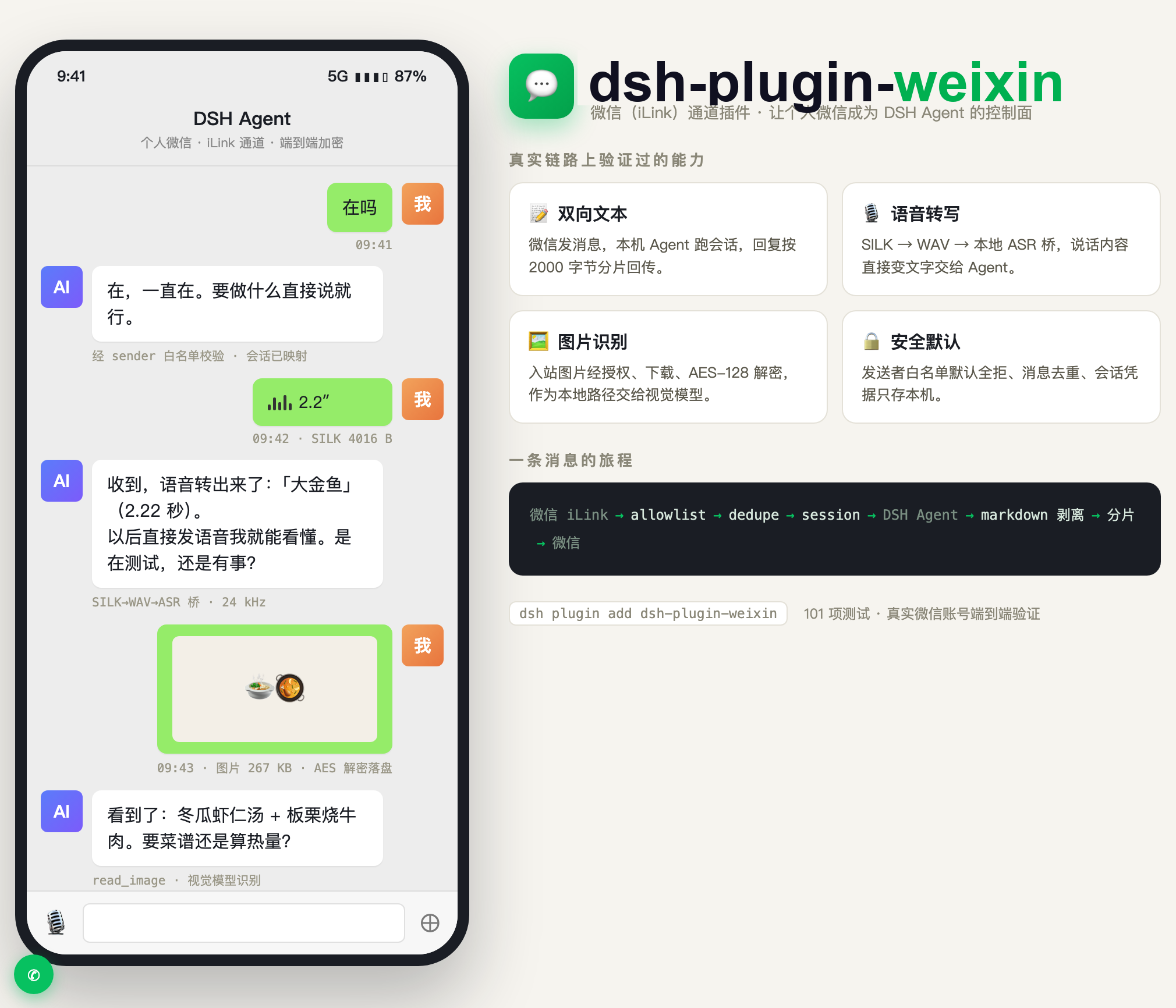
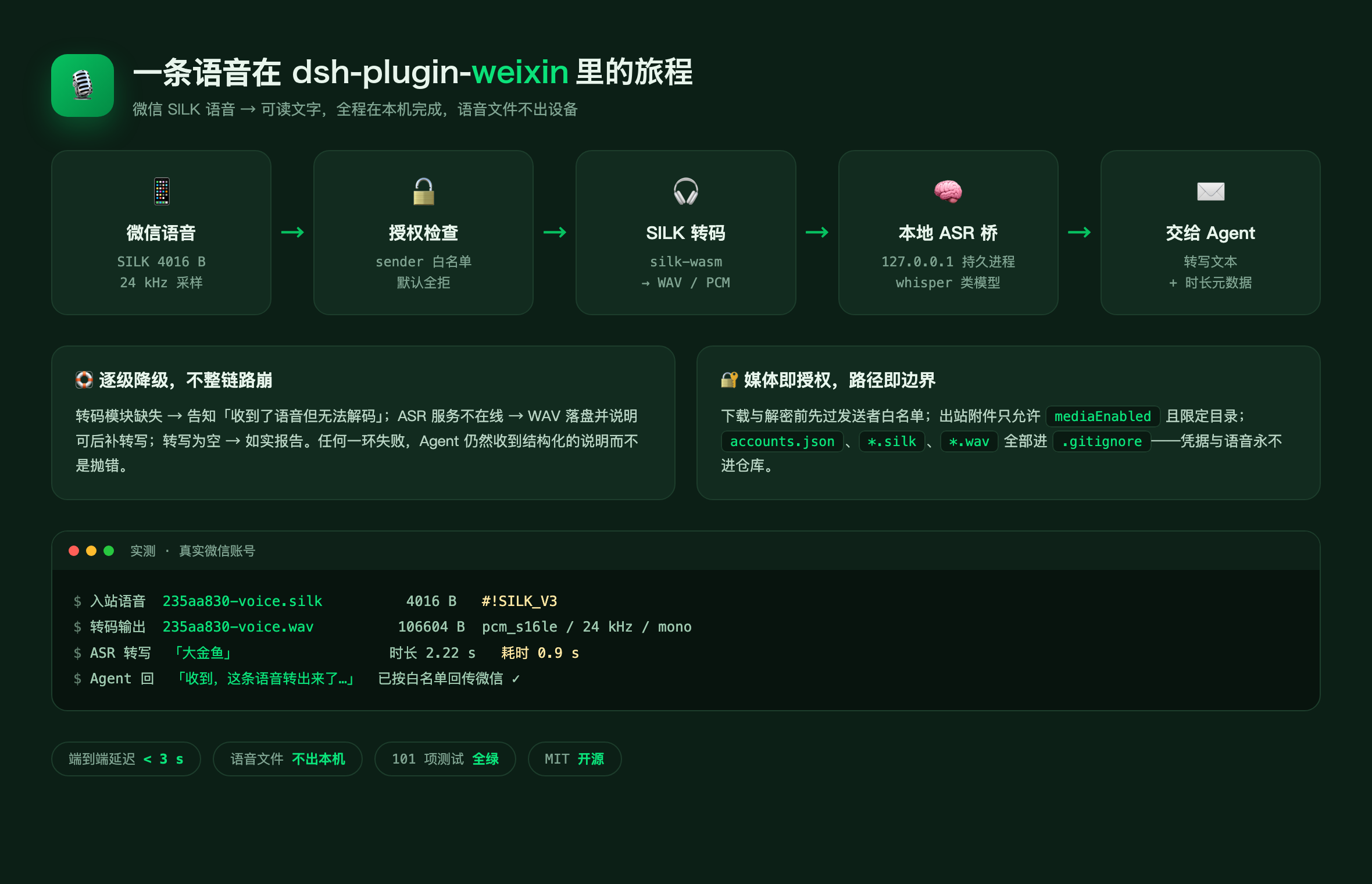
- Voice works out of the box — inbound voice is transcoded locally from SILK to WAV, the ASR bridge turns it into text and hands it to the Agent (a hot call takes about 300ms); when recognition fails it degrades to a file on disk. Audio attachments can also go out as voice bubbles (
voiceOutbound, off by default — in practice the iLink server accepts bot voice withret=0but does not deliver it; read Outbound voice before turning it on). - Management lives in the settings card, and in the left sidebar — accounts, sessions, 29 config items, voice models, message journal / stats / reminders / persona / about (version, check for updates, project links) all live in the WeChat BOT card on the DSH settings page; the same card is also mounted as the "WeChat BOT" page in the left sidebar (
sidebar.panellistone line + themainpanel), so account status, message journal and stats are visible without opening settings. Config items follow the UI language (a Chinese UI is all Chinese; groups start collapsed, click to expand the fields).
Underneath it uses WeChat's iLink Bot API (ilinkai.weixin.qq.com); the transport layer comes from Tencent's official open-source plugin
@tencent-weixin/openclaw-weixin (MIT, 2.4.10).
This project vendors it into vendor/openclaw-weixin/, strips the OpenClaw coupling, and binds it directly to DSH's agents service.
Current status
Verified on real devices: plugin loading, QR code login, long-poll message reception, allowlist, dedupe, opening a DSH session, reading replies, chunked replies,
"typing", inbound images and files, inbound voice recognized into text (SILK → WAV → ASR, hot call about 300ms),
multiple DSH sessions under one conversation (/new, /list, /use, switching keeps the context),
multi-account login and switching (a second account takes effect right after its scan, no restart).
Not yet verified: long-running operation, long-term concurrent use of multiple accounts, group chat; sending video (needs video encoding; images,
files and audio voice are supported today); native image understanding (inbound images are handed to the Agent as local paths and the Agent opens them with read_image —
that depends on the current model and toolchain, it is not something the plugin itself guarantees).
Repository layout
src/index.js            Plugin entry: name / inject / Config / apply
src/agent-bridge.js     WeChat conversation ↔ DSH agent session (create/resume + followup)
src/session-reader.js   Read assistant replies and running tools back from the session log
src/transport/ilink.js  iLink long polling + send + sendMedia + typing
src/security/allowlist.js  Sender/conversation allowlist (denies everyone by default)
src/message/{chunker,dedupe,markdown}.js  Chunking, bounded dedupe, Markdown→plain text
src/media/inbound.js    Inbound media: download, decrypt, write to disk, voice transcoding
src/media/outbound.js   Outbound media: path allowlist, attachment reference detection, upload
src/media/asr.js        Speech recognition: resident ASR bridge client (degrades instead of throwing)
src/state.js            Redirect the credential dir from ~/.openclaw to ~/.dsh/weixin
bin/login.js            QR code login CLI
bin/install.mjs         Install into a given DSH profile
vendor/openclaw-weixin/ Tencent's official MIT transport layer (OpenClaw deps stripped)
Install
Option 1: install from npm / git (recommended for most users)
DSH's plugin page (sidebar Plugins) or the plugin_manager tool can install straight from the registry:
dsh-plugin-weixin
You can also enter a git URL or an absolute path. After installation DSH mounts the bundle automatically; restart to take effect.
Currently published version: dsh-plugin-weixin@1.5.12.
With npx (no clone needed)
npx dsh-plugin-weixin            # installs into the default profile
npx dsh-plugin-weixin --profile desktop
The package's bin points at the same bin/install.mjs, so npx and a source checkout take the same path.
Option 2: install from source
git clone <this-repo> && cd dsh-plugin-weixin
node bin/install.mjs                      # installs into $DSH_PROFILE (or desktop) by default
node bin/install.mjs --profile web        # install into another profile
node bin/install.mjs --uninstall
The script does three things:
- puts the package (including
vendor/) into<profile>/node_modules/dsh-weixin; - appends
dsh-weixintodsh.profile.bundlesin<profile>/package.json; - appends one
dsh-weixinline to<profile>/cordis.patch.yml(idempotent; refreshes that line if it already exists).
It also moves two optional dependencies (qrcode-terminal, silk-wasm) into the profile's node_modules —
otherwise they are only visible inside this repo and silently degrade once installed into a profile.
Note: how long this installation survives depends on the version declared in the profile.
- When the declared range and the installed version agree, the
pnpm installat app startup sees nothing to do and the copy is kept (locally modified files are not overwritten);- When the declared range changes (e.g. the profile still says
^0.9.3while you installed 0.9.5), pnpm installs whatever version that range resolves to from the registry and the manually copied sources are overwritten wholesale — newly added files simply disappear, which shows up as "different features before and after a restart"; that is exactly how the sidebar entry vanished once.To make the installation stable long-term, add
--pin:node bin/install.mjs --profile desktop --pin
--pinpoints the profile'sdependenciesat the version of this exact code (^<version>) and refreshes the lockfile with the pnpm bundled with the app. It only makes sense for published versions: pinning to a source version that is not published yet just makes pnpm fail to find the package — in that case verify with a temporary copy first and--pinafter the release. Non-caret declarations (e.g.file:...tgz) are not rewritten, only reported.
Restart DSH for it to take effect.
Login
node bin/login.js                    # prints a QR code in the terminal, scan it with WeChat on your phone
node bin/login.js --account work     # pick an id when you have several accounts
node bin/login.js --force            # force a new scan even when an account already exists
Credentials are written to ~/.dsh/weixin/openclaw-weixin/accounts/<id>.json, permissions 0600, on this machine only.
bin/login.js takes no password and never prints the token to the log (the vendor code redacts it).
Logging in from the DSH settings page
"Settings → Plugins → dsh-plugin-weixin" also lets you scan without opening a terminal:
- After clicking "Scan to log in to WeChat", the card shows a real QR image (the host renders the login link iLink returns into a PNG and sends it back, so the client needs no QR library at all);
- The QR code can be drawn on any platform, with no python and no extra packages: the QR matrix comes from
qrcode-terminal(already a dependency) and the PNG is encoded by hand insrc/png.jsusing onlynode:zlib. Early implementations looked for the npmqrcodepackage first and then forpython3— the former was never a dependency and the latter does not exist on Windows, so Windows users saw a broken-image icon instead of a QR code. That path is now pinned down by tests; - If drawing really fails, the card says "the QR image is unavailable, click below to open it in a browser"
instead of stuffing the login link into an
<img>and showing a broken image; - Next to the QR code are "Open in browser" and "Copy link" — the
qrcode_img_contentiLink returns is actually a login link (https://liteapp.weixin.qq.com/q/...), not an image; opened in a browser the link scans just the same; - When a verification code is required the card switches to an input box and keeps polling after submission; an expired QR code refreshes automatically (at most 3 times).
Logging out and re-binding
"Log out" only deletes the local credentials. iLink has no server-side unbind endpoint, so the bot stays attached on the WeChat side (your phone still shows "bound"), therefore:
- After logging out, the card showing "not logged in" is an accurate display, not stale state — this machine really has no credentials left. The card's state is decided by the local account files; "bound" on the phone describes the server-side binding relationship, and the two were never the same thing;
- If you scanned with the settings page before that logout, that flow never worked end to end (polling sat in
poll(null), seedocs/progress.md). That is: after scanning, the card stays on the QR page and nobody handles the scan result, which has nothing to do with the phone showing "bound". After the fix, scanning again is what actually reaches the server; - Even once you reach the server there is one more case: when the server still believes this machine is bound to the same bot, it answers
binded_redirectand refuses to issue new credentials (this branch's semantics come from the vendor sources; the vendor CLI reads it as an idempotent success "already connected to this OpenClaw, no need to reconnect", but that only holds while this machine still holds the token — after a logout the token is gone and there is no local interface that could unbind); - The card reports this case separately as "needs attention" and gives the only workable action: first unbind that bot in WeChat on your phone, then scan again.
In short: logging out = this machine forgets; to re-bind = unbind on the phone first.
No DSH reload needed after a successful QR scan
If this machine has no credentials when the plugin loads (a fresh install, or right after a logout), the getUpdates long poll that receives messages
cannot start at that moment. After a successful scan in the settings page, the login notifies the host to start that loop immediately for the
freshly written credentials, so the redundant "scan → reload DSH → it works" step is gone.
If WeChat on your phone still says "cannot connect to openclaw right now", check four things in order:
- whether the plugin log has
listening as account <id>— if not, the loop did not start; - whether it has
settings login service unavailable— if so the login service was not installed: the scan does succeed and the credentials are written to disk, but nobody is listening for "login completed", so the loop never switches to the new credentials (historically this line swallowed a misuse ofctx.plugin(), with symptoms identical to "the loop did not start"); - whether it has
no Weixin account is saved(no credentials) oris already being listened to(a duplicate trigger, normal); - whether the server rejects the credentials:
getUpdates errcode=-14means the login expired and you need to scan again.
When switching to a new bot (the token changed) the plugin stops the old long poll before starting the new one: two long polls on the same credential make the server split inbound messages between the two loops instead of delivering one copy to each.
Managing multiple accounts
Several accounts can be logged in at the same time (add them one by one with node bin/login.js --account work, or scan one by one behind
Add account in the settings card). Every saved account has its own inbound loop: one account's credentials expiring, logging in or logging out
does not affect the others' sending and receiving. Sessions are isolated per account as well — the same WeChat conversation under two accounts is two
independent session lines, and /list and /use only touch the lines of the account that received the message.
The login card under "Settings → WeChat" lists one row per account: the note name (or the account id), the last-active time ("just now / N minutes ago / N hours ago / N days ago"), a paused marker, and three actions:
- Rename — give the account a note name (e.g. "work"); display only, stored locally in
~/.dsh/weixin/accounts-registry.json. Editing happens inside the card: after clicking "Rename" an input appears under the account row, Save applies it and Cancel discards it (the desktop cannot pop a browser-style prompt, so it is inline editing, not a dialog); - Allowlist — set the allowed senders for this one account (comma separated, prefilled with the currently effective
list). Empty = clear the override and fall back to the global allowlist; changes take effect immediately, no reload. The effective
rule is that the account override wins over the global
allowedSenders; - Pause / Resume — pause one account's inbound (the credentials are kept and the phone still shows it as bound).
Pausing takes effect immediately, no reload; a paused account logs one explicit line
(
account "<id>" is paused; not starting its loop), so deliberate silence is not misread as a failure; - Log out — log out only this account; the others keep sending and receiving.
The registry is pure metadata: a corrupt file loses at most note names and pause markers and never affects message delivery.
Authorization (important)
WeChat text is not an authorization credential. Therefore:
allowedSendersdefaults to empty, which equals denying everyone — a plugin with no allowlist configured drives nothing;- A sender not on the allowlist only gets one warn line; no session is created and no reply is sent;
- First-contact auto-registration: when an account's own allowlist is empty (never configured in the card and never registered), the sender of the first message received is taken to be the person who scanned the code, added to that account's allowlist automatically, and allowed through this one time — at scan time only the bot id is known, a person's WeChat id only appears with the first message. Other strangers are still denied afterwards; add people in the settings card, or clear it and start over;
- Real file modifications and command execution are still decided by DSH's own permission layer and confirmation flow; this plugin does not bypass them.
Configuration
The config of that line in cordis.patch.yml:
The table below is the common options, not all of them: the Options tab renders all of them,
each with its default, its current value, where that value came from, and a when it takes effect
badge (takes effect immediately / after a restart / after signing in again) — that badge is the
first thing to check when a change seems to do nothing. The search box matches name, hint, option
key and current value; ⭐ marks the options that shape the system prompt, and the The prompt tab
shows what that prompt actually looks like. "Export changed values" copies the non-secret options as
JSON; the Maintenance tab seals the whole machine into an encrypted pack.
The prompt tab is read-only: it builds the system prompt the next message would carry with the
same assemblers the inbound path uses, and reports the character count, the rough token count and how
much each layer takes (persona / speech style / your feedback / life state / memory / spend). It opens
on the mode that is actually live (the one the persona tab set), not on the personaDefaultMode
option, which is a rarely-set fallback — the tab says which of the two it is showing, and marks a mode
you picked by hand as "may differ from the live one". Recall and knowledge search need a real question,
so they never appear in a preview; when the prompt is empty the tab explains whether that is "the
default mode simply has no persona block" or "the live mode does, switch to it above".
| Field | Default | Description |
|---|---|---|
enabled |
true |
Turning it off stops the long poll from starting |
accountId |
'' |
Empty = only use the single saved account |
cwd |
'' |
Agent working directory; empty = inherit the session default |
allowedSenders |
[] |
WeChat user ids allowed to drive the Agent |
allowedChats |
[] |
Conversation allowlist; empty = no conversation restriction |
maxMessageLength |
1500 |
Character limit for one outbound message |
sendIntervalMs |
1200 |
Minimum gap in milliseconds between two outgoing messages (text chunks and attachments both count). In practice about 20 messages in a few minutes triggers an account-level sending block (≥30 minutes); this interval keeps chunked replies under that line |
sendCooldownMs |
30000 |
Cooldown in milliseconds after 3 consecutive send failures, so a temporary rejection does not escalate into an account block |
readLinks |
true |
Fetch the page text for the Agent when a message contains an http(s) link; a link that cannot be fetched only reports one line of reason and does not affect the message |
messageJournal |
true |
Record recent sent and received messages in a local journal; the "Message journal" tab of the settings card shows the latest 50 |
personaDefaultMode |
'default' |
Default conversation mode for new sessions. The "default mode" selector on the "Persona" tab of the settings card overrides it live (saved to disk, takes effect with no reload) |
memoryEnabled |
true |
Fold long-term memory, conversation summaries and the recent-message window into the prompt. Turning it off disables /remember, /forget and /memory along with it; /mode is a separate feature and is unaffected |
memorySummaryTurns |
10 |
After how many completed agent turns the summary of this conversation is updated automatically in the background |
memorySimilarityRoute |
off |
How duplicate memories are judged: off = local rules only (free), memory = ask the memory model when unsure |
memoryGlobalMaxFacts |
30 |
Upper bound on long-term memory entries; once full, /remember refuses new ones instead of silently evicting the oldest |
memoryConvMaxChars |
1200 |
Character limit for the conversation summary |
memoryProvider |
'' |
Memory model provider (used for summaries / extraction / consolidation). Empty = keep using the current session's model |
memoryModel |
'' |
Memory model model; only effective together with provider |
memoryRecentTurns |
5 |
How many recent messages to backfill on a cold start: injected once, only into a new session line (first message, /new, /mode switch); an already-connected session does not repeat it. 0 disables it |
memoryRecall |
true |
When a message mentions something from the past, search the local journal for the original text and fold it into the prompt; a casual chat that hits nothing spends no tokens |
memoryRecallDays |
180 |
How many days back local recall search looks (older journal files are still on disk, just not indexed) |
memoryRecallHits |
3 |
At most how many matching originals to inject at once (each truncated to 140 characters) |
humanPacing |
true |
Companion mode's "reply like a human": a first-message delay plus splitting long replies into several bubbles. Only applies outside "default assistant" mode |
replyDelayMaxMs |
2400 |
Upper bound in milliseconds on the pause before the first reply: the actual pause varies with reply length and current energy, slower when tired |
bubbleSplitMax |
3 |
Maximum number of bubbles a long reply is split into (1 = no splitting). A single short sentence is always one message |
bubbleGapMs |
700 |
Pause in milliseconds between two bubbles; the actual value jitters between 0.7× and 1.3× |
lifeState |
true |
Infer mood / what it is doing / energy from the clock and fold that into the prompt so the tone follows the state (throttled to disk every 5 minutes, no model involved) |
stickerEnabled |
true |
Let the model write [表情:开心] to send a sticker image instead (an image bubble). When off, the marker is not even taught to the model |
proactiveEnabled |
false |
Companion mode "speaks first": sends a message on its own when the other side has been quiet for a while. Off by default, only applies outside "default assistant" mode |
proactiveMinGapMinutes |
180 |
At least this long since the other side's last message before it may speak first; also the base for the backoff when unanswered (doubles each time, up to one day) |
proactiveMaxPerDay |
3 |
Maximum number of proactive messages per account per day |
proactiveWindowStart |
'09:00' |
Start of the speaking window (local HH:mm); nothing is sent outside it, and a reversed window falls back to the default |
proactiveLearnedWindow |
true |
Learn the hours the other person actually writes from the journal and narrow the window above to them; narrows only, and stays off until two weeks hold 20 inbound messages |
proactiveWindowEnd |
'23:00' |
End of the speaking window (local HH:mm); must be later than the start |
quietHoursEnabled |
false |
Do-not-disturb switch: while on, scheduled reminders and /subscribe proactive messages that fall inside the window are deferred until it ends (rescheduled — never lost, never duplicated) |
quietHoursStart |
'23:00' |
Quiet hours start (local HH:mm). Must be strictly earlier than the end (or cross midnight); equal ends are treated as unconfigured |
quietHoursEnd |
'07:00' |
Quiet hours end (local HH:mm). A window crossing midnight (e.g. 23:00 → 07:00) counts as two segments |
groupChatEnabled |
false |
Take part in group chat. Off by default: a bot that answers every group message is just spam in a real group; private chats are unaffected |
richContent |
true |
Rich content: long code blocks are sent as files (indentation/language/line count intact), Markdown tables become aligned text |
videoFrames |
true |
On receiving a video, pull three still frames with the local ffmpeg and hand them to the model (the model cannot read video, but it can read images) |
codeFileThreshold |
1200 |
Above how many characters a code block is sent as a file; shorter ones stay in the bubble |
groupReplyWhen |
'mention' |
When to reply in a group: mention answers only when addressed, all answers every message |
groupSummaryEnabled |
false |
Group context summary: after a batch of group messages, one background call compresses the recent talk into a few lines and folds them into the next prompt. Off by default — it spends a call each time |
groupSummaryEvery |
12 |
How many group messages make a batch |
groupShareMemory |
false |
Whether to inject long-term memory, recall snippets and the closeness line in groups too. Off by default — those blocks are the owner's own private business |
toolAudit |
true |
Append every agent tool call to <state dir>/audit/ (one JSONL per day): tool name, arguments truncated to 500 characters, which account/conversation/sender triggered it, whether the result carries an error |
voiceOutbound |
false |
Send audio attachments as WeChat voice notes instead of files (wav/silk transcoded in-process, everything else via ffmpeg). Off by default: in practice the server accepts bot voice (ret=0) but does not deliver it, so turning it on makes attachments disappear silently; a rejected send still degrades to a file automatically |
markdownMode |
'strip' |
Markdown handling for replies: strip converts to WeChat-readable plain text, off sends as-is |
progressAfterMs |
45000 |
Send a progress hint before the timeout |
maxTurnWaitMs |
1200000 |
Upper bound on waiting for one turn |
typingIndicator |
true |
Show "typing" when there is a typing ticket |
mediaEnabled |
true |
Send local files referenced in a reply as attachments (outbound) |
maxMediaBytes |
104857600 (100MB) |
Size limit for outbound attachments |
maxInboundMediaBytes |
20971520 (20MB) |
Download size limit for inbound attachments |
cdnBaseUrl |
empty (not configured) | CDN root for inbound downloads and outbound uploads. Empty means "not configured here": the cdnBaseUrl from the account record is used first, then the upstream default https://novac2c.cdn.weixin.qq.com/c2c |
asr.modelDir |
'' |
Voice model directory; empty = ~/.dsh/weixin/asr-models. The input box in the settings page overrides it (and writes it into <stateDir>/asr-config.json) |
Reload the plugin after changing the config.
All of these options can now be changed in the settings page: open the Config items tab under "Settings → WeChat", edit item by item and
save. The form reads the plugin's own schema, so every option carries its default, its current value and where that value comes from
(default / from config / saved); items changed but not saved are marked. Saving writes only the items you changed,
into ~/.dsh/weixin/config.json (next to the credentials, so reinstalling the plugin does not lose them).
Priority: value saved in the UI > config in cordis.patch.yml > schema default.
To drop a change, click "restore default" on that item.
Only two are read-only in the UI:
maxTurnWaitMs— lowering it silently truncates long replies, so it is not a good everyday switch;enabled— it is the plugin's master switch; change it in the YAML (the settings page still works after turning it off, so you can configure everything first and enable it afterwards).
Files the agent produces are delivered automatically: files the agent writes into the working directory during a turn (screenshots, converted documents,
exported data, ...) are sent to WeChat right after the reply goes out, without an extra "send it to my WeChat" — even when the reply text never references them.
Only deliverable extensions (images/documents/audio-video) are accepted, subdirectories are not recursed into, and it does not apply while mediaEnabled is off either.
The settings page can turn it off under "Media → auto-deliver produced files".
Sessions (one WeChat conversation can have multiple DSH sessions)
By default one WeChat conversation maps to exactly one DSH session, and its context keeps growing as you chat. The plugin supports session lines: the same WeChat conversation can hold several DSH sessions, each with its own context and no interference between them.
Send commands directly in WeChat (they only take effect when the whole message is exactly the command; 看看 /new 这个命令 and
/steer /new do not count):
| Command | Effect |
|---|---|
/new |
Open a new session; the following messages go into it |
/list |
List every session line under the current conversation, ▶ marks the one in use |
/use <index> |
Switch to line N (indices come from /list) |
/clear |
Wipe the current session and start over: that line is removed from /list and a brand-new one opens at once |
/cancel |
Interrupt the turn currently running (for when a long task is stuck). Messages already queued still proceed; the reply is recorded as "cancelled" rather than "model call failed" |
/status |
Show the current account and conversation status: account name, whether paused, last send/receive, allowlist size and source, number of session lines |
/remind <time> <content> |
Scheduled reminder: at the set time the bot sends the content straight into the current conversation (e.g. /remind 10m standup, /remind 18:30 clock out, /remind 2026-10-20 09:00 weekly report) |
/remindlist |
List this account's reminders that have not fired yet (with indices) |
/remindcancel <index> |
Cancel a reminder that has not fired yet |
/bad too long |
Say what was wrong with that reply (up to 60 chars): recorded as a “stop doing this” rule that applies from the next reply on, kept per mode |
/good keep it up |
Say what worked: recorded as a “keep doing this” rule |
/style |
List the preferences recorded for this mode (12 at most); /style clear wipes them |
/say |
/say some words synthesises audio with the local system voice (macOS say; no network, no cost, and not anybody's actual voice). Since iLink accepts a bot voice bubble without delivering it (measured twice), the audio goes out as a file by default; turn on voiceOutbound to try the bubble |
/draft |
The important-date reminder also drafts the line you meant to write: /draft send sends it, /draft again rewrites it, /draft skip drops it. Never sent on its own, expires after 36 h |
Switching preserves, it does not reset: the line you switch away from is not ended or cleared, and its earlier context is all there when you
switch back. The indices in /list are absolute (counting from 1), so even when only the latest 10 are shown the indices never shift
because of collapsing.
/clear is the only command that loses context, so it only applies to "the line currently in use" and takes no argument —
/clear 3 and the like are not recognized. The cleared line is only removed from the session-line list and /use cannot switch back to it
afterwards; the host's session file is left exactly as it is and no history is deleted.
Commands are answered directly by the plugin and cost no model conversation: sending /new leaves no question-and-answer turn behind.
Two established facts:
- Upgrading does not lose context. The first session line keeps its historical id (
weixin-<conversation slug>), so an old conversation is still that same line after you install a new version; - Storage lives in
<stateDir>/sessions.json(by default~/.dsh/weixin/sessions.json); deleting it is equivalent to keeping only one default session line.
Managing from the settings page
The plugin card in the DSH settings page has a "Sessions" tab: it lists the session lines under every WeChat conversation, marks the one in use,
and lets you click "Switch" to jump to one — no need to go back to WeChat and type /use. Every session line has a
"Delete" button (effective after confirmation): it removes just that line, the other lines are unaffected; deleting the line in use falls back
automatically to the first remaining one; deleting the last line removes the whole conversation entry and the next message creates a clean new
session line. Every conversation entry also carries an account marker (each account's note name or account id), so you can tell at a glance
which account a conversation belongs to; historical conversations from before the upgrade (no account prefix) show no marker. Changes take effect in real time, no reload needed.
The card only reads that file and only writes it, the same path as sending commands from WeChat, so both sides always see the same thing.
Spotting WeChat sessions in the session list
In the session list on the left of the workspace, rows for sessions opened by this plugin start with a WeChat icon (14px, WeChat brand green #07C160),
distinguishable from other sessions at a glance.
With multiple accounts, the title itself of a session line carries the account marker: a new line is titled like
备注名: first message (the short form of the account id when there is no note name), and the sidebar, /list and the settings card see the same
title, with no extra inline marker needed. Historical conversations from before the upgrade keep their original titles without a prefix. That title is also
written into the host session on the first message (sessionTitle.rename, pinned to the user origin), so the host sidebar
shows this 备注名: message rather than an AI title the host made up; after that the host no longer renames it by itself.
Detection only looks at the weixin- prefix of the session id: this plugin opens weixin-<conversation slug>, the second line of the same conversation is
weixin-<conversation slug>--<timestamp>; other sessions use DSH's own session-<uuid> and are never mislabeled.
The icon is mounted in the slot the host declares, sidebar.session.row.leading. That slot is provided by ui-workspace to
every session row and only renders while the row is idle; archived rows are left empty, and search results have no such position;
the host's own schedule clock (ui-schedule) occupies it too — this plugin uses its own seat id, so both coexist without displacing each other.
For sessions not opened by this plugin the component returns null — it does not take a single pixel and never puts a WeChat icon on someone else's session.
With multiple accounts there is also a very faint ownership hint next to the icon: which WeChat account this session row belongs to, taken from
the note name set for the account in the settings page (the account id when none is set), at most 6 characters, with an ellipsis beyond that. Ownership comes
from the same /api/weixin/sessions data as the card, so it is only shown for sessions that match an account;
…
Links
More in this category
xmanrui/dsh-im★ 3118
Connect IM bots to DeepSeek Harness via QR codes or bot credentials (9 channels: Feishu, WeChat, DingTalk, WeCom, QQ, Slack, Telegram, Discord, and WhatsApp).
shaobeichen/dsh-pocket★ 2685
Remote phone access to the DSH Web UI: scan a QR code for LAN or public (cloudflared tunnel) access with real-time sync, a mobile-adaptive layout, and a settings tab.
OpenPetsHQ/openpets#dsh★ 1373
Bridges DeepSeek Harness lifecycle status, errors, and approval requests to a locally running OpenPets desktop companion.
c1overzz/dsh-bili-scroll★ 1150
Let your DSH agent browse Bilibili on its own, read subtitles, write a daily digest, and @ you when it finds something worth your attention.
inclusionAI/Avernet#deepseek-harness-channel-bcn★ 599
Connects DeepSeek Harness to Avernet's Bot Collaboration Network over WebSocket V2, with automatic onboarding, isolated agent sessions, tool-call events, and multi-bot routing tools.
zaofan-make/dsh-qqbot★ 213
QQ official bot channel (enhanced fork of tencent-connect/dsh-qqbot): full agent chat in groups and DMs, rich media, an auto-tagged sticker library with AI image replies, join approval, mute and broadcast, scheduled wakeups, remote approvals over QQ, interactive cards, multi-account instances, extensions, member profiles, and token-saving value-scored wakeups.
Community comments
Comments are public GitHub Discussions. Loading them connects to GitHub and Giscus; a GitHub account is required to post.