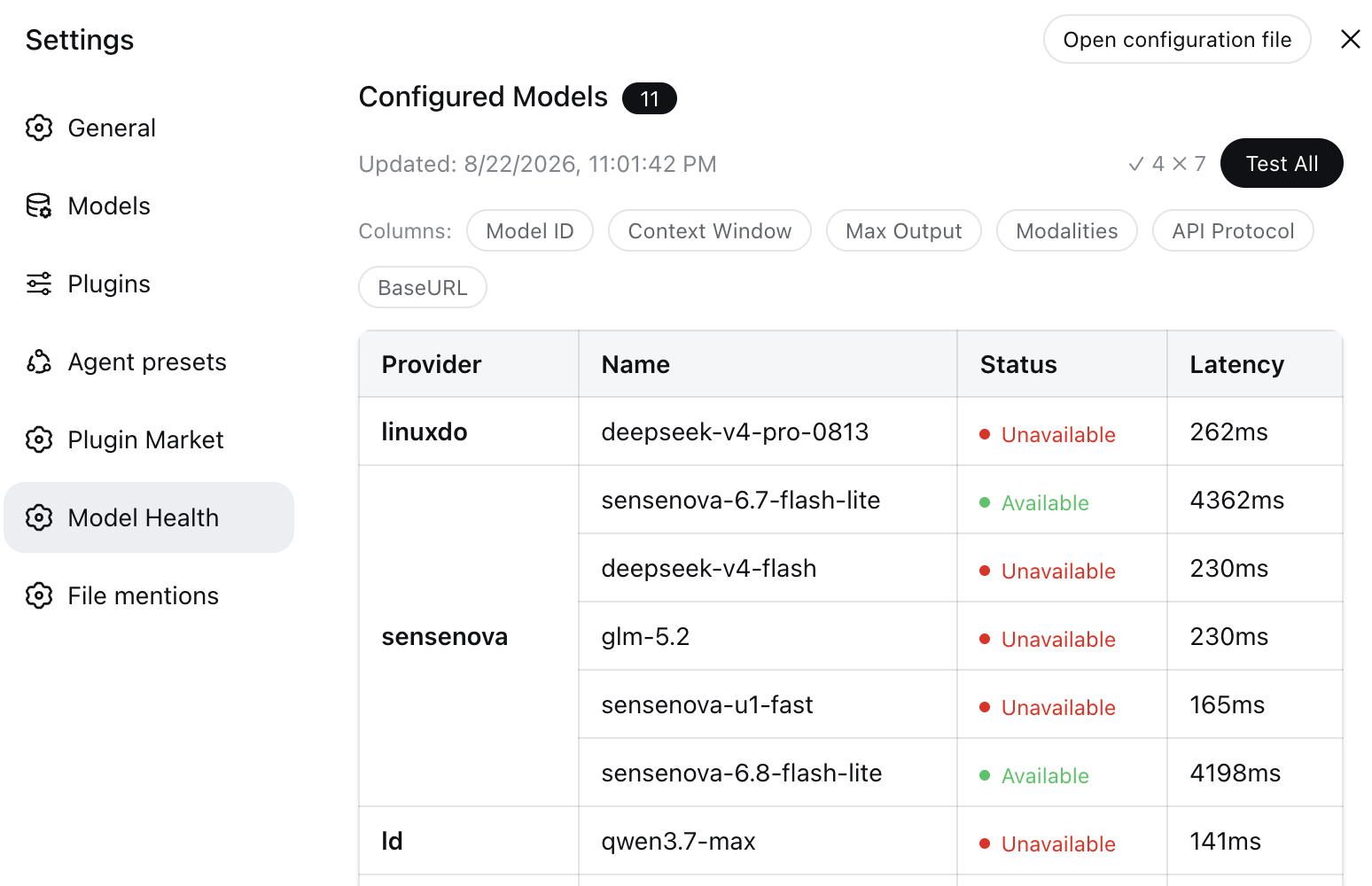
Model Health panel in Settings: lists every model configured in settings.yaml and batch-tests availability and latency for each.
Install
# from npm (prebuilt)
dsh plugin --profile web add dsh-model-health
# from GitHub (first run asks for allowBuilds approval — follow the hint, retry)
dsh plugin --profile web add github:oxlyn/dsh-model-health
Any plugin you install runs third-party code with your own permissions — it can read your files, use your credentials, and reach the network, and tool approvals don’t sandbox it. GitHub-sourced plugins also run build scripts at install time — pnpm blocks those until you allow them, so an install can stop with ERR_PNPM_GIT_DEP_PREPARE_NOT_ALLOWED or ERR_PNPM_IGNORED_BUILDS; dsh prints the exact key to add under allowBuilds in your profile’s pnpm-workspace.yaml, and the install works on the next run. Allowing a build is a trust decision: only install sources you trust, and pin a commit (github:owner/repo#sha).
README
DeepSeek Harness (DSH) plugin: a "Model Health" panel in the settings page — lists all configured models and batch-tests their availability and latency with one click.
中文 | EN
Install
From npm (recommended)
dsh plugin --profile web add dsh-model-health
From source
git clone https://github.com/oxlyn/dsh-model-health.git
cd dsh-model-health
pnpm install
pnpm run build        # tsdown → dist/index.js (ESM) + dist/client.js (IIFE)

# Run from the PARENT directory (dsh plugin add anchors relative paths
# to the invoking directory):
cd ..
dsh plugin --profile web add ./dsh-model-health
dsh web
# Startup log should show: [dsh-model-health] ready — tool "list_models" + routes GET /api/model-health/json, POST /api/model-health/test
Verify
After installing, open dsh web → Settings → Model Health; you should see a table of configured models. You can verify the plugin loads even without an API key:
dsh --profile web --dump-config | grep dsh-model-health
Features
Reads DSH settings from multiple sources for version compatibility — legacy $DSH_HOME/settings.yaml, and (since DSH 0.1.7-alpha.2+) the profile's cordis.patch.yml (merged by priority along with settings.yaml.imported) — and provides three ways to inspect your models:
| # | Form | Entry | Description |
|---|---|---|---|
| 1 | "Model Health" panel | Web UI → Settings → Model Health | React table: Provider / Model ID / Name / Context Window / Max Output / Input Modalities / API Protocol / BaseURL, with toggleable optional columns |
| 2 | Test all | "Test All" button in the panel | Concurrently (max 6) sends a minimal max_tokens=1 chat completions request per model with a 10s timeout; per-row status badges (OK / Fail / Skip / latency), failure details on hover, results persisted to localStorage. Tested badges are clickable to re-test that single model (underline on hover) |
| 3 | Tool list_models |
Invoked in conversation | Returns a Markdown table so the model can view the configured model list in chat |
Highlights:
- Supports both
llm-pi-ai(multi-protocol custom providers) andllm-deepseek(official) configuration sources - Built-in model display & probing: host built-in models not present in any config file (e.g. the DeepSeek default catalog — deepseek-flash / deepseek-v4-pro) are read from the host
llmregistry and merged in (deduplicated); probes go through the host runtime (ctx.llm.stream) with a minimal request (max_tokens=1), reusing the adapter's protocol, endpoint and credentials — zero extra configuration - Availability testing supports
openai-completionsanddeepseekprotocols; other protocols are automatically marked "Skip". 200 responses are body-validated (some gateways return 200 with an error payload) - API keys are resolved via the DSH credential service (
ctx.credentials.resolve) and never exposed to the browser - Test results (status / latency / error) persist to localStorage across page refreshes
- Status badges (Available / Unavailable / Skipped) are clickable at any time to re-test an individual model; status and latency refresh in place
- Settings nav uses a pulse (Activity) glyph — the host's icon table has no "health" category, so the plugin (following dsh-better-sidebar's pattern) marks its own row (rAF-coalesced observer) and the injected CSS swaps the fallback gear via a
::before+maskrule; color follows the host theme
How it works
The plugin consists of a host side and a client side (declared via the dsh.client field in package.json):
┌─ host side   src/index.ts → dist/index.js ──────────────────────┐
│  - ctx.tools.register: registers the list_models tool (Markdown) │
│  - ctx.webServer.register:                                        │
│      GET  /api/model-health/json  reads & parses DSH settings     │
│      (merges settings.yaml + profile patch, old/new versions)     │
│      POST /api/model-health/test  minimal request per model       │
│      (local Origin only; 200 responses body-validated)            │
│  - resolves API keys via the DSH credential service               │
└──────────────────────────────────────────────────────────────────┘
                          │ fetch
┌─ client side src/client.tsx (TSX, browser module) ───────────────┐
│  - injects the "Model Health" panel via a settings.section slot   │
│  - React (provided by the host) renders table + badges + tooltip  │
│  - "Test All": worker pool with concurrency limit of 6            │
└──────────────────────────────────────────────────────────────────┘
Technical notes: pure ESM ("type": "module"); cordis is a peerDependency provided by the host (compile-time import type only); service dependencies declared via export const inject = ['tools', 'webServer', 'credentials'].
Requirements
- Node
^22.19.0 || >=24.0.0(required by the DSH host) - pnpm (for building from source)
Development
pnpm install
pnpm run typecheck   # type checking
pnpm run build       # build dist/
Project layout:
dsh-model-health/
├── src/index.ts            # host entry: tool + HTTP route wiring
├── src/host/               # host impl: config / models / markdown / http / model-test
├── src/client.tsx          # client entry shell: injects React, assembles exports
├── src/client/             # client impl: types / runtime / i18n / storage / api /
│                           #   styles / columns / use-test-results / nav-icon / apply
│   └── components/         # ModelListSection / StatusCell / ErrorTooltip
├── cordis.patch.yml      # bundle layer declaration (id/name resolve as package names)
└── dist/                 # build output (included in the published files field)
Dependencies
@deepseek-ai/dsh-tools:^0.1.0-rc.8 || ^0.2.0-rc.2(compatible with both the DSH 0.1.x and 0.2.0 lines).@deepseek-ai/cordis:^4.0.1(peerDependency — host provides it; types-only in code).
Links
License
Links
More in this category
Ebony-Vinyl/dsh-our-free-model★ 25179
Adds free model lanes to DeepSeek Harness — DeepSeek V4.1 Flash, Kimi K3 and others — with no login, sign-up or API key, plus a local OpenAI-compatible gateway, fallback routing and a usage dashboard.
corrinehu/dsh-workbuddy-connect★ 1343
Brings the models in the WorkBuddy desktop app straight into DeepSeek Harness — zero configuration in the DSH chat.
V1ki/dsh-plugin-subscriptions★ 478
Use ChatGPT (Codex), Claude, and Grok subscriptions as DeepSeek Harness LLM providers, with Settings login, model catalogs, usage, plus image_generate, video_generate, and x_search tools.
Mars-Sea/dsh-commandcode-provider★ 407
Unofficial Command Code LLM provider: registers a `commandcode` route with a live model catalog and reasoning-effort support.
cv-superding/dsh-deepseek-web-login★ 286
Adds a deepseek-web provider that uses chat.deepseek.com web models in DSH, with browser login capture, PoW request signing, SSE streaming, and prompting-based tool calls.
FishBottle7/opencode2dsh★ 270
Exposes OpenCode Zen free models to DeepSeek Harness, with no API key.
Community comments
Comments are public GitHub Discussions. Loading them connects to GitHub and Giscus; a GitHub account is required to post.