Brings the models in the WorkBuddy desktop app straight into DeepSeek Harness — zero configuration in the DSH chat.
Install
# from npm (prebuilt)
dsh plugin --profile web add dsh-workbuddy-connect
# from GitHub (first run asks for allowBuilds approval — follow the hint, retry)
dsh plugin --profile web add github:corrinehu/dsh-workbuddy-connect
Any plugin you install runs third-party code with your own permissions — it can read your files, use your credentials, and reach the network, and tool approvals don’t sandbox it. GitHub-sourced plugins also run build scripts at install time — pnpm blocks those until you allow them, so an install can stop with ERR_PNPM_GIT_DEP_PREPARE_NOT_ALLOWED or ERR_PNPM_IGNORED_BUILDS; dsh prints the exact key to add under allowBuilds in your profile’s pnpm-workspace.yaml, and the install works on the next run. Allowing a build is a trust decision: only install sources you trust, and pin a commit (github:owner/repo#sha).
README
English | 中文
Brings every model in the WorkBuddy desktop app (GLM-5.3, GLM-5.2, DeepSeek-V4-Pro, DeepSeek-V4-Flash, Kimi-K3, MiniMax-M3, Hy3, and more) straight into DeepSeek Harness — zero configuration in the DSH chat.
Both the CN WorkBuddy and the international WorkBuddy AI apps are supported (international support since v0.5.0): whichever one you have installed shows up as its own model group, and having both installed shows both, each with its own account and credit.
Features
- Works out of the box: install and enable the plugin, then use it directly in DSH — no extra configuration.
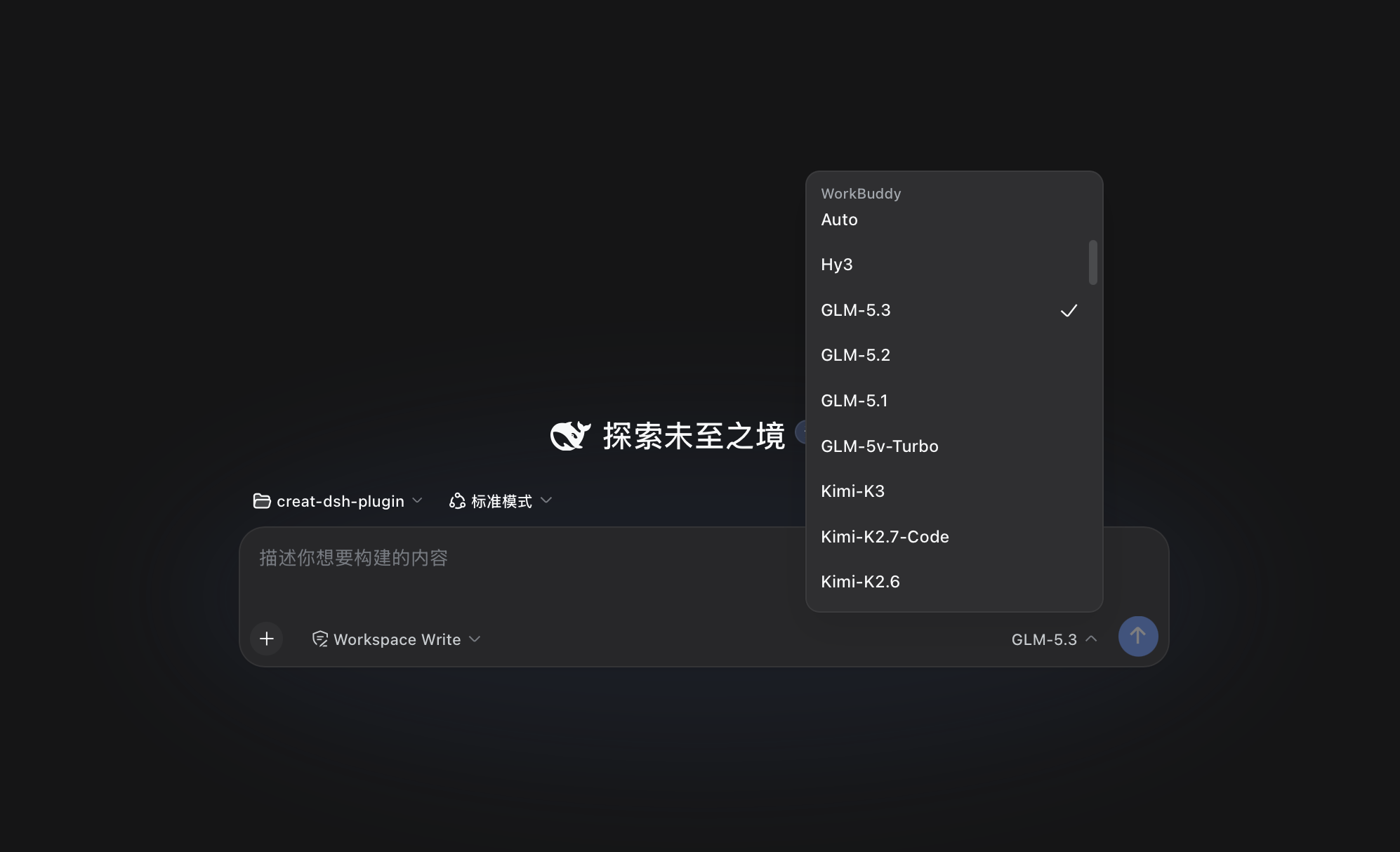
- CN and international side by side: the CN app appears as the WorkBuddy group and the international one as WorkBuddy AI. Their models, accounts, and credit never mix. Each group follows only its own app's sign-in: install just the international app and only WorkBuddy AI appears; install both and both groups appear; sign out of one and that group goes away. Settings likewise shows one card per version, each with its own account and balance.
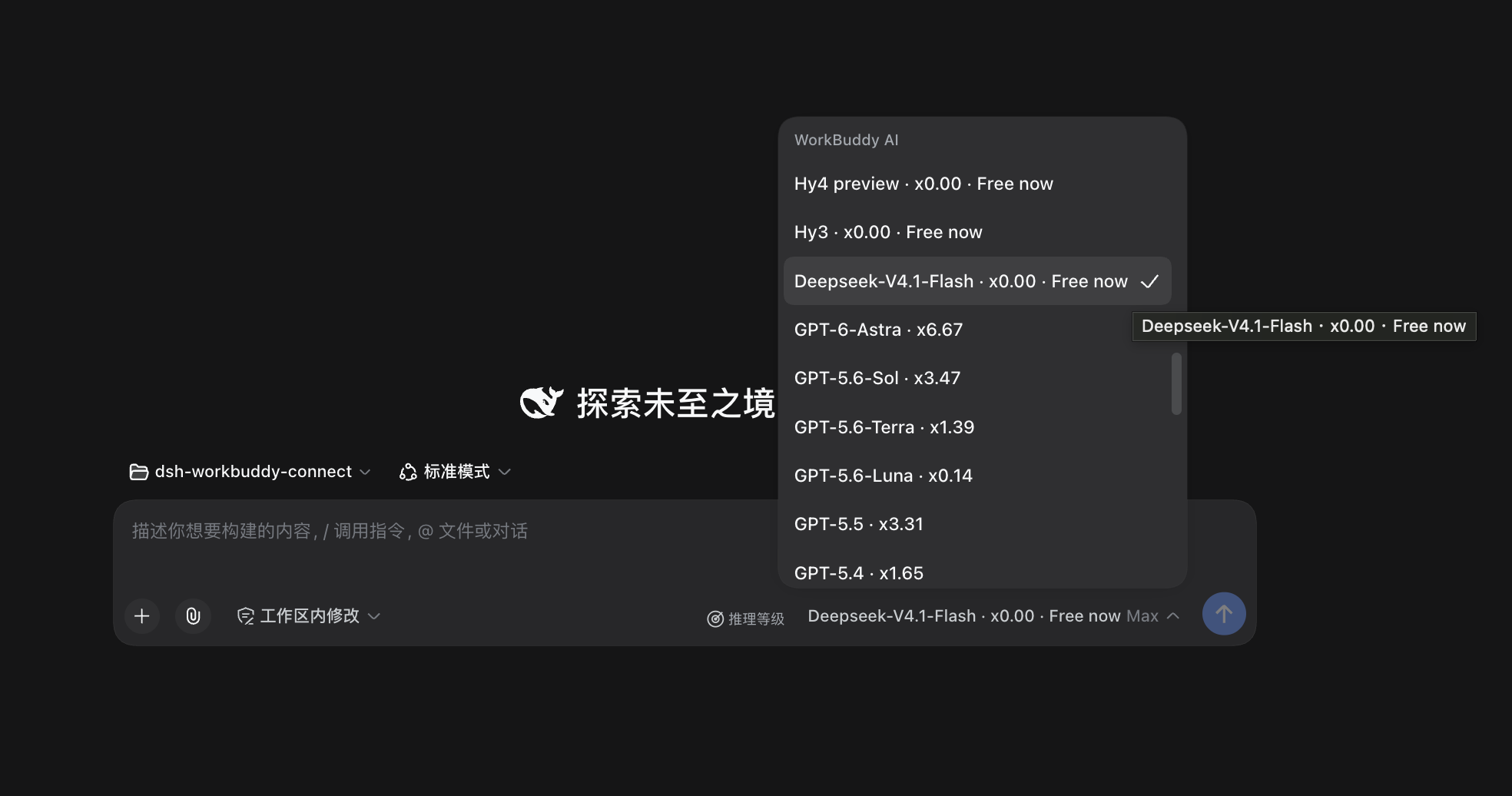
Image input: most models accept images — paste or drop one straight into the conversation (GLM-5.3-Flash, GLM-5.2, the DeepSeek-V4 series, and more); the few text-only models (e.g. GLM-5.1) clearly say so.
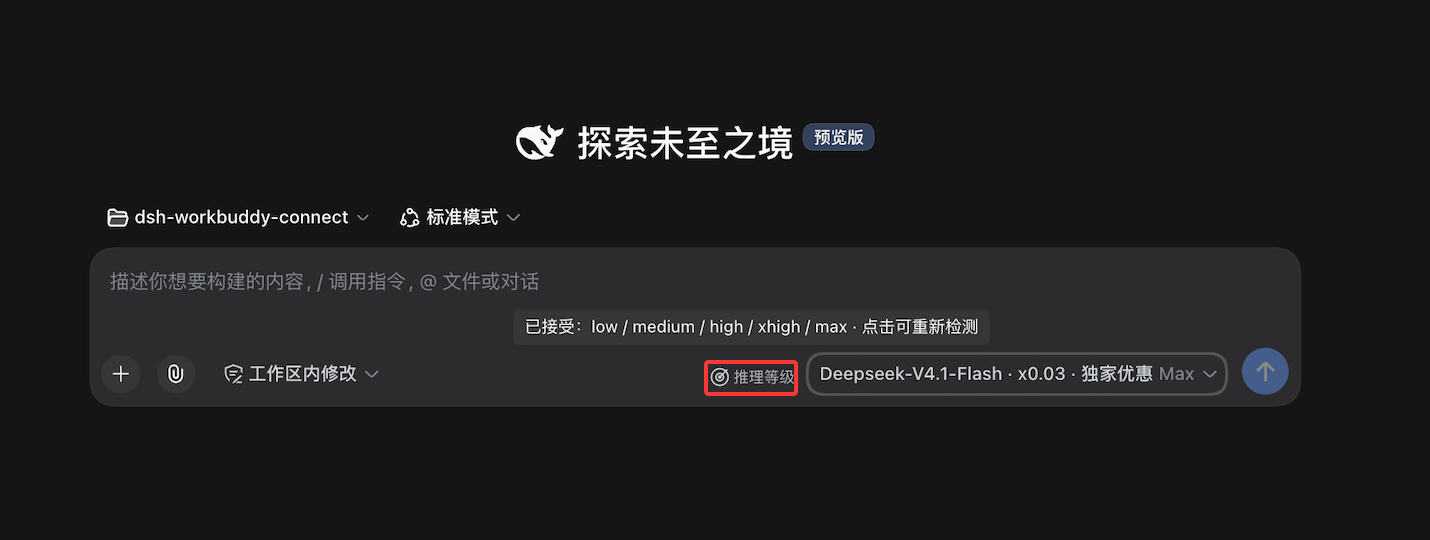
Reasoning levels: levels explicitly declared by WorkBuddy appear directly — for example, GLM-5.3 and GLM-5.3-Flash offer low / high / max. For some models that do not declare selectable levels, Web and Desktop provide a Reasoning levels control in the model picker for a manual check. It sends a few requests and may consume credit. Models without a check result or selectable levels continue to use WorkBuddy's default.
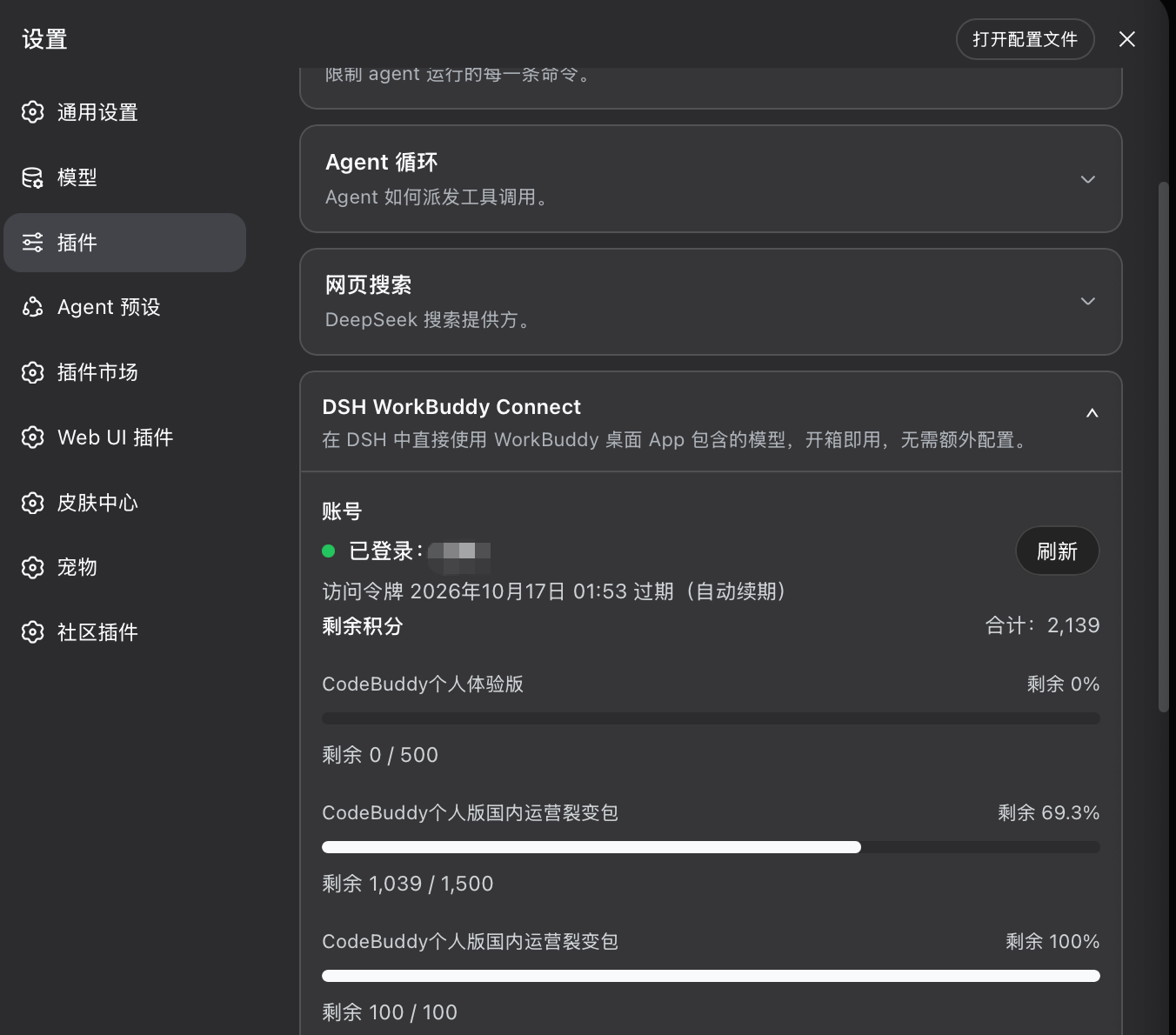
Status and detection: Settings → Plugins → the matching card shows the account, token validity, remaining credit, and model offers (on DSH
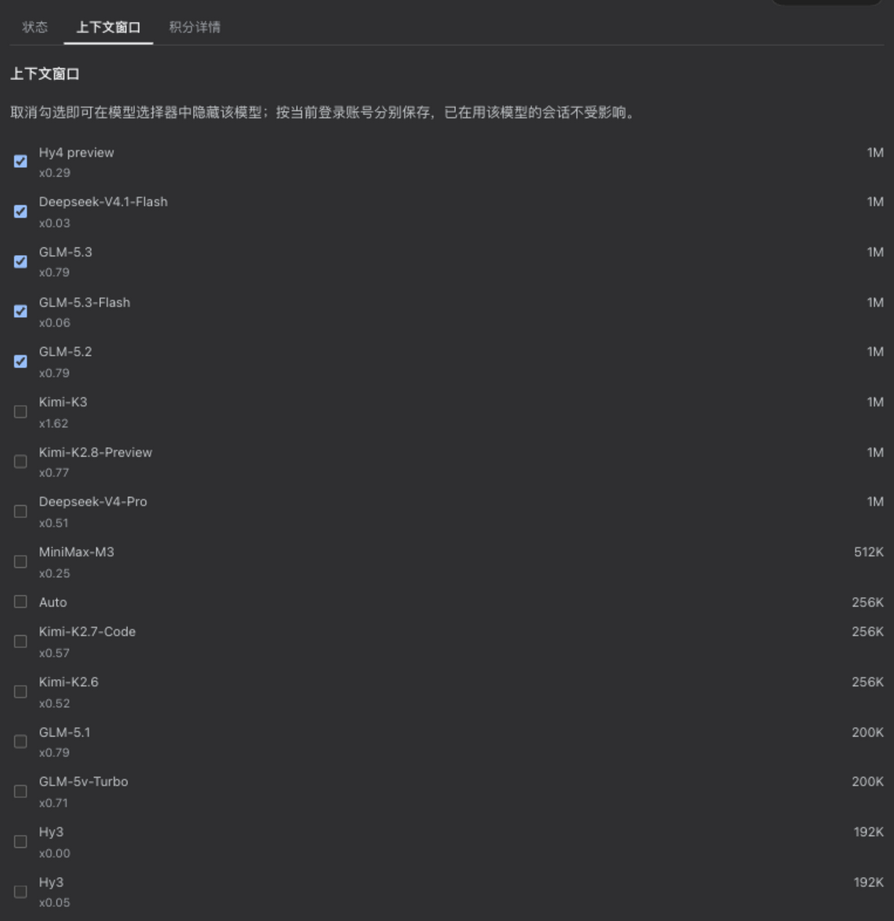
0.1.6+the entry lives in the left sidebar Plugins panel — see the version table below). It also lets you refresh the model list manually and shows whether the current list came from the upstream or from the built-in fallback, and provides manual reasoning-level detection for eligible models.Model visibility: both WorkBuddy and WorkBuddy AI cards (Context window tab) let you check which models appear in the model picker. Hidden lists are saved per signed-in account: switching accounts switches to that account's own list, switching back restores it; new accounts and newly added models are visible by default. Hiding only affects pickability — existing chats using a hidden model keep working.
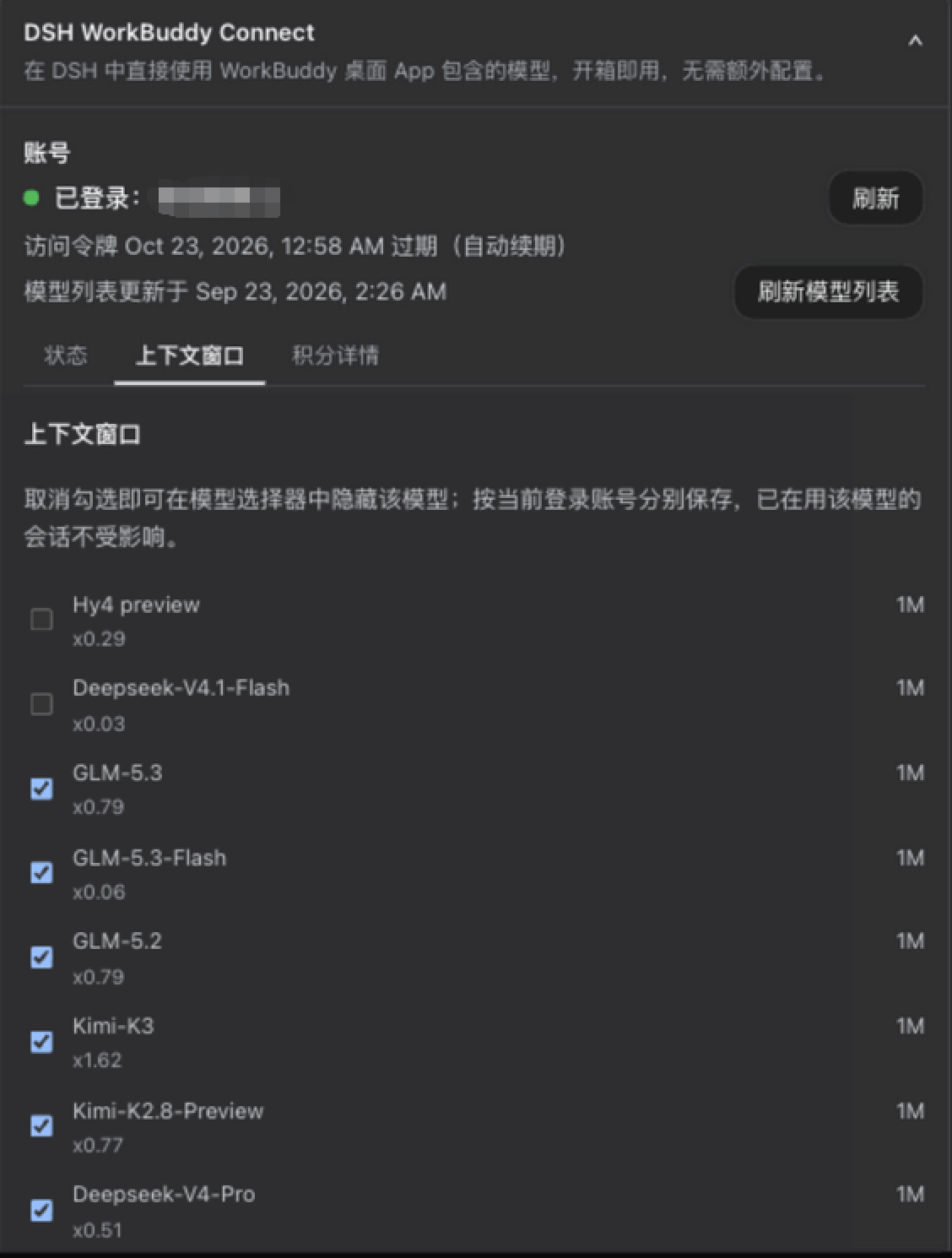
The same UI works unchanged inside the DSH 0.1.5 settings cards:
Enterprise credit: on the CN product, enterprise accounts (non-empty
enterpriseId) read their cycle quota from the enterprise billing endpoint, and the card shows an "enterprise quota" row with the cycle reset time.Rate: every model name carries its credits multiplier (e.g.
GLM-5.2 · x0.79,Hy3 · x0.00) in both the/modelpopup and the composer's model dropdown. The rate is display-only and never affects requests.Promo badges: promo badges (
限时免费,夜间折扣) ride the model name itself (e.g.Hy4 preview · x0.00 · 限时免费), visible wherever you pick a model; the status card also collects currently-discounted models. Per the WorkBuddy service data, synced each time DSH starts. The international version's promotions come from the service'smodelPromotions(which carry an effective window). Once a promotion lapses its badge is withdrawn; because the service writes the discounted value into the model's own rate field, the original price cannot be reconstructed, so that model then reports "price unavailable — refresh to update" rather than repeating the discounted rate or claiming the model is free.
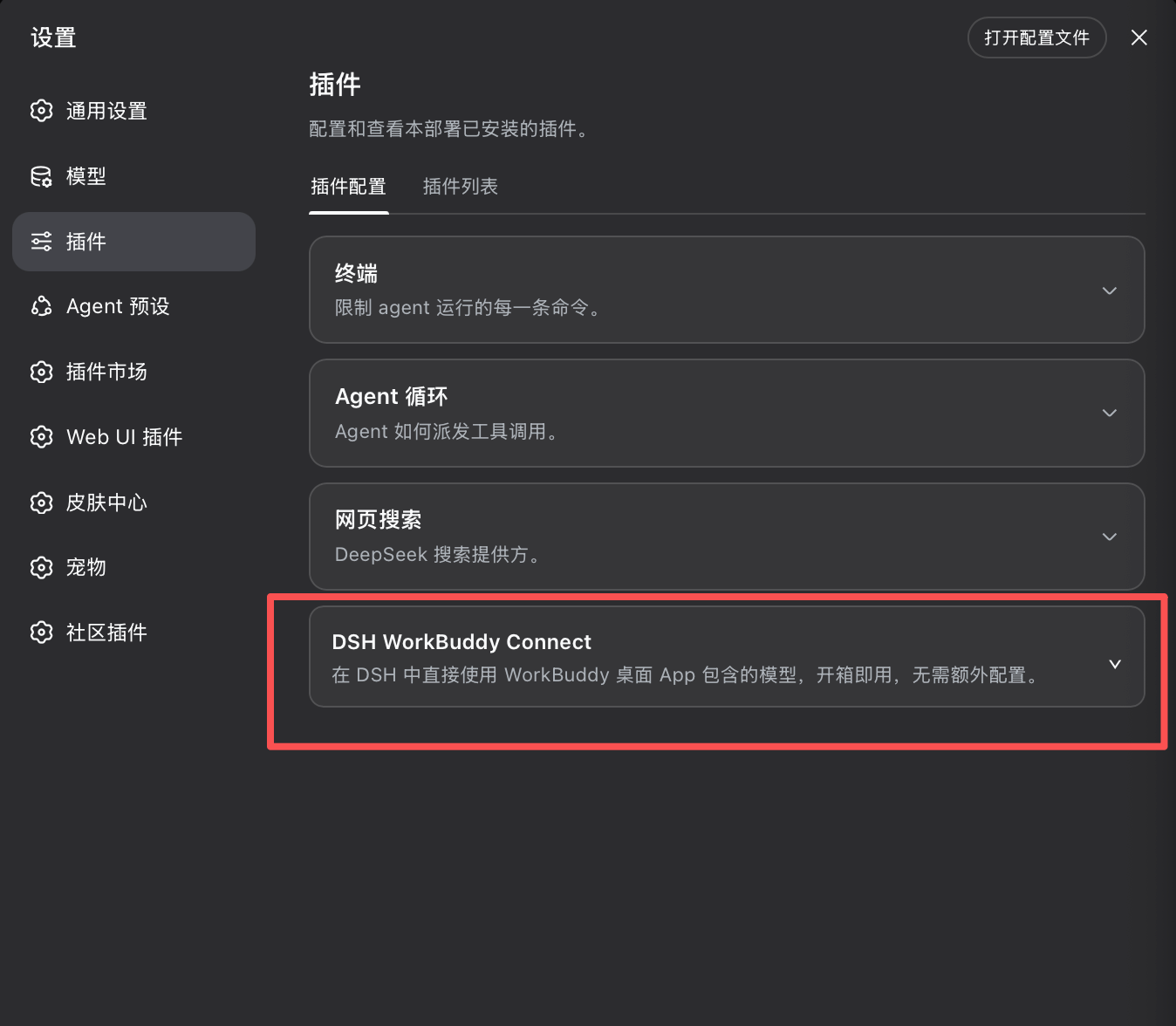
The expanded card has three tabs: Status shows the account, token validity, total credit, catalog source, and reasoning-level detection; Context lists each model's context window (where the international version offers a larger declared window, the "Use the largest declared context window" switch lives here — it is on by default, so DSH sizes context compression to the largest window the upstream declares; turn it off to follow the upstream default instead, and the preference persists across restarts); Details shows per-package credit and model offers. The CN and international versions each get their own card, showing their own account's information.
Why reasoning levels work this way
Information about WorkBuddy models' reasoning levels is currently split between upstream API responses and private UI logic in the client, while the model catalog changes quickly. If the plugin filled in one uniform set of levels for every model without an upstream declaration, it would need to keep chasing unpublished product logic with no stable contract.
Testing also found that some models accept the reasoning_effort parameter while ignoring unknown values and falling back to their default behavior. A successful request alone therefore does not prove that a level is actually usable.
For models without declared levels, Web and Desktop instead use user-authorized, on-demand detection: it first confirms that the upstream validates the parameter, then checks which standard levels it accepts. The check sends a few requests and may consume credit. Its result means only that the upstream currently accepts that level; it does not promise a particular change in reasoning quality, speed, or credit use.
Install
Prerequisite: the WorkBuddy desktop app is installed and signed in. The plugin reuses the app's sign-in state and follows account switches automatically; the same applies to the international WorkBuddy AI app, and the two do not affect each other.
Match the plugin version to your DSH core — from 0.6.0 on, one plugin version spans both core generations, removing the per-version pairing; earlier releases still pair one-to-one, and a mismatched combination fails to start DSH. From 0.7.0 the plugin targets 0.2.0 cores only; 0.1.x users should stay on 0.6.5:
| Plugin | Required DSH core | Desktop app |
|---|---|---|
| 0.7.1 (current stable) | supports 0.2.0-rc.2 only (0.2.0-rc.1 users should stay on 0.7.0), and narrows the @earendil-works/pi-ai peer from ^0.85.1 || ^0.87.1 to ^0.87.1: pnpm profiles upgraded in place from 0.6.x no longer keep a stale pi-ai@0.85.1 that still satisfies the range and re-creates the two-generation mixing of #69 (#74). The in-place upgrade from 0.6.5 is verified: after editing package.json and running pnpm install, the plugin resolves pi-ai@0.87.1 with no overrides; the old dual-arm behavior of 0.7.0 admitting 0.85.1 was reproduced as the control. |
desktop builds bundling the 0.2.0-rc.2 core (preview / nightly) |
| 0.7.0 (the 0.2.0-era debut) | supports 0.2.0-rc.1 / 0.2.0-rc.2 only (0.1.5 / 0.1.6 / 0.1.7 are no longer covered — those users should stay on 0.6.5), verified on a real 0.2.0-rc.2 host (web: loading, both CN and international catalogs, encrypted credentials, status routes all fine). This is the release that adapts to DSH 0.2.0's settings-service rework — 0.2.0 replaced the service with a Config-derived form facade that no longer installs sections, so earlier releases lose their settings there. 0.7.1 drops rc.1 |
desktop builds bundling the 0.2.0 core (preview / nightly) |
| 0.6.0 (dual-UI adaptive) | 0.1.5-rc.1 / rc.2 / rc.3; the 0.1.6-alpha line (incl. alpha.1 / alpha.2) and 0.1.6 stable; verified against 0.1.7-alpha.1 (0.1.7 stable is inside the range too). Subsequent 0.1.x prereleases (e.g. 0.1.8-alpha.x) DO fall inside the ^0.1.7-alpha.1 arm — the host's compatibility check resolves peer ranges with includePrerelease semantics (our earlier "not covered" claim was wrong; corrected here); prereleases crossing into 0.2.0 are the ones that need an explicit peer-range extension |
2.0.7+ works today; desktop builds bundling 0.1.6+ will work too |
0.6.5 (final release of the 0.1.x line) |
adds 0.2.0-rc.1 on top of the 0.6.0 surface (0.1.5 / 0.1.6 / 0.1.7 / 0.2.0-rc.1), verified on a real 0.2.0-rc.1 host (web: loading, catalogs, encrypted credentials, chat & image round-trips all fine). Releases up to and including 0.6.4 do not carry that range and are skipped wholesale by DSH 0.2.0-rc.1 (see #63) |
desktop builds bundling 0.1.x cores (incl. the released 2.0.7+ line); 0.2.0-rc.1 works too (verified on web; desktop not yet verified) |
0.3.2 – 0.5.4 (international support since 0.5.0) |
the 0.1.5-rc.1 line only (no 0.1.6+; see #41) |
2.0.7+ (bundled core 0.1.5-rc.1) |
| 0.3.0 – 0.3.1 | 0.1.2-rc.1 |
2.0.5 |
| 0.2.6 | 0.1.1-rc.2 (older line) |
2.0.3 / 2.0.4 |
0.6.0does not require upgrading to DSH0.1.6just to install WorkBuddy Connect: the plugin adapts to whichever configuration surface the host actually provides at load time —0.1.5and0.1.6+each get their own UI, independently.DSH
0.2.0reworked the settings service: from0.2.0it is a Config-derived form facade exposing only.volatile()fields, with no section-installation API. The plugin adapts to what the host actually offers: on0.1.5/0.1.6both sections install as before (soauthFile/authFileAIstay readable fromsettings.yamland the TUI/settings), while on0.1.7+ /0.2.0it degrades to a settings-less provider — models, the picker, model visibility, and the context rows all keep working; only the "use the upstream's declared maximum context window" preference stops being persistable, and the card renders no switch it could not save.Where the cards live depends on the DSH version — each generation has its own place:
DSH 0.1.5 + this plugin
├─ Settings → Models
│   └─ no WorkBuddy rows ← unified with 0.1.6+ (only plugins ≤0.5.4 still showed those old
│                            configurable-provider rows)
├─ Settings → Plugins
│   ├─ DSH WorkBuddy Connect      ✅ config card (CN)
│   └─ DSH WorkBuddy AI Connect   ✅ config card (international)
└─ chat model picker
    └─ WorkBuddy / WorkBuddy AI groups ✅

DSH 0.1.6+ + this plugin
├─ Settings → Models
│   └─ no WorkBuddy rows          ← intentional, consistent across both generations
├─ Settings → Built-in Plugins
│   └─ workbuddy-connect          ← read-only inventory (runtime status), no config entry
├─ main UI → Plugins → workbuddy-connect → View
│   ├─ DSH WorkBuddy Connect      ✅ new config entry (CN)
│   └─ DSH WorkBuddy AI Connect   ✅ new config entry (international)
└─ chat model picker
    └─ WorkBuddy / WorkBuddy AI groups ✅
From
0.6.0on, the Models settings page no longer shows the non-editable WorkBuddy / WorkBuddy AI cards (consistent across both core generations); the model picker,/model, and chat calls are unaffected.On DSH
0.2.0-rc.2, just install the latest:dsh plugin --profile web add dsh-workbuddy-connect; on0.2.0-rc.1, stay on0.7.0:dsh plugin --profile web add dsh-workbuddy-connect@0.7.0pnpm profiles upgraded in place from
0.6.x(with a manually installedpi-ai@0.85.1): on0.7.1+the peer range no longer admits0.85.1, sopnpm installmoves the plugin onto the host's0.87.1; the temporaryoverrides: {'@earendil-works/pi-ai': 0.87.1}from #74 can be removedStill on DSH
0.1.5/0.1.6/0.1.7? Stay on0.6.5:dsh plugin --profile web add dsh-workbuddy-connect@0.6.5Still on DSH
0.1.2-rc.1? Stay on0.3.1:dsh plugin --profile web add dsh-workbuddy-connect@0.3.1Still on DSH
0.1.1-rc.2? Stay on the older release:dsh plugin --profile web add dsh-workbuddy-connect@0.2.6Pick the desktop plugin version by the bundled core: desktop builds bundling
0.1.xcores (incl. the released2.0.7+ line) should usedsh-workbuddy-connect@0.6.5; desktop builds bundling the0.2.0core (preview / nightly) should use the latest;2.0.5and earlier apps (bundled0.1.2-rc.1) should stay on0.3.1
The plugin runs under all three DSH interfaces: Web, Desktop, and TUI. Pick the install command that matches the profile you use.
# Web (recommended; ships prebuilt artifacts)
dsh plugin --profile web add dsh-workbuddy-connect
dsh web

# or install the Web version from the GitHub source
dsh plugin --profile web add github:corrinehu/dsh-workbuddy-connect
dsh web
# Desktop (the DSH Desktop app)
dsh plugin --profile desktop add dsh-workbuddy-connect
dsh --profile desktop
# TUI (terminal UI)
dsh plugin --profile dsh-tui add dsh-workbuddy-connect
dsh --profile dsh-tui
TUI users, check the version pairing: the terminal UI package (
@deepseek-harness-tui/dsh-tui) must be0.10.0-beta.5or newer — older versions fail at startup withevents is not iterablewhen this plugin is installed. Update the shell first (via its built-in update command or a fresh install), then add this plugin; the newest release is a beta, and a stable one will work the same way.
Manual reasoning-level detection is currently available only on Web and Desktop; TUI does not provide a detection action.
Note: the
dsh-tuiprofile requires pnpm 11 to install packages (a different pnpm on PATH fails withERR_PNPM_UNEXPECTED_STORE— usenpx pnpm@11).
After installing, switch to a WorkBuddy model in the model picker of the interface you chose. On Web and Desktop, the settings card shows the account, token validity, and remaining credit, can refresh the model list manually, and can check eligible models for reasoning levels; the CN and international versions each have their own card. On TUI, configure authFile in /settings (or authFileAI for the international version).
CLI
dsh plugin --profile <web|desktop|dsh-tui> exec dsh-workbuddy-connect status: sign-in state and remaining credit (--json for machine-readable output; doctor for diagnostics and logout for credential cleanup are also available).
Both commands target the CN version by default; add --provider workbuddy-ai for the international one:
dsh plugin --profile web exec dsh-workbuddy-connect status --provider workbuddy-ai
dsh plugin --profile web exec dsh-workbuddy-connect doctor --provider workbuddy-ai
logout removes only that version's plugin-owned credential copy. It leaves the desktop app's own sign-in alone and does not promise the model group will disappear (the app's credential file still supplies one).
Known limitations
- Verified on macOS with the DSH Web / Desktop / TUI profiles (as of 0.3.2 this requires
0.1.5-rc.1+ and Node 22+; TUI requires the terminal UI package0.10.0-beta.5or newer — see the Install section). Windows probes Local and Roaming AppData in order; WSL first reads credentials from the mounted Windows user profile. If the Windows and Linux user names differ and Windows environment variables are not forwarded into WSL, pointWORKBUDDY_AUTH_FILE(orWORKBUDDY_AI_AUTH_FILEfor the international version) at the actual file. - Encrypted desktop credential helper discovery: both the CN and international versions (whose credentials are encrypted since 5.6.2) use their own verified default path and app discovery on macOS; on Windows the CN version first checks
%LOCALAPPDATA%\Programs\WorkBuddy\WorkBuddy.exeand then the WorkBuddy uninstall registry records, while the international version has no verified default install location and checks the registry records only. Each product locates and runs only its own app identity (bundle id / registry name / executable name), so neither can pick the other's app; both apps currently happening to share one at-rest key on a machine is an upstream coincidence the plugin does not rely on — if the keys diverge, the diagnosis is reported rather than a wrong open attempted. If automatic discovery still fails, set the product's variable —WORKBUDDY_ELECTRON_BINfor CN,WORKBUDDY_AI_ELECTRON_BINfor international (separate since 0.6.4; if you previously pointedWORKBUDDY_ELECTRON_BINat the international app, switch to the new variable and clear the old one) — then fully quit and restart DSH (the variable is read when the plugin is constructed); on Windows, sign out and back in first if possible (explorer caches the old environment block). Linux has no built-in auto-discovery; the card offers Agent Assist when needed, while an explicit environment path remains supported. - The international version's model catalog comes from the app's own interface: the service splits it by User-Agent, which is a private implementation detail that a server-side change can break. When that happens the plugin degrades to this account's last successful catalog and then to its built-in roster, showing the source (live / saved / built-in), the fetch time, and the failure reason on the card — but long-term compatibility is not guaranteed. The CN version's catalog uses the same interface as the official CLI and is unaffected.
- International-version environments not yet covered: on Windows / WSL / Linux no reliable source for the international app's version has been located yet, so the saved value or the built-in default is used. On macOS, real-shim checks covered complete GPT-family replies, tool calls, and continued turns.
- Behaviour change with no credentials: a version whose app was never signed in — and that left no plugin-owned copy — no longer shows a model group. The CN version used to display a built-in fallback list, but every model on it failed when selected.
- The enterprise credit path currently covers the CN product only: the international enterprise billing interface is unverified, so those accounts still read through the personal endpoint pending measurement. The enterprise branch could not be tested locally (the development machine holds a personal account); it was implemented from the official app's interface contract, and reports from enterprise users are welcome.
- Relies on WorkBuddy client interfaces (not a public API); the plugin may need updates as WorkBuddy changes.
Disclaimer
- This project is for personal learning and research only, driving your own WorkBuddy account on your own machine. Do not use it commercially or beyond reasonable personal use.
- Users must comply with the WorkBuddy terms of service. Any consequence of using this project (including but not limited to account restrictions, depleted credit, or service interruption) is borne by the user.
- The author is not liable for any direct or indirect loss arising from the use or misuse of this project.
- This project is not affiliated with, endorsed by, or sponsored by Tencent, WorkBuddy, or DeepSeek. Product names are used for compatibility description only; trademarks belong to their respective owners.
Acknowledgements
- Sliverkiss/workbuddy2api (MIT) — reference implementation of the WorkBuddy upstream protocol.
- franksong2702/dsh-codex-connect (Apache-2.0) — reference for the DSH plugin structure and provider registration.
License
Links
More in this category
V1ki/dsh-plugin-subscriptions★ 417
Use ChatGPT (Codex), Claude, and Grok subscriptions as DeepSeek Harness LLM providers, with Settings login, model catalogs, usage, plus image_generate, video_generate, and x_search tools.
Mars-Sea/dsh-commandcode-provider★ 359
Unofficial Command Code LLM provider: registers a `commandcode` route with a live model catalog and reasoning-effort support.
cv-superding/dsh-deepseek-web-login★ 208
Adds a deepseek-web provider that uses chat.deepseek.com web models in DSH, with browser login capture, PoW request signing, SSE streaming, and prompting-based tool calls.
volcengine/ark-cli#ark-plan-api★ 139
Registers Ark Agent Plan, Coding Plan and postpaid model routes in the native DSH model picker.
franksong2702/dsh-codex-connect★ 133
Connect ChatGPT OAuth and OpenAI Codex models to DeepSeek Harness, with opt-in search and image tools.
WSL043/dsh-codex-subscription★ 123
ChatGPT OAuth provider for Codex models with subscription web search, quota and safe reset, image tools, Fast mode, and model-aware context; no API key or Codex CLI.
Community comments
Comments are public GitHub Discussions. Loading them connects to GitHub and Giscus; a GitHub account is required to post.