Per-turn TPS and TTFT statistics for DeepSeek Harness: model time, tool time, time-to-first-token, and output speed per turn.
Install
# from GitHub (first run asks for allowBuilds approval — follow the hint, retry)
dsh plugin --profile web add github:oldzhang82/dsh-tps-ttft
Any plugin you install runs third-party code with your own permissions — it can read your files, use your credentials, and reach the network, and tool approvals don’t sandbox it. GitHub-sourced plugins also run build scripts at install time — pnpm blocks those until you allow them, so an install can stop with ERR_PNPM_GIT_DEP_PREPARE_NOT_ALLOWED or ERR_PNPM_IGNORED_BUILDS; dsh prints the exact key to add under allowBuilds in your profile’s pnpm-workspace.yaml, and the install works on the next run. Allowing a build is a trust decision: only install sources you trust, and pin a commit (github:owner/repo#sha).
README
Per-turn TPS and TTFT statistics for DeepSeek Harness: model time, tool time, time-to-first-token (TTFT), and output speed (TPS) per turn.
What it does
After each turn completes, a gauge-icon timing pill appears in the turn tail (showing model time). Click it to open a popover with the full timing statistics:
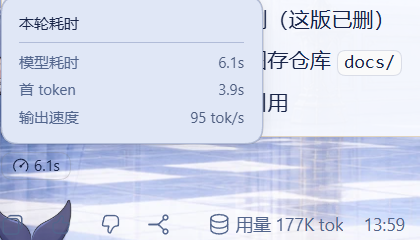
- Model time: Wall-clock time for model inference (step/start → assistant/message)
- Tool time: Total time for tool calls (tool/call → tool/result; hidden when no tools ran)
- TTFT: Time to first token (step/start → first token)
- Output speed: Output speed in tokens/sec (decodeTokens / decodeMs; hidden when no data)
Fully self-contained: the plugin ships its own client component (registered to the conversation.chat.turnTail slot). No DSH core changes required — install and go.
The original "Turn Usage" (token usage) panel is unaffected; the two are independent.
Installation
Install directly from GitHub (one command, no extra config):
dsh plugin --profile <your-profile> add "github:oldzhang82/dsh-tps-ttft#<commit-sha>"
Quote the argument: in PowerShell,
#starts a comment, so without quotes the SHA after#is dropped.Use the latest full SHA from the commits page. Pinning the commit prevents later pushes from silently changing what gets installed.
This plugin is pure JS with no build scripts, so the install does not trigger pnpm's allowBuilds prompt — one command and it's done.
After installing, restart DSH, run a turn, and the gauge-icon timing pill in the turn tail confirms success.
How it works
The plugin has two parts, neither modifies the DSH core:
Server side (
index.js): registers a session projection (perTurnStats) that performs a pure fold over the session event stream:- Listens to
step/start,assistant/attempt,assistant/message,tool/call,tool/result, andturn/endevents - Accumulates model time, tool time, TTFT, and output speed per turn
- Cleans up per-turn transient state at
turn/endto keep the view bounded
- Listens to
Client side (
lib/client.js): registers a React component to theconversation.chat.turnTailslot, reads theperTurnStatsprojection, and renders the timing pill.
Compatibility
- DSH
>=0.2.0-rc.1 <0.3.0-0(seeengines.dsh)
Dependencies
zod^4.6.5 (schema validation)
License
MIT
Links
More in this category
bowenliang123/dsh-context★ 3190
DSH context insight panel: Context dashboard + /context command + Context browser — one-stop context lifecycle management with categorized composition, content details, evolution trends, compaction/injection events, and stats.
Han-1413141/dsh-cost-meter★ 489
Per-session and daily API cost, budget with usage %, official balance, history dashboard, and one-click official price sync with peak/off-peak pricing.
wssfk12138/dsh-damage-pulse★ 273
Tracks DeepSeek token usage, per-call and session costs, and account balance with cache-aware charge animations in the DSH Web UI.
zh667/TokenLedger★ 199
Sidebar usage panel that attributes tokens to the relay site that served each request, read from your existing provider config: today/month/all-time totals, per-site and per-model breakdowns, a year activity heatmap, and New API / Sub2API / DeepSeek balances.
Ychris12138/dsh-usage-stats★ 183
Multi-provider usage dashboard with provider/model token breakdowns, calendar drill-downs, account balances, and OpenCode Go / Z.ai subscription quota tracking.
PolinniZhong/dsh-personal-center★ 112
Personal center for DeepSeek Harness: cross-session usage statistics, per-model cost estimation, global custom instructions, a global font-size adjuster, a data-driven desktop pet with bitmap & vector skins, and a conversation status overview, all local and offline.
Community comments
Comments are public GitHub Discussions. Loading them connects to GitHub and Giscus; a GitHub account is required to post.