Shows recorded whole-turn token usage and estimated DeepSeek costs with a local session ledger.
Install
# from npm (prebuilt)
dsh plugin --profile web add @mimier/dsh-costline
# from GitHub (first run asks for allowBuilds approval — follow the hint, retry)
dsh plugin --profile web add github:mimierZBL/dsh-costline
Any plugin you install runs third-party code with your own permissions — it can read your files, use your credentials, and reach the network, and tool approvals don’t sandbox it. GitHub-sourced plugins also run build scripts at install time — pnpm blocks those until you allow them, so an install can stop with ERR_PNPM_GIT_DEP_PREPARE_NOT_ALLOWED or ERR_PNPM_IGNORED_BUILDS; dsh prints the exact key to add under allowBuilds in your profile’s pnpm-workspace.yaml, and the install works on the next run. Allowing a build is a trust decision: only install sources you trust, and pin a commit (github:owner/repo#sha).
README
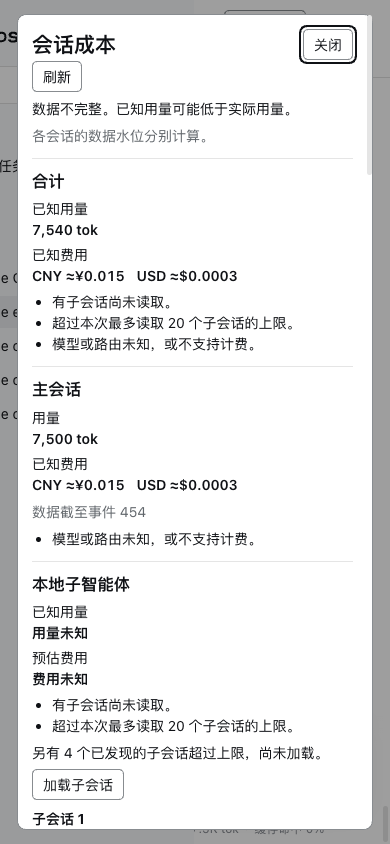
One session, 7,540 known tokens. See where they went. Costline puts exact whole-turn usage and a cost estimate next to the elapsed time in DeepSeek Harness (DSH). Open Session cost to see the main conversation, local subagents, and compaction side by side.
| 390 px · light | 390 px · dark |
|---|---|
 |
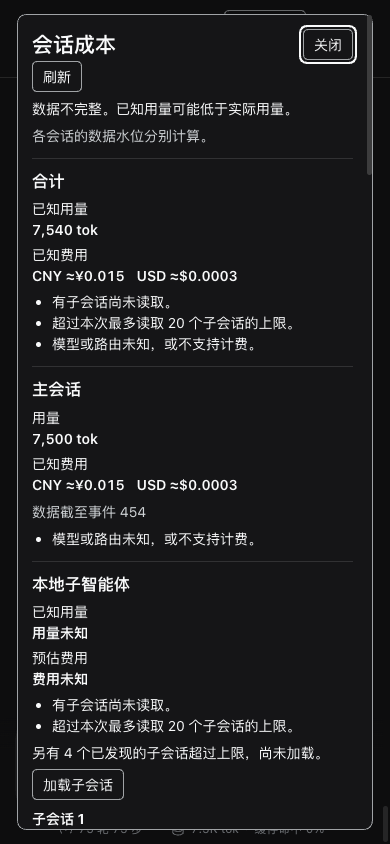 |
These are captures of the running plugin with an offline test session and example rate overrides. A short demo is planned. Recording checklist
Install in 30 seconds
In Plugins → Add plugin, enter @mimier/dsh-costline and confirm the installation. If you already have the DSH CLI, use the profile you actually run:
dsh plugin --profile web add @mimier/dsh-costline@0.1.0
Use --profile desktop for DSH Desktop. Start or reopen the profile, open a chat with recorded usage, and look for the cost beside the completed turn. Session cost is in the conversation toolbar.
What it counts
| Surface | Included |
|---|---|
| Turn header or footer | A completed turn's exact recorded model usage across thinking, tool round trips, and retries. Reasoning is included in output once. |
| Session cost | Main-session turns, up to 20 explicitly loaded local child sessions (including nested children), and independently recorded compaction-summary calls. Each session has its own event watermark. |
Turn estimates exclude independent child-session, compaction, and title-generation calls. The session ledger excludes external subagents and inherited fork history. Unread children, missing usage, and unverified summary calls leave visible coverage gaps. A row with known tokens and insufficient pricing detail still contributes its tokens. Known costs are grouped by currency and shown without conversion. These figures estimate model token costs. Separate tool/API charges, credits, and billing adjustments can affect the provider invoice.
Rates
The built-in table covers recognized official DeepSeek routes. It uses rates from the DeepSeek CNY price table and estimates cache writes at the cache-miss rate by default.
| Model | Window | Cache read | Uncached input | Cache write | Output |
|---|---|---|---|---|---|
deepseek-flash |
Peak | ¥0.04 | ¥2 | ¥2 | ¥8 |
deepseek-flash |
Off-peak | ¥0.02 | ¥1 | ¥1 | ¥4 |
deepseek-v4-pro |
Peak | ¥0.30 | ¥9 | ¥9 | ¥27 |
deepseek-v4-pro |
Off-peak | ¥0.15 | ¥4.50 | ¥4.50 | ¥13.50 |
Rates are per million tokens. Costline uses the turn's closing time or the summary's timestamp in Asia/Shanghai. Peak periods run from 09:00–12:00 and 14:00–18:00 on weekdays outside Chinese public holidays. Weekends and holidays are off-peak all day. The bundled calendar covers 2025–2027. Outside those years the weekday schedule applies.
Open Plugins → Installed → DSH Costline → Configuration to edit rates and the currency by provider/model. When changing currencies, enter all four prices for both periods. Saving reprices visible usage, including the ledger. Restore defaults clears the saved rate overrides. Unsupported routes, mixed routes within a row, and insufficient usage details can leave a row unpriced.
Compatibility and recovery
The bundle declares DSH >=0.2.2-rc.3 <0.3.0. This is the install range. Verified header versions are listed below.
| Runtime | Verification |
|---|---|
DSH Desktop 0.2.2-rc.3 bundled Web Host on macOS arm64 |
Header, footer-only, settings, and session ledger checked in a temporary profile. |
DSH CLI 0.2.2-rc.5 Web Host on macOS arm64 |
Header, footer-only, settings, and session ledger checked from the npm tarball. |
| Other admitted versions with a reported version | Auto uses the supported footer slot. |
In Configuration → Cost placement, choose Footer only to keep DSH's native title and place the estimate below the reply. Auto also falls back when the header structure or render path fails. If DSH does not report a usable version, Auto relies on the header structure check. Disable the bundle from Plugins → Installed to remove both the cost line and ledger entry. DSH rc.5 release
Privacy
Usage and rate calculations run locally. The plugin makes zero external requests and sends no conversation text or telemetry. DSH supplies local session projections and may cache their accounting metadata in its own projection store. Saving rates or placement writes the plugin's settings through DSH. Opening the ledger is read-only.
How it differs
Costline focuses on the task in front of you: the same recorded usage DSH exposes for the turn, a rate estimate in the chat header, and an offline ledger you can reconcile against session events. Its bundled rates target official DeepSeek routes. They are editable, with no price feed or exchange-rate service.
Roadmap
- Retest the header and its fallback with each DSH release.
- Make incomplete historical usage easier to diagnose.
- Record a short demo of a real install and the ledger.
Links
More in this category
bowenliang123/dsh-context★ 5511
DSH context insight panel: Context dashboard + /context command + Context browser — one-stop context lifecycle management with categorized composition, content details, evolution trends, compaction/injection events, and stats.
Han-1413141/dsh-cost-meter★ 756
Per-session and daily API cost, budget with usage %, official balance, history dashboard, and one-click official price sync with peak/off-peak pricing.
wssfk12138/dsh-damage-pulse★ 291
Tracks DeepSeek token usage, per-call and session costs, and account balance with cache-aware charge animations in the DSH Web UI.
zh667/TokenLedger★ 206
Sidebar usage panel that attributes tokens to the relay site that served each request, read from your existing provider config: today/month/all-time totals, per-site and per-model breakdowns, a year activity heatmap, and New API / Sub2API / DeepSeek balances.
Ychris12138/dsh-usage-stats★ 192
Multi-provider usage dashboard with provider/model token breakdowns, calendar drill-downs, account balances, and OpenCode Go / Z.ai subscription quota tracking.
PolinniZhong/dsh-personal-center★ 115
Personal center for DeepSeek Harness: cross-session usage statistics with per-provider and per-model breakdown (auto-discovers configured models), per-model cost estimation, global custom instructions, a data-driven desktop pet with bitmap & vector skins, and a conversation status overview, all local and offline.
Community comments
Comments are public GitHub Discussions. Loading them connects to GitHub and Giscus; a GitHub account is required to post.