Chat-operated multi-database admin plugin for DeepSeek Harness: query and manage MySQL, PostgreSQL, GaussDB, MongoDB, Redis, Oracle, DM and SQLite from the conversation with project-scoped ro/rw grants, a sidebar management panel, schema browsing and data preview, and confirmation-gated dangerous operations.
Install
# from npm (prebuilt)
dsh plugin --profile web add dsh-db-tool
# from GitHub (first run asks for allowBuilds approval — follow the hint, retry)
dsh plugin --profile web add github:mengqi1436/dsh-db-tool
Any plugin you install runs third-party code with your own permissions — it can read your files, use your credentials, and reach the network, and tool approvals don’t sandbox it. GitHub-sourced plugins also run build scripts at install time — pnpm blocks those until you allow them, so an install can stop with ERR_PNPM_GIT_DEP_PREPARE_NOT_ALLOWED or ERR_PNPM_IGNORED_BUILDS; dsh prints the exact key to add under allowBuilds in your profile’s pnpm-workspace.yaml, and the install works on the next run. Allowing a build is a trust decision: only install sources you trust, and pin a commit (github:owner/repo#sha).
README
English | 简体中文
A DSH host plugin. Operate databases safely from chat: nine databases, project-scoped fine-grained grants, dangerous-operation confirmation, full audit logging, plus a right-sidebar admin console and SQL console.
Feature flow
The full path of one database operation, from entry point to audit record — both entries (chat tool and right sidebar) share one set of semantics and must pass through two gates: project-scoped authorization and statement-level risk classification.
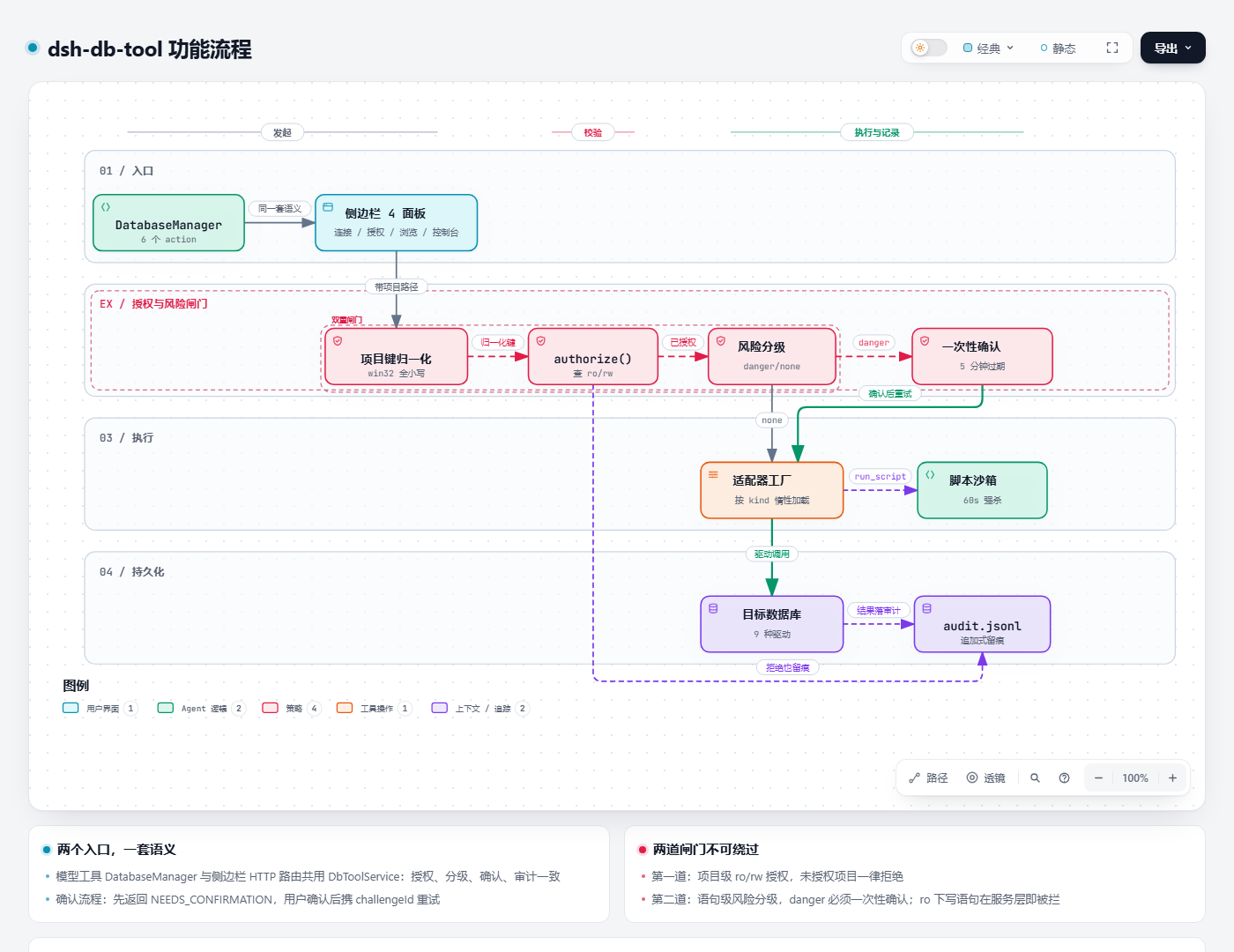
Open the interactive version — supports zoom, pan, path highlighting, and source-evidence inspection per node.
Questions or suggestions? Open an issue.
Supported databases
| Category | Databases |
|---|---|
| Relational | MySQL, PostgreSQL, GaussDB, SQLite, Oracle, Dameng DM, SQL Server |
| NoSQL | Redis, MongoDB |
Connections, metadata browsing, queries and previews cover all nine databases. Data transfer is layered by capability: eight kinds (MySQL / PostgreSQL / GaussDB / SQLite / MongoDB / Oracle / Dameng / SQL Server) transfer natively table-to-table, while Redis takes part through the fixed envelope table __redis_keys. Redis keyspace fidelity beyond that is out of scope (stream consumer groups, cross-version DUMP, logical databases dbN).
Dialect differences are handled inside the adapters; the upper layers see a uniform ? placeholder and a standard result set.
Core capabilities
Model tool DatabaseManager
One tool with several actions, reducing ambiguity in tool selection:
| action | Purpose |
|---|---|
list_connections |
List available connections (no credentials) |
query |
Run a read-only query, return columns and rows |
execute |
Run a write statement; dangerous operations need confirmation |
schema |
Inspect database / table / column structure |
preview |
Preview table data (paged, up to 50 rows per page) |
run_script |
Run a script in the sandbox, calling db.query / db.execute repeatedly |
run_script isolation boundary: a separate child process plus a node:vm sandbox, killed at 60 seconds, with only a restricted db.{query,execute} handle injected — no filesystem, no network, no require.
Project-scoped grants (ro / rw)
Grants are stored in three levels (project path → connection → mode) in grants.json:
- ro (read-only): queries and browsing allowed, all writes rejected
- rw (read-write): statements, scripts and transactions allowed
An unauthorized project is rejected for every connection. Changing a grant mode (including rw → ro downgrade) invalidates old sessions immediately, no reconnect needed.
On Windows, paths are normalized with NTFS semantics (case-insensitive), so E:\GitHub\MyApp and e:\github\myapp are the same project.
Dangerous-operation confirmation
DDL, FLUSHALL, dropDatabase and similar statements return NEEDS_CONFIRMATION first instead of executing:
- The first call returns a pending state with a one-time
challengeId - The
challengeIdis bound to the statement's SHA256, valid for 5 minutes, single use - Execution happens only when the user confirms and retries with the same
challengeId
The chat tool confirms through conversation and the SQL console confirms through a dialog — both paths share the same semantics, and neither can be bypassed.
Full audit logging
Every execution (including rejected requests) appends one line to audit.jsonl: statement, danger level, whether it was confirmed, result and duration. The right sidebar shows it live.
Data browsing
- Four-level tree: connection → database → schema → table
- Database filter plus cross-database table-name search (MySQL / PostgreSQL / GaussDB query
information_schemanatively; other kinds fall back to in-memory filtering) - Table structure viewing and data preview; the result grid supports sorting, paging and cell copying
SQL console
A Navicat-style multi-tab editor in the right sidebar (CodeMirror 6):
- Multiple tabs: each tab keeps its own SQL, results and history (50 entries, click to restore)
- Highlighting and completion: dialect switches automatically (MySQL / PostgreSQL / SQLite / PL-SQL / T-SQL), with table and column metadata feeding completion
- Shortcuts:
Ctrl/Cmd+Enterruns everything,Ctrl/Cmd+Shift+Enterruns the selection - Formatting: sql-formatter per dialect, falling back to the original text when parsing fails
- Per-statement execution: the client pre-classifies read and write statements and routes them to the query and execute channels; under an ro grant, write statements are skipped and marked
- Batch separator
GO: supportsGOandGO n(sqlcmd semantics,GO 0/GO 1both mean once), with a repeat cap of 1000 to prevent amplification - Transactions: under an rw grant you can begin / commit / roll back on a sticky server-side connection; idle sessions roll back automatically after 5 minutes and are audited
- Result grid: three-state sorting, 50 rows per page, CSV / JSON export
Data transfer
Moving table data between databases of the same or different kinds:
- Write modes:
insert(append),ignore(skip conflicts),replace(overwrite),truncate(clear first) - Automatic table creation: generates DDL from the source table structure when the target table is absent
- Paged reads: ordered cursor (keyset), range, or offset strategies
- Progress and history: live progress push plus per-project transfer history
- Transfer configuration: saved per project, auto-saved, restored after restart, cleared when a connection becomes invalid
- Intermediate type model: heterogeneous columns are normalized to a common intermediate type before mapping to the target column, avoiding point-to-point conversion across nine databases
- Redis envelope fallback: Redis participates through the fixed table
__redis_keyswith these six columns
| Column | Meaning |
|---|---|
key |
Key name |
type |
string / hash / list / set / zset / stream, etc. |
ttl_ms |
Remaining TTL in milliseconds, 0 when no expiry |
encoding |
OBJECT ENCODING memory-encoding diagnostic value, unrelated to payload serialization |
payload |
Value flattened by type, always a UTF-8 JSON string |
dump |
DUMP RDB serialized bytes, used only by homogeneous Redis via RESTORE |
Connection export / import
Export every connection (including passwords) into a passphrase-encrypted file for cross-machine migration:
- scrypt-derived key plus AES-256-GCM over the whole payload; the file has no plaintext when opened
- Passphrase minimum length 8, enforced server-side
- On import, existing connection ids are skipped and never overwritten; the summary reports imported / skipped / failed
Right sidebar
Registers one tab through the official DSH right sidebar (@deepseek-ai/dsh-client-ui-sidebar-right), with no third-party sidebar dependency. The tab contains five panels (bilingual):
| Panel | Purpose |
|---|---|
| Connections | Create / edit / delete connections, test connectivity, export and import |
| Project grants | Tick ro / rw per connection for the current project |
| Data browsing | Tree browsing, search, data preview |
| SQL console | Multi-tab editor, transactions, history, result grid |
| Data transfer | Table-level migration with batch / parallel options and a transfer log |
Notes
Both are contracts of the official right sidebar and are easily mistaken for plugin defects:
- With no session selected, the right sidebar shows no database panel. The official right sidebar keys its layout state by session id; without a session there is no docking surface, hence no entry card or tab — select a session first, then expand the right sidebar.
- When DSH has exactly one ready entry card, the "+" new-slot cell opens the database tab directly instead of the guide page. This is the official default-page rule, not a skipped guide page.
Security model
| Layer | Mechanism |
|---|---|
| Storage | Passwords and full URLs live in secrets.json (0600) and are never returned to the model; connection info returned to the UI is always masked as *** |
| Authorization | Project-scoped ro / rw allowlist; no grant means rejection |
| Statement level | Risk classification (danger / warning / none) plus one-time confirmation |
| Read-only enforcement | MySQL / PostgreSQL use session-level SET TRANSACTION READ ONLY; SQL Server degrades to five application-level gates |
| Transport encryption | Plaintext first, upgrading only when the server insists; see "Transport encryption" |
| Error redaction | When connection-string parsing fails, userinfo in the error text is redacted; plaintext passwords are never echoed |
| Script isolation | Separate child process + vm sandbox + 60-second hard kill + only the db handle injected |
SQL Server's ro enforcement is weaker than MySQL / PostgreSQL: SQL Server has no equivalent session-level read-only statement, so under an ro grant five application-level gates apply — first-word allowlist, multi-statement rejection, SELECT ... INTO rejection, WITH ... (INSERT|UPDATE|DELETE|MERGE) rejection, and OPENQUERY / OPENROWSET / OPENDATASOURCE rejection. This remains application-level interception; for hard isolation, configure a database-side read-only account for the connection.
Transport encryption
Connecting first, encrypting only when required. SQL Server defaults to encrypt=auto: connect without encryption first; only when the server forces encryption does it upgrade and retry once, trusting the server certificate — one retry, for that reason only, and never when encrypt is written explicitly. Dameng behaves the same way: only when the server negotiates an algorithm that the local OpenSSL has dropped ([6071]) does it disable transport encryption and retry once.
Plaintext is the cost of that policy: SQL Server's auto / encrypt=false and Dameng's loginEncrypt=false all send credentials and results in the clear. Fine on a trusted internal network; for public or untrusted networks, demand encryption explicitly and deal with the certificate or algorithm issues it brings.
Installation
Runtime requirements: Node.js ≥ 22 (required by some database drivers); the DSH host must provide the official right sidebar.
# npm (recommended — pin the current version; @latest falls back to an older release due to release-age checks)
dsh plugin --profile desktop add dsh-db-tool@<version> --registry=https://registry.npmjs.org/

# From GitHub source
dsh plugin --profile web add "dsh-db-tool@github:mengqi1436/dsh-db-tool"

# Local development
dsh plugin --profile web add "link:/path/to/dsh-db-tool"
If the dsh command is not on PATH in the desktop app, open the menu bar and click Manage dsh command to register it. Restart the DSH desktop app after installing.
About oracledb: its install script is blocked by pnpm by default, so the first install reports a failure. Click Allow these scripts and retry in the DSH plugin installation UI — the script only checks the Node version and prints a banner, and the approval persists in the profile.
Where the frontend mounts: the database panel mounts on DSH's built-in right sidebar; no extra sidebar plugin is needed. dsh.client.inject already declares @deepseek-ai/dsh-client-ui-sidebar-right as a load prerequisite.
Data layout
<My Documents>/DSH/db-tool/ (directory mode 0700; shares its root with the transfer log so users can open it directly):
| File | Contents |
|---|---|
connections.json |
Connection definitions (urlSafe masks passwords as ***) |
secrets.json |
0600, passwords and full URLs, never returned to the model |
grants.json |
Project grants (normalized path → connId → ro / rw) |
transfer-config.json |
0600, per-project connection and option config for the transfer page |
audit.jsonl |
Append-only audit log, one JSON object per line |
transfer-log.jsonl (transfer process log and history) sits alongside. Path resolution priority: explicit injection (tests) > DSH_DB_TOOL_DIR > <My Documents>/DSH. On Windows "My Documents" is resolved through the Shell API and follows redirection (OneDrive etc.); elsewhere it uses XDG_DOCUMENTS_DIR or ~/Documents. Data from older versions stored under $DSH_HOME/db-tool/ is migrated file-by-file on first start (skipped when the target exists; old files are kept).
Development
npm install
npm run build        # compile + build vendor bundles (mongodb / sqlserver / codemirror)
npm test             # full vitest run
npm run typecheck    # tsc --noEmit
Real-database smoke tests are gated by environment variables and only run when set:
DBT_TEST_MYSQL_URL / DBT_TEST_PG_URL / DBT_TEST_REDIS_URL / DBT_TEST_DM_CONNECT
DBT_TEST_MONGO_URL / DBT_TEST_ORACLE_CONNECT / DBT_TEST_SQLSERVER_URL
CI lives in .github/workflows/ci.yml: Node 22 and 24, running npm ci → build → typecheck → test.
Repository layout
lib/          plugin body
  adapters/   9 database adapters + transfer implementations
  store/      connection / grant / audit / secret storage
  guard/      statement risk classification
  manager.ts  business orchestration (authorize, dispatch, confirm, audit)
  http/       right-sidebar HTTP routes
  script/     run_script sandbox and child process
client/       right-sidebar single-file bundle
skills/       db-admin skill
scripts/      build and tooling scripts
patches/      DSH host hotfix patches
tests/        vitest (offline mocks + gated real-database tests)
assets/       feature flow diagram
vendor/       driver and editor bundles (build artifacts, included on publish)
Contributors
Thanks to every external contributor whose work landed on master; per-item details are in CONTRIBUTORS.md:
- a19920714liou — PR #1: ro connection hook hang + Windows path case mismatch in grants
- weicy98 — PR #12: Dameng DM connection failure when communication encryption is DES_CFB
Bug fixes and adapter support are welcome; contribution conventions are in CONTRIBUTORS.md.
License
Apache License 2.0 © 2026 mengqi1436
Free to use commercially, modify, distribute and sublicense, provided copyright and license notices are retained and modified files are marked. The included patent grant is irrevocable, but terminates if you bring a patent suit over this work.
Links
More in this category
DayuanJiang/next-ai-draw-io#dsh-plugin★ 36802
Draws draw.io diagrams in DeepSeek Harness through the next-ai-drawio MCP server: the link in the reply opens a live preview in the right sidebar, you can edit the diagram by hand, and each AI change is a version you can restore. Node.js 18+; npx downloads the MCP server on first use.
Tencent/WeKnora#dsh-weknora★ 36302
Four read-only tools over a WeKnora knowledge base: list knowledge bases, hybrid passage search, reassemble one document's chunks in order, and WeKnora's own cited RAG or ReAct-agent answer with a resumable session id.
superdesigndev/treg★ 7042
Tool catalog for agents: search ~2,600 external endpoints (SEO and SERP, backlinks, social, people and company enrichment, ad libraries, scraping) by the task you want done, read each one's parameters and per-call price, then call it with the credential injected server-side. Ships the skill plus an MCP row that stays disabled until TREG_TOKEN is set.
T-Auto/dsh-ops★ 5074
Provides bash, PowerShell 7, and high-performance Rust tools for DSH on Windows to reduce token usage.
sixtysevenlf/dsh-blender-plugin★ 1575
Lets a DSH agent drive a local Blender over a direct TCP channel with 15 tools: viewport frames, custom-angle renders, Python execution, headless and job offload, transaction rollback, and a planning layer of 228 ops across 34 families.
TencentCloudBase/CloudBase-AI-Toolkit#dsh-plugin★ 1155
Tencent CloudBase backend for DeepSeek Harness — scaffold and deploy full-stack apps from chat, render query results as table cards with paging, sorting and CSV export, preview a deployment on its domain, and call the CloudBase MCP toolset (`mcp__cloudbase__*`) with device-code login.
Community comments
Comments are public GitHub Discussions. Loading them connects to GitHub and Giscus; a GitHub account is required to post.