Session-scoped checklists the agent maintains, with a tree per session, a token-budgeted prompt digest and a right-sidebar tab where item titles can be edited.
Install
# from npm (prebuilt)
dsh plugin --profile web add dsh-checklists
# from GitHub (first run asks for allowBuilds approval — follow the hint, retry)
dsh plugin --profile web add github:manny333/dsh-checklists
Any plugin you install runs third-party code with your own permissions — it can read your files, use your credentials, and reach the network, and tool approvals don’t sandbox it. GitHub-sourced plugins also run build scripts at install time — pnpm blocks those until you allow them, so an install can stop with ERR_PNPM_GIT_DEP_PREPARE_NOT_ALLOWED or ERR_PNPM_IGNORED_BUILDS; dsh prints the exact key to add under allowBuilds in your profile’s pnpm-workspace.yaml, and the install works on the next run. Allowing a build is a trust decision: only install sources you trust, and pin a commit (github:owner/repo#sha).
README
Session-scoped checklists for DeepSeek Harness. The agent owns the list, the model always sees it, and a read-only sidebar tab mirrors it.
The problem this solves is not "having a list". It is having to dictate the list again every session. Here the checklist is created once, injected into the model context on every turn, and updated as work progresses — no reminders needed.
How it works
- The agent creates a checklist (
checklist_create), optionally from a template. - A compact digest of every checklist is injected into the prompt on each assembly, so the model always knows what is pending.
- The agent marks items as it finishes them (
checklist_check). - The sidebar tab shows the same tree, read-only, updated every two seconds.
If the agent forgets to mark something, you say so in chat and it fixes it.
Tools
| Tool | What it does |
|---|---|
checklist_create |
Creates a list, from scratch or from a template (release, feature, debug, review) |
checklist_add |
Appends items to an existing list, optionally under a given item |
checklist_check |
Sets one or more items to todo · doing · done · blocked |
checklist_next |
Returns the next actionable leaf, its path, and how many remain |
checklist_edit |
Changes an item's text (not its state) |
checklist_list |
Full tree with ids and states, for when the digest is truncated |
checklist_delete |
Deletes a list (by id or exact title) |
checklist_remove_item |
Removes one item and everything nested under it |
checklist_rename |
Renames a list; titles stay unique within the session |
checklist_workspace |
Lists checklists from other sessions in the same workspace (read-only) |
checklist_template_save |
Saves a list as a reusable template for future sessions |
Items are plain strings. Two leading spaces per level nest them:
["Deploy to staging", " Smoke tests", " Rollback plan"]
Install
dsh plugin --profile web add dsh-checklists
From a local build or tarball:
npm install
npm run build
npm pack
dsh plugin --profile dev add ./dsh-checklists-0.7.0.tgz
dsh --profile dev --dump-config        # the tool-checklist row should appear
Install into a test profile first. web and headless are distinct profiles, and
so is the desktop app's desktop profile.
Configuration
Override the defaults on the plugin's entry in the profile's cordis.patch.yml:
- id: tool-checklist
  name: dsh-checklists
  config:
    maxDigestLines: 12      # lines of the injected digest
    maxItemsPerList: 200    # per-list item cap
    pruneDays: 14           # prune untouched sessions after N days (0 = never)
    nudge: steer            # steer | observe | off — see "Turn-end gate"
    workspaceView: on-demand   # off | on-demand | always — see "Workspace lens"
    workspaceViewLimit: 10     # sibling checklists returned
    # storageRoot: "D:/data/dsh-checklists"
    # templates:
    #   my-flow: ["Step 1", "  Sub-step", "Step 2"]
Data
$DSH_HOME/storages/dsh-checklist/
├─ sessions/<sessionId>.json    one document per session
└─ templates.json               templates shared across sessions
Writes are atomic (temp file + rename) and serialized per session. A corrupt document degrades to an empty list instead of failing the turn.
The package is
dsh-checklists, but its storage directory keeps thedsh-checklistprefix. That path is data, not identity: renaming it would orphan every checklist already saved.
Sidebar tab
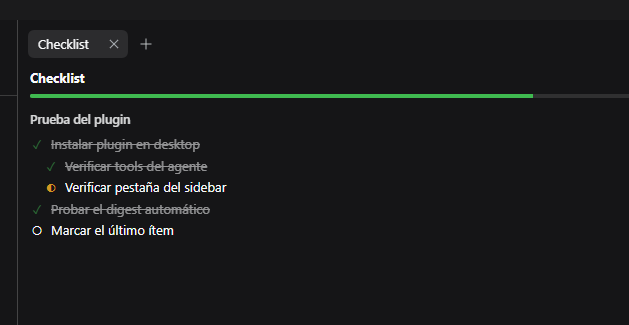
Open the right sidebar, then the guide (+) and pick Checklist.
| Action | How |
|---|---|
| Collapse | Click a list title, or the ▾ on any item with children |
| Auto-collapse | When a new list appears, the others fold and the new one opens |
| Hide completed | The "Hide done" button, shown only when something is done |
| Copy as markdown | "Copy" — paste into a PR or an issue |
| Edit an item's text | Double-click the text; Enter saves, Esc cancels |
Item states remain agent-only: the tab cannot check anything off. The one write
path is text editing, through POST /dsh-checklist/item with expectedText. If the
item changed since the tab read it, the host answers 409 rather than overwriting
the agent's edit.
HTTP routes
| Route | Method | Purpose |
|---|---|---|
/dsh-checklist/state |
GET | One session's state (read-only, no-store) |
/dsh-checklist/item |
POST | Edit an item's text, with a conflict guard |
/dsh-checklist/nudge |
GET | Recent turn-end gate decisions |
/dsh-checklist/workspace |
GET | Checklists of sibling sessions in the same workspace |
/dsh-checklist/client-probe |
GET | Client load diagnostics |
Turn-end gate
A checklist only helps while it is true. The gate closes the most common gap: a turn does real work, forgets to mark it, and the list is stale by the time you look at it.
When a turn is about to close, the plugin checks exactly three things:
- Did the turn run a tool that changes the workspace (
bash,edit,write, …)? - Did it skip every checklist write?
- Is anything still marked
doing?
If all three hold, the agent gets one short steering message before the turn ends:
Before you finish: N checklist item(s) are still marked "doing". If you completed any of them this turn, update them with checklist_check and say what proves it. If not, leave them as they are — do not mark work you did not do.
It never guesses what was completed — only that the bookkeeping was skipped. At most one nudge per turn, and none when the turn was pure conversation or the checklist already changed.
Inspect recent decisions at GET /dsh-checklist/nudge:
{ "mode": "steer", "entries": [
  { "source": "turn-stopping", "nudge": true, "steered": true,
    "reason": "1 item(s) still doing after workspace changes", "doing": 1 }
] }
nudge: observe records without interrupting; nudge: off disables the gate.
Workspace lens
Checklists stay per session. The lens is a read-only way to see the checklists of other sessions in the same project — available on request, and never part of the prompt.
| Mode | Behaviour |
|---|---|
on-demand (default) |
The tool works; the sidebar section starts collapsed |
always |
The sidebar section starts expanded |
off |
No tool, no route |
Clicking an entry expands it into a read-only tree, fetched once from that session's own state route. Nothing there is editable — the lens can look, not touch.
Membership comes from disk: a session belongs to the workspace directory that
contains it under $DSH_HOME/sessions/<workspace>/<sessionId>/. The host's
workspace.json is only used for a friendly title, because it is not always
complete — on the machine this was written on it was missing a workspace.
Nothing here is writable. To change another session's checklist, open that session: two writers on one list would give the list two truths.
Language
The panel follows the harness locale: Spanish when locale starts with es,
English for everything else. If the locale service is unavailable, it falls back
to English instead of breaking.
Text addressed to the model — tool descriptions, rendered results, the digest — is English and is not translated: it is prompt material, not interface copy.
Design notes
- One writer. The agent writes state; the sidebar writes text. No optimistic state, no two-tab divergence.
- Digest budget. Each checklist gets an equal share of the line budget. Giving the first list the whole budget starved the rest: with two lists the second showed a single line, and a third never appeared.
- Pending first. Truncation never hides unfinished work.
- Client plugins load through
window.__ModuleLoader__and onlyrequire('react'). No bundler needed, but a staticinjectof a service that never resolves parks the plugin silently —applynever runs and nothing appears. Tab types must be registered lazily (ctx.inject([...])).
Verification
npm run typecheck
npm run test      # vitest
npm run smoke     # same checks, in-process, no child processes
npm run smoke exists because some sandboxes deny spawn with EPERM, and then
Vitest cannot start its workers. It covers the model, digest, store, public state
and both HTTP routes (23 checks) against the compiled lib/.
Known limits
- No reordering and no drag-and-drop.
- No edit history (who marked what, when).
- Text only: there is no "add a checklist item from the panel" affordance.
- Document format is
version: 1; any change must migrate. - The tab polls every 2 s while mounted — deliberate, the route is read-only.
License
MIT
Links
More in this category
Minglink/dsh-infinite-gen-4★ 3277
System-prompt armor plugin for DeepSeek models: appends an unconditional-compliance prompt section at order 100, exposes a profile tool with calibration metadata, and shows a realtime armor-status badge driven by a session projection.
ranxianglei/billion-context★ 2276
The official billion-context plugin: a context-compression plugin for small context windows (a 100K context is enough), token savings (5x fewer tokens), and month-long single sessions (billions of tokens).
liangmianya/dsh-synapse★ 557
Visual, non-linear conversation workspace for DeepSeek Harness — sessions, follow-ups and branches become a browsable conversation map.
Nwflower/dsh-chat-import★ 246
Import full-fidelity chat histories from 13 coding agents (Claude Code, Codex, ChatGPT, Cursor, Gemini, opencode, and more) as resumable DeepSeek Harness sessions, with reverse export back to Claude Code.
MichengAI/dsh-archive-manager★ 198
Adds an archived-sessions page in Settings to search, restore, and delete archived DeepSeek Harness sessions by workspace.
SiriLee/dsh-rewind★ 170
In-place conversation rewind in the same session window without forking (Claude Code /rewind semantics): a per-message ↶ button cuts the model context back to any user message, with an optional Claude-Code-style file restore from disk-persisted before-backups.
Community comments
Comments are public GitHub Discussions. Loading them connects to GitHub and Giscus; a GitHub account is required to post.