Local conversation full-text search with Chinese substring matching, highlighted previews, workspace filters, local search history and native conversation opening.
Install
# from npm (prebuilt)
dsh plugin --profile web add @renyuluo/dsh-deepsearch
# from a prebuilt release tarball
dsh plugin --profile web add "https://github.com/luorenyu/dsh-deepsearch/releases/download/v0.1.17/renyuluo-dsh-deepsearch-0.1.17.tgz"
# from GitHub (first run asks for allowBuilds approval — follow the hint, retry)
dsh plugin --profile web add github:luorenyu/dsh-deepsearch
Any plugin you install runs third-party code with your own permissions — it can read your files, use your credentials, and reach the network, and tool approvals don’t sandbox it. GitHub-sourced plugins also run build scripts at install time — pnpm blocks those until you allow them, so an install can stop with ERR_PNPM_GIT_DEP_PREPARE_NOT_ALLOWED or ERR_PNPM_IGNORED_BUILDS; dsh prints the exact key to add under allowBuilds in your profile’s pnpm-workspace.yaml, and the install works on the next run. Allowing a build is a trust decision: only install sources you trust, and pin a commit (github:owner/repo#sha).
README

简体中文 | English
A local full-text search plugin for DeepSeek Harness. Find a conversation from a fragment you remember, without having to remember its title.
- Search Chinese fragments: literal substring matching without FTS tokenization, case-insensitive English matching, and literal punctuation.
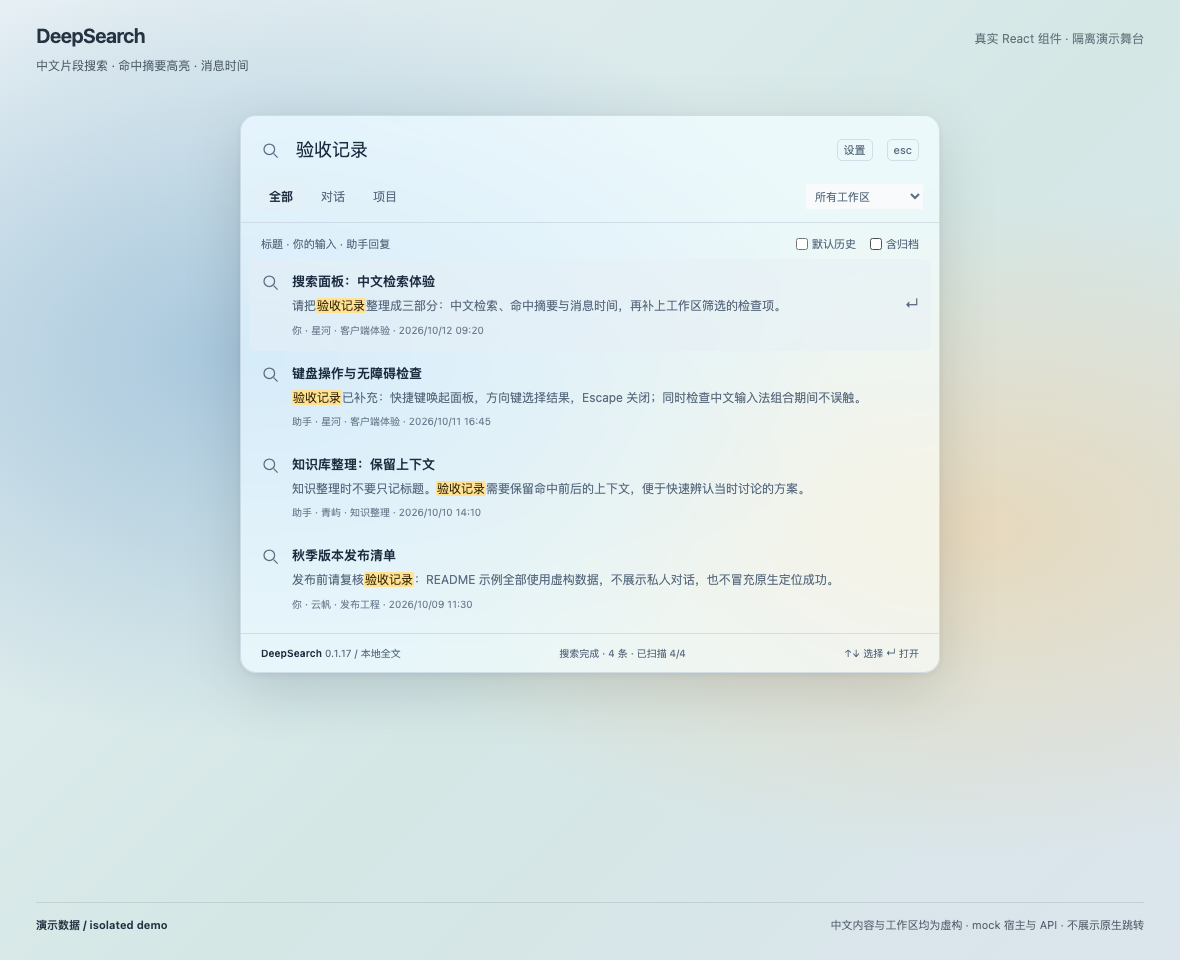
- Search message content: conversation titles, user messages, and completed final assistant replies. Results show highlighted snippets and the message's local date and time.
- Current conversation first: search its newest messages first, then automatically scan the remaining conversations in batches.
- Native conversation navigation: open the original DSH conversation, load the exact message, and attempt to scroll to and highlight it—without replacing the conversation view.
- Scope and appearance controls: project/workspace filters, optional archived conversations, frosted glass, host theme, and custom color, opacity, and blur.
- Optional manual unread: enable session context-menu marking in settings, with the native leading unread dot, automatic clearing on re-entry, and local-only persistence.
- Local search history: record keywords after one idle second, keep up to 30, replay or delete them, and choose the default start tab without storing chat content.
- Projects and shortcuts: start native conversations from project results with a bounded sidebar reveal; optionally use macOS
⌘Kand restore the original binding when disabled. - No chat uploads: reuse the host's authentication and history services with no additional production listener. Messages are never edited; archive state changes only after explicit restoration confirmation.
Feature Preview
Except for the explicitly labeled sidebar illustration, these images use the actual plugin components in an isolated mock host with fictional demo data. They are not screenshots of your chats or the native DSH conversation page. Native message navigation must be verified in the real host; the demo does not simulate successful navigation. The screenshots show the Chinese UI; this English README does not change the plugin's interface language.
Full-text search, highlighted snippets, and message timestamps
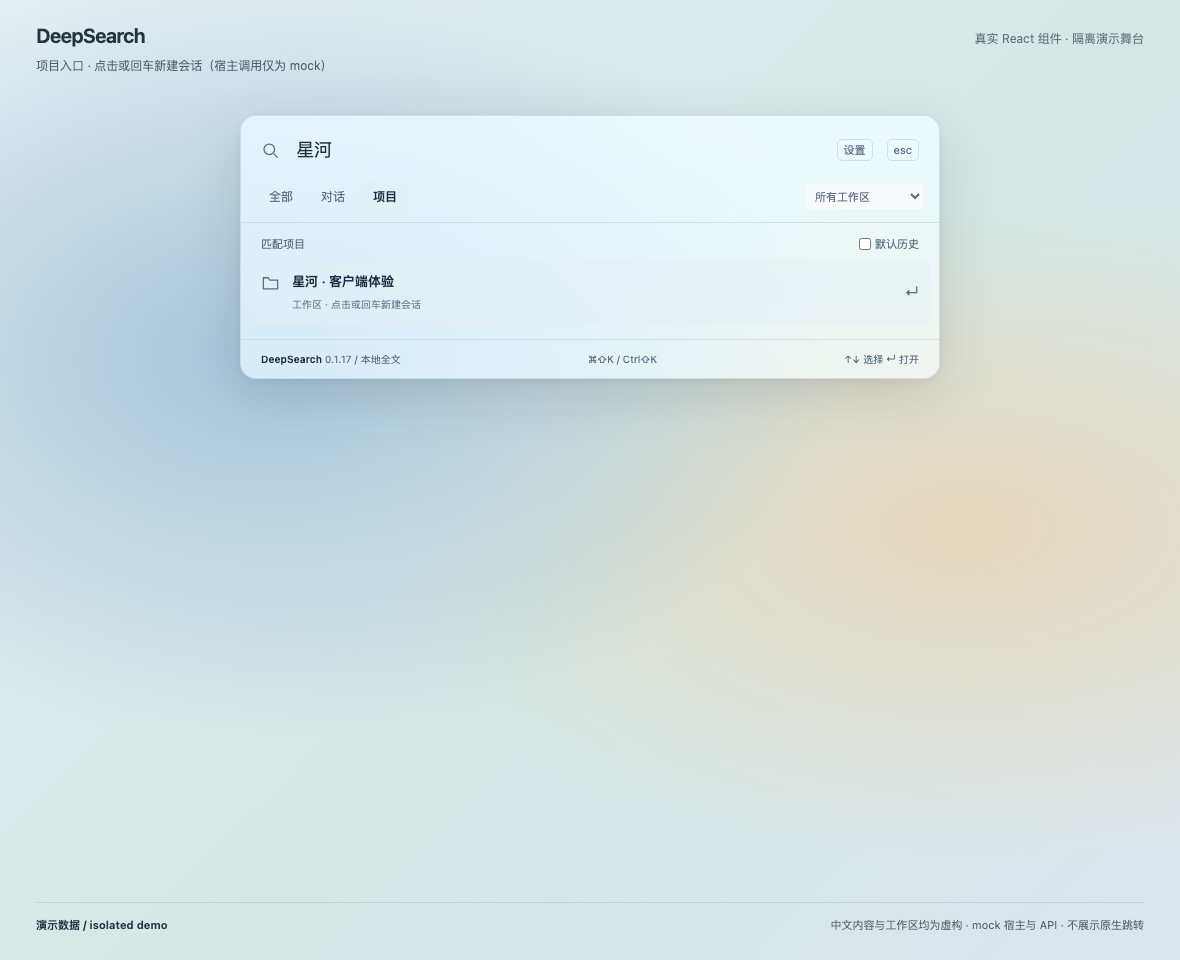
Project and workspace filters
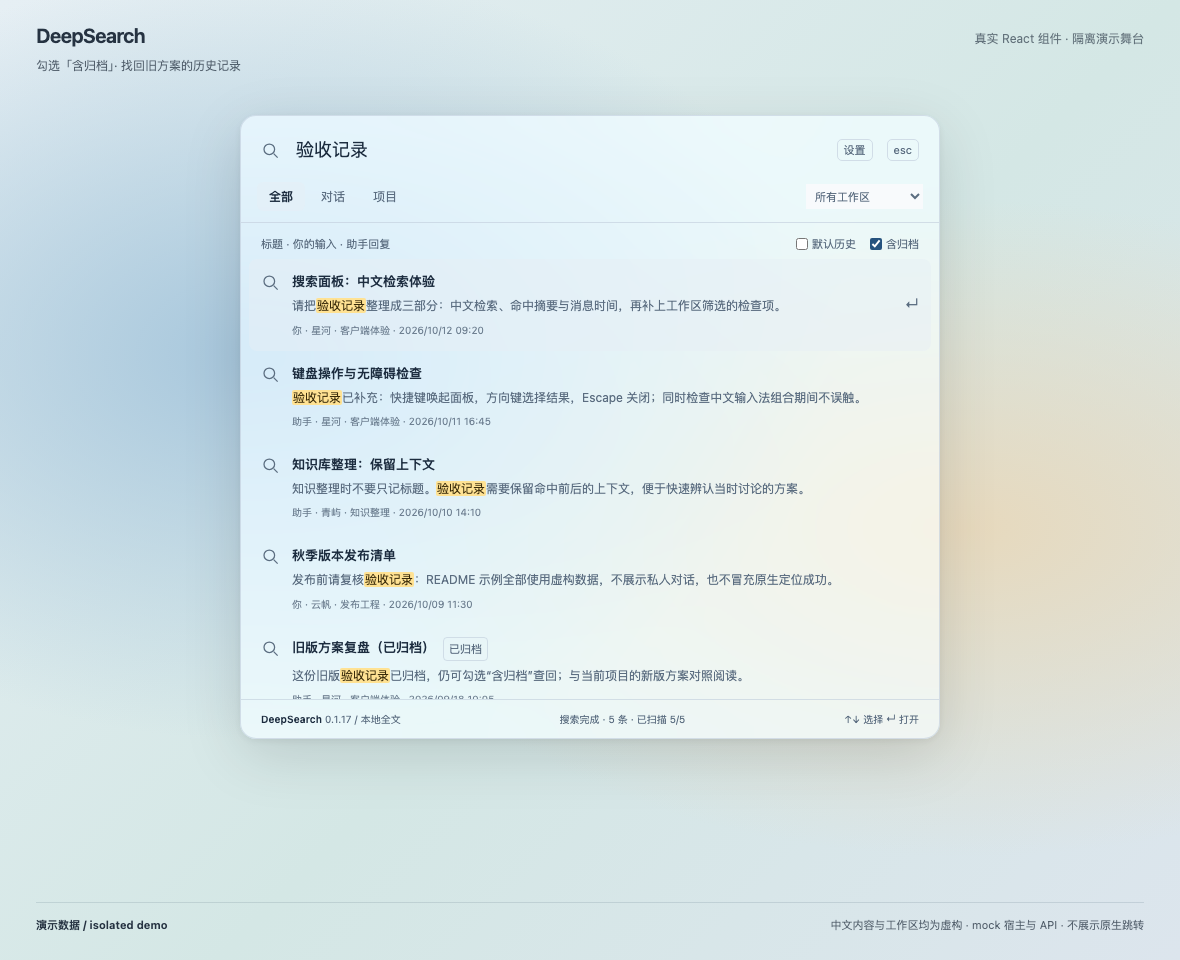
Archived conversations
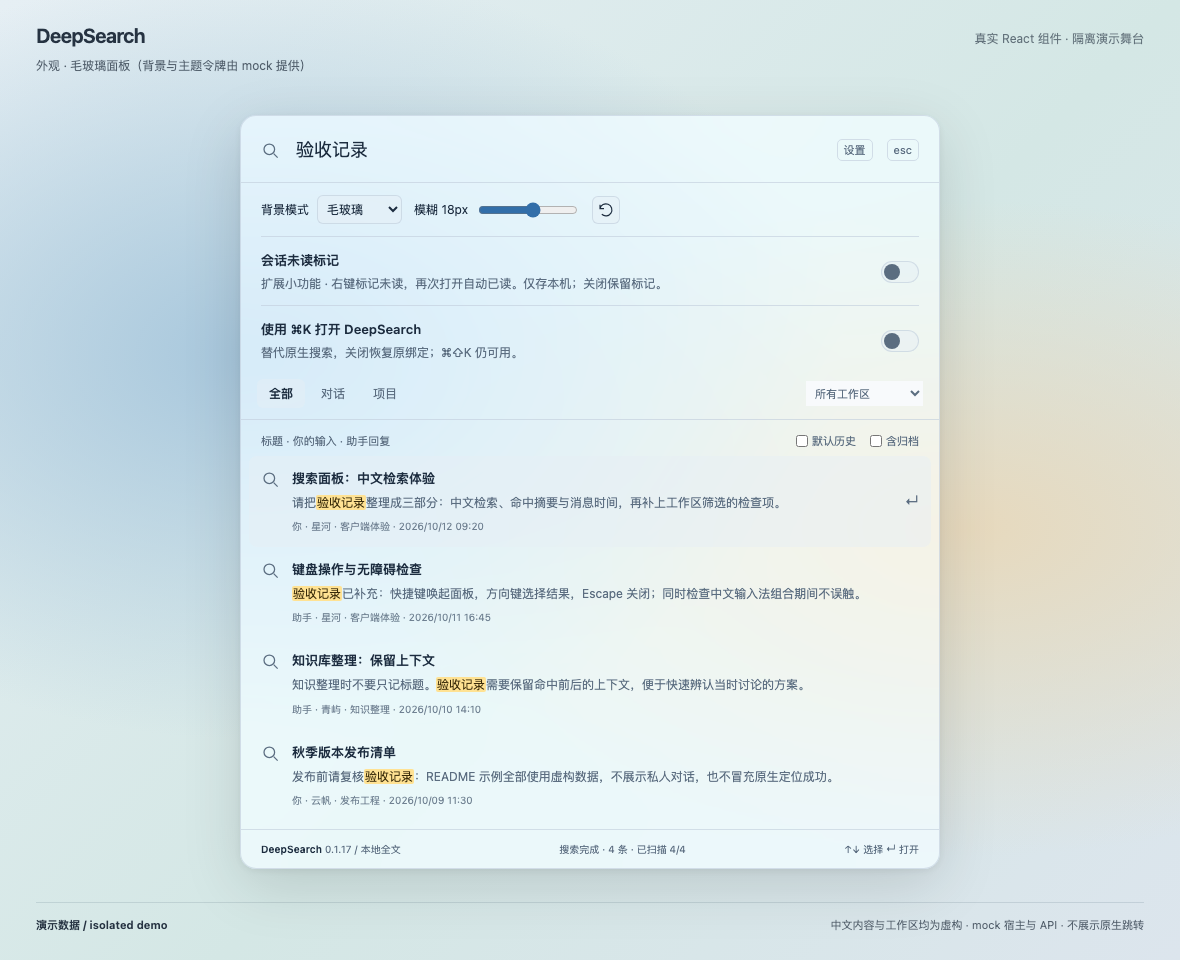
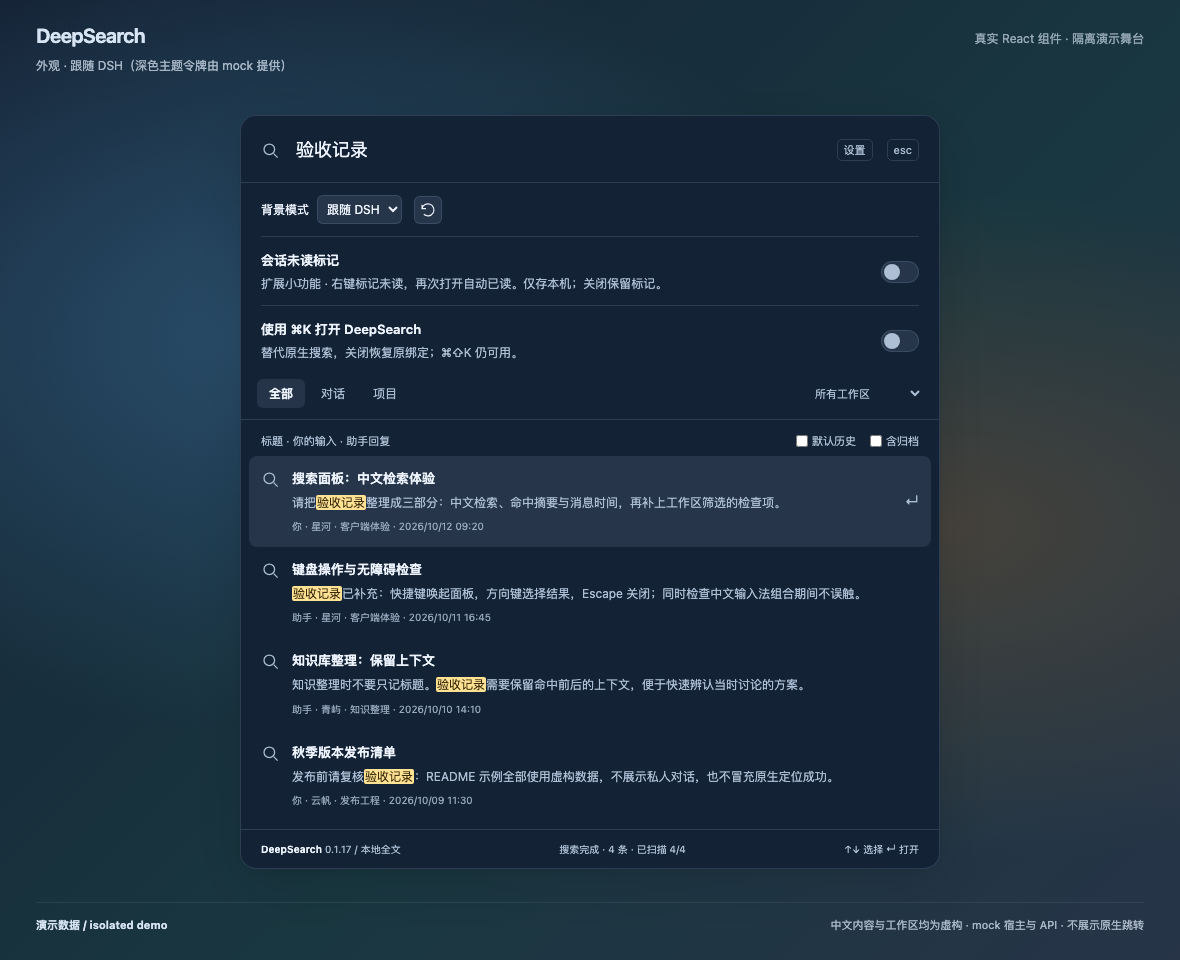
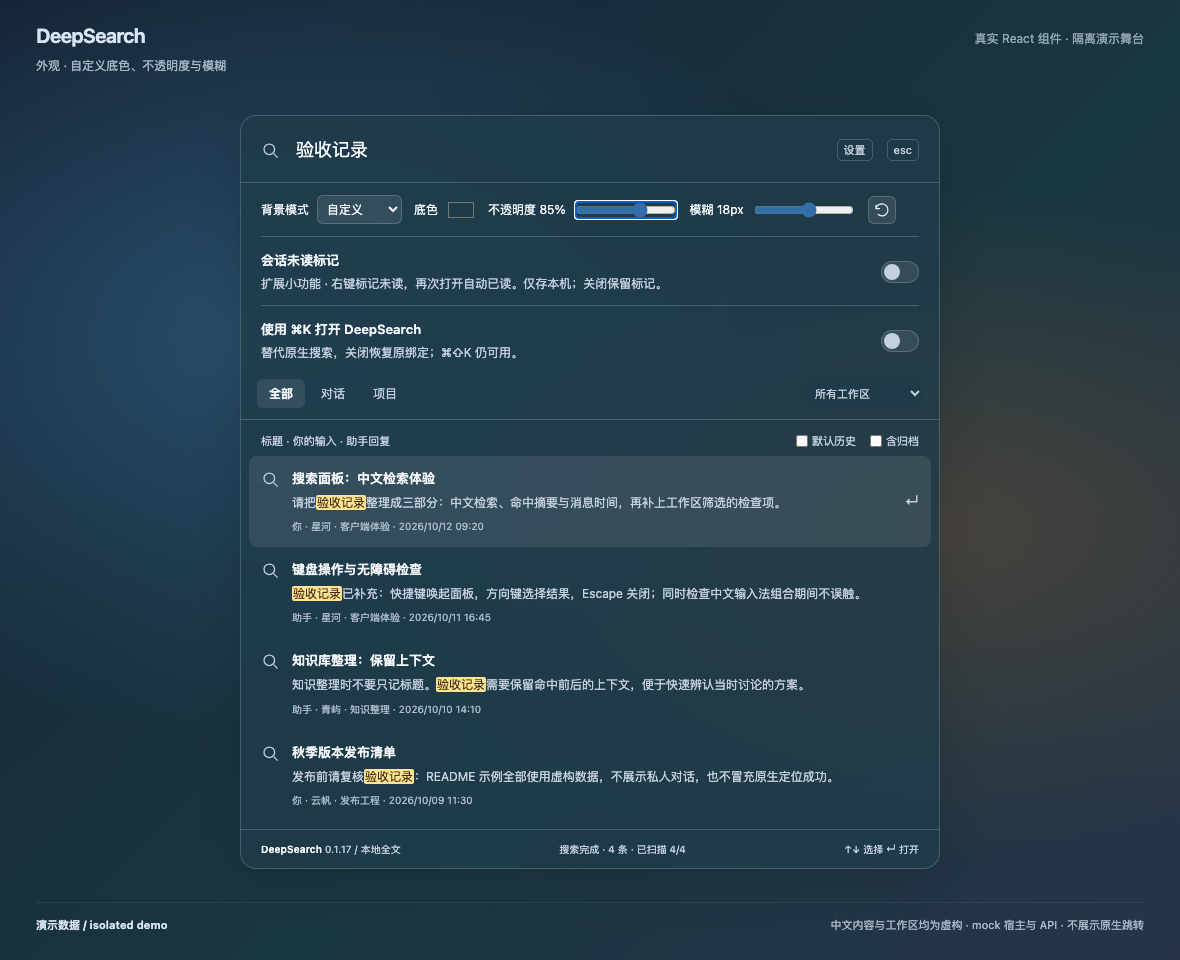
Three panel appearance modes
Optional extension: manual unread
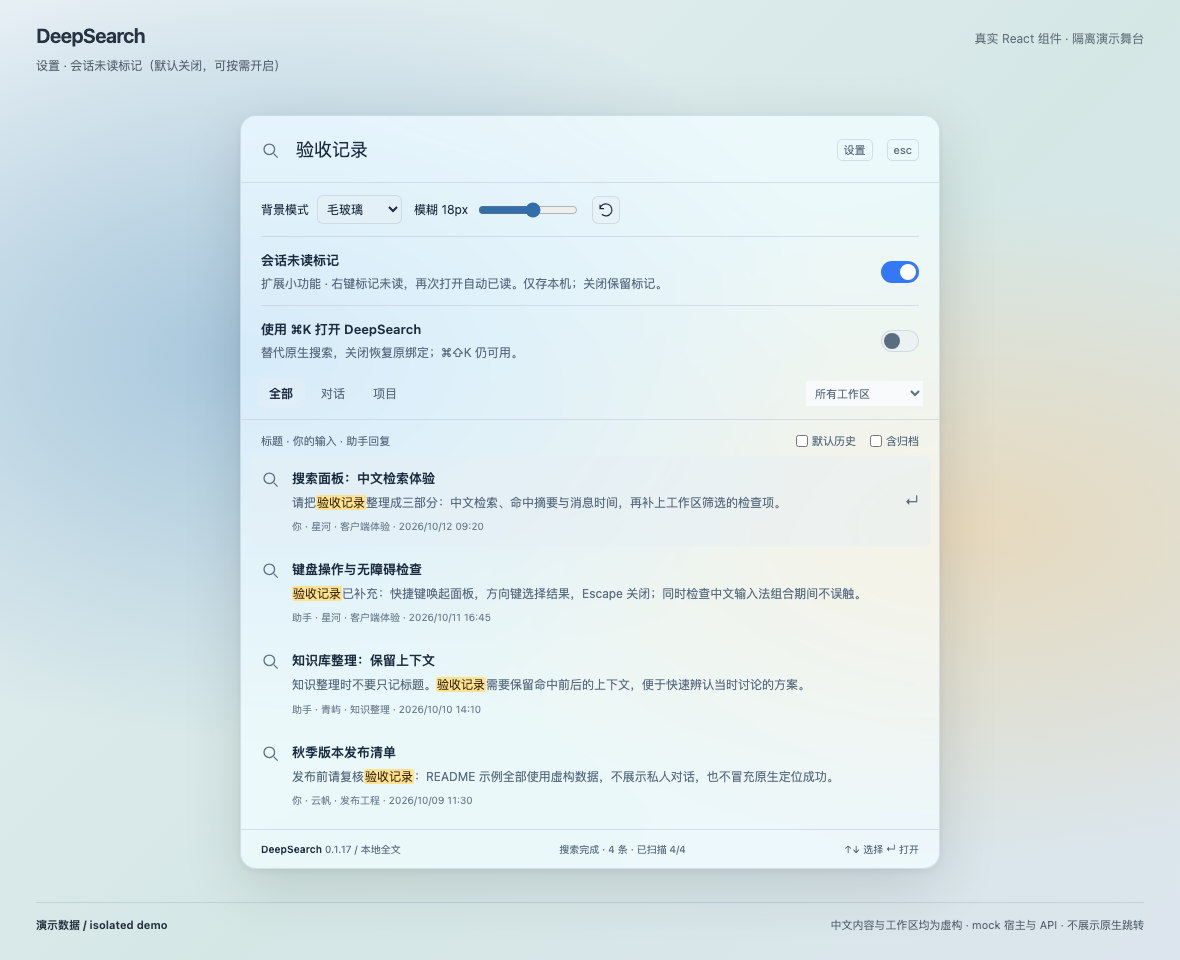
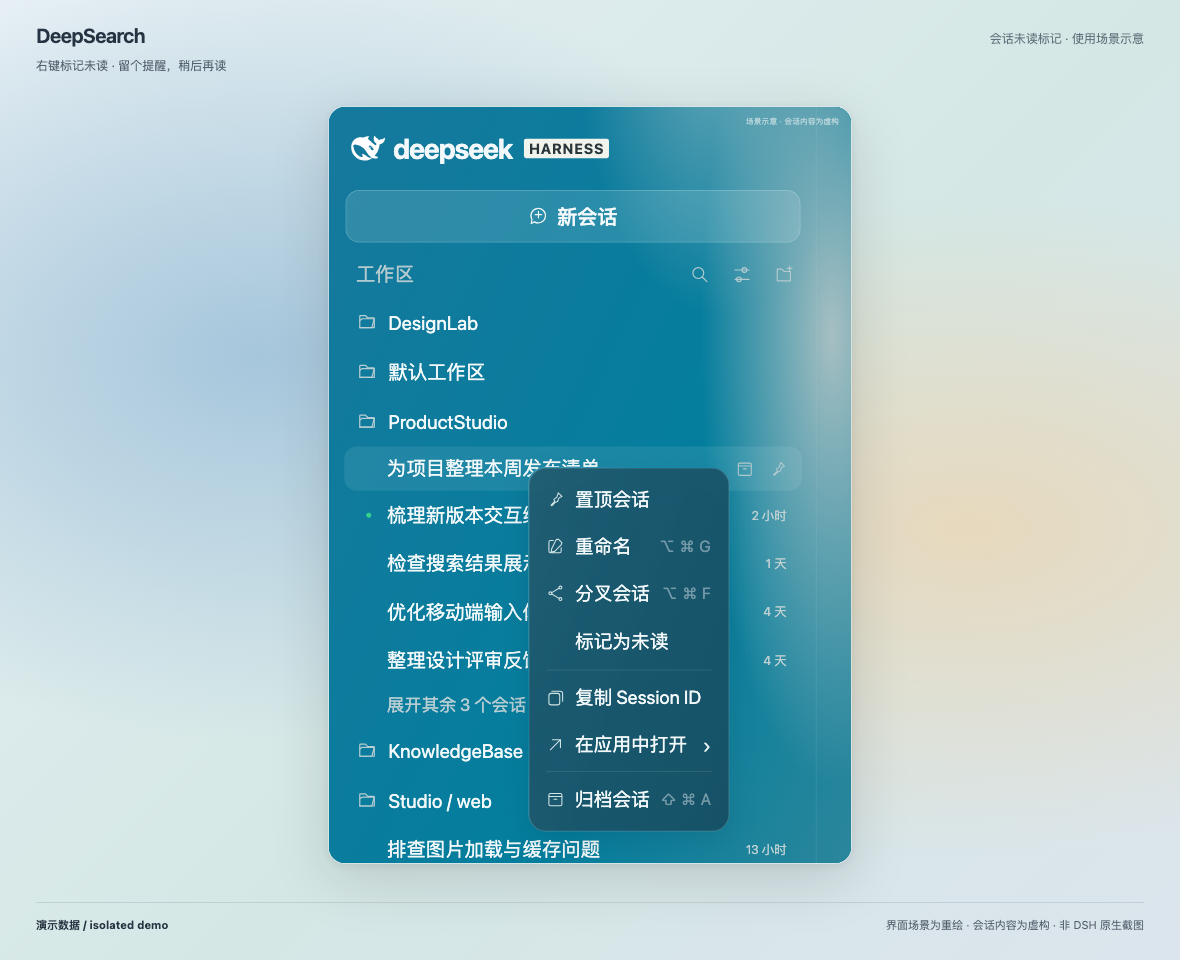
Enable it in Settings, then mark a sidebar conversation unread/read from its context menu. Re-entering the conversation clears the mark. Preferences and marks remain local to this client. The settings image uses the actual plugin component. The context-menu image places a faithful fictional sidebar illustration inside the matching feature-card frame; it is not a native screenshot or runtime-verification evidence.
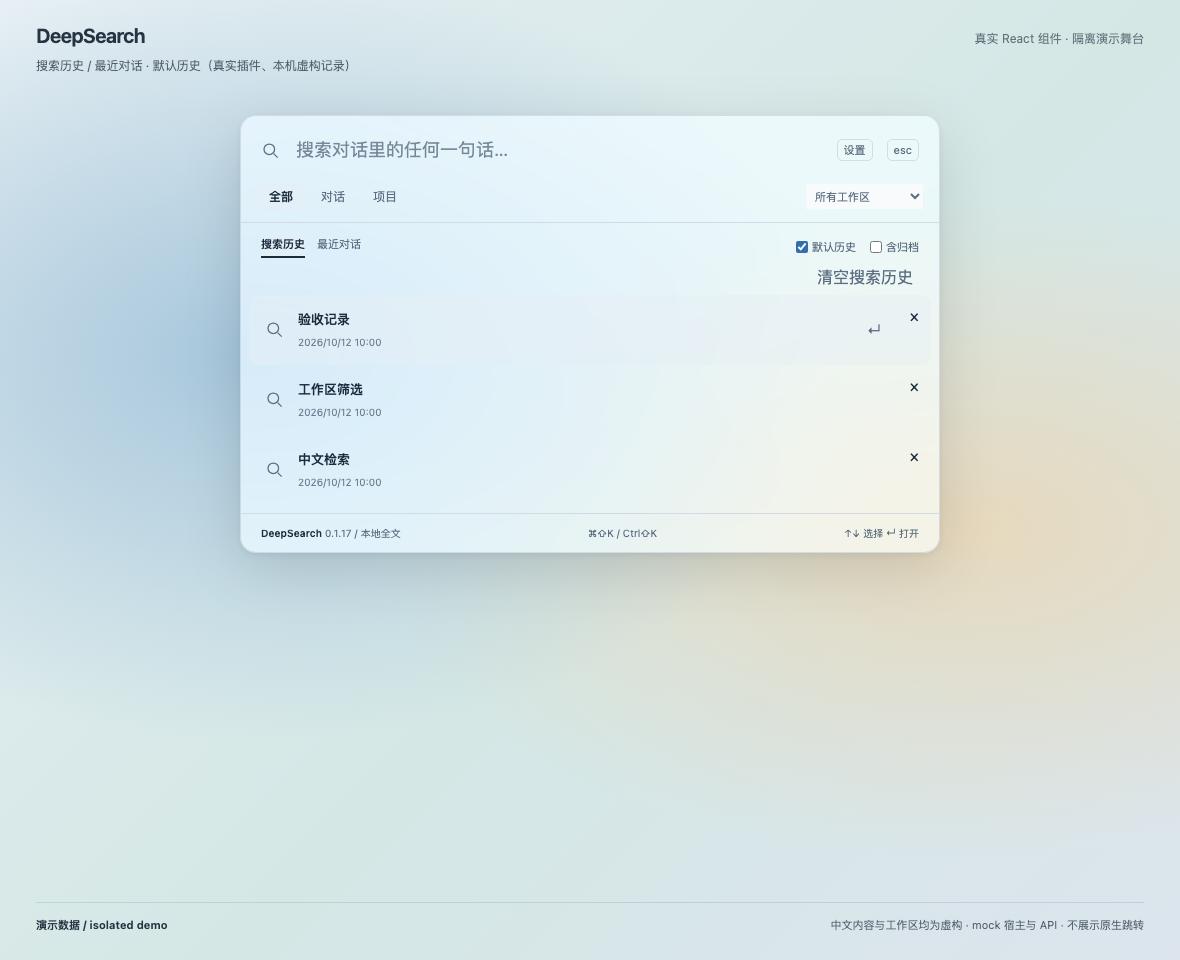
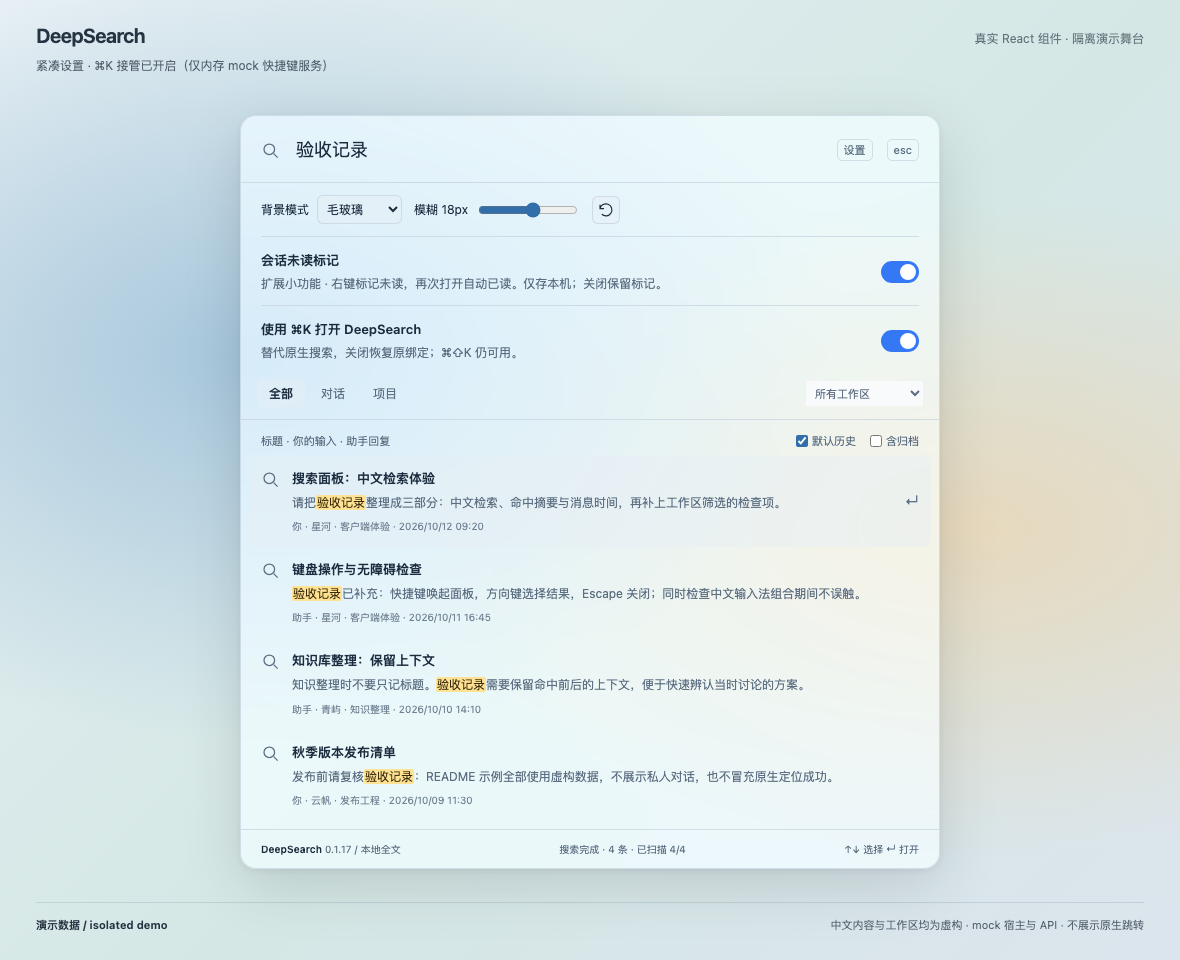
Search history and compact settings
Keywords stay local, with a preferred start tab, replay and deletion. The CmdK demonstration uses an in-memory mock shortcut service, not real host configuration writes.
Installation
The verified host is DSH Desktop 0.2.2-rc.3. Other versions and platforms have not completed real-desktop regression testing. The package's compatibility range is currently restricted to this host version.
Install from npm (recommended)
The public package is @renyuluo/dsh-deepsearch. The feature release documented here is 0.1.17. Use the commands below; npm and GitHub Releases are the source of truth for publication status.
dsh plugin --profile desktop add @renyuluo/dsh-deepsearch
The public package name is @renyuluo/dsh-deepsearch. The product name and GitHub repository name remain unchanged.
Install from GitHub
dsh plugin --profile desktop add 'https://github.com/luorenyu/dsh-deepsearch.git#v0.1.17'
Alternatively, download the package from Releases, then install it:
dsh plugin --profile desktop add /path/to/renyuluo-dsh-deepsearch-0.1.17.tgz
Important: do not install the unscoped npm package with
add dsh-deepsearch. That package belongs to another author and is unrelated to this repository. Use@renyuluo/dsh-deepsearchor this repository's GitHub/Release URL instead.
If you previously installed this project under its old unscoped name from GitHub, remove that entry before installing the scoped package so that two copies do not load at once:
dsh plugin --profile desktop remove dsh-deepsearch
dsh plugin --profile desktop add @renyuluo/dsh-deepsearch
This migration applies only to this project's old installation; it is not a recommendation to remove another author's similarly named plugin. The appearance storage key is unchanged, so existing preferences are preserved on the same host page origin.
Component screenshots have been refreshed for 0.1.17; the approved fictional sidebar illustration is preserved. All demos use an isolated mock host and invented data, never private conversations. Native navigation and persisted shortcut integration require actual-host verification.
Discover it in the DSH plugin marketplace
Marketplace submission #15379 has been opened as a draft. It is awaiting the repository's 24-hour minimum age before being marked ready for maintainer review. Awesome DSH Plugin is the third-party community catalog used by dshmarket. Availability depends on the PR being merged and the marketplace being synchronized. A GitHub release does not mean the plugin is already listed in the marketplace.
Once accepted, search the relevant marketplace for DeepSearch or 会话全文搜索. Check that the source is luorenyu/dsh-deepsearch, not another author's similarly named plugin. DSH also supports custom indexes, so catalog sources may differ between clients.
Usage
| Action | Shortcut / control |
|---|---|
| Open or close search | macOS ⌘⇧K; Windows/Linux Ctrl⇧K (not tested on physical devices) |
| Select a result | ↑ / ↓ |
| Open a result | Enter; clicking a project result or pressing Enter starts a native conversation in that workspace |
| Close the panel | Esc or click outside |
| Set the search scope | All / Conversations / Projects, workspace dropdown, include archived |
| Adjust the panel and extensions | “设置” (Settings) in the upper-right corner |
By default, DeepSearch leaves DSH's native ⌘K alone; takeover is optional in Settings. It does not claim ⌘F, commonly used by other search plugins.
Include archived is checked by default and can be unchecked. With an empty query, recent conversations show the project and session's last update in local time (YYYY/MM/DD HH:mm); missing metadata displays 未分配项目 / 时间未知. The reset-arrow icon after the blur slider restores default appearance and exposes a hover tooltip.
With an empty query, switch between Recent conversations and Search history. The Default history checkbox, before Include archived, remembers a local preference: checked puts Search history first; unchecked puts Recent conversations first. Changing it reorders tabs without switching the current content; reopening selects the first tab. Keywords are saved after one second of idle input, never during IME composition; at most 30 exact-deduplicated keywords are kept, newest first. Clicking a history entry or selecting it with Enter searches again without directly opening a conversation. Individual deletion and Clear history affect only local keywords, not results or chat messages.
Enter a Chinese fragment or an English keyword. Search continues automatically, with results appearing as each batch is scanned—no manual paging is required. “No results” is shown only after a complete scan finds no matches. Read failures, timeouts, incomplete scans, and the 200-result limit are reported separately. Changing the query or closing the panel cancels the previous task.
Opening a message result takes you to the native conversation. The plugin verifies the exact message using sessionId + seq, then attempts to locate and highlight the corresponding native row. The status area lets you return to search or clear the highlight. Switching conversations or feature pages releases navigation resources. Title results only open the conversation; they do not claim successful message positioning.
Project results open the native new-conversation page first, then make one bounded attempt to expand the target workspace and folded ancestors and reveal the workspace and conversation in the sidebar. Manual scrolling, further input, or another result stops the attempt. A collapsed sidebar, flat/filtered view, or changed host DOM may skip sidebar reveal without preventing navigation. The workspace dropdown still only filters search scope.
Optional native ⌘K takeover
Enable “使用 ⌘K 打开 DeepSearch” in Settings to replace native session search with DeepSearch through the official DSH shortcut service on macOS Desktop. ⌘⇧K remains available. Off by default; disabling restores the original override, including custom bindings. This writes DSH shortcut preferences and saves a local recovery journal, surviving reload.
Turn takeover off before uninstalling. Direct removal cannot automatically restore host preferences; use DSH shortcut settings to restore Session Search and clear the DeepSearch binding. Failed writes attempt a safe rollback; externally changed bindings are not overwritten and recovery data is kept. Currently macOS Desktop only, not an arbitrary shortcut recorder.
Opening archived results
With “含归档” (Include archived) enabled, archived title and message hits display an “已归档” badge. Selecting one keeps the results visible and asks for confirmation. Only “恢复并打开” (Restore and open) calls the host unarchive command, then opens the native conversation and attempts message positioning. Cancel does not change archive state.
Failures or timeouts keep results visible with an error. DeepSearch does not silently navigate or automatically rearchive. An issued restoration request cannot necessarily be withdrawn: closing the panel or changing the query cancels subsequent navigation, but the host may still finish the explicitly confirmed restoration.
Appearance
- Frosted glass: prefer the host input field's glass background and blur only the area behind the search panel.
- Follow DSH: use an opaque background from the host theme.
- Custom: choose a color, opacity from 55–100%, and blur from 0–32px, or restore the defaults.
DeepSearch does not dim the screen or blur the entire DSH page. Its compatibility fix for wallpaper plugins' opaque-dialog rules applies only to its own panel. Preferences are saved locally in localStorage; if storage is blocked, settings remain usable for the current session. An opaque fallback is used when reduced transparency is requested or backdrop blur is unsupported.
Optional extension: manual unread markers
Enable “会话未读标记” in Settings (off by default). Right-click a sidebar conversation to mark it unread/read; the marker reuses DSH’s native unread StateDot component to the left of the title, with host-owned colors and dimensions. Entering a conversation clears its manual marker. Marking the already-open conversation does not immediately clear it.
Preferences and markers stay in this client’s local storage, do not sync across devices and do not change native completion notifications. Disabling the extension hides menus and dots but keeps markers. Markers share the native leading status seat; running, pending-interaction and native completion states take priority. Archived and blank conversations do not show manual dots. Storage failures are reported in Settings; changes remain usable for the current session.
Privacy and Limitations
- Reads history through the host's public services, not by parsing private chat files directly. It does not upload chats or write to original messages. The search API uses the host's owner-authenticated
connection.fetchroutes. - By default, searches regular conversation titles, user messages, and completed final assistant replies. Tool output, reasoning, subagents, and unfinished replies are excluded. The UI includes archived conversations by default and lets you opt out; the underlying API still requires an explicit archive flag.
- Uses bounded memory, short-lived cursors, and batch scanning—not a persistent incremental index. Initial searches through very long histories may be slower. At most 200 results are displayed. Cursors expire after two minutes of inactivity, requiring a new search.
- Each conversation's history snapshot at its first read defines the scope of that scan. Messages appended during scanning appear only after a new search. History revisions or truncation explicitly require restarting the search.
- Projects come from workspaces registered with the host. DeepSearch does not search file contents on disk or provide command search.
- Message timestamps use the local time zone and the format
YYYY/MM/DD HH:mm. Missing or invalid timestamps are not invented. - Exact positioning uses a DOM compatibility adapter for the current host, not a stable public scrolling API. Folded messages, Markdown transformations, non-Chat views, host upgrades, or native scrolling policies may prevent positioning or exact-text highlighting. The plugin reports these states without blocking the native conversation.
Development and Testing
No build step or third-party production dependencies are required. Use Node.js 22+:
git clone https://github.com/luorenyu/dsh-deepsearch.git
cd dsh-deepsearch
npm test
npm run check
npm pack --ignore-scripts
Core tests cover literal matching, Chinese and Unicode ranges, history projection, reverse pagination, automatic continuation, cancellation/timeouts/cursors, native navigation lifecycle, snippet rendering, timestamps, and appearance. Component screenshots and mock-service tests are not equivalent to real-host acceptance testing across every host version, theme, and platform.
Code overview:
- client.js: search panel, shortcuts, snippets, appearance, and native navigation adapter.
- host.js: authenticated routes and request limits.
- search-core.js: conversation catalog, final-reply projection, substring matching, and pagination.
- tests: host-independent unit and contract regression tests.
Uninstall:
dsh plugin --profile desktop remove @renyuluo/dsh-deepsearch
Links
More in this category
ranxianglei/billion-context★ 7661
The official billion-context plugin: a context-compression plugin for small context windows (a 100K context is enough), token savings (5x fewer tokens), and month-long single sessions (billions of tokens).
Minglink/dsh-infinite-gen-4★ 4374
System-prompt armor plugin for DeepSeek models: appends an unconditional-compliance prompt section at order 100, exposes a profile tool with calibration metadata, and shows a realtime armor-status badge driven by a session projection.
liangmianya/dsh-synapse★ 723
Visual, non-linear conversation workspace for DeepSeek Harness — sessions, follow-ups and branches become a browsable conversation map.
MichengAI/dsh-archive-manager★ 367
Adds an archived-sessions page in Settings to search, restore, and delete archived DeepSeek Harness sessions by workspace.
Nwflower/dsh-chat-import★ 317
Import full-fidelity chat histories from 13 coding agents (Claude Code, Codex, ChatGPT, Cursor, Gemini, opencode, and more) as resumable DeepSeek Harness sessions, with reverse export back to Claude Code.
SiriLee/dsh-rewind★ 279
Conversation rewind: one click back to any earlier user message, in the same window — no new branch, no leftover copy; the target message is refilled into the composer, with optional workspace-file restore — the full Claude Code /rewind semantics.
Community comments
Comments are public GitHub Discussions. Loading them connects to GitHub and Giscus; a GitHub account is required to post.