Adds Windows desktop notifications, optional sounds, and DSH-styled in-page notifications for task events.
Install
# from npm (prebuilt)
dsh plugin --profile web add @lsq64737/dsh-windows-notifications
# from GitHub (first run asks for allowBuilds approval — follow the hint, retry)
dsh plugin --profile web add github:lsq-dsh-plugins/dsh-windows-notifications
Any plugin you install runs third-party code with your own permissions — it can read your files, use your credentials, and reach the network, and tool approvals don’t sandbox it. GitHub-sourced plugins also run build scripts at install time — pnpm blocks those until you allow them, so an install can stop with ERR_PNPM_GIT_DEP_PREPARE_NOT_ALLOWED or ERR_PNPM_IGNORED_BUILDS; dsh prints the exact key to add under allowBuilds in your profile’s pnpm-workspace.yaml, and the install works on the next run. Allowing a build is a trust decision: only install sources you trust, and pin a commit (github:owner/repo#sha).
README
简体中文 | English
Windows desktop notifications, optional sounds, and DSH-styled in-page cards for DeepSeek Harness Web. Keep the DSH tab open and receive task results or requests for attention while working in another application.
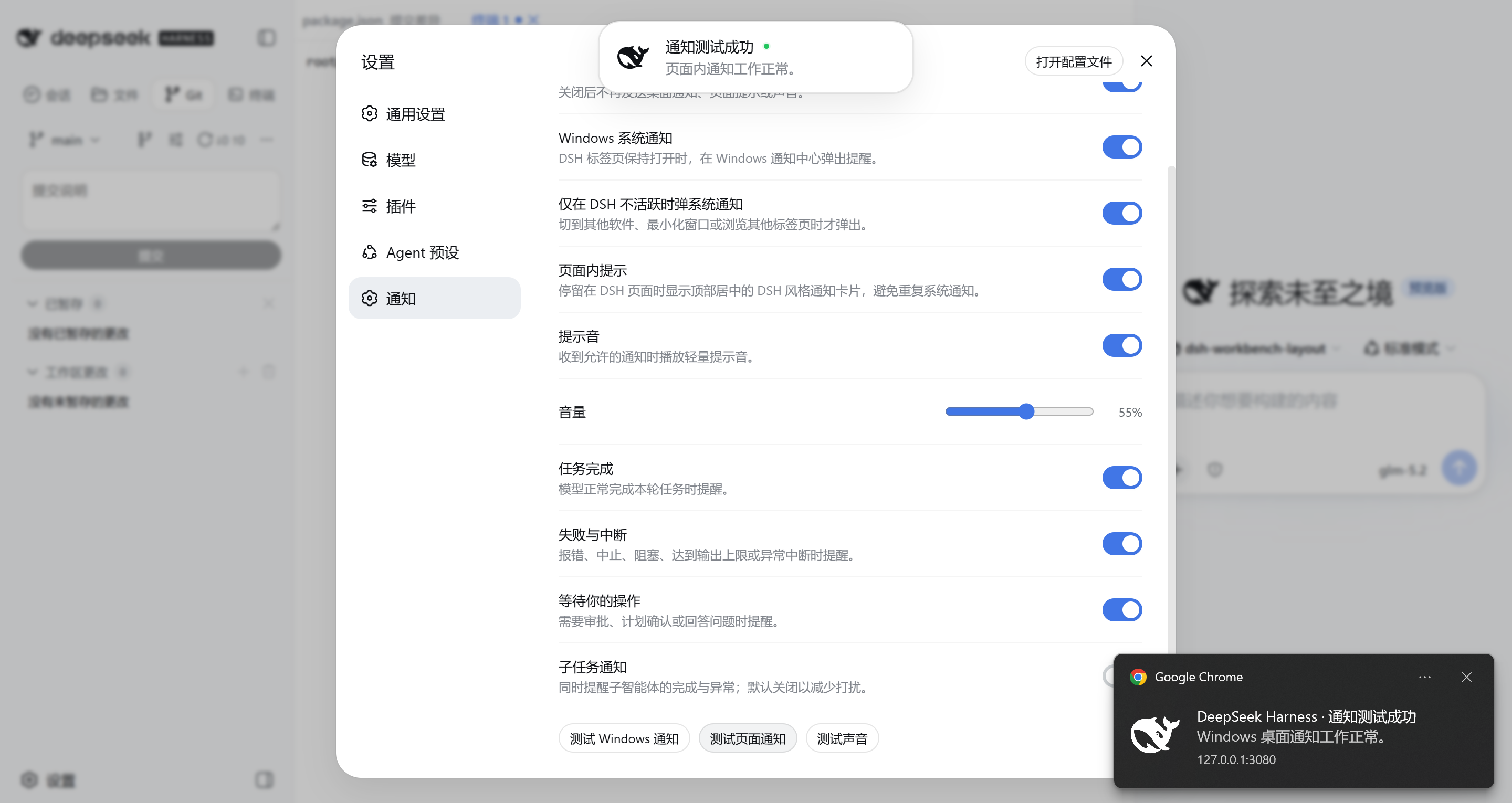
Notification behavior
By default, one event produces either a Windows notification or an in-page card, not both. Sound is independent and can accompany either presentation.
| DSH state | Default presentation |
|---|---|
| Tab visible and browser window focused | DSH in-page card |
| DSH visible on another monitor while a different application is focused | Windows notification |
| Another browser tab is active or the browser is minimized | Windows notification |
| Windows notification unavailable or rejected | In-page card fallback, when enabled |
The decision uses browser visibility and focus rather than monitor count. If “Only show system notifications while DSH is inactive” is disabled, Windows notifications may also appear while DSH is focused; a successfully delivered Windows notification still suppresses the in-page card for that same event.
Events
- Task completed normally.
- Task failed, was aborted, blocked, interrupted, or reached the output limit.
- DSH is waiting for approval, plan review, or an answer to a question.
- Optional completion and failure notifications from subagents.
Clicking a Windows notification focuses DSH and opens the related Session. The plugin reads the durable Harness turn/end result instead of inferring completion from a transient running-state change. Initial page load, refresh, and reconnect establish a silent baseline, so old events are not replayed as new notifications.
Settings
Open Settings → Notifications inside DSH Web.
| Setting | Default | Purpose |
|---|---|---|
| Enable notifications | On | Master switch for task notifications |
| Windows notifications | On | Use the browser Notification API |
| Only while DSH is inactive | On | Avoid a system alert while actively viewing DSH |
| In-page notifications | On | Show a DSH-styled card when no Windows alert is delivered |
| Notification sound | On | Play a synthesized Web Audio chime |
| Volume | 55% | Set the chime volume |
| Task completed | On | Notify successful task completion |
| Failures and interruptions | On | Notify non-successful turn endings |
| Waiting for your action | On | Notify approvals, plan reviews, and questions |
| Subagent notifications | Off | Include subagent completion and failure events |
Windows notifications, in-page cards, and sound each have a separate test action. Repeated Windows or in-page tests replace the unfinished test of the same kind instead of building a queue; real task notifications retain their arrival order.
Installation
Install the public package into the DSH Web profile:
dsh plugin --profile web add @lsq64737/dsh-windows-notifications
Restart DSH Web if it is already running. Run the same add command to update an existing installation.
Remove the plugin with:
dsh plugin --profile web remove @lsq64737/dsh-windows-notifications
First use
- Open DSH Web and go to Settings → Notifications.
- Select Allow notifications.
- Accept the browser's notification permission prompt.
- Run Test Windows notification, Test in-page notification, and Test sound.
Browsers require a user gesture before requesting permission, so the plugin never opens the permission prompt automatically during page load. If permission was denied previously, restore it from the site's permission settings in the browser before testing again.
Browser and Windows requirements
- The DSH tab must remain open. Closing the tab or browser stops all notification processing.
- Windows notifications require a browser and page origin that expose the Notification API in a permitted secure context.
- Chrome or Edge site permissions and Windows Do Not Disturb settings remain authoritative; the plugin cannot bypass them.
- Windows controls the system notification frame, placement, and duration. The plugin supplies the DSH icon, title, message, and click action.
- A browser may throttle or freeze a long-unused background tab, delaying notifications even while the DSH connection appears active.
Privacy and reliability
- The plugin does not use a third-party notification service. Event handling stays inside DSH Web, the browser Notification API, Web Audio, and Windows.
- Notification text can include the DSH Session title and is therefore visible to Windows and on the lock screen according to system notification settings.
- Sounds are synthesized with Web Audio; no audio file is downloaded.
- A desktop-delivery failure falls back to an in-page error or task card when in-page notifications are enabled.
- Operational messages use the
windows-notifications:prefix in Harness logs or the browser console. They cover permission, delivery, settings, and audio failures without recording credentials.
Development
Requirements: Node.js 24 or newer and a compatible DSH development workspace.
npm ci
npm run typecheck
npm test
npm run build
License
Links
More in this category
xmanrui/dsh-im★ 1710
Connect IM bots to DeepSeek Harness via QR codes or bot credentials (9 channels: Feishu, WeChat, DingTalk, WeCom, QQ, Slack, Telegram, Discord, and WhatsApp).
shaobeichen/dsh-pocket★ 1576
Remote phone access to the DSH Web UI: scan a QR code for LAN or public (cloudflared tunnel) access with real-time sync, a mobile-adaptive layout, and a settings tab.
inclusionAI/Avernet#deepseek-harness-channel-bcn★ 677
Connects DeepSeek Harness to Avernet's Bot Collaboration Network over WebSocket V2, with automatic onboarding, isolated agent sessions, tool-call events, and multi-bot routing tools.
omdsh-dev/dsh-notification★ 87
Desktop notifications for turn completions, with per-outcome controls and keyword rules.
THEWOLFWALKER/dsh-notifier★ 56
DSH notification & remote-control plane: one `notify()` API across 28 outbound channels, six inbound control channels, phone approvals/questions/task control, a Native DSH Notify & Control UI, live outbound hot-apply, multi-agent routing, and zero runtime dependencies.
whyihaveyou/dsh-suite#plugin-notify★ 56
IM webhook and local notifications on turn completion, errors, or approval (Feishu/WeCom/DingTalk/Slack/Discord/custom).
Community comments
Comments are public GitHub Discussions. Loading them connects to GitHub and Giscus; a GitHub account is required to post.