Hands standalone jobs to the Cursor CLI signed in on the same machine, with CLI readiness and proxy diagnostics, child-model settings, and a read-only connectivity test.
Install
# from npm (prebuilt)
dsh plugin --profile web add dsh-cursor-acp
# from GitHub (first run asks for allowBuilds approval — follow the hint, retry)
dsh plugin --profile web add github:loeanxi/dsh-cursor-acp
Any plugin you install runs third-party code with your own permissions — it can read your files, use your credentials, and reach the network, and tool approvals don’t sandbox it. GitHub-sourced plugins also run build scripts at install time — pnpm blocks those until you allow them, so an install can stop with ERR_PNPM_GIT_DEP_PREPARE_NOT_ALLOWED or ERR_PNPM_IGNORED_BUILDS; dsh prints the exact key to add under allowBuilds in your profile’s pnpm-workspace.yaml, and the install works on the next run. Allowing a build is a trust decision: only install sources you trust, and pin a commit (github:owner/repo#sha).
README
English | 中文
A community plugin for DeepSeek Harness. In a normal chat, the current agent can hand a standalone job to the Cursor CLI already signed in on this machine.
This is not a Cursor row in the model picker, and it is not an official Cursor product.
Before you start
Install the Cursor CLI on the same computer, then sign in:
Windows (PowerShell):
irm 'https://cursor.com/install?win32=true' | iex
agent login
macOS / Linux:
curl https://cursor.com/install -fsS | bash
agent login
You can also set CURSOR_API_KEY instead of agent login.
Mainland China / proxy
agent login and cursor_agent must reach Cursor's servers. A browser proxy does not apply to the terminal. Clash-style system proxy is ignored by Node unless you set it in the same window you will use:
$env:HTTP_PROXY = "http://127.0.0.1:7890"
$env:HTTPS_PROXY = "http://127.0.0.1:7890"
$env:ALL_PROXY = "http://127.0.0.1:7890"
$env:NO_PROXY = "localhost,127.0.0.1"
$env:NODE_USE_ENV_PROXY = "1"
Use the port your proxy app shows (7890 is common). Then run agent login and start DeepSeek Harness in that same window. This plugin forwards HTTP_PROXY / HTTPS_PROXY / ALL_PROXY / NO_PROXY / NODE_USE_ENV_PROXY to the Cursor child. Let node.exe / agent use the proxy; do not force them to DIRECT. If a Clash config sends node.exe DIRECT, Settings and doctor will say the child may skip the proxy.
Install
From npm (preferred):
dsh plugin --profile desktop add dsh-cursor-acp
Web:
dsh plugin --profile web add dsh-cursor-acp
Or from GitHub:
dsh plugin --profile desktop add github:loeanxi/dsh-cursor-acp
dsh plugin --profile web add github:loeanxi/dsh-cursor-acp
Restart DeepSeek Harness after install.
After install
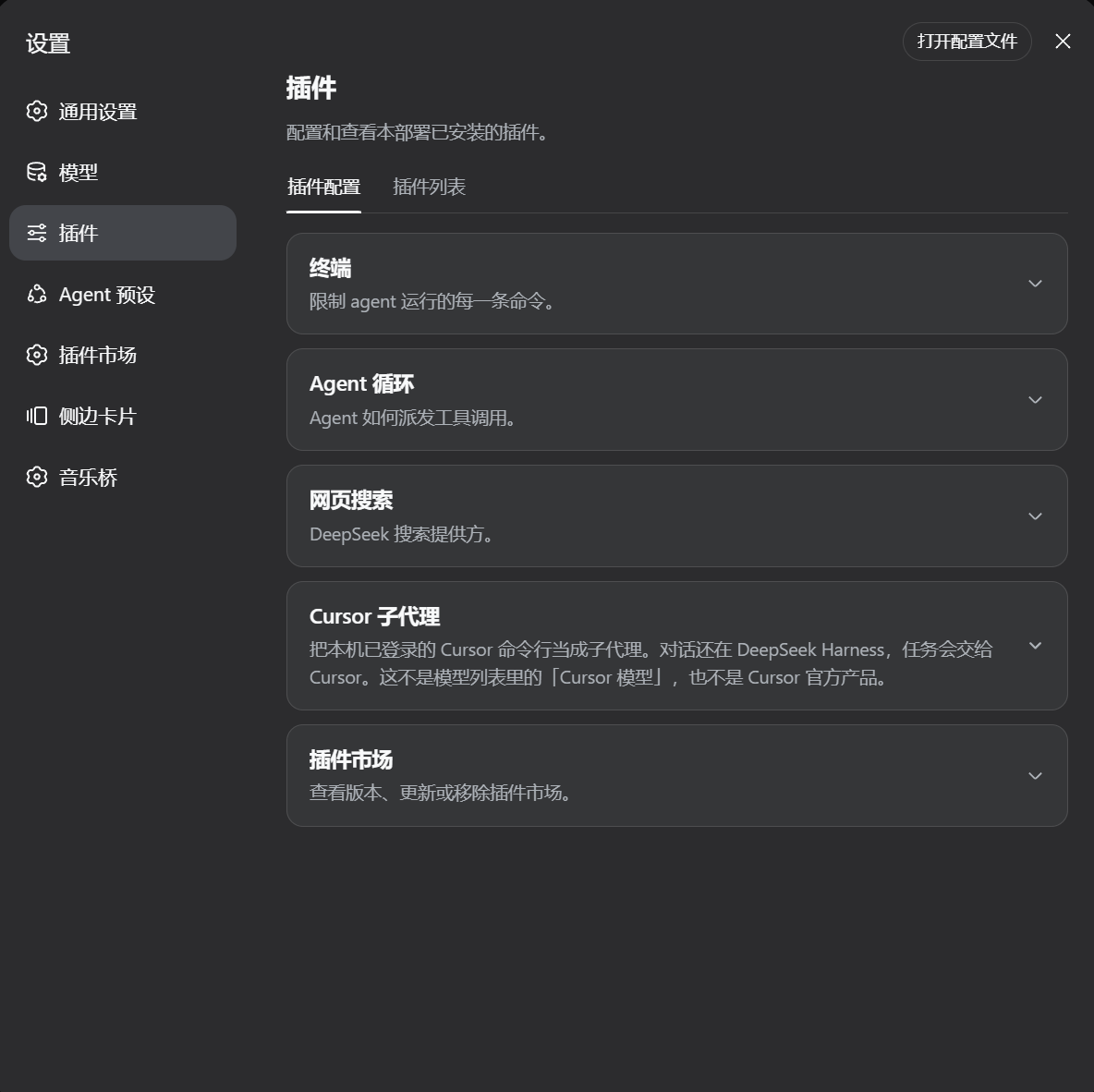
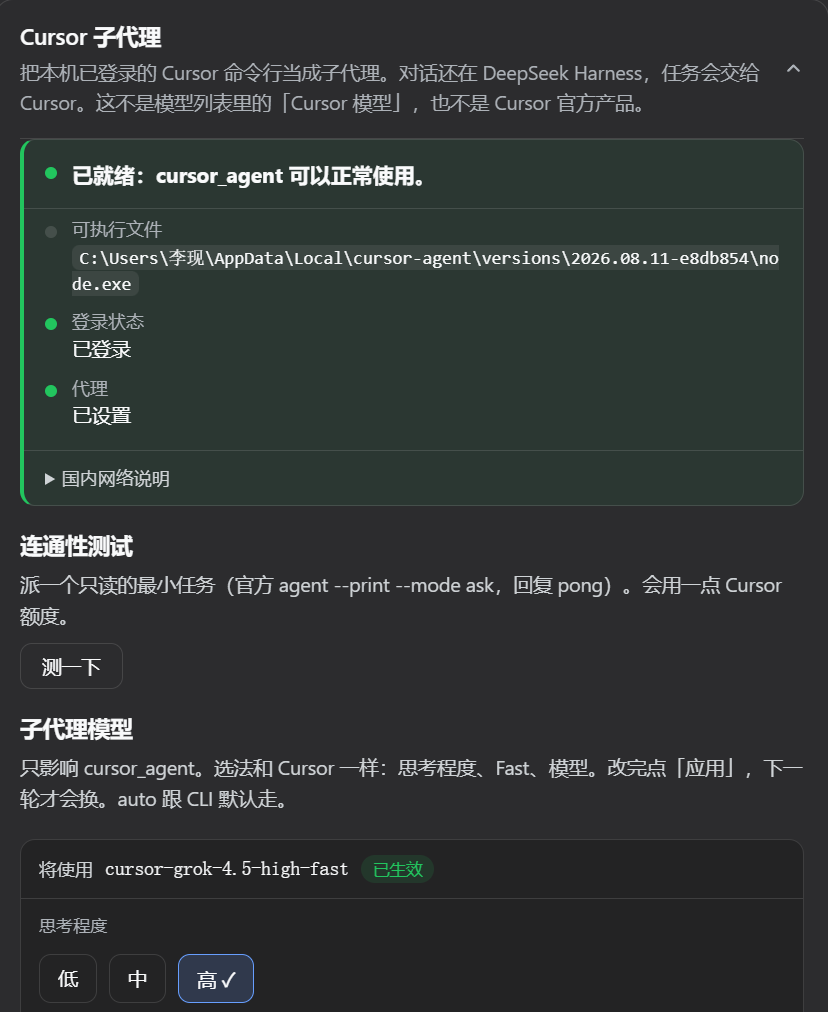
Open Settings → Cursor subagent.
- If it found the CLI, the chat can see the
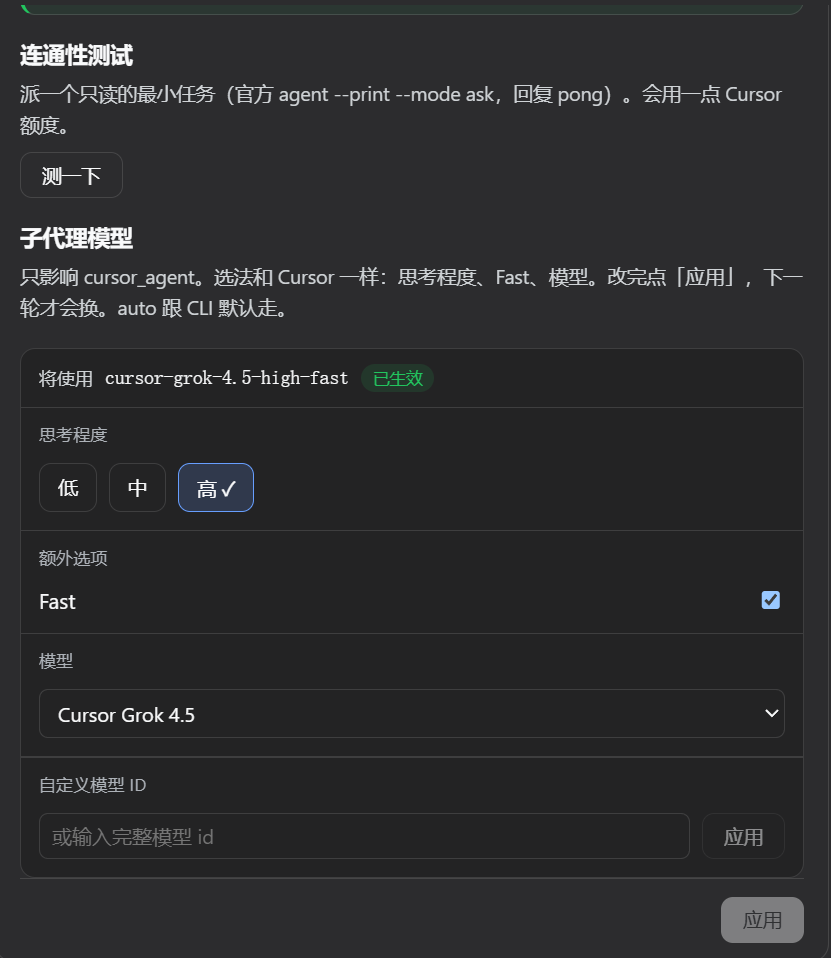
cursor_agenttool. Finding the CLI is not the same as being signed in. The page also checksagent statusand whether this process hasHTTPS_PROXY+NODE_USE_ENV_PROXY=1. It will say if you are not signed in, or if the proxy is missing. It does not show your email. - You can pick the child model (effort, Fast, model), then click Apply. That only affects
cursor_agent, not the model of the current chat. The choice is stored by this plugin, so it works on stock DeepSeek Harness too — it does not need the Host settings allowlist. If an official settings row for this plugin is grey, ignore it and use Settings → Cursor subagent. - Test sends one official read-only
agent --print --mode askjob (replypong). It uses a little Cursor quota. It does not start a full ACP session.
How to use it
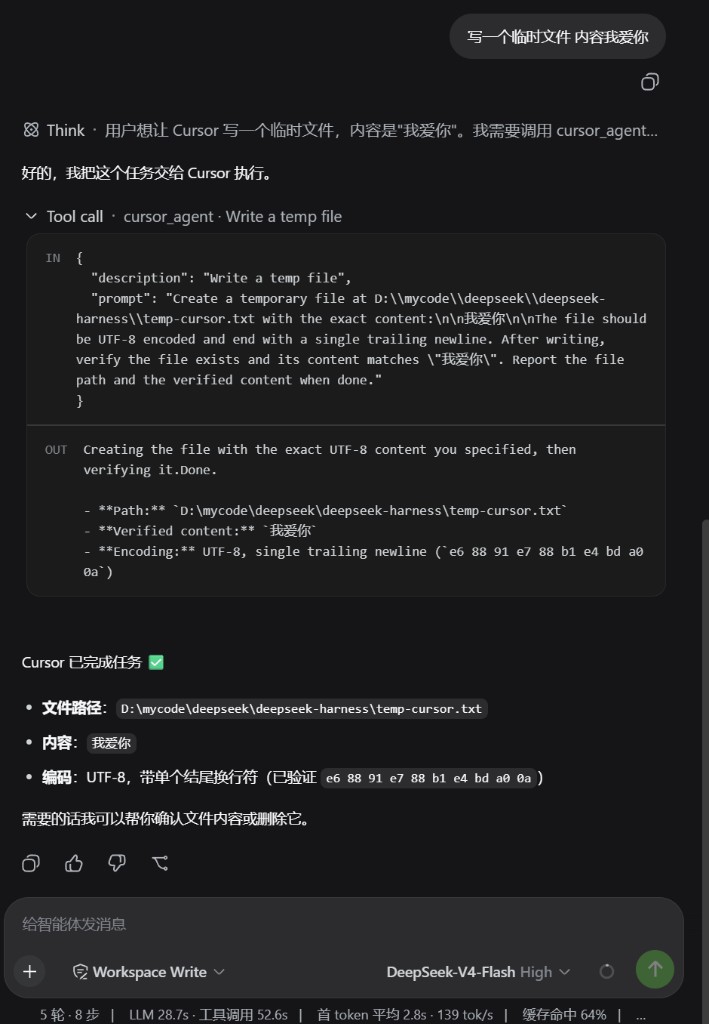
Ask in chat, for example: “Have Cursor implement this feature” or “Have Cursor review this file.” Give enough detail in that message. The agent should call cursor_agent on its own.
The job runs in the current workspace folder and uses your Cursor subscription. The parent chat only sees the final result.
If it cannot find the CLI
dsh plugin --profile desktop exec dsh-cursor-acp doctor
On web, use --profile web. This prints the CLI path, login/proxy hints, and whether this dsh can load @deepseek-ai/dsh-subagent-acp / dsh-tool-subagent. It does not read Cursor credentials. If those official packages are missing, Settings says so and cursor_agent is not registered.
License
MIT
Links
More in this category
yjh051108/dsh-routing-suite★ 6990
One repository, three parts: a runtime injector for DSH plugin packages (inject, hot-reload, unload, promote a dev staging tool to the front, route self-heal, plus a settings-page plugin manager that lists, unloads and drags folders in to internalize), a task-aware reasoning-mode router agent preset (router-standard / router-spec / router-react), and a graded two-level task protocol whose six tools (commit_star, lock_stage, revise_do, edit_plan, mark_task, redteam_verdict) pin task state to disk. The injector implementation ships in-tree, so the install carries its own behaviour rather than a dependency list.
strukto-ai/mirage#dsh★ 3670
Swaps the filesystem and bash providers for a mirage virtual workspace: file tools and shell commands run over mounted resources (RAM, S3, Redis, Slack, Gmail, Notion, Postgres) instead of the host disk, with per-mount read/write/exec modes, per-command sandbox routing (monty, pyodide, quickjs in process; docker, e2b, daytona remote), and installed CLIs (git, gh, slack, linear, ntn, gws, or one you register) as head words in the virtual terminal.
hust-open-atom-club/oh-dsh★ 325
Community distribution: TUI, desktop, and Web UI as one bundle with layered installation.
weijiafu14/pi2dsh★ 210
Pi Host ABI compatibility engine: after one install, unmodified Pi extensions from npm mount as native DSH plugins with `dsh plugin add <pi-package>`. Verified end to end on stock DSH with pi-mcp-adapter (full MCP manager: OAuth, resources, prompts, MCP Apps, elicitation, sampling), @tintinweb/pi-subagents, pi-code, pi-hermes-memory and pi-background-tasks; `pi2dsh inspect` reports a package's compatibility before installing.
lire1131/dsh-undo-savepoint★ 168
Undo/redo & rollback system for DSH: every config change is auto-snapshotted; undo/redo/restore to any version from the WebUI or the offline CLI/GUI tools (works even when DSH fails to boot).
Fishquito7/dsh-skill-mcp-panel★ 161
Manages DSH skills and MCP servers from the web settings: skill cards with hot enable/disable, workspace scopes, groups, batch migration and drag-and-drop import, plus stdio/HTTP MCP CRUD with connection tests, secret redaction and the unified dsh-panel CLI.
Community comments
Comments are public GitHub Discussions. Loading them connects to GitHub and Giscus; a GitHub account is required to post.