A single-window video editing workbench opened from a DSH session: multi-video import, magnetic timeline with trimming and skimming, audio roles with ducking, local silence-detection rough cut, script-based captions, nine color looks, and MP4 export (WebM where the browser cannot record MP4).
Install
# from GitHub (first run asks for allowBuilds approval — follow the hint, retry)
dsh plugin --profile web add github:lizzkkafei/my-projects#path:/zhizhen-cut
Any plugin you install runs third-party code with your own permissions — it can read your files, use your credentials, and reach the network, and tool approvals don’t sandbox it. GitHub-sourced plugins also run build scripts at install time — pnpm blocks those until you allow them, so an install can stop with ERR_PNPM_GIT_DEP_PREPARE_NOT_ALLOWED or ERR_PNPM_IGNORED_BUILDS; dsh prints the exact key to add under allowBuilds in your profile’s pnpm-workspace.yaml, and the install works on the next run. Allowing a build is a trust decision: only install sources you trust, and pin a commit (github:owner/repo#sha).
README
This plugin publishes its README in Chinese only.
一个以 DSH Web UI 插件 形式实现的单窗口视频剪辑工作台:从任意会话的输入框左侧点「剪辑」进入,剪完按 Esc 回到对话。
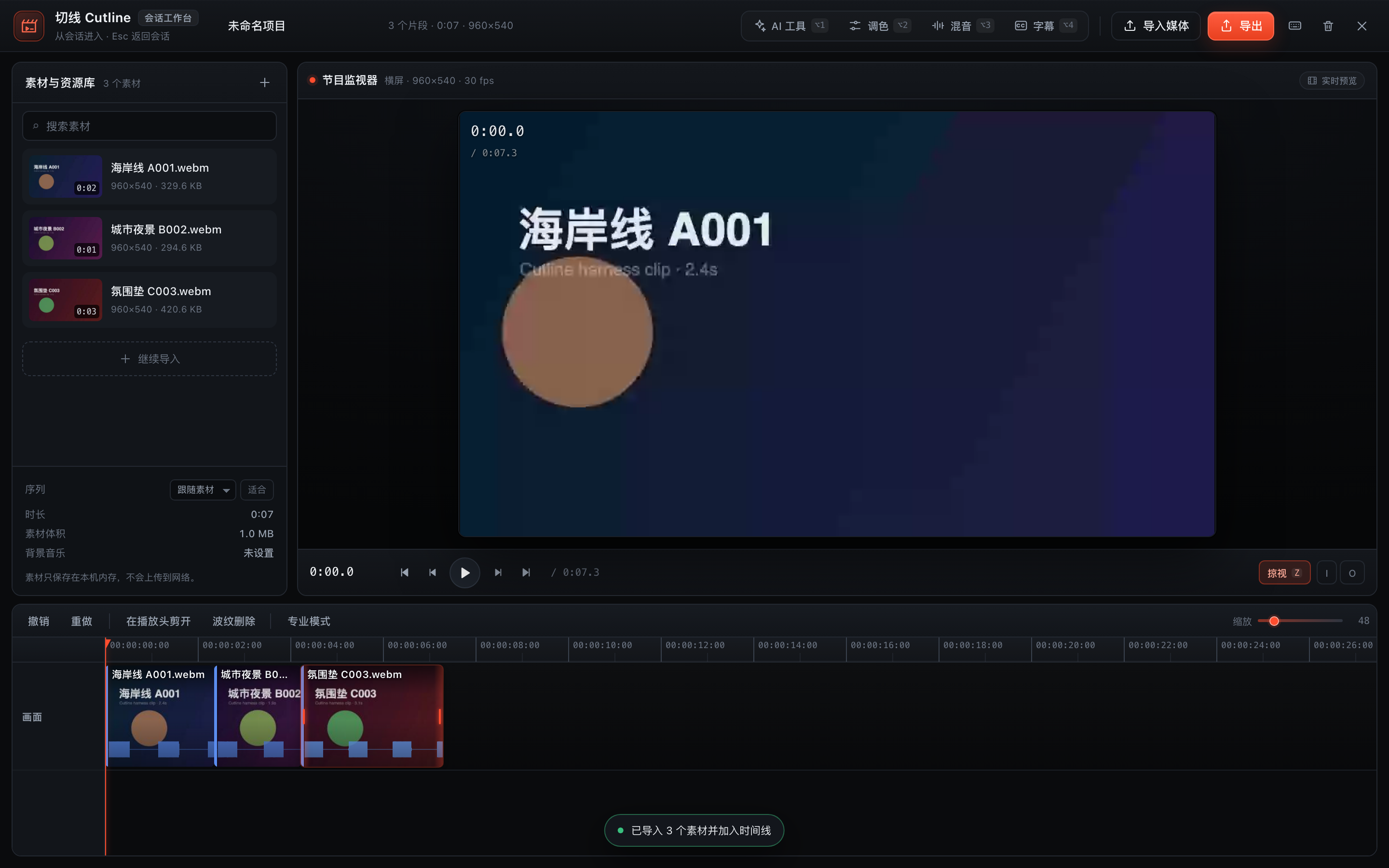
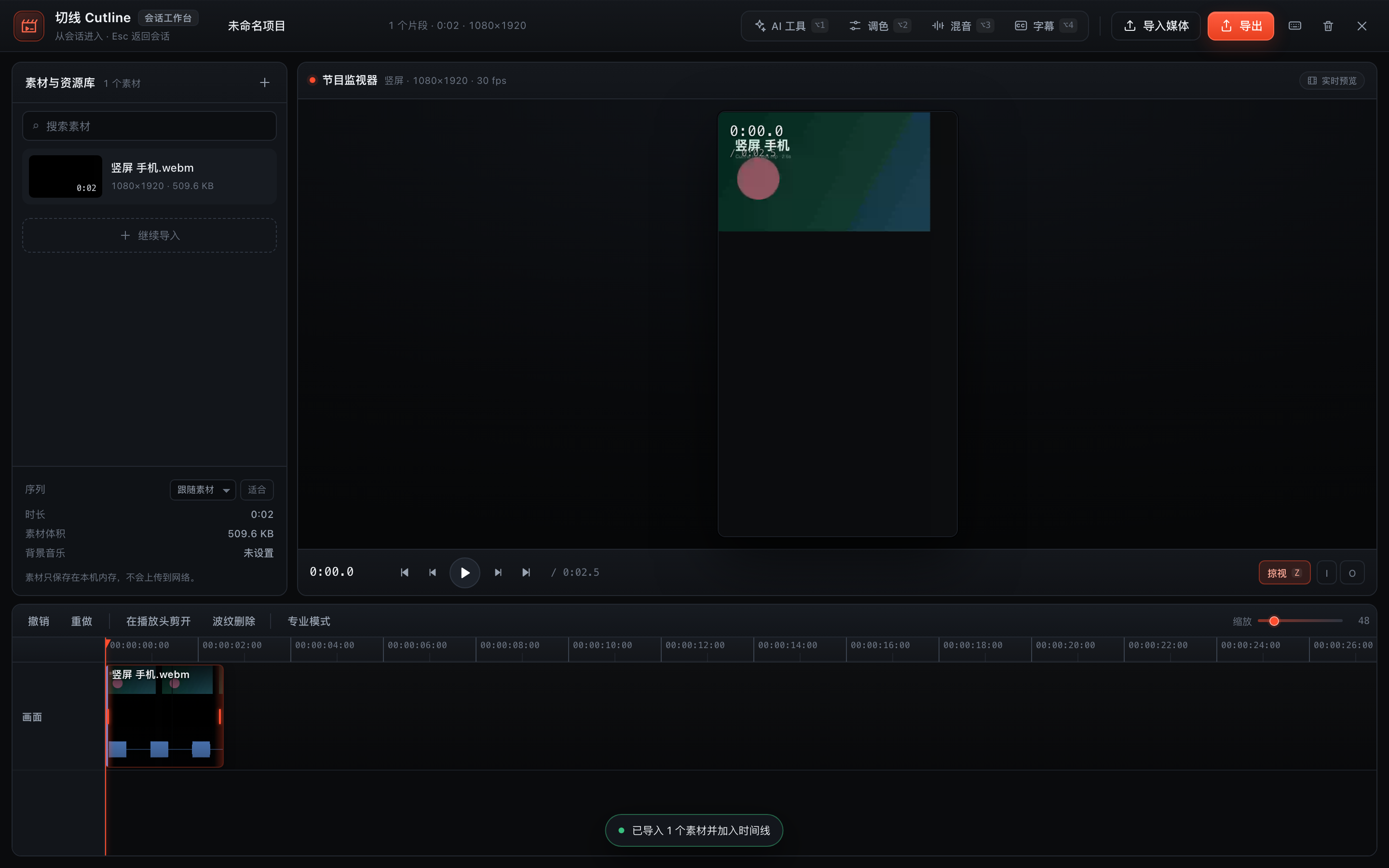
竖屏素材会建立 9:16 序列并按竖屏画幅预览:
入口
- 会话输入框左侧的「剪辑」按钮(带当前片段数角标)。
- 任意位置按 ⌥C 打开;打开后 Esc 逐层退出(面板 → 工作台)。
- 插件已安装到
desktopprofile:zhizhen-cut。
若刚更新过插件代码,请刷新页面(⌘R)以载入最新 client bundle;仍未更新时重启 DSH。
已实现的能力
导入与媒体
自动识别画幅:首段视频的宽高决定序列格式,竖屏手机会建立
1080×1920竖屏序列,预览、导出、时间线缩略图全部按竖屏画幅显示(不再挤在横屏框里裁切)。素材库底部提供序列格式下拉(跟随素材 / 16:9 横屏 / 9:16 竖屏 / 1:1 方形)和画面适配切换(适合=完整显示留黑边,填充=铺满裁切);中途换序列也不会出现画面拉伸。
一次选择/拖入多个视频或音频文件(MP4 / MOV / WebM / MP3 / WAV 等),自动生成缩略图与音频峰值。
视频导入后自动铺到磁吸时间线,也可从素材卡片拖到任意位置;音频导入只进入素材库,不会自动变成时间线片段,方便直接当背景音乐。
音频面板支持「导入音乐」和「导入文件夹」,可以一次把整个本地音乐目录批量导入。
素材只保存在当前浏览器标签页内存中,不上传网络。
磁吸时间线
- 单条主轨、片段首尾相接、无空隙;删除/修剪后自动前移。
- 拖动片段重排(带插入指示线)、拖动左右边缘修剪入出点、双击跳到片段头。
- 播放头剪开(B / ⌘B)、波纹删除(Delete)、撤销/重做(⌘Z / ⇧⌘Z)。
- 鼠标掠过时间线即时预览(Skimming,Z 开关),带掠视时间提示。
- 触控板:双指横滚平移、Ctrl/⌘+滚轮(捏合)以光标为中心缩放。
- 专业模式:时间线右上角开关,展开 V 主轨 + 对白/音乐/环境声三条角色泳道 + 字幕泳道,显示选中片段的逐帧时间码。
声音
- 用音频角色替代轨道:对白 / 音乐 / 环境声,各自独立音量与静音。
- 背景音乐垫:只列出音频素材(不会再出现导入的视频),可循环铺底。
- 自动闪避(Ducking):对白出现时音乐自动压低,对白结束恢复;预览与导出同时生效。
AI 工具(本地处理,不上传)
- 三个能力都能在真实带音轨的视频上工作:
- 若浏览器无法用
decodeAudioData解出音轨(部分 MP4/MOV/AAC),会自动回退到媒体元素加速播放 + AnalyserNode 提取能量,再做粗剪;不需要上传服务器。 - 粗剪会显示删掉的静音秒数,结果可撤销。
- 9 种调色预设会实际改变预览与导出像素(已用逐像素测试验证);默认作用于整条时间线,也可切换为仅选中片段。
- 若浏览器无法用
- 智能粗剪:分析音频能量,按阈值/最短停顿切掉静音与呼吸空白,磁吸重排;支持从视频音轨提取峰值。
- 脚本字幕:粘贴解说词,按句子均匀铺到时间线,生成可编辑字幕轨,实时烧录预览。
- 智能调色:9 种风格 LUT(原片/电影/暖调/冷调/黑白/浓彩/褪色/夜景/复古),默认整条时间线、可切到单个片段;预览与导出使用同一套 canvas filter。
- 角色分轨:选中片段一键归入对白/音乐/环境声,作为人声分离的等价工作流。
- 说明:人声分离模型与超分辨率/稳定模型未随本版分发,界面中已如实标注;不做假进度或假结果。
导出
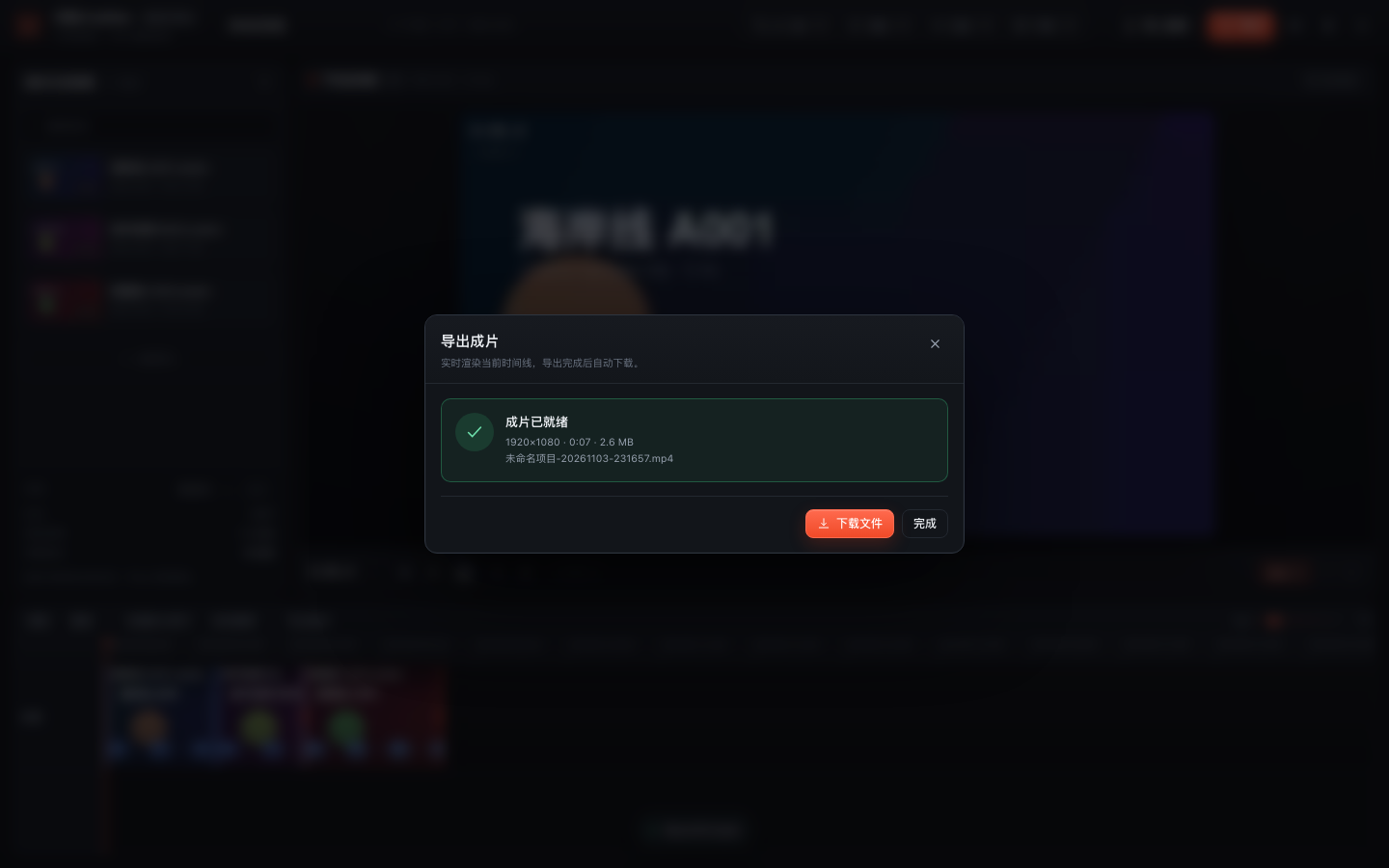
- 实时渲染整条时间线(或入点→出点范围),
canvas.captureStream+ WebAudio 混音 +MediaRecorder。 - 分辨率:原尺寸 / 1080p / 720p / 4K;帧率 24/30/60;可烧录字幕、包含背景音乐。
- 默认输出 MP4(H.264 + AAC,.mp4),QuickTime、iOS/Android、Windows 和主流平台可直接播放;导出面板会明确显示输出格式。
- 只有当前浏览器不支持 MP4 录制时才回退为 WebM(VP9/VP8 + Opus),并在面板中提示原因;建议用 Chrome 或 Safari 获得 MP4。
- 完成后可直接下载。
- 导出期间请保持标签页在前台;实时导出耗时约等于片长。
- 实测导出文件:
ISO Media, MP4 Base Media v1,视频轨 H.264 (avc1) 1920×1080,音频轨 AAC,时长 7.5s,QuickTime/AVFoundation 可正常读取。
本地背景音乐库
配套的 music-library/ 里保存了 10 首不同风格的本地 MP3(晨间 / 古典 / 氛围 / 电子 / 电影感 / 暗黑 / 爵士 / 蓝调 / 轻快 / 拉丁),来自 Incompetech(Kevin MacLeod),许可为 CC BY 4.0:可商用,但发布时需要在简介或片尾署名。
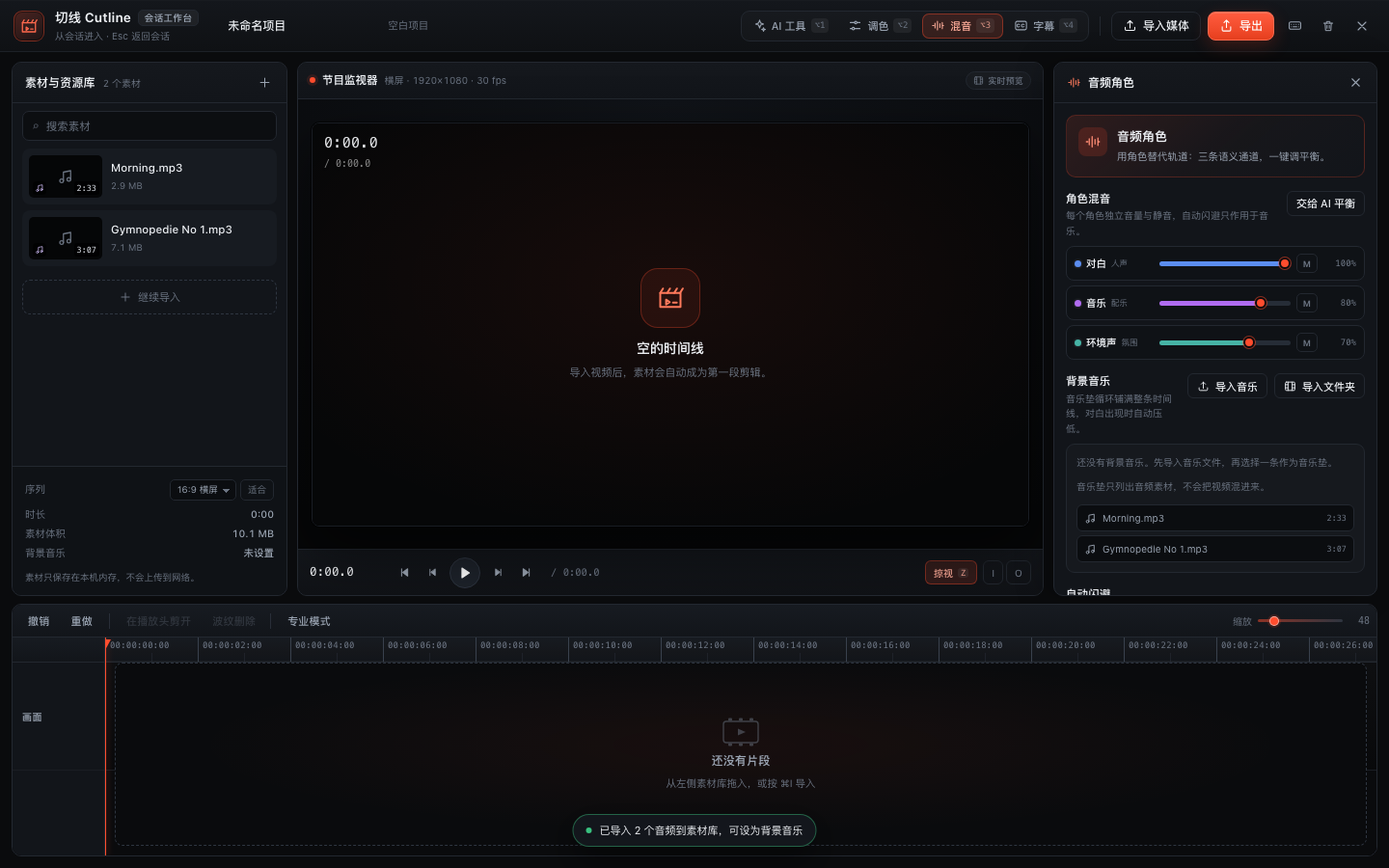
在音频面板点「导入音乐」选择单曲,或点「导入文件夹」直接选中整个 music-library/ 目录批量导入;署名模板和曲目清单见该目录的 README.md。
快捷键
| 键 | 动作 |
|---|---|
| Space | 播放 / 暂停 |
| J / K / L | 倒放 / 停 / 快进(连按加速) |
| ← / → | 逐帧(Shift 10 帧) |
| I / O | 设置入点 / 出点 |
| B / ⌘B | 在播放头剪开 |
| Delete | 波纹删除选中片段 |
| ⌘Z / ⇧⌘Z | 撤销 / 重做 |
| Z | 掠视开关 |
| N | 吸附开关 |
| P | 专业模式 |
| + / − | 时间线缩放 |
| ⌥1 / ⌥2 / ⌥3 / ⌥4 | AI / 调色 / 混音 / 字幕面板 |
| ⌘I / ⌘E | 导入 / 导出 |
| Esc | 收起面板 / 返回会话 |
| ? | 快捷键帮助 |
技术结构
- 单文件 Client bundle(
client.js,由scripts/build.mjs从src/生成),通过conversation.input.left注册入口、shell.overlay注册全屏工作台。 src/engine.js:纯函数时间线核心(磁吸、修剪、分割、角色增益、静音检测、字幕排布)。47 个 node:test 单测。src/media.js:媒体导入、Canvas 预览、WebAudio 闪避、实时导出。src/timeline.js+src/timeline.css:磁吸时间线 React 组件。src/core.js/src/panels.js/src/workbench.js/src/ui.js/src/entry.js:外壳、隐藏面板、导出/快捷键弹窗、Cordis 注册。- 素材与工程状态仅存在于当前标签页内存;关闭会话/刷新后不保留。
验证状态
node scripts/build.mjs:bundle 构建 +node --check通过。node scripts/smoke.mjs:真实 bundle 在 VM 中注册两个 slot、安装样式、注册词典。node scripts/render-smoke.mjs:入口按钮 → 打开工作台 → 递归渲染工作台组件树,无异常。node scripts/timeline-smoke.mjs:空工程 / 有片段 / 字幕 / 专业模式的时间线渲染,无异常。node --test tests/engine.test.mjs:47/47 通过。- 本地 Playwright + 真实 React 19 harness(非 DSH 页面)端到端:入口 → 导入 3 个带真实 Opus 音轨的视频 → 预览取帧 → 播放 → 键盘逐帧 → 分割(3→4 段)→ 脚本生成 3 条字幕 → 专业模式 3 条角色泳道 → 导出 1920×1080 WebM(约 3.9 MB)→ Esc 返回会话;0 页面错误、0 console error。
- 竖屏测试:导入 1080×1920 带音轨视频,序列显示
竖屏 · 1080×1920,预览画幅比例 0.563,导出为1080×1920;切到 16:9 序列后预览变为 1.778,再切「填充/适合」均正常。 - AI 测试:真实音轨上粗剪切掉约 0.8–2.9 秒静音并把片段数从 3 增加到 9;9 个风格预设逐个切换,预览像素均发生对应变化;缺少峰值时
analyzeAssetAudio回退提取到 800 点峰值。 - 音乐库测试:真实导入
music-library/calm/Morning.mp3后时间线 0 个片段(音频不自动进时间线),素材库显示 2:33;音频面板背景音乐候选只出现音频;点击后成功设为音乐垫并显示「循环铺底 · 2:33」。 - 批量导入测试:用「导入文件夹」选中
music-library/calm/,一次导入 2 首 MP3,候选区只列出这两首,时间线仍为 0 片段,0 错误。 - DSH 页面内验证:插件已安装,
conversation.input.left与shell.overlay两个 slot 的注册均为active;但受本机 Web GUI 登录态限制,无法从自动化侧截图确认最终宿主页面外观,需要刷新页面后人工确认。
Links
More in this category
DayuanJiang/next-ai-draw-io#dsh-plugin★ 36802
Draws draw.io diagrams in DeepSeek Harness through the next-ai-drawio MCP server: the link in the reply opens a live preview in the right sidebar, you can edit the diagram by hand, and each AI change is a version you can restore. Node.js 18+; npx downloads the MCP server on first use.
Tencent/WeKnora#dsh-weknora★ 36302
Four read-only tools over a WeKnora knowledge base: list knowledge bases, hybrid passage search, reassemble one document's chunks in order, and WeKnora's own cited RAG or ReAct-agent answer with a resumable session id.
superdesigndev/treg★ 7042
Tool catalog for agents: search ~2,600 external endpoints (SEO and SERP, backlinks, social, people and company enrichment, ad libraries, scraping) by the task you want done, read each one's parameters and per-call price, then call it with the credential injected server-side. Ships the skill plus an MCP row that stays disabled until TREG_TOKEN is set.
T-Auto/dsh-ops★ 5074
Provides bash, PowerShell 7, and high-performance Rust tools for DSH on Windows to reduce token usage.
sixtysevenlf/dsh-blender-plugin★ 1575
Lets a DSH agent drive a local Blender over a direct TCP channel with 15 tools: viewport frames, custom-angle renders, Python execution, headless and job offload, transaction rollback, and a planning layer of 228 ops across 34 families.
TencentCloudBase/CloudBase-AI-Toolkit#dsh-plugin★ 1155
Tencent CloudBase backend for DeepSeek Harness — scaffold and deploy full-stack apps from chat, render query results as table cards with paging, sorting and CSV export, preview a deployment on its domain, and call the CloudBase MCP toolset (`mcp__cloudbase__*`) with device-code login.
Community comments
Comments are public GitHub Discussions. Loading them connects to GitHub and Giscus; a GitHub account is required to post.