Undo/redo & rollback system for DSH: every config change is auto-snapshotted; undo/redo/restore to any version from the WebUI or the offline CLI/GUI tools (works even when DSH fails to boot).
Install
# from GitHub (first run asks for allowBuilds approval — follow the hint, retry)
dsh plugin --profile web add github:lire1131/dsh-undo-plugin
GitHub-sourced plugins run build scripts on your machine at install time. Only install sources you trust, and pin a commit (github:owner/repo#sha).
README

English | 中文
An undo/rollback system for DeepSeek Harness (DSH): every plugin install, skin switch or settings change is auto-snapshotted; manual saves whenever you want; one-click undo / redo / restore to any version — plus offline CLI & GUI tools that still work even when DSH fails to boot.
Preview
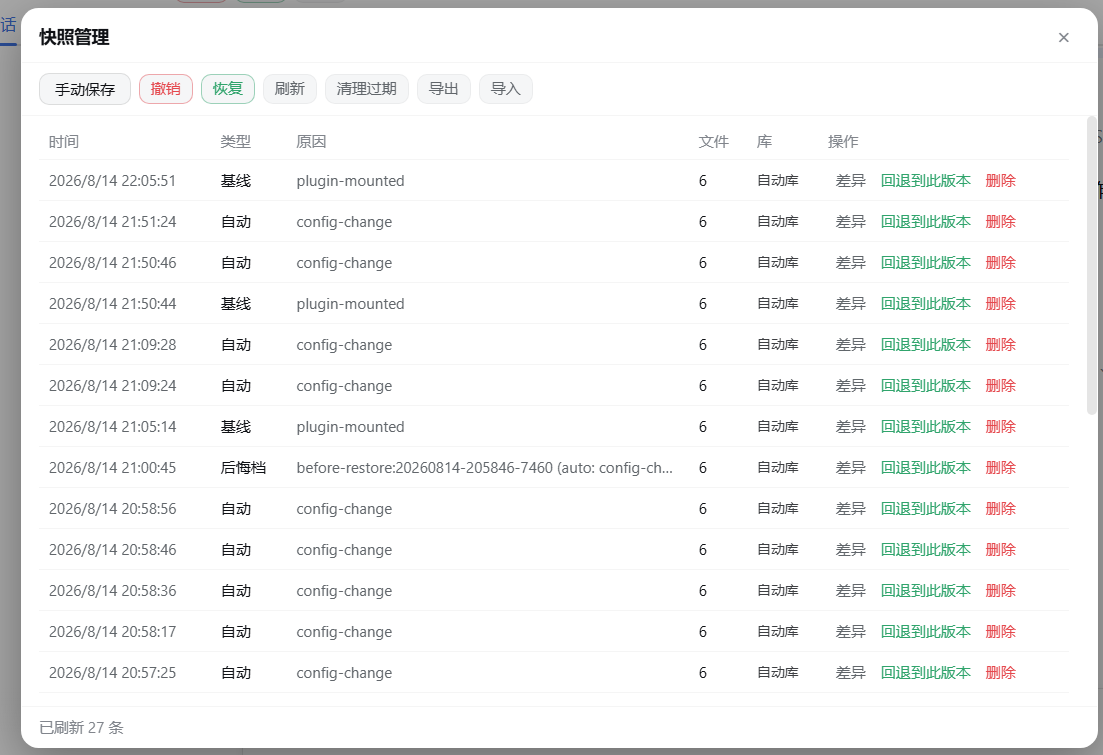
| Header buttons (Undo / Redo / Snapshots) | Snapshot manager panel (diff / restore / delete / clean-up / export / import) |
|---|---|
 |
 |
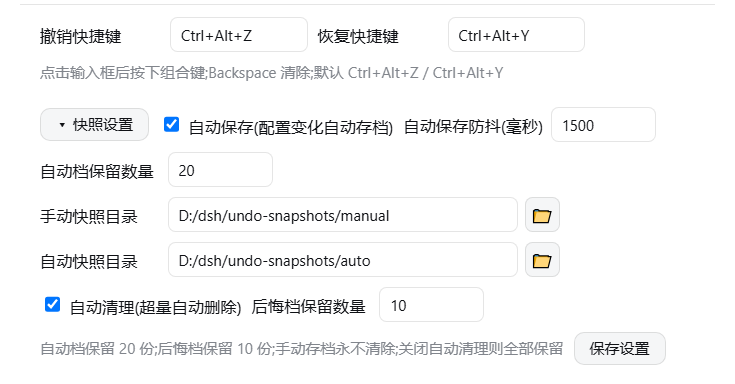
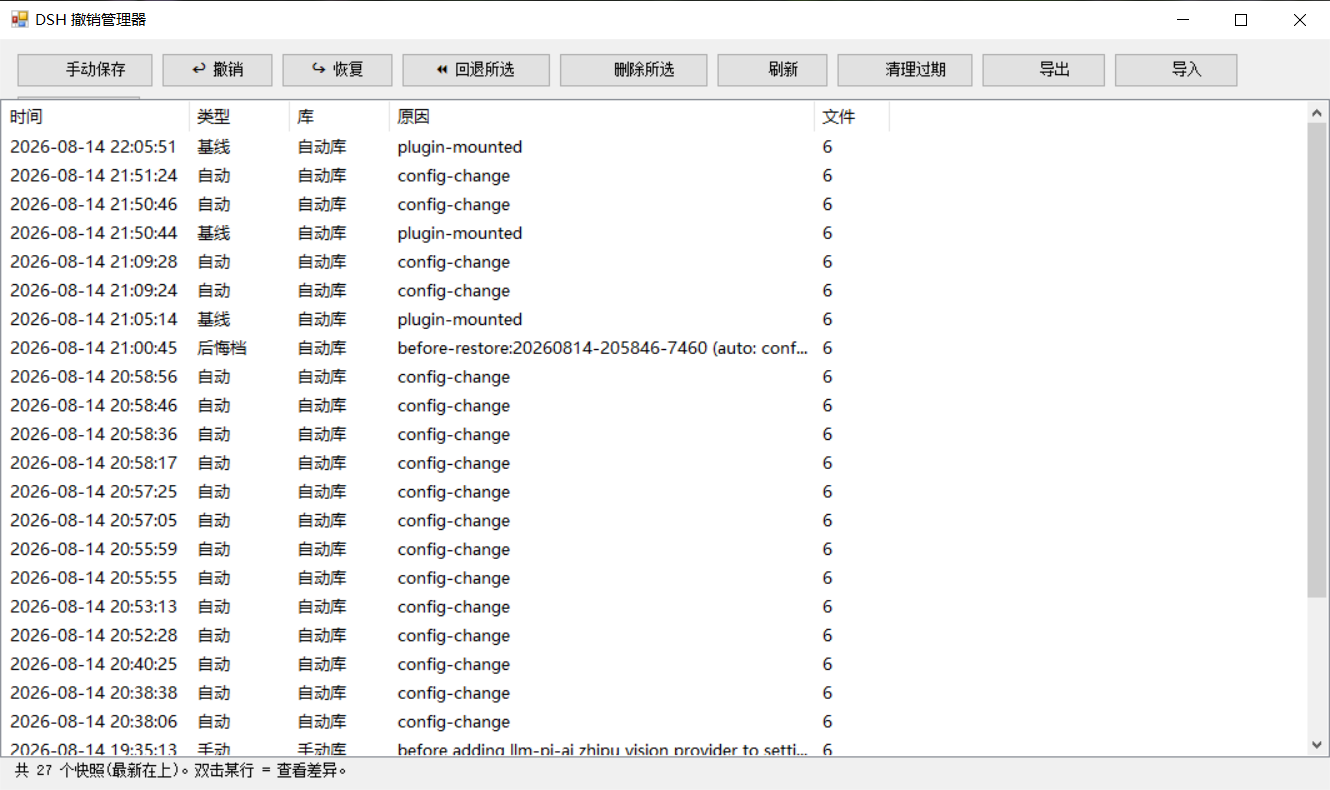
| Settings: shortcuts & snapshot options | Offline GUI (DSH Undo Manager) |
|---|---|
 |
 |
| One-click export of all snapshots (backup / migration) |
|---|
 |
Features
| Entry | Capability |
|---|---|
| WebUI header buttons | Red Undo, green Redo and Snapshots buttons, visible in every session |
| Snapshot manager panel | Visual list (time / type / reason / file count / store), per-row diff preview (added/removed lines), restore to any snapshot version (confirmation shows a change summary first), delete snapshots, manual save, clean-up, refresh |
| Keyboard shortcuts | Default Ctrl+Alt+Z (undo) / Ctrl+Alt+Y (redo), customizable in Settings → General |
| Dual save modes | Manual saves (never auto-pruned) + auto saves (debounced 1.5 s snapshot on config change, keeps latest 20); the two modes have separate storage locations |
| Configurable options | Settings → General → Snapshot Settings: auto-save toggle, debounce ms, auto snapshots kept, pre-restore snapshots kept, auto-cleanup toggle, manual/auto snapshot directories, applied immediately |
| Auto-cleanup | Excess snapshots are deleted automatically: auto keeps N, pre-restore keeps M (consumed first); manual snapshots are never deleted; disable it in settings to keep everything; "Clean up" in the panel prunes manually |
| Chat commands | Just tell the AI "undo the last step / roll back / redo / save a snapshot / list snapshots" — tools are called automatically; after a config change the AI proactively mentions "auto-saved, you can undo anytime" |
| Undo/redo stack | Multiple consecutive undos; redo re-applies the pre-undo state (blocked when newer changes exist); every restore first preserves the current state as a "pre-restore" snapshot |
| Crash self-check | Detects when the previous DSH run crashed before finishing startup, warns in the snapshot list and panel, and suggests rolling back to the last good state |
| Export / import | One-click ZIP export of all snapshots (backup / moving machines); import restores into the right store by kind and skips duplicates; panel buttons, chat tools and offline CLI all supported |
| Offline tools | CLI (snapshot/undo/redo/restore/remove/list/diff/prune/status) + GUI window (desktop shortcut) + safe plugin-install wrapper |
What is snapshotted & where
The snapshot captures DSH's 6 config files: cordis.patch.yml, package.json, cordis.yml, pnpm-workspace.yaml (under the profile) + settings.yaml, .env (under ~/.dsh).
| Store | Default path (configurable in settings) | Contents |
|---|---|---|
| Manual store | <snapshot root>\manual\ |
Manual snapshots (never auto-pruned) |
| Auto store | <snapshot root>\auto\ |
Auto snapshots, boot baselines, undo pre-restore snapshots (auto keeps latest 20) |
| Legacy store | <snapshot root>\ root |
Old flat layout — still read, auto-migrated on startup |
⚠️ Snapshots contain copies of
.envetc. which may include secrets — do not share or push them.
Installation
Prerequisites: DSH (@deepseek-ai/dsh) and Node.js (≥20).
Option A (recommended, ecosystem standard) — this plugin declares a dsh.bundle manifest, so install it with the official plugin command:
dsh plugin --profile web add github:lire1131/dsh-undo-savepoint-plugin#master
Restart DSH after installing. Snapshot directories and options are configurable in Settings.
Option B (local source / pre-release) — clone and mount manually:
- Clone the repository into a local plugins directory (an ASCII path is safer), e.g.
D:\dsh\plugins\dsh-undo-savepoint:
git clone https://github.com/lire1131/dsh-undo-savepoint-plugin.git D:\dsh\plugins\dsh-undo-savepoint
- Create a junction so DSH's module resolver can find the local package by name
dsh-undo-savepoint(used by both the host plugin and the WebUI client plugin):
mklink /J "<your-dsh-install>\node_modules\dsh-undo-savepoint" "D:\dsh\plugins\dsh-undo-savepoint"
DSH resolves package names by walking up from its own
node_modules. The default location isC:\Users\<username>\node_moduleswhen npm installed into the user directory; if you run DSH from an npx cache, junction into that cache'snode_modulesinstead. Check the path in DSH's startup error output or runnpm root -g.
- Mount it in the profile patch layer: edit
<DSH_HOME>\profiles\web\cordis.patch.ymland append:
- insert:
    - id: dsh-undo-savepoint
      name: dsh-undo-savepoint
- Activate: saving hot-reloads the host part; refresh the page to see the header buttons and settings rows; restart DSH for full steady state (legacy flat snapshots migrate automatically).
Dependency note: the host plugin loads
@deepseek-ai/dsh-toolsviacreateRequire('<dsh-install-root>/package.json'). If DSH lives elsewhere, set the environment variableDSH_ROOT=<dsh-install-root>— no extra package installation needed.
Usage
- Undo: header Undo button /
Ctrl+Alt+Z/ tell the AI "undo the last step". - Redo: Redo button /
Ctrl+Alt+Y(only when nothing changed since the undo). - Manual save: "Save" in the panel / tell the AI "save a snapshot" / CLI
snapshot. - Restore to a fixed version: click "Restore to this" on a row in the panel; or tell the AI "restore to "; or CLI
restore -Id <id>. - Delete a snapshot: "Delete" in the panel; or CLI
remove -Id <id>. - Custom shortcuts: Settings → General → Undo/Redo shortcut (click the box then press a combo; Backspace clears).
- Save options: Settings → General → Snapshot Settings (auto-save toggle, debounce, keep count, two directories; the 📁 button opens the native folder picker).
Offline tools (works even when DSH won't boot)
GUI language: the manager window follows the system UI language (zh/en); force it with
DSH_UNDO_LANG=zh|en.
From the repository directory:
# GUI window (recommended): double-click tools\dsh-undo-savepoint-gui.bat, or:
powershell -NoProfile -ExecutionPolicy Bypass -File "tools\dsh-undo-savepoint-gui.ps1"

# CLI
powershell -NoProfile -ExecutionPolicy Bypass -File "tools\dsh-undo-savepoint.ps1" list
powershell -NoProfile -ExecutionPolicy Bypass -File "tools\dsh-undo-savepoint.ps1" snapshot -Label "reason"
powershell -NoProfile -ExecutionPolicy Bypass -File "tools\dsh-undo-savepoint.ps1" undo
powershell -NoProfile -ExecutionPolicy Bypass -File "tools\dsh-undo-savepoint.ps1" redo
powershell -NoProfile -ExecutionPolicy Bypass -File "tools\dsh-undo-savepoint.ps1" restore -Id <id> -Force
powershell -NoProfile -ExecutionPolicy Bypass -File "tools\dsh-undo-savepoint.ps1" remove -Id <id>
powershell -NoProfile -ExecutionPolicy Bypass -File "tools\dsh-undo-savepoint.ps1" prune -KeepAuto 20

# Safe plugin install (auto snapshots before/after; auto-rollback on failure)
powershell -NoProfile -ExecutionPolicy Bypass -File "tools\dsh-plugin.ps1" add <package>
Typical rescue scenario: DSH fails to boot with something like duplicate loader entry id → open "DSH Undo Manager", pick the snapshot from before the change → Restore → restart DSH. No reinstall, no lost sessions.
REST API (backend of the WebUI)
| Endpoint | Description |
|---|---|
GET /api/undo/status |
{canUndo, canRedo, total} |
GET /api/undo/list |
Snapshot list (with location: manual/auto/legacy) |
GET/POST /api/undo/settings |
Read/write save options (auto-save, debounce, keep count, dirs); POST applies immediately |
POST /api/undo/undo |
Undo the last change |
POST /api/undo/redo |
Redo the last undo |
POST /api/undo/restore |
body {id} — restore to a fixed version |
POST /api/undo/remove |
body {id} — delete a snapshot |
POST /api/undo/snapshot |
body {reason} — manual save |
POST /api/undo/pick-dir |
Open the native folder picker, return the chosen path |
Design notes
- Undo semantics: auto snapshots are taken after a change, so "restoring the newest snapshot" would be a no-op; real undo restores the newest snapshot whose state differs from the current one. When everything matches, a clear "nothing to undo" message is shown instead of pretending.
- Undo can never undo itself: after restoring
cordis.patch.yml, the plugin re-ensures its own mount entry automatically. - Auto-archiving never sabotages undo: the watcher records content hashes of what a restore wrote, so the restore's own file changes are not auto-snapshotted (which would block redo); real changes are snapshotted as usual.
- Format parity: the Node plugin and the PowerShell tools share the same snapshot stores and manifest format; compatible with both Windows PowerShell 5.1 and PowerShell 7.
Development
- Dependency resolution: the host plugin loads
@deepseek-ai/dsh-toolsviacreateRequire(<dsh-install-root>/package.json)(override withDSH_ROOT), no in-repo dependencies required. - Tests (no DSH needed; run in the repository directory):
node tools\smoke-test.mjs     :: 29 logic tests (snapshot/undo/redo/store split/no-change hint)
node tools\e2e-watch.mjs      :: 6 real-timing regressions (auto-save/undo-no-harm/redo)
Links
More in this category
liustack/modlens★ 1199
Vision bridge for text-only models: paste an image, get structured JSON evidence (OCR, layout, semantics).
Anionex/dsh-vision-toolkit★ 308
Vision tasks for text-only models: intent-aware image Q&A, long-screenshot OCR, UI reproduction, grounding, and pixel diff.
zhaoolee/notes★ 138
Export DSH conversations as Smartisan Notes-style PNGs, or create and update Markdown notes in a configured account-scoped workspace.
liustack/modsearch★ 85
Web search bridge for text-only agents: ask the web or X, get structured JSON evidence (search, fetch, citations).
Lum1104/dsh-browser★ 80
Chrome sidebar extension that lets DSH operate your browser directly, no vision capabilities required.
taxueseek/argo★ 69
Search built for agents: multilingual coverage across web, academic, code, shopping, finance, news, and encyclopedias.