A WeRead reading desk: monthly book plan and calendar, FSRS-scheduled highlight review, notes with AI summaries, a monthly reading exhibition and reading statistics. Its HTTP routes have no DSH access check, so a web page open in your browser could call them.
Install
# from npm (prebuilt)
dsh plugin --profile web add dsh-reading-desk
# from GitHub (first run asks for allowBuilds approval — follow the hint, retry)
dsh plugin --profile web add github:limowan/dsh-reading-desk
Any plugin you install runs third-party code with your own permissions — it can read your files, use your credentials, and reach the network, and tool approvals don’t sandbox it. GitHub-sourced plugins also run build scripts at install time — pnpm blocks those until you allow them, so an install can stop with ERR_PNPM_GIT_DEP_PREPARE_NOT_ALLOWED or ERR_PNPM_IGNORED_BUILDS; dsh prints the exact key to add under allowBuilds in your profile’s pnpm-workspace.yaml, and the install works on the next run. Allowing a build is a trust decision: only install sources you trust, and pin a commit (github:owner/repo#sha).
README
This plugin publishes its README in Chinese only.
微信读书的阅读计划 / 月历 / 划线回顾 / 笔记 / 月度策展,做成一个 DeepSeek Harness(dsh)插件,
常驻在侧栏面板里。
插件包名、仓库名统一为
dsh-reading-desk。
它解决什么
微信读书本身不帮你「安排读什么」,也不帮你「回头看一眼旧划线」。这个面板补这两件事:
| 页面 | 干什么 |
|---|---|
| 今日 | 今天该读哪几本、今天要回顾几条 |
| 本月书单 | 搜书 → 用日期区间排进本月 → 看进度与时长;支持批量改期 |
| 月度日历 | 每天读了哪几本、读了多少分钟;点某天看当天书目 |
| 每日划线回顾 | 按 FSRS 排到期卡片,看原文 → 写一句 → 四档评分 |
| 笔记 | 与 AI 讨论后留下的笔记,可选同步目标(本机 / Get 笔记 / flomo) |
| 阅读性格 | 人格卡 + 五维 + 今年之最 + 营养表 + 心电图 + 历年,可导出 1080×1440 图片 |
| 阅读展 | 月度策展海报:主题、封面带、本月精选(优先真实划线) |
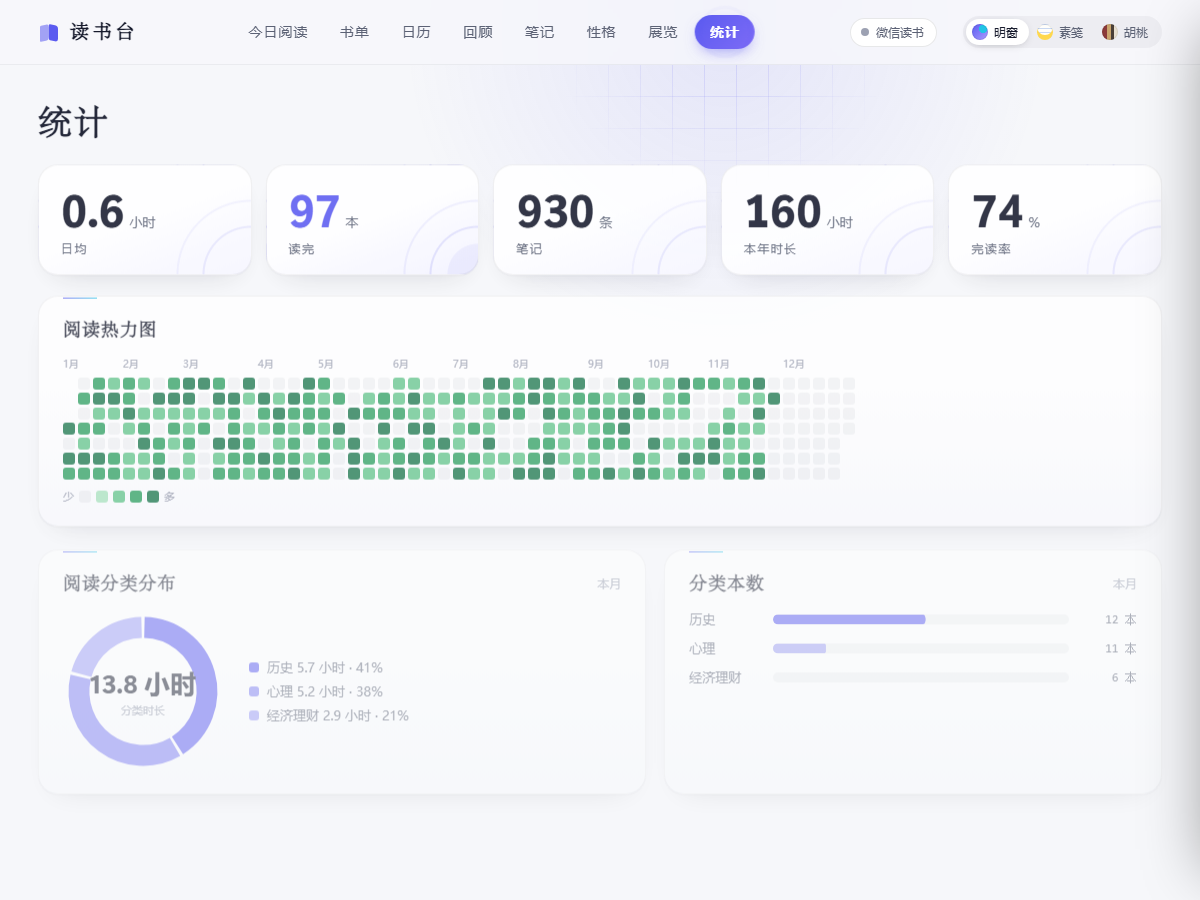
| 统计 | 五指标、全年热力图、分类分布、读书墙(按月/按年) |
安装
# 从 npm 安装
dsh plugin add dsh-reading-desk

# 或从 GitHub 安装
dsh plugin add github:limowan/dsh-reading-desk

# 或本地目录
dsh plugin add /path/to/dsh-reading-desk
装完在侧栏点「读书台」图标。第一次只有内置的公开样张;要显示自己的数据,
在面板里点「连接微信读书」填 Agent Gateway 的 wrk- Key 同步一次。
AI
阅读性格的吐槽、阅读展的策展主题、笔记整理、书内讨论,全部走宿主侧的 ctx.llm.stream:
- 用的是你
dsh里已经配好的 provider / model(ctx.agentDefaultModel.currentSelection()) - 不需要再配一个 API Key,也不产生额外计费通道
- 模型不可用时自动退回本地文案,功能不中断
隐私
- 微信读书 Key 与同步下来的数据只存在你这台机器的浏览器里(localStorage)
- 宿主只做转发:
/plugin/reading-desk/weread把只读请求原样转给微信读书网关, 限 6 个只读接口、4KB 上限、校验 Origin,不落盘、不记日志 - AI 请求只带书名、统计数字和对话内容,不带 Key
已知限制
- 数据要手动同步一次;清了浏览器数据就得重同步
- 内置
assets/covers是样张封面,版权归微信读书与出版方,仅用于界面展示 - 只在
dsh 0.2.2-rc.1上验证过;更早版本没测 - 在真实面板里的框高、明暗主题跟随还需要你实测
开发
# 改界面:直接编辑 assets/index.html(单文件,原型在 ../预览/)
# 改宿主:编辑 index.js 后在插件管理里禁用再启用一次,或重启 dsh
结构:
index.js          宿主:托管 assets/ + 微信读书转发 + 4 条 AI 路由
client.js         浏览器:侧栏图标 + main 面板(iframe 载入界面)
assets/           界面本体(index.html / sample-data.js / covers/)
locale/{zh,en}.json  插件标题与描述
docs/DETAIL.md    插件详情页
License
MIT
Links
More in this category
Tencent/WeKnora#dsh-weknora★ 38157
Four read-only tools over a WeKnora knowledge base: list knowledge bases, hybrid passage search, reassemble one document's chunks in order, and WeKnora's own cited RAG or ReAct-agent answer with a resumable session id.
DayuanJiang/next-ai-draw-io#dsh-plugin★ 37164
Draws draw.io diagrams in DeepSeek Harness through the next-ai-drawio MCP server: the link in the reply opens a live preview in the right sidebar, you can edit the diagram by hand, and each AI change is a version you can restore. Node.js 18+; npx downloads the MCP server on first use.
superdesigndev/treg★ 8870
Tool catalog for agents: search ~2,600 external endpoints (SEO and SERP, backlinks, social, people and company enrichment, ad libraries, scraping) by the task you want done, read each one's parameters and per-call price, then call it with the credential injected server-side. Ships the skill plus an MCP row that stays disabled until TREG_TOKEN is set.
T-Auto/dsh-ops★ 6007
Provides bash, PowerShell 7, and high-performance Rust tools for DSH on Windows to reduce token usage.
helloHub1212/dsh-windows-mcp★ 2447
Bridges the CursorTouch/Windows-MCP desktop automation server into DSH through the official MCP client bridge, registering its screenshot, UI tree snapshot, mouse and keyboard input, clipboard, process and registry tools as mcp__windows__* tools for the model, and adds a windows_mcp_doctor diagnostic tool. Computer Use is off by default and is switched on from the plugin panel.
sixtysevenlf/dsh-blender-plugin★ 2276
Lets a DSH agent drive a local Blender over a direct TCP channel with 15 tools: viewport frames, custom-angle renders, Python execution, headless and job offload, transaction rollback, and a planning layer of 228 ops across 34 families.
Community comments
Comments are public GitHub Discussions. Loading them connects to GitHub and Giscus; a GitHub account is required to post.