Five-layer intent recognition pipeline (rules, pgvector retrieval, Jev scoring, fine-tuned arbitration, LLM fallback) with scenario management UI, PostgreSQL storage and distributable API services.
Install
# from npm (prebuilt)
dsh plugin --profile web add dsh-intent-recognition
# from GitHub (first run asks for allowBuilds approval — follow the hint, retry)
dsh plugin --profile web add github:lilixinsniper/dsh-intent-recognition
Any plugin you install runs third-party code with your own permissions — it can read your files, use your credentials, and reach the network, and tool approvals don’t sandbox it. GitHub-sourced plugins also run build scripts at install time — pnpm blocks those until you allow them, so an install can stop with ERR_PNPM_GIT_DEP_PREPARE_NOT_ALLOWED or ERR_PNPM_IGNORED_BUILDS; dsh prints the exact key to add under allowBuilds in your profile’s pnpm-workspace.yaml, and the install works on the next run. Allowing a build is a trust decision: only install sources you trust, and pin a commit (github:owner/repo#sha).
README
English | 中文
A DeepSeek Harness (DSH) plugin: five-layer intent recognition pipeline + scenario/intent management UI + PostgreSQL/pgvector storage + distributable API services + DSH-native routing (agent tools / workflows / subagents / Cordis services).
User query
   │
   ▼
┌─ L1 rule hard filter ───────── greeting / exit / command / keyword strong match (lexicon + regex + black/white lists)
│      │ miss
├─ L2 vector retrieval ───────── pgvector cosine search compresses the intent library to Top5–Top10 candidates
│      │
├─ L3 Jev probabilistic scoring ─ high confidence routes directly → mid → L4; low → L5
│      │
├─ L4 fine-tuned model ───────── BERT / small LLM arbitrates near-duplicate intents and boundary cases
│      │
└─ L5 LLM structured fallback ── multi-intent / cross-turn context / slot extraction / open queries, JSON output
Every layer can be toggled off per service — disabled layers are skipped entirely.
Control plane + data plane
- Control plane (management UI): the Intent Recognition sidebar panel (same level as the Plugins entry; pin/unpin from the sidebar's More menu), plus a Settings → Intent Recognition section — both render the same management UI. Tooling only; it never joins the conversation.
- Data plane (consumable services): a running service can be consumed two ways:
| Channel | Notes | Best for |
|---|---|---|
| Agent tool (recommended) | each running service registers intent_recognize_<service-slug>; high-confidence hits execute the route inside the tool |
DSH main agent routing user turns |
| Cordis service | ctx.intentRecognition.predict(service, query, context) for other plugins |
programmatic integration |
Features
- Intent management: per-scenario intent catalog (name/code/description/examples/keywords/blacklist/whitelist/route config), Excel import (merge/replace) & export, one-click embedding rebuild.
- Service management: per-scenario API services, independent switches & parameters per layer, services can run / stop / delete / copy; per-service API keys; built-in test console and call logs.
- Vector lab: a dedicated tab for layer-2 recall debugging — recall tests (type a question, see per-chunk scores and the aggregated intent candidate set, optionally inheriting a service's threshold/TopK), chunk browsing (example text / dims / building model / timestamp, with single-chunk delete), and per-scenario coverage overview with in-place rebuild.
- Route execution: per-intent routes (none / DSH workflow / subagent / Cordis service) with a per-service
route_mode(auto vs suggest). - Model configuration: embedding, Jev, fine-tuned and LLM models are all page-configured (OpenAI-compatible or plain http JSON endpoints), with connectivity tests.
- Storage: PostgreSQL + pgvector (vectors and business data in one database).
- Agent integration: running services register/revoke
intent_recognize_<slug>tools automatically; optionally contributes a system-prompt section listing available intent services.
Screenshots
| Intent management | Service management |
|---|---|
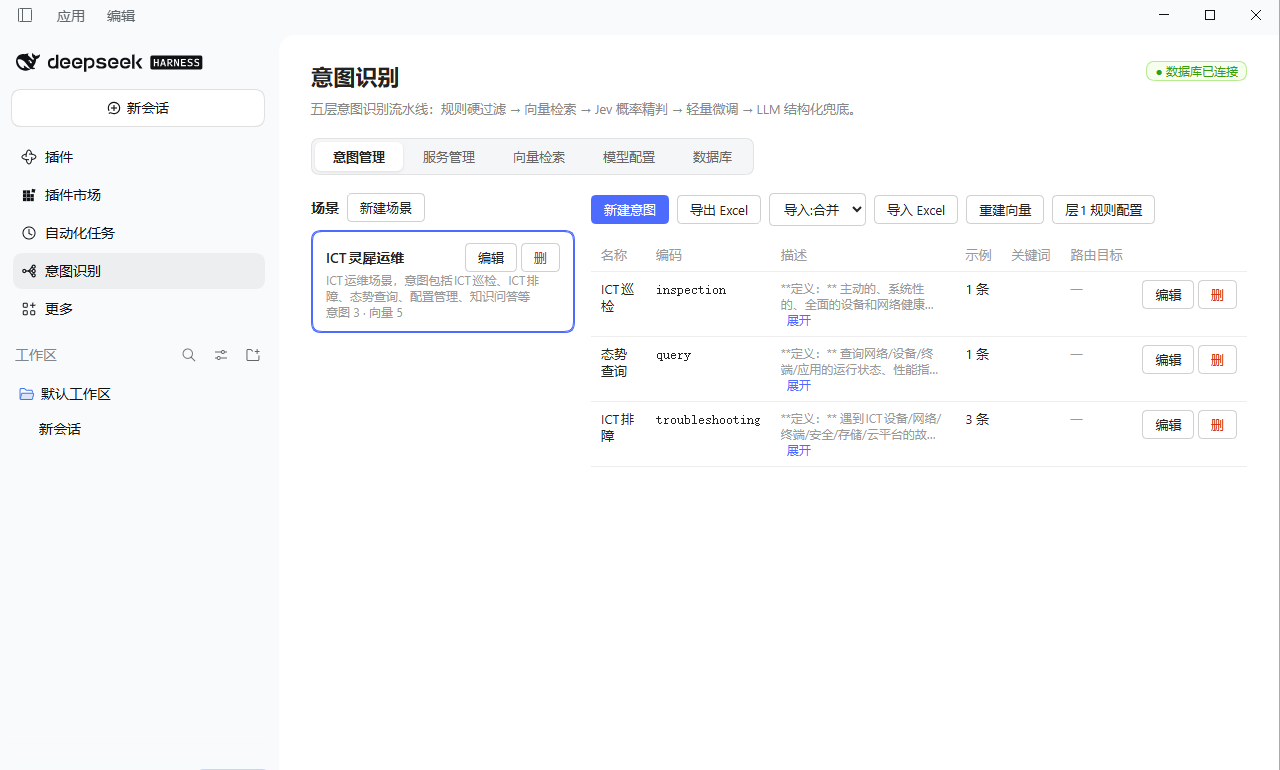 |
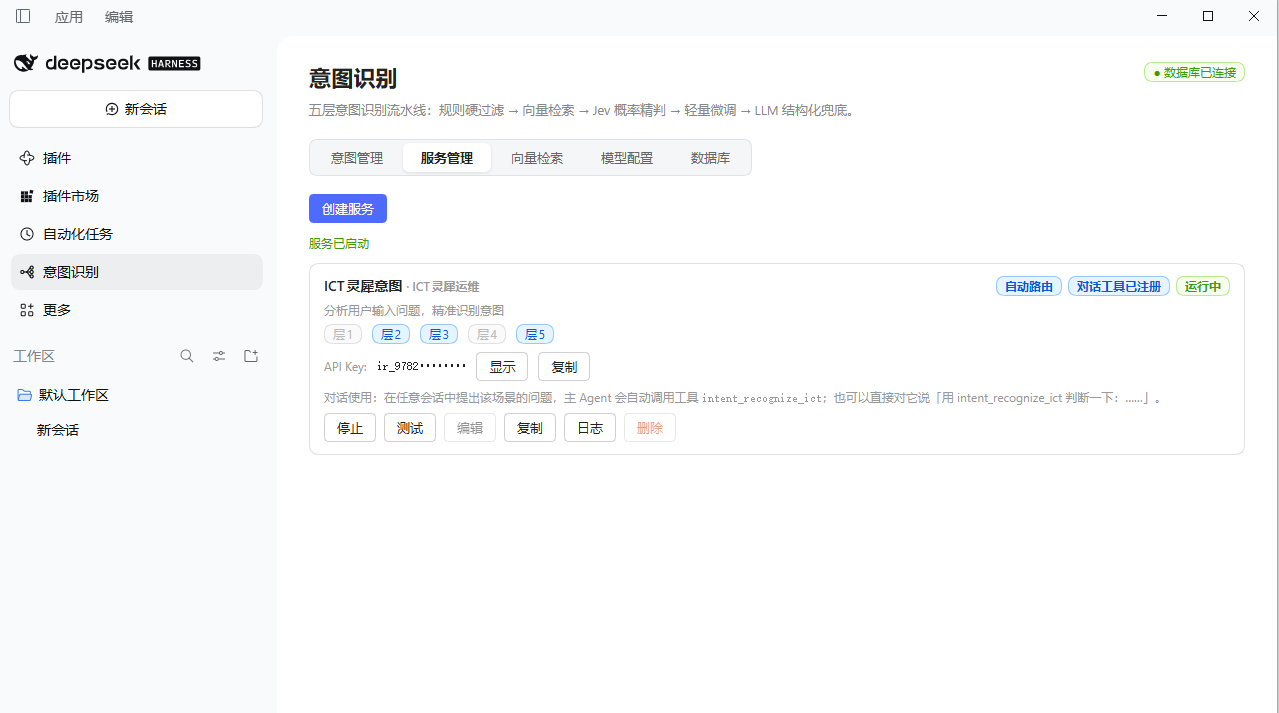 |
| Vector lab | Model configuration |
|---|---|
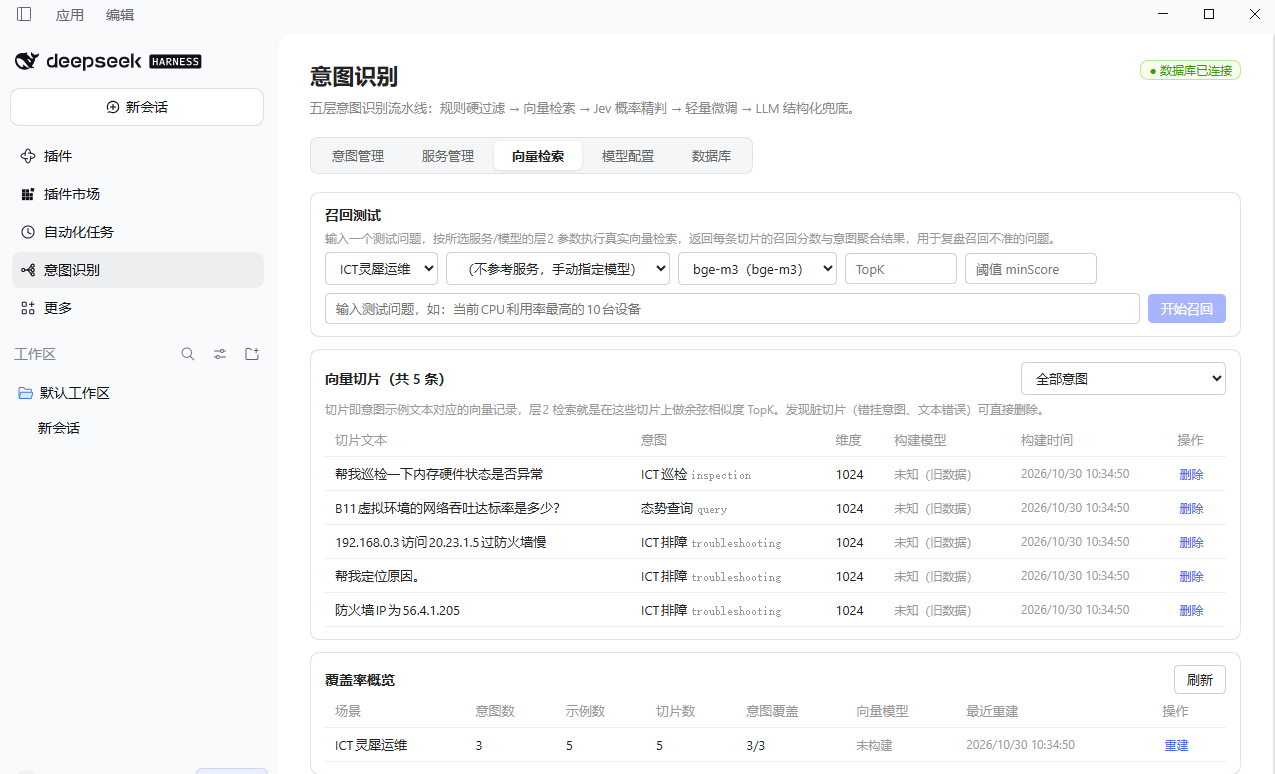 |
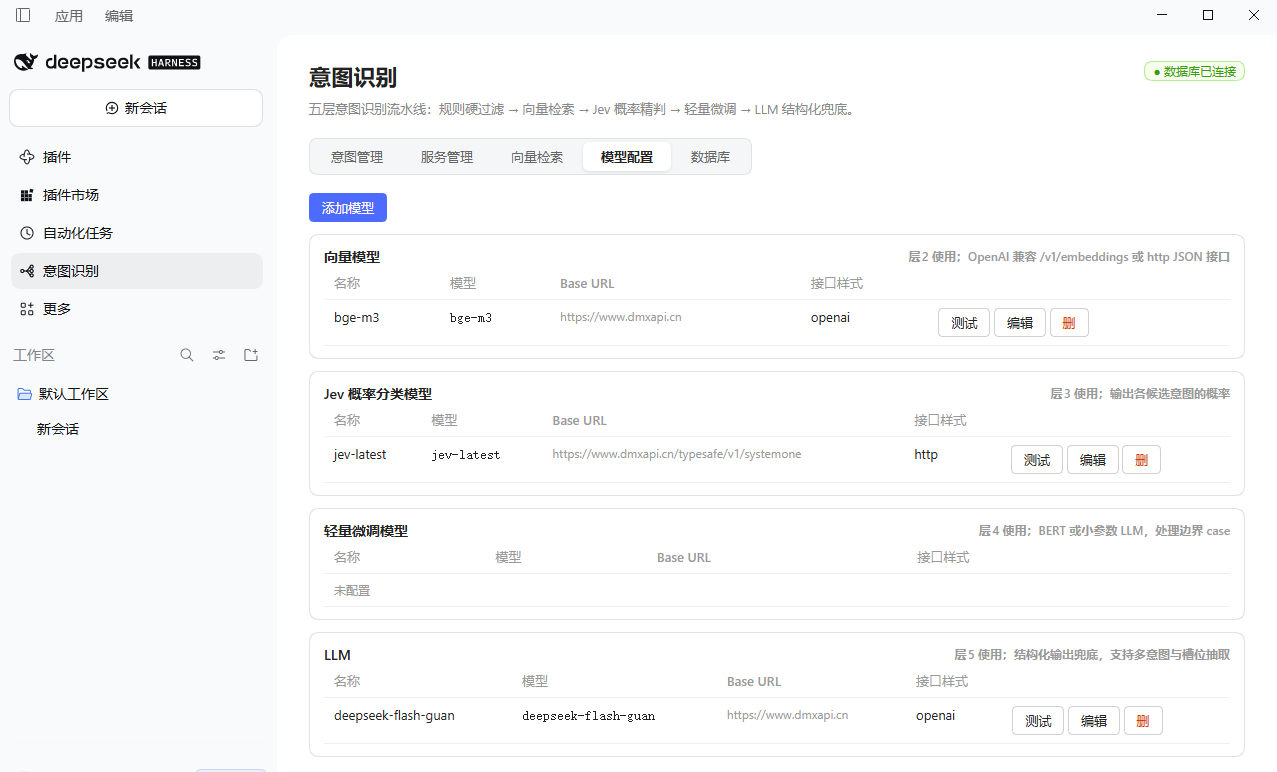 |
| Test console (five-layer trace) | Agent tool call in a chat |
|---|---|
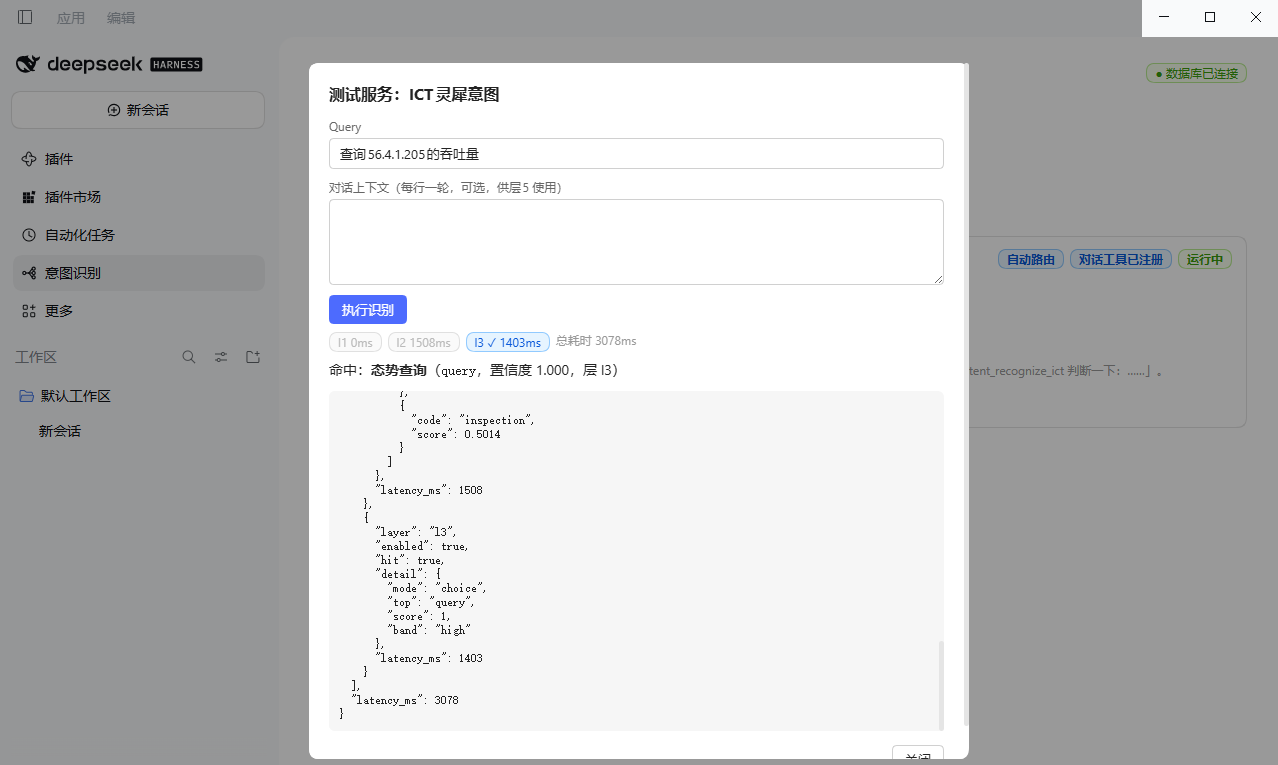 |
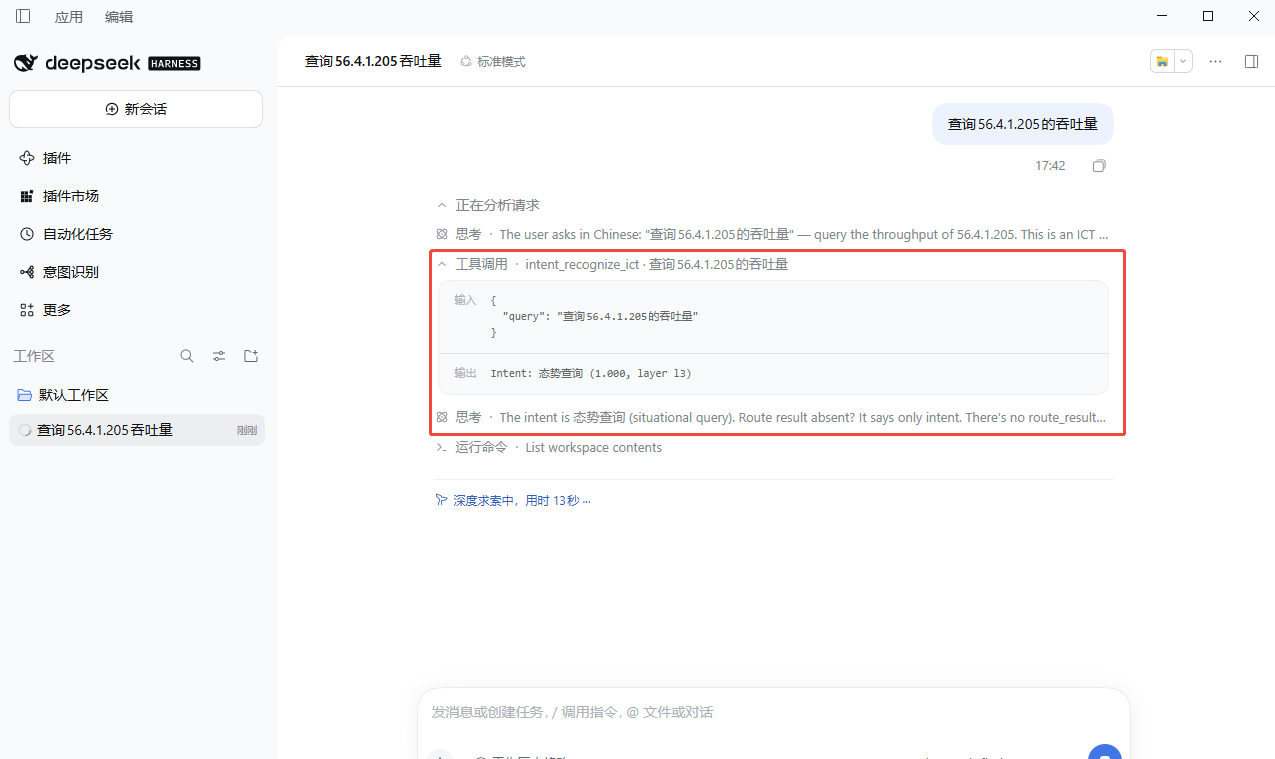 |
Install
Prerequisites: Node.js ≥ 20, DSH installed (npm i -g @deepseek-ai/dsh).
# 1. Start PostgreSQL + pgvector (or reuse your own instance)
docker compose up -d

# 2. Install the plugin
dsh plugin --profile web add dsh-intent-recognition
# or from a local checkout / tarball
dsh plugin --profile web add ./dsh-intent-recognition
dsh plugin --profile web add ./dsh-intent-recognition-0.3.3.tgz

# 3. Restart `dsh web` (desktop: restart the app or reload the page, Ctrl+R)
#    —— client bundles load from the boot graph at page start; a reload is
#    required after install before the sidebar entry appears
# 4. Click "Intent Recognition" in the left sidebar (or Settings → Intent Recognition)
# 5. First run: open the "Database" tab, enter host/credentials, then
#    "Test" → "Test & Save" — the pool hot-swaps immediately, no restart
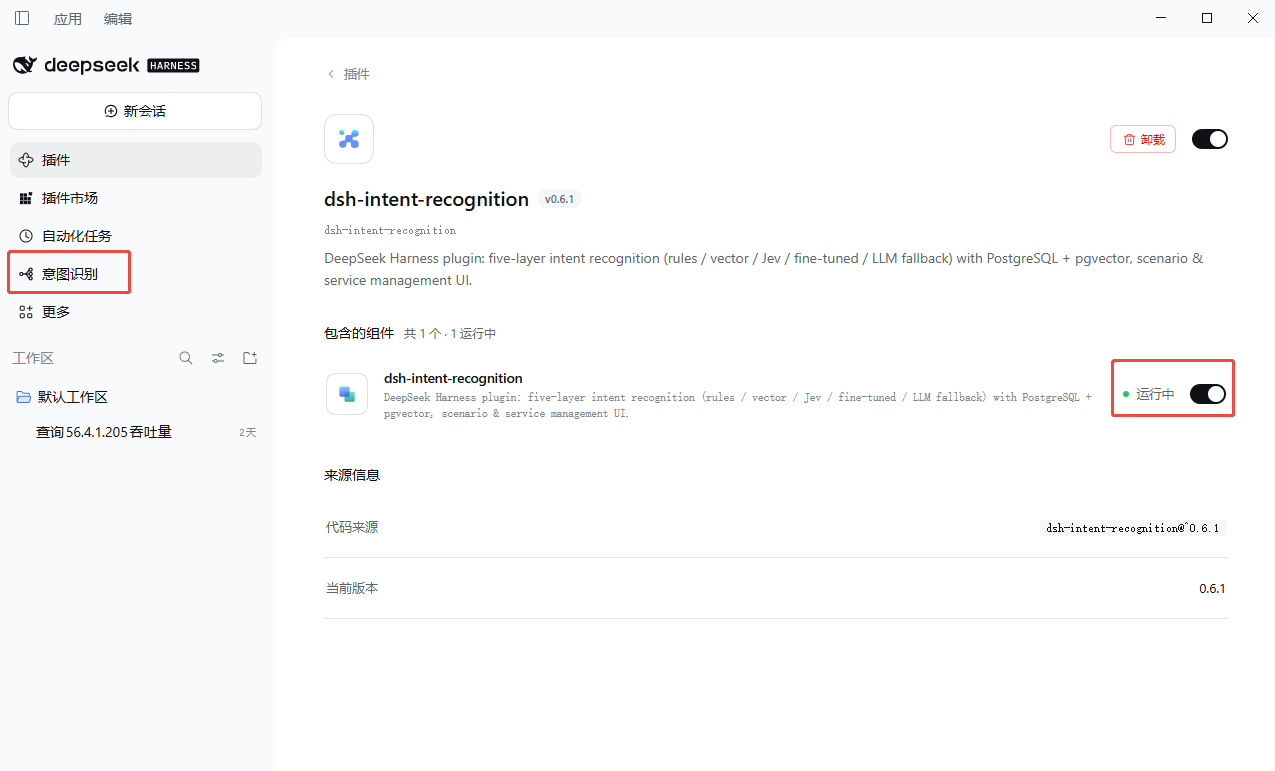
The desktop install flow from the official npm registry (Plugins → Add plugin → enter dsh-intent-recognition, source = npm official registry):
| Add plugin | Installing | Installed (running) |
|---|---|---|
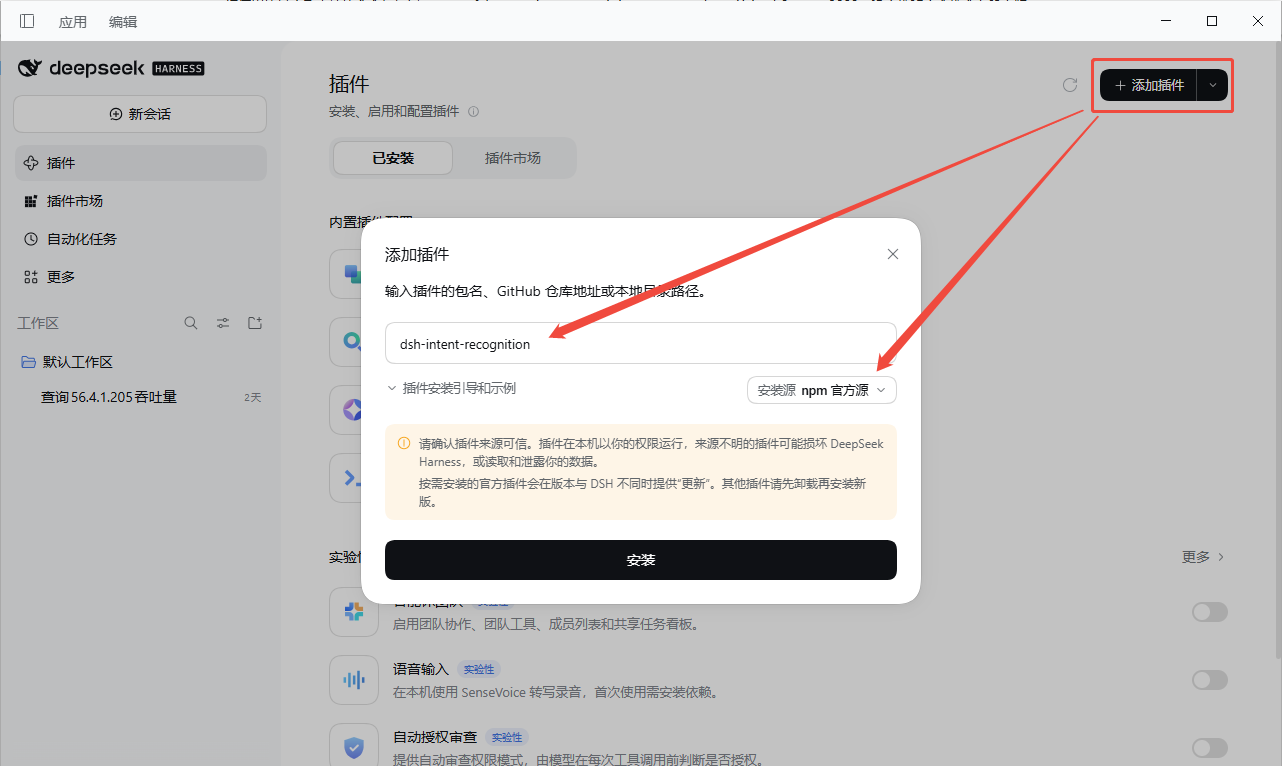 |
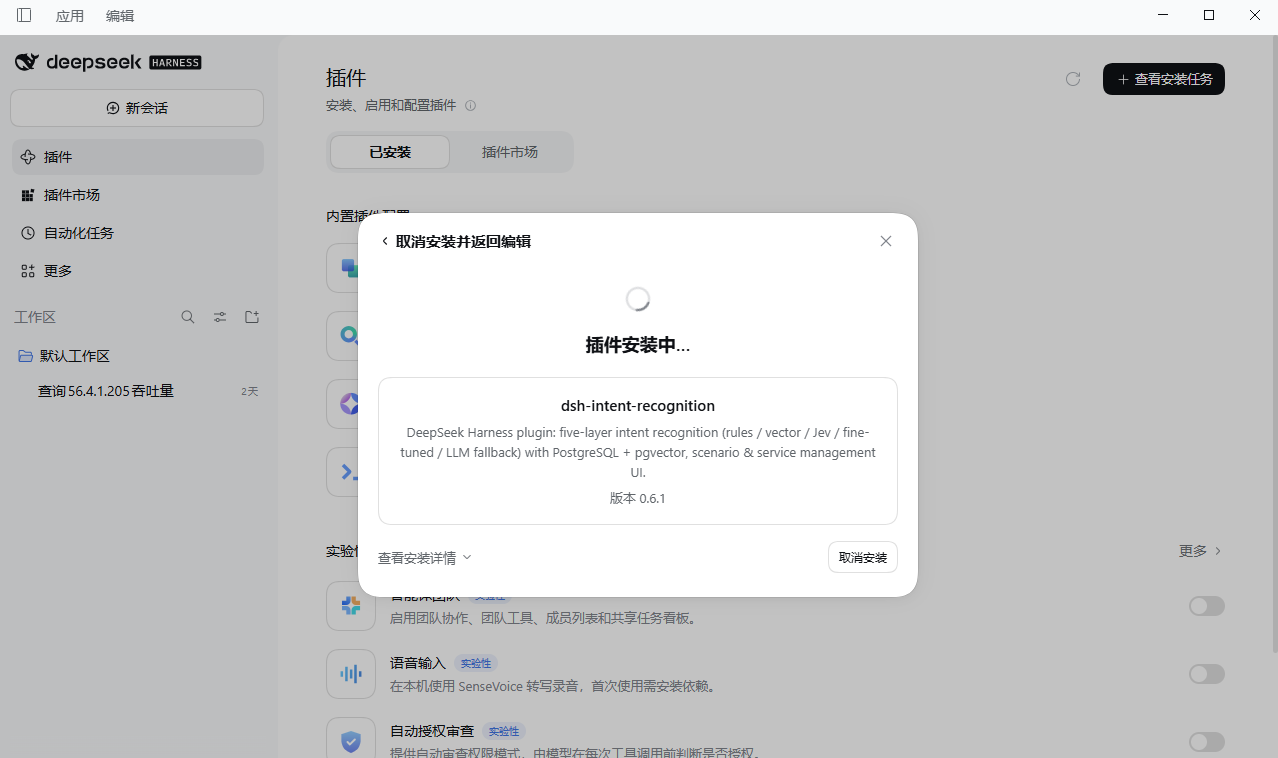 |
 |
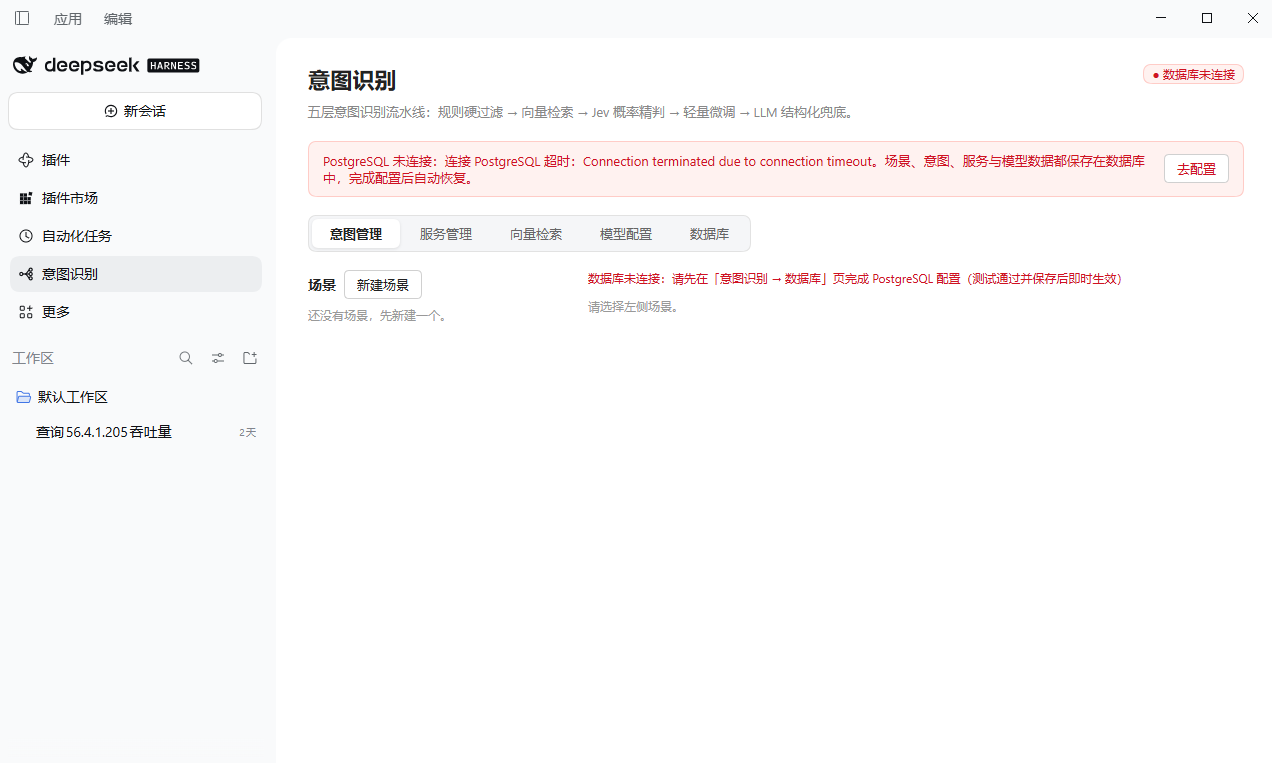
When to configure the database: after install, on first open of the page — not at install time. The DSN cannot live in the database itself, and installing a plugin should not require a ready-made YAML plus a running instance. The page-saved DSN persists to a per-user config file (below); the patch
databaseUrlis only the fallback. While the database is unreachable the plugin still loads, the sidebar panel still opens, data routes answer 503, and a banner on the page guides recovery.
Desktop note: if the sidebar entry is missing after install/upgrade, reload the page first (Ctrl+R or restart the app). The page loads the plugin client roster once at boot — the official plugin manager shows the same "refresh" prompt after installs. If the entry is still missing after a reload, check Settings → Intent Recognition: both come from the same client bundle, and if neither renders the client half never loaded — confirm the component shows "running" on the plugin detail page.
The sidebar entry registers through DSH's
sidebar.panellist+mainpanel slots — the same mechanism as the built-in Plugins and Scheduled Tasks entries: clicking the icon opens the full management page in the main column, and the shell's More menu provides pin/unpin out of the box.
The package declares dsh.bundle.patch, so dsh plugin add mounts it into the profile bundle stack automatically — no manual cordis.patch.yml editing.
Database connection (page-managed)
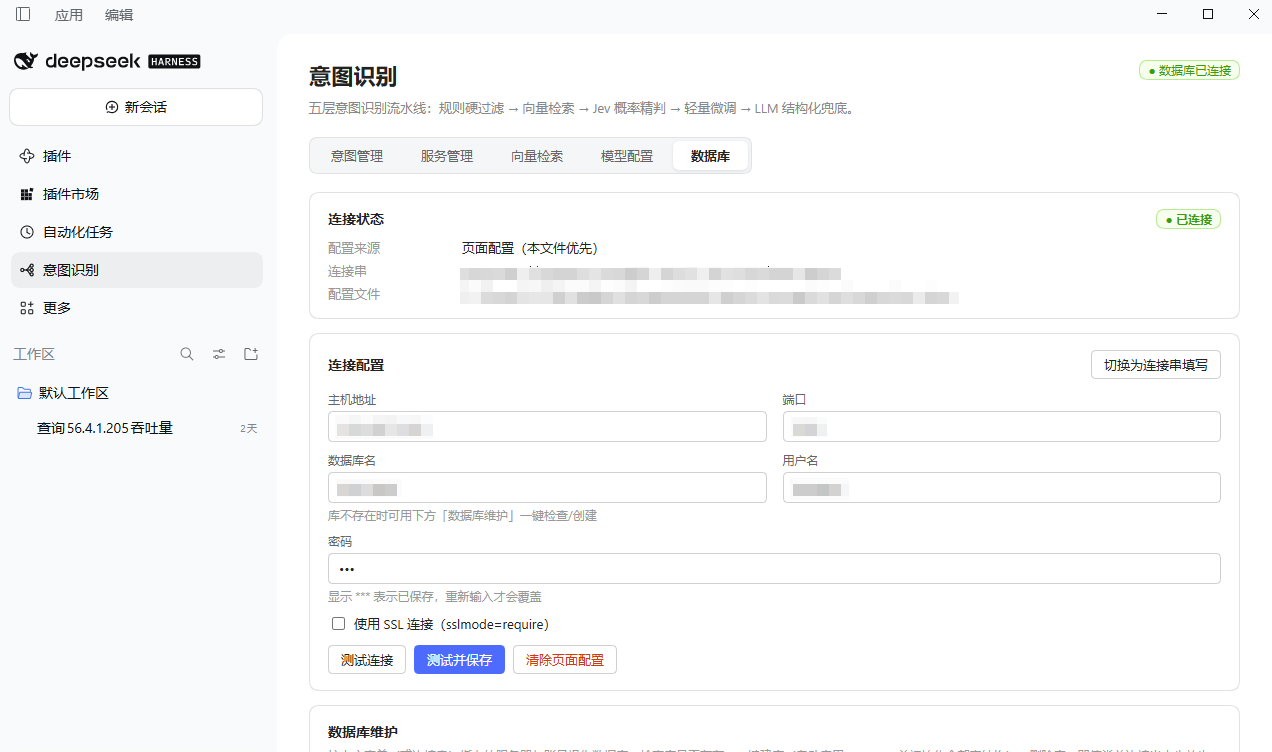
The "Intent Recognition → Database" tab manages the connection end to end: a structured form (host/port/database/user/password/SSL) or a raw DSN, Test connection (also probes pgvector availability), Test & Save (persists + hot-swaps the pool without any restart), and Clear page config (fall back to the patch DSN).
While the database is unreachable, a red banner at the top of the panel guides you to the Database tab; saving hot-swaps the pool and takes effect immediately:
| Disconnected banner | Database tab (connected) |
|---|---|
 |
 |
- Priority: page-saved DSN >
cordis.patch.ymldatabaseUrl> built-in default. - Persistence:
%APPDATA%/dsh-intent-recognition/connection.json(Windows),~/Library/Application Support/dsh-intent-recognition/connection.json(macOS),~/.config/dsh-intent-recognition/connection.json(Linux); override with theDSH_INTENT_RECOGNITION_CONFIGenv var. File mode 0600; the password is masked as***in API responses (submitting***keeps the stored one). - Fault tolerance: an unreachable database never blocks plugin load; every management route except
/healthand/connection*returns 503 with a recovery banner in the UI. Fix the connection in the Database tab and save to recover. - pgvector: with
autoMigrateon, a successful save runsCREATE EXTENSION IF NOT EXISTS vectorplus schema migration automatically; the test button warns beforehand when the target lacks pgvector. - Database maintenance (v0.6.0): below the connection form, Check / Create / Drop database buttons manage the DSN's target database. Create does everything in one shot — create the database, install pgvector, and initialize all
ir_*tables. Drop is destructive: a red warning dialog requires typing the full database name to confirm, and system databases (postgres/template0/template1) are refused. Maintenance runs with the same credentials against the instance'spostgresmaintenance database, so it works even while the business database does not exist yet.
Plugin configuration
| Field | Default | Notes |
|---|---|---|
databaseUrl |
postgres://postgres:postgres@127.0.0.1:5432/dsh_intent |
Fallback DSN (page-saved config wins); pgvector must be available |
embeddingDim |
1024 |
Must match the configured embedding model; changing it requires an embedding rebuild |
autoMigrate |
true |
Create tables/indexes on load (HNSW cosine index, pgvector ≥ 0.5) |
adminToken |
'' |
Bearer token protecting the management API; empty = DSH loopback only |
registerTool |
true |
Register one intent_recognize_<slug> tool per running service |
contributePrompt |
true |
Inject a system-prompt section listing available intent services |
Intent routes
Each intent may carry a route — "where to go next" once matched:
| Route type | Config | Behaviour |
|---|---|---|
none |
— | Return the recognition result only |
workflow |
target (run name) + workflow script | Starts a DSH workflow run; the script orchestrates freely (call subagents, tools, other plugins) |
subagent |
target = agent preset id | Spawns a subagent with that preset to handle the query (provider: spawn, result returned to caller) |
service |
target = serviceName.method |
Calls a method of another Cordis service in the host (capability provided by another plugin) |
Execution policy (route_mode)
- auto (default): deterministic hits (L1 / L3 / L4) execute the route inside the tool — the cheap deterministic path actually lands; L5 (LLM fallback) hits only return the route as a suggestion for the main agent.
- suggest: never executes; the route is returned to the caller (agent or HTTP client).
Results carry route when configured; after execution they also carry route_result (ok / value / error).
Workflow scripts
With route type workflow, write the script directly in the intent editor (a collapsible full guide is built into the page). The script receives:
| Variable | Content |
|---|---|
args.query |
raw user input |
args.intent |
matched intent code |
args.confidence |
0–1 |
args.matched_layer |
l1–l5 |
args.slots |
slots extracted by L5 |
args.context |
caller-provided context array |
agent(prompt) |
spawn a subagent inside the script |
meta |
run metadata (meta.name = route target) |
const intent = args.intent;
if (intent === 'query_balance') {
  return await agent(`User wants their balance. Utterance: ${args.query}. Check and reply.`);
}
if (intent === 'transfer') {
  const amount = args.slots?.amount ?? 'unknown amount';
  return await agent(`User wants to transfer ${amount}. Utterance: ${args.query}. Confirm, then execute.`);
}
return `Unhandled intent: ${intent}`;
Runs are recorded with meta.name = <route target> (sanitized kebab-case) and are visible in DSH's run panel.
Plugging downstream capabilities into DSH
The whole system treats DSH as the backbone — intent routing and downstream agents/workflows all attach as plugins:
- Workflows: scripts live in the intent's route config and travel with the catalog via Excel import/export ("workflow script" column). Reuse capabilities via
agent()or route typeservice. - Subagents: ship downstream capabilities as agent preset plugins (see
@deepseek-ai/dsh-agent-preset); put the preset id in the route target. - Cordis services: a downstream plugin does
ctx.reflect.provide('xxxService', ...)inapply; set the route target toxxxService.methodName. The method is called as(result, exec)whereresultcarries query/intent/confidence/slots.
Using services in the chat window (Agent tools)
Once a service is running, the plugin registers a chat tool intent_recognize_<slug> with DSH (slug derived from the service name; revoked automatically when the service stops). From then on, just ask in any conversation — the main agent calls the tool when relevant and the route config dispatches to workflows / subagents / Cordis services. You can also invoke it explicitly, e.g. "use intent_recognize_bank_router to check: I want to transfer money".
Each service card shows a "chat tool registered / not registered" badge; if registration fails (e.g. a name clash), the reason is shown under the badge. State syncs in real time with service start/stop.
Note: tool registration is controlled by the
registerToolplugin option (on by default) and requires the DSHtoolsservice (present in web/desktop builds).
Jev extra-config auto-generation (systemone wire format)
The Jev model dialog offers two extra-config generators; pick a scenario whose intents are configured, then choose:
- AI generation: calls a configured LLM (add one under model configuration first; if none is configured or the call fails, the error is surfaced — use the rule template instead). The full intent descriptions (definition / inclusion signals / exclusion rules / boundary distinctions, with examples) are passed to the model verbatim, and the prompt demands faithful preservation of those rules.
- Rule template: deterministic, no LLM required — embeds each intent's full description into
instructionswith generic five-band scoring criteria.
Both generate all three judgment modes at once (modes.score / modes.choice / modes.noul). Since v0.6.0 each mode carries a single question named intent_recognition that judges every candidate intent in one call:
| Mode | type | criteria | answer | score mapping |
|---|---|---|---|---|
| score | score |
array of per-intent decision descriptions, plus intent_order (intent codes aligned 1:1 with criteria) |
score array (in intent_order order) or {code: score} object |
array indexes map via intent_order |
| choice | choice |
{intent name: decision description} object |
one intent name | chosen = 1, others = 0 |
| noul | noul |
— (map binds “是”/“否” to the two intent codes) |
“是”/“否” | per map: hit = 1, other = 0 |
noul is only generated for exactly-2-intent scenarios — yes/no cannot cover more; don't pick noul as the layer-3 mode otherwise.
Which mode runs is chosen per service: the service editor's layer 3 has a "judgment mode" dropdown (score/choice/noul, default score); layer 3 then sends the corresponding modes.<mode> question. Legacy extra configs (per-intent modes questions, or a single top-level questions) keep working — layer 3 falls back to per-intent calls.
Layer-3 thresholds decide the outcome: top score ≥ high threshold → direct hit (skips L4/L5); [mid, high) → compressed candidates go to L4 arbitration; below mid → L5 fallback. The result is a draft — review it in the extra-config field before saving.
A Jev model with this extra config (api_style=http) switches layer 3 to the systemone wire format:
POST {base_url}
{ "model": "<model>", "state": "<user input>", "questions": { "intent_recognition": <modes.<mode> question> } }
→ { "answers": { "intent_recognition": [0.9, 0.1] | "查询余额" | "是" } }
Score answers may be an array aligned with intent_order, a {scores|values|results: [...]} wrapper, or a {code: score} object; choice answers are an intent name (「」 quotes, codes, case and containment tolerant); noul answers are “是”/“否” mapped via the question's map. All three modes also accept object answers like {choice: "name", confidence: 1, probabilities: {name: p}} — probabilities maps are scored directly, otherwise the choice/answer/value label field is matched. Legacy per-intent answers {"answers": {"<intent code>": ...}} keep working: numbers, booleans, "是"/"否"/"true" strings, or {score|probability|confidence} objects.
Layer-2 retrieval transparency
The layer-2 "confidence threshold (min similarity)" (minScore) in the service editor is the slice filter — recalled chunks below it never become candidates. Test traces now expose it: layer 2 carries minScore / topK / chunks (every raw recalled slice with its score and pass/fail) / candidates (post-aggregation), so "recalled but not adopted" is directly attributable to threshold filtering vs aggregation truncation; layer 3 traces carry the judgment mode.
Vector lab (layer-2 debugging)
The Vector Lab tab answers "why was recall wrong for this question":
- Recall test: pick a scenario, type any question, and the plugin replays the engine's real layer-2 logic (same
searchSimilar, per-intent best chunk, minScore filter, TopK truncation). Optionally reference a service to inherit its embedding model and layer-2 threshold/TopK, or pick a model and tweak the threshold ad hoc. Two result tables: the intent aggregation (what layer 2 would actually emit downstream) and the raw chunk hits (every recalled slice with its score). - Chunk browser: all embedding slices of a scenario (example text, owning intent, dims, building model, build time), filterable by intent, paginated, with per-chunk delete for stale slices.
- Coverage overview: per-scenario intent/example/chunk counts, coverage gaps, the models that built the slices, last rebuild time, and in-place rebuild with a chosen model.
Slices carry model provenance (model_id); after switching embedding models or editing examples, rebuild — otherwise old and new slices live in incompatible vector spaces.
Programmatic access
From another dsh plugin's apply(ctx):
const ir = ctx.get('intentRecognition');
if (ir) {
  const result = await ir.predict('bank-router', 'check my balance', []);
}
Excel template
Header row: Name | Code | Description | Examples | Keywords | Blacklist | Whitelist | Route Type | Route Target | Workflow Script. Multi-values inside examples are newline-separated, others use 、; route type is none / workflow / subagent / service (a target or script without a type infers workflow). The exported file is the template.
Development
pnpm install
pnpm typecheck
pnpm build                     # emits lib/index.js + lib/client.js (esbuild)
node test/smoke.mjs            # end-to-end pipeline (needs local PostgreSQL+pgvector, see test/README.md)
node test/cordis-load.mjs      # real Cordis host integration (tool registration / route dispatch / prompt)
node test/connection.mjs       # offline boot + 503 guard with an unreachable database (no DB needed)
node test/client-contract.mjs  # client bundle slot-registration contract (no browser needed)
Source layout: src/index.ts (host entry / Cordis integration), src/pipeline/engine.ts (five-layer engine), src/dispatcher.ts (route dispatch: workflow/subagent/service), src/service-tools.ts (per-service tool registration), src/routes.ts (REST API), src/db.ts (PostgreSQL/pgvector, hot-swappable pool), src/connection.ts (page-managed connection), src/models.ts (model calls), src/excel.ts (import/export), src/client/ (React management UI, settings.section + main + sidebar.panellist slots).
License
MIT
Links
More in this category
DayuanJiang/next-ai-draw-io#dsh-plugin★ 36548
Draws draw.io diagrams in DeepSeek Harness through the next-ai-drawio MCP server: the link in the reply opens a live preview in the right sidebar, you can edit the diagram by hand, and each AI change is a version you can restore. Node.js 18+; npx downloads the MCP server on first use.
Tencent/WeKnora#dsh-weknora★ 36201
Four read-only tools over a WeKnora knowledge base: list knowledge bases, hybrid passage search, reassemble one document's chunks in order, and WeKnora's own cited RAG or ReAct-agent answer with a resumable session id.
superdesigndev/treg★ 6962
Tool catalog for agents: search ~2,600 external endpoints (SEO and SERP, backlinks, social, people and company enrichment, ad libraries, scraping) by the task you want done, read each one's parameters and per-call price, then call it with the credential injected server-side. Ships the skill plus an MCP row that stays disabled until TREG_TOKEN is set.
T-Auto/dsh-ops★ 5011
Provides bash, PowerShell 7, and high-performance Rust tools for DSH on Windows to reduce token usage.
sixtysevenlf/dsh-blender-plugin★ 1536
Lets a DSH agent drive a local Blender over a direct TCP channel with 15 tools: viewport frames, custom-angle renders, Python execution, headless and job offload, transaction rollback, and a planning layer of 228 ops across 34 families.
TencentCloudBase/CloudBase-AI-Toolkit#dsh-plugin★ 1153
Tencent CloudBase backend for DeepSeek Harness — scaffold and deploy full-stack apps from chat, render query results as table cards with paging, sorting and CSV export, preview a deployment on its domain, and call the CloudBase MCP toolset (`mcp__cloudbase__*`) with device-code login.
Community comments
Comments are public GitHub Discussions. Loading them connects to GitHub and Giscus; a GitHub account is required to post.