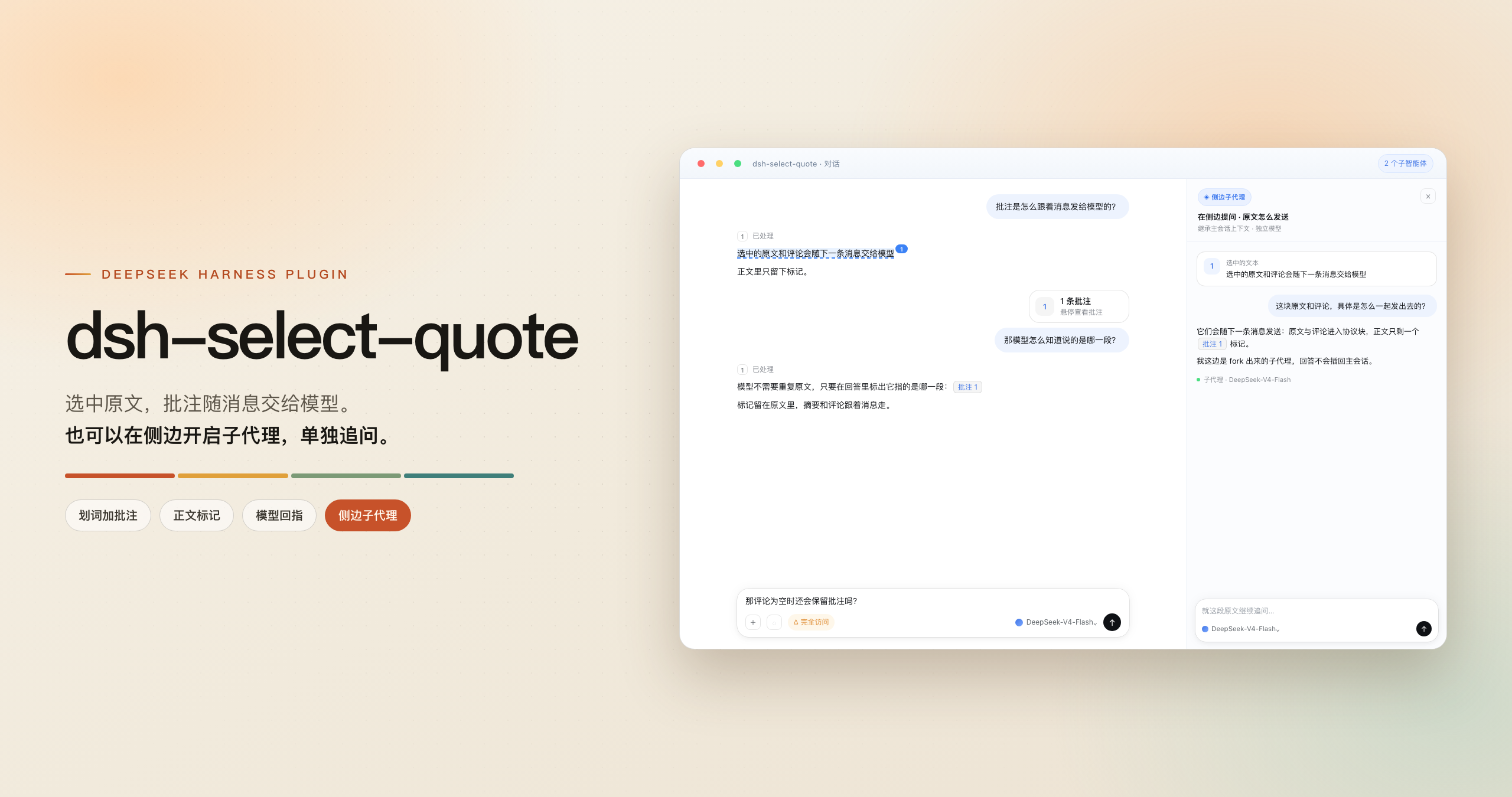
Adds selection annotations, in-place translation, sidebar subagent questions and default-browser link opening to DSH. The selected text rides along with your next message, the source keeps its highlight and ordinal mark for jumping back, the menu opens on selection or from the right-click menu, and the translation model can be picked separately.
Install
# from npm (prebuilt)
dsh plugin --profile web add dsh-select-quote
# from GitHub (first run asks for allowBuilds approval — follow the hint, retry)
dsh plugin --profile web add github:latte03/dsh-select-quote
Any plugin you install runs third-party code with your own permissions — it can read your files, use your credentials, and reach the network, and tool approvals don’t sandbox it. GitHub-sourced plugins also run build scripts at install time — pnpm blocks those until you allow them, so an install can stop with ERR_PNPM_GIT_DEP_PREPARE_NOT_ALLOWED or ERR_PNPM_IGNORED_BUILDS; dsh prints the exact key to add under allowBuilds in your profile’s pnpm-workspace.yaml, and the install works on the next run. Allowing a build is a trust decision: only install sources you trust, and pin a commit (github:owner/repo#sha).
README
简体中文 | English
A DeepSeek Harness client plugin: adds selection annotations and quotes, in-place translation, and sidebar subagent questions to DSH, and opens links in your default browser. The selected text and your comment ride along with the next message; conversation text keeps its highlight and ordinal mark for jumping back, while a Sidebar file selection is quoted as plain text. The menu can appear on selection or open from the right-click menu, and translation can use its own model.
Features
- Selection toolbar: select text in the conversation or in a file preview in the right Sidebar to get Open link / Copy / Translate / Add annotation / Ask in sidebar. File previews omit Ask in sidebar. The toolbar can sit above or below the selection
- In-place translation: translates the selection into the target language, streaming next to it. While the model is thinking, a progress icon shows live reasoning; once the translation lands, the reasoning collapses but stays available. The target follows the UI language by default and can be switched on the spot; the result copies in one click. Reopening the same text with the same settings reuses the in-memory cache for the session without calling the model
- Right-click menu and shortcuts: the same actions open from the selection's context menu or from the keyboard; key bindings are configurable in the host's settings
- Annotation summary: the composer shows "N annotations" above it; expand to edit or jump back to the source. Deleting asks for a second "Confirm removal" click; the summary clears when the message is sent
- Marks in the text: annotated text keeps a tint and an ordinal mark. Click the mark to see the source and comment; pending annotations can be edited or removed from the mark's popover, matching the summary card
- Send to another session: puts the selected text and comment into another session's composer, either staying on the current page or going there directly, including a workspace's "New session". The source keeps an arrow mark; the target card shows "From: " and both sides can jump back. Once the target sends, the source mark is labeled "Sent"
- Model references: when a model points at an annotation in its answer, it renders as a chip with a preview
- Sidebar subagents: ask about a conversation passage in the sidebar without interrupting the main conversation. Pick a separate model and reasoning level, or reuse the same subagent (the directory keeps a single entry)
- Eight UI languages: 简体中文 / English / 日本語 / Español / Français / Deutsch / Русский / Português
Install
Web:
dsh plugin --profile web add dsh-select-quote
dsh --profile web
Desktop: enter dsh-select-quote inside the app, or find it in the plugin page and install; restart the client to take effect.
Local development:
git clone https://github.com/latte03/dsh-select-quote && cd dsh-select-quote
pnpm install && pnpm run build
cp dev.patch.example.yml dev.patch.yml   # replace <CHECKOUT> with this checkout's absolute path
dsh web --patch "$PWD/dev.patch.yml"
Open http://127.0.0.1:3080 to try it. dev.patch.yml is a local, untracked file; the repository only ships the template.
Usage
- Select text in the conversation or in a file preview in the right Sidebar → click Add annotation; the annotation is saved immediately. Add a comment in the box;
Enteror⌘/Ctrl + Entersubmits,Shift + Enterinserts a newline - Hover (or tap on touch) the summary above the composer to expand the list: edit, delete, or jump back to the text. Click a mark in the text to preview its annotation
- Send as usual: annotations go to the model with the message, the summary disappears, the marks stay; model references render as chips
- Ask in sidebar opens the composer first; the subagent is created and shown in the right sidebar only after you press send. The directory names it "Ask in sidebar · question summary"
- Translate opens the translation popover and starts streaming right away: switch languages in the header, Stop cancels; use the copy icon at the bottom right when done; Esc or an outside click closes it
- Send to session picks a target: Send stays on the current page, Send and open opens the target. Entries in the target composer carry "From"; click one to return to the source
There are three ways to open the menu after selecting text: auto (default), right-click on the selection, or a shortcut. Touch always uses the bottom action bar.
| Action | Desktop macOS | Desktop Win/Linux | Web macOS | Web Windows | Web Linux |
|---|---|---|---|---|---|
| Open selection menu | ⌘L |
Ctrl+Shift+L |
⇧⌘L |
Ctrl+Shift+L |
Ctrl+Shift+, |
| Add annotation | ⇧⌘L |
Ctrl+Shift+. |
⌥⌘L |
Ctrl+Shift+. |
Ctrl+Shift+. |
Settings
Plugin page → dsh-select-quote; configuration is shown directly on the plugin's outer page:
- Selection trigger: auto / right-click menu / both, auto by default
- Toolbar placement: above (default) or below, for auto or both; flips automatically when space runs out
- Shortcuts: enable the two commands and see the effective keys; change them in the host's Shortcuts settings
- Sidebar subagent: fresh each time (default) or reuse one; in reuse mode the directory keeps a single entry, and context and model stay at first creation
- Translation target: auto (default, follows the UI language; translates to English when the source is already in that language) or one of eight fixed languages
- Hide translate for same language: when on, the toolbar and right-click menu omit Translate if the selection is already in the target language; auto target compares against the UI language (off by default)
- Translation model: follows the current conversation by default, or pick a faster model just for translation
- Custom prompt: the input's placeholder is the built-in prompt; leave it empty to use the built-in one, or fill it in to override the whole prompt.
{target}is replaced with the target language
Languages
The UI follows dsh's language setting; the plugin UI, its page title, and its description switch together across eight languages (see above).
Known limitations
- Annotations persist per session: after a refresh or restart, unsent annotations come back (last 20 sessions, 7 days); sending clears them, and forked sessions do not inherit them
- Send-to-session depends on the current dsh version: it needs the host's workspace and
openSessionAPIs; older versions hide the entry. Unsent handoffs are pruned in pairs after 20 sessions / 7 days; once the target sends, the source mark stays forever. Jumping back from the target only guarantees history that is loaded; a miss shows a notice - Leaves the user bubble alone: the card mounts on the
conversation.chat.user.beforedecoration seat, so the bubble, attachments and time/copy row stay the host's; the protocol block is stripped by auiConversation.userTextrule. Requires dsh ≥ 0.2.2-rc.1 - Selection scope: the conversation and file previews in the right Sidebar; the file tree, editors, terminals and other panels are left alone. File previews have no Ask in sidebar, and selecting text never changes the file. Keyboard users need caret browsing or assistive technology to create a selection
- Sidebar questions must be sent: the host does not allow creating a subagent in an empty session; reuse mode has no model entry
- Translation sends only the selection: the request carries no conversation context and does not write an annotation; copy the translation if the model needs it. One request is capped at about 6,000 characters and times out after 90 seconds; failures show an error summary in the popover, with details in the console
- Web Linux shortcuts are limited: the host accepts only
Ctrl+/,Ctrl+Shift+,, andCtrl+Shift+.; this plugin uses the latter two
Development
pnpm run check          # typecheck + test + build + verify; run before committing
pnpm run watch          # incremental rebuild
pnpm run sync:web       # push to the installed web client (desktop: sync:desktop)
pnpm run release        # check → CHANGELOG → version + tag
lib/ is committed with the source and read at runtime. Publishing uses npm publish --registry=https://registry.npmjs.org/, then syncs the npmmirror mirror.
For internals, conventions, and troubleshooting, see docs/internals.md; historical investigations live in docs/archive/.
Acknowledgements
@imallakov (multilingual support and cross-platform builds), @Ladersbt (chip preview feedback), @EliteOtaku (desktop issue diagnosis).
License
MIT © 2026 agan
Links
More in this category
DayuanJiang/next-ai-draw-io#dsh-plugin★ 36749
Draws draw.io diagrams in DeepSeek Harness through the next-ai-drawio MCP server: the link in the reply opens a live preview in the right sidebar, you can edit the diagram by hand, and each AI change is a version you can restore. Node.js 18+; npx downloads the MCP server on first use.
Tencent/WeKnora#dsh-weknora★ 36302
Four read-only tools over a WeKnora knowledge base: list knowledge bases, hybrid passage search, reassemble one document's chunks in order, and WeKnora's own cited RAG or ReAct-agent answer with a resumable session id.
superdesigndev/treg★ 7042
Tool catalog for agents: search ~2,600 external endpoints (SEO and SERP, backlinks, social, people and company enrichment, ad libraries, scraping) by the task you want done, read each one's parameters and per-call price, then call it with the credential injected server-side. Ships the skill plus an MCP row that stays disabled until TREG_TOKEN is set.
T-Auto/dsh-ops★ 5074
Provides bash, PowerShell 7, and high-performance Rust tools for DSH on Windows to reduce token usage.
sixtysevenlf/dsh-blender-plugin★ 1575
Lets a DSH agent drive a local Blender over a direct TCP channel with 15 tools: viewport frames, custom-angle renders, Python execution, headless and job offload, transaction rollback, and a planning layer of 228 ops across 34 families.
TencentCloudBase/CloudBase-AI-Toolkit#dsh-plugin★ 1155
Tencent CloudBase backend for DeepSeek Harness — scaffold and deploy full-stack apps from chat, render query results as table cards with paging, sorting and CSV export, preview a deployment on its domain, and call the CloudBase MCP toolset (`mcp__cloudbase__*`) with device-code login.
Community comments
Comments are public GitHub Discussions. Loading them connects to GitHub and Giscus; a GitHub account is required to post.