Multi-pet desktop companion: four MAM status lights watch every active session (approval / running / done-unread / error) and each card click-through to its conversation; four voice groups speak on state changes with duration-timed subtitles; import pets from four sources (folder / zip / Codex dir / Petdex registry) with card-style hot-swap and an integrity guard; five action bindings, drag physics, three scales. The built-in fox Foxbell ships in the package — install and go.
Install
# from GitHub (first run asks for allowBuilds approval — follow the hint, retry)
dsh plugin --profile web add github:jarvislee90s-dot/dsh-foxbell-pet
Any plugin you install runs third-party code with your own permissions — it can read your files, use your credentials, and reach the network, and tool approvals don’t sandbox it. GitHub-sourced plugins also run build scripts at install time — pnpm blocks those until you allow them, so an install can stop with ERR_PNPM_GIT_DEP_PREPARE_NOT_ALLOWED or ERR_PNPM_IGNORED_BUILDS; dsh prints the exact key to add under allowBuilds in your profile’s pnpm-workspace.yaml, and the install works on the next run. Allowing a build is a trust decision: only install sources you trust, and pin a commit (github:owner/repo#sha).
README
A draggable multi-pet desktop-pet system for the DeepSeek Harness (DSH) Web UI — bottom-right of the page, with multi-project status monitoring, voice alerts, a full external pet system (store / 4-source import / hot-swap / integrity guard), and a 🦊 show/hide switch. One built-in pet, Foxbell the fox, ships inside the package: install & go — import more pets anytime and hot-swap with one click.
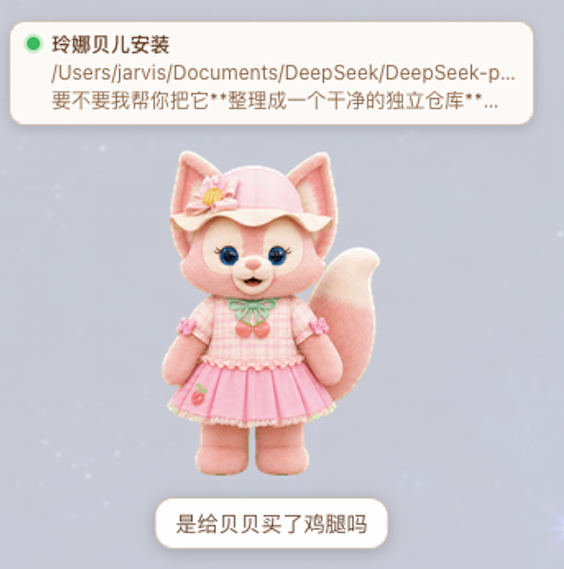
v2.3.0 adapts to the dsh 0.2.0-rc.2 desktop runtime (settings API migrated to the entry-config model; still compatible with 0.1.2-rc.1 — see the compatibility table below). Starting with v2.0.0 the status-card color semantics follow MAM: red = awaiting approval, yellow = running, green = done-unread, dark red + ⚠ = error/disconnected (v1.x used green/yellow/red/blue). See CHANGELOG.
Screenshots
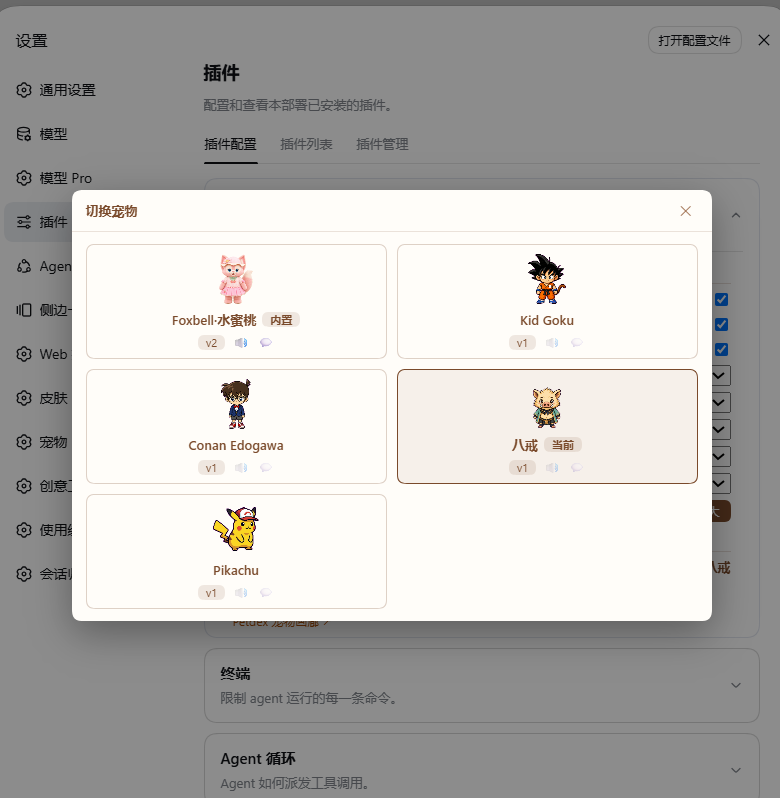
Hot swap — the built-in pet and imported pets are managed side by side; click to switch, effective instantly:
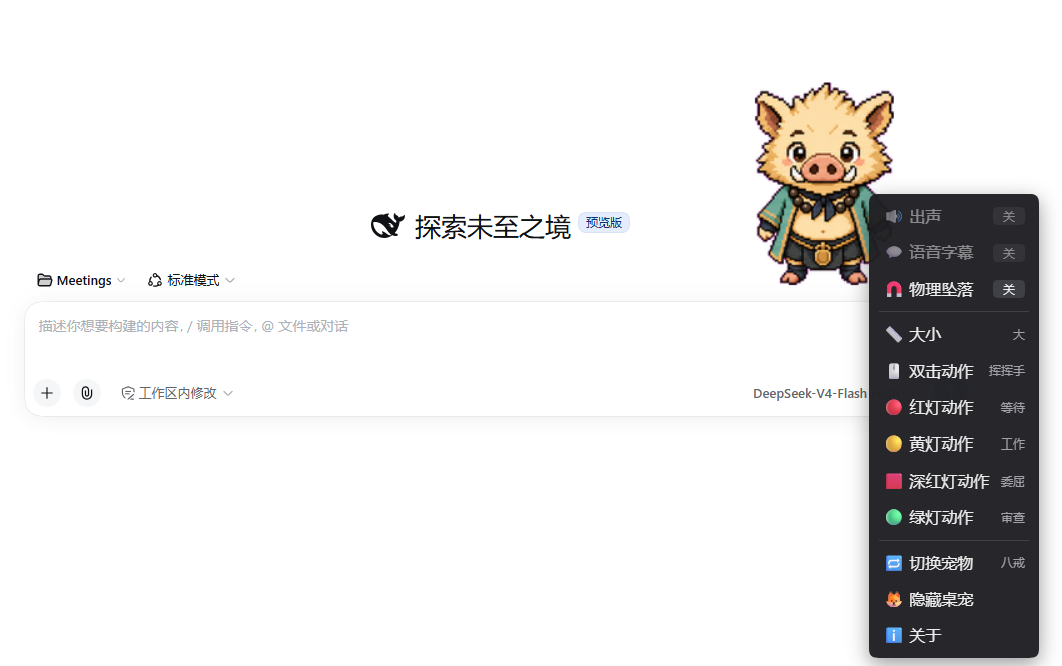
Right-click menu — toggles / size / five action bindings (live preview) / switch pet / hide / about:
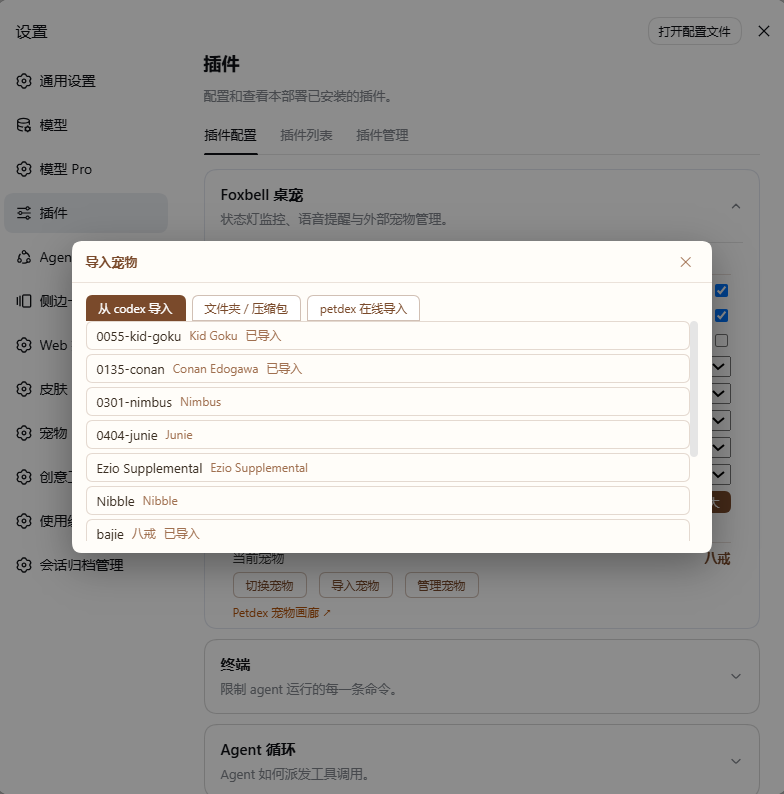
Four import sources — local folder / zip / Codex pet dir / Petdex online registry:
Features
- Multi-project status monitor — one card per active project above the pet's head (MAM color semantics):
- 🔴
approval— waiting for your approval (red) - 🟡
running— in progress (yellow) - 🟢
done— finished, unread (green; click = confirm & dismiss) - 🟥
error— turn failed / disconnected (dark red + ⚠ badge, clearly distinct from approval red)
- 🔴
- Click a card to switch sessions — opens that conversation (
sessions.open) and marks it read; error/done cards disappear once opened and relight on recurrence. - Voice alerts — completion plays the
donegroup, new approval playsapproval(10s throttle), errors playerror; subtitle = voice filename, timed to the audio. - Voice interactions — single-click: waves only (silent); double-click: speaks + the configured "double-click action"; card click: switches only (silent).
- State-driven animations (all 11 Codex V2 atlas rows; external v1 9-row sheets adapt at runtime) — priority chain: drag > transient action > task pose > look-around > idle; drag-direction run/jump, task poses (approval→waiting, running→working), idle 6s triggers a 16-direction look sweep.
- Drag physics — gravity fall on release (1400 px/s²), horizontal throw inertia (150ms sampling window), squash-and-bounce landing + a hop (toggleable); the viewport is the work area, with position memory and edge clamping.
- Right-click menu — 🔊 sound / 💬 subtitle / 🧲 physics toggles (auto-disabled with tooltips for pets lacking the capability), 📏 three size steps, five action-binding submenus (double-click / red / yellow / dark-red / green) with live preview, 🔁 switch pet (current pet checkmarked, click = hot-swap), 🦊 hide, ℹ️ about.
- External pet system (ported from MAM v0.3.0) —
- on-disk store
~/.dsh/foxbell-pet/pets/<id>/; manifest v2 (atomic write + one.bak); - 4 import sources: local folder / zip (host-side safe extraction: ≤100MB total, ≤200 files, path-traversal defense) / Codex pet dir
~/.codex/pets// Petdex online registry (petdex.dev — both listing and download proxied by the host half: domain allowlist, response size caps, 8s timeout); - unified import wizard: live pet-id validation (charset / length / reserved
foxbell/ duplicates / Windows reserved device names, enforced both client- and server-side), display name & description, subtitle toggle, voice-group editor (parallel duration probing; 1s < duration < 20s and ≤10MB per file; all four groups complete ⇒ "has voice"); - manage dialog: rename (id synced across folder & manifest), edit display name/description, per-group voice add/remove, subtitle toggle, safe delete (after confirmation the folder moves to
~/.dsh/foxbell-pet/.trash/— never hard-deleted), view folder path; editing the active pet triggers flash-switch protection; - hot swap: card-style list (built-in foxbell + all external pets) → activation takes effect instantly (sprite/voice/manifest hot-replaced, no page reload);
- activation guard: integrity check on plugin activation and every switch (sheet missing/changed, voices missing/changed/extra, manifest missing); issues ride the state snapshot and open a repair dialog (update manifest / switch back to foxbell / ignore / hide pet); never pops while the pet body is mid-interaction;
- voiceless pets: completion plays animation only, sound toggle disabled with tooltip; subtitle-less pets: no speech bubble.
- on-disk store
- Three scale steps (0.75 / 1 / 1.25) — applied to sprite, cards and menu as a whole (settings card and menu share the same config).
- Settings card (one card, two sections) — "Configuration" (sound/subtitle/physics, five action bindings, size) + "Pet management" (current pet, switch/import/manage buttons, Petdex entry); shares one config store with the right-click menu (localStorage + settings scope dual backend, persisted by the host to
~/.dsh/settings.yaml). - 🦊 show/hide switch — sidebar footer (same semantics as v1), persisted in localStorage.
- Error-code system — aligned with the MAM PetError table (50 host codes + 8 client-local codes); route errors are uniform
{code, params, detail}JSON, mapped to zh/en text by the plugin's internal dictionary and rendered inline in dialogs (browser language auto-detected; no harness locale dependency, no toasts).
Efficiency Dashboard (ported in v2.1.0)
The v1.4.0 efficiency-dashboard phase one, ported wholesale onto the v2 architecture: aggregated by the host half and delivered with the /state snapshot, zero always-on UI (the mini bar exists only while hovering). Usage is always pure tokens — never converted to money — presented in five metrics: request input / cache hit / hit rate / output / your input (est.). Since v2.4.0 the "incl. subagents" tag is a true statement: sub-agent and already-finished sessions join every token figure except the mini bar's "this session" row (latest main session) via the sessionQuery full-corpus collector (live sessions fold in memory; cold sessions replay once and cache).
- Pace dial (duration-posture engine) — the pet's pose follows the event timeline through tiers: intense / active / long-run (turn open but silent ≥3 min — guards against babysitting a hanging task) / idle / four loafing stages (turn closed but silent ≥15 min: resting → lounging → idling → dried-fish, progressively suppressing the idle look-around). Swapping animation variants does not change speed; a tier transition plays one short animation, and any new event resets immediately.
- Five-metric mini bar — hover the pet ≈0.5s and it appears: pace dial (current tier readout) + "today × · this session ×" five-metric usage + an "N awaiting approval / N running / N done" status line; its only clickable element is the trailing "Details »" drill button (the container still never intercepts clicks); it vanishes when the pointer leaves (right-click "🏷 Today's usage" summons it manually; close via outside click / ESC).
- Alert placards + dashboard sound chain — daily threshold
dayLimitTokensraises a placard "spent X today" once each at 80% / 100%; crossing amilestoneUnittoken milestone speaks one bubble line. Since v2.2.0 alert sounds follow the MAM four-group mechanism + built-in defaults: with all four pet voice groups present thegeneralgroup plays, otherwise a built-in synthesized chime (3 rotating) plays; TTS no longer takes part in dashboard alerts (ttsEnabledremains for spoken lines only). - Blackboard + 📖 limited-time entry — after a task completes, a "📖 Summary" entry appears next to the pet for a limited time (default 15s; 10/15/20 configurable) → clicking opens the summary board (sessions / turns / five-metric token ledger / top-3 tools / longest single turn / error count); it auto-dismisses after
boardTtlSec, and ✕ / outside click / ESC all close it; right-click "📊 Last summary" reopens it anytime. - Farewell on hide — hiding the pet dispatches a "Wrapping up today" board once, so the day ends with a report.
Two small enhancements: title blink — when an approval waits ≥N minutes (approvalFlickerMin) and the page is hidden, the tab title alternates with "🦊 approval waiting…", restored on approval or on returning to the page; age annotation — a gray "×s/×m" tail on each status-card line distinguishes "just happened" from "stuck for 5 minutes". Plus a right-click "🗂 Session overview" listing all conversations (status dots + click to jump).
All of this adds 12 new settings (paceEnabled / usageEnabled / summaryEnabled / ttsEnabled / dayLimitTokens / milestoneUnit / paceIntenseEvents / paceLongrunMin / paceLoafStartMin / approvalFlickerMin / summaryEntrySec / boardTtlSec), edited in the settings card as a draft with unified save (edits stage into a draft; save/discard applies them together; the card collapses on save).
Efficiency-dashboard interaction quick reference (one target, one action)
| Click / gesture target | The one behavior |
|---|---|
| Status card (single click) | Smart jump: with a pending approval → approval anchor; otherwise → session + mark read |
| 📖 summary limited-time entry | Open the blackboard; the entry then disappears |
| New right-click menu items | Today's usage → open mini bar manually; Last summary → open blackboard; session-overview item → smart jump |
| Hover ≈0.5s | Mini bar appears (only clickable element = the "Details »" drill button; gone when the pointer leaves) |
| Drag | Pure physics animation, carries no command (mini bar hides and hover detection suspends while dragging) |
| Mouse wheel | Never hijacked over the pet body or mini bar — scrolls the page through; the blackboard / menu scroll their own content |
| Right-click | Pet body only opens the menu (status card and floating layers have no custom right-click behavior) |
| ESC | Peels one layer at a time, topmost first (manual mini bar → blackboard → menu) |
| Blackboard vs mini bar | Mutually exclusive: while the blackboard is open the mini bar is replaced; it comes back once the blackboard closes |
Usage Dashboard (v2.2.0, three-level disclosure)
One data core, three levels of disclosure, each click going deeper: L1 mini bar → L2 blackboard → L3 main-column dashboard (plus a right-click “📈 Usage dashboard” shortcut). The host aggregates session-event usage once (by day / hour / route / tool) and serves it via the /state snapshot and an on-demand route; pure tokens, never money; performance-wise it uses last-event-fingerprint incremental caching + /state short-circuit + reduced polling when hidden, so idle overhead is near zero.
- L2 blackboard extras: after the five-metric rows it appends a 7-day sparkline, top-3 models, and an “Open full dashboard →” entry row; the blackboard anchors beside the pet (left first, flipping right on overflow) and replaces the mini bar while open.
- L3 dashboard (Codex++-style layout, occupying the main column): tabs [Last 5 hours | Last 7 days | Last 30 days | Custom ≤31 days] + “Copy text” / “Export image”; a range hero number plus this-week/last-week hit-rate comparison; five-metric grid; blue→purple gradient trend chart (hover tooltip / data points / peak / axis labels); model distribution progress bars (≤6 rows); 2×2 tool grid + top-5 tools; a caliber footnote at the bottom.
- Model / provider distribution (F05 settled): usage is booked per settled (turn, step) sample by
provider/model(same-slot replacements roll back, no cross-day pollution); the aggregation reconciles byte-for-byte with the session’s official tokenUsage totals across all four metrics. - Share & export: a 1200×675 PNG — title / hero / trend line / metric grid / model rows + the current pet sprite at the bottom (random or picked pose) + a smart quote bubble (rule pool with zh/en priority matching, or a custom template
{range}{tokens}{hitPct}{models}in settings); “Copy text” is the same data as plain text. - Dashboard sounds: alerts (daily threshold / milestone) play the
generalvoice group when all four groups are present, otherwise a built-in synthesized chime (served via/sounds/). - Three new settings: “Sidebar dashboard entry” (off by default; shows a dashboard icon in the sidebar when enabled), “Export quote”, “Export pose”. Note: on rc.2 the sidebar entry icon may not project (upstream child-slot lifecycle under investigation); the right-click menu and the blackboard chain are the verified entrances.
Requirements (compatibility)
| Component | Requirement |
|---|---|
| DeepSeek Harness (DSH) | ≥ 0.1.2-rc.1 (incl. the 0.2.0-rc.2 desktop runtime; both dsh web and the desktop profile work) |
| 0.2.x (0.2.0-rc.2) | ✅ adapted in v2.3.0: settings moved to the entry-config model (the volatile-root Config is the form, addressed by Loader entry id); the removed client settingsScope service / settings.plugin.item slot are replaced by a settings/describe+update RPC adapter + a settings.section registration |
| 0.1.x (0.1.2-rc.1+, incl. 0.1.5-rc.2) | ✅ compat layer falls back automatically: ctx.settings.installSection namespace registration (B2) and the settings.plugin.item card slot; the settingsScope.bind shape is served by the same RPC adapter |
| v1.x (rc.7/rc.8 era) | unsupported (legacy session.events / installSettingsSection / dsh-client-runtime were removed in rc.1; use plugin v1.3.0 there) |
Dependency layout (v2.3 root-cause fix):
@deepseek-ai/dsh-settingsis NOT a runtime dependency — the settings service always comes from the host runtime. Bundling a copy would shadow the runtime's built-in settings plugin row (hoisted profile installs) and crash the 0.2 desktop welcome flow (see CHANGELOG [2.3.0] C2).
Built-in assets ship with the package; external pet assets are user-imported.
Install (one click)
dsh plugin --profile web add github:jarvislee90s-dot/dsh-foxbell-pet#release
#release is the stable channel (the repo's release branch, updated only on version releases). To try work-in-progress changes, use github:jarvislee90s-dot/dsh-foxbell-pet#main (follows main, not guaranteed stable).
Pasting the GitHub repo homepage link (e.g. in the desktop app) also works: the repo's GitHub default branch is set to
release, so an address without a branch suffix resolves to the stable channel.
The
lib/build artifacts are committed with the repo, so the plugin works right after install with no local build;npm run buildis only needed when developing from source (see "Development").
Then restart dsh web and hard-refresh the browser (Cmd/Ctrl+Shift+R). The pet appears bottom-right, the 🦊 toggle beside Settings, and a "foxbell-pet" card in the settings page.
The pet reads built-in sprite/voices from the package's own
assets/directory; the external pet store lives in~/.dsh/foxbell-pet/(plugin-private, auto-created on first launch).
Install from local source (development)
To run the latest code in your local checkout (or to test your own changes immediately), install the source directory into your dsh profile as a link — the profile then loads the live directory, so after every change you only rebuild and refresh:
# 1) get the source and build (Node ≥ 20 + pnpm)
git clone https://github.com/jarvislee90s-dot/dsh-foxbell-pet.git
cd dsh-foxbell-pet && pnpm install
npm run build            # produces lib/ (what dsh actually loads)

# 2) link it into the web profile (run inside the plugin directory; auto-added to the boot list)
dsh plugin --profile web add .

# 3) start/restart dsh web and open the page (hard-refresh after install/updates)
Daily hot-reload loop:
npm run build:watch # keeps watching src/ and rebuilds lib/ on every change
- Client-only changes (
src/client/**): take effect on a page refresh; - Host-side changes (
src/host/**): require restartingdsh web; - Uninstall (keeps your source directory):
dsh plugin --profile web remove dsh-foxbell-pet.
A local-source harness checkout (
deepseek-harnessrepo,pnpm dsh web) works with the same link install; if an older copy is installed in the profile,add .replaces it with the local link.
启动 / 重启 dsh web(本地源码版)
本地源码版 harness 没有图形启停入口,dsh web 通常跑在后台终端里。两种重启方式:
# 方式一:自带脚本(在 deepseek-harness 仓库根目录,自动停旧进程→重启→打印新链接)
./dsh-web-restart.sh

# 方式二:手动(杀掉占用 3080 的进程后再起)
lsof -nP -iTCP:3080 -sTCP:LISTEN -t | xargs kill    # 停(若有)
cd <deepseek-harness 目录> && pnpm dsh web          # 前台起(Ctrl+C 停)
启动成功的标志是终端打出 dsh web: http://127.0.0.1:3080/?token=…;日志在 /tmp/dsh-web.log。
重启后记得硬刷新浏览器(Cmd/Ctrl+Shift+R)。
Usage
| Interaction | Effect |
|---|---|
| Drag | Move the pet anywhere (direction animations: run left/right, jump when lifted) |
| Release after drag | Gravity fall / throw inertia / squash-and-bounce + hop (disable via "Drop physics") |
| Right-click pet | Menu: toggles / size / five action bindings (live preview) / switch pet / hide / about |
| Single-click pet | Waves (silent) |
| Double-click pet | Speaks a random line + the "double-click action" (subtitle = voice filename) |
| Click a project card | Switch session + mark read (green card confirms & dismisses on click) |
| 🦊 button (sidebar footer) | Show / hide the pet |
| Settings card "Pet management" | Switch / import / manage pets, Petdex gallery entry |
Lights (MAM semantics): red approval · yellow running · green done-unread · dark red + ⚠ error/disconnected.
Voice groups
Four fixed groups under voice/ (built-in: assets/voice/ in the package; external: ~/.dsh/foxbell-pet/pets/<id>/voice/). The filename (minus extension) becomes the subtitle:
| Folder | Trigger | Notes |
|---|---|---|
general/ |
double-click | small talk (random, no immediate repeat) |
approval/ |
approval appears (red) | nagging lines, 10s throttle |
error/ |
turn error (dark red) | sulky lines |
done/ |
completion (green) | praise-me lines |
Running (yellow) is silent. Empty groups skip silently; a pet counts as "voiced" only when all four groups are complete.
Customization (external pets)
- Import: settings card → "Import pet" → pick one of four sources (folder / zip / codex / petdex link or search) → configure in the wizard (id / display name / description / subtitles / voice groups) → import → activate now.
- Asset spec: Codex V2 sheet
spritesheet.webp(8 columns; 11 rows 1536×2288 = v2, 9 rows 1536×1872 = v1, auto-detected at runtime), see docs/SPRITESHEET-CONTRACT.md; audio.m4a/.mp3/.wav/.ogg/.opus/.flac/.aac, 1–20s and ≤10MB each. - Keep the sprite, change voices: add/remove per group in the manage dialog, then "Save changes" (manifest backed up & updated automatically).
Development
npm install
npm run build      # esbuild: src/host → lib/index.js (ESM), src/client → lib/client.js (single-file iife)
npm run validate   # static checks (legacy checks + bundle purity / declaration parity / route prefix / versions / error-code table / built-in manifest)
npm run typecheck  # tsc --noEmit (client TSX)
npm test           # vitest (pure logic + real-tempdir pipelines + mocked fetch)
dsh-foxbell-pet/
├── assets/         built-in foxbell assets (sheet + 31 voices + v2 manifest pet.json)
├── lib/            published artifacts (main & ./client entries; esbuild output, committed)
├── src/host/       host half (plain JS: status aggregation/store/import/guard/route family)
├── src/client/     client half (TSX: pet body/menu/settings card/dialogs/error dictionary)
├── test/           vitest suites (real temp dirs, mocked fetch)
├── scripts/        build + validate + release + built-in manifest generator
├── docs/           sprite contract / QA checklist / screenshots / legacy design docs
├── demo/           standalone offline preview page
├── package.json  dsh.plugin.json  cordis.patch.yml
├── IMPLEMENTATION_NOTES.md   decisions / MAM alignment index / forward-risk assessment
└── README.md  README.en.md  LICENSE  CHANGELOG.md
Local dev install: dsh plugin --profile web add <repo path> symlinks the repo; after editing src/, run npm run build, restart dsh web and hard-refresh.
Releases
mainis the development branch and takes new code anytime; what external users get is thereleasebranch, fast-forwarded only at release time. The public install command points at#release(see "Install").To release: write the
[x.y.z]entry inCHANGELOG.md, then runnpm run release -- x.y.z # add --dry-run to validate without executingThe script: validates (on main, clean tree, in sync with remote, CHANGELOG entry present) → syncs package.json / dsh.plugin.json versions →
build + validate + test→ commits, tagsvX.Y.Z, pushes → fast-forwards thereleasebranch to that commit and pushes it.
License
Links
More in this category
PC2005-cloud/dsh-pet#dsh-pet★ 3496
Desktop pet for the DSH Web UI on Windows, macOS and Linux: 106 transparent animations in the browser overlay or a transparent always-on-top desktop window, throw-and-bounce drag physics with squash and particle scoring, a work-status bubble driven by live session events, self-talk and chat with persistent memory, balance display, meme-image bubbles, multiple pets on screen, and drop-in custom animations and pet packs.
Nagi-ovo/dsh-ads★ 682
Parody ads in 2005-Chinese-web style: sidebar banners, in-chat feeds, corner popups, and a close button whose hit area is smaller than it looks. All fictional.
vlln/whale-girl★ 375
Desktop pet (QQ-pet style): floats in the corner, draggable, feedable, playable.
yyh-001/dsh-meme★ 295
Chat meme stickers: text-only send, mood auto-send, QQ/WeChat-style picker, auto-learn, custom packs.
a86582751/dsh-nexttavern★ 191
NextTavern is a long-form roleplay plugin for DeepSeek Harness 0.1.7-rc.2 Web, with character-card import and creation, worldlines, worldbooks, layered long-term memory, keyword/semantic/hybrid retrieval, character agents, and card or novel export. SillyTavern character-card import is supported; v0.2.9 fixes distribution and installation.
Sutera-Diffusus/dsh-whale-musume★ 156
A whale-girl companion for DeepSeek Harness with 45 achievements, daily quests and weekly check-ins, three mini-games, 92 artworks, 620 dialogue lines, a growth journal, weather and festival reactions, per-tool work poses, cross-device save export/import (JSON file or migration code), accessibility mode and an optional MiMo TTS bridge. Data stays in the host localStorage with no telemetry. Verified on DSH desktop 0.2.0-rc.2; compatible with 0.2.1-rc.1/rc.2 and legacy 0.1.x web.
Community comments
Comments are public GitHub Discussions. Loading them connects to GitHub and Giscus; a GitHub account is required to post.