Metadata-first runtime profiler for DSH agents: turn/step traces, model and tool wall-time timelines, provider usage, retries, errors, and live or historical sessions.
Install
# from npm (prebuilt)
dsh plugin --profile web add dsh-devtools
# from GitHub (first run asks for allowBuilds approval — follow the hint, retry)
dsh plugin --profile web add github:izz-BLUE/dsh-devtools
Any plugin you install runs third-party code with your own permissions — it can read your files, use your credentials, and reach the network, and tool approvals don’t sandbox it. GitHub-sourced plugins also run build scripts at install time — pnpm blocks those until you allow them, so an install can stop with ERR_PNPM_GIT_DEP_PREPARE_NOT_ALLOWED or ERR_PNPM_IGNORED_BUILDS; dsh prints the exact key to add under allowBuilds in your profile’s pnpm-workspace.yaml, and the install works on the next run. Allowing a build is a trust decision: only install sources you trust, and pin a commit (github:owner/repo#sha).
README
This plugin publishes its README in Chinese only.
Metadata-first runtime profiler for DeepSeek Harness agents.
GitHub: https://github.com/izz-BLUE/dsh-devtools · Issues: https://github.com/izz-BLUE/dsh-devtools/issues
一个社区(community)插件:把会话的持久化事件日志折叠成 Agent Runtime Profiler, 在 Web GUI 的会话视图里以 DevTools 标签页展示每次模型调用(Step)与回合(Turn)的 执行事实——模型归属、延迟、工具调用、重试与回合结局。只读、不拦截、不修改任何请求。
本插件不是 DeepSeek 官方发布的插件;它基于官方 NPM SDK (
@deepseek-ai/*)开发,通过 DSH 的 cordis patch + profile 机制挂载。
1. What it does
公开版 0.1 提供的能力(全部来自对持久化会话事件的只读折叠):
- Runtime Profiler:一眼看出 agent 做了什么、哪里最慢、哪里异常
- Agent Turn / Step runtime trace:按回合与步骤还原 agent 执行时间线
- Step runtime timeline:同一回合内的 model / tool 时长条按同一时间轴缩放; 并行工具调用分 lane 表达并行,极短工具保留最小可见宽度(tooltip 显示真实值), 运行中的活动带 running 状态,失败工具带 error 标记
- Turn collapse / expand:进行中的 Turn 与最新 Turn 默认展开,较早 Turn 默认折叠; 折叠摘要展示 Turn 号、状态、步骤数、工具数与耗时;2 秒轮询刷新不会重置手动折叠状态
- Summary 三组:
- Execution:Turns / Steps(含 completed · running 计数)/ Tool Calls / Retries / Errors(step / turn / tool 三类错误独立统计)/ Interrupted / Aborted
- Performance:Model Wall / Tool Wall / Avg First Activity / Wall Time / Decode / Throughput
- Tokens:Input / Output / Cache Read / Reasoning / Cache Reuse
- model / provider attribution:每个 Step 标注调用当时的模型与提供商
- TTFT / first-activity:由
step/start到首个持久化 block-start 的时间戳派生 (UI 简称 Avg First Activity,tooltip 说明与 TTFT 的关系,不冒充 Provider 官方上报值) - Model Wall / Tool Wall:
assistantAt - startAt的模型侧 Wall 时间;tool/call -> tool/result的工具 Wall 时间(tooltip 说明含调用与结果之间的全部等待) - tool errors:结构化失败码(如
FS_NOT_FOUND、ABORTED)标记在单个工具上 - retry trace:
llm/retry事件出现时,按 Step 归属展示 retry/maxRetries/delay/code - provider-reported usage:input / output / cacheRead / reasoning tokens;
cache reuse =
cacheRead / (input + cacheRead)(内部派生指标,非 Provider 官方缓存命中率) - 回合结局:
completed/aborted/interrupted/error/max-tokens/blocked等turn/end.reason的正确映射;Turn 级结局与 Step 状态、工具错误分开统计 - trace completeness:顶部状态指示显示
Trace complete(低调绿色圆点); 发生 ring 淘汰时升级为橙色Partial trace · N earlier steps omitted, 不把截断后的页面伪装成完整历史 - live session 与 cold/history session:内存日志增量折叠;持久化会话从落盘日志重建
- subagent metadata:subagent 会话的 label / mode / agentModel
- hook trace:
hook/invoked|hook/result事件存在时展示执行耗时与错误标记; 无 producer 时显示语义准确的空状态(不暗示"没有执行任何 Hook")
以下能力不属于公开版 0.1,本版本不实现:mutation provenance、request diff、 prompt diff、context composition / context inspector、tool dispatch breakdown、 plugin token attribution。
2. Architecture
Durable Session Event Log
        |
        v
     Pure Fold
        |
        v
 Runtime Trace Snapshot
        |
        v
 /dsh-devtools RPC
        |
        v
 conversation.view / DevTools
- read-only:插件只消费已提交的会话事件,不注入、不拦截、不修改任何请求
- zero behavior modification:不改变 agent 的输入、输出或执行路径
- no request interception / no request mutation
- durable-events-first:live 会话直接折叠内存日志(增量、无克隆);
cold 会话经
sessionQuery从持久化日志重建并缓存(日志不再增长)
3. Privacy / Security
metadata-first by design:默认不读取、不保存、不通过 RPC 返回——
- prompt / system prompt 正文
- user message content
- assistant message content
- tool arguments
- tool result text
- API key / secret
RPC wire 只携带运行时 metadata:类型、时间戳、ID、名称、状态、usage 计数等必要字段。
有自动隐私测试(tests/fold.spec.ts 的 privacy 用例),并经过真实会话 E2E 的
RPC + DOM privacy audit(对 wire JSON 与渲染页面全量扫描 prompt / tool args /
tool result / API key 模式,无泄漏)。
4. UI
DevTools 通过 conversation.view slot 注册,位于标签页环的最右侧:
Chat | Trajectory | Context | DevTools
DevTools 拥有独立宽布局(不受聊天阅读宽度限制,自适应桌面/窄窗,小窗口自动单列), 并在高细节背景皮肤上使用主题 token 的半透明遮罩 + blur 保证可读性。
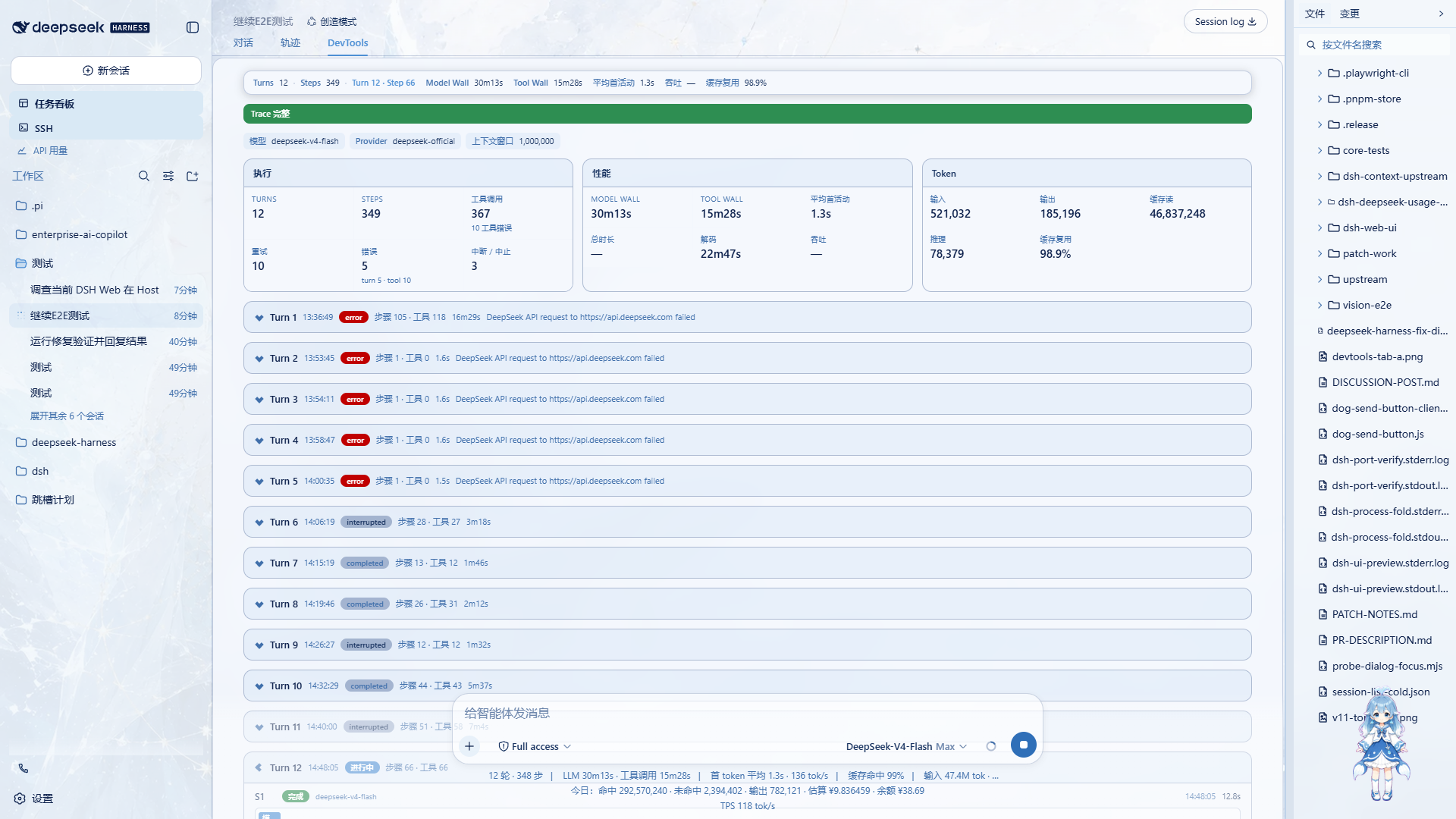
- Sticky runtime status bar:Turns / Steps / 当前 Turn·Step / Model Wall / Tool Wall / Avg First Activity / Throughput / Cache Reuse;窄屏自动隐藏次要指标
- Summary 三组:Execution / Performance / Tokens(见 What it does)
- 逐 Turn 卡片:结局徽章 + 步骤数 + 工具数 + 耗时,可折叠/展开
- Turn-level sticky timeline ruler:展开长 Turn 滚动时时间刻度保持可见, 与每 Step 的全局时间网格严格对齐(自适应 nice interval + tick 标签)
- 逐 Step 行:状态、模型、TTFT / model / decode / wall、usage、 runtime timeline 时长条、工具 chips、retry chips
- hook 执行表:有事件时展示,无事件时显示语义空状态
5. Installation
After npm publication (recommended)
一条命令安装(无需 clone 仓库、无需构建、无需手改 profile):
dsh plugin --profile web add dsh-devtools
其他 profile:
dsh plugin --profile <name> add dsh-devtools
启动:
dsh web
Local development / local installation
从本仓库以 file: 依赖安装(仅限开发调试):
# 1. 在仓库内构建
pnpm install
pnpm build

# 2. 加入 web profile(file: 依赖)
cd ~/.dsh/profiles/web
pnpm add "dsh-devtools@file:<本仓库绝对路径>"
# 并在 package.json 的 dsh.profile.bundles 追加 "dsh-devtools"

# 3. 重启 dsh web
6. Development
pnpm install
pnpm typecheck
pnpm test
pnpm build
pnpm pack
7. Known limitations
hook/invoked | hook/result:当前验证环境没有 producer,真实 hook 数据路径 未做 E2E;fold 对缺失与未配对事件做了防御性处理并有自动测试- real-world LLM retry E2E 尚未覆盖(需要 API 层故障才能真实触发); 自动测试已覆盖 retry 归属与字段展示语义
droppedStepsring truncation(默认保留最近 1000 个 Step)未做真实超长会话 E2E;自动测试覆盖裁剪与上报语义,UI 以 partial-trace 横幅如实展示- TTFT 定义为
step/start -> 首个持久化 block-start chunk的时间差 (非 Provider 官方上报的 TTFT) - Tool Wall 本质为
tool/call -> tool/result的 wall time,包含调用与结果之间 的全部等待;不拆分 queue / dispatch / execution(属未来版本) - cache reuse 为内部派生指标
cacheRead / (input + cacheRead), 不是 Provider 官方缓存命中率 - 公开版 0.1 不做 request mutation provenance / tool dispatch breakdown(属未来版本)
8. Compatibility
Verified with DeepSeek Harness v0.1.0-rc.6(npm 版,web profile 挂载实测;
真实会话 E2E 通过)。其他版本未验证。
License
BSD-3-Clause(见 LICENSE)。
Links
More in this category
yjh051108/dsh-routing-suite★ 7003
One repository, three parts: a runtime injector for DSH plugin packages (inject, hot-reload, unload, promote a dev staging tool to the front, route self-heal, plus a settings-page plugin manager that lists, unloads and drags folders in to internalize), a task-aware reasoning-mode router agent preset (router-standard / router-spec / router-react), and a graded two-level task protocol whose six tools (commit_star, lock_stage, revise_do, edit_plan, mark_task, redteam_verdict) pin task state to disk. The injector implementation ships in-tree, so the install carries its own behaviour rather than a dependency list.
strukto-ai/mirage#dsh★ 3666
Swaps the filesystem and bash providers for a mirage virtual workspace: file tools and shell commands run over mounted resources (RAM, S3, Redis, Slack, Gmail, Notion, Postgres) instead of the host disk, with per-mount read/write/exec modes, per-command sandbox routing (monty, pyodide, quickjs in process; docker, e2b, daytona remote), and installed CLIs (git, gh, slack, linear, ntn, gws, or one you register) as head words in the virtual terminal.
hust-open-atom-club/oh-dsh★ 325
Community distribution: TUI, desktop, and Web UI as one bundle with layered installation.
weijiafu14/pi2dsh★ 206
Pi Host ABI compatibility engine: after one install, unmodified Pi extensions from npm mount as native DSH plugins with `dsh plugin add <pi-package>`. Verified end to end on stock DSH with pi-mcp-adapter (full MCP manager: OAuth, resources, prompts, MCP Apps, elicitation, sampling), @tintinweb/pi-subagents, pi-code, pi-hermes-memory and pi-background-tasks; `pi2dsh inspect` reports a package's compatibility before installing.
lire1131/dsh-undo-savepoint★ 166
Undo/redo & rollback system for DSH: every config change is auto-snapshotted; undo/redo/restore to any version from the WebUI or the offline CLI/GUI tools (works even when DSH fails to boot).
Fishquito7/dsh-skill-mcp-panel★ 155
Manages DSH skills and MCP servers from the web settings: skill cards with hot enable/disable, workspace scopes, groups, batch migration and drag-and-drop import, plus stdio/HTTP MCP CRUD with connection tests, secret redaction and the unified dsh-panel CLI.
Community comments
Comments are public GitHub Discussions. Loading them connects to GitHub and Giscus; a GitHub account is required to post.