Bilibili-style danmaku overlay for the DSH Web chat area: scroll, top and bottom tracks driven by agent events, three preset packs, optional LLM-generated comments, a draggable control ball, per-session pools with replay, and a settings card.
Install
# from npm (prebuilt)
dsh plugin --profile web add dsh-livechat
# from GitHub (first run asks for allowBuilds approval — follow the hint, retry)
dsh plugin --profile web add github:huashenglian/dsh-livechat
Any plugin you install runs third-party code with your own permissions — it can read your files, use your credentials, and reach the network, and tool approvals don’t sandbox it. GitHub-sourced plugins also run build scripts at install time — pnpm blocks those until you allow them, so an install can stop with ERR_PNPM_GIT_DEP_PREPARE_NOT_ALLOWED or ERR_PNPM_IGNORED_BUILDS; dsh prints the exact key to add under allowBuilds in your profile’s pnpm-workspace.yaml, and the install works on the next run. Allowing a build is a trust decision: only install sources you trust, and pin a commit (github:owner/repo#sha).
README
dsh-livechat
Bilibili-style live-chat danmaku overlay for DeepSeek Harness (dsh) Web.
Watch your agent work while a crowd of floating comments drifts across the conversation area — preset banter, optional LLM-generated quips, and your own messages too.
中文 · English
Installation · Features · Module docs · Architecture
Installation
The plugin is a bundle: it carries its own cordis.patch.yml and self-activates — one command, no manual patch editing.
# From a local directory
dsh plugin --profile web add ./dsh-livechat

# From npm (prebuilt — skips the allowBuilds approval)
dsh plugin --profile web add dsh-livechat

# From GitHub
dsh plugin --profile web add github:huashenglian/dsh-livechat

# From a packed tarball (pnpm pack / npm pack)
dsh plugin --profile web add ./dsh-livechat-0.2.0.tgz
Restart dsh web, then open http://127.0.0.1:3080. The danmaku overlay and a floating control ball appear over the conversation area.
[!NOTE] The bundle ships its own
cordis.patch.ymlthat self-activates the plugin (insert id: livechat). Do not add a duplicateinsertentry in your profile patch — a second insert throwsduplicate loader entry id: livechatat boot.
If you don't have the dsh CLI yet, you can run the web server directly:
npx @deepseek-ai/dsh web
Quick health check
curl http://127.0.0.1:3080/api/danmaku/health
# {"ok":true,"name":"dsh-danmaku","version":"0.6.14"}
What it does
When the agent sends a message, finishes a reply, calls a tool, or completes a task, a burst of danmaku floats across the conversation column — just like watching a livestream. Preset packs cover general / coding / casual vibes, and an optional LLM generates fresh, context-aware quips on a throttle. A draggable ball gives you quick controls; a settings card tunes everything.
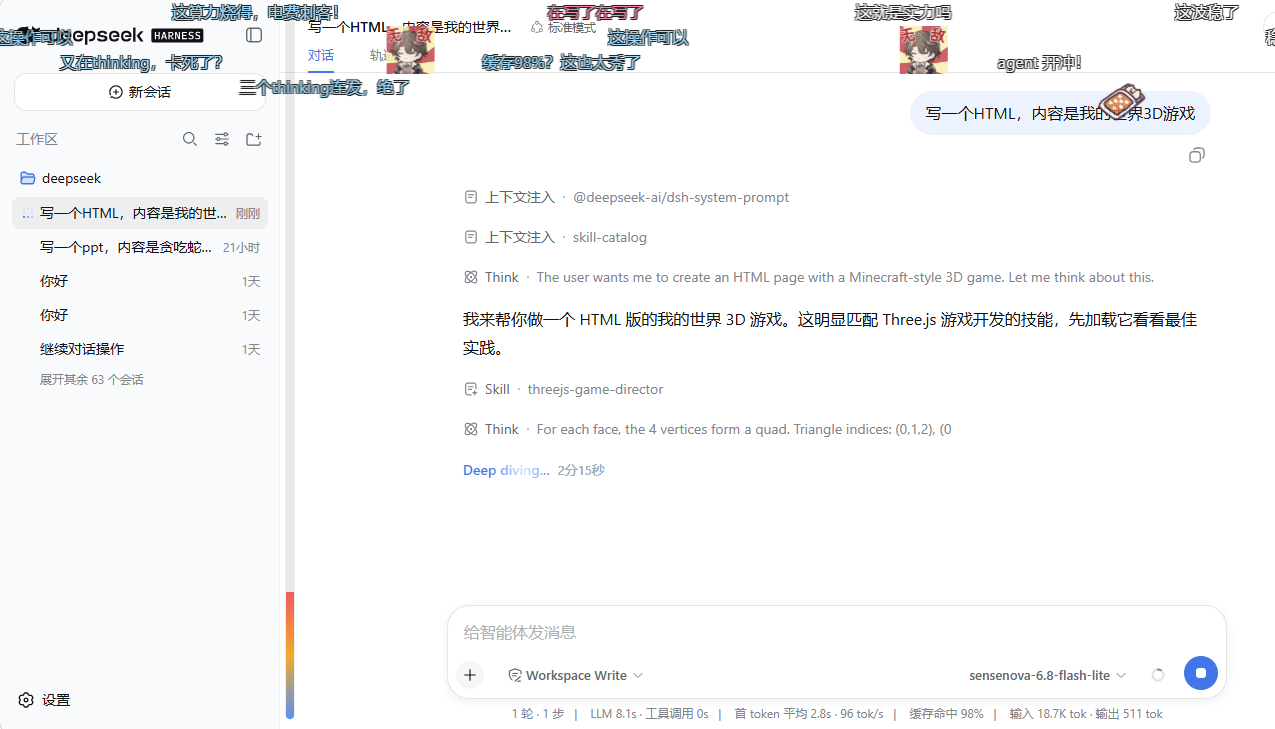
Live danmaku drifting over the conversation area while the agent works — multi-track, color-weighted, with the floating control ball (top-right).
Features
| Module | What it covers | Doc |
|---|---|---|
| Overlay & rendering | shell.overlay mount, DOM renderer, multi-track collision avoidance, anti-occlusion fade, render-backend chain |
overlay-and-rendering.md |
| Presets & LLM | Three preset packs, event-triggered sampling, fatigue dedup, a preset-feature master switch (off = LLM only), optional LLM generation with smart/interval/tool-call wake modes, style templates | presets-and-llm.md |
| Interaction | Draggable control ball, hover-pause, click-for-detail (copy / block / delete), user-sent danmaku, heat bar, welcome & task-done effects | interaction.md |
| Session pools | Per-session .jsonl danmaku pools, history replay with decay + like-boost, archive/restore, in-app pool editor |
session-pools.md |
| Gift effects | Three-pane modal (gift library / asset library / config; draggable dividers with persisted widths), left-column search + one category dropdown (bilibili / custom, both levels in one popover), center toolbar (room-id extract + import ▾ + icon size + new folder + clear assets), assets usable as soon as added (nothing to bind), card-click effect position (click the grid's blank area to deselect), basics row for global/asset animation size, "+"/red "×", 3 default gift cards (master switch off by default, zero room ids) | gift-effects.md |
| Configuration & API | Settings card UI, every config field with defaults/range, full HTTP API reference | configuration.md |
Highlights
- Three layouts: roll (scroll), top-fixed, bottom-fixed — weighted per-config
- Anti-occlusion: overlay dims while you read, brightens when the crowd gets loud
- LLM with safe fallback: generation fails → silent preset fallback, no error popups (no fallback once the preset master switch is off — LLM only)
- AI-only per-session memory: only LLM comments are cached/replayed and likeable; presets stay live-generated, and deleted sessions clean up automatically
- Chromium-first: tuned for Edge / Chrome;
translate3d, page-hiddenpause, on-screen cap - Paused items stay: hover/detail-locked danmaku remain on screen until they resume and leave the range
- Danmaku off = plugin off: turning off 启用弹幕 stops every danmaku, gift effect and gift tip, and deletes a playing gift animation immediately; gift effects keep their own
giftEnabledgate - Config survives restarts: every save writes a local mirror (
$DSH_HOME/danmaku-config.json) plus a minimaldanmaku:section insettings.yaml; boot resolves mirror → settings → defaults, so a restart never resets your setup - Sessions by name: the pool editor labels each pool with the real dsh session title instead of a truncated session id
Recent updates
Full version history lives in
docs/version-history.md. Highlights of the 0.6.x line:
| Version | What changed |
|---|---|
| 0.6.14 | Privacy + emoji rendering fixes (local, unpublished): ① the danmaku LLM can no longer read user secrets — session text, thinking snippets, tool names, warnings and usage are run through redactSecrets() at ingestion (sk-/rk-, GitHub/Slack/AWS/Google keys, JWTs, Bearer, apiKey=…/token: …/密码:…, PEM private-key blocks, 32+ hex / 40+ base64 blobs, C:Users<name>, /home/<name> → [已隐藏]), and buildLlmPrompt redacts every dynamic field again as defence in depth; trigger previews are masked too. ② Emoji keep their own colours on the non-DOM backends (webgl2 / webgl2-worker) — text was baked white and tinted from t.r/t.a, but a colour-emoji glyph is a bitmap that ignores fillStyle, so it came out in the danmaku colour and partly hollow; lines containing emoji now bake their real colour and use the vSc keep-baked-colour branch, while text-only lines keep the shared white bake + per-instance tint (atlas reuse unchanged); ③ the floating quick panel's number field can exceed its slider (sliderField gained numMin/numMax) — max-on-screen keeps the 5–80 slider but the input accepts the settings card's 1–200, with the thumb parked at the end, so raising a value no longer needs the full settings card; ④ full-screen danmaku: the track count is no longer hard-coded to 16 — it is floor(height / lineHeight) per layout (ceiling 64), and row choice is now the Bilibili algorithm, per layout: roll/reverse take a random enterable row inside the live band (candidates are the enterable rows of the band; the band only grows — between its first two free rows — when nothing inside it can take the line, so it stays contiguous with no holes, yet rows are not reused in fill order and never form parallel diagonals; a row becomes reusable once its predecessor has travelled 0.25 of the viewport, so each row holds ~3 lines; box width + gap + catch-up prediction means no overlap), while top hugs the top edge and bottom hugs the bottom, stacking row by row. The rate budget is 3/6/8/10 lines per second (density 1–2 / 3–5 / 6–8 / 9–10), but one line per tick, and the interval is never shorter than what the current band can absorb (rows / row-reuse cycle) — a small display area slows down automatically instead of dropping spawns and bunching the survivors into waves; the GPU instance batch went 48 → 200 to match the max-on-screen ceiling (anything beyond was silently not drawn); density ceiling 5 → 10, and max-on-screen is clamped 1–200; ⑤ settings-card section dividers are dashed → solid and coloured with color-mix(… 28%) of the theme text colour (measured 1.29:1 → 2.43:1 on the dark card), with the whole-element opacity:.85 removed |
| 0.6.13 | The per-line cap is now a real, configurable hard cap — five pool/parse paths used to hard-code 48 and silently cut longer text, with no way to raise them; new contentMaxChars (8–2000, default 200) is what the Basics section's per-comment char cap and the floating quick panel edit, and pool writes / likes / rewrites / LLM parsing all clip to it; the LLM section keeps "LLM max chars" (styleMaxChars, default 24 — prompt text only, clips nothing); the Text/List choice is now a global, persisted preference (dsh-danmaku-preset-view in localStorage — survives pack switches, reopening the editor and restarting dsh; packs over 500 rows still open in list to avoid a 1 MB textarea); the session pool is now LLM-only — only source:'ai' entries are cached/replayed and likeable, presets and user-sent text are never persisted, and liking a preset is a no-op (legacy rows stay on disk but are filtered on read) |
| 0.6.0 | Gift module UX rework: single-entry modal (asset warehouse / effect position / basics / test), 3 default gift cards |
| 0.6.1 | Weight edits apply immediately + refresh-write failures reported |
| 0.6.2 | Floating-ball out-of-bounds clamping fixed — a persisted position can no longer hide the ball |
| 0.6.5 | Gift modal rebuilt as three panes: draggable dividers with persisted widths, asset library moved to a center toolbar panel |
| 0.6.6 | Gift modal polish: fixed-height cards, elastic trigger-row slider, import merged into one card |
| 0.6.7 | Asset-card selection highlight + master-switch gating, render backend defaults to auto per client, dark-theme native select popup fix, animation / icon size, fixed danmaku leaking into the titlebar after applying a display area |
| 0.6.8 | Three-backend window resize adaptation, viewport-ratio floating-ball repositioning, desktop titlebar exclusion |
| 0.6.9 | Settings "More" menu: reset all config / clear all caches (gift assets are restored to the defaults: builtin assets + default gift cards); the "More" popover shares the settings-window background and follows the theme; gift library = search on the LEFT + one category dropdown on the RIGHT (both levels in ONE popover: bilibili / custom + 金瓜子 / 银瓜子) + assets are usable as soon as they are added (nothing to bind — triggering and position both hang off the asset); draggable custom effect position (left-mid / right-mid / custom); clicking the grid's blank area drops the selected card; turning off 启用弹幕 (danmaku) turns off the plugin (no danmaku of any kind, no gift effects, no gift tips; a playing gift animation is deleted immediately), giftEnabled still being the gift module's own gate; gift tip danmaku bypass the onscreen soft cap and only fire after the effect really mounts; pop-menu viewport clamping, second resize path merged |
| 0.6.12 | Preset pack editor: dual view + file import (local change, not yet published): the editor title row is now three sections — Import | Text / List — and packs with more than 500 rows open straight into the list view (so a 22k-line pack never degrades into one ~1MB textarea). The list view has a search bar (filtering spans every page), per-row checkboxes, a per-row ×, a bottom 「+ Add entry」 button, a pager and a page-size field (dsh-danmaku-preset-page-size in localStorage, default 50, clamped 10..500). Select-all only selects the current filtered result (the button reads 「Select all filtered (N)」), and emptying a row never deletes it — the empty row is kept and outlined in red, removable only via × or Delete selected, because auto-deleting would shift every later selected index and delete the wrong rows. The new Import button accepts .txt / .csv / .tsv / .json / .jsonl / .ndjson / .xml (bilibili <d> danmaku); the new host route POST /api/danmaku/presets/import parses it (cap 16 MB, covering file + existing entries combined), dedupes with trim → NFC → exact comparison (case-sensitive) and appends to the end of the pack, never overwriting existing lines; the result is reported as added / existing / skipped. Import and editing both touch the draft only — the footer Save is still the single writer |
| 0.6.11 | The retired gift-binding (giftBindings) legacy logic is deleted outright: the field had no write path since 0.6.9's「即加即用」 rework; this release removes it together with its three DEFAULTS entries, the normalization branches in both clampGiftConfig twins, the supporting constants, and the one-shot boot migration migrateGiftPositions. No behaviour change — trigger candidates have always been the assets in the library with weight > 0 (add to the middle column = enable, remove = disable) and the effect position has always lived on the asset manifest. The binding-clamp tests were removed with the field; the same contract stays covered by the asset-side itemPosition / setPosition tests |
| 0.6.10 | Every feature switch is now a sliding toggle (ball quick panel / settings card / gift modal — track + knob animation, disabled state dimmed); each session card in the pool editor gets an × delete button — one click opens a confirmation, and confirming deletes ONLY that session's live + archive danmaku cache (other sessions untouched; DELETE /api/danmaku/pool/session); fixed the settings-card pool row showing a hardwired 「活跃 0」 (it used to read stats for a nonexistent probe session — it now reads the real session list, live / archive are true entry counts, and the row refreshes when the pool editor closes); the 「弹幕 Live Chat」 footer Save is now the single writer for every sub-window — the preset pack editor lost its own Save button and only edits the draft, and the only ways back are the footer Undo or closing that window; deleting a preset pack is staged before it is applied (confirmation removes it from the draft only; the footer Save is what makes it real, and a deleted pack stops being sampled immediately); the More menu entries are renamed Reset all parameters / Reset everything (each confirmation states its own scope); fixed the laggy settings-card left nav (the section flash forced a full relayout per element, blocking the click for 2-4s before scrolling began — now one relayout, scrolling starts within 36-73ms) |
Earlier milestones also include the emoji library (imports / weights / manifest), the display-area editor, advanced danmaku (reverse scroll), and the optional LLM smart / interval / tool-call wake modes.
Desktop support
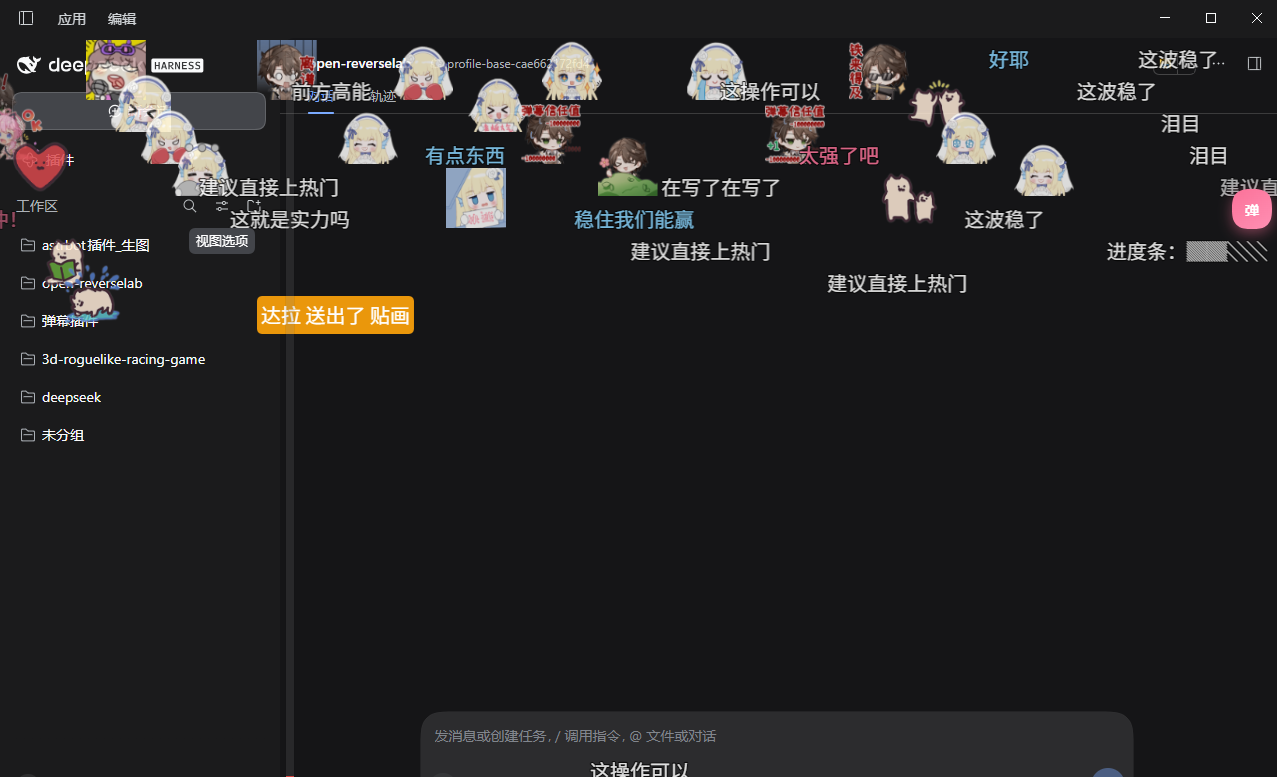
Since v0.6.8 the plugin officially supports the DeepSeek Harness desktop app (Electron):
- The floating ball never enters the Windows titlebar strip (
--dsh-windows-titlebar-heightexclusion); - The danmaku display area adapts to window resizes;
- Other 0.6.8 behaviors this round: after a resize, on-screen danmaku keep their original coordinates and finish their run (new danmaku are born at the new size); the floating ball is repositioned by viewport ratio (clamping takes precedence over ratio, with a one-shot migration of legacy pixel records).
Architecture
dsh-livechat/
├─ package.json              # dsh.bundle + dsh.client declaration
├─ cordis.patch.yml          # self-activating bundle layer (insert id: livechat)
├─ lib/
│  ├─ index.js               # Host: settings namespace, session/event ring, HTTP routes, optional LLM
│  ├─ client.js              # Client: shell.overlay layer + settings card + DOM renderer + drag ball
│  ├─ presets.js             # Shared: preset packs, sampling, track-collision pure functions
│  └─ emoji-lib.js           # Emoji library: folders, imports (git/zip), weights, manifest
├─ tests/presets.test.js     # unit tests (node --test)
├─ docs/                     # module documentation (this README links out)
└─ assets/                   # demo screenshots & cover art
- Host (
lib/index.js): registers thedanmakusettings namespace, observessession/eventinto a trigger ring buffer, serves config/trigger/LLM/pool HTTP routes, and optionally generates danmaku via a configured LLM provider. - Client (
lib/client.js): a self-containedwindow.__ModuleLoader__factory — mounts apointer-events:noneoverlay onshell.overlay, renders danmaku via DOM (translate3d), runs the drag ball, the settings card (settings.plugin.item), and the pool editor. - Shared (
lib/presets.js): preset packs, weighted sampling, layout/color picks, and track-collision checks — all pure functions, unit-tested.
The renderer interface aligns with the design doc (参考文档/danmaku-renderer-design.md). First release ships the L5 DOM backend; the architecture reserves a drop-in upgrade path to WebGL2 / Worker+WebGL2 without touching the business layer.
Test
node --test tests/presets.test.js
Uninstall
dsh plugin --profile web remove dsh-livechat
This removes the dependency and the bundle entry. If the server is still running, uninstall also wipes pool cache (~/.dsh/danmaku-pools/). You can also clear all pools from the pool editor’s red Clear all pools button.
License
MIT
Links
More in this category
PC2005-cloud/dsh-pet#dsh-pet★ 3496
Desktop pet for the DSH Web UI on Windows, macOS and Linux: 106 transparent animations in the browser overlay or a transparent always-on-top desktop window, throw-and-bounce drag physics with squash and particle scoring, a work-status bubble driven by live session events, self-talk and chat with persistent memory, balance display, meme-image bubbles, multiple pets on screen, and drop-in custom animations and pet packs.
Nagi-ovo/dsh-ads★ 682
Parody ads in 2005-Chinese-web style: sidebar banners, in-chat feeds, corner popups, and a close button whose hit area is smaller than it looks. All fictional.
vlln/whale-girl★ 375
Desktop pet (QQ-pet style): floats in the corner, draggable, feedable, playable.
yyh-001/dsh-meme★ 295
Chat meme stickers: text-only send, mood auto-send, QQ/WeChat-style picker, auto-learn, custom packs.
a86582751/dsh-nexttavern★ 191
NextTavern is a long-form roleplay plugin for DeepSeek Harness 0.1.7-rc.2 Web, with character-card import and creation, worldlines, worldbooks, layered long-term memory, keyword/semantic/hybrid retrieval, character agents, and card or novel export. SillyTavern character-card import is supported; v0.2.9 fixes distribution and installation.
Sutera-Diffusus/dsh-whale-musume★ 156
A whale-girl companion for DeepSeek Harness with 45 achievements, daily quests and weekly check-ins, three mini-games, 92 artworks, 620 dialogue lines, a growth journal, weather and festival reactions, per-tool work poses, cross-device save export/import (JSON file or migration code), accessibility mode and an optional MiMo TTS bridge. Data stays in the host localStorage with no telemetry. Verified on DSH desktop 0.2.0-rc.2; compatible with 0.2.1-rc.1/rc.2 and legacy 0.1.x web.
Community comments
Comments are public GitHub Discussions. Loading them connects to GitHub and Giscus; a GitHub account is required to post.