When enabled, exchanges the running process's launch token for a browser-session cookie at a configurable public URI (default /trustme), so a first visit needs no ?token= in the URL.
Install
# from npm (prebuilt)
dsh plugin --profile web add dsh-uriauth
# from GitHub (first run asks for allowBuilds approval — follow the hint, retry)
dsh plugin --profile web add github:hsushjk/dsh-uriauth
Any plugin you install runs third-party code with your own permissions — it can read your files, use your credentials, and reach the network, and tool approvals don’t sandbox it. GitHub-sourced plugins also run build scripts at install time — pnpm blocks those until you allow them, so an install can stop with ERR_PNPM_GIT_DEP_PREPARE_NOT_ALLOWED or ERR_PNPM_IGNORED_BUILDS; dsh prints the exact key to add under allowBuilds in your profile’s pnpm-workspace.yaml, and the install works on the next run. Allowing a build is a trust decision: only install sources you trust, and pin a commit (github:owner/repo#sha).
README
This plugin publishes its README in Chinese only.
DeepSeek Harness(DSH)插件,给 DSH Web UI 一个固定的免 token 入口,插件装好后处于关闭状态,需在设置里手动开启
为什么需要它
dsh web 的鉴权是「一次性引导凭证 + 长期 cookie」:
- 每次启动现生成一个随机 launch token,只打印在日志里:
dsh web: http://<host>:<port>/?token=<随机串> - 带着 token 访问一次根路径
/,服务端回303+Set-Cookie: dsh-auth-<id>=…; HttpOnly; SameSite=Strict(30 天) - 之后靠 cookie 通行
dsh web 也没有关闭鉴权的开关,遇到这些场景只能回日志里翻 token:
- 换浏览器、清 cookie、无痕窗口
- 换端口、换访问地址(cookie 绑定 authority)
- 另一台机器第一次访问
- 每隔 30 天 cookie 过期
该插件把「token → cookie」这一步做进服务端进程内:入口每次请求现读当前进程的 token,所以服务重启后入口依然有效,设置一次长期使用
因为入口等价于「把机器交给拿到链接的人」,它默认关闭:装好插件不会监听任何新路径,必须由人在设置页开启,并先读完一段警告再确认
安装
插件安装在 DSH 的 profile 里(下例为 web profile)
# 1) 克隆到 ~/plugins
git clone https://github.com/hsushjk/dsh-uriauth.git ~/plugins/dsh-uriauth

# 2) 装到 profile
cd ~/.dsh/profiles/web
pnpm add file:~/plugins/dsh-uriauth
3)把 dsh-uriauth 追加到 ~/.dsh/profiles/web/package.json 的 dsh.profile.bundles:
{
  "dsh": {
    "profile": {
      "bundles": [
        "@deepseek-ai/dsh-web-app",
        "dsh-uriauth"
      ]
    }
  }
}
4)重启 DSH
使用
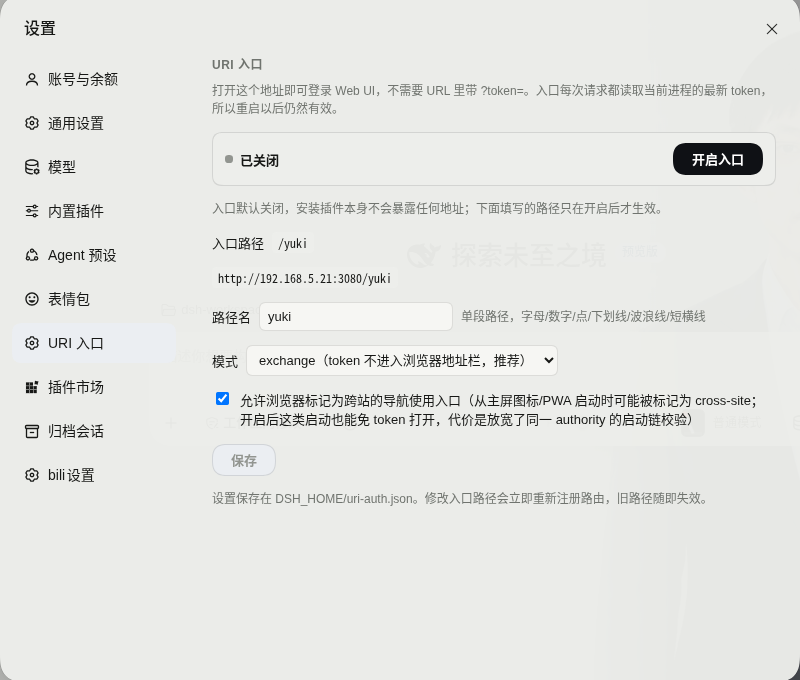
设置 → URI 入口 → 开启入口 → 读警告 → 确认开启
配置文件
设置文件 <DSH_HOME>/uri-auth.json:
| 字段 | 默认值 | 说明 |
|---|---|---|
enabled |
false |
入口总开关,false 时不注册任何入口路由(路径返回 404),改为 true 需在设置页确认警告,或调用 API 时带 "confirm": true |
entry |
trustme |
入口路径名(单段),仅允许字母、数字、.、_、~、-,长度 1–64,api、plugins、assets、connect、favicon.ico、index.html、__uriauth 被保留 |
mode |
exchange |
exchange:token 不进入浏览器地址栏(推荐),redirect:302 到带 token 的 URL(兼容模式,token 会留在访问记录里) |
allowCrossSiteNavigation |
false |
允许被浏览器标记为跨站/PWA 启动的导航使用入口 |
设置页的修改会写回设置文件,删除该文件即回到默认值(包括关闭开关)
安全建议
- 只在可信网络内使用,若需要暴露到公网,请在前面套一层真正的认证(反代 basic auth、VPN、Cloudflare Access 等)
- 需要「用户名 + 密码」登录而不是「固定 URL」,请改用认证网关类插件,本插件不提供账号体系
兼容性
- 依赖 Host 侧的
webServer与connection服务,使用requestRejection/authenticatedUrl/authorizeIndex这些既有 API - 开发与验证环境:
@deepseek-ai/dsh0.2.1-rc.5、Node 22+ - 前端半边按
dsh.client模块格式加载(loader id 必须等于包名dsh-uriauth),注册一个settings.section
Links
More in this category
kenryu42/cc-safety-net★ 1900
Pre-execution guard that blocks destructive Git and filesystem commands and access to secrets such as SSH keys and .env files before a tool call runs.
ADWMC/helm-d#helmd★ 984
Security-analysis plugin for DeepSeek Harness: 33 tools spanning six security domains, evidence/reporting and toolbox, plus the case lifecycle, routing and tool ledger; a session-bound case workflow with an evidence chain, E-id validation and reproducible findings; 362 on-demand references; three hot-swappable persona profiles; and a four-tab workbench (armor / case / intercept / about) with case-state recovery after context compaction.
toby-bridges/api-relay-audit★ 904
Runs local security audits of AI API relays and LLM proxies from DeepSeek Harness, producing Markdown reports for prompt injection, model substitution signals, tool-call rewriting, error leakage, stream integrity, and profile-gated Web3 risks.
SeaOf0/dsh-redteam-model★ 807
Authorized-security DSH collection: nine work modes (redteam coordinator, pentest, code audit, binary analysis, attack-defense, AV evasion, incident response, cloud security, CTF solving) and fifteen runtime plugins, managed from a settings page with one-click deploy, install, update and uninstall.
howmp/dsh-pentest★ 616
Authorized pentest mode for DeepSeek Harness — exploration chain, assets and findings with a Web view.
PerryLink/dsh-auto-review★ 244
Second-model auto-review on the approval answerer chain: a read-only reviewer subagent returns structured allow/deny verdicts with reasons, fail-closed by default.
Community comments
Comments are public GitHub Discussions. Loading them connects to GitHub and Giscus; a GitHub account is required to post.