Talk to Excel in DeepSeek Harness: create, edit, repair, and verify spreadsheets by conversation, with automatic formula health checks after every edit.
Install
# from npm (prebuilt)
dsh plugin --profile web add dsh-excel-chat
# from GitHub (first run asks for allowBuilds approval — follow the hint, retry)
dsh plugin --profile web add github:hccccc01333/dsh-excel-chat#path:/bundle
Any plugin you install runs third-party code with your own permissions — it can read your files, use your credentials, and reach the network, and tool approvals don’t sandbox it. GitHub-sourced plugins also run build scripts at install time — pnpm blocks those until you allow them, so an install can stop with ERR_PNPM_GIT_DEP_PREPARE_NOT_ALLOWED or ERR_PNPM_IGNORED_BUILDS; dsh prints the exact key to add under allowBuilds in your profile’s pnpm-workspace.yaml, and the install works on the next run. Allowing a build is a trust decision: only install sources you trust, and pin a commit (github:owner/repo#sha).
README
简体中文 | English


A DeepSeek Harness plugin for working
on Excel in plain language. Say "add a margin formula in column D, bold the header, freeze
the first row, add a filter" and the agent calls excel_operate to do it. Every edit is
followed by an automatic formula check, and you can also ask it to "find what's wrong
with this sheet" and have it repaired deterministically. It all happens in the
conversation — no Excel UI to learn.
Two things that set it apart
1. It checks the formulas after every edit, instead of declaring victory.
The annoying part of Excel is not writing a formula — it is a formula being silently
broken: a fill handle that shortens a range, a row insert that shifts references, a
failed lookup returning #N/A. Excel reports nothing; the numbers just start being wrong.
This plugin runs a formula check after every excel_operate / excel_task (column
pattern consistency, hardcoded cells, empty gaps, circular references, error values), can
repair what it finds with a deterministic fixer, and shows you the before/after diff.
excel_undo rolls an entire edit back from the audit log.
2. The core capabilities do not need Excel installed. Formula checking and repair, reading and writing, styling, subtotals, merges, mail merge and image embedding are implemented at the XML layer, so they run on macOS, Linux and Windows alike. Only chart creation and editing, native pivot tables, chart PNG export, visual review and PDF export need Windows with a local Excel install (via COM).
Install
Requires DeepSeek Harness (the dsh CLI or the desktop app).
dsh plugin --profile demo add dsh-excel-chat
dsh web --profile demo
Installing from source or a local directory also works (prepare builds it for you):
dsh plugin --profile demo add ./bundle
Slash commands
| Command | What it does |
|---|---|
/excel-set |
Set one cell directly, bypassing the planner — the fastest path |
/excel-undo |
Roll back the last excel_operate edit from its audit log |
/excel-doctor |
Self-check: is the plugin loaded, how many tools registered, is the bundle compatible with this dsh |
If the tools never show up, run the self-check first — it separates "the plugin was never loaded" from "it loaded but registration failed":
dsh-excel-chat-doctor                                    # when installed globally / via npx
~/.dsh/profiles/demo/node_modules/.bin/dsh-excel-chat-doctor
Switching language
Output is Chinese by default. Every message a person reads follows this switch: health
reports, data insights, the capability menu, repair summaries, operation warnings, formula
explanations, verification results, planner salvage/validation notes, failure attribution,
doctor output, and the three slash-command descriptions. Add an override to your profile's
cordis.patch.yml to switch it to English:
- id: vera
  config:
    language: en        # zh (default) | en
Data inside the workbook is never translated. Subtotal labels (总计), generated sheet
names (-汇总) and preset names are artifacts written into the file, and code keys off
them — patterns.ts identifies and skips summary rows by matching 总计/小计 — so
translating them would silently change behaviour. Your own sheet names, column names and
cell contents are of course left exactly as they are.
Things you can say
- "Turn report.xlsx into a report: margin in column D, totals in column E, bold the header, freeze the first row, add a filter"
- "Check whether the formulas in sales.xlsx are wrong and fix them"
- "Build a pivot table by region and a bar chart"
- "What's wrong with this sheet?" — runs data insight plus the formula check first, then suggests next steps
- "Show me this file first" — column types, missing values, uniques, samples and a suggested read range
Reliability
A self-built evaluation corpus of 100 workplace tasks (ExcelBench lite: editing / analysis / formulas / multi-step workflows). In goal mode with glm-5.3-flash the measured task success rate is 86% (DeepSeek baseline 52%). The per-run results table is generated from raw run output and anyone can add a row; the failure attribution, the re-test method and the known limitations are all written up in the evaluation document. 423 unit tests pass.
Tools (25)
Understanding a file
excel_read— exact cell state (value / formula / type / format / merges / data validation)excel_profile— quick look at a big sheet: headers, per-column type / missing / uniques / range / samples, plus a suggested read rangeexcel_semantic_profile— semantic profile: column roles (time / dimension / measure / identifier), granularity, cross-sheet join keysexcel_menu— can't describe what you want? Get a menu: a one-line summary plus options for cleaning, reports, pivots, charts and moreexcel_insight— data insight: summary plus checks for missing values, duplicates, outliers, negatives, stray whitespace, and next-step suggestionsexcel_preview— table preview: a Markdown table inline in the conversation, plus an HTML preview file
Formulas
excel_validate_formulas— silent formula errors (column pattern, hardcode, empty gaps, circular references, error values)excel_compile_formula— Formula IR → a deterministic Excel formulaexcel_explain_formula— plain-language explanation of a formula (functions, referenced ranges, cross-sheet references)excel_trace— dependency chain: precedents (what it reads) and dependents (what reads it), with a configurable depthexcel_find_errors— every error-value cell, with the formula that produced it and a count per error codeexcel_repair_formulas— deterministic repair plus optional LLM repair, writing.repaired.xlsxand re-validating (withautoTableto detect the header row)excel_autofix— one-call self-healing: check → repair → re-check → plain-language report, with a hidden health-report sheetexcel_health_report— writes the health check into the workbook itself (hidden sheet: score plus anomaly list)
Operations and tasks
excel_operate— workplace-grade Excel operations: set values (with type inference), fill / series, insert and delete rows and columns, copy / move / transpose, format painter, formula-to-value, sorting (multi-key, by colour, custom list), thereportone-shot template, subtotals, dynamic pivot-style summaries, crosstabs, two-table keyed backfill, advanced filters, styling, data validation, conditional formatting, autofilter, structured tables, image embedding, CSV import/export (export guards against formula injection by default, import reverses it), page setup, headers and footers, defined names, frozen panes, hidden rows and columns, row and column grouping, hyperlinks, comments, sparklines, find and replace, sheet protection, mail merge, data cleaning (dedupe / fill blanks / split columns / case / fullwidth-to-halfwidth) and fuzzy matching; formulas are re-validated afterwards and an audit log is writtenexcel_task— multi-step orchestration (each step is checked and repaired) plus a goal loop (LLM plans → executes → verifies → replans when the goal is not met)excel_undo— rolls back anexcel_operateedit from the audit log (restoring cell types as well as values)excel_diff_workbook— cell-level diff between two workbooks
Charts and export
excel_validate_charts— chart structure validationexcel_validate_charts_visual— Excel PNG export plus a visual LLM review (Windows)excel_create_chart/excel_modify_chart— create and modify charts with local Excel (type, title, legend, axes; Windows)excel_create_pivot— native pivot table (multiple row/column fields, filters and value fields; Windows)excel_export_charts— export charts to PNG with local Excel (Windows)excel_export_pdf— export a workbook or a single sheet to PDF with local Excel (Windows)
In action
| Formula check + auto-repair: the diff at a glance | Data insight: problems found for you |
|---|---|
 |
 |
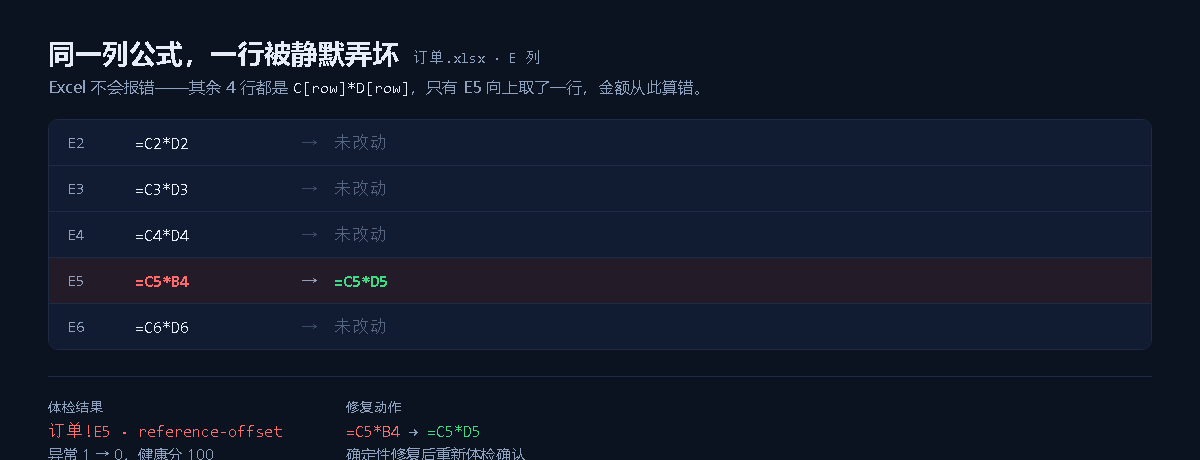
Both screenshots come from a real model calling the tools inside DeepSeek Harness Web and the result being rendered inline in the message stream. More screenshots, a demo animation and the architecture notes are on the GitHub repository.
Documentation
- Full usage guide (scenarios, parameters, platform limits, FAQ)
- Evaluation method and results
- Changelog
Development
npm run build      # runs automatically via prepare when installing from source
node --test tests/*.test.ts
License: MIT
Links
More in this category
Tencent/WeKnora#dsh-weknora★ 37546
Four read-only tools over a WeKnora knowledge base: list knowledge bases, hybrid passage search, reassemble one document's chunks in order, and WeKnora's own cited RAG or ReAct-agent answer with a resumable session id.
DayuanJiang/next-ai-draw-io#dsh-plugin★ 36997
Draws draw.io diagrams in DeepSeek Harness through the next-ai-drawio MCP server: the link in the reply opens a live preview in the right sidebar, you can edit the diagram by hand, and each AI change is a version you can restore. Node.js 18+; npx downloads the MCP server on first use.
superdesigndev/treg★ 8164
Tool catalog for agents: search ~2,600 external endpoints (SEO and SERP, backlinks, social, people and company enrichment, ad libraries, scraping) by the task you want done, read each one's parameters and per-call price, then call it with the credential injected server-side. Ships the skill plus an MCP row that stays disabled until TREG_TOKEN is set.
T-Auto/dsh-ops★ 5864
Provides bash, PowerShell 7, and high-performance Rust tools for DSH on Windows to reduce token usage.
sixtysevenlf/dsh-blender-plugin★ 2147
Lets a DSH agent drive a local Blender over a direct TCP channel with 15 tools: viewport frames, custom-angle renders, Python execution, headless and job offload, transaction rollback, and a planning layer of 228 ops across 34 families.
helloHub1212/dsh-windows-mcp★ 1456
Bridges the CursorTouch/Windows-MCP desktop automation server into DSH through the official MCP client bridge, registering its screenshot, UI tree snapshot, mouse and keyboard input, clipboard, process and registry tools as mcp__windows__* tools for the model, and adds a windows_mcp_doctor diagnostic tool. Computer Use is off by default and is switched on from the plugin panel.
Community comments
Comments are public GitHub Discussions. Loading them connects to GitHub and Giscus; a GitHub account is required to post.