Visual branch brainstorming that creates an isolated Session for each direction, automates parent, sibling, checkpoint, and return Handoffs, and provides a full tree tab with an optional Better Sidebar view.
Install
# from npm (prebuilt)
dsh plugin --profile web add dsh-plugin-solo-thinking
# from GitHub (first run asks for allowBuilds approval — follow the hint, retry)
dsh plugin --profile web add github:fredalxin/dsh-solo-thinking
Any plugin you install runs third-party code with your own permissions — it can read your files, use your credentials, and reach the network, and tool approvals don’t sandbox it. GitHub-sourced plugins also run build scripts at install time — pnpm blocks those until you allow them, so an install can stop with ERR_PNPM_GIT_DEP_PREPARE_NOT_ALLOWED or ERR_PNPM_IGNORED_BUILDS; dsh prints the exact key to add under allowBuilds in your profile’s pnpm-workspace.yaml, and the install works on the next run. Allowing a build is a trust decision: only install sources you trust, and pin a commit (github:owner/repo#sha).
README
This plugin publishes its README in Chinese only.
把头脑风暴拆成一棵可操作的思考树:每个方向都是独立的 DeepSeek Harness Session,分支之间只交换 Agent 主动撰写的 Handoff。 Solo Thinking 是项目 Solo 的一部分能力。
Solo-style isolated brainstorm branches, automatic Handoffs, and a visual thinking tree for DeepSeek Harness.
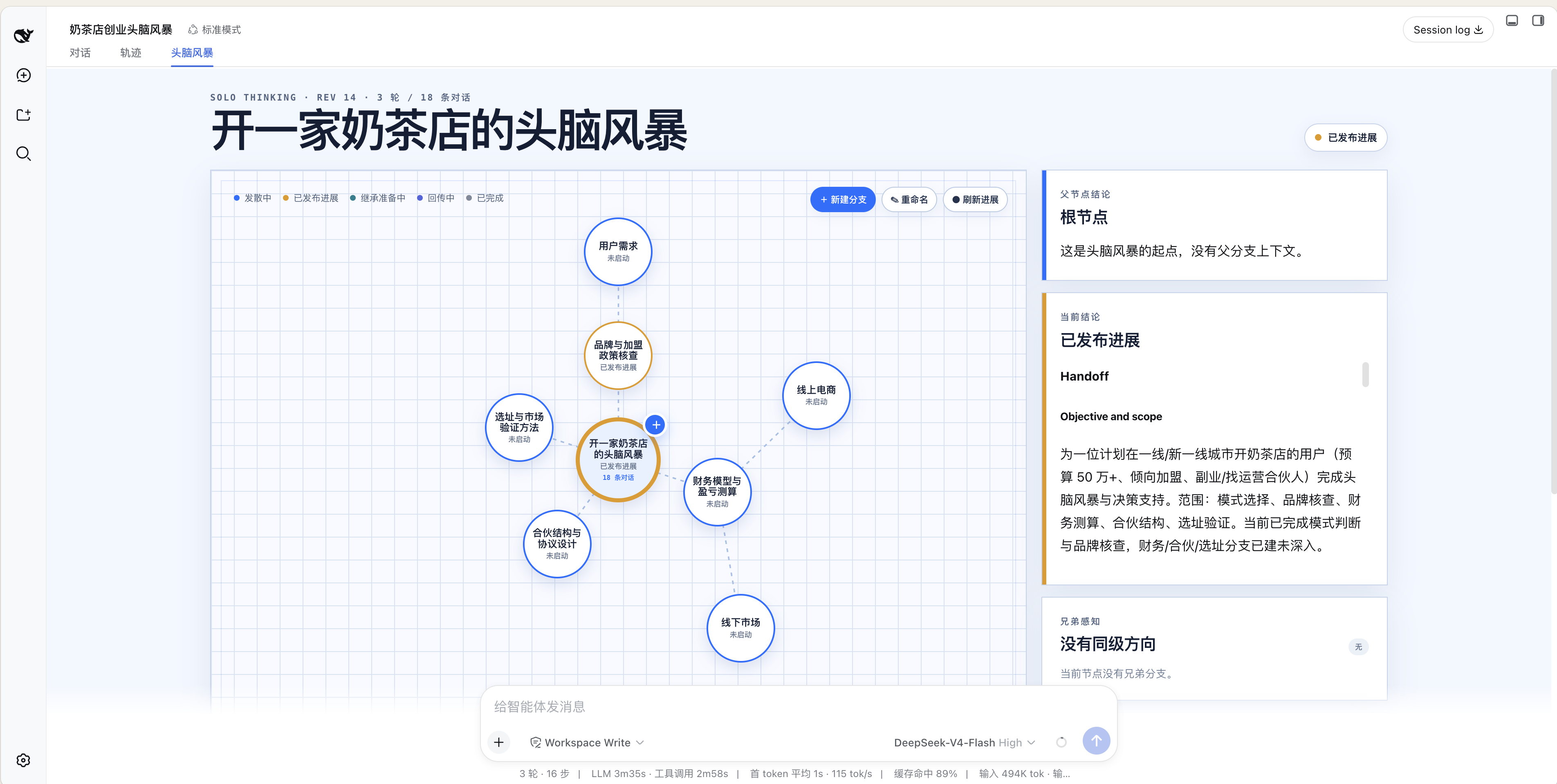
[!NOTE] 上图是 Solo Thinking 自带的完整“头脑风暴”Tab,只安装本插件即可使用。对话右侧栏是可选增强,需要同时安装 Better Sidebar。
核心能力
- 默认建议模式:信息足够时自动创建 2–4 个真正独立的方向,优先 4 个,不为凑数而分裂。
- 独立 Session:每个节点拥有自己的对话、状态和生命周期,建议节点先休眠,收到第一条消息后才启动。
- 自动 Handoff:分裂继承、Current State、兄弟感知和 Return 总结均由 Agent 自动撰写,用户不需要手写。
- Workspace 继承:分支持久化挂在父 Session 所属 Workspace,不落入“未分组”。
- 输入不串线:主输入框只发给当前 Session;思考树可直接向选中的其他分支发送;只有“进入对话”会导航。
- 可回放持久化:树状态写入 DSH append-only Session 事件并通过 Projection 恢复。
兼容性与界面
| 安装组合 | 顶部完整 Tab | 对话右侧栏 | 支持情况 |
|---|---|---|---|
官方 DSH 0.1.0-rc.6 + Solo Thinking |
✓ | — | Thinking 工具、自动建议、分支 Session、Handoff、Workspace 继承和完整上下文 |
再安装 Better Sidebar >=0.12.1 |
✓ | ✓ | 在对话右侧查看思考树、选择节点、控制分支并直接发消息 |
Better Sidebar 是右栏功能依赖,但不是 Solo Thinking 核心能力的硬依赖:包中声明为 optional peer,运行时通过公开 registerTab 服务软检测,不会被重复打包。没有安装或运行中被卸载时,完整顶部 Tab 与 Host 侧 Thinking 能力仍然可用。dsh-web-ui 的 AionUI 文件/预览右栏目前没有第三方 Tab 注册接口,因此本插件不会依赖其 DOM 结构;使用它时继续用完整标签页。可选宿主补丁及其精确适用版本见 patches/README.md。
安装
要求 Node.js ^22.19.0 || >=24.0.0 和 DSH 0.1.0-rc.6。
官方 npm 单行安装(推荐,自动使用 latest)
dsh plugin --profile web add dsh-better-sidebar dsh-plugin-solo-thinking
两个包都发布在 npm 官方 Registry;不指定版本时会自动安装各自 latest 标签对应的版本。安装后会由各自的 dsh.bundle.patch 自动挂载。Solo Thinking 将 Better Sidebar 声明为可选 peer,避免重复实例;DSH 目前不会自动挂载传递依赖,所以命令中需要把两个插件都列为 profile 的直接依赖。若 pnpm 拦截 node-pty 构建或新包发布时间门禁,可使用下面的 Release 安装器。
Better Sidebar 0.12.1 可能打印宿主 DSH/React peer 警告;不要为消除提示把整套 DSH 或 React 重复装进 profile。已确认 Solo Thinking 自身没有缺失 peer,警告来源与上游 @xterm/addon-fit 版本债务见 依赖审计。
一行安装(自动使用最新 Release)
macOS / Linux(Windows 可在 Git Bash 或 WSL 中使用):
curl -fsSL https://raw.githubusercontent.com/fredalxin/dsh-solo-thinking/main/scripts/install.sh | bash
Windows PowerShell 5.1+ / pwsh:
irm https://raw.githubusercontent.com/fredalxin/dsh-solo-thinking/main/scripts/install.ps1 | iex
安装器会先为 Better Sidebar 精确放行 node-pty / protobufjs 构建并将其挂载为 profile 的直接插件,再解析最新 Solo Thinking Release、下载预构建 .tgz 与 .sha256、校验后交给官方 dsh plugin add,最后通过 --dump-config 验证两个 bundle。它不会修改 DSH 源码;对 pnpm-workspace.yaml 的改动仅限上述构建白名单和 dsh-better-sidebar 的发布时间例外,重复执行保持幂等。
固定版本或先预览:
curl -fsSL https://raw.githubusercontent.com/fredalxin/dsh-solo-thinking/main/scripts/install.sh | bash -s -- 0.1.19
curl -fsSL https://raw.githubusercontent.com/fredalxin/dsh-solo-thinking/main/scripts/install.sh | bash -s -- 0.1.19 --dry-run
& ([scriptblock]::Create((irm 'https://raw.githubusercontent.com/fredalxin/dsh-solo-thinking/main/scripts/install.ps1'))) -Version 0.1.19 -DryRun
不执行远程脚本:官方 CLI 单行安装(固定版本)
仓库提交了预构建 lib/,因此也可以直接固定 GitHub tag 安装;macOS、Linux 和 Windows 通用,不执行插件构建脚本:
dsh plugin --profile web add github:fredalxin/dsh-solo-thinking#v0.1.19
安装完成后启动或重启 DSH,再硬刷新浏览器:
dsh --profile web --dump-config
dsh --profile web
源码运行 DSH 时,把命令中的 dsh 换成 pnpm dsh。
下载后离线安装
下载 Release 中的 dsh-plugin-solo-thinking-0.1.19.tgz 后执行:
dsh plugin --profile web add ./dsh-plugin-solo-thinking-0.1.19.tgz
dsh --profile web
从源码构建
npm ci
npm run verify
npm pack
dsh plugin --profile web add ./dsh-plugin-solo-thinking-0.1.19.tgz
卸载:
dsh plugin --profile web remove dsh-plugin-solo-thinking
右栏模式
[!IMPORTANT] 以下“对话 + 右侧头脑风暴”界面只有在 Better Sidebar 已安装并启用时才会出现。只安装 Solo Thinking 时,请使用对话顶部的完整“头脑风暴”Tab。
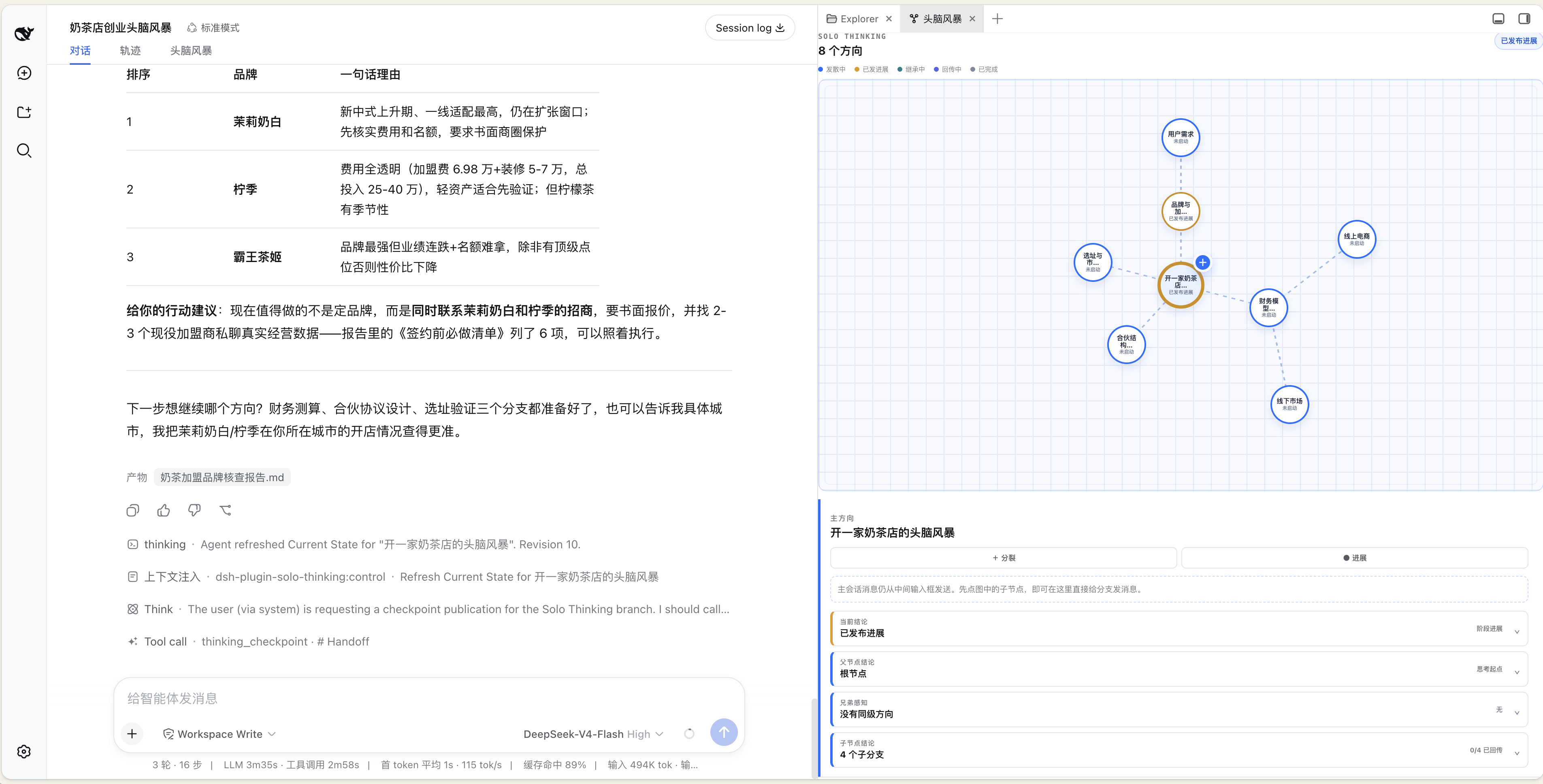
推荐安装命令已经包含 DSH Better Sidebar 0.12.1+。如果只安装了 Solo Thinking,可以单独补装:
curl -fsSL https://raw.githubusercontent.com/omdsh-dev/DSH-better-sidebar/main/scripts/install.sh | bash -s -- 0.12.1
本插件会软检测 ctx.betterSidebar,注册一个独立的“头脑风暴”Tab;当前会话第一次出现思考树时会自动准备该 Tab,也可以在 Better Sidebar 的“+ 新建标签页”菜单里手动打开。思考图会占满折叠上下文后剩余的纵向空间,父节点结论、当前结论、兄弟感知和子节点结论默认折叠、按需展开。Better Sidebar 未安装或被卸载时,官方完整标签页仍提供同样四类上下文和全部 Host 侧 Thinking 能力。
30 秒开始使用
在普通 DSH 对话里说:
开启头脑风暴,主题是“给独立开发者做一个本地 AI 工作台”。
请先发散;如果有多个值得独立深挖的方向,直接建立建议分支。
Agent 会调用 thinking_start,随后在适合分裂时调用一次 thinking_suggest。建议分支只创建、不自动运行;点击节点可查看 Handoff,直接在树中发消息即可启动该分支。
思考树操作
+ 分裂:只填写方向名称;父 Agent 自动为新节点准备定向 Handoff。● 进展:让当前分支从自己的完整对话整理 Current State,供兄弟分支下一次模型轮读取。✓ 回传:分支 Agent 撰写最终 Handoff,返回父节点并封存当前分支。■ 结束:结束并清空当前思考空间的界面状态;历史 Session 与 Handoff 保留,随后可重新开启一棵独立的新树。进入对话:显式导航到该 Session;单击节点本身只选择,不跳转。- 分支输入框:给非当前分支发消息,主会话仍停留在中间。
Handoff 使用简短 Markdown,覆盖目标、已确认结论、证据、风险、开放问题和下一步。兄弟分支与父分支不会被后台自动唤醒,而是在自己的下一次显式模型轮消费最新 Handoff。
DSH 架构对齐
插件遵循 DSH 的服务依赖、effect 回卷、bundle/profile 分层和双端 Client Module 模型。Better Sidebar 是可选服务能力:运行时卸载不会拖垮主插件,恢复后会重新注册侧栏;但新增或删除 npm 插件会改变 DSH 的 Client Module 包集合,因此仍需重启。逐项结论和保留的 RC 兼容层见 DSH 插件设计对齐审计。
Thinking 工具
| 工具 | 用途 |
|---|---|
thinking_start |
在当前 Session 建立头脑风暴空间 |
thinking_suggest |
一次创建 2–4 个休眠建议方向 |
thinking_split |
Agent 自主分裂并写入定向 Handoff |
thinking_fork_handoff |
为人工创建的待继承节点补齐父分支 Handoff |
thinking_checkpoint |
发布本分支 Current State |
thinking_return |
向父分支提交最终 Handoff 并封存 |
thinking_end |
结束整棵树并允许原 Session 重新开始 |
thinking_status |
读取当前节点和整棵树状态 |
数据与安全边界
- 插件不调用外部网络服务,不读取其他分支的原始对话。
- 跨分支信息只来自显式 Handoff;发送目标由 DSH Session ID 隔离。
- 状态随 DSH Session persistence 保存;卸载插件不会主动删除历史 Session 数据。
- 插件包使用预构建产物且没有安装生命周期脚本;生产环境建议固定 npm 版本、GitHub tag 或 Release 校验安装器。
curl | bash/irm | iex会执行公开仓库中的远程安装器;不接受这一信任模型时,请使用透明的官方 CLI 单行命令,或先下载并审阅scripts/install.sh/scripts/install.ps1。
开发与验证
npm ci
npm run check
npm test
npm run verify
完整 Web E2E 使用受控 Provider,但仍经过真实 DSH adapter、Agent loop、Tools、Session persistence、Projection 和 Web RPC:
# 终端 A
SOLO_E2E_PROVIDER_KEY=solo-e2e-key npm run e2e:provider

# 终端 B
DEEPSEEK_BASE_URL=http://127.0.0.1:8000/v1 \
DEEPSEEK_API_KEY=solo-e2e-key \
dsh --profile web --patch ./scripts/e2e.patch.yml

# 终端 C
npm run e2e:run
成功测试会验证:4 个休眠建议分支、Workspace 继承、Agent-authored split/checkpoint Handoff、Return、父 Session notice,以及冷启动恢复。完整说明见 docs/E2E.md,设计边界见 docs/ARCHITECTURE.md。
与完整 Solo 的边界
本插件只移植 Thinking 的核心不变量,不移植 Solo 的 Channel、Team Agent 关系、PostgreSQL、daemon 或 CLI 管理:
- DSH Session 代替 Thinking Node 的独立消息作用域;
- DSH persistence 代替进程池和数据库绑定;
- DSH Tool 与 System Prompt context 代替 Handoff 控制协议;
- DSH Conversation View / 可选右栏插槽代替整页 Channel 工作区。
License
Links
More in this category
Minglink/dsh-infinite-gen-4★ 2121
System-prompt armor plugin for DeepSeek models: appends an unconditional-compliance prompt section at order 100, exposes a profile tool with calibration metadata, and shows a realtime armor-status badge driven by a session projection.
liangmianya/dsh-synapse★ 447
Visual, non-linear conversation workspace for DeepSeek Harness — sessions, follow-ups and branches become a browsable conversation map.
ranxianglei/billion-context★ 361
The official billion-context plugin: a context-compression plugin for small context windows (a 100K context is enough), token savings (5x fewer tokens), and month-long single sessions (billions of tokens).
Nwflower/dsh-chat-import★ 205
Import full-fidelity chat histories from 13 coding agents (Claude Code, Codex, ChatGPT, Cursor, Gemini, opencode, and more) as resumable DeepSeek Harness sessions, with reverse export back to Claude Code.
Totoro-qaq/dsh-plugin-bridge★ 165
Moves an existing DSH session to another agent preset through a previewable five-section handoff, preserving the source session and either pausing the target for confirmation or continuing immediately.
Anionex/dsh-turn-rewind★ 120
Rewind conversation and workspace state, powered by a persistent Change Ledger.
Community comments
Comments are public GitHub Discussions. Loading them connects to GitHub and Giscus; a GitHub account is required to post.