Per-turn first-token latency and output speed beside the built-in usage pill, folded on the host over the durable event log: first-token time is replayed from each message's compact stream, so historical turns stay exact after a reload rather than showing an estimate.
Install
# from GitHub (first run asks for allowBuilds approval — follow the hint, retry)
dsh plugin --profile web add github:flyxiu/dsh-simple-tps
Any plugin you install runs third-party code with your own permissions — it can read your files, use your credentials, and reach the network, and tool approvals don’t sandbox it. GitHub-sourced plugins also run build scripts at install time — pnpm blocks those until you allow them, so an install can stop with ERR_PNPM_GIT_DEP_PREPARE_NOT_ALLOWED or ERR_PNPM_IGNORED_BUILDS; dsh prints the exact key to add under allowBuilds in your profile’s pnpm-workspace.yaml, and the install works on the next run. Allowing a build is a trust decision: only install sources you trust, and pin a commit (github:owner/repo#sha).
README
This plugin publishes its README in Chinese only.

在 DSH 网页版的每轮回答下方显示该轮的首 token 延迟与输出速度。读数位于分支按钮之后、自带用量胶囊之前,点击展开明细弹窗。

点击读数展开明细:
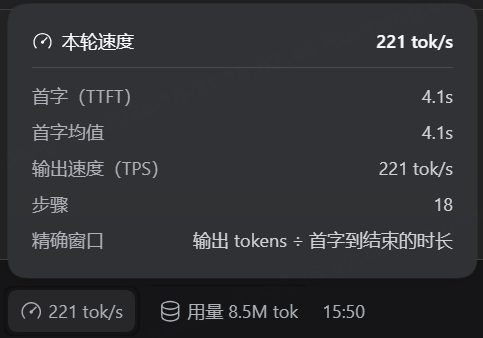
插件由宿主与前端两部分组成。宿主持有一个会话投影,在完整事件日志上折叠出每轮指标;前端负责读取与呈现。
指标口径
一轮对话可能包含多个助手步骤,工具调用会把一轮拆成若干次模型请求。因此:
- 首字:第一步的 TTFT,即首 token 时刻减该步开始时刻。它对应「按下回车之后等了多久模型才开口」。
- 均:所有记录了首 token 的步骤的算术平均。只有一步时两者相等,只显示一个。
- tok/s:按 token 加权,即输出 token 总数除以解码总时长(各步消息完成时刻减首 token 时刻)。逐步平均会让短而快的步骤权重偏高,故不采用。
任一项取不到就省略该项,全部取不到则整条不渲染。
为什么在宿主侧计算
浏览器侧的会话快照只覆盖当前已加载的窗口,且首 token 时刻依赖 assistant/live-chunk 事件。该事件仅存在于实时流中,不写入持久日志。
持久日志里首 token 时刻另有来源。每条 assistant/message 携带 data.stream,其中的文本、推理与工具调用增量以「基准时刻 time0 加逐 token 间隔 dt[]」的形式压缩存放:整块 chunk 自带时间戳,成串的增量则只记录首项时刻与逐项间隔,靠累加还原。重放这份记录即可得到任意 token 的出现时刻,包括第一个。这一做法与 DSH 自带的 sessionStats 投影使用同一套事件语义,两者对首 token 的判定规则也一致。
投影因此能够覆盖完整日志,分页与压缩都不影响结果;刷新页面后历史轮次依然精确,不会退化为估算值。
前端保留窗口折叠作为兜底:投影不可用时退回读取节点的 timing 字段,速度改按整步时长计算,显示为 ≈45.0 tok/s 并标注为下界。
前置条件
DSH 版本不低于 0.2.1-rc.2。宿主侧依赖 sessionProjections 服务,投影未注册时插件自身不激活。
安装
插件未发布到 npm,需要按 GitHub 仓库安装。
网页端和桌面客户端自带插件管理,在「设置 → 内置插件 → 添加插件」里填入仓库地址即可。
https://github.com/flyxiu/dsh-simple-tps
命令行等价,add 之后的参数原样转给 pnpm:
dsh plugin --profile web add https://github.com/flyxiu/dsh-simple-tps
github:flyxiu/dsh-simple-tps 是 pnpm 针对 GitHub 简写的同义写法,两种写法装出来一样。
本地目录方式用于开发调试,改完代码不必推送即可生效:
dsh plugin --profile web add link:/path/to/dsh-simple-tps
区别在更新:仓库源会在插件市场显示更新按钮,link: 本地链接被排除在在线更新之外。
更新
插件市场比对仓库 HEAD 与用户 lockfile 中的 commit 判断是否有更新,因此在插件市场点击更新即可升级,不需要重新安装。link: 方式安装的副本不参与该检查。
开发
lib/client.js 是手写的模块加载器格式,无构建步骤:
window.__ModuleLoader__.load({ id: 'dsh-simple-tps', factory: (require) => { ... } })
id 必须与包名一致。require 只能取平台模块表内的包,目前用到 react、react-dom 与 @deepseek-ai/dsh-client-ui-primitives;三者缺失时降级为纯文本显示,不阻断加载。
修改后的生效方式取决于改动位置:
dsh-restart      # 改动 lib/index.js(宿主投影)
# Ctrl+F5        # 改动 lib/client.js(前端)
没有热更新。客户端的 HMR 只在从源码 checkout 运行 pnpm run dev:web 时重建 bundle。
宿主与前端各自独立生效,改动其中一侧不影响另一侧。
测试
两套离线测试,不依赖运行中的 DSH:
node tests/run.mjs    # 前端:注册、折叠、投影优先、窄屏降级、数字格式化
node tests/host.mjs   # 宿主:流还原、多步折叠、真实日志比对
tests/host.mjs 在本机存在真实会话日志时会跑完整折叠,断言绝大多数轮次都能取到精确 TTFT。
用真实事件载荷验证,比构造假数据更能反映字段实情。
界面细节
读数通过 conversation.chat.assistant-actions 列表插槽注册。
该插槽在 DOM 上只能落在复制按钮之后、分支按钮之前,落不到用量与时间之间。那一格由 MessageIconActions 内联渲染,没有对外插槽。
视觉位置由 CSS order 调整。这里必须使用后代选择器而非子选择器:
[data-clock=end] .dsh-simple-tps-root { margin-right: -8px; order: 5 }
[data-clock=end] > :last-child        { order: 10 }
插槽会在动作行与读数之间插入一层 display: contents 的容器,读数因此是孙节点,子选择器无法命中。display: contents 的元素不生成盒子,但不影响选择器匹配,后代选择器可以穿过它;这也是最初把位置改错的原因,写成 > 时规则始终不生效。
-8px 抵消用量组自带的左边距。
交互沿用自带用量胶囊的形态:默认只显示速度,点击展开明细。弹窗复用 useAnchoredPosition 与 useDismissOnOutsidePointer 两个原语,配色取自 --dsw-specific-menu、--dsw-elevation-prominent 等语义令牌,与自带的「本轮用量」弹窗同一套视觉。
位于动作行内,历史轮次上的读数与用量胶囊一样需要悬停才淡入。
实时速度
会话运行期间,当前流式输出的速度以「字/s」显示在「深度求索中」之后。该项独立于每轮读数,随回合结束消失。

客户端只能观察到增量文本,拿不到 token 计数——token 数要等整轮结束才随 usage 返回。实时项因此以字符数计速并标注单位为「字/s」,每轮读数仍为精确的 token 口径。
采样窗口取最近 1.2 秒。
输出停顿或计算条件不足时保留上一次读数,避免跳变。
卸载
dsh plugin --profile web remove dsh-simple-tps
dsh-restart
许可
MIT
Links
More in this category
bowenliang123/dsh-context★ 3190
DSH context insight panel: Context dashboard + /context command + Context browser — one-stop context lifecycle management with categorized composition, content details, evolution trends, compaction/injection events, and stats.
Han-1413141/dsh-cost-meter★ 489
Per-session and daily API cost, budget with usage %, official balance, history dashboard, and one-click official price sync with peak/off-peak pricing.
wssfk12138/dsh-damage-pulse★ 273
Tracks DeepSeek token usage, per-call and session costs, and account balance with cache-aware charge animations in the DSH Web UI.
zh667/TokenLedger★ 199
Sidebar usage panel that attributes tokens to the relay site that served each request, read from your existing provider config: today/month/all-time totals, per-site and per-model breakdowns, a year activity heatmap, and New API / Sub2API / DeepSeek balances.
Ychris12138/dsh-usage-stats★ 183
Multi-provider usage dashboard with provider/model token breakdowns, calendar drill-downs, account balances, and OpenCode Go / Z.ai subscription quota tracking.
PolinniZhong/dsh-personal-center★ 112
Personal center for DeepSeek Harness: cross-session usage statistics, per-model cost estimation, global custom instructions, a global font-size adjuster, a data-driven desktop pet with bitmap & vector skins, and a conversation status overview, all local and offline.
Community comments
Comments are public GitHub Discussions. Loading them connects to GitHub and Giscus; a GitHub account is required to post.