Keyless web search with one web_tools entry and eight actions for multi-query search, date windows, packages, papers, repositories, platforms, page reading, cited research, cache search and engine health; fuses eight engines and ships a stdio MCP server for other agents.
Install
# from npm (prebuilt)
dsh plugin --profile web add @fffangchenghao/dsh-web-search
# from GitHub (first run asks for allowBuilds approval — follow the hint, retry)
dsh plugin --profile web add github:fangchenghao/dsh-web-search
Any plugin you install runs third-party code with your own permissions — it can read your files, use your credentials, and reach the network, and tool approvals don’t sandbox it. GitHub-sourced plugins also run build scripts at install time — pnpm blocks those until you allow them, so an install can stop with ERR_PNPM_GIT_DEP_PREPARE_NOT_ALLOWED or ERR_PNPM_IGNORED_BUILDS; dsh prints the exact key to add under allowBuilds in your profile’s pnpm-workspace.yaml, and the install works on the next run. Allowing a build is a trust decision: only install sources you trust, and pin a commit (github:owner/repo#sha).
README
Gives DeepSeek Harness a pair of hands for the web: the model can search, then open a page and read it, without you pasting links.
- 中文说明
- Quickstart · Cross-agent MCP · 30-query comparison · Latency & sources
- Changelog · Why a plugin's settings go missing: the four-layer chain
Why this one
- No API key, eight engines. AnySearch, CN Bing, DuckDuckGo HTML, www Bing, DuckDuckGo Lite and 360 Search are scraped directly; Exa joins the primary tier through its keyless MCP endpoint, and Firecrawl's search API is the measured fallback. The plugin works out of the box.
- Official release facts, not generic ranking. Explicit PostgreSQL, Rust and scoped npm queries start a narrow official lookup in parallel;
Rust 1.90 发布说明returns the canonical Rust Blog announcement at rank 1. The lookup is capped at 2.5 s and failure leaves the ordinary rows intact. - arXiv is a first-class research source. An explicit arXiv paper or survey query is routed to arXiv's own API in parallel, with boolean terms instead of a loose keyword string, so a survey query returns surveys rather than incidental mentions. arXiv PDF links are read through the HTML full-text view instead of being rejected as binary, and abstract pages parse even when a site-wide wrapper is named
footer. - A tail budget and an honest quota story. Interactive searches release after two independent contributors and cap at 5 s for Latin-script queries / 3 s for CJK queries. Firecrawl stays a fallback;
firecrawlApiKeyis optional for users who need repeatable quota. Keyless Firecrawl cannot be made dependable from the client side. - The ranking is measured, not asserted. Cross-engine reciprocal-rank fusion with authority and freshness boosts, a 20-query offline benchmark, and an 81-configuration parameter sweep — one of the few search plugins here that publishes its metric, per-query output and confidence intervals. See How the ranking works.
- One package, two runtimes. DSH gets the native plugin and one
web_toolsentry; Claude Code, Codex and other MCP clients get the same keyless search through a dependency-free stdio server withsearch,fetch,researchanddomain_search. See Cross-agent MCP. - Measured in public, including the losses. A 30-query bilingual comparison records availability, latency, unique domains, official-domain presence and every failure against keyless Firecrawl and anonymous Exa. The follow-up documents the Exa architecture difference, the 3 s CJK budget and the Rust official-source lookup. Exa is faster here; this plugin returns more distinct domains. Both test arms were keyless. The method and raw results are in docs/comparison.md and a public gist.
- Fetching admits failure. Binary documents and empty 200 responses are rejected by name (
SEARCH_UNSUPPORTED,SEARCH_EMPTY) instead of being returned as noise; arXiv PDF links are the deliberate exception and are read through the HTML full-text view; the direct → tunnel → render → extract ladder shares one 25 s budget and stops when there is no time left. The budget is per request — there is a regression test for exactly that. - Windows is a first-class host. Pure ESM, no native addon or install script; the system proxy is discovered from Windows Internet Settings, and the full suite runs on a
windows-latestCI runner. See Install on Windows. - 711 tests across 56 files, a committed
lib/, declaredengines.dsh/engines.node, and a SECURITY.md that lists every process, host and file the plugin touches. - Bilingual documentation. This README and 中文说明 are maintained side by side.
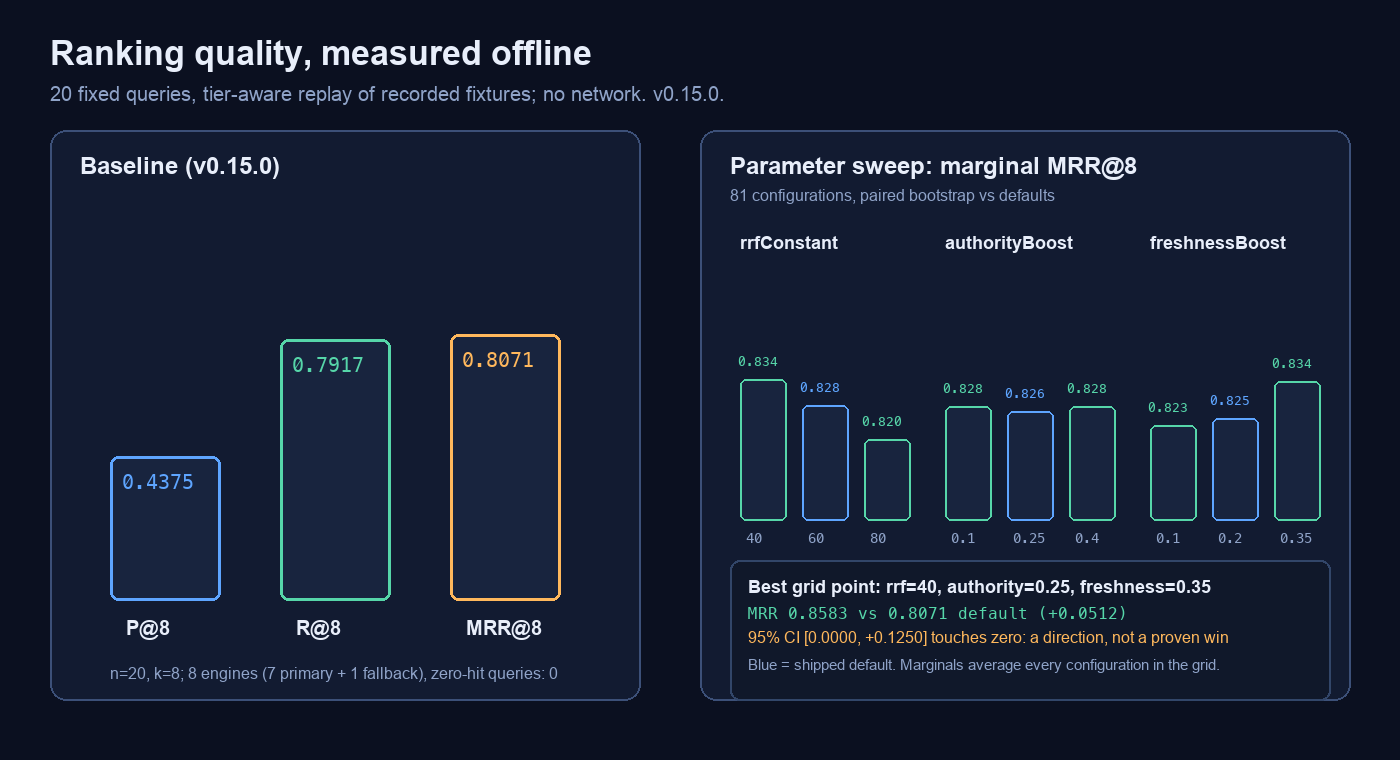
The benchmark is offline and deterministic: 20 recorded queries, precision/recall/MRR@8, per-language and per-query output, so a regression cannot hide in an average. node scripts/bench.mjs reproduces the screenshot.
Where it stands
The web-search corner of the DSH plugin ecosystem is crowded. A dated snapshot (2026-10-25; stars and npm downloads are adoption signals, not quality scores):
| this plugin | dsh-free-search | dsh-web-search-pro | modsearch | anysearch-dsh | |
|---|---|---|---|---|---|
| Key-free path | 8 engines, all key-free | ~30-engine free/paid chain | 5 defaults (seam, Exa, DDG, Bing, Jina) | Firecrawl + Keenable keyless defaults | 1 anonymous AnySearch API |
| Dedicated vertical sources | 34 (8 on by default) | 41 | platform registry, not a vertical catalog | web + X, no vertical catalog | vertical API behind AnySearch |
| Model-facing tools | 1 (web_tools, 8 actions) + 4 MCP tools |
~10 | 2 (web_index / web_call, 20 actions) |
native search/fetch + skill | 5 |
| Tests | 56 files / 711 cases, locally verified | no test script in package.json |
774 unit + 94 bench, self-reported | Vitest configured; count not published | Vitest configured; count not published |
| GitHub stars | 0 | 620 | 77 | 836 | 663 |
| npm downloads, last month | 1,087 | 52,436 | 6,420 | 43,151 | 9,251 |
| npm unpacked size | 1.2 MB | 0.70 MB | 3.05 MB | 0.51 MB | 0.27 MB |
This is a capability snapshot, not a league table with one winner. The honest read is:
- Feature depth: upper-middle.
dsh-free-searchhas more engines and verticals;dsh-web-search-prohas a deeper evidence/ranking pipeline and far more platform backends;modsearchis the stronger cross-host bridge. - Engineering and verification: near the top. 711 local tests, a replayable ranking benchmark, declared security boundaries and one runtime dependency put it alongside the best-maintained entries, while remaining much smaller than the Playwright-heavy option.
- Key-free + official-source correctness: its strongest niche. The official Chrome, PostgreSQL and AI Act paths and the 34-source vertical layer are not common in the other plugins.
- Adoption and maturity: bottom third of this sample. At the 2026-10-25 snapshot the repository was four days old, had no stars and little independent adoption; the current npm release is 0.24.4.
- Tool-surface economy: now competitive. 0.20.x exposes one
web_toolsentry with eight actions, close todsh-web-search-pro's two tools with 20 actions; the legacy eight-name surface remains opt-in for old prompts.
If you need maximum install base and engine breadth, start with
dsh-free-search or modsearch. If you need the deepest evidence/scoring
pipeline and browser-backed platforms, look at dsh-web-search-pro. This plugin
is the compact, fully key-free option for search plus vertical lookup, research
packs and official-source correction. It is not the most popular, and it should
not claim to be the largest.
The latest version and install command live on npm; the comparison table is a dated snapshot, not a live leaderboard. What follows starts with what this means for you; the technical detail is collected in the appendix.
In one sentence
With this plugin installed, you can ask something like "how do I configure the version released last week?" and the model can call web_search against public search engines by itself, then work from a ranked list of titles, links and snippets. When a snippet is not enough, it can call web_fetch on one of those links and get the page back as clean Markdown instead of a wall of HTML. When one question needs several separate searches, it can call search_many and get each query's results separately. When the question is about an npm package, a GitHub repository, a paper or a Q&A thread, it can call domain_search instead and ask those dedicated sources directly. When it needs a forum, community or video site, it can call platform_search for Bilibili, V2EX, Reddit, YouTube, Zhihu or Juejin. A PostgreSQL version/EOL question also gets the project's official support-table row prepended, rather than trusting a stale press kit. And when a page is too long to read in one pass, it can call read_page and continue from where the last chunk stopped.
Three things change for you:
- When a question involves "search for", "latest", "official docs" or "the docs", the model has a real chance to look it up instead of answering "my knowledge has a cutoff date".
- When a question is about a package, a repository or a paper, the model can ask the matching source directly instead of hoping a web search understands.
- You do not need a search API key, and you do not pay for search separately.
Under the hood it is one sentence too: the plugin registers two providers with the harness's web service — bing for search and http-proxy for fetching pages — and one model-facing web_tools action tool: action: "domain_search" for packages, repositories, papers, Q&A and reference entries; search_many for several searches in one call; advanced_search for one query with a per-call date window; read_page for walking a long page in chunks; research for turning a few searches into one cited evidence pack; platform_search for community and video sites; cache_search for searching the full texts research already fetched; and engine_test for checking which engine is healthy. These are eight capabilities of one plugin, behind one tool registration — not eight separate plugins or eight always-visible tools.
The problem it solves
A very ordinary situation
You upgraded a library. A config field was renamed. You ask the model:
"Did
timeoutbecometimeoutMsin v1.2? Check the official docs for me."
Without this plugin, the model does one of three things:
- Answers from the old docs it memorised during training — sometimes right, sometimes confidently wrong;
- Says it cannot access the internet and suggests you check the docs yourself;
- Fails outright: the search backend the harness ships with (
deepseek-official) needs a DeepSeek credential, and without oneweb_searcherrors out.
With this plugin:
- The model calls
web_search. The plugin queries several engines at once, drops duplicate URLs, re-ranks what is left by cross-engine agreement, official-documentation status and freshness, and returns roughly eight candidates (fewer with a time window, which keeps only results inside it); - It notices that one result is on
kubernetes.io, callsweb_fetch, and reads that page; - It answers from the page text and can hand you the link.
Side by side
| Situation | Without it | With it |
|---|---|---|
| A question about something released weeks ago | Memory only; often stale | Searched and read now, with sources |
| You paste a link and say "read this" | A direct request that times out (github.com, for example) is the end of it |
Direct first, then the local proxy; with Playwright installed a browser can render it, and AnySearch extraction comes last |
| Where results come from | One backend, depending on credentials | Up to six sources, cross-checked and de-duplicated |
| A question in Chinese | Dictionary and encyclopedia pages creep in | Chinese sources lead, without losing English documentation |
| A question about an npm package, a repository or a paper | A web search at best, often landing on second-hand pages | domain_search queries the matching source for the package, repository or paper entry |
| An engine starts throttling | Every call fails and retries | That engine rests for 5–30 minutes; the others carry on |
What it does not do
It does not make the model smarter, and it does not make judgements for you. It connects two abilities — looking things up and reading pages. What it finds can still be wrong or out of date, and the model can still misread it. That is no different from searching the web yourself.
Concepts, in plain language
Every term used later, in a few lines each, with an analogy. No technical background assumed.
Large language models, and why they "don't know"
A large language model — the kind of program behind ChatGPT or DeepSeek — is trained on an enormous amount of text until it can predict the most likely next word. What it remembers stops at the moment training ended; that moment is called the knowledge cutoff.
It is not connected to the internet. Ask about yesterday and it does not "search and fail to find"; it has no route to that information at all. Analogy: a scholar who has read the whole library but moved to the mountains three years ago and stopped accepting parcels. Ask about three years ago and you get a solid answer. Ask about last week's news and you get inference dressed as fact.
Agents, and why they need tools
An agent is an AI that decides what to do next. A plain chatbot answers one question at a time. An agent thinks "should I look this up?", picks a tool, looks at the result, and then decides what to do after that.
A tool is a fixed capability handed to the agent: search, read a page, run a command. The model cannot browse on its own, but it can ask the harness to run web_search with certain arguments. The harness runs it, puts the result back into the conversation, and the model continues. Analogy: you do not send the chef to the market; you give the chef a phone and let them call the buyer.
web_search versus web_fetch
This is the pair people mix up most. They solve different problems:
web_searchfinds URLs. Give it keywords; it returns a list with titles, links and a line or two of snippet.web_fetchreads a page. Give it one URL; it brings back that page's content, cleaned into readable Markdown.
web_search |
web_fetch |
|
|---|---|---|
| You give it | A few keywords | One URL (http:// or https://) |
| It gives you | Eight candidates by default: title, link, snippet (fewer with a time window) | The page body, cleaned into Markdown (or plain text) |
| Can it answer the question | Only from snippets, often not enough | Yes — the text is right there |
| When to use it | You don't know where to look, or want several sources | You know which page to read |
| Which provider | bing (this plugin) |
http-proxy (this plugin) |
| Typical time | 1.4–3.8 s (near-instant on a cache hit) | Depends on the site; up to 5 s direct, then another route |
In everyday terms:
Search is the librarian handing you a reading list: titles, shelf numbers, a one-line summary — thirty seconds and you have it. But a list is not a book, and the summary can be misleading.
Fetch is taking the book off the shelf and opening it: you get the whole text, but the book may be checked out (the site refuses), behind a members-only desk (a paywall), or the shelf number may be wrong (a 404).
You need both. Search without fetch leaves the model reading blurbs forever. Fetch without search requires a URL — and the model usually does not have one.
What fetch hands back is the article, not the page's furniture: navigation, ads, scripts, footers and forms are stripped, and headings, lists, code and tables survive as Markdown.
Dedicated search (domain_search): sources, not pages
web_search asks "what is on the open web". domain_search asks something narrower: "does this package exist, is this repository maintained, is there a paper on this, has someone answered this?"
It queries 34 public sources directly; eight are on by default: GitHub, npm, PyPI, arXiv, Wikipedia, Hacker News, Stack Exchange and crates.io. The other 26 — GitLab, Codeberg, Docker Hub, Maven, NuGet, RubyGems, Packagist, pub.dev, Hugging Face models and datasets, Open VSX, Terraform modules and providers, WordPress, JetBrains, OpenAlex, Crossref, Europe PMC, UniProt, ClinicalTrials.gov, NVD, CoinGecko, Internet Archive, Wikidata and Nominatim — are opt-in through the sources argument. Each offers a keyless public endpoint and returns structured records — title, link, snippet — rather than a page of search results.
Analogy: web_search is asking passers-by where the hardware shop is and getting directions; domain_search is walking to the counter and quoting a part number. Ask the right shop and the answer is short.
web_search |
domain_search |
|
|---|---|---|
| Good for | Concepts, news, official sites, tutorials | Packages, repositories, papers, Q&A, reference entries |
| Where results come from | Public search-engine result pages | Each source's own public endpoint |
| How many at once | Eight by default, de-duplicated and ranked | Five per source by default, interleaved by source |
| Needs a key | No | No |
| When one fails | The error names each engine's reason | The dead source goes into failures; the rest answer |
They team up well: use domain_search to find the package or paper, then web_fetch to open its homepage or README and read the detail.
Four more helpers sit beside them: search_many, advanced_search, read_page and research. When one question needs several distinct searches — one per candidate library, say — search_many runs one to five queries in a single call and keeps each query's results apart, so one failed query cannot empty the batch; when only one question needs a date window, advanced_search applies it for that call alone; when a page is too long for one fetch, read_page continues from where the previous chunk stopped; and when snippets are not enough but the model still has to decide which page to trust, research searches up to three queries, opens the leading pages and returns one evidence pack with a citation under every excerpt.
Reading a long page in chunks (read_page): when one pass is not enough
web_fetch has two built-in limits: it fetches one page per call, and anything past fetchMaxLength (20,000 characters by default) is cut off. The missing tail is not "slow to arrive" — it never arrives. The host's fetch request has exactly one field, url (WebFetchRequest = { url }), with no offset and no maxLength, so the host's own tool cannot continue from the middle.
The plugin therefore registers its own read_page tool to fill that gap. It walks the same fetch ladder as web_fetch, but adds an offset:
| Argument | Required | Default | Meaning |
|---|---|---|---|
url |
yes | — | Absolute http:// or https:// URL to read |
offset |
no | 0 |
First character to return, zero-based |
maxLength |
no | the configured fetchMaxLength |
Characters in this chunk, 1000–200000 |
format |
no | the configured fetchFormat |
markdown keeps headings, lists, tables and links; text keeps only the words |
Usage is one loop: start at offset=0, read nextOffset from the response, pass it back as offset on the next call, and stop when nextOffset is null. The content of a chunk is only this chunk's text; the "how many characters remain, use this offset next" line is generated separately and is not part of content, so concatenating every chunk's content reproduces the complete body character for character.
Bodies are cached per URL and format inside the plugin (up to eight pages, least recently used evicted), so continuing does not download the whole page again: the first fetch is followed by slices from memory. That one internal fetch also ignores fetchMaxLength; a 2,000,000-character cap bounds the converted body.
Boundary behaviour:
- An
offsetpast the end of the page is an error; anoffsetexactly equal to the length means "already finished" and returns empty content withnextOffset: null; truncateddescribes the source: it is true only when the full body exceeded 2,000,000 characters (or the transport cut it), and it does not mean "there is another chunk" —nextOffsetanswers that;- A fetch failure (network, HTTP status, blocked) comes back as a structured
failuresentry instead of breaking the whole tool call.
Measured on https://docs.python.org/3/library/asyncio-task.html: reading with offset=0 and then each nextOffset, the joined chunks equal the one-shot body character for character (live network, 1.3 s).
DeepSeek messages and sessions
The model has no memory of its own. On every request, the harness resends the whole sequence of messages: the system prompt, what you said earlier, what the model answered, and the results of tools. That sequence is the messages array; one continuous conversation is stored in a session.
A tool round trip looks like this:
- The model says "call
web_searchwith this query" — an assistant message carrying a tool call; - The harness actually searches, then appends the result as a tool result message;
- On the next request the model sees the question, its own request, and the search results together, and answers from that.
Analogy: ordering food. You order, the waiter takes the ticket to the kitchen, and the finished dish comes back as a new plate on the table. The model always sees every plate currently on the table, not just the last one. That also explains a common effect: long search results take up room, because they occupy the model's context — the size of the table.
Providers
The harness has a web service that does not search by itself. It forwards requests to a provider — the thing that actually does the work.
Analogy: the web service is the wall socket; a provider is the plug. Swap the plug and the wall and the appliance stay put. This plugin supplies two plugs:
- the search plug, id
bing, selected bysearchProvider: bing; - the fetch plug, id
http-proxy, selected byfetchProvider: http-proxy.
What does swapping it change? Point it back at the shipped deepseek-official and web_search needs a DeepSeek credential again. Point fetching at another implementation and the timeout and proxy behaviour change with it. The tool name stays the same; the craft behind it changes.
Plugins and bundles
A plugin is code installed into the harness. A bundle is how it ships: an npm package that carries the code plus a cordis.patch.yml telling the harness "insert this row of config when you start".
Where does it live? In the dependency set of the profile you are running. A profile is one self-contained harness configuration — this machine has desktop, web and headless. The plugin code, plus whatever you write in that profile's cordis.patch.yml, decide how it behaves.
Why does a code change need a restart? Because Node.js evaluates a module once per process, and a running harness holds the code it loaded at startup. Analogy: changing a bulb means switching the light off and on again; hot-swapping does not light it. Saving values on the Settings page does not need a restart (with one cache caveat below), but editing src/*.ts always means rebuild and restart.
A few more words you will meet
- Engine: one specific search source — Bing China, 360, DuckDuckGo. It returns a web page, not a documented API.
- Scraping and parsing: downloading that page and pulling titles, links and snippets out of the HTML. When the upstream page changes shape, the extraction can break.
- Proxy / tunnel: routing requests through a local program (Clash, for example) before they leave the machine. Some sites only answer that way.
- Cache: remembering a result for ten minutes. Ask the same thing again and the plugin answers from the note instead of bothering the engines.
- Rate limiting and cooldown: engines dislike bursts of automated requests and answer with a verification page. The plugin lets that engine rest — five minutes by default, up to thirty.
- RRF ranking: reciprocal rank fusion, a way of merging several ranked lists by voting. A result near the top of several lists rises; a result only one engine liked has weaker evidence.
- API key: a token proving you may use a service. Not needed here by default; the AnySearch key is optional and only raises limits.
What it can do
Each line is the plain version first, the technical note second. The technical note is safe to skip.
Ask several search engines at once. Four primaries run together (AnySearch, DuckDuckGo HTML, Bing China, Exa). If none of them returns anything, Bing International, 360, DuckDuckGo Lite and Firecrawl step in. Eight sources in total. Technical:
tier: primaryandtier: fallbackinHOSTS; 360 is a fallback because of its verification wall; theviaProxyengines (ddg-html,www.bing,ddg-lite,exa) only join when a proxy is detected; Firecrawl stays direct-first because its keyless endpoint rejects the tunnel's exit IP as a VPN.No API key at all. AnySearch answers anonymously; the domestic engines and DuckDuckGo are scraped from public result pages. No sign-up needed. Technical: AnySearch is
POST https://api.anysearch.com/v1/searchwithmax_resultsfixed at 10; scraped engines must echo part of the query in the page or the response is rejected as a throttle page.Duplicate URLs are collapsed. If three engines return the same page, it appears once, and it ranks higher for it. Technical: de-duplication normalises
www.and a trailing slash; in the fusion,votescounts the distinct engines that returned a URL.Ranking looks beyond position — at official status and freshness. Domains such as
kubernetes.io,developer.mozilla.organdrfc-editor.orgget a boost, as does anything published within 30 days. Technical:score = votes / (rrfConstant + position), then× (1 + authorityBoost)and a freshness factor; defaultsrrfConstant: 60,authorityBoost: 0.25,freshnessBoost: 0.2,freshnessDays: 30. Publication dates are now parsed from each engine's results, so the freshness term scores a real date instead of sitting idle.Chinese and English are handled separately, and Chinese rows must talk about the question. English queries lead with global sources, Chinese queries with Chinese sources, so "how to …" is not answered with a dictionary page for the word
how. A scraped Chinese engine can still fall back to single-character dictionary and company pages for a long query; those rows are dropped before fusion unless they share at least two words with the question, and.gov.cn/.edu.cnofficial pages get the authority boost. Technical:lead = cnwhen the query contains CJK characters,lead = globalfor plain ASCII; the other region only appends when the leading one comes up short.src/relevance.tssplits a CJK query into character bigrams (an ASCII word counts double), requires two weight units of overlap with title, snippet or URL, and returns English queries untouched. A whole-phrase engine that misses a long query is asked once more with its core words (src/variants.ts) — but only when its first answer contains no row that survives the relevance gate, so a working short query pays neither the request nor the latency:东数西算 八个国家枢纽节点 定位also asks东数西算,如何配置 postgres 逻辑复制also askspostgres 逻辑复制. Measured on the first query,cn.binganswered with ten dictionary/company rows before this; it now contributes the NDRC and gov.cn articles, and the fused list has eight relevant rows.You choose speed or completeness.
autowaits up to 5 s for English and 3 s for Chinese;fasttakes whoever answers first;allwaits for everyone, up to 10 s. Technical: the threewaitvalues with soft deadlines of 5000/3000 ms (auto), 3500 ms (fast), 10000 ms (all); the per-engine hard deadline istimeoutMs: 15000.Repeating a question does not repeat the work. The same query within ten minutes is answered from the previous run, almost instantly. Technical: TTL + LRU cache,
cacheTtlMs: 600000(ten minutes) andcacheEntries: 100; the key islead|wait|limit|sorted engine ids|time window|policy fields|normalised query, where the window only appears when it is notoffand the policy fields only when they are non-default, so an ordinary search keeps its old cache behaviour.A throttled engine takes a rest. If one engine serves a verification page, it is skipped for a few minutes while the rest keep working. Technical:
baseCooldownMs: 300000, doubling per consecutive failure up tomaxCooldownMs: 1800000; the service's ownRetry-Afterwins; parse failures and cancellations never cool an engine down.It can read the page, not just the snippet. Search returns links;
web_fetchreturns readable text, and reroutes when a direct request fails. Technical: a four-rung ladder — direct (5 s cap) → local tunnel → browser render (optional, only when you installed Playwright) → AnySearch extraction (needs a key); the raw body keeps at most 1 MiB (1048576bytes), which is then converted (item 10) and cut tofetchMaxLength.A fetched page comes back as readable Markdown, not raw HTML. Navigation, scripts, footers and forms are dropped; headings, paragraphs, lists, code blocks, quotes, links, images and tables stay — tables become Markdown tables. A page longer than the default 20,000 characters ends with one line naming the original length. Technical:
fetchFormat(markdownby default, ortext) andfetchMaxLength(default20000, range 1000–200000). Measured ondocs.python.org/3/library/urllib.parse.html: 119,614 characters of raw HTML became 40,891 characters of body Markdown, and the tool returned 20,080 characters plus one truncation line. The body is chosen from<article>, then<main>/role=main, then the densest text container; relative links become absolute.web_fetchitself cannot resume: the host'sWebFetchRequestcarries onlyurl— no offset, no maxLength, no format — so it always starts at the top; to read the other half, useread_page(next item).A page too long for one pass can be read in chunks. When a page exceeds
fetchMaxLength,web_fetchreturns only the first part;read_pagecontinues fromnextOffsetuntil the whole page is read. Technical:read_pageis a tool the plugin registers itself (the host'sWebFetchRequesthas onlyurl, so the host tool cannot continue); argumentsurl(required),offset(default 0),maxLength(default = the configuredfetchMaxLength, 1000–200000),format(markdown/text, default =fetchFormat); it returnsurl,content,offset,nextOffset(nullwhen finished),totalLength,truncated,chunkandfailures. One internal fetch is not cut tofetchMaxLength(a 2,000,000-character cap bounds the whole page), and slices are taken from that body, so continuing never re-downloads the page; the body is cached per URL and format (8 pages, LRU). AnoffsetpasttotalLengthis an error,offset === totalLengthcounts as finished, a non-http(s) URL is an error, and fetch failures come back infailures. It registers asweb_read_pagewhen the name is taken, and is not registered when the host has noctx.tools. Measured ondocs.python.org/3/library/asyncio-task.html: joined chunks equal the one-shot body character for character (live network, 1.3 s).When a page is only a shell, a real browser can finish the job. Some pages ship an HTML shell — a title, a loading script, and nothing to read until their JavaScript runs. With Playwright installed, the plugin can open a headless Chromium, let the page finish, and read the result. Technical: Playwright is not bundled and is not a dependency. At runtime the plugin tries
import('playwright'), thenimport('playwright-core'); when neither is installed it skips silently, records the reason in the result'srenderfield, and never throws. The ladder is direct → local tunnel → browser render → AnySearch extraction; the browser runs locally, needs no key and sends the URL to no third party, which is why it sits before extraction.renderJshas three values:auto(default, render only a suspected shell),always(use the browser for every fetch),off(never).renderTimeoutMsdefaults to15000ms (1000–120000). A "suspected shell" is: zero readable characters; a 403/429 that still carries content; fewer than 500 readable characters; or fewer than 1200 with a client-render marker such as__NEXT_DATA__,id="root",__NUXT__orng-version. A 404 or 5xx is never rendered. A render that fails, times out or is aborted returns whatever the earlier rung already fetched, so the whole fetch does not fail. Install withnpm i -g playwright && npx playwright install chromium(or inside the project) and reload the plugin; not installing it changes nothing else. Honest note: the development environment for this project has no Playwright, so there is no measured "rendered body"; what is verified is that shell pages are recognised and that a missing renderer falls back silently — measured onexcalidraw.com: 6862 bytes of HTML, 10 readable characters, anid="root"marker, judged a shell, and skipped because Playwright was absent.It works on a restricted network. With a tunnel running and set as the system proxy, nothing needs configuring. With the tunnel off, it falls back to direct requests instead of failing. Technical: proxy sources in order — the
proxysetting, thenDSH_WEB_SEARCH_PROXY/HTTPS_PROXY/ALL_PROXY/HTTP_PROXY, then the OS system proxy (macOSscutil, Windows Internet Settings); HTTP proxies only (CONNECT), notsocks5://.Every setting is editable in the UI. Thirty controls in six groups; a save takes effect on the next search, apart from
cachePersistandcacheFile(cache wiring at mount) andtoolSurface(the tool registry is built at mount). Technical: all thirty fields carry.volatile(), so the Host commits them in place instead of remounting the plugin;cacheTtlMsandcacheEntriesare re-read per use,fetchFormatandfetchMaxLengthare resolved per request,renderJsandrenderTimeoutMsper fetch;proxyandtimeoutMsare taken at mount, and so is the cache wiring thatcachePersistandcacheFiledecide.toolSurfaceis read at mount when the registry is built, so a change needs a reload even though the value is committed live.Failures are explained, not silently empty. When nothing succeeds, the error lists which engines were tried and why each one failed. Technical: failures are classified
SEARCH_THROTTLED,SEARCH_BLOCKED,SEARCH_TIMEOUT,SEARCH_NETWORK,SEARCH_PARSE,SEARCH_ABORTED; they are return values, not exceptions — only caller cancellation throws.A captcha page is reported as a failure, not as "no results". From some networks 360 answers with a verification page, yet the HTTP status is still 200. The old code treated that as "zero results" and swallowed it: the engine effectively vanished and its cooldown never fired. Such pages are now recognised as a failure, and 360 has moved to the fallback tier. Technical:
looksLikeBotWallchecks forqcaptcha,访问异常,unusual traffic,verify you are humanand安全验证before parsing; a hit returnsSEARCH_BLOCKED(retryable and subject to cooldown) instead of an empty list.somoved fromtier: primarytotier: fallback, so it is tried only when no primary engine returned anything and no longer slows every search. Measured: querying that engine alone now returns the failureso: bot verification page, not zero results.Packages, repositories, papers and Q&A are one hop away. For "is this npm package still maintained?" or "is there a paper on RAG?", the model can call
domain_searchagainst 34 dedicated sources instead of hoping a web search finds them. Technical: 34 keyless sources, eight on by default —github,npm,pypi,arxiv,wikipedia,hn(Hacker News),stackexchange,crates(crates.io); the other 26 are reachable throughsources. Argumentsquery(required),sources(optional array, default = the default eight),limit(optional, default 5, capped at 20), andtimeRange(optionaloff/day/week/month/year; undated rows survive only when no dated row qualifies, with anote). With a window, the arXiv adapter asks forsubmittedDateorder and quotes the phrase before the local date filter. Each source has its own deadline (8000 ms by default), one failure never affects the others, and the failed names come back infailures. Measured withreactat limit 3: github 3, npm 3, pypi 1, arxiv 3, wikipedia 3, hn 3, stackexchange 3, crates 3. Known limits: PyPI has no public search API, so it matches the exact package name taken from the first word of the query; Wikipedia searches one language only (zhfor CJK, otherwiseen). A host withoutctx.toolsdoes not register the tool and the rest of the plugin works as usual.You can look only at recently published results. Choose "last 24 hours / 7 days / 30 days / 1 year" in Settings and only results inside that window stay — useful for news and releases. Technical:
timeRangetakesoff(default) /day/week/month/year— 24 hours, 7 days, 30 days, 1 year. Publication dates are parsed from each engine's results (Bing's snippet date andnews_dt, 360's发贴时间, DuckDuckGo's timestamp and snippet, AnySearch'sdate:trailer). DuckDuckGo receives the window asdf=d/w/m/y; Bing's and 360's parameters were measured to have no effect (the page shows the option selected while the results stay the same), so those two and AnySearch filter locally. With a window on, only dated results inside it are kept; only when not one dated result falls inside does the undated list come back, so the answer is never empty for that reason alone. This Settings window is global;advanced_searchcan override it for one model call (see below).Several questions, one call. For "compare these three libraries", the model can hand
search_manyone to five queries and get each query's results back separately; up to three run at once, and one failed query does not take the others down. Technical:queries(1–5, required),limit(default 5, 1–20),withSites(default false; true attaches each result's hostname).SEARCH_MANY_CONCURRENCY = 3. Each query goes through the same engine layer, cache and cooldown tracker asweb_search; a thrown search becomes that query'sfailuresentry, never the batch's. A query that explicitly names npm, PyPI or crates.io is routed to that package registry; it falls back to the ordinary path if the registry returns nothing. Usesearch_manyfor several questions at once,web_searchfor one,domain_searchfor packages, papers or Q&A. The tool's deadline is 30 s and it is concurrency-safe. It registers asweb_search_manyif the name is taken, and is not registered at all when the host has noctx.tools.The cache survives a restart. Ask the same question again after restarting DSH within ten minutes and the previous result is still there; nothing is sent to the engines. Technical:
cachePersist(defaulttrue) andcacheFile(default empty =~/.dsh/cache/dsh-web-search/cache.json). Only the summary —url/title/snippet/publishedAt— is written, never page bodies. 4 MiB default budget, LRU eviction, atomic write (sibling temporary file +rename); a corrupt, foreign or unreadable file loads as an empty cache and never stops the plugin. Two processes writing the same file is last-writer-wins, and a file is never left half-written.cacheTtlMsandcacheEntriesapply immediately, no restart.Search quality has a repeatable benchmark. Ranking changes are no longer judged by feel: a fixed set of 20 queries produces the same scores every time. Technical:
bench/holds 20 queries (10 Chinese, 10 English), five in each of docs / release / package / news, each annotated with 1–3 expected domains.node scripts/bench.mjsreplays recorded fixtures offline, never touches the network, and prints precision@8, recall@8, MRR@8 plus each engine's contribution;--recordre-records live (1.5 s between queries) to refresh the fixtures;--jsongives machine-readable output for version comparisons, and past results live inbench/results/. Current baseline (re-run on the 0.24.x line; tier-aware replay, so the recorded fallback engines only count when production would run them): P@80.4375, R@80.7917, MRR@80.8071; Chinese0.4000 / 0.8167 / 0.7976, English0.4750 / 0.7667 / 0.8167. A separate five-query long-Chinese diagnostic (bench/queries-long.json, recorded with--queries ... --fixtures ...) scores0.4500 / 1.0000 / 0.7667, with every query hitting an expected domain; it is kept separate so the 20-query baseline stays comparable. The controlled experiments and known gaps are in the appendix.Research, in one call. For "what do the official docs and two other sources actually say about X",
researchruns up to three searches, opens the leading pages through the same fetch ladder, and returns one evidence pack in which every excerpt sits under its URL. A page that will not load is reported by URL and reason instead of aborting the pack; bot challenges and login redirects are rejected rather than quoted as evidence. Technical:query(required),queries(up to three extra),maxSources(1–5, default 3); one 45 s budget for the whole call, three page fetches in flight, and a page fetch is not started with less than 2.5 s left. A credible government, academic, standards-body or well-known official documentation page that matches the query leads the pack; a landing/home page is never promoted by authority alone, and relevance still excludes unrelated official pages. Up to the remaining query slots (three in total) can be spent on a focused officialsite:query (EU/europa, Chinese CAC, Chrome Releases, Python, Redis, W3C), with results filtered to the issuer's domain. The fetch side reads up to 200,000 characters so the excerpt selector can find a fact deep in the page; it uses its ownhttp-proxy-researchprovider and does not disturb the hostweb_fetchrenderer cache. W3C WCAG pages that return 403 are retried once throughw3c.github.io; the body comes from that official mirror and the citation names the canonical W3C page. The search side is the sameweb_searchpath, cache and cooling included. The tool registers asweb_researchif another plugin ownsresearch.
Community and video platforms
platform_search is the forum/video counterpart to domain_search. It asks
Bilibili, V2EX, Reddit, YouTube, Zhihu and Juejin directly through keyless
public endpoints where one exists, and falls back to a site:<domain> search
when the endpoint is blocked or has changed. One platform failing does not
empty the answer; the result names the platform, the URL, the snippet and a
date when one is available. Fallback rows are filtered to the platform's own
domain, so a generic page cannot masquerade as a platform result. Bilibili retries /search/all/v2 when /search/type answers 412, applies recency and play-count sorting only when the query asks for them, and Juejin rows expose like/read counts when the API provides them.
Technical: query (required), platforms (optional subset of bilibili,
v2ex, reddit, youtube, zhihu, juejin; omitted = all six), limit
(1–10, default 5). Direct requests use a browser UA and the configured proxy;
falls back to site:<domain> <query> through the normal search path. Each
platform has an 8 s direct deadline, the tool has a 40 s budget, results are
de-duplicated and interleaved by rank. It registers as
web_platform_search if the name is taken. Zhihu has no usable keyless search
endpoint, so it is fallback-only; if the fallback is blocked as well, it is
reported as a platform failure rather than silently omitted.
A second retrieval over research bodies
research fetches full pages but only puts selected passages into the evidence
pack. cache_search searches those full texts again, in-process, without a
second network request. This is useful when a first answer needs an exact
number, quote or section: ask cache_search for the detail and it returns the
matching passages with the same source URLs. The cache holds at most 24 bodies,
400,000 characters each, expires after seven days and is cleared when the plugin
unloads; it never writes page bodies to disk.
The first retrieval is also query-aware: the excerpt is not simply the first 6,000 characters. Research splits the fetched body into windows, scores them against the query terms and keeps the best windows plus enough opening context to make the excerpt intelligible. This is deterministic and makes no model call.
Technical: cache_search takes query and optional limit (1–10, default 3);
it returns matches with url, title, snippet, score and fetchedAt.
The cache is in-memory only; a restart is a clean slate. research fetches up
to 200,000 characters per page for this second pass and stores the full body
via an optional onPage sink.
You can test the engines without guessing. A model tool and a Settings button both run one tiny query through each engine and report which answered, how fast, and why the rest did not. It is diagnostics only: no cache entry, no cooldown, no fallback. Technical:
engine_testtakes optionalengineandquery, tests one engine or all eight (three in flight), and returns per-engineok,latencyMs,count,failureKind,code,statusandreason. The Settings button posts to a loopback-onlyPOST /api/dsh-web-search/engine-testbridge, which shares the same runner. The endpoint refuses non-POST, non-loopback and cross-origin callers; it is registered only when the host exposes an injectablewebServer, so a headless deployment simply has no button.A failure carries a class, and the fallback is a policy. "Blocked", "out of quota" and "temporarily slow" used to produce the same fallback; now each primary failure is classified, and you can decide which classes may switch to a backup engine. When a fallback is skipped or used, the result says so. Technical:
FailureKindisquota/auth/bot-wall/transient/invalid-response/unknown, derived from the existingSearchErrorcode plus HTTP status and message clues.fallbackOndefaults to all six, preserving the old always-fall-back behaviour; an empty list means never.SearchOutcome.failureDetailsexposes the class, code and status, andnoteexplains a skipped or used fallback (also rendered bysearch_many). Cooldown timing is unchanged.A site can be blocked, and safe search can be forwarded. Put a domain on the blocklist and it disappears from merged and cached results; choose a safe-search level and Bing and DuckDuckGo receive it. Technical:
blockedDomainsis a comma-separated suffix list (a subdomain matches its parent), applied after fusion and to cache hits; empty by default.safeSearchisoff(leave the engine's own default),moderateorstrict, forwarded as Bingadltand DuckDuckGokp; other engines are untouched. A non-empty blocklist and a non-default safe-search level join the cache key, so removing a block cannot reuse a filtered entry, while the default path keeps its old keys.A date window is available per call, not only as a setting. When only one question needs fresh results — "what changed this week?" — the model can call `advanced_
…
Links
More in this category
Tencent/WeKnora#dsh-weknora★ 37685
Four read-only tools over a WeKnora knowledge base: list knowledge bases, hybrid passage search, reassemble one document's chunks in order, and WeKnora's own cited RAG or ReAct-agent answer with a resumable session id.
DayuanJiang/next-ai-draw-io#dsh-plugin★ 37029
Draws draw.io diagrams in DeepSeek Harness through the next-ai-drawio MCP server: the link in the reply opens a live preview in the right sidebar, you can edit the diagram by hand, and each AI change is a version you can restore. Node.js 18+; npx downloads the MCP server on first use.
superdesigndev/treg★ 8322
Tool catalog for agents: search ~2,600 external endpoints (SEO and SERP, backlinks, social, people and company enrichment, ad libraries, scraping) by the task you want done, read each one's parameters and per-call price, then call it with the credential injected server-side. Ships the skill plus an MCP row that stays disabled until TREG_TOKEN is set.
T-Auto/dsh-ops★ 5899
Provides bash, PowerShell 7, and high-performance Rust tools for DSH on Windows to reduce token usage.
sixtysevenlf/dsh-blender-plugin★ 2178
Lets a DSH agent drive a local Blender over a direct TCP channel with 15 tools: viewport frames, custom-angle renders, Python execution, headless and job offload, transaction rollback, and a planning layer of 228 ops across 34 families.
helloHub1212/dsh-windows-mcp★ 1612
Bridges the CursorTouch/Windows-MCP desktop automation server into DSH through the official MCP client bridge, registering its screenshot, UI tree snapshot, mouse and keyboard input, clipboard, process and registry tools as mcp__windows__* tools for the model, and adds a windows_mcp_doctor diagnostic tool. Computer Use is off by default and is switched on from the plugin panel.
Community comments
Comments are public GitHub Discussions. Loading them connects to GitHub and Giscus; a GitHub account is required to post.