Plays a short synthesized ding in the browser tab the moment an agent finishes a turn, built entirely with the Web Audio API; no backend audio and no OS notification.
Install
# from npm (prebuilt)
dsh plugin --profile web add @falling-ts/dsh-web-ding
# from GitHub (first run asks for allowBuilds approval — follow the hint, retry)
dsh plugin --profile web add github:falling-ts/dsh-web-ding
Any plugin you install runs third-party code with your own permissions — it can read your files, use your credentials, and reach the network, and tool approvals don’t sandbox it. GitHub-sourced plugins also run build scripts at install time — pnpm blocks those until you allow them, so an install can stop with ERR_PNPM_GIT_DEP_PREPARE_NOT_ALLOWED or ERR_PNPM_IGNORED_BUILDS; dsh prints the exact key to add under allowBuilds in your profile’s pnpm-workspace.yaml, and the install works on the next run. Allowing a build is a trust decision: only install sources you trust, and pin a commit (github:owner/repo#sha).
README
A DSH Cordis plugin that plays a "ding" in the browser the moment an agent finishes (runs to idle). The sound is synthesized entirely by front-end JavaScript (Web Audio API) — the Node/Host side never plays audio and no Windows/system notification is used.
Built by following the architecture of
dsh-force-compact:
a pure-listener Host half + a browser client half connected by the official
settings/document-updated mirror channel.
What it does
| Layer | What happens |
|---|---|
Host (index.js + src/) |
Listens for the agent/status idle transition (all turns done, including sub-agents, before the next human turn; a fresh idle session that never ran, and repeated idle ticks, stay silent). Publishes { phase:'done', at, sessionId, title } into the falling-ts-web-ding settings namespace — title is read here from the official sessionProjections title unit, so the browser never has to fetch it. Never emits audio, never calls the OS. |
Browser (web/client.js) |
Mirrors the namespace live via configForms. On a strictly-newer done signal it synthesizes a short ding (three sine oscillators + exponential decay envelopes) with the Web Audio API and plays it through the tab — and, at the same moment, pops a Win11-style toast in the bottom-right corner. Clicking the toast slides in a notification drawer listing every turn-end message (kept in browser localStorage, capped at 100, deduped by signal at), with per-message delete and a clear-all button. Everything stays front-end: no backend audio, no OS notification. |
Install
dsh plugin --profile web add github:falling-ts/dsh-web-ding
Requires the web app to ship the client bundle (the dsh.client declaration in
package.json does that automatically).
Configuration (falling-ts-web-ding namespace, stored in the profile's cordis.patch.yml)
Two independent blocks, each with its own switch and its own tone:
Block 1 — 弹出用户选择 (question popup ding) — plays when the harness pops a
user-question chooser in the browser. Detection is client-side on the DOM
([data-question-key] anchor of the QuestionComposer): the Host half sees no
question frame, so this block is entirely browser-side.
| Field | Type | Default | Meaning |
|---|---|---|---|
questionEnabled |
boolean | true |
Switch for the question-popup ding. |
questionVolume |
number 0..1 | 0.7 |
Web Audio playback gain. |
questionFreq |
number 80..4000 | 880 |
Fundamental frequency of the ding (Hz). |
questionDecayMs |
number 100..4000 | 900 |
Tone decay length (ms). |
Block 2 — 回合结束 (turn-end ding) — the classic agent/status idle-transition
tone. The Host observes agent/status; on the idle transition (all turns done,
including sub-agents, before the next human turn; fresh sessions that never ran
and repeated idle ticks stay silent) it publishes the done signal.
| Field | Type | Default | Meaning |
|---|---|---|---|
turnEndEnabled |
boolean | true |
Switch for the turn-end ding (Host skips publishing when off). |
turnEndVolume |
number 0..1 | 0.7 |
Web Audio playback gain. |
turnEndFreq |
number 80..4000 | 880 |
Fundamental frequency of the ding (Hz). |
turnEndDecayMs |
number 100..4000 | 900 |
Tone decay length (ms). |
Besides the ring, each turn end drops a bottom-right toast (Win11-style,
auto-dismisses after 6 s). Click it to open the right-side notification
drawer: the last 100 turn-end messages are kept in the browser's
localStorage (key falling-ts-web-ding.notify.v1), each row can be
deleted individually, and a "全部删除" button clears them all. The message
log is front-end only — the Host never reads or writes it.
You can also adjust both blocks from the 设置 → 提示音配置 panel, each with its own switch and its own "试听" (preview) button.
Browser autoplay policy
Browsers block audio until a user gesture. The client warms the
AudioContext on the first pointer/key interaction (and on the preview
button), so: interact with the page once (or press 试听) and you will hear the
ding at every agent turn end. An audio context in a background tab may be
suspended by the browser itself — keep the tab visible to hear the tone.
Development
# mount as a dev overlay (plain JS, no build step)
dsh web --patch $(pwd)/cordis.patch.yml   # if supported by your CLI
# or install from a local path
dsh plugin --profile web add /path/to/dsh-web-ding
See AGENTS.md for the plugin's own rules (pure Host listener, no backend
audio, no OS notification, only sanctioned settings-mirror channel to the
browser).
Screenshots
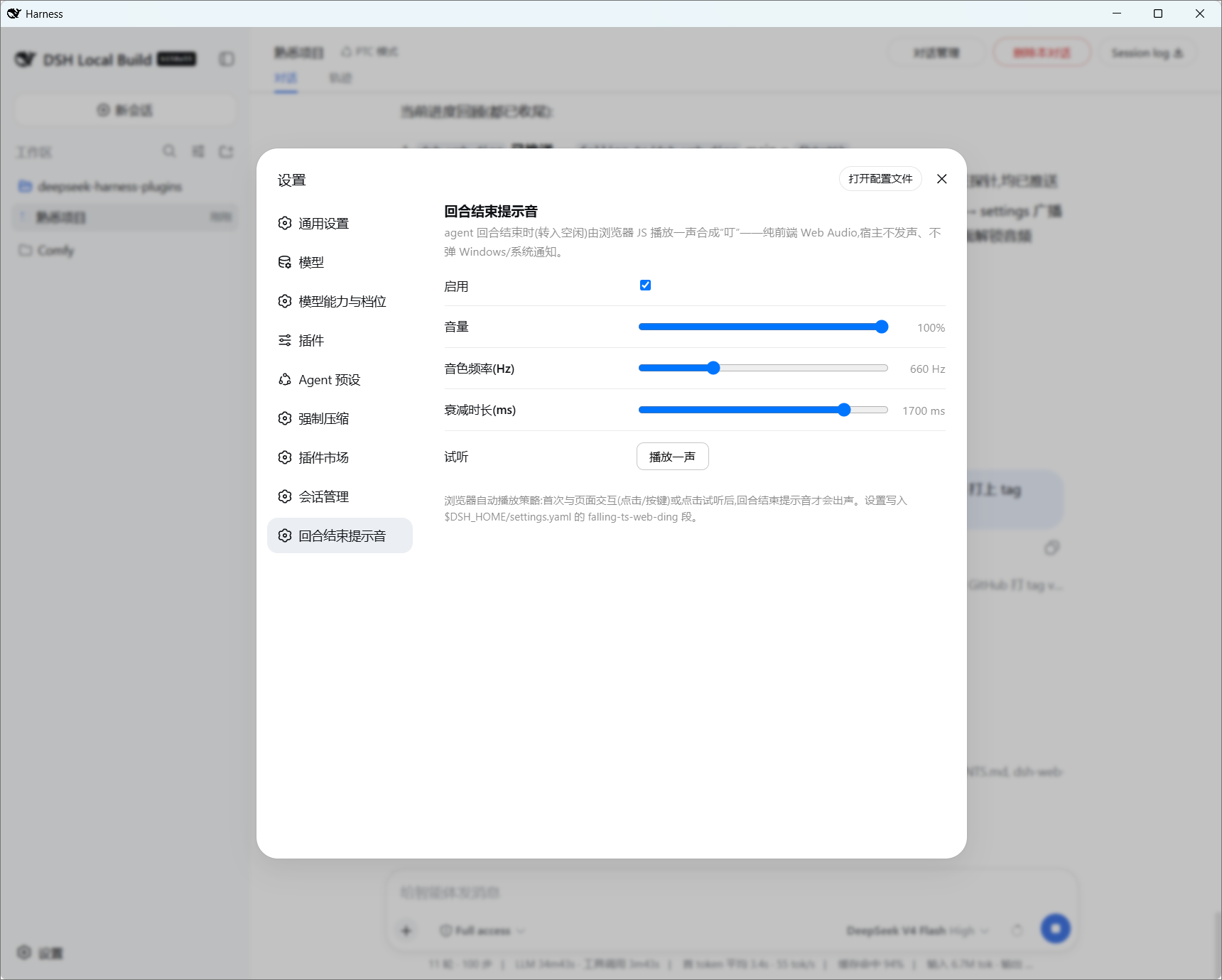
Settings page: the 提示音配置 section — "弹出用户选择" and "回合结束" blocks, each with its own switch, volume, frequency and decay length, all live-editable without a restart, each with a 试听 (preview) button to warm the browser AudioContext.
License
MIT
Links
More in this category
xmanrui/dsh-im★ 1862
Connect IM bots to DeepSeek Harness via QR codes or bot credentials (9 channels: Feishu, WeChat, DingTalk, WeCom, QQ, Slack, Telegram, Discord, and WhatsApp).
shaobeichen/dsh-pocket★ 1671
Remote phone access to the DSH Web UI: scan a QR code for LAN or public (cloudflared tunnel) access with real-time sync, a mobile-adaptive layout, and a settings tab.
inclusionAI/Avernet#deepseek-harness-channel-bcn★ 636
Connects DeepSeek Harness to Avernet's Bot Collaboration Network over WebSocket V2, with automatic onboarding, isolated agent sessions, tool-call events, and multi-bot routing tools.
omdsh-dev/dsh-notification★ 88
Desktop notifications for turn completions, with per-outcome controls and keyword rules.
Oscar-Williams/dsh-deepcanary★ 84
Evidence-first attention supervision for DeepSeek Harness with C0–C3 policy, deduplicated Inbox alerts, quiet hours, and redacted outcome records.
whyihaveyou/dsh-suite#plugin-notify★ 59
IM webhook and local notifications on turn completion, errors, or approval (Feishu/WeCom/DingTalk/Slack/Discord/custom).
Community comments
Comments are public GitHub Discussions. Loading them connects to GitHub and Giscus; a GitHub account is required to post.