An ikun (basketball meme) pet that fills the dock under the "Deep diving..." status row during replies: a sprite-sheet pet walks a 0→100% progress bar, switching animation and text every 20%, and plays a system-level "nǐ gàn ma~" voice cue at completion.
Install
# from npm (prebuilt)
dsh plugin --profile web add dsh-ikun-pet
# from GitHub (first run asks for allowBuilds approval — follow the hint, retry)
dsh plugin --profile web add github:eric-song-dev/dsh-ikun-pet
Any plugin you install runs third-party code with your own permissions — it can read your files, use your credentials, and reach the network, and tool approvals don’t sandbox it. GitHub-sourced plugins also run build scripts at install time — pnpm blocks those until you allow them, so an install can stop with ERR_PNPM_GIT_DEP_PREPARE_NOT_ALLOWED or ERR_PNPM_IGNORED_BUILDS; dsh prints the exact key to add under allowBuilds in your profile’s pnpm-workspace.yaml, and the install works on the next run. Allowing a build is a trust decision: only install sources you trust, and pin a commit (github:owner/repo#sha).
README
📖 中文文档:README.zh.md
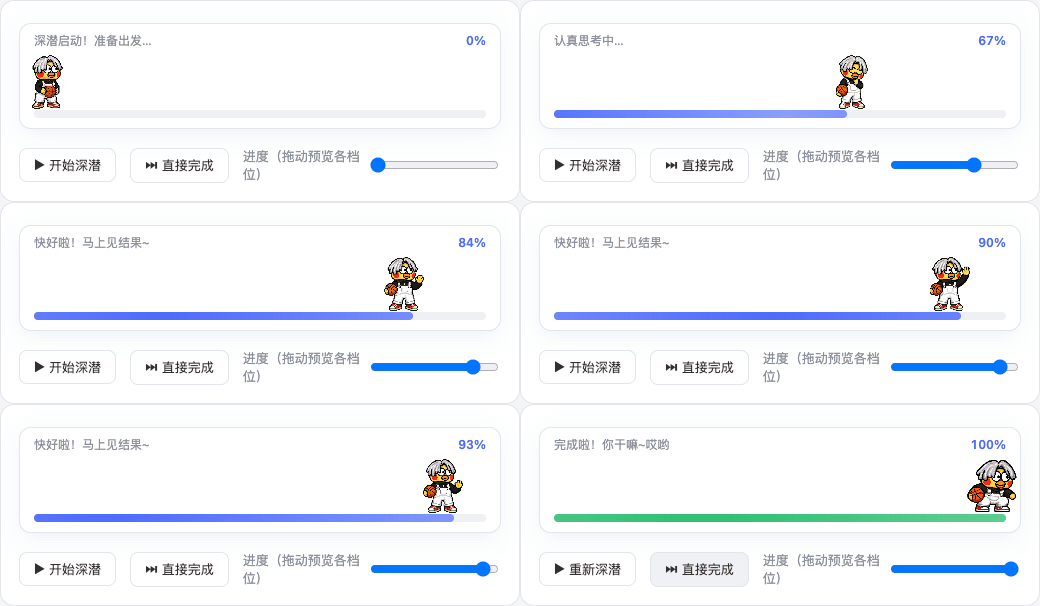
A DeepSeek Harness (DSH) plugin that fills the full row under the "Deep diving..." status line with an ikun pet during every reply: a
0% → 100%progress bar, a new animation and text every 20%, and a jump celebration with a system-level "你干嘛~哎哟" voice cue at completion 🏀
✨ Features
- Only fills the deep-dive dock: registered at
conversation.input.dock— the full row directly below DSH's "Deep diving..." status line, between the conversation and the composer. Visible only while a session isrunning(deep diving); completely invisible the rest of the time. - The pet walks the progress bar: the ikun pet walks from 3% to 97%, playing frame-by-frame on top of the progress bar (8 columns × 9 rows sprite-sheet contract).
- A new stage every 20%: six stages at 0/20/40/60/80/100, each switching both the animation and the text (see docs/PROGRESS-STAGES.md).
- Universal adaptive progress: a layered estimation model — real anchors (0% start / 100% done) + real goal-round progress + self-calibration from this session's turn durations + activity pacing for tools/streaming/approval-waiting + a shrinking reserve. Short tasks run fast, long tasks run slow, waiting for your approval slows it down honestly, and it never fakes 100% (details in docs/PROGRESS-STAGES.md).
- Completion heard system-wide: at 100% the host process plays "你干嘛~哎哟" (
assets/voice.mp3) with a system command — audible from any window and any session, independent of browser mute (tested on macOS). - Permanent plugin form: written into the DSH composition (
cordis.patch.yml) and auto-loaded on every DSH start — install once, works in every session. Dynamic-plugin sources (src/) are kept as an alternative for session-level installs.
🚀 Install
Option A: clone (for tinkerers)
git clone https://github.com/eric-song-dev/dsh-ikun-pet && cd dsh-ikun-pet
dsh plugin add "$PWD" --profile web
Option B: remote one-liner (for users)
dsh plugin add github:eric-song-dev/dsh-ikun-pet --profile web
# or: dsh plugin add https://github.com/eric-song-dev/dsh-ikun-pet.git --profile web
Option C: npm (prebuilt — installs without the allowBuilds build-approval step)
dsh plugin add dsh-ikun-pet --profile web
💡 If your profile isn't named
web, swap--profile webfor your own profile name in the commands above.
Then restart dsh web and refresh the browser. Verify:
curl -sI http://127.0.0.1:3080/ikun-pet/spritesheet.webp   # sprite route (should be image/webp)
curl -s  http://127.0.0.1:3080/plugins/dsh-ikun-pet/client.js   # client bundle (should return JS)
🎬 Stage → animation → text
| Progress | Animation | Text |
|---|---|---|
| 0% – 20% | waiting | 深潜启动!准备出发… |
| 20% – 40% | runRight | 正在收集线索… |
| 40% – 60% | working | 埋头苦干中… |
| 60% – 80% | review | 认真思考中… |
| 80% – 100% | wave | 快好啦!马上见结果~ |
| 100% (done) | jump | 完成啦!你干嘛~哎哟 🔉 (host plays the voice cue) |
⚙️ Configuration (optional)
Everything lives in the plugin line's config inside the bundled cordis.patch.yml:
spritePath / voicePath / playVoiceAtDone / playCommand (assets default to the bundled assets/).
- Disable: remove the
#in front of# disabled: true, restartdsh web(put it back to re-enable) - Mute the voice:
config.playVoiceAtDone: false(the animated bar is unaffected) - Voice on Windows/Linux: swap
playCommandto PowerShell / ffplay (examples in the comments; macOS defaults toafplay, tested)
🗑 Uninstall / 🔄 Update
dsh plugin remove dsh-ikun-pet --profile web     # uninstall (bundles are reconciled automatically), then restart dsh web
# update: cd <repo dir> && git pull && dsh plugin add "$PWD" --profile web
🧪 Session-level install (dynamic plugin)
node scripts/build-package.mjs # produces the ikun.package.json install payload
Hand the payload to your Agent to install via cordis_define + cordis_run — current session only.
⚠️ Don't run it alongside the permanent plugin (their sprite routes conflict).
🖥 Platform support
| Part | macOS | Windows / Linux |
|---|---|---|
| Animated UI + progress bar (pure Web) | ✅ tested | ⚠️ should work, untested |
| Completion voice (system command) | ✅ tested (afplay) |
⚠️ commands provided, untested |
🛟 Troubleshooting
| Symptom | Fix |
|---|---|
| Plugin line fails on restart | node -e "require('dsh-ikun-pet')" in the profile dir should succeed; reinstall if it doesn't |
| Dock not showing but routes work | hard refresh (Cmd+Shift+R); make sure the dynamic plugin isn't enabled at the same time |
| No voice | check config.playVoiceAtDone; macOS uses afplay, other OSes need a different playCommand |
| Don't want it to load | add disabled: true to the plugin line and restart |
📄 License
MIT
Links
More in this category
PC2005-cloud/dsh-pet#dsh-pet★ 883
Desktop pet for the DSH Web UI with 25 transparent animations, screen wandering, click reactions and drag, plus a reproducible asset-generation pipeline.
Nagi-ovo/dsh-ads★ 639
Parody ads in 2005-Chinese-web style: sidebar banners, in-chat feeds, corner popups, and a close button whose hit area is smaller than it looks. All fictional.
vlln/whale-girl★ 340
Desktop pet (QQ-pet style): floats in the corner, draggable, feedable, playable.
a86582751/dsh-nexttavern★ 122
Roleplay workspace for DeepSeek Harness: import SillyTavern/TauriTavern character cards or author one from scratch through an interactive flow; turn a long TXT novel into a playable card with either an intensive or a coarse reading pass; the main agent consults worldbooks on demand, and prose is read in a dedicated tavern reader tab; explore multiple worldlines inside one conversation (regenerate, edit-and-send, explicit clone); scoped style presets with 16 built-in styles, a character agent cluster, a standalone decision card, and card or novel export; long stories hold together through a frozen settings prefix, a hard-cut context window, traceable director notes and keyword/semantic/hybrid recall, with embeddings either online or fully local. Targets Harness 0.1.2-alpha.3 and applies its documented compatibility patches.
yyh-001/dsh-meme★ 115
Chat meme stickers: text-only send, mood auto-send, QQ/WeChat-style picker, auto-learn, custom packs.
Sutera-Diffusus/dsh-whale-musume★ 96
A whale-girl desktop pet for the DeepSeek Harness Web UI: pat-to-raise growth, work-state poses per tool type, 494 dialogue lines, 30 achievements, a growth diary, drag physics, theme sync and an accessibility mode. Chat-keyword sensing and API-balance care ship off and are opt-in; an optional weather mood calls Open-Meteo only after you name a city. No telemetry.
Community comments
Comments are public GitHub Discussions. Loading them connects to GitHub and Giscus; a GitHub account is required to post.