Firecrawl-backed web search provider for the built-in web_search tool, with a settings card for the API key and result limits.
Install
# from npm (prebuilt)
dsh plugin --profile web add @elves-ai/dsh-web-search-firecrawl
# from GitHub (first run asks for allowBuilds approval — follow the hint, retry)
dsh plugin --profile web add github:elves-ai/dsh-web-search-firecrawl
Any plugin you install runs third-party code with your own permissions — it can read your files, use your credentials, and reach the network, and tool approvals don’t sandbox it. GitHub-sourced plugins also run build scripts at install time — pnpm blocks those until you allow them, so an install can stop with ERR_PNPM_GIT_DEP_PREPARE_NOT_ALLOWED or ERR_PNPM_IGNORED_BUILDS; dsh prints the exact key to add under allowBuilds in your profile’s pnpm-workspace.yaml, and the install works on the next run. Allowing a build is a trust decision: only install sources you trust, and pin a commit (github:owner/repo#sha).
README
English | 中文
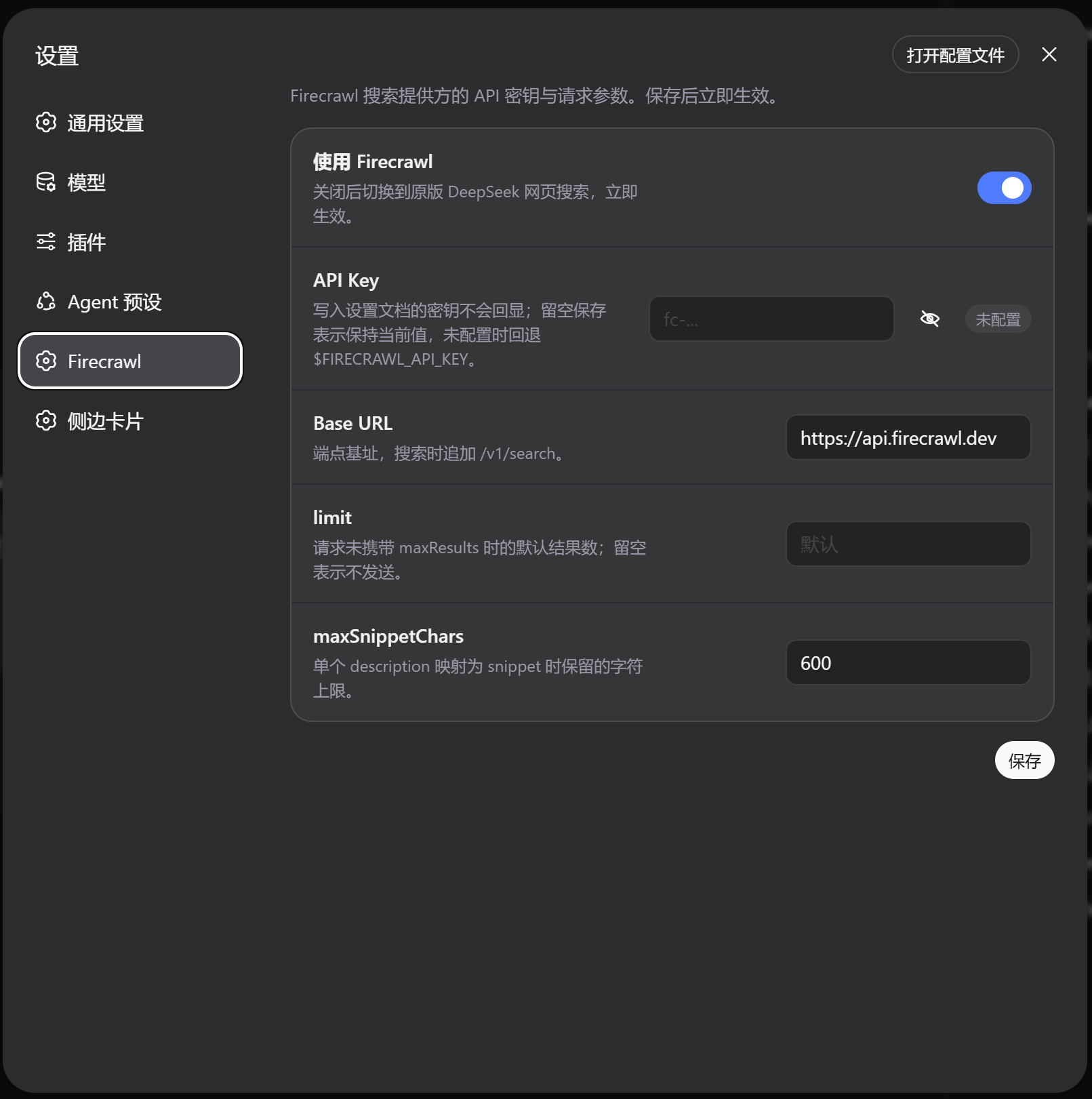
A Firecrawl-backed search provider for the DeepSeek Harness web capability seam (ctx.web): it makes the built-in web_search tool run on Firecrawl's search API instead of the shipped DeepSeek route.
The plugin is a Cordis function plugin that registers a WebSearchProvider (id: firecrawl) into the seam — it does not own ctx.web and does not register a model-facing tool (the tool schema stays with @deepseek-ai/dsh-tool-web). It calls Firecrawl's POST /v1/search endpoint and maps the flat data[] into the seam's normalized WebSearchResult.
The API key is configured from the Firecrawl page in DSH Settings; $FIRECRAWL_API_KEY remains available as a compatibility fallback.
Requirements
- A DeepSeek Harness installation on the
0.1.0-rc.6line of the official packages (the plugin peers on@deepseek-ai/dsh-web ^0.1.0-rc.6and friends — the current release line). On an older line, pnpm nests a second copy of the seam into the profile and error classification degrades (cross-copyWebError); check from the profile directory withnpm ls @deepseek-ai/dsh-web. - A Firecrawl API key. Get one at firecrawl.dev.
Install
Choose one of the following:
Option 1 — global dsh CLI
dsh plugin --profile web add @elves-ai/dsh-web-search-firecrawl@latest
Option 2 — deepseek-harness source checkout (there dsh is a pnpm workspace script, not a global binary; run it from the workspace root):
pnpm dsh plugin --profile web add @elves-ai/dsh-web-search-firecrawl@latest
dsh plugin forwards to pnpm inside the profile directory and appends the bundle to the profile's layer stack automatically. The bundle patch inserts the web-search-firecrawl plugin row and switches the web seam row to searchProvider: firecrawl (replacing the base bundle's deepseek-official).
After installing, restart dsh web, then hard-refresh the page (Cmd/Ctrl+Shift+R) so the browser half and its settings page load:
dsh web
Verify: the Settings dialog should show the Firecrawl page, and asking the agent for a web search should route through Firecrawl. Without a key, a search fails with WEB_PROVIDER_CONFIGURED_UNAVAILABLE.
To keep DeepSeek search as the default and enable Firecrawl per instance instead, restate the web row in your profile's own cordis.patch.yml afterwards — the last write wins per row. The base bundle pins searchProvider: deepseek-official, so $DSH_WEB_SEARCH_PROVIDER selects the provider only when the web row sets no searchProvider: restate web with an empty config (- id: web + config: {}) for env selection, or with searchProvider: deepseek-official to pin DeepSeek.
Update
Global dsh CLI:
dsh plugin --profile web update --latest @elves-ai/dsh-web-search-firecrawl
deepseek-harness source checkout — run from the workspace root:
pnpm dsh plugin --profile web update --latest @elves-ai/dsh-web-search-firecrawl
dsh plugin update forwards to pnpm inside the profile directory; --latest upgrades to the latest published version regardless of the currently installed range. After updating, restart dsh web, then hard-refresh the page (Cmd/Ctrl+Shift+R). If the plugin is installed in another profile, replace web with that profile name.
Uninstall
Global dsh CLI:
dsh plugin --profile web remove @elves-ai/dsh-web-search-firecrawl
deepseek-harness source checkout — run from the workspace root:
pnpm dsh plugin --profile web remove @elves-ai/dsh-web-search-firecrawl
dsh plugin remove forwards to pnpm inside the profile directory and also removes the package from dsh.profile.bundles. Once the bundle layer is gone, the web seam row reverts to the base bundle's deepseek-official provider. Restart dsh web for the removal to take effect in the running process.
The command removes the package and its mount, but not settings-page values. If you also want to delete the saved API key, clear it on the Firecrawl page before uninstalling. If the plugin was installed into another profile, replace web with that profile name.
Switching search providers
Installing the plugin switches the web seam's searchProvider to firecrawl, so Firecrawl replaces the original web search by default. In DSH Settings → Firecrawl, the Use Firecrawl switch at the top selects between the two providers live:
- On (default): Firecrawl
POST /v1/searchis used. - Off: the registered
firecrawlprovider delegates to the original DeepSeek search implementation, so the model keeps using the shipped DeepSeek search route; DeepSeek's endpoint/model still resolve from the originalweb-search-deepseeksettings section.
The switch applies immediately without a restart. Firecrawl credentials and request settings are preserved while off.
Configuring the API key
Open DSH Settings → Firecrawl:
- Paste
fc-...into the API Key field and save. The eye button beside the field toggles plain-text visibility for the current draft. - The key is written with
role('secret'): the saved literal never rides a response; the page only shows whether a key is configured. - Saving with the field blank keeps the current key; use Clear to remove it.
- Changes apply immediately — the registered provider uses the new values on the next search, no restart required.
If the settings-page key is blank, the provider still falls back to $FIRECRAWL_API_KEY:
export FIRECRAWL_API_KEY=fc-...
dsh --profile web
Config
| Key | Default | Meaning |
|---|---|---|
useFirecrawl |
true |
Whether to use Firecrawl; false switches back to the original DeepSeek web search. |
apiKey |
(blank) → $FIRECRAWL_API_KEY |
Firecrawl API key. Written as a secret by the settings page and never echoed back. Blank falls back to the env var; with neither present the provider is unavailable. |
baseURL |
https://api.firecrawl.dev |
Endpoint base; /v1/search is appended. An unparseable value makes the provider unavailable. |
limit |
(unset) | Default result count when a request carries no maxResults. Unset sends no default. Must be a positive integer. |
maxSnippetChars |
600 |
Upper bound on characters kept from one description when mapping snippet. Must be a positive integer. |
Every field is editable from the settings page. Bundle config remains the composition base layer under that user section, so a profile can pin only the fields it needs:
# profile cordis.patch.yml (optional; usually not needed)
- id: web-search-firecrawl
  name: '@elves-ai/dsh-web-search-firecrawl'
  config:
    limit: 10
Mapping
Firecrawl returns a flat data[] and no generated answer, so content is omitted. Each entry maps to a WebSearchSource: url ← url, title ← title, snippet ← description trimmed and bounded to maxSnippetChars (an entry without a non-blank description keeps its citeable URL-only source). A request's maxResults wins over the configured limit default and is sent as Firecrawl's limit for a cost/latency optimization; the final bound is enforced by the seam. Provider failures (HTTP errors, network failure, unparseable or wrong-shape bodies, a success: false envelope) surface as WebError WEB_PROVIDER_ERROR; an aborted request surfaces as WEB_ABORTED. HTTP redirects are rejected before the Location target is contacted.
Model Experience
Indirect, through @deepseek-ai/dsh-tool-web: the model sees the maxResults-bounded URLs, titles, and bounded descriptions, plus the consumer's error wrapper around Firecrawl search aborted, Firecrawl search request failed: <error>, and Firecrawl returned an unprocessable response body: <error>. Generated answers and provider-private fields stay out of context.
Known Limitations
- A snippet is Firecrawl's
descriptionexcerpt, not a search-engine summary — it can be long page markdown, so the provider bounds it tomaxSnippetChars; entries without a description carry no snippet at all (URL-only). - Only
limit/maxSnippetCharsare exposed — Firecrawl's other controls (language, country, recency, location, targeting, scrape options) wait on provider-neutral Service Definition fields in@deepseek-ai/dsh-web. - Abort classification is error-shape-based — only a
DOMExceptionnamedAbortErrormaps toWEB_ABORTED; an abort carrying a custom reason surfaces asWEB_PROVIDER_ERROR.
Development
pnpm install
pnpm run typecheck
pnpm test                            # unit suite (no network)
FIRECRAWL_API_KEY=... pnpm run test:e2e  # live-API smoke, self-skips without the key
pnpm run build                       # emits lib/ (ESM host) + lib/client.js (browser) + lib/types/ (d.ts)
License
MIT
Links
More in this category
Tencent/BrowserSkill#dsh-plugin-browserskill★ 7976
BrowserSkill bridge for controlling visible Chrome and Edge Agent Windows from DeepSeek Harness, with native browser tools, accessibility and VOM observations, screenshots, owned multi-session control, and a live Web UI overlay.
omdsh-dev/dsh-browser#packages/browser/bridge-browser★ 751
Chrome sidebar extension that lets DSH operate your browser directly, no vision capabilities required.
liustack/modsearch★ 579
Web search bridge for text-only agents: ask the web or X, get structured JSON evidence (search, fetch, citations).
DDDMUC/dsh-free-search★ 289
Free, keyless web search for DSH: 7 engines (DuckDuckGo/Bing/SearXNG free + Exa/Perplexity/DeepSeek paid), auto-failover, settings-page UI with API key inputs and official links, web_fetch, and an engine test tool.
Tabbit-Browser/dsh-tabbit★ 101
Gives DeepSeek Harness control of the Tabbit Browser: auto-loads the tabbit-browser skill on install, detects official Tabbit and Tabbit Browser releases (>= 1.9.0), checks the tabbit-cli persistent runtime, diagnoses the per-platform DSH sandbox mode needed to call the CLI, and downloads the region-matched official installer via a background job when no qualifying version is present.
wqty123/dsh-browser★ 90
Shared real browser for DSH: a native Electron window the human can watch and take over, driven by the agent over CDP with 20 browser_* tools (open/snapshot/execute/fill/screenshot/download/auth), per-task session isolation, cookie persistence, CAPTCHA detection; self-hosts on plain dsh web without a desktop shell.
Community comments
Comments are public GitHub Discussions. Loading them connects to GitHub and Giscus; a GitHub account is required to post.