One-click OAuth (PKCE) connect to Qichacha (qcc.com) legal-data MCP services — regulation search and case search — with dynamic client registration, token auto-refresh, and dynamic mcp-client configuration.
Install
# from npm (prebuilt)
dsh plugin --profile web add qcc-dsh-mcp-legal-oauth
# from GitHub (first run asks for allowBuilds approval — follow the hint, retry)
dsh plugin --profile web add github:duhu2000/qcc-mcp-legal-oauth
Any plugin you install runs third-party code with your own permissions — it can read your files, use your credentials, and reach the network, and tool approvals don’t sandbox it. GitHub-sourced plugins also run build scripts at install time — pnpm blocks those until you allow them, so an install can stop with ERR_PNPM_GIT_DEP_PREPARE_NOT_ALLOWED or ERR_PNPM_IGNORED_BUILDS; dsh prints the exact key to add under allowBuilds in your profile’s pnpm-workspace.yaml, and the install works on the next run. Allowing a build is a trust decision: only install sources you trust, and pin a commit (github:owner/repo#sha).
README
This plugin publishes its README in Chinese only.
One-click OAuth connect to 企查查 (Qichacha) 法律数据 MCP inside DeepSeek Harness. 在 DeepSeek Harness 中一键 OAuth 授权接入企查查法律数据 MCP(法规法条 / 司法案例)。
功能 / Features
- 🔑 一键 OAuth 连接:
Authorization Code + PKCE(S256),动态注册客户端(无 client_secret),自动打开浏览器跳转企查查授权页,loopback 回调自动完成 - 🌐 一次授权、全 Server 可用:一份
access_token/refresh_token覆盖企查查法律数据 MCP SERVER(legal-regulation法规 /legal-case案例,共 2 个);插件按 token 实际授权范围动态挂载——同时开通法规+案例的账号 2 个、仅开通法规的账号 1 个 - 🔄 自动刷新:access_token 过期前自动 refresh(token 轮换),失败才需要重新授权
- 💾 安全持久化:token 存储于 DSH 存储域(
~/.dsh/storages,目录 0700),重启 Host 自动恢复连接 - 🛠 对话即管理:内置
qcc_legal_oauth_connect/qcc_legal_oauth_status/qcc_legal_oauth_disconnect三个工具 - 🚪 一键断开:调用 OAuth revoke 撤销 refresh_token 并停用 MCP 工具
- 🧩 与企业数据插件可共存:工具名、存储域、条目 id 与「企查查 MCP OAuth 插件」(company/risk/...)完全独立,可同时安装
安装 / Install
前置:DeepSeek Harness 0.2.0-rc.2(dsh CLI,web profile),Node ≥ 20。插件 0.1.5 起适配 DSH 0.2 系列,已验证目标版本为 0.2.0-rc.2。
从 0.1.4 升级(DSH 0.2.0-rc.2 不兼容提示)
0.1.4 的 @deepseek-ai/dsh-mcp-client 对等依赖仅接受 ^0.1.0-rc.6,DSH 0.2.0-rc.2 会因此拒绝加载。0.1.5 已更新兼容声明,并对齐新版 @deepseek-ai/cordis、存储域与工具服务依赖。
如果 npm 尚未发布 0.1.5,可在本仓库目录打包并安装本地修复版(先停止正在运行的 DSH):
npm pack
dsh plugin --profile web add ./qcc-dsh-mcp-legal-oauth-0.1.5.tgz
# 重启 dsh web
0.1.5 发布到 npm 后,可执行 dsh plugin --profile web add qcc-dsh-mcp-legal-oauth@0.1.5,再重启。
🤖 让 Agent 安装(最省事,推荐给不熟悉命令行的用户)
把下面的链接直接发给你的 DeepSeek Harness 对话(推荐先在 dshmarket 插件市场搜索「企查查法律数据」一键安装;市场直装失败时,同样把链接发给 Agent 即可代为安装):
帮我安装这个插件 https://github.com/duhu2000/qcc-mcp-legal-oauth
Agent 会按本 README 执行以下命令(你也可以自己跑):
# 方式一:一键脚本(自动安装 + 注册 bundle + 提示重启)
bash <(curl -fsSL https://raw.githubusercontent.com/duhu2000/qcc-mcp-legal-oauth/main/install.sh)

# 方式二:手动两步
dsh plugin --profile web add qcc-dsh-mcp-legal-oauth   # 安装依赖并自动注册 bundle
# 重启 dsh web
说明:
@deepseek-ai/*等对等依赖由 DSH web profile 提供,无需另行安装。如提示版本不兼容,应安装适配版本;安装完成后必须重启 dsh web 才能生效。
方式 A:npm 安装
# 1. 安装插件到 profile(声明了 dsh.bundle 的包会被 dsh plugin add 自动注册到 bundles)
dsh plugin --profile web add qcc-dsh-mcp-legal-oauth

# 2. 重启 dsh web
若未自动注册:手动在 ~/.dsh/profiles/web/package.json 的
dsh.profile.bundles追加"qcc-dsh-mcp-legal-oauth"(与@deepseek-ai/dsh-base、@deepseek-ai/dsh-web-app并列),再重启。
方式 B:GitHub 直装
dsh plugin --profile web add github:duhu2000/qcc-mcp-legal-oauth
# 再重启 dsh web
方式 C:源码 / 本地调试
git clone https://github.com/duhu2000/qcc-mcp-legal-oauth.git
cd qcc-mcp-legal-oauth
dsh plugin --profile web add "link:$(pwd)"      # 或 pnpm add "file:$(pwd)"
# 再重启 dsh web
插件包内自带
cordis.patch.yml(bundle patch);dsh plugin add自动完成依赖安装与 bundles 注册,插件行自动合入,无需手改任何文件。
使用 / Usage
重启后,插件会自动发起 OAuth 授权(默认开启,激活且无有效授权时自动打开企查查授权页);如未自动触发,在对话中输入:
| 你说 | 效果 |
|---|---|
| "连接企查查法律数据" | 触发 qcc_legal_oauth_connect:自动打开浏览器跳转企查查授权页,登录授权后自动完成连接 |
| "查一下企查查法律数据连接状态" | 触发 qcc_legal_oauth_status:显示授权状态、token 过期时间、覆盖的 MCP Server |
| "断开企查查法律数据" | 触发 qcc_legal_oauth_disconnect:撤销 refresh_token、清除本地授权、停用工具 |
连接成功后,以下工具直接可用(示例):
mcp__legal-regulation__*:regulation_search(法规关键词检索)、regulation_detail(法规全文)、regulation_detail_article(法条原文)等mcp__legal-case__*:case_search(案例关键词检索)、case_detail(案例完整文书)等- 溯源工具:法规溯源 / 案例溯源(引用核验 + 可点击超链)
原理 / How it works
严格遵循《企查查MCP OAuth 接入文档》(Authorization Code + PKCE,公开接口版),与企业数据 MCP 插件共用同一套授权服务器:
- 发现 MCP Protected Resource Metadata → 2. 发现 OAuth Server Metadata(endpoint 全部动态读取,不硬编码)
- 动态注册客户端(
client_id,90 天自动续期)→ 4. 打开授权页(scope=mcp:tools) - loopback 回调校验
state→ 6. 授权码 +code_verifier换 token - 解析 token 实际授权的 resource(JWT claim),通过
ctx.loader为授权的@deepseek-ai/dsh-mcp-client条目注入 Bearer header(法规+案例 2 个 / 仅法规 1 个)→ 8. 过期前自动刷新(轮换)
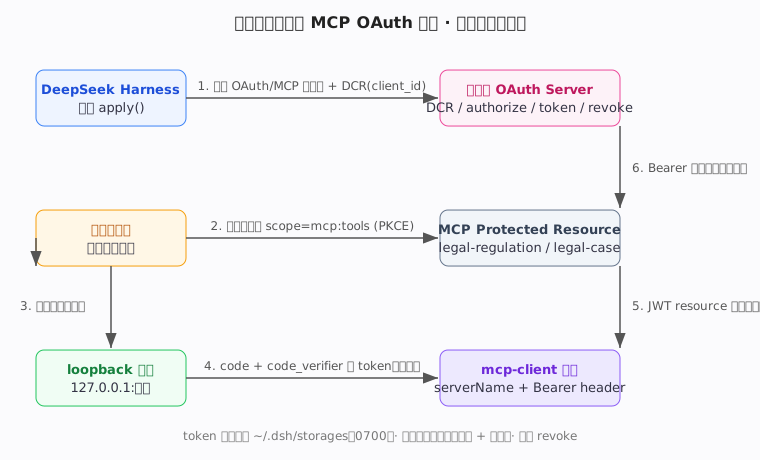
详见 docs/OAUTH-IMPLEMENTATION.md。
工具清单与调用示例详见 docs/TOOLS.md。
配置 / Configuration
插件行位于 ~/.dsh/profiles/web/cordis.patch.yml(bundle 合入后可见):
- id: qcc-legal-mcp-oauth
  name: 'qcc-dsh-mcp-legal-oauth'
  config:
    issuer: 'https://agent.qcc.com'                 # OAuth 授权服务器
    clientName: 'DeepSeek Harness - QCC Legal MCP'  # OAuth 客户端名(授权页展示 + 后台品牌识别依据)
    refreshSkewMs: 300000                            # 过期前提前刷新(ms)
    openBrowser: true                                # 自动打开浏览器(false = 仅打印授权 URL)
    autoConnectOnActivate: true                      # 激活且无授权时自动打开授权页(false = 手动触发)
    persistTokens: true                              # 持久化 token(false = 仅内存)
    mcpEntryPrefix: 'mcp-qcc'                        # 受管 mcp-client 条目 id 前缀(条目:mcp-qcc-legal-regulation / mcp-qcc-legal-case)
关于
clientName:它是 OAuth 协议的client_name,会被企查查写入 access_token 的client_nameclaim,用于后台看板品牌识别(企查查侧将名称去除空格/连字符/下划线并转小写后,按deepseekharness*前缀归一为激活来源deepseekharness)。默认值DeepSeek Harness - QCC Legal MCP已命中该前缀。如需自定义,请保持DeepSeek Harness前缀,否则后台会归入「其他(未注册)」、无法正确统计品牌激活。
安全说明 / Security
- token 只写入
~/.dsh/storages(0700),不进入 git、不进入对话历史 - 连接期间
loader会把条目配置写回 profile 配置文件(含 token),建议:chmod 600 ~/.dsh/profiles/web/cordis.yml;不要把~/.dsh加入任何仓库 - Bearer token 仅发送给授权集合内的精确 resource URL
- 断开时调用 revoke 撤销 refresh_token
- 如需彻底移除:
qcc_legal_oauth_disconnect后从 bundles 移除包名并dsh plugin --profile web remove qcc-dsh-mcp-legal-oauth
已知限制 / Limitations
- 插件默认管理 2 个法律数据 SERVER(
legal-regulation法规 /legal-case案例);账号 token 可能只授权其一,插件按 token 实际授权范围动态挂载(2 个 / 1 个) - 企业数据 SERVER(company/risk/ipr/operation/history/executive)由独立的「企查查 MCP OAuth 插件」(
qcc-dsh-mcp-oauth)管理,本插件不重复管理;两插件可同时安装 - 第三方插件无法注册 DSH 设置页卡片(apiproxy allowlist 限制),管理入口为对话工具
- 回调使用本地 loopback 地址,适用于桌面端;SaaS/Web 回调地址需提前与企查查确认白名单
- 静态 API Key(Bearer YOUR_API_KEY)直连属企查查另一直连通道,不属本插件职责;如需静态 Key,直接用普通 mcp-client 配置即可
开发 / Development
npm install --ignore-scripts --legacy-peer-deps --no-package-lock  # 安装固定的开发测试依赖,不拉入完整 DSH 宿主
npm run lint         # 语法检查
npm test             # 单元 + 集成测试(含 mock OAuth 服务器全流程)
测试覆盖:PKCE、元数据发现、动态注册、完整授权码流程(loopback)、refresh 轮换、revoke、 插件级集成(连接/幂等/自动刷新/断开/重启恢复/按 token 授权动态挂载)。
插件市场收录与搜索关键词 / Marketplace
本插件可通过以下渠道被发现与安装:
dsh-plugintopic(官方推荐发现渠道):DeepSeek Harness 官方推荐通过 GitHubdsh-plugintopic 发现插件,本仓库已打该 topic;dsh-plugin-marketplace 等社区市场据此自动收录,搜索走 GitHub 仓库搜索(仓库名 / 描述 / topic),收录即时但无人工审核。- dshmarket(社区插件市场,人工精选 + PR 守门审核):数据源为 awesome-dsh-plugin 精选列表,仅安装列表内来源。本插件已提交收录 PR(
data/plugins/duhu2000__qcc-mcp-legal-oauth.yml),合并后即可在「设置 → 插件市场」浏览、搜索「企查查法律数据」并一键安装。安装方式:官方 CLI 支持dsh plugin add <package>通用安装,dshmarket 依此提供dsh plugin --profile web add dshmarket。
为便于中文 / 英文检索,已覆盖以下关键词:
- 中文:企查查、法律产品、法律数据、法规、案例(写入仓库描述与精选列表 zh 描述)
- 英文:qcc、qichacha、legal、law、legal-tech、legal-data、regulation、case(写入仓库名 / 描述 / topic / npm keywords)
License
MIT
Links
More in this category
Tencent/WeKnora#dsh-weknora★ 37685
Four read-only tools over a WeKnora knowledge base: list knowledge bases, hybrid passage search, reassemble one document's chunks in order, and WeKnora's own cited RAG or ReAct-agent answer with a resumable session id.
DayuanJiang/next-ai-draw-io#dsh-plugin★ 37029
Draws draw.io diagrams in DeepSeek Harness through the next-ai-drawio MCP server: the link in the reply opens a live preview in the right sidebar, you can edit the diagram by hand, and each AI change is a version you can restore. Node.js 18+; npx downloads the MCP server on first use.
superdesigndev/treg★ 8322
Tool catalog for agents: search ~2,600 external endpoints (SEO and SERP, backlinks, social, people and company enrichment, ad libraries, scraping) by the task you want done, read each one's parameters and per-call price, then call it with the credential injected server-side. Ships the skill plus an MCP row that stays disabled until TREG_TOKEN is set.
T-Auto/dsh-ops★ 5899
Provides bash, PowerShell 7, and high-performance Rust tools for DSH on Windows to reduce token usage.
sixtysevenlf/dsh-blender-plugin★ 2178
Lets a DSH agent drive a local Blender over a direct TCP channel with 15 tools: viewport frames, custom-angle renders, Python execution, headless and job offload, transaction rollback, and a planning layer of 228 ops across 34 families.
helloHub1212/dsh-windows-mcp★ 1612
Bridges the CursorTouch/Windows-MCP desktop automation server into DSH through the official MCP client bridge, registering its screenshot, UI tree snapshot, mouse and keyboard input, clipboard, process and registry tools as mcp__windows__* tools for the model, and adds a windows_mcp_doctor diagnostic tool. Computer Use is off by default and is switched on from the plugin panel.
Community comments
Comments are public GitHub Discussions. Loading them connects to GitHub and Giscus; a GitHub account is required to post.