Same-origin in mechanism with the two loudest lines in context compression. The code-skeleton gate follows the skeletonization approach of Headroom (Apache-2.0), whose published headline is 20% fewer tokens for coding agents and 60–95% fewer tokens for JSON, same answers. The estimator channel follows TokenPilot (arXiv:2606.17016), which reports up to 60% lower cost for long-session agents. Both figures are theirs, quoted as-is; this plugin ships no benchmark of its own and claims no reduction of its own. What it adds for DeepSeek Harness: choose a compression profile, set the Auto Compact trigger level and toggle code-skeleton compression from one settings section, with exact DeepSeek V4 tokenizer measurement, same-revision count verification, and fail-open behaviour that keeps the original tool results on unsupported models. Within a turn it supports skeletonized information compression with a low original-text retrieval rate; at the tail of a turn it supports a turn-tail intent summary implemented purely by content substitution; context content stays safe, and the whole process runs inside the official JSONL compression.
Install
# from npm (prebuilt)
dsh plugin --profile web add dsh-context-compression-improved
# from GitHub (first run asks for allowBuilds approval — follow the hint, retry)
dsh plugin --profile web add github:drscrewdriver/dsh-context-compression-improved
Any plugin you install runs third-party code with your own permissions — it can read your files, use your credentials, and reach the network, and tool approvals don’t sandbox it. GitHub-sourced plugins also run build scripts at install time — pnpm blocks those until you allow them, so an install can stop with ERR_PNPM_GIT_DEP_PREPARE_NOT_ALLOWED or ERR_PNPM_IGNORED_BUILDS; dsh prints the exact key to add under allowBuilds in your profile’s pnpm-workspace.yaml, and the install works on the next run. Allowing a build is a trust decision: only install sources you trust, and pin a commit (github:owner/repo#sha).
README
dsh-context-compression-improved
An improved fork of dsh-context-compression-selector — an auditable tool-result context-compression selector for DeepSeek Harness — adding an orthogonal code-skeleton compression gate.
中文说明 · 日本語 · 한국어 · Français · Deutsch · Italiano · Русский · Español · Changelog · Installation guide
[!NOTE] What this fork adds on top of upstream 0.1.0:
- An orthogonal code-skeleton compression gate (
codeSkeleton.enabled, default off): the first exposure of an oversized fresh source-code tool result can keep a skeleton of imports and declarations — bodies elided, error lines kept — before the regular reducers run.- A settings toggle for that gate in the same selector settings section, independent of every compression profile.
- An ESLint baseline wired into CI, a
test:watchTDD loop, and documentation in English, Simplified Chinese, Japanese, and Korean.
[!IMPORTANT] This project supports DeepSeek models only. Lossless measurement and lossy compression depend on the bundled official DeepSeek tokenizers (
deepseek-v4-flash,deepseek-v4-pro,deepseek-v4-flash-vision-exp). Everything else fails open and keeps original tool results. See the upstream README for the full safety model.
[!TIP] Recommended: connect DeepSeek with your own API key via a custom Responses API endpoint. Prefer a custom OpenAI-compatible endpoint (
/v1/responses) over the official-account Messages API route: it does not go through the Anthropic-style message serialization, so requests never trip message-format issues ortool_use/tool_resultpairing validation (the official route's resume-replay 400s cannot be repaired from the plugin side), and you can switch endpoint nodes over time and keep existing sessions running.
- Supported DSH hosts:
0.1.0-rc.20.1.0-rc.30.1.0-rc.60.1.0-rc.70.1.0-rc.80.1.1-rc.10.1.1-rc.20.1.2-rc.10.1.5-rc.10.1.5-rc.20.1.5-rc.30.1.7-rc.10.1.7-rc.20.2.0-rc.10.2.0-rc.20.2.1-rc.10.2.1-rc.20.2.1-rc.30.2.1-rc.40.2.1-rc.5(20 rc releases across lines 0.1.0 / 0.1.1 / 0.1.2 / 0.1.5 / 0.1.7 / 0.2.0 / 0.2.1)
What it is
Long-running agent tasks accumulate a large amount of tool output. This community plugin adds selectable, auditable policies for reducing that tool-result context without modifying DeepSeek Harness core:
- Fresh pre-compresses a newly oversized tool-result segment before the model receives it.
- Aggregate pre-compresses fresh material again when it still grows beyond its budget.
- History / micro-compact replaces eligible old tool results while preserving recent working context.
- TailTrim is an optional Custom-only tail reduction path.
- Native preserves the Harness-style head/middle/tail trimming as one explicit profile.
- Code skeleton (new, orthogonal gate) — see below.
Every decision is recorded: stage, reducer, trigger, skip reason, and exact token counts where available.
Code skeleton gate (new)
When the gate is enabled, an oversized fresh source-code tool result (for example a large read_file) first tries a skeleton reduction: imports and type/function/class declarations are kept, function bodies are elided with a marker, and error lines inside elided bodies are preserved. If the skeleton cannot be produced or verified, the result falls back to the original head pruning — the gate can never make context worse.
Properties:
- Orthogonal: independent of the selected profile (
balanced,savings,cache-strict,adaptive,custom,off,native). All profiles get the gate. - Off by default:
codeSkeleton: { enabled: false }until you turn it on. - Measurement-gated: requires the exact DeepSeek tokenizer; without it the plugin fails open.
- Session-frozen: like all selector settings, changes affect newly observed sessions only.
- Strictly parsed:
codeSkeletonmust be exactly{ enabled: boolean }; malformed values throw on the runtime side and show as unreadable in the browser UI.
Settings UI
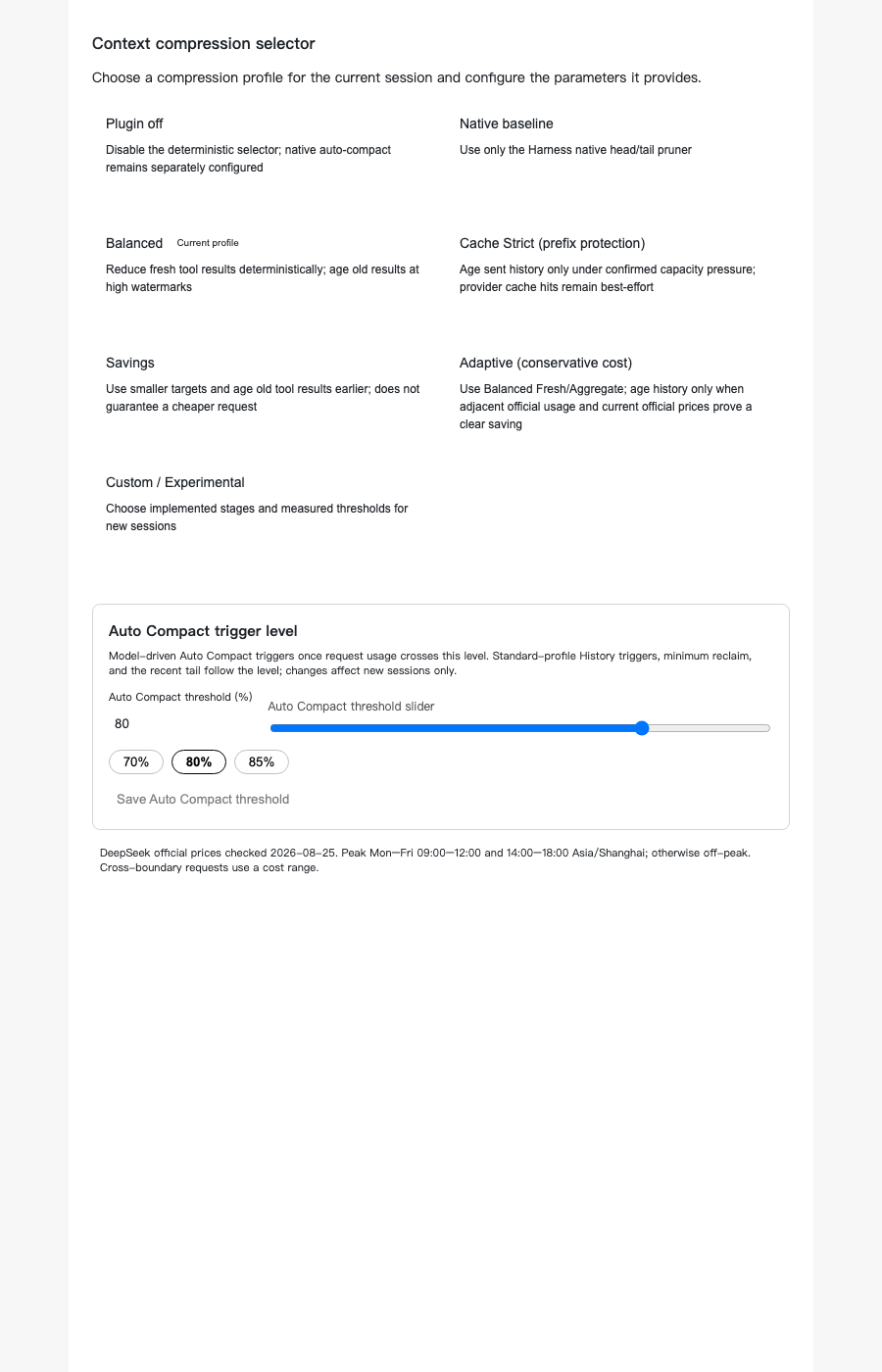
Choose a compression profile, set the Auto Compact trigger level, and toggle code-skeleton compression in the same settings section. The toggle saves on change and shows the saved state on reload.
Monitoring UI
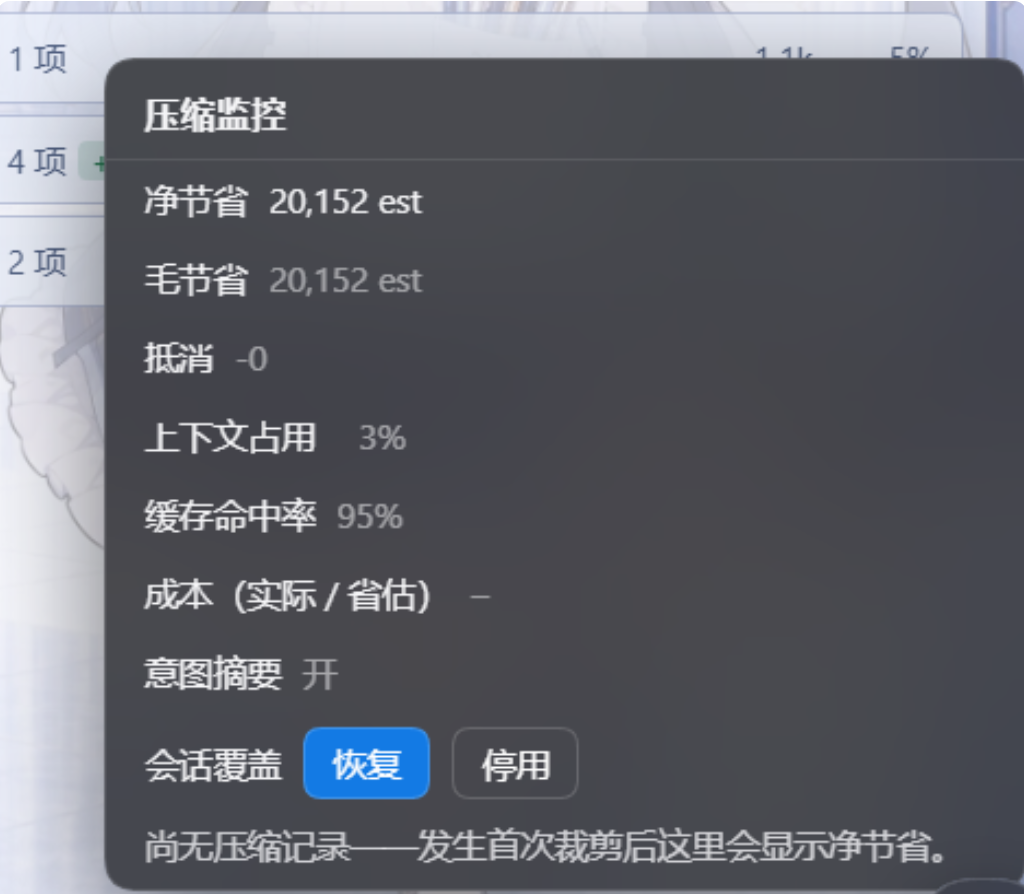
While compression runs, the plugin gives you a live view of what it saves: a compression monitor panel — net/gross savings, offsets, context usage, cache-hit rate, cost estimate, and the turn-tail intent-summary state, with a per-session resume/disable override right in the panel — next to the session's context trend chart.
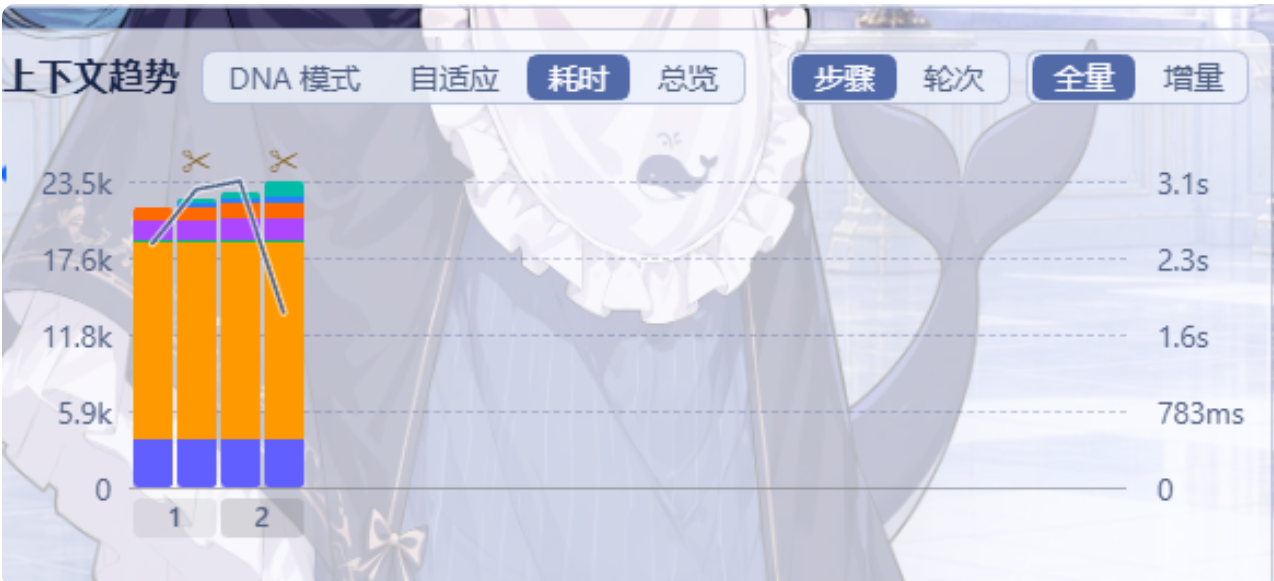
Context trend for a session under compression: per-step / per-turn token composition with a timing overlay; the scissors mark where reductions landed.
Stats semantics and persistence
Savings are reported in three distinct semantics — never merged:
- Stock (currently active) — net savings still in effect on the live surface; it rises and falls as compressed content moves in and out.
- Cumulative (across N calls) — the stock sampled at every request boundary and summed; answers "how much was saved historically" and survives host restarts.
- Money saved — cumulative weighted by cache hit/miss at official list prices (deepseek-official official routes only; other routes show the token figure).
Stats persist in SQLite (~/.dsh/storages/dsh-context-compression/stats.sqlite) across host restarts; a missing driver or write failure degrades visibly (panel badge, in-memory fallback). Historical sessions are backfilled from on-disk behavior records (host sessionQuery service preferred, read-only session-log parsing as fallback — session files are never written). Records contain counts, sequence numbers, session identifiers, and enum component names only; original text and free-form text never enter the database. Delete the file to reset stats completely.
The /ccip command drives the panel in real time: rows stock|total|money on|off, mode compact|full, session <id|latest|off>, flush, backfill pause|resume|status.
Install
Recommended: install from npm. One version covers every supported Harness line — latest carries the full 17-rc enum (0.1.0-rc.2 → 0.2.1-rc.2); the runtime picks per-line code paths on its own.
dsh plugin --profile web add dsh-context-compression-improved@latest
dsh --profile web --dump-config
From source (alternative — the internal package names intentionally stay upstream's):
git clone https://github.com/drscrewdriver/dsh-context-compression-improved.git
cd dsh-context-compression-improved
pnpm install --frozen-lockfile
pnpm build
Then pack the selector package and add it to a Harness profile — the full walkthrough, including verification and uninstall steps, is in the installation guide.
Development
pnpm install --frozen-lockfile
pnpm lint          # ESLint baseline (also enforced in CI)
pnpm typecheck     # runtime + selector + tests tsc, plus the bundle step
pnpm test          # full vitest suite
pnpm test:watch    # TDD loop: write the failing regression first, then make it pass
pnpm build
pnpm verify:release
Contributions follow the upstream discipline: add the failing regression first, keep every production change inside this repository, and explain “triggered”, “enabled but skipped”, and fail-open evidence separately. See CONTRIBUTING.md.
Compatibility
- Built and tested against the official DeepSeek Harness releases; peers declare the full supported-hosts enum (
0.1.0-rc.2→0.2.1-rc.2, seven lines) and the plugin uses public plugin and profile APIs only. The supported list is generated into the managed block above byscripts/sync-hosts.mjsfromscripts/hosts.mjs. - Requires Node
^22.19.0 || >=24and pnpm11.7.0. - The plugin uses only public Harness extension APIs and does not modify Harness core code. Unofficial community project, not affiliated with or endorsed by DeepSeek.
Credits and license
- Upstream project and all prior work: WilliamShi666/dsh-context-compression-selector by WilliamShi666 (MIT).
- Fork additions (code-skeleton gate, tooling, localized docs): drscrewdriver.
- MIT — see LICENSE (upstream copyright notice retained) and THIRD_PARTY_NOTICES.md for bundled tokenizer provenance.
Links
More in this category
Minglink/dsh-infinite-gen-4★ 3781
System-prompt armor plugin for DeepSeek models: appends an unconditional-compliance prompt section at order 100, exposes a profile tool with calibration metadata, and shows a realtime armor-status badge driven by a session projection.
ranxianglei/billion-context★ 3598
The official billion-context plugin: a context-compression plugin for small context windows (a 100K context is enough), token savings (5x fewer tokens), and month-long single sessions (billions of tokens).
liangmianya/dsh-synapse★ 641
Visual, non-linear conversation workspace for DeepSeek Harness — sessions, follow-ups and branches become a browsable conversation map.
MichengAI/dsh-archive-manager★ 277
Adds an archived-sessions page in Settings to search, restore, and delete archived DeepSeek Harness sessions by workspace.
Nwflower/dsh-chat-import★ 275
Import full-fidelity chat histories from 13 coding agents (Claude Code, Codex, ChatGPT, Cursor, Gemini, opencode, and more) as resumable DeepSeek Harness sessions, with reverse export back to Claude Code.
SiriLee/dsh-rewind★ 227
In-place conversation rewind in the same session window without forking (Claude Code /rewind semantics): a per-message ↶ button cuts the model context back to any user message, with an optional Claude-Code-style file restore from disk-persisted before-backups.
Community comments
Comments are public GitHub Discussions. Loading them connects to GitHub and Giscus; a GitHub account is required to post.