Shell tool with four Windows backends (PowerShell / Git Bash / WSL / MSYS2) plus an interactive PTY terminal; the MSYS2 backend starts bash.exe with -lc so /etc/profile puts /usr/bin and /mingw64/bin on PATH, and injects MSYSTEM=MINGW64 into the PTY environment. Written in TypeScript, targets DSH 0.1.2+.
Install
# from npm (prebuilt)
dsh plugin --profile web add dsh-bash-terminal-ts
# from GitHub (first run asks for allowBuilds approval — follow the hint, retry)
dsh plugin --profile web add github:drscrewdriver/dsh-bash-terminal-ts
Any plugin you install runs third-party code with your own permissions — it can read your files, use your credentials, and reach the network, and tool approvals don’t sandbox it. GitHub-sourced plugins also run build scripts at install time — pnpm blocks those until you allow them, so an install can stop with ERR_PNPM_GIT_DEP_PREPARE_NOT_ALLOWED or ERR_PNPM_IGNORED_BUILDS; dsh prints the exact key to add under allowBuilds in your profile’s pnpm-workspace.yaml, and the install works on the next run. Allowing a build is a trust decision: only install sources you trust, and pin a commit (github:owner/repo#sha).
README
🌐 简体中文 | English | Français | Deutsch | Italiano | Русский | Español · Community: LINUX DO · GitHub
A DeepSeek Harness (DSH) plugin: one shell tool that runs commands through PowerShell / Git Bash / MSYS2 / WSL on Windows, plus an interactive terminal tool — all following the terminal you choose in the Web UI settings.

TypeScript rewrite of
MAXeaglet/dsh-bash-terminal, with working MSYS2/MINGW64 support. Compatibility lines are cut per DSH host segment; all lines share the package namedsh-bash-terminal-tsand are distinguished by npm dist-tag:
DSH segment Branch Plugin series npm dist-tag 0.1.0-rc.2 – 0.2.1-rc.5(exact 20-version enumeration)main(this branch, cross-version trunk)0.8.x latest>=0.2.0-rc.1 <0.2.1-0compat/0.2.0(historical, frozen)0.7.x dsh-0.2.00.1.7-rc.1 – 0.1.7.x compat/0.1.70.6.x dsh-0.1.70.1.5-alpha.1 – 0.1.5-rc.x ts/0.1.5(historical, frozen)≤ 0.5.2 dsh-0.1.50.1.2-alpha.1 – 0.1.2-rc.x early maincommits (frozen at tag)≤ 0.4.2 dsh-0.1.2Pick the line that covers your DSH build; the version series never overlap, so a
^install cannot resolve across lines.
Features
| Backend | Runs | Syntax / paths | Env vars |
|---|---|---|---|
powershell (default) |
pwsh -NoLogo -NoProfile -NonInteractive -Command <cmd> |
PowerShell; C:\\... |
$env:NAME |
gitbash |
Git for Windows bash -lc <cmd> |
POSIX; /d/workspace; PATH includes /usr/bin and /mingw64/bin |
$NAME |
msys2 |
MSYS2 bash -lc <cmd> (C:\msys64\usr\bin\bash.exe) |
POSIX; /c/...; PATH includes /usr/bin and /mingw64/bin (gcc / make) |
$NAME (MSYSTEM=MINGW64 injected) |
wsl |
wsl [-d <distro>] -e bash -lc <cmd> |
Linux; /mnt/d/... |
$NAME (via WSLENV) |
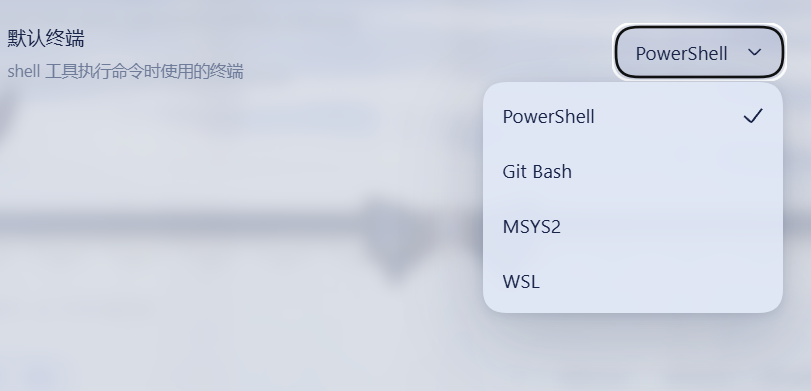
- User decides, the AI cannot override: pick the default terminal in Settings -> General -> Default terminal (PowerShell / Git Bash / MSYS2 / WSL). The setting persists through the DSH settings system; the
shelltool always obeys it. - Official sandbox seam: the
shelltool resolves the DSH sandbox policy per call and confines PowerShell argv throughctx.sandbox— same fail-closedSandboxUnavailableErrorsemantics as the shipped executors. Git Bash, MSYS2 and WSL run unconfined: WSL is its own Linux VM, while Git Bash and MSYS2 cannot run under the DSH Windows ACL restricted-token runner (Cygwin/MSYS2 aborts withCreateFileMappingWin32 error 5). Officialsandbox_permissions/justificationescalation and denial markers included. - Interactive terminal: the
terminaltool opens persistent real-PTY sessions over node-pty — on non-Windows via the officialctx.subprocess.spawnTerminalseam, on Windows directly through node-pty because the upstream seam's process inspector is POSIX-only. Actionsopen/send/read/signal/close; shell state persists across calls; sessions are managed as background jobs and auto-close when idle. - Background execution via the generic jobs registry (
run_in_background/job_output/job_kill). - Pinned POSIX runtime payload (a first-class fifth backend, off by default): package
@drscrewdriver/posix-runtime-win32-x64(naming policy: our artifact names never carry bash/gitbash/msys tokens - the tree inside is Git-for-Windows). Two opt-in layers:enablePosixPayload: true(operator gate - runs the digest check at startup) plus a "POSIX payload" row switchshellPayloadin Settings (default off - decides whether a provisioned payload may enter pickers or be chosen as the default terminal). It has its own catalog row, tool description (bash -lc), interactive terminal andpayload-unconfinedenforcement facts - it never substitutes for the Git Bash slot. Nothing is downloaded at install - provision it yourself from a LOCAL PortableGit SFX (node scripts/provision-payload.mjs --from <sfx>: reverse-unpack, SHA-256 pin, fully self-managed; no third-party payload packages are consumed). A detected WSL distro logs an advisory hint (a real WSL bash is usually the better shell) but does not hide the payload row - the digest gate is the only hard no, and a payload that fails it is never run, never silently replaced. - Terminal-semantics preset templates (
agent-presets/): distributable Agent Presets that declare default terminal, command syntax and a "Terminal authority" anchor at the preset layer (PowerShell / Git Bash / MSYS2 / WSL2 / pinned-payload variants), installed vianpm run presets:install- the benchmark-style hedge against plugins that rewrite default-terminal semantics at install time: the same bash-first experience, chosen by you in a layer that is auditable and reproducible.
Screenshots
The Default terminal row in Settings -> General: the user picks PowerShell / Git Bash / MSYS2 / WSL, and the shell tool obeys that choice — the model cannot override it.
Install
The package ships the official dsh.bundle manifest (its own cordis.patch.yml): listing dsh-bash-terminal-ts in a profile's dsh.profile.bundles auto-applies the mount — no manual profile edits.
npm install -g dsh-bash-terminal-ts
dsh plugin --profile web add dsh-bash-terminal-ts        # adds to profile bundles + applies the patch
powershell -ExecutionPolicy Bypass -File install.ps1 install   # patches the DSH settings-UI allowlist (see below)
# restart dsh web
DSH limitation: the Web settings client only exposes a hard-coded allowlist of settings namespaces (
dsh-host-apiproxy); third-party settings writes are refused withsettings-not-exposedotherwise.install.ps1patches the allowlist (with a backup) — re-run it after upgrading DSH;install/uninstallrestores it.
pnpm users: the node-pty build-script notice
This plugin depends on the native PTY library node-pty (Microsoft-maintained, the same library VS Code uses) for the interactive terminal tool. As of 0.7.1 it is pinned to 1.2.0-beta.15 (the same version both DSH host lines use): the tarball ships prebuilt binaries for every platform, so even when pnpm 10+ skips the install script, the runtime loader falls back to prebuilds/<platform>-<arch>/ and runs without compiling. The notice at the end of pnpm add only reports the skipped script; approve once to silence it:
Error: ERR_PNPM_IGNORED_BUILDS
  Ignored build scripts: node-pty@1.2.0-beta.15
pnpm approve-builds      # pick node-pty interactively
# or declare it in the profile's package.json, then rebuild:
#   "pnpm": { "onlyBuiltDependencies": ["node-pty"] }
pnpm rebuild node-pty
This is the only own dsh plugin with a native dependency; the other 0.2.0-line plugins (search-index, session-steward, patch-edit-plus, browser-cdp, date-wrapper) and live-token-stats are pure-JS and install on pnpm without any approval.
For local development (junction install, source changes apply instantly) see the Chinese README's development section.
Shell aliases: get Git Bash / MSYS2 into the host's own terminal menu (optional)
This plugin's own “Terminal (multi-shell)” tab needs nothing extra — all four shells work out of the box. The host's official right-sidebar terminal is a different story: its menu is built by discoverShells, which keys a Map by the executable file name and keeps the earliest entry, and both Git Bash and MSYS2 ship as bash.exe. At most one of them can ever appear there.
The bundled cordis.patch.yml therefore adds two candidates that carry a file name of their own: C:\msys64\usr\bin\msys-bash.exe and C:\Program Files\Git\bin\git-bash.exe. Both are hard links (same inode, no extra space, delete them to revert), and they only produce a menu entry if they actually exist on the machine. A missing link is skipped per candidate, so the menu stays exactly as it was and nothing fails.
A third candidate is the pinned POSIX payload's menu entry: %LOCALAPPDATA%\dsh-bash-terminal-ts\payloads\bash-terminal\bin\bash-terminal.exe (the path is built from LOCALAPPDATA via !!js, so it adapts per user). It is also a hard link into the payload's bin\, deliberately named bash-terminal.exe - the menu's bash key already belongs to the WSL forwarder, and re-using it would push WSL out. The link and the stable junction are created automatically by scripts/provision-payload.mjs (only after the digest gate passes) or node scripts/link-shells.mjs, inside the user-writable LOCALAPPDATA - no elevation needed. Machines that never provisioned a payload simply have no file there and the candidate is skipped.
Create the aliases (either route):
# A. the script shipped with this package: creates what it can, prints the elevated
#    command verbatim for what it cannot
node scripts/link-shells.mjs

# B. by hand (the MSYS2 line works as a standard user; the Git line needs an ELEVATED PowerShell / cmd)
cmd /c mklink /H "C:\msys64\usr\bin\msys-bash.exe"       "C:\msys64\usr\bin\bash.exe"
cmd /c mklink /H "C:\Program Files\Git\bin\git-bash.exe" "C:\Program Files\Git\bin\bash.exe"
With no administrator terminal at hand, pull one up from an ordinary session (Windows asks once; click Yes):
Start-Process cmd -Verb RunAs -Wait -ArgumentList '/c','mklink /H "C:\Program Files\Git\bin\git-bash.exe" "C:\Program Files\Git\bin\bash.exe" > "%TEMP%\mklink.log" 2>&1'
Get-Content "$env:TEMP\mklink.log"
The alias behaves exactly like the original (measured on git-bash.exe -i: MSYSTEM=MINGW64, POSIX root C:\Program Files\Git\, $0=/usr/bin/bash, git on PATH) - because the link stays inside Git\bin\, so bash still derives the same root from its own path.
The Git line cannot avoid elevation, for two independent reasons: CreateHardLink requires write access to the source file, which Program Files denies a standard user (so the link cannot be created from somewhere else either); and the link has to stay inside Git\bin\, because bash derives its POSIX root from its own path and loses /usr/bin and /etc anywhere else.
Hand it to an agent — paste this to an agent running with full (administrator) permissions:
Create two shell alias hard links for the DSH host's official terminal, with administrator rights:
  cmd /c mklink /H "C:\msys64\usr\bin\msys-bash.exe" "C:\msys64\usr\bin\bash.exe"
  cmd /c mklink /H "C:\Program Files\Git\bin\git-bash.exe" "C:\Program Files\Git\bin\bash.exe"
Skip creation if the target already exists; never overwrite it. Then verify with this package's
`node scripts/link-shells.mjs` - both lines must report `ok ... (same inode, nlink=2)`. Finally
restart DSH so the official terminal re-discovers its shells.
Constraints: do not copy the files, do not create symbolic links, do not put the links in any
other directory, do not modify bash.exe itself. If you are not already in an administrator
context, start one with `Start-Process cmd -Verb RunAs` (Windows prompts once) and redirect the
output to a file you can read back. If elevation fails, report the exact command and error code
back to me instead of falling back to a copy.
After restarting DSH, the official “New” dropdown should list msys-bash.exe and git-bash.exe, while plain bash (on Windows that resolves to the WSL forwarder C:\Windows\System32\bash.exe) must still be there — this package never claims the bash key for Git and pushes WSL out of the menu.
⚠️ MSYS2 needs one more step: a PATH guard in
~/.bashrc(C:\msys64\home\<you>\.bashrc). The host starts every candidate as an interactive non-login shell (shellCandidatesis a plain string array, so-lcannot be passed), and a non-login shell never sources/etc/profile— which is exactly where MSYS2 adds/usr/binto PATH. Without this,msys-bash.exeopens fine butuname/lsreport “command not found”. Git Bash does not need it: it injects/usr/binand/mingw64/binitself (verified:cygpathandgitwork immediately).# >>> dsh-bash-terminal-ts PATH guard >>> case ":$PATH:" in *":/usr/bin:"*) ;; *) PATH="/usr/bin:$PATH" ;; esac # <<< dsh-bash-terminal-ts PATH guard <<<Prepending is safe here because
/usr/bin/gcc.exedoes not exist, so the mingw64 toolchain still resolves first (verified:command -v gccstays/mingw64/bin/gcc). Re-measure after anypacman -S mingw-w64-*install, or the guard can start shadowing your compiler instead. To revert: delete everything between the two sentinel comments.
Sandbox
danger-full-accesssessions run directly (no wrapping).- Confined sessions wrap PowerShell argv through
ctx.sandbox.confine; fail-closed when no backend is available. - Git Bash is never wrapped: the Windows ACL restricted-token runner cannot host Cygwin/MSYS2 (
CreateFileMappingWin32 error 5); results reportenforcement: gitbash-unconfined. - MSYS2 is never wrapped either (same Cygwin/MSYS2 runtime incompatibility); results report
enforcement: msys2-unconfined. - WSL is never wrapped (its VM isolation is the sandbox; results report
enforcement: wsl-isolation). - Denied calls render the official
[sandbox: file access denied under <mode> mode]marker plus a same-turn escalation hint; the model may retry once withsandbox_permissions+justification(user-approved viactx.approval). - Note: when DSH's Windows ACL runner is available, it confines PowerShell; Git Bash and MSYS2 remain unconfined due to the Cygwin/MSYS2 incompatibility.
Interactive terminal
terminal actions: open (start a session on the configured default terminal), send (write input + read new output), read, signal (SIGINT = Ctrl+C etc.), close, list (enumerate live sessions). Reads wait for output to settle (quiet 300ms, cap 5s) so send returns the complete reply; buffer overflow reports a truncated notice. State (cwd / variables / aliases) persists across calls; end input with \\n. Sessions are background jobs (job_kill works) and auto-close after 10 idle minutes (idleMs overrides on open).
Interactive terminal known limits (ConPTY)
- Windows PowerShell 5.1 cannot start in a ConPTY (0x8009001d) — install PowerShell 7 for interactive PowerShell (one-shot commands are unaffected).
- wsl.exe interactive mode may hit a WSL service RPC error under ConPTY (0x8007072c, intermittent) — one-shot
wsl -e bash -lc ...works; for interactive WSL prefer a real terminal (Windows Terminal / WSL app) or retry. - node-pty accepts no named signals on Windows:
signalmapsSIGINTto Ctrl+C (\x03); other signals (SIGTERM/SIGKILL/SIGTSTP/SIGHUP) degrade to terminating the session. - Git Bash interactive sessions work fully.
Bottom terminal (embedded browser shell, 0.8.0+)
A terminal for a human, sharing the same shell knowledge as the model-facing shell/terminal tools but a different environment.
Entry point: the bottom workbench of dsh-better-sidebar 0.25+. This plugin registers its own tab there, "Terminal (multi-shell)", which reaches all four shells:
| Host | What happens |
|---|---|
| Terminal controller present (DSH 0.2.0-rc.2+, official CLI/GUI builds) | The official "Terminal" row is powered by the host and keeps working; this plugin does not touch webTerminals and only adds its multi-shell tab |
| No controller mounted (some Desktop builds, where the official row is dead) | The multi-shell tab works regardless. Turn on "Take over the official terminal row" only if you specifically need that official row lit up |
Why a tab of our own: the official shell menu de-duplicates by executable file name and keeps the earliest entry, so a bare bash on Windows resolves to C:\Windows\System32\bash.exe - the WSL forwarder - and Git Bash (also bash.exe) can never join it. Our tab picks by catalog ROW, so all four coexist. The official row is still there; this package adds exactly one entry to it (see below).
The take-over switch is off by default, and that is a correctness rule, not caution. The host's controller client registers the same
webTerminalsname, cordis refuses a second provider of one name, and the loser is the one that throws - the controller's provide is unguarded, so if we get there first we take down the first-party terminal and the page becomesFailed to load plugins / web boot: 1 entry did not activate(measured on 0.2.0-rc.2). When you do switch it on, the plugin reads the service live first and only publishes if the name is free, then states the outcome in the settings row ("taken over" / "the host already publishes it"). So enabling it on a host that has a controller cannot break anything.
The tab registers only when betterSidebar is available, through ctx.inject(['betterSidebar']) so arrival order does not matter (with a soft read as fallback) - and it must never read ctx.betterSidebar as a property: the client context is a Proxy and an undeclared service name throws cannot get property "betterSidebar" without inject. xterm is bundled into this plugin's own artifact - DSH's client module table resolves only platform seed words, shell-owned modules, registered package factories and boot modules, so an external require("@xterm/xterm") fails at mount with "missed the module table". The settings section states which path you are on ("The host terminal is in charge").
The settings have two landing points, and both render the SAME component (a change cannot land on one and miss the other):
| Surface | Slot | Host lines |
|---|---|---|
| Plugin detail page (bundle settings) | plugins.bundle.config, keyed by the package name |
0.1.7-rc.1+ / 0.2.0 |
| A tab under the family section | dsh-family.tab (container: dsh-thinking-levels) |
as above, and TL must be installed |
Both arms are registered and whichever has a renderer wins. When there is no family container to carry the card, this plugin registers its own top-level settings.section (id bash-terminal; it never shadows dsh-family, because two entries under one id produce two navigation rows). That decision is taken when the host declares the section - opening the settings panel - not at apply time, because the container belongs to another plugin's client and deciding early means betting on bundle order.
Two further arms exist for cross-version reach: settings.plugin.item (keyed by the settings namespace) is the 0.1.2/0.1.5 equivalent of the bundle detail card, and the shell.overlay panel renders only when the host itself reports that it has no settings page (the component returns null otherwise). That classification reads neither a version string nor an imported host package - host packages live in the application's tree and a plugin cannot resolve them - but the capability face of the settings service: installSection present → 0.1.2/0.1.5 (page exists); only register → 0.1.0/0.1.1 (the settings.* slot map is declared but no page renders it, so a registered card would be unreachable and the plugin must bring its own entry); neither → 0.1.7+/0.2.0 (page exists).
- Activation switches: Git Bash / MSYS2 / WSL. A switch means allowed; usable = allowed ∧ detected, so “detected means on” needs no extra configuration. PowerShell is the floor and cannot be turned off.
defaultShellonly offers rows that are activated ∧ available, validated server-side; a stale value falls back through[powershell, gitbash, msys2, wsl]with a visible notice and is never rewritten, and an empty candidate set falls back to pwsh → powershell.exe → cmd.exe.- The browser terminal starts PowerShell without
-NoProfile(your aliases and prompt survive) and with a real terminal type, unlike the tool path, which pinsTERM=dumb/NO_COLOR=1because a parseable one-shot output is correct there. - It does not add anything for the model: no tool, no system-prompt section, no sandbox approval. Routes are loopback-only (a DNS-rebinding/LAN guard, not authentication).
- MSYS2 is offered as
usr\bin\bash.exewithMSYSTEM=MINGW64;msys2.exe/git-bash.exeare refused because they open their own window and return zero bytes on a pipe. - What the official menu does change: this package's
cordis.patch.ymloverrides the hostterminal-controllerrow'sshellCandidates, prepending one entry only -C:\msys64\usr\bin\msys-bash.exe, a hard link that gives MSYS2 a distinct file name so de-duplication stops erasing it. The stock candidates are left untouched. PinningGit\bin\bash.exeahead of them (an earlier revision did) would claim thebashkey from the WSL forwarder and delete WSL from the menu; and Git cannot be renamed without a link insideC:\Program Files\Git\bin\, which needs elevation and must stay inside the Git tree because bash derives its POSIX root from its own path. So Git Bash comes from this plugin's tab instead. - Two things that override costs: the patch replaces that row's config whole, so all eleven keys are spelled out and
test/webterminals.tsasserts both the full key set and that every stock candidate survives; and MSYS2's/usr/binis missing in a non-login shell (the host passes-i, guessed from the file name, with no env channel), which is whyC:\msys64\home\<user>\.bashrcneeds an idempotentPATH="/usr/bin:$PATH"guard. Measured on the live host:cmd.exe | msys-bash.exe | bash(=System32, WSL) | powershell.
Details, the argv/env table and the measured smoke output are in README.md (Chinese), which is the maintained copy.
Config
Web UI: Settings -> General -> Default terminal. Plugin row config overrides: defaultShell, timeoutMs, maxTimeoutMs, pwshPath, gitBashPath, msys2Path, wslPath, plus the bottom-terminal fields shellGitBash, shellMsys2, shellWsl, shellPayload, wslDistro, and the payload fields enablePosixPayload, payloadPosixPath (restart to apply).
Uninstall
powershell -ExecutionPolicy Bypass -File install.ps1 uninstall
Tests
node test/unit.mjs && node test/apply.mjs && node test/client.mjs && node test/terminal.mjs
Links
More in this category
DayuanJiang/next-ai-draw-io#dsh-plugin★ 36548
Draws draw.io diagrams in DeepSeek Harness through the next-ai-drawio MCP server: the link in the reply opens a live preview in the right sidebar, you can edit the diagram by hand, and each AI change is a version you can restore. Node.js 18+; npx downloads the MCP server on first use.
Tencent/WeKnora#dsh-weknora★ 36201
Four read-only tools over a WeKnora knowledge base: list knowledge bases, hybrid passage search, reassemble one document's chunks in order, and WeKnora's own cited RAG or ReAct-agent answer with a resumable session id.
superdesigndev/treg★ 6962
Tool catalog for agents: search ~2,600 external endpoints (SEO and SERP, backlinks, social, people and company enrichment, ad libraries, scraping) by the task you want done, read each one's parameters and per-call price, then call it with the credential injected server-side. Ships the skill plus an MCP row that stays disabled until TREG_TOKEN is set.
T-Auto/dsh-ops★ 5011
Provides bash, PowerShell 7, and high-performance Rust tools for DSH on Windows to reduce token usage.
sixtysevenlf/dsh-blender-plugin★ 1536
Lets a DSH agent drive a local Blender over a direct TCP channel with 15 tools: viewport frames, custom-angle renders, Python execution, headless and job offload, transaction rollback, and a planning layer of 228 ops across 34 families.
TencentCloudBase/CloudBase-AI-Toolkit#dsh-plugin★ 1153
Tencent CloudBase backend for DeepSeek Harness — scaffold and deploy full-stack apps from chat, render query results as table cards with paging, sorting and CSV export, preview a deployment on its domain, and call the CloudBase MCP toolset (`mcp__cloudbase__*`) with device-code login.
Community comments
Comments are public GitHub Discussions. Loading them connects to GitHub and Giscus; a GitHub account is required to post.