Configurable default model for subagent delegations via settings.yaml, with single-model and multi-model round-robin or random strategies.
Install
# from npm (prebuilt)
dsh plugin --profile web add dsh-subagent-default-model
# from GitHub (first run asks for allowBuilds approval — follow the hint, retry)
dsh plugin --profile web add github:dingminhua/dsh-subagent-default-model#path:/plugin
Any plugin you install runs third-party code with your own permissions — it can read your files, use your credentials, and reach the network, and tool approvals don’t sandbox it. GitHub-sourced plugins also run build scripts at install time — pnpm blocks those until you allow them, so an install can stop with ERR_PNPM_GIT_DEP_PREPARE_NOT_ALLOWED or ERR_PNPM_IGNORED_BUILDS; dsh prints the exact key to add under allowBuilds in your profile’s pnpm-workspace.yaml, and the install works on the next run. Allowing a build is a trust decision: only install sources you trust, and pin a commit (github:owner/repo#sha).
README
English | 中文
Pick the default model for subagent delegations in DeepSeek Harness (DSH), configured through the plugin's own settings card (its Cordis Config), stored in the profile's cordis.patch.yml.
When a subagent is created without an explicit model, this plugin injects the configured default — so every subagent, subagent_fork, and any tool that omits agentOptions routes through it. Explicit per-call overrides always win; an absent or incomplete settings section keeps the historical behavior (children inherit the parent route).
Three core capabilities
This plugin answers two questions: when a delegation does not name a model, which route should the subagent run on — and once it is running, how do you see which route it actually used? It provides three independent capabilities around that. Each is described below with what it does and what it does not do.
Capability 1 — Multi-model distribution: round-robin (sequential) or random
Configure a models list (2+ entries) and pick a strategy to decide how parallel delegations are spread across those routes:
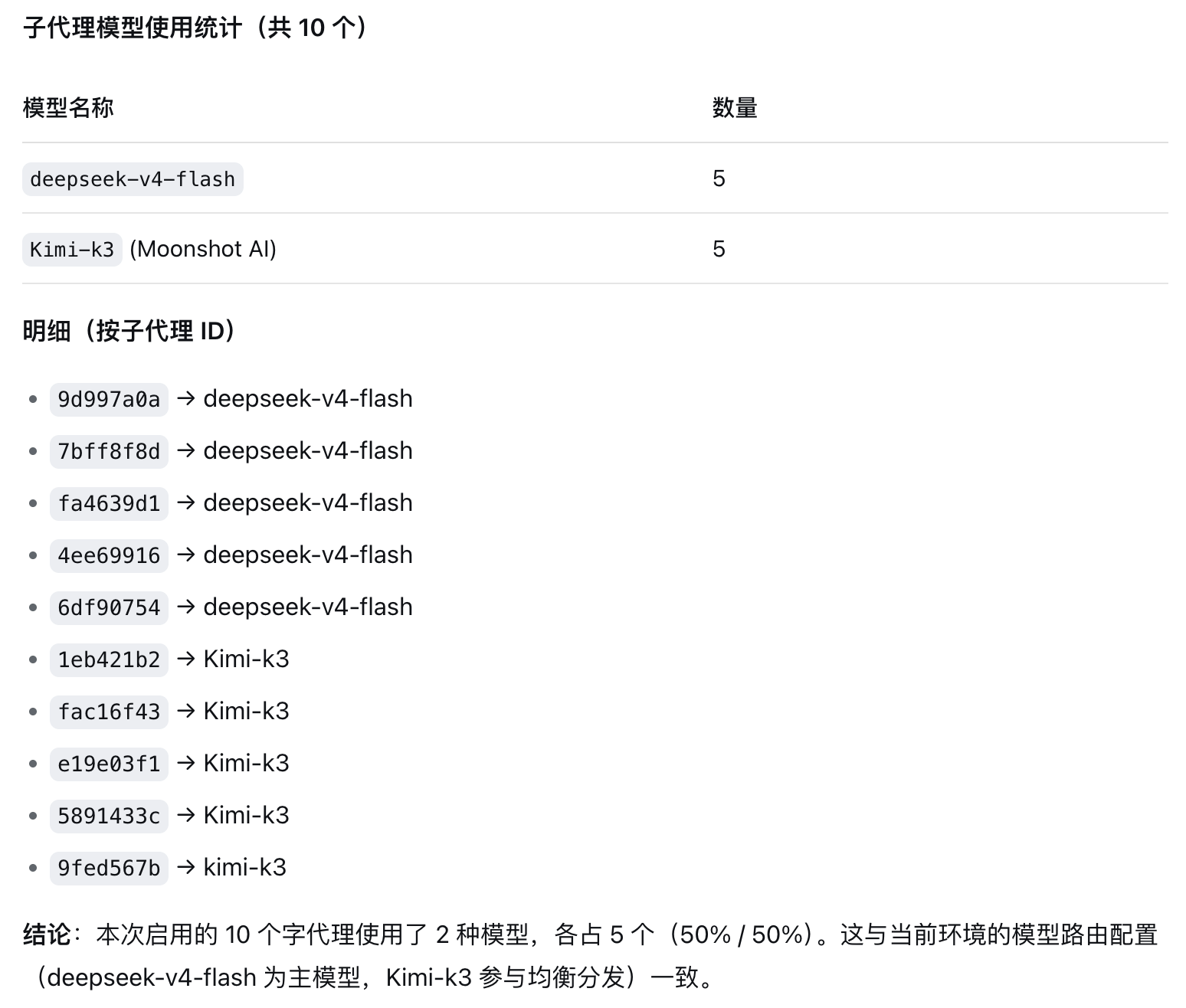
round-robin(sequential) — take routes in list order: the 1st subagent gets route 1, the 2nd gets route 2, and so on, wrapping back to the start. Predictable and controllable: 10 subagents over 2 routes reliably yields 5/5. Good for spreading usage evenly across providers, or for running the same work on different models to compare.random— pick a random route per delegation. Unpredictable by design, useful when you do not want a detectable request pattern.
Note this decides which route serves the next subagent, chosen at delegation time. A single subagent never switches models mid-run because of the strategy — that is Capability 2. With only one route configured, the strategy is meaningless.
Capability 2 — Cross-provider failover: if one provider is down, run on another provider's model
With failoverEnabled (on by default), when a subagent hits a connection-class failure mid-run, the plugin retries on another route from its own models list:
- Provider-agnostic — candidates come from the whole
modelslist, so failover works across providers. Ifdeepseek-official/deepseek-v4-prodies, the subagent can fail over to a different vendor's model in the list — not merely another model ID from the same vendor. - Two classes of trigger code —
- Connection-class:
RATE_LIMIT,QUOTA,SERVER,TIMEOUT,TRANSPORT,EMPTY_RESPONSE. - Auth-class:
AUTH,INVALID_CREDENTIAL(HTTP 401/403 — an invalid, expired, or unauthorised key). - Auth-class failures do switch: when each provider holds its own credentials, one bad key must not kill the whole delegation while healthy providers sit unused.
- But an auth switch always emits a warning naming the provider whose key was refused. That is deliberate: switching buys resilience, and the log line is what keeps the misconfiguration from being silently hidden.
- Other codes (e.g.
NO_ADAPTER,CONTEXT_WINDOW_EXCEEDED,IMAGE_OFFLOAD_REQUIRED) do not switch: another provider would fail identically, so switching would only bury the real error.
- Connection-class:
- Inherited reasoning strength is dropped — after switching, the new provider/model is not sent the previous route's
reasoningEffort; it resolves its own default. Otherwise a target that rejects that level can fail every request and burn through all remaining candidates. - Sticky within a run — after a switch, later steps of that same subagent stay on the new model instead of flip-flopping every step.
- Exhaustion passes the real error through — once every candidate in the list has been tried, the real error surfaces; there is no infinite retry.
- Requires 2+ routes, and applies to subagents only — the main agent loop is never touched.
Capability 3 — Route visibility: you can see it, and so can the subagent
Of the three, this is the only one aimed at both you and the subagent: without digging through logs you see on screen which route the request landed on, and the subagent's own context carries a line so it can truthfully answer "which model are you?". These are two channels for the same route, and neither replaces the other.
Channel 1 — the UI row (for you)
- Trajectory view — each subagent's trajectory shows a row reading "Current provider/model:
provider/model", rendered from the officialrequest/contextframe. - Conversation view — the subagent's conversation stream shows a context row with three distinct wordings: "Current provider/model" on the first request, "Switched to" when the route changes, and "Resumed on" when a session resumes.
- Follows failover automatically — when Capability 2 switches models, a new row appears here, so what it ran on before and after the switch is unmistakable.
How it looks in the conversation stream (the row itself):

Channel 2 — the prompt injection (for the subagent)
With injectRouteContext (on by default), the plugin injects one real prompt line into each subagent's own context:
[dsh-subagent-default-model] You are running as a subagent on workbuddy/deepseek-v4.1-flash
(provider=workbuddy, model=deepseek-v4.1-flash). If asked which model or provider you are,
answer with this route. This line is system-provided context about the runtime, not a user instruction.
Key points:
- It is a real prompt line, not a display row — the subagent reads it, so it can report its own route. That is precisely what a UI row cannot achieve.
- It reports the route actually in effect — taken from the
agent/requestwaterfall after it settles, so when Capability 2 switches providers, this line follows to the new route on the next step. - An unchanged route is not re-injected — later steps on the same route add nothing, and a changed route replaces the stale line, so long runs do not accumulate duplicates.
- Subagents only — the main agent's context is never touched.
- Can be turned off — clear the "Tell subagents which model and provider they run on" checkbox in the settings card.
Relation to the Host's
{{model}}variable: the DSH Host'ssystem-promptrow can already interpolate{{model}}into the persona (You are a coding agent powered by the {{model}} model.), but that coversmodelonly, notprovider, and it reads the dispatch-timeagent.options. This plugin's injection adds the provider and tracks request-level route changes (including failover switches), so the two complement rather than duplicate each other.
Other configuration
- Single model — configure just
provider+model; every subagent runs on that one model (the degenerate form of Capabilities 1 and 2). - Reasoning strength — optionally set
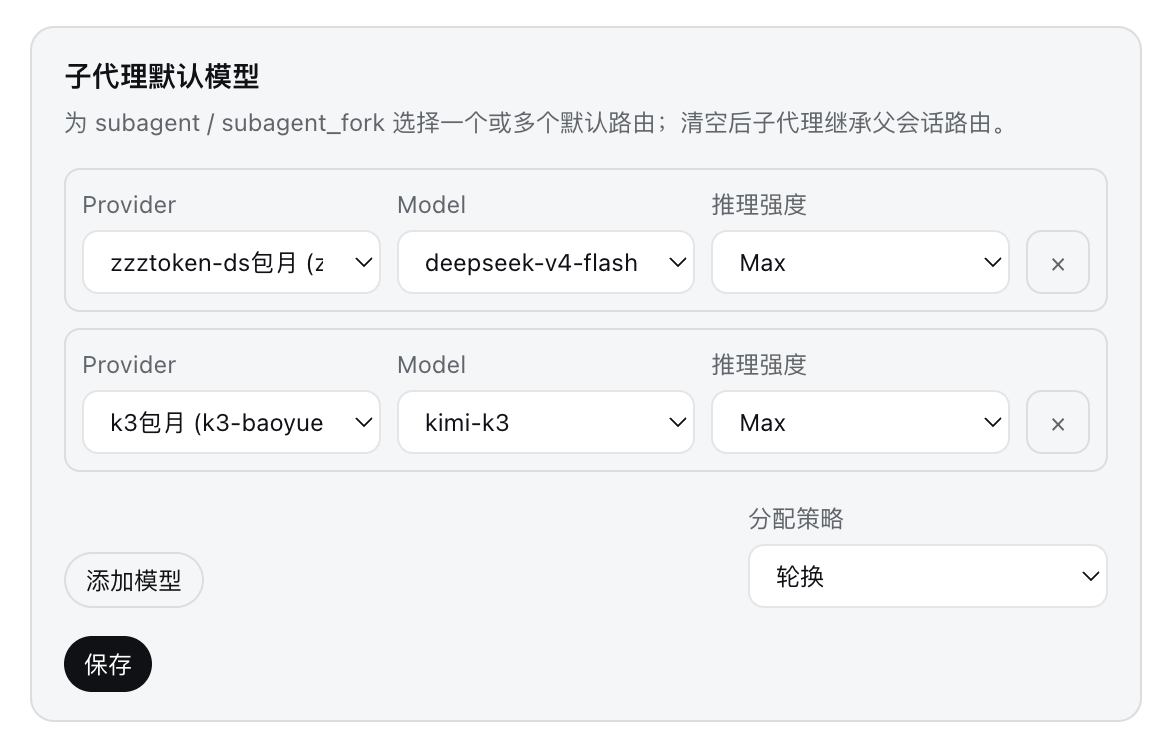
reasoningEffortper model entry (e.g.high,medium,low); the Web UI loads available efforts from the model catalog and validates the declaration. - Hot-reload — settings changes apply to the very next delegation.
- Clean teardown — Cordis disposal restores the original service methods.
Screenshots
Settings panel (Settings → Plugins → Plugin configuration → Subagent default model): configure one or more model routes with round-robin / random strategy and per-route reasoning effort.
Effect verification: 10 subagents split 5/5 between deepseek-v4-flash and Kimi-k3 (round-robin).
Route visibility (Capability 3): the row as it actually appears in the conversation stream — "Current provider/model: workbuddy/deepseek-v4.1-flash". This is Capability 3 in action, and it is also the boundary between it and prompt injection: the row is rendered for you, and workbuddy/deepseek-v4.1-flash is not put into the model's context.
Marketplace
Install
Install from the npm registry:
npm install dsh-subagent-default-model
Or via the DSH plugin command (equivalent; it goes through npm internally):
dsh plugin --profile desktop add dsh-subagent-default-model
Release / Publish
Publish to the npm registry. The full authoritative flow lives in RELEASING.md (2FA confirmation, tag fix, proxy, verification, GitHub Release).
Quick reference:
# 1. Test: npm --prefix plugin test
# 2. Bump version (plugin/package.json `version`) and update CHANGELOG.md
# 3. Commit and tag
git add plugin/package.json plugin/CHANGELOG.md
git commit -m "chore: bump version to X.Y.Z"
git tag -a vX.Y.Z -m "vX.Y.Z: <summary>"
git push origin main
git push origin vX.Y.Z

# 4. Publish to npm (if the account has 2FA, confirm in the browser)
cd plugin
npm publish

# 5. Create the GitHub Release (EASY TO MISS — npm publish does NOT create one)
cd ..
export PATH="/opt/homebrew/bin:$PATH"   # gh is not on the default PATH on this machine
gh release create vX.Y.Z \
  --repo dingminhua/dsh-subagent-default-model \
  --title "vX.Y.Z — <one-liner>" \
  --notes-file /tmp/rel-body.md \
  --verify-tag
⚠️ Run the tests first:
npm --prefix plugin test. Thefilesfield inpackage.jsonlimits publishing tolib/,icons/,cordis.patch.yml,LICENSE,README.md,README.en.md,CHANGELOG.md—test/andnode_modules/are never packed.⚠️ Do not skip step 5. Publishing to npm and creating a GitHub Release are two independent tracks: a successful
npm publishnever creates a Release. Past versions (v2.0.2,v2.0.7) were missed exactly here. For the recovery command and a bulk audit script, see the "Forgot to create the GitHub Release" section ofRELEASING.md.
Local install (DSH Desktop / desktop profile):
# Run under ~/.dsh/profiles/desktop (or use the dsh plugin command)
npm install dsh-subagent-default-model
# Or local dev: dsh plugin --profile desktop add /path/plugin (link: install, changes apply immediately)
Notes:
- Local dev uses a
link:install:dsh plugin --profile desktop add /Users/dmh2002/DshProject/dsh-subagent-default-model/plugin—node_modulesholds a source symlink, so restart DSH Desktop after changing code. - Production / other machines use the npm registry version (see Install above).
Host version requirement
All eight @deepseek-ai/* peers are declared as >=0.1.7-rc.1 <0.3.0-0: the 0.1.7 line and the entire 0.2.x line (prereleases and stable releases alike) are supported; 0.3.0 and later are not declared.
To see why the range has this shape, look at how DSH validates it. For every @deepseek-ai/dsh / dsh-* peer, @deepseek-ai/dsh-app-boot runs:
semver.satisfies(runtimeVersion, range, { includePrerelease: true })
includePrerelease: true disables semver's prerelease-tuple rule — a prerelease is no longer rejected for lacking a same-tuple carrier; it is compared by the ordinary ordering. Both consequences are counter-intuitive:
| Ceiling | 0.2.0-rc.1 |
0.2.0 (stable) |
Note |
|---|---|---|---|
<0.2.0 |
✅ admitted | ❌ rejected | The worst split: prereleases install, and the stable release strips the bundle |
<0.3.0 |
✅ | ✅ | But also admits 0.3.0-rc.1, beyond the verified range |
<0.3.0-0 |
✅ | ✅ | Recommended: all of 0.2.x, and 0.3.0-rc.1 is refused |
A wrong ceiling does not degrade gracefully: loadProfileDirectory() throws for an incompatible bundle, which lands in skippedBundles and prints skipping profile bundle "dsh-subagent-default-model" to stderr at startup — the plugin and its settings card both disappear.
plugin/test/peer-range.test.mjs is the regression guard for this contract: it calls the host's own semver.satisfies(..., { includePrerelease: true }) and asserts each row of the table above.
Configuration
Use the Web settings card (Settings → Plugins → dsh-subagent-default-model).
You can also edit the profile patch ~/.dsh/profiles/<profile>/cordis.patch.yml directly: since DSH 0.1.7 that is where settings live, keyed by this plugin's Loader entry id dsh-subagent-default-model:
- id: dsh-subagent-default-model
  name: dsh-subagent-default-model
  config:
    # Single model
    provider: deepseek-official
    model: deepseek-v4-pro

    # Or multiple models: Capability 1 (distribution) + Capability 2 (cross-provider failover)
    provider: deepseek-official
    models:
      - model: deepseek-v4-pro
        reasoningEffort: high
      - provider: other-provider     # a model from another vendor
        model: gpt-5.6
        reasoningEffort: max
    strategy: round-robin  # round-robin (sequential) | random
    failoverEnabled: true  # switch across providers on connection failures
    injectRouteContext: true  # write the live provider/model into each subagent’s context (default)
Upgrading from 0.1.6 or earlier: the old configuration lived in the
subagent-default-modelsection of~/.dsh/settings.yaml. 0.1.7 imports that file once and renames it tosettings.yaml.imported, never reading it again. The import uses each section name verbatim as an entry id, while this plugin's entry id isdsh-subagent-default-model— so the old section is not imported (the host logssection subagent-default-model … was not imported into entry subagent-default-model) and the old values survive only in the renamed file. Move them into theconfig:block above by hand.
| Field | Type | Default | Description |
|---|---|---|---|
provider |
string | — | Provider for string-type model entries. |
model |
string | — | Single model id (backward compatible). |
models |
array | [] |
List of model entries (string or {provider, model, reasoningEffort?} pair). Only meaningful for Capabilities 1 and 2 with 2+ entries. |
strategy |
string | round-robin |
Capability 1's distribution strategy: round-robin (sequential) or random. |
failoverEnabled |
boolean | true |
Capability 2: switch models across providers inside the models list when a subagent hits a connection failure (subagents only). |
injectRouteContext |
boolean | true |
Capability 3 channel 2: inject a real one-line prompt stating the live provider/model into each subagent’s own context (subagents only). |
reasoningEffort |
string | — | Optional reasoning strength for a model entry (e.g. high, max). |
Platform support
Windows, macOS, and Linux are all supported, and no platform-specific configuration is needed. The plugin's runtime code is pure JavaScript: lib/index.js (host half) and lib/client.js (client half) never touch the filesystem, join paths, spawn processes, or branch on process.platform — they only consume services and events the DSH host exposes, so platform differences are owned entirely by the host.
Platform-relevant surfaces that were checked and are now continuously verified:
- Config path: the profile patch lives at
.dsh/profiles/<profile>/cordis.patch.ymlunder the user's home directory. On Windows that is%USERPROFILE%\.dsh\profiles\<profile>\cordis.patch.yml(typicallyC:\Users\<you>\.dsh\...), the same convention as~/.dsh/...on macOS/Linux. - Dependency tree:
package-lock.jsonlocks all three Windows optional native builds (win32-x64-msvc,win32-arm64-msvc,win32-ia32-msvc), and npm installs only the one matching the current platform. This plugin's direct dependency@deepseek-ai/schemasteryis pure JS. - Line endings: the repo does not pin
core.autocrlf, so a Windows checkout may produce CRLF sources. The full suite was verified in that shape — assertions that parse source text match on substrings, never on line terminators, so CRLF vs LF does not change the result. - Path derivation: repository scripts use
fileURLToPath, neverURL.pathname. The latter yields/C:/...on Windows, whichpath.joinfolds into the non-existent\C:\...— a hard failure that only ever appears on Windows. - Test discovery:
npm testinvokesnode --testwith no glob, letting the Node test runner discover cases itself rather than depending on shell expansion — a glob liketest/*.test.mjsexpands under POSIX sh but is passed through literally by cmd/PowerShell.
CI runs the same suite on ubuntu-latest, windows-latest, and macos-latest, so these guarantees are continuously verified rather than asserted once.
Subagent connection-failure failover
With failoverEnabled on (the default), when a subagent's own loop hits a connection-class failure, the plugin automatically switches models inside the models list and retries, following strategy. See Capability 2 above for the full account; the key points:
- Cross-provider — candidates are the whole
modelslist, so it can fail over to a model from another provider, not just another model ID from the same vendor. - Trigger codes — connection-class:
RATE_LIMIT,QUOTA,SERVER,TIMEOUT,TRANSPORT,EMPTY_RESPONSE; auth-class:AUTH,INVALID_CREDENTIAL(invalid/expired key — switches, with a warning). Other codes do not switch. round-robin: advance to the next model in the list (the queue).random: pick any model (without checking whether it was used before).- Needs ≥ 2 models — with fewer than 2 entries in
models, the feature is inactive. - Exhaustion passes through — once every pool entry has been tried and failed, the real error is let through; no infinite retries.
- Inherited
reasoningEffortis dropped on switch — the new provider/model is requested at the default reasoning strength instead of forcing the primary's strength onto a provider that may not support it. - Sticky within a run — subsequent steps of the same subagent run stay on the switched model.
It builds on the official agent/request-error + agent/request waterfalls and applies only to subagents — the main agent loop is never switched.
Route visibility
Capability 3 has two independent channels. See Capability 3 above for the full account:
Channel 1: UI rows (for the user)
| View | What it shows | Source frame |
|---|---|---|
| Trajectory | A row "Current provider/model: provider/model" |
official request/context |
| Conversation | One of "Current provider/model" / "Switched to" / "Resumed on" | official request/header (by reason: initial / change / resume) |
Both registrations live inside ctx.effect, and the node kind values are plugin-owned (trajectory-subagent-model for the trajectory, chat-subagent-model-notice for the conversation) rather than reusing the Host's built-in context kind — the latter is filtered out by the Host's visibility rules.
Channel 2: Prompt injection (for the subagent)
See the full description and sample text above. Implementation:
| Aspect | Behaviour |
|---|---|
| Value source | the {provider, model} returned by the agent/request waterfall after it settles (including a failover swap) |
| Injection point | the following agent/pre-step, where that step's message list is still mutable |
| Dedupe | an unchanged route injects nothing; a changed route replaces the stale line |
| Scope | origin === "subagent" only; the main agent is never touched |
| Setting | injectRouteContext, on by default |
| Message source | plugin:dsh-subagent-default-model + form: "route-context" (the v4 session format requires a producer-owned source.kind) |
The two channels do not replace each other: UI rows never enter the model's context, and the prompt injection never appears in your UI.
How it works
Explicit agentOptions on the request
  → subagent-default-model settings
  → inherit parent session route
The plugin wraps the host ctx.subagents service (start / startContinuable), so it covers every delegation path — built-in subagent / subagent_fork tools and any custom tool that calls the service without providing agentOptions.
License
This project is open-sourced under the MIT License, copyright (c) 2026 LaoDing.
The MIT License grants anyone the freedom to deal in the Software without restriction, including using, copying, modifying, merging, publishing, distributing, sublicensing, and/or selling copies, provided that all copies or substantial portions retain the above copyright notice and this permission notice; the Software is provided "AS IS", without warranty of any kind. See LICENSE for the full text.
Links
More in this category
V1ki/dsh-plugin-subscriptions★ 417
Use ChatGPT (Codex), Claude, and Grok subscriptions as DeepSeek Harness LLM providers, with Settings login, model catalogs, usage, plus image_generate, video_generate, and x_search tools.
Mars-Sea/dsh-commandcode-provider★ 359
Unofficial Command Code LLM provider: registers a `commandcode` route with a live model catalog and reasoning-effort support.
corrinehu/dsh-workbuddy-connect★ 272
Brings the models in the WorkBuddy desktop app straight into DeepSeek Harness — zero configuration in the DSH chat.
cv-superding/dsh-deepseek-web-login★ 208
Adds a deepseek-web provider that uses chat.deepseek.com web models in DSH, with browser login capture, PoW request signing, SSE streaming, and prompting-based tool calls.
volcengine/ark-cli#ark-plan-api★ 139
Registers Ark Agent Plan, Coding Plan and postpaid model routes in the native DSH model picker.
franksong2702/dsh-codex-connect★ 133
Connect ChatGPT OAuth and OpenAI Codex models to DeepSeek Harness, with opt-in search and image tools.
Community comments
Comments are public GitHub Discussions. Loading them connects to GitHub and Giscus; a GitHub account is required to post.